


Zapier Pricing, Reviews, Pros and Cons: The Math Nobody Shows You
Zapier's pricing page says "$19.99/month." What it doesn't say is that's billed annually, and 750 tasks disappear faster than you'd expect. An 8-step lead workflow processing 100 leads a day burns 24,000 tasks in a month. That's not a hypothetical - that's a real scenario from r/aiagents where the user was paying $847/month.
With 4.5/5 on G2 across 1,800+ reviews, Zapier earns its reputation for ease. But the bill at scale tells a different story. We've spent enough time building and breaking Zaps to know where the value is - and where it falls apart. This breakdown covers the real pricing math, what users actually say, and when you should look elsewhere.
30-Second Verdict
Zapier is the easiest automation platform to start with and one of the most expensive to scale. Nothing else onboards this fast or connects to this many apps. But task-based billing punishes multi-step workflows hard. If you're under ~1,000 tasks/month, the Pro plan is usually fine. Above that, do the math before committing - Make or n8n can save you hundreds per month at volume.
Pricing Breakdown (2026)
Every plan includes Zaps, Tables, Forms, and Zapier MCP. These "starting from" prices require annual billing.
| Plan | Price (annual) | Tasks/mo | Key inclusions | Best for |
|---|---|---|---|---|
| Free | $0 | 100 | Two-step Zaps, Copilot (capped daily messages) | Testing only |
| Pro | $19.99/mo | 750 (slider to 2M) | Multi-step, premium apps, webhooks | Solo operators |
| Team | $69/mo | 2,000+ | 25 users, SSO, shared Zaps | Small teams |
| Enterprise | ~$600+/mo | Custom | Annual task pools, VPC, TAM | Large orgs |
The Pro plan's task tier is adjustable - slide it up, and the price scales accordingly. At 5,000 tasks you're looking at $300+/month. At 10,000 tasks, roughly $600/month.
How Task-Based Billing Actually Works
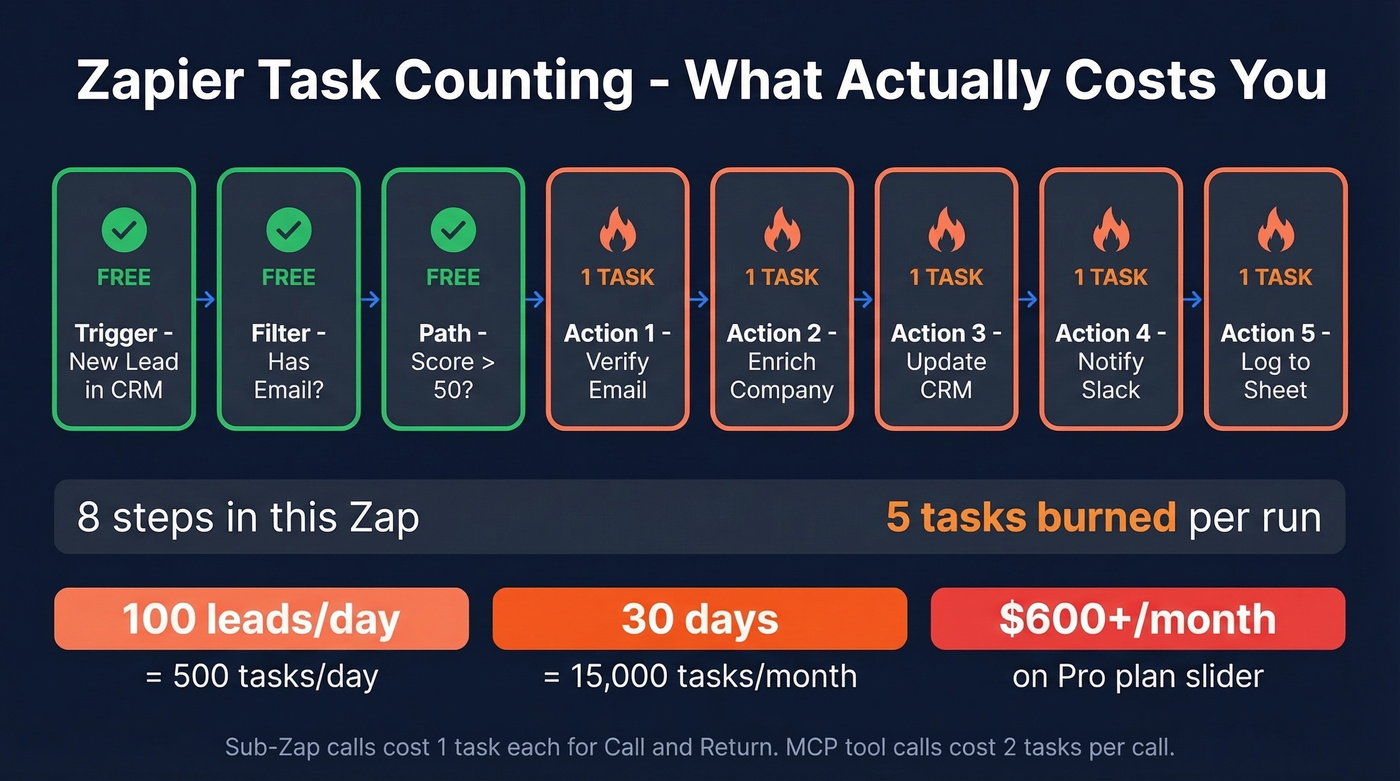
Every successful action step counts as one task. Triggers, filters, paths, and native steps like Tables, Delay, and Looping are free. Sub-Zap calls cost 1 task each for "Call" and "Return." Zapier MCP tool calls cost 2 tasks per call. AI-heavy workflows can burn 15-20 tasks per single run.
Here's the thing about overages: if you blow past your task limit, extra tasks bill at 1.25x your plan's per-task cost, capped at 3x your included limit. So a Pro plan with 750 tasks can run up to 2,250 before Zaps pause. That overage cap sounds generous until 1,500 extra tasks at 1.25x hits your invoice.

Every bad email in your Zap triggers error branches, retries, and notifications - all billable tasks. Prospeo's native Zapier integration sends 98%-accurate emails directly into your workflows, so you stop paying for bounce-handling steps that never should have fired.
Clean data in, fewer tasks burned. Start free with 75 verified emails.
Real-World Cost Math
Let's break down a common scenario. A lead enrichment workflow - check CRM, verify email, enrich company data, score, route, update CRM, notify Slack, log to sheet - is 8 action steps. One hundred leads a day means 24,000 tasks a month, well into the $300-600/month range. If you're building this kind of pipeline, it helps to understand lead enrichment and how it impacts downstream automation costs.
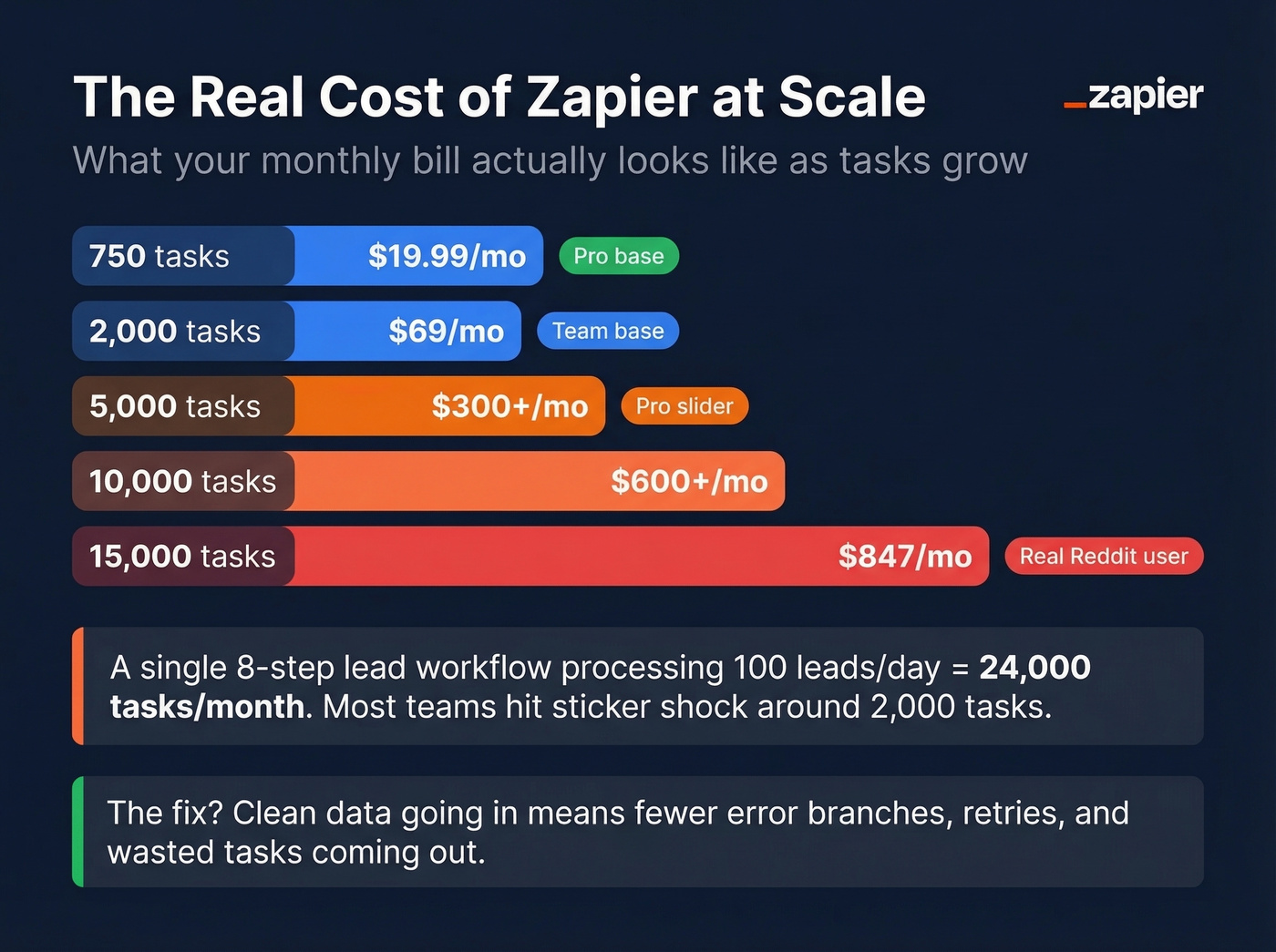
One Reddit user running 15,000 tasks/month reported an $847 invoice. Their frustration wasn't just the cost - they'd started designing workflows around billing instead of around the best process. That's the real danger of task-based pricing: it warps your automation design.
A detail most reviews skip - the quality of data entering your Zaps directly affects how many tasks you burn. Bad emails trigger error-handling branches, retries, and notification steps, all billable. Prospeo's native Zapier integration sends 98%-verified emails into workflows, which means fewer wasted tasks on bounce-handling paths. If you're diagnosing why automations keep failing, start with email bounce rate and the root causes behind it.

Pros and Cons From Actual Users
What works
Fastest onboarding in the category. Reddit users consistently call it "super easy to pick up" with an intuitive interface. Non-technical teams build useful automations in minutes - no exaggeration.
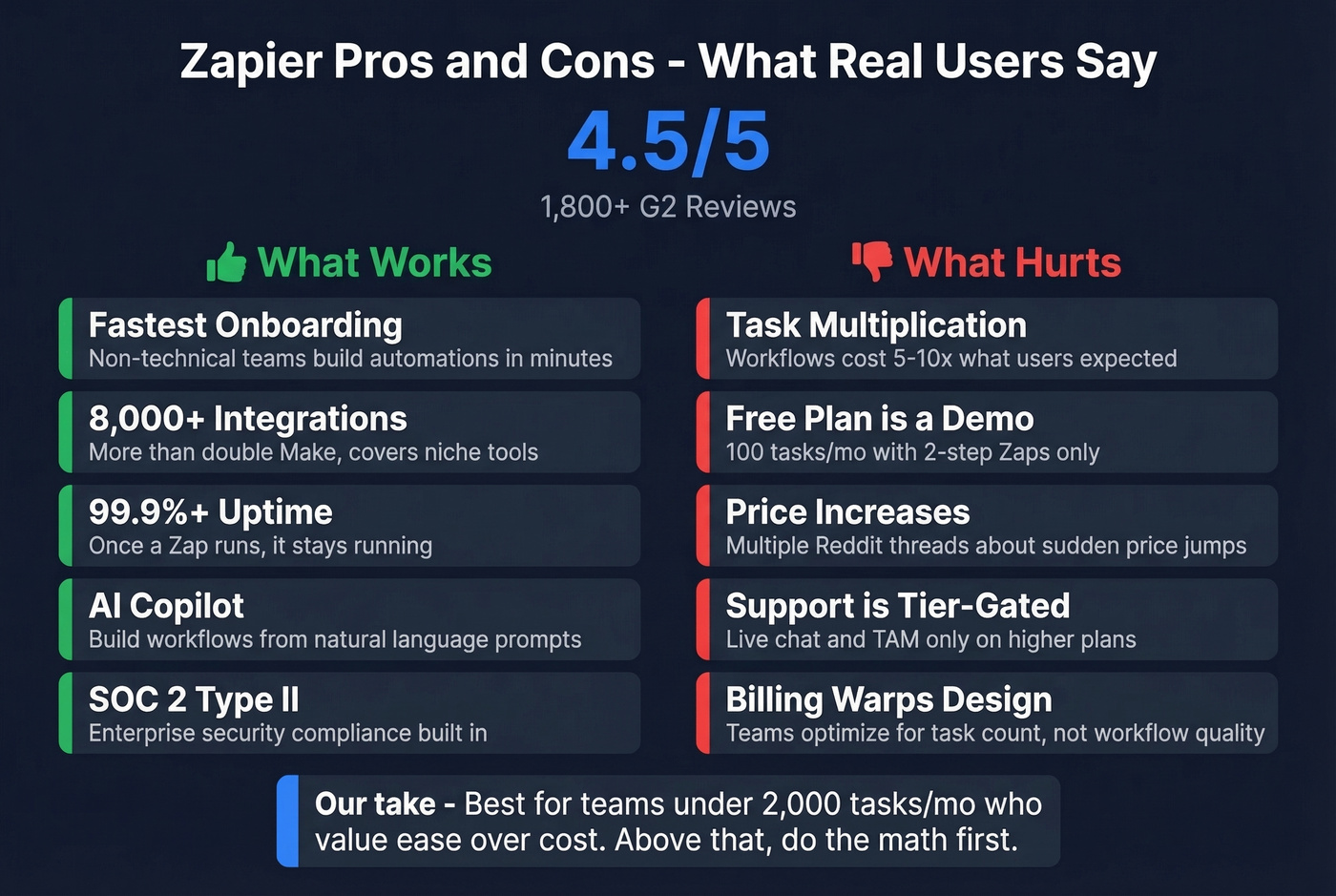
8,000+ app integrations. Make advertises 3,000+ apps. That gap matters when you're connecting niche tools like your industry-specific CRM or a regional payment processor that nobody else supports. If you're evaluating where automation fits in your stack, compare options in sales funnel automation tools.
Uptime runs at 99.9%+, consistent with our experience. Once a Zap is running, it stays running. The AI Copilot genuinely helps build workflows from natural language, even if you'll tweak the output. SOC 2 Type II compliance matters for teams with security requirements.
What doesn't
Task multiplication is the #1 complaint. Across r/zapier and r/automation, users describe workflows costing 5-10x what they expected once every action step is counted.
The free plan is a demo. 100 tasks/month, two-step Zaps, capped Copilot messages. You can't evaluate real value on it.
Multiple Reddit threads reference Zapier doubling prices "overnight", and whether that's literal or perceived, the sentiment is widespread. Support also depends on tier: Team includes Premier Support, Professional can include live chat at higher task tiers, and Enterprise adds a Technical Account Manager.
Our take: Zapier is still the best automation platform for people who don't think of themselves as "automation people." But the moment you start optimizing task counts instead of workflow quality, you've outgrown it. For a lot of teams, that inflection point hits right around 2,000+ tasks/month. If you're trying to systematize the handoff from lead to pipeline, map it against a lead generation workflow so you can see where steps (and tasks) multiply.
Alternatives Worth Considering
| Platform | Billing unit | Free tier | Paid from | Key difference |
|---|---|---|---|---|
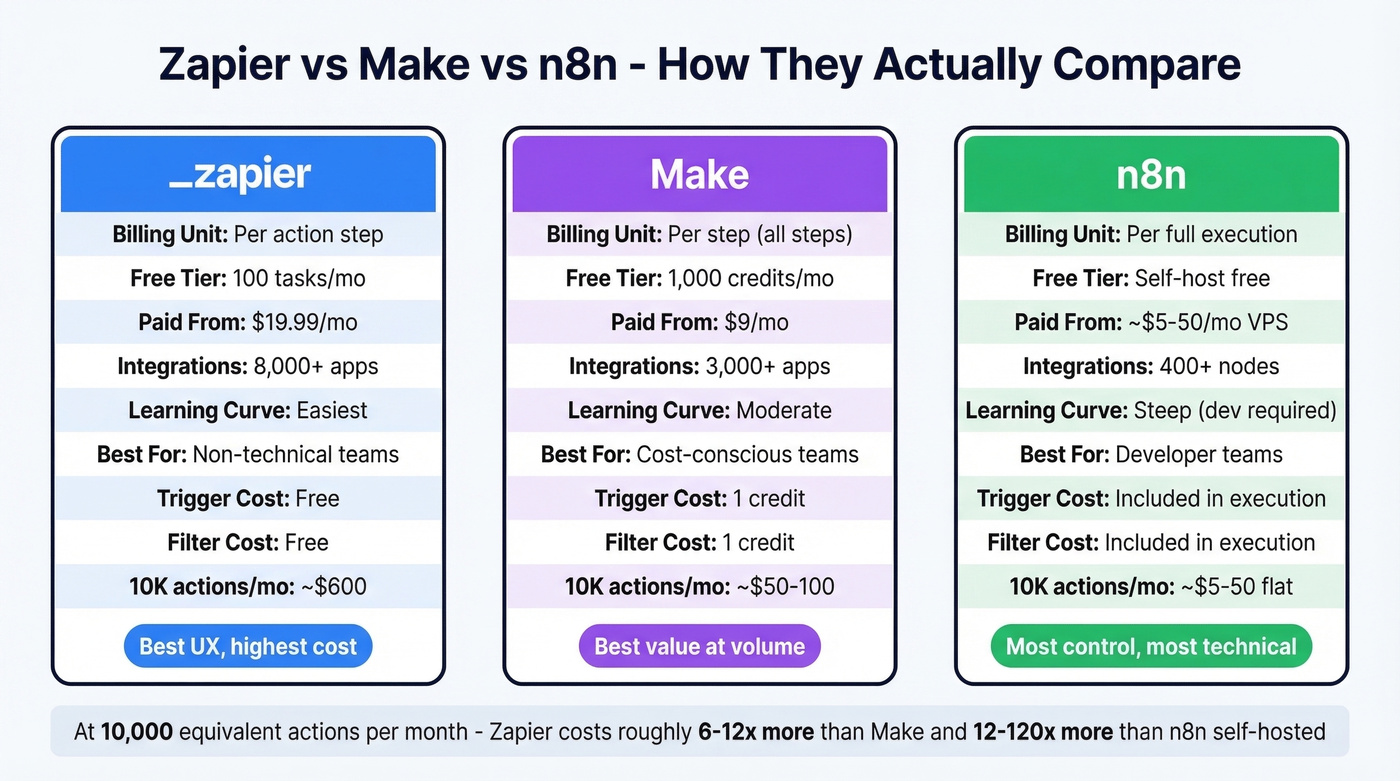
| Zapier | Task (action) | 100 tasks/mo | $19.99/mo | Most apps, easiest UX |
| Make | Credit (all steps) | 1,000 credits/mo | $9/mo | Cheaper, counts more |
| n8n | Execution (full run) | Self-host free | ~$5-50/mo VPS | Dev-friendly, flat runs |
Make
Make starts at $9/month for 10,000 credits (Core), with Pro at $16/month and Teams at $29/month. Dramatically cheaper than Zapier's $19.99 for 750 tasks - but Make charges credits for triggers, filters, and routers, not just actions. Every step in a scenario costs a credit.
That "polling tax" is real: checking email every minute burns around 43,000 credits/month just to listen. Still, teams often cut their automation bill by 50-70% switching from Zapier to Make for volume workflows. The learning curve is steeper, but the savings are hard to ignore. If your automations are tied to outbound, it’s worth reviewing your broader outbound lead generation tools stack before you migrate.
n8n
n8n charges per execution - the entire workflow run counts as one unit regardless of step count. Self-hosting on a VPS runs $5-50/month. It's open-source, developer-friendly, and gaining traction among teams that want full control. If you’re building more complex automations around prospecting, you may also want to compare sales prospecting techniques that reduce unnecessary steps upstream.
Skip this if nobody on your team is comfortable with a terminal.
Is Zapier Worth It in 2026?
For non-technical teams running simple automations under 1,000 tasks/month, Zapier is a strong choice. The UX is unmatched and 8,000+ integrations mean you won't hit compatibility walls. For high-volume workflows, Make saves real money. For dev teams wanting maximum control, n8n is the move.
Weighing the full picture - pricing, user feedback, and tradeoffs - Zapier still earns its spot as the default starter tool. Not the default scaling tool.
The platform matters less than the data flowing through it. Bad contact data creates error branches, retries, and wasted tasks on any platform. Get the data right first, then pick your automation tool. If you’re cleaning lists before they ever hit automation, start with data enrichment services and then validate deliverability with an email deliverability guide.
That 8-step lead enrichment Zap eating 24,000 tasks a month? Half those steps exist because your data source sends unverified contacts. Prospeo returns 50+ data points per contact at 92% match rate - pre-verified before they ever hit your Zap.
Verified data at $0.01/email beats fixing bad data at $0.03/task.
FAQ
What counts as a task in Zapier?
Each successful action step in a Zap counts as one task. Triggers, filters, and path steps are free. Sub-Zap calls cost 1 task each for "Call" and "Return," and MCP tool calls cost 2 tasks per invocation.
Is Zapier's free plan enough for real use?
No. 100 tasks/month with only two-step Zaps is a sandbox, not a production tier. You'll hit the limit within days of running any meaningful automation. Upgrade to Pro or test Make's 1,000-credit free tier for a better evaluation.
How does Zapier compare to Make on cost?
Make starts at $9/month for 10,000 credits versus Zapier's $19.99 for 750 tasks. Make charges for all steps including triggers; Zapier charges only for actions. For most multi-step workflows, Make is 50-70% cheaper at equivalent volume.
How do I reduce wasted tasks in Zapier?
Feed verified data into your Zaps so error-handling branches rarely fire. Use filters early in your workflows to stop bad records before they trigger downstream tasks, and consolidate action steps where possible. Clean input data is the single biggest lever - it's cheaper to verify contacts upfront than to pay for the tasks that handle bounces and errors downstream.