


9 Best Zoom Alternatives in 2026: Pick by Your Actual Problem
Finance just flagged the Zoom renewal. $13.33 per user per month doesn't sound bad until you multiply it across 50 hosts and realize you're paying for webinar capacity nobody uses. Or maybe it's simpler than that - your last three client calls started with two minutes of "can you hear me?" and a forced app update.
Either way, you're shopping because Zoom isn't working for your situation anymore, even though it works fine for plenty of people. It holds a 4.5/5 on G2 with 55,863 reviews for a reason. The question isn't whether Zoom is good. It's whether it's good for what you need right now.
We compared nine alternatives head to head. Let's find what fits.
Our Picks (TL;DR)
| Your Situation | Pick | Why |
|---|---|---|
| Already on Google Workspace | Google Meet | You're already paying for it |
| Already on Microsoft 365 | Microsoft Teams | Same - it's bundled |
| Enterprise security/compliance | Cisco Webex | FedRAMP, HIPAA/BAA, DISA Level 5 |
| Simplest guest experience | Whereby | Browser-only, permanent room links |
| Open-source / self-hosted | Jitsi Meet | Apache 2.0, full data sovereignty |
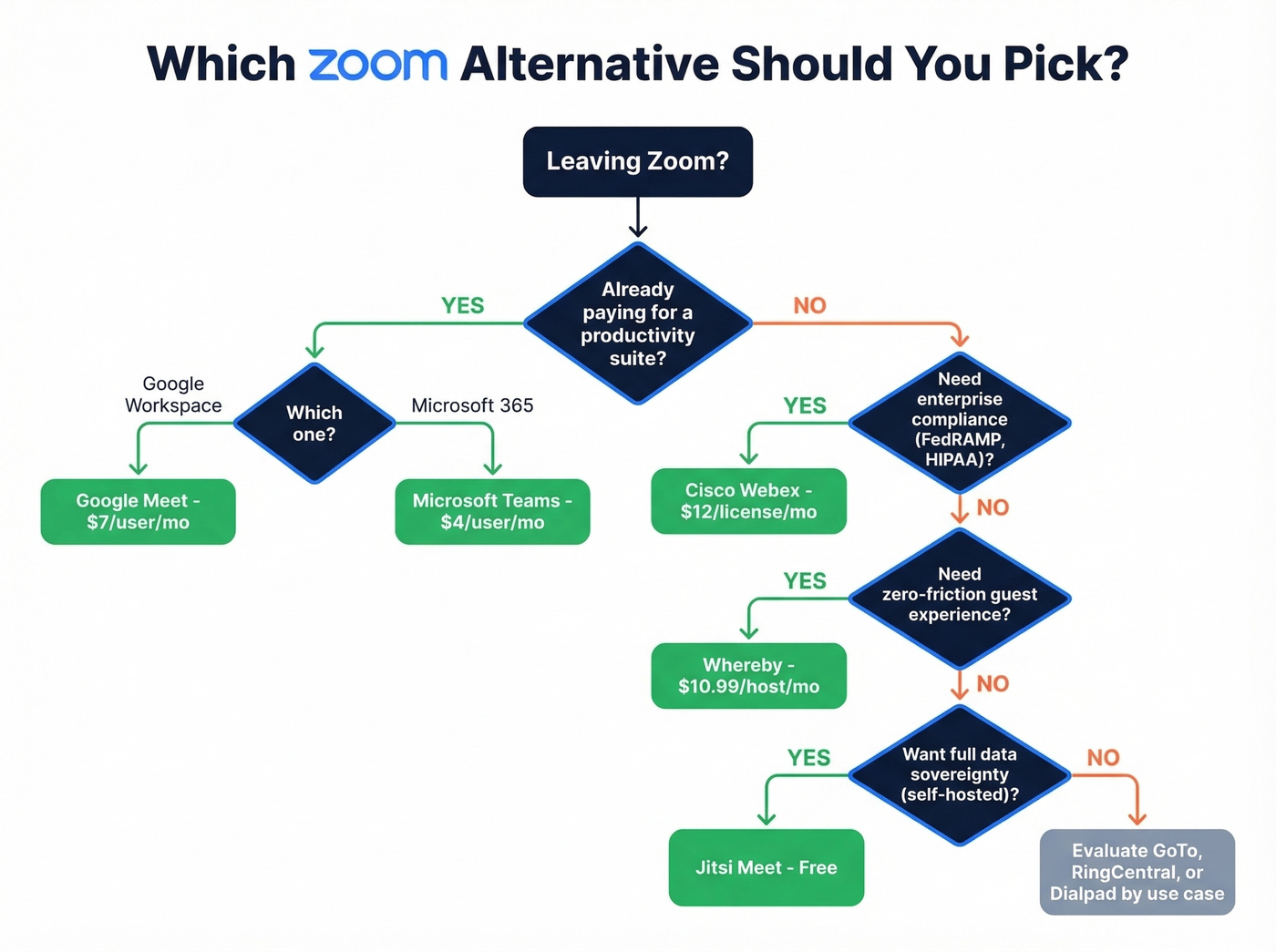
If you're already paying for a productivity suite, the answer is almost certainly the meeting tool bundled inside it. Paying for Zoom on top of Google Workspace or Microsoft 365 is lighting money on fire.
For everyone else, the decision comes down to compliance requirements, guest experience, or philosophical preferences about open-source software.
Here's a hot take: Zoom positions itself as a consolidation play - Zoom Phone, Zoom Chat, Zoom Meetings, all one platform. That math only works if you're actually using all three. Most teams aren't. They're paying for a meeting tool and ignoring the rest.
Pricing Comparison
Zoom is the baseline row so you can see exactly where you save - or don't.
| Tool | Free Plan Limits | Paid Start | Max Attendees (Paid) | Duration (Paid) |
|---|---|---|---|---|
| Zoom Pro | 40 min, 100 (unlimited 1:1) | $12.49/mo per host (annual) | 100 | Up to 24+ hrs |
| Google Meet | 60 min (3+), 100 | $7/mo per user | 150 (Business Standard+) | 24 hrs |
| Microsoft Teams | 60 min, 100 | $4/mo per user | 300 | 30 hrs |
| Cisco Webex | 40 min, 100 | $12/mo per license | 200 | 24 hrs |
| Whereby | 30 min, 4 attendees | $10.99/mo per host | 100 (Pro) / 200 (Business) | Unlimited |
| Jitsi Meet | Unlimited | Free | 100 | Unlimited |
| GoTo Meeting | No free plan (14-day trial) | $12/mo per organizer | 150 | Unlimited |
| RingCentral Video | 50 min, 100 | $20/user/mo (RingEX Core) | 200 | 24 hrs |
| Dialpad Ai | 45 min, 10 participants | $15-20/mo per user | 150 | 5 hrs |
| Discord | Unlimited | Free | Group video calls | Unlimited |
What 5 Hosts Actually Costs Per Year
This is the number that matters for budget conversations. All prices billed annually.
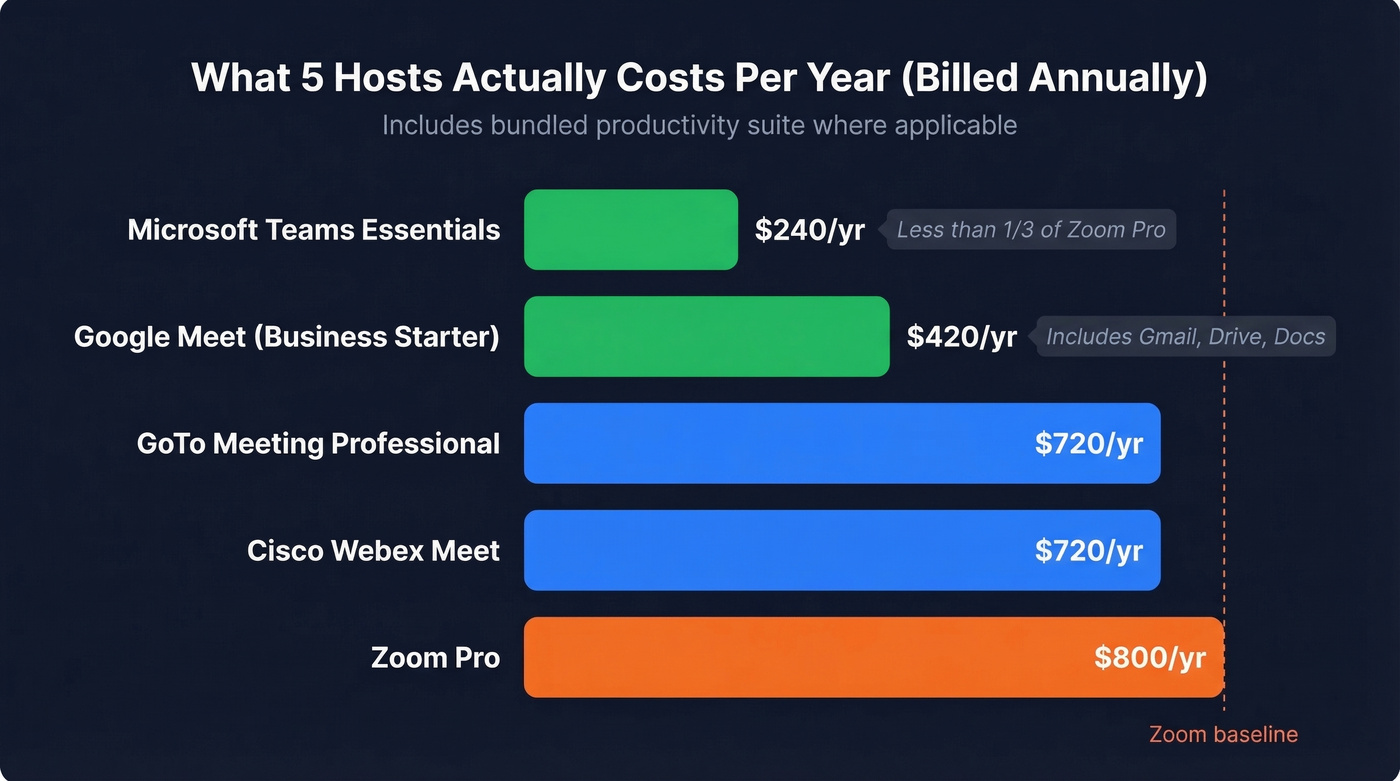
- Zoom Pro: 5 x $13.33 = $800/yr
- Google Meet (Business Starter): 5 x $7 = $420/yr (includes Gmail, Drive, Docs)
- Microsoft Teams (Essentials): 5 x $4 = $240/yr
- Cisco Webex Meet: 5 x $12 = $720/yr
- GoTo Meeting (Professional): 5 x $12 = $720/yr
Teams Essentials at $240/year for five users is less than a third of Zoom Pro. Google Meet at $420 includes your entire productivity suite. The math speaks for itself.
Honorable mention: Zoho Meeting starts at $1/mo if you're already in the Zoho ecosystem. It won't replace Zoom for most teams, but for budget-conscious Zoho shops, it's worth a look.
The Best Video Conferencing Tools to Replace Zoom
Google Meet
Best for: Teams already paying for Google Workspace.
Skip if: You need breakout rooms with fine-grained controls, or your org runs on Microsoft 365.
Price: Starts at $7/user/mo (Business Starter, billed annually). Free tier gives you 60-minute meetings for groups of 3+, unlimited 1:1 calls.
Look - if your company already pays for Google Workspace, you have Google Meet. Paying for Zoom on top of that is paying twice for the same capability. Google's higher Workspace tiers add AI note-taking and automatic summaries, which closes the gap on Zoom's AI Companion features. The interface is clean, the join experience is frictionless (just a browser link), and calendar integration is automatic because it's all one ecosystem.
Noise cancellation has improved significantly, and recording to Google Drive is built in at the Business Standard tier. For most Google-native teams, this isn't even a decision. It's a migration.
If you're also tightening your post-call workflow, pair Meet with a better sales meeting follow-up email process so action items don't die in Slack.
Microsoft Teams
Best for: Microsoft 365 shops that want to consolidate vendors.
Skip if: You're not in the Microsoft ecosystem and don't plan to be. Teams outside of M365 feels incomplete.
Price: Teams Essentials starts at $4/user/mo. M365 Business Basic at $6/user/mo adds the full Office suite.
Teams is the consolidation play. You get meetings, chat, file sharing, and - with Copilot integration - AI-generated meeting summaries and action items, all inside one platform. The savings are real: a 50-person org dropping Zoom Pro saves roughly $7,500-$8,000/year in Zoom licenses alone.
The downside? Teams can feel heavy. The UI has layers - channels within teams within organizations - and new users sometimes struggle to find things. But if you're already living in Outlook and SharePoint, the switching cost is minimal. The free plan caps meetings at 60 minutes with 100 participants; Essentials bumps that to 30 hours and 300 attendees.
If you're standardizing your stack, it’s worth mapping how Teams fits into your broader sales process optimization plan.
Cisco Webex
Best for: Enterprise security, compliance-heavy industries, government.
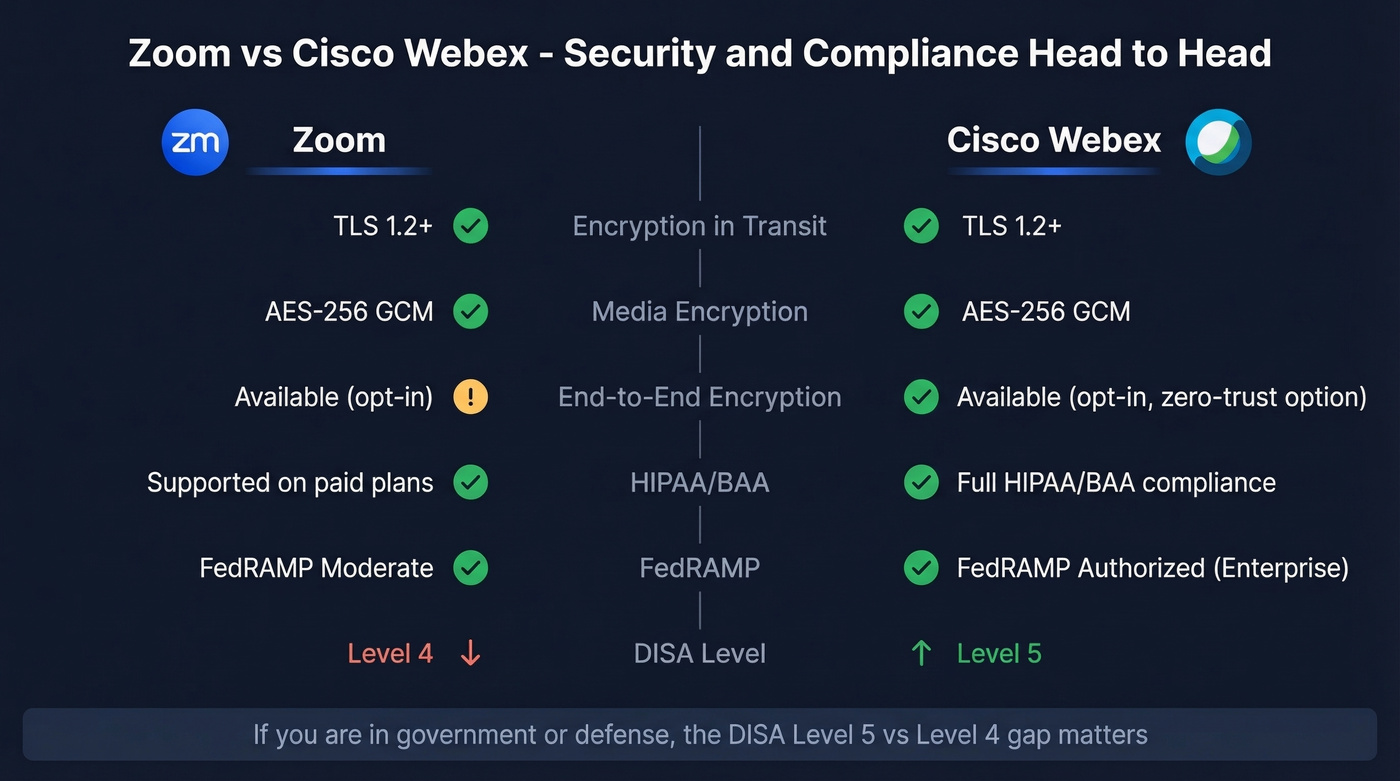
Skip if: You're a 5-person startup that just needs a meeting link. Webex is more platform than you need.
Price: Free plan offers 40-minute meetings with up to 100 attendees and unlimited whiteboards. Webex Meet runs $12/license/mo billed annually. Enterprise pricing requires a sales conversation.
Webex is the security answer. The stack includes TLS 1.2+ for signaling, AES-256-GCM for media encryption, optional end-to-end encryption, HIPAA/BAA compliance, and FedRAMP authorized security on Enterprise. Zapier's 2026 comparison notes that Webex holds DISA Provisional Authority Level 5 while Zoom sits at Level 4 - a meaningful gap if you're in government or defense.
The AI assistant handles real-time translations across 100+ languages, which is genuinely useful for global teams. Webex isn't the flashiest tool on this list, but for regulated industries, it's the one that won't get you in trouble.
If you're in a regulated org, align meeting security with your broader ethics in sales and data-handling standards.
Whereby
Best for: The simplest possible guest experience. No downloads, no accounts, permanent room links.
Skip if: You run meetings with more than 12 active video feeds regularly.
Price: Free for 1 room with 4 attendees and 30-minute meetings. Pro is $10.99/mo for 100 attendees with no time limit. Business runs $13.99/mo per host (minimum 3 hosts) and supports up to 200 attendees.
Here's the catch most articles miss: Whereby caps "active videos" at 12 on Pro and 24 on Business. In a 50-person call, only 12 or 24 people show video simultaneously. For webinar-style calls, that's fine. For all-hands where everyone's on camera, it's a real constraint.
That said, Whereby's killer feature is simplicity. You get a permanent room URL, guests click it, and they're in - no app install, no account creation, no "downloading Zoom client" interstitial. For client-facing calls where you want zero friction, it's unbeatable.
To make those client calls convert, keep a set of proven sales follow-up templates ready to send right after the meeting.
Jitsi Meet
Jitsi is the tool that privacy-focused communities on Reddit and elsewhere consistently point to as the go-to self-hosted option - and for good reason. It's WebRTC-based, maintained by 8x8 and the open-source community, completely free under the Apache 2.0 license, and scales horizontally by adding Jitsi Videobridge instances. Self-host on your own infrastructure, or use the free meet.jit.si instance to try it.
The real appeal is data sovereignty. When you self-host, all metadata, logs, and recordings stay on your servers. No third-party vendor ever touches your data. End-to-end encryption works for 1:1 calls, with group E2EE still maturing.
The tradeoff is operational overhead. You're running the infrastructure, handling updates, and troubleshooting without enterprise support unless you pay 8x8 for their managed service. The mobile app is functional but less polished than Teams or Google Meet. For small-to-mid teams willing to manage their own stack, Jitsi is rock solid. For everyone else, it's a weekend experiment that teaches you a lot about WebRTC.
If you're building a privacy-first outbound motion, pair self-hosting with clean list hygiene and email deliverability fundamentals.
GoTo Meeting
GoTo Meeting is the dependable mid-market option that nobody gets excited about and nobody complains about either. It doesn't have Google's ecosystem integration or Webex's compliance certifications, but it has rock-solid dial-in reliability and a clean interface that doesn't require training.
It's been around long enough that IT teams trust it. Pricing is competitive with Zoom Pro at $12/organizer/mo billed annually, with the Business tier running ~$16/organizer/mo. No free tier - that's its biggest weakness for teams that want to test before committing, though a free trial is available.
If you're running a high-volume outbound team, make sure your meeting tool choice supports your sequence management workflow.
RingCentral Video
RingCentral Video makes the most sense when you're buying the full UCaaS platform - phone, messaging, and video together. RingEX Core starts at $20/user/mo, and webinar add-ons run $30-54/user/mo on top. If you need a unified communications platform and video is just one piece, RingCentral is a contender. If you just need meetings, look elsewhere.
If you're evaluating UCaaS options, compare it alongside other outbound lead generation tools you’re already paying for.
Dialpad Ai Meetings
Dialpad leans hard into AI - real-time transcription, live coaching, and post-call summaries are built in at the $15-20/user/mo tier. The features that auto-generate action items and summaries address a real pain point. If AI meeting intelligence is your primary buying criterion, give Dialpad a serious look. For everything else, it's a niche pick.
If Dialpad is on your shortlist, you may also want to review Dialpad alternatives before you commit.
Discord
Discord is free and works great for informal team huddles or community calls. Zero calendar integration, no formal meeting scheduling, and no recording features worth mentioning. Use it for internal standups with your dev team, not for client presentations.

Switching video tools saves you $8K/year. Switching to accurate prospect data saves you pipeline. Prospeo delivers 98% email accuracy at $0.01/email - so every meeting you book on your new platform actually connects you to a real buyer.
Stop optimizing the meeting tool. Start optimizing who's in the meeting.
Choose by Your Failure Mode
Instead of comparing feature matrices, start with what's actually broken.
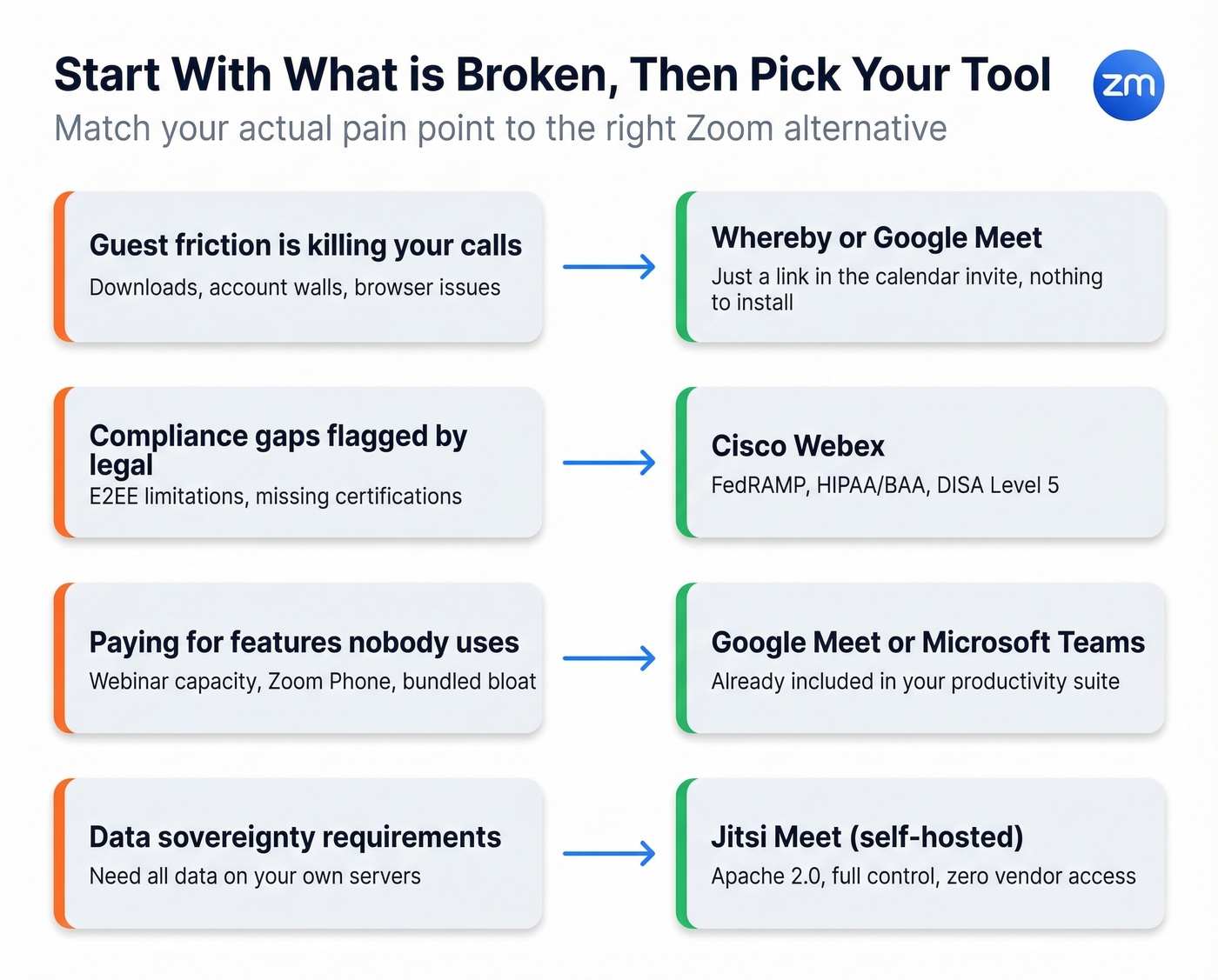
Guest friction is killing your calls. External participants struggle with downloads, account creation, or browser compatibility. Switch to Whereby or Google Meet - both are just a link in the calendar invite.
You have compliance gaps. Your legal or security team flagged Zoom's E2EE limitations or you need specific certifications. Move to Webex (FedRAMP, HIPAA/BAA, DISA Level 5) or Jitsi (self-hosted, full data control).
Cost creep is the problem. You're paying for Zoom plus a productivity suite that already includes meetings. Stop. Consolidate into Google Meet or Microsoft Teams and redirect that budget.
Reliability at scale is failing you. Calls drop, audio cuts out, video freezes with 50+ participants. Here's the uncomfortable truth: test with your actual group size on your actual network. No vendor comparison will tell you how a tool performs on your office's 200 Mbps shared connection with 80 concurrent users. Run a two-week pilot before you commit.
Your team takes calls from phones constantly. Test the mobile app before anything else. In our experience, Teams and Google Meet have the most polished mobile experiences. Jitsi's mobile app works but feels a generation behind. Whereby's mobile browser experience is surprisingly good given its simplicity.
Slack huddles work for quick audio calls if you're already in Slack, and CoScreen is worth a look for pair-programming screen sharing. Neither replaces a full meeting tool, but they fill gaps.
Security and Privacy
Every vendor says "secure." What matters is what you can enable without breaking your workflow.
Zoom offers optional end-to-end encryption, but enabling it disables cloud recording and live transcription. That's a tradeoff most teams won't accept. Webex supports end-to-end encryption and is built for regulated environments. Jitsi lets you own the entire stack.
| Tool | E2EE Available | Self-Hosting | E2EE Tradeoffs |
|---|---|---|---|
| Zoom | Yes (optional) | No | No recording/transcription |
| Webex | Yes | No | Varies by configuration |
| Jitsi | Yes (1:1 only) | Yes | Group E2EE limited |
If you're in healthcare, finance, or government, Webex or self-hosted Jitsi are your only serious options. Everyone else should at minimum enable waiting rooms and meeting passwords - the basics that prevent the "Zoombombing" scenarios that plagued the platform's early pandemic days.
The Migration Checklist
The real cost of switching isn't the license. It's the switching tax.
- Calendar plugins: Swap the Zoom plugin for your new tool's calendar integration. Test recurring meetings.
- Recurring meeting links: Every standing meeting needs a new link. Update calendar invites in bulk.
- Recording storage: Export existing Zoom cloud recordings before your subscription lapses - you'll lose access otherwise.
- Dial-in numbers: If your team uses PSTN dial-in, verify your new tool's numbers and update any published conference lines.
- SSO/SAML: Reconfigure single sign-on for the new platform. This is the step IT always underestimates.
- Room hardware: Zoom Rooms hardware is often incompatible with other platforms. Check before you buy.
- Team training: Budget one week for adoption. Record a 5-minute "here's how to join a call" video and pin it in Slack.
We've seen teams underestimate this by weeks. A 30-day overlap period where both tools run simultaneously is worth the cost.
What to Pair with Your Meeting Tool
Switching your meeting platform is usually part of a bigger stack overhaul. You fix the meeting tool, then realize the next bottleneck is everything that happens after the call - the recap, the follow-up, the pipeline update. The meeting is just the starting gun.
The chain breaks when you can't reach the right stakeholders after the meeting. You had a great discovery call, identified three more people to loop in, and now you need verified emails and direct dials for a VP of Engineering and two directors. Prospeo covers 300M+ professional profiles with 98% email accuracy and 125M+ verified mobile numbers - all on a 7-day refresh cycle, so you're not emailing someone who left the company last month. The Chrome extension lets you pull verified contact data from any website in one click, shrinking the gap between "great meeting" and "follow-up sent" to minutes.
If you're rebuilding your outbound stack, start with data enrichment services so every follow-up goes to a real inbox.
You're cutting costs on Zoom licenses. Cut wasted outreach too. Teams using Prospeo book 35% more meetings than Apollo users - because 98% verified emails mean fewer bounces and more live conversations on whatever platform you pick.
Fill your new meeting rooms with decision-makers who actually pick up.
FAQ
What's the best free Zoom alternative with no time limit?
Jitsi Meet is completely free, open source, and imposes no time cap on meetings. Discord also works for unlimited informal calls but lacks scheduling, recording, and calendar integration - making Jitsi the stronger choice for business use.
Can I use Microsoft Teams without Microsoft 365?
Yes. Teams Essentials is a $4/user/mo standalone plan that includes meetings (up to 300 attendees, 30-hour duration) and persistent chat. You lose access to the full Office desktop apps - those require M365 Business Basic at $6/user/mo.
Which Zoom competitor is best for HIPAA compliance?
Cisco Webex is the strongest option. It carries HIPAA/BAA support, FedRAMP authorization, and DISA Provisional Authority Level 5 on its Enterprise tier. Zoom supports optional E2EE but disables recording and transcription when enabled, which limits its usefulness in clinical workflows.
How do I find verified contact details for meeting follow-ups?
Prospeo provides 98% accurate emails across 300M+ profiles and 125M+ verified mobile numbers on a 7-day refresh cycle. Use the Chrome extension to pull contact data from any website in one click, or upload a CSV for bulk enrichment. The free tier includes 75 emails per month with no contracts.