

AI Email Writing: How to Actually Use It (Without Sounding Like a Robot)
In 2023, 62% of marketing teams needed two or more weeks to produce a single campaign email. By 2025, only 6% did. That's not a marginal improvement - it's a category shift. But here's the counterintuitive part: the teams getting the best results from AI email writing aren't using it to generate from scratch. PCMag's independent testing found that AI tools are "generally not great at generating text from scratch" - they're dramatically better at rewriting something you've already drafted. The workflow matters more than the tool. And the step most people skip has nothing to do with writing at all.
What You Need (Quick Version)
The tool matters less than the workflow. Prompt well, edit ruthlessly, verify the recipient before you hit send.
- Casual or professional email: Gmail "Help Me Write" - built-in, good enough for one-off messages
- Sales outbound: Lavender ($27/mo) - real-time coaching, reply prediction, personalization scoring
- Flexible power user: ChatGPT or Claude (around $20/mo) - custom prompts beat any template library
Below: the full five-step workflow, the best tools with real pricing, the mistakes that kill results, and the step everyone skips.
What AI Email Tools Actually Do
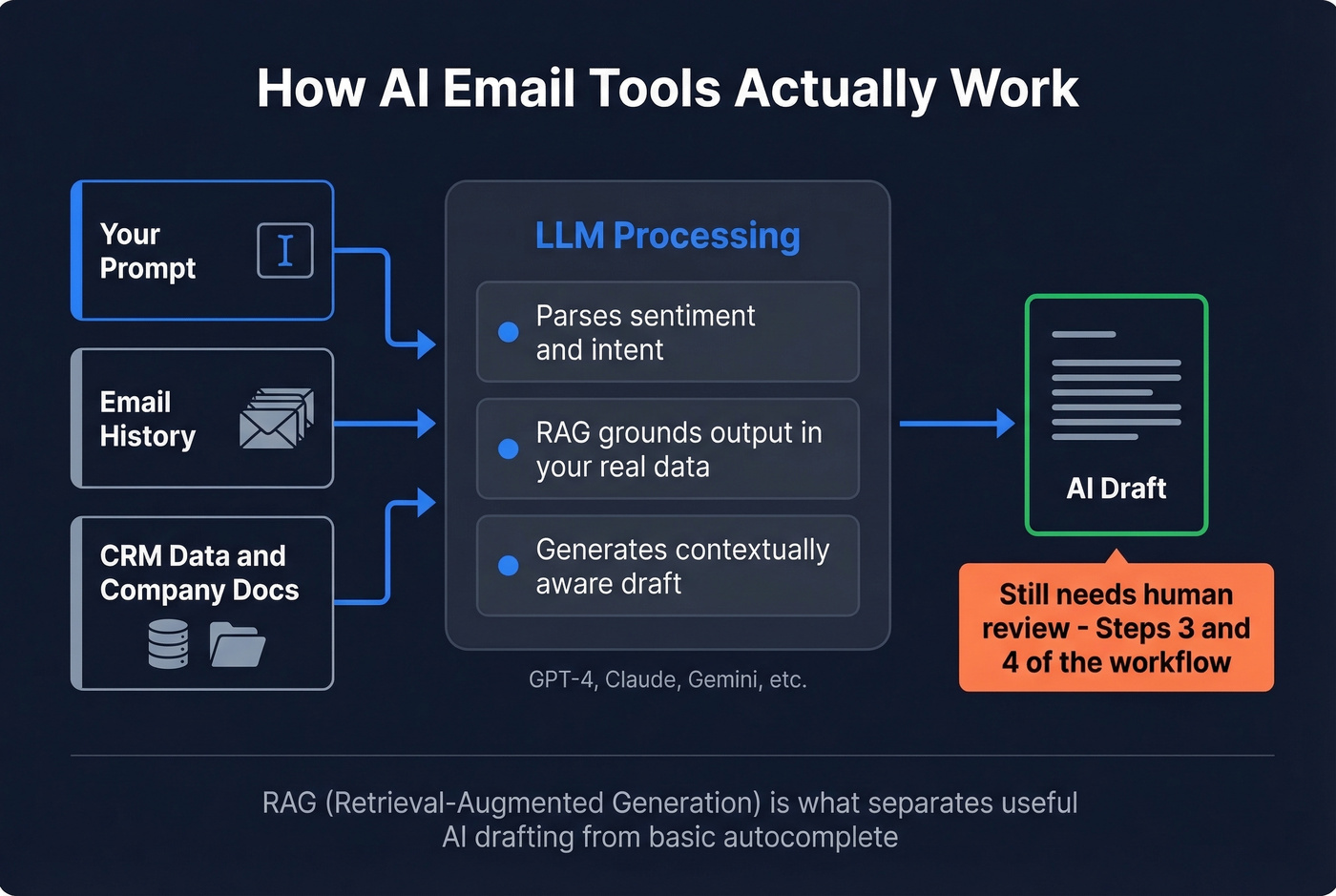
AI email tools don't just pattern-match keywords. Modern LLMs like GPT-4 and Claude parse sentiment, intent, and contextual nuance to generate text that reads like a human wrote it. Many tools layer in RAG (Retrieval-Augmented Generation) to ground output in your actual email history, company docs, or CRM data - which cuts hallucinations and keeps tone consistent. That's what separates useful AI-assisted drafting from the basic autocomplete features of a few years ago.
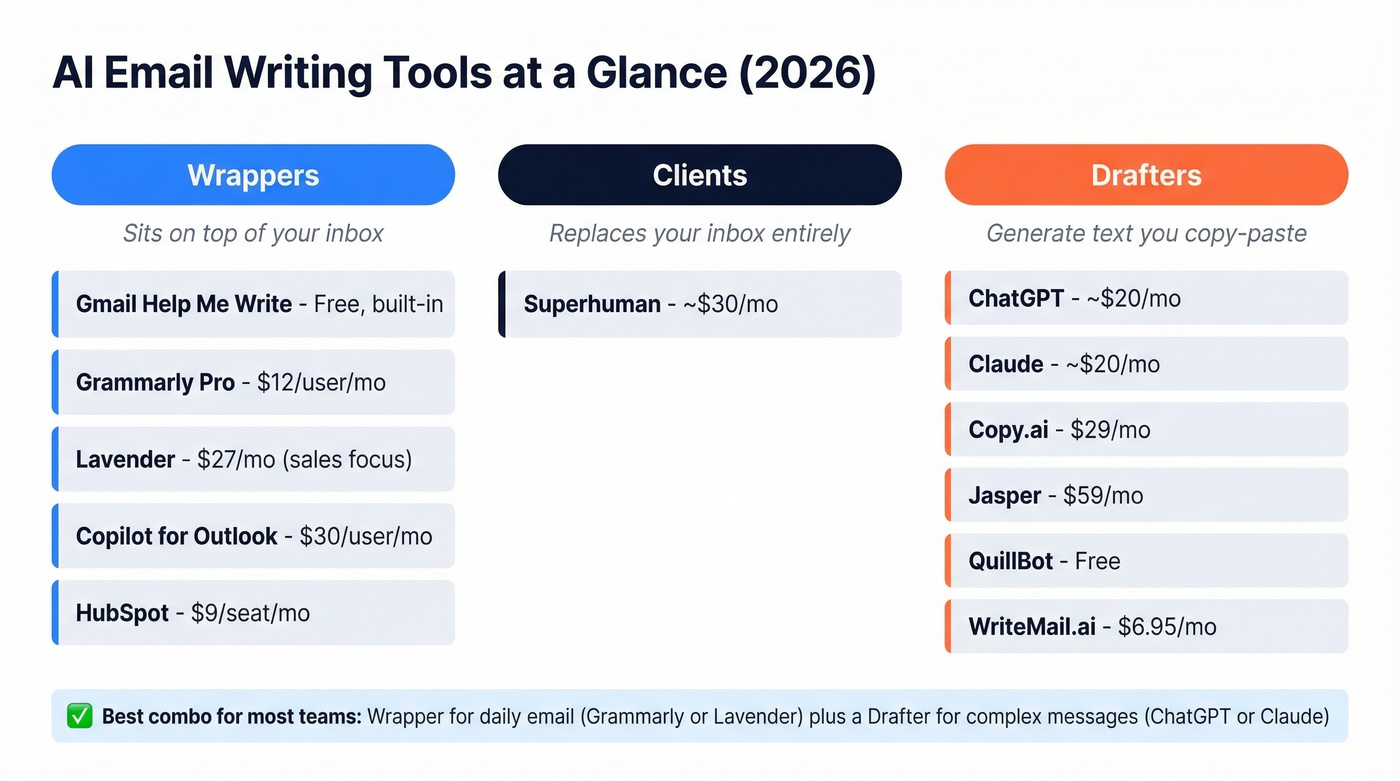
The market breaks into three categories, and understanding which type you're using changes how you evaluate it.
| Type | How It Works | Examples | Best For |
|---|---|---|---|
| Wrapper | Sits on top of Gmail/Outlook via browser extension | Grammarly, Gmelius, Lavender | Rewriting and polishing inside your existing inbox |
| Client | Replaces your inbox with an AI-native interface | Superhuman, Shortwave | Power users who want AI in every interaction |
| Drafter | Generates text you copy-paste or export | ChatGPT, Claude, Copy.ai | Maximum flexibility, custom prompts, any use case |
Wrappers are the lowest-friction option - you don't change your workflow, you just augment it. Clients offer the deepest integration but require you to abandon your current inbox. Drafters give you the most control but add a copy-paste step.
Most teams end up using a wrapper for daily email plus a drafter for complex or high-stakes messages. That's the right call.
The 5-Step Workflow
We've seen teams cut email drafting time by roughly 60% using this framework - not because the AI is magic, but because the structure forces you to front-load the thinking and back-load the editing. AI handles 70-90% of the initial message. You handle the 10-30% that makes it sound like you.
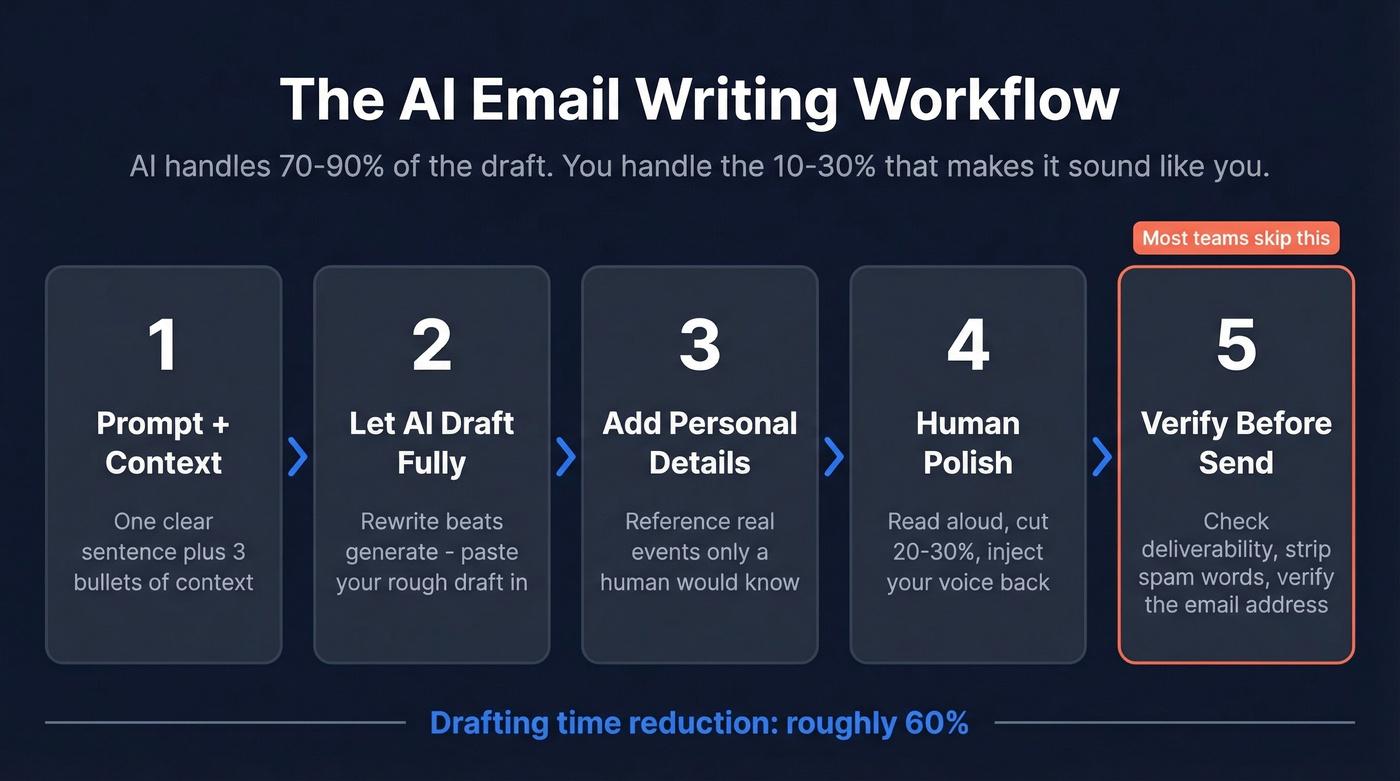
Step 1: One-Sentence Prompt + Context
Vague prompts produce vague emails. "Write a follow-up email" gives you something generic and forgettable. Instead, give the AI one clear sentence about what you need, plus three bullets of context.
A template that works:
Prompt: Write a follow-up email to a VP of Marketing who attended our webinar last week but didn't book a demo.
- Tone: conversational, not salesy
- Length: under 120 words
- Include: reference to the specific webinar topic (ABM for mid-market), offer a 15-minute call instead of a full demo
That level of specificity gets you a first draft that's 80% usable instead of 30% usable. The three minutes you spend on the prompt save you ten minutes of editing.
Step 2: Let AI Draft Fully Before Editing
Resist the urge to interrupt. Let the AI finish its complete draft before you touch anything. Generate the full draft, read it once, then start cutting.
This is where the "rewrite beats generate" insight matters most. If you already have a rough draft - even three bullet points of what you want to say - paste that in and ask the AI to rewrite it. The output will be dramatically better than a from-scratch generation.
Step 3: Add Recipient-Specific Details
AI can't know that your prospect just got promoted, that their company announced a funding round last Tuesday, or that you met them at a conference in Austin. This is the step where you add the details that make an email feel personal rather than templated.
Hunter.io's cold email research is clear on this: "stiff personalization" - the kind where AI inserts a company name but nothing genuinely specific - is one of the top red flags recipients notice. Real personalization at scale means referencing something only a human who did their homework would know. (If you want a deeper playbook, see AI Email Personalization.)
Step 4: Human Polish - Shorten and Align
Read the draft out loud. If any sentence sounds like something you'd never actually say, rewrite it. AI tends to over-formalize - PCMag found that even Apple Intelligence's default rewrites made tone "too stiff and professional, removing personality." Your job in this step is to inject your voice back in.
Cut ruthlessly. Most AI drafts are 20-30% too long. Delete filler phrases like "I hope this email finds you well" and "I wanted to reach out to." Tighten the CTA to one clear ask. Benchmark Email's guidance puts it well: don't use AI output verbatim. Preserve your storytelling and add human context.
For marketing emails, generate 3-5 subject line variants and A/B test them. AI is particularly strong at subject line ideation - it can produce dozens of options in seconds, and testing them against each other often lifts open rates. (For examples, use these email blast templates.)
Step 5: Verify Before You Send
This is the step everyone skips, and it's the one that matters most for outbound. Confirm your SPF and DKIM records pass. Strip out spammy phrases the AI might have snuck in ("act now," "limited time," "guaranteed"). And verify the recipient's email address actually exists.
A perfectly written email to a dead inbox is a waste of everyone's time. This is especially critical for cold outbound, where bounce rates above 5% can torch your domain reputation. Tools like Prospeo check emails in real-time with 98% accuracy, including catch-all domain handling and spam-trap removal, so you're not burning sends on addresses that went stale months ago. (If you’re comparing options, see our guide to the best email verifier tools.)

Do AI-Written Emails Actually Work?
Let's address the elephant in the room: can people tell when an email is AI-written? And do they care?
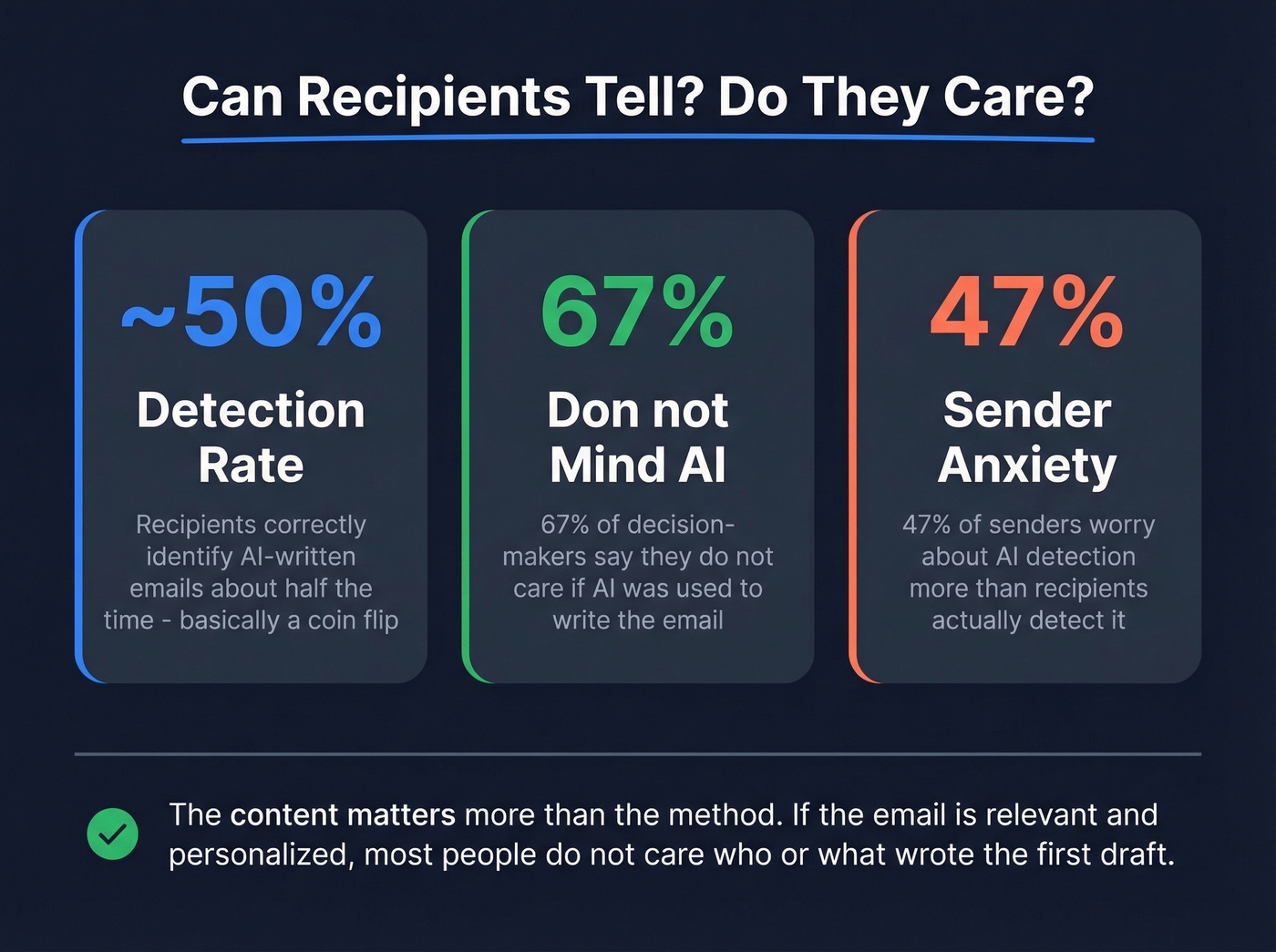
Hunter.io surveyed 200 decision-makers and 300 B2B professionals and found that recipients correctly identified AI-written emails about half the time - essentially a coin flip. Even in higher-performing industries, detection rates barely cleared 50%.
Here's what matters more: 67% of those decision-makers said they don't mind if generative AI was used to write the email. The content matters more than the method. If the email is relevant, personalized, and offers genuine value, most recipients don't care whether a human or a model wrote the first draft.
There is a perception gap, though. 47% of B2B professionals on the sender side said they'd be less likely to reply if they thought an email was AI-written. Senders worry more about AI detection than recipients actually detect it.
The red flags that do give AI away are specific and avoidable: repetitive sentence structure, overly formal language, and generic personalization that feels templated. All fixable in Step 4 of the workflow above.
Adoption is accelerating regardless. 61% of American adults have used AI in the past six months, with roughly one in five using it daily. A Gallup Q3 2025 survey found 45% of US employees now use AI at work. Generative AI users save about 5.4% of their weekly work hours - roughly 2.2 hours per week. For email-heavy roles, the savings compound fast.

Step 5 is where most teams fail. You craft the perfect AI-generated email, then send it to a dead inbox. Prospeo verifies emails in real-time with 98% accuracy - including catch-all domains, spam traps, and honeypots - so every send counts.
Stop wasting perfect emails on invalid addresses.
Best Tools Compared (2026)
| Tool | Type | Starting Price | Free Tier | Best For |
|---|---|---|---|---|
| Gmail "Help Me Write" | Wrapper | Built-in | - | Quick one-off emails |
| Grammarly Pro | Wrapper | $12/user/mo | Yes (basic) | Rewriting & polishing |
| QuillBot AI Email Writer | Drafter | Free | Yes | Non-native speakers |
| ChatGPT | Drafter | ~$20/mo | Yes | Flexible power users |
| Claude | Drafter | ~$20/mo | Yes | Long-form, nuanced email |
| Lavender | Wrapper | $27/mo | Limited | Sales outbound |
| Copy.ai | Drafter | $29/mo | Yes | Templates & sequences |
| Jasper | Drafter | $59/mo | No | Brand-consistent content |
| Copilot (Outlook) | Wrapper | $30/user/mo | No | Microsoft 365 orgs |
| HubSpot Marketing Hub | Wrapper | $9/seat/mo | Limited | Marketing + CRM workflows |
| WriteMail.ai | Drafter | $6.95/mo | Yes (5/mo) | Budget option |
| Superhuman | Client | ~$30/mo | No | Premium inbox UX |
For Professional and Personal Email
Gmail "Help Me Write" is the zero-friction starting point. It's already in your inbox, and it handles simple replies and one-off messages without any setup. The context window is limited - it won't reference a long email thread well - but for "write a polite decline" or "draft a meeting request," it's perfectly adequate.
Grammarly is the safe pick for anyone who writes more than a few emails a day. PCMag's testing validated what we've seen in practice: Grammarly's one-click "Improve It" feature keeps your tone intact while fixing grammar, clarity, and conciseness. The Pro plan runs $12/user/month billed annually, and it integrates with Gmail, Outlook, Slack, and basically everywhere else you type. The free tier handles basic grammar and spelling. Pro adds tone detection, full-sentence rewrites, and custom style guides - for teams that need a "just make this better" button without changing anyone's workflow, it's the obvious choice.
QuillBot fills a different niche. Its AI Email Writer is completely free, and its paraphrasing engine is particularly strong for non-native English speakers who want to sound more natural. It doubles as a broader writing toolkit for reports, proposals, and documentation, which makes it good value beyond just email.
For Sales and Outbound
Lavender is purpose-built for sales emails, and it shows. At $27/mo, you get real-time coaching that scores your email before you send it, predicts reply likelihood, and flags personalization gaps. It sits inside Gmail or Outlook and gives you a sidebar with actionable suggestions - not just "make this shorter" but "this opening line has a 12% reply rate; try this pattern instead." For SDR teams running high-volume outbound, Lavender pays for itself if it lifts reply rates even marginally.
Skip Copy.ai ($29/mo) if you're doing one-to-one cold email. It leans toward template-driven workflows and is stronger for marketing-flavored outbound - nurture sequences, event follow-ups, newsletter content. The free tier lets you test the template library before committing, which is worth doing before you pay.
ChatGPT and Claude are the most flexible option for anyone who knows how to prompt well. At around $20/mo each for Plus/Pro tiers, you get a general-purpose AI that handles any email scenario - cold outreach, investor updates, customer apologies, internal memos. Custom prompts beat any template library because you control every variable. The tradeoff: no email-specific coaching or reply prediction. You're the quality control layer. For power users, that's a feature, not a bug. (If you want a broader shortlist, see our AI email writer rankings.)
Hot take: If your deal sizes are under five figures, you probably don't need a dedicated AI email tool. ChatGPT with a well-crafted prompt template will get you 90% of the way there at a fraction of the cost. Save the Lavender budget for when your outbound volume justifies the investment.
For Marketing and Bulk Email
Jasper ($59/mo) is the premium option for teams that need brand voice consistency across multiple writers. Its brand voice training feature lets you feed in examples of your company's tone, and it generates content that matches. Expensive for individuals, but worth it for marketing teams producing high volumes of branded email content at scale.
HubSpot bakes AI writing features into Marketing Hub starting at $9/seat/mo. If you're already in the HubSpot ecosystem, the AI email tools are a natural extension - not best-in-class, but convenient and well-integrated with your marketing automation workflows. Using generative AI within a CRM means your messaging stays aligned with contact data and lifecycle stages automatically. (Related: CRM automation software.)
Microsoft Copilot for Outlook runs $30/user/mo and is the enterprise play. If your org is already on Microsoft 365, Copilot adds AI drafting and summarization directly into Outlook. The value proposition is consolidation, not innovation.
Honorable Mentions
WriteMail.ai offers a free tier (5 emails/mo) with paid plans from $6.95/mo. It markets aggressively - "write 87% faster," "save 5 hours per week" - but none of those stats come with sources. Use it as a budget option, not as a benchmark.
Superhuman (~$30/mo) is a standalone AI email client with beautiful UX and fast keyboard shortcuts. It's a premium inbox experience for people who live in email all day. Not cheap, but the people who love it really love it.
AImReply is worth knowing about if you need a free, no-login option for quick one-off replies. It won't replace a real workflow, but it's useful in a pinch.
5 Mistakes That Kill Results
1. Blindly trusting the output. AI hallucinates. It'll cite "the 2023 McKinsey report" that doesn't exist, or reference a product feature your company discontinued two years ago. Every AI-generated email needs a fact-check pass. This applies to vendor claims too - WriteMail.ai's landing page says it helps you "write 87% faster" and that "personalization can improve CTR by 14%," but none of those stats have sources. Don't trust AI output. Don't trust vendor stats. Verify.
2. Leaving the robotic tone intact. This is the #1 giveaway. The output often sounds like a press release - stiff, symmetrical, devoid of personality. Fix this by reading the draft out loud and rewriting any sentence that sounds like corporate boilerplate. Add a specific anecdote, a casual aside, or a sentence fragment. Real humans don't write in perfect parallel structure.
3. Using vague prompts. "Write a sales email" isn't a prompt. It's a wish. Specify the audience, the tone, the length, the CTA, and any phrases to avoid. Break complex emails into parts - subject line, opening hook, value prop, CTA - and prompt each separately if needed. (For a proven structure, start with a best sales introduction email framework.)
4. Ignoring brand context. If you don't feed the AI your brand guidelines, tone preferences, and audience context, you'll get generic output that could've come from any company. Spend five minutes creating a "brand brief" prompt that you prepend to every email request. It saves hours of editing downstream.
5. Sending without verifying the recipient. You can craft the perfect email and still waste it entirely if the address is invalid. Bounce rates above 5% damage your sender reputation, and once your domain gets flagged, even your human-written emails stop landing. Verification isn't optional - it's infrastructure. (More: outbound email spam prevention.)
The Step Everyone Skips: Data Quality
You spent 20 minutes crafting the perfect cold email with AI. You nailed the personalization, tightened the CTA, read it out loud twice. You hit send. It bounces. The prospect left that company six months ago.
This happens constantly in outbound. Teams obsess over email copy - subject line testing, A/B splits, tone optimization - while sending to lists that are 15-20% stale. In our experience, writing quality and delivery quality aren't separate problems. They're the same pipeline, and a break anywhere kills the whole thing.
SPF and DKIM authentication handle the technical side of deliverability. But the upstream problem is simpler: are you emailing a real person at a real address? Catch-all domains make this worse - they accept every email at the domain level, so you never get a hard bounce, but the message lands in a black hole. (If you’re troubleshooting, start with check bounce.)
Look, if you're doing outbound at scale, start with verified contact data. Prospeo's database covers 300M+ professional profiles with 143M+ verified emails on a 7-day refresh cycle - that's 98% email accuracy with catch-all handling, spam-trap removal, and honeypot filtering that keeps your list clean even when domains try to obscure invalid addresses. (For a broader comparison, see the best B2B database roundup.)

The best AI email writing tool in the world can't fix bad data. Fix the data first.
AI can draft the email, but it can't find the right person to send it to. Prospeo gives you 300M+ verified contacts with 30+ filters - job title, intent signals, tech stack - so your AI-written outbound reaches real decision-makers.
Great copy deserves a verified inbox. Start at $0.01 per email.
Where Does Your Email Data Go?
Every AI email tool processes your content somewhere, and where that happens matters.
Cloud-based processing is the most common. Your email content travels to the provider's servers, gets decrypted for AI processing, and the results come back. TLS protects data in transit, but on the server side, your content is exposed to the provider's infrastructure.
On-device processing keeps everything on your hardware. The AI model runs locally, and your email content never leaves your machine. This is the most private option, but it requires significant local compute and limits model sophistication - Apple Intelligence takes this approach for some features.
Hybrid models process simple tasks locally and route complex ones to the cloud, balancing privacy with capability.
Regulators are catching up. GDPR fines can hit 4% of annual global revenue. The EU AI Act became applicable in August 2025 and affects email AI systems that process employee data at scale. The November 2024 Gmail AI training controversy - where users worried Google was training models on personal emails - highlighted how sensitive this topic has become. The consensus on r/privacy and r/sysadmin threads is blunt: if you're pasting client data into a free AI tool, you're the product.
Third-party extensions add another layer of risk. When you use a browser extension for email AI, your data touches two companies: your email provider and the extension developer. Gartner predicts that by 2028, 40% of large enterprises will use AI to monitor employee communications. Before you paste anything confidential into an AI tool, check for SOC 2 certification, zero-retention policies, and explicit GDPR compliance. (If you need a checklist, start with B2B compliance.)
FAQ
Is AI email writing free?
Several strong tools offer free tiers. Gmail "Help Me Write" is built-in at no cost, and ChatGPT, Grammarly, and QuillBot all have free versions with usage limits. Paid plans range from $6.95/mo (WriteMail.ai) to $59/mo (Jasper).
Can people tell if an email was AI-written?
Recipients correctly identify AI-generated emails about half the time - essentially random chance, per Hunter.io's survey of 200 decision-makers. The giveaways are repetitive structure, overly formal language, and generic personalization - all fixable with human editing in Step 4.
What's the best tool in 2026?
Grammarly for rewriting, Lavender for sales outbound, ChatGPT for maximum flexibility. A mediocre tool with a disciplined five-step process beats a premium tool with lazy prompts every time.
How do I make sure AI-written emails get delivered?
Verify the recipient's email address before sending. Beyond verification, ensure your SPF and DKIM records are properly configured and strip spam-trigger phrases that AI sometimes generates.
What is AI-powered conversational email?
AI-powered conversational email refers to tools that manage entire back-and-forth threads - suggesting contextual replies, summarizing long chains, and adapting tone based on the conversation's direction. Clients like Superhuman and Shortwave lean into this approach, making every reply feel like a natural continuation rather than a standalone message.