

AI Reply Agents: What They Are, How to Choose One, and What to Set Up First
You're getting 100+ emails a day. Half need a reply, a quarter need a real answer, and the rest are noise you still have to scan. An AI reply agent promises to handle the sorting and responding for you - but the category is a mess of overlapping tools, vague pricing, and wildly different use cases.
Let's cut through it.
What Is an AI Reply Agent?
An AI reply agent is software that reads incoming emails, interprets intent, and either drafts or sends a response without manual input. Some operate in human-in-the-loop (HITL) mode, where you approve every draft before it goes out. Others run on full autopilot.
The underlying tech: an LLM processes the incoming message against your context - product docs, pricing sheets, CRM data - and generates a reply matching your tone and rules. The sophistication gap between tools is enormous, but that's the core loop. Whether you call it an automated email responder or an intelligent inbox assistant, the mechanics are the same.
The market is moving fast. Deloitte estimates 25% of enterprises using generative AI will deploy AI agents in 2026, rising to 50% by 2027. The AI agent market is projected to grow from $3.7B to $103.6B over the next decade. That's not hype - it's infrastructure being built in real time.
What You Need (Quick Version)
- Pick your category first. These tools split into three buckets: sales, support, and ops/inbox productivity. They barely overlap.
- For sales teams on a budget, start with Instantly's HITL mode. For support, Zendesk's generative replies. For personal inbox triage, Superhuman or Gmelius.
Three Types of Reply Agents
Not all reply agents solve the same problem. The ROI timeline, the metrics you track, and the risk profile differ sharply by category.
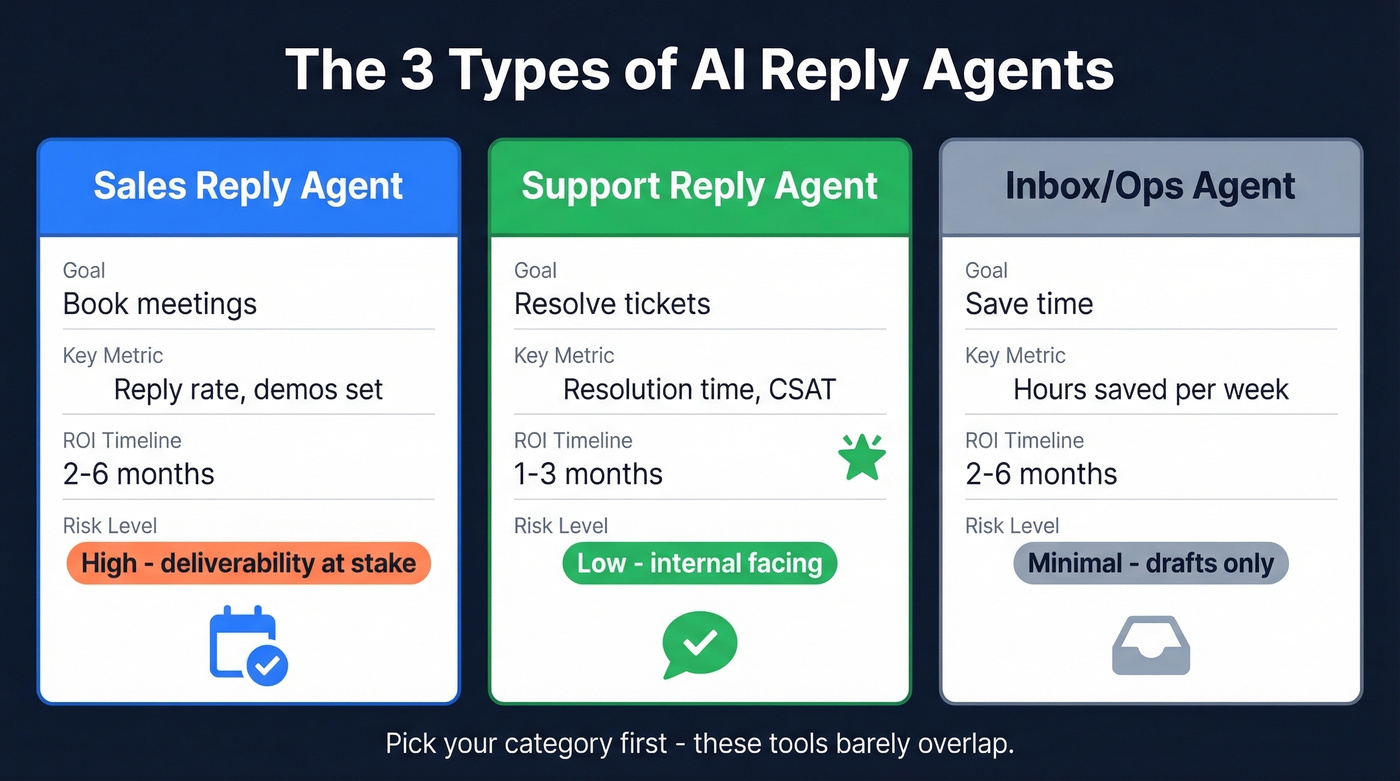
| Type | Goal | Key Metric | Typical ROI Timeline |
|---|---|---|---|
| Sales | Book meetings | Reply rate, demos set | 2-6 months |
| Support | Resolve tickets | Resolution time, CSAT | 1-3 months |
| Ops/Inbox | Save time | Hours saved/week | 2-6 months |
Sales reply agents handle outbound follow-ups and inbound lead responses. They can respond to warm leads in seconds rather than hours - and the MIT stat bears repeating: responding within 5 minutes yields 21x better qualification odds than waiting 30 minutes. Meanwhile, 88% of customers expect a reply within 60 minutes, yet 62% of companies don't respond to customer emails at all. That's not a staffing problem. That's a systems problem.
If you're running Outlook or Microsoft 365, note that most sales-focused tools still have better Gmail/Google Workspace integrations. Check native support before committing.
Support reply agents deliver the fastest ROI. McKinsey benchmarks show +14% issue resolution and -9% handling time with AI agents. Gorgias data is even sharper: merchants using automation reply 37% faster, resolve tickets 52% faster, and see an 8-point lift in repeat purchase rate within 28 days. If your support queue is drowning, this is where to start.
Inbox productivity agents are the simplest category. They draft replies to routine emails so you can approve and send in seconds. Lower stakes, lower cost, immediate time savings.

An AI reply agent burning credits on bad emails is expensive. An AI reply agent torching your domain on spam traps is catastrophic. Prospeo's 5-step verification - with catch-all handling, honeypot filtering, and spam-trap removal - keeps bounce rates under 1% so your agent actually reaches real inboxes.
Clean your list before your reply agent touches it.
Top Tools and What They Cost
Here's the thing: a fully loaded SDR costs $98K-$173K/year. AI reply agents run from ~$20-$30/user/month for inbox tools to $500-$3,000/month for full AI SDR agents. The ROI question isn't really about cost - it's about workflow fit and risk tolerance.
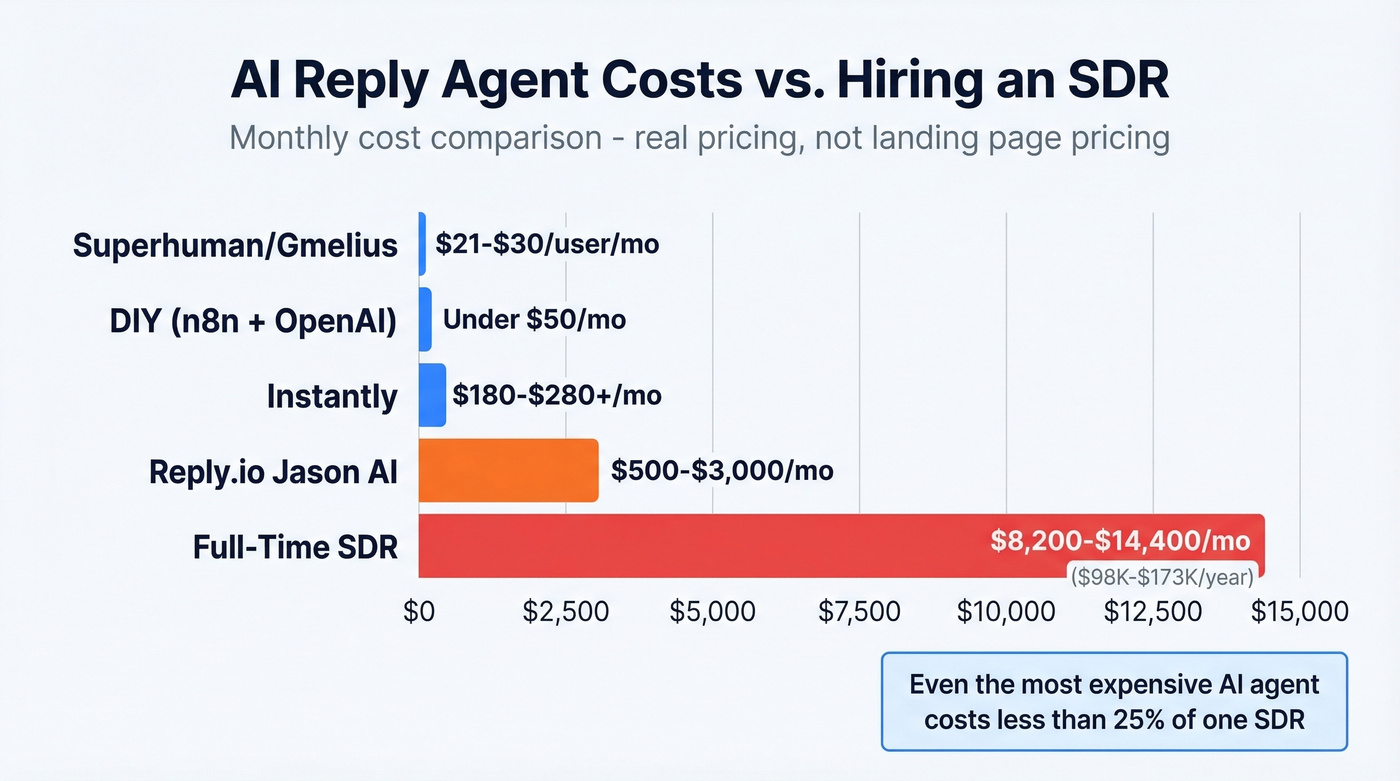
| Tool | Category | Real Cost | G2 Rating |
|---|---|---|---|
| Instantly | Sales | $180-$280+/mo | 4.8/5 (3,400+ reviews) |
| Reply.io (Jason AI) | Sales | $500+/mo | 4.6/5 (1,480 reviews) |
| Zendesk | Support | $19-$115/agent/mo | - |
| DIY (n8n + OpenAI) | Any | Under $50/mo | - |
| Superhuman / Gmelius | Inbox | $21-$30/user/mo | - |
Instantly
Often shown as $37/mo in older pricing references, but most teams end up stacking modules. AI replies cost 5 credits each, and many teams add the outreach module ($47/mo), lead finder ($42/mo), and a CRM add-on ($47/mo). Real cost: $180-$280+/mo. Trustpilot reviewers (3.8/5 from 987 reviews) frequently cite the credit model as a surprise. The HITL mode is excellent - we've tested this and recommend running 50-100 replies in approval mode before switching to autopilot. That ramp cadence catches the weird edge cases before they reach prospects.
Reply.io's Jason AI SDR
Starts at $500/mo for 1,000 active contacts, scaling to $3,000/mo for 10,000. It routes across Claude, Gemini, Mistral, and OpenAI. Enterprise pricing, but it's a full AI SDR - prospecting, replying, and booking in one system. If you're running sequences for fewer than 1,000 contacts, skip this. The math doesn't work at that scale.
Zendesk
Runs $19-$115/agent/mo with AI add-ons on top. The ecosystem and integrations are unmatched for support workflows, but you'll pay for that breadth.
DIY with n8n + OpenAI
Surprisingly viable. A common pattern from r/automation and r/AI_Agents: monitor inbox, match against FAQ docs, draft reply, send approval via Telegram, book calendar slot, send. Under $50/mo for most teams, but you're building and maintaining it yourself. Full control comes with a real maintenance burden - plan for 2-4 hours/month of upkeep once it's running.
Superhuman and Gmelius
Superhuman ($30/user/mo) and Gmelius ($21/user/mo) handle inbox productivity with AI-drafted replies and triage features. They won't replace an SDR, but they'll save you serious time every day.
Using One for Cold Email
Cold outreach is where these tools get the most attention - and where the stakes are highest. A cold email reply agent handles the follow-up sequences that most reps abandon after the second touch, responding to positive replies instantly and routing objections to the right playbook.
The key difference between cold email and support or inbox use cases: deliverability is everything. One bad bounce spike can torch a domain you've spent months warming. That's why the setup steps below aren't optional. They're the difference between a system that books meetings and one that lands in spam.
Set Up Before You Deploy
Skipping these steps is how teams crater their domain reputation in the first week. We've seen it happen more times than we'd like to admit.
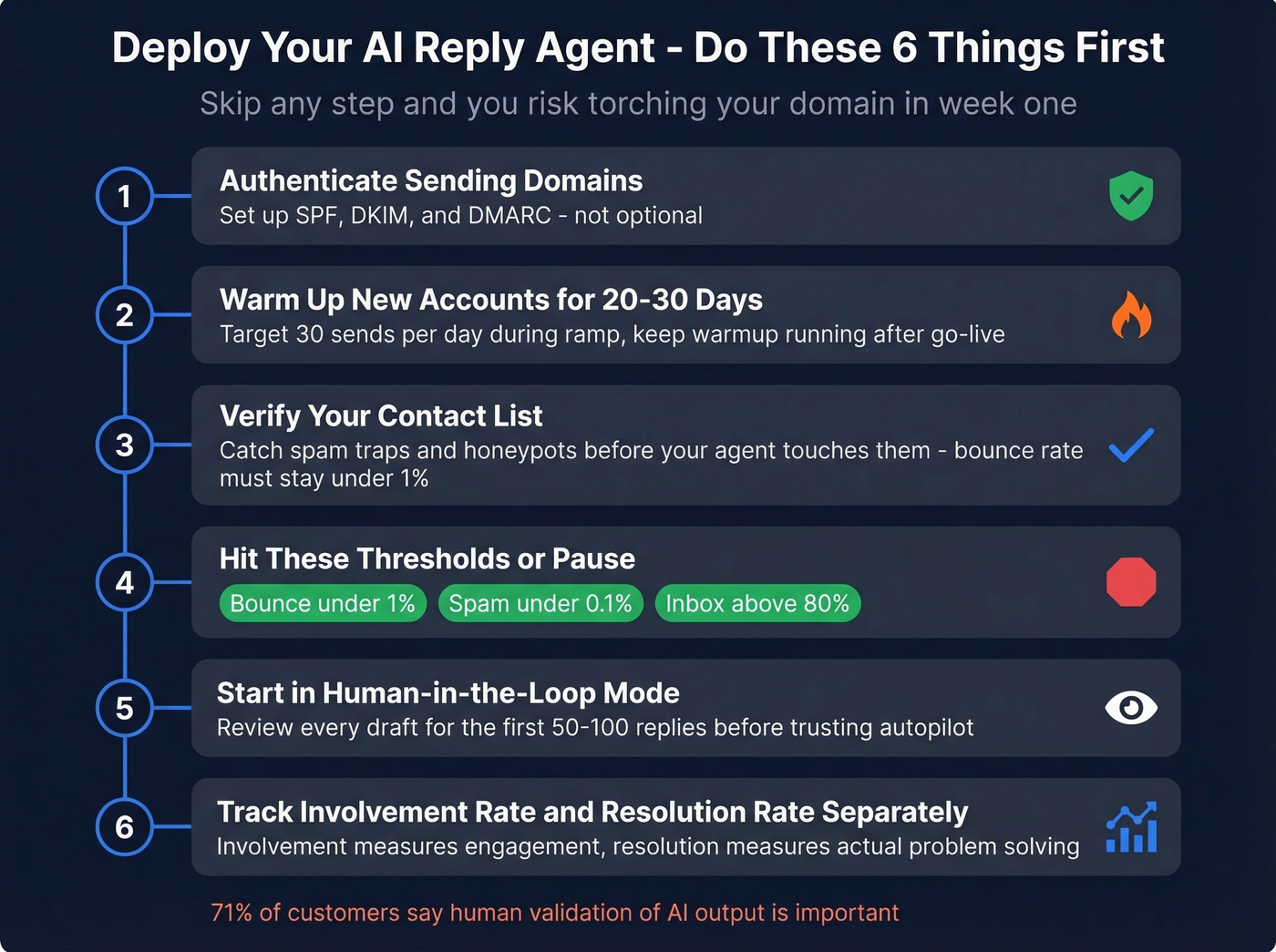
Authenticate your sending domains. SPF, DKIM, and DMARC aren't optional. If you haven't set these up, stop here and do it now. (If you need a checklist, start with sender authentication.)
Warm up new sending accounts for 20-30 days. Warmup isn't a one-time task - keep it running even after you go live. Target 30 sends/day during ramp. Use a dedicated Gmail warm up plan if you're on Google Workspace.
Hit these thresholds or pause. Bounce rate under 1%. Spam complaints under 0.1%. Inbox placement above 80% primary. If you're outside those numbers, don't scale - diagnose. (More detail: inbox placement and email reputation check.)
Verify your contact list first. This is non-negotiable. Upload a CSV to Prospeo and get verified results in minutes - the 5-step verification process catches spam traps and honeypots that other providers miss, so your agent isn't wasting credits on dead addresses or, worse, burning your domain on trap hits. If you want a broader comparison, see our guide to email verifier tools.
Start in HITL mode. 71% of customers say it's important for a human to validate AI output. Review every draft for the first 50-100 replies before trusting autopilot. This isn't paranoia - it's calibration.
Track involvement rate and resolution rate separately. Involvement rate measures how often the agent engages; resolution rate measures how often it actually solves the problem. Both matter, but resolution rate is the one that earns trust from your team and your prospects.

You're spending $180-$3,000/month on an AI reply agent. Don't feed it stale data. Prospeo refreshes 300M+ profiles every 7 days - not the 6-week industry average - so your agent replies to leads who still work there, at emails that still exist, for roughly $0.01 per verified address.
Fresh data in, booked meetings out. It starts at $0.01 per email.
Mistakes That Kill Deployments
Bad data is the #1 killer. A 15% bounce rate doesn't just waste credits - it craters your domain reputation, and recovery takes weeks. Verify every list before you automate anything. (If you're troubleshooting, start with check bounce and soft bounce rate.)
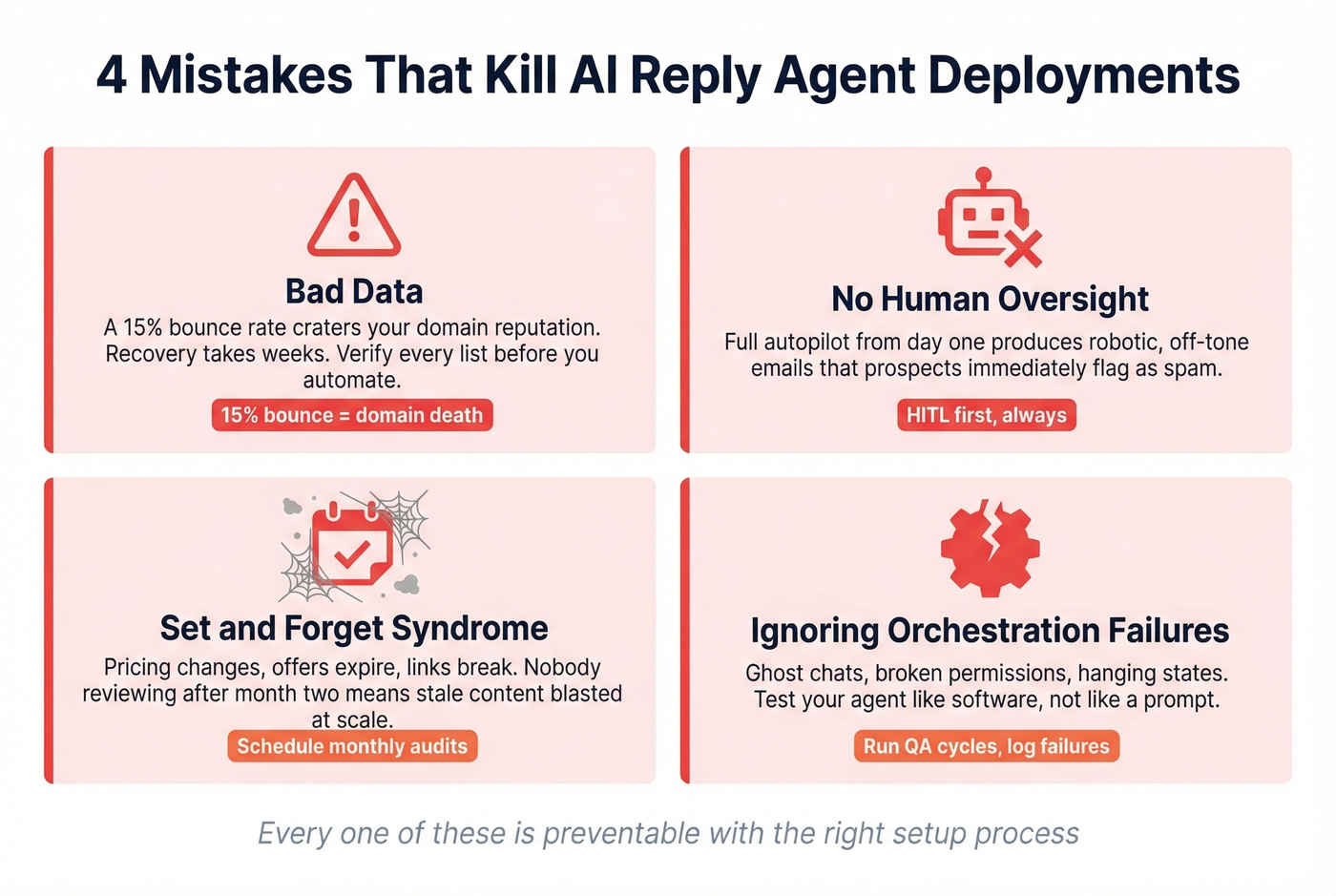
No human oversight early on. Full autopilot from day one produces robotic, off-tone emails that prospects immediately flag as spam. The consensus on r/sales is clear: HITL first, autopilot later. Always.
"Set and forget" syndrome. Pricing changes, offers expire, links break. If nobody's reviewing what the agent sends after month two, you're blasting stale content at scale. Calendar a monthly audit.
Ignoring orchestration failures. Real-world bugs aren't just hallucinations - they're ghost chats that persist after deletion, permissions that don't revoke properly, and loading states that hang forever. Test your agent like software, not like a prompt. Run QA cycles, log failures, and build fallback paths for when the LLM returns garbage.
FAQ
Can AI reply agents send emails without approval?
Yes. Most tools offer both HITL and full autopilot modes. Start with HITL for at least 50-100 replies to calibrate tone and catch errors before switching to autonomous sending.
How much does an AI reply agent cost?
Inbox assistants start at $21/user/mo. Sales tools like Instantly land around $180-$280+/mo once you stack modules. Full AI SDRs like Jason AI start at $500/mo. DIY setups with n8n and OpenAI run under $50/mo.
Do I need to verify contacts before deploying?
Absolutely. Bounced emails waste credits, damage sender reputation, and can get your domain blacklisted. Prospeo's 98% email accuracy and 7-day refresh cycle make pre-deployment verification fast - the free tier covers 75 emails to test your workflow.
How is a cold email reply agent different from a support agent?
A cold email agent prioritizes deliverability, sender reputation, and meeting-booking workflows. A support agent prioritizes ticket resolution and CSAT. The underlying LLM tech is similar, but integrations, warmup requirements, and risk profiles are completely different. Don't try to use one for the other.