

AI Reply Automation: What It Is, How It Works, and How to Get It Right
You're fielding 100+ customer emails a day. You tried the AI features in Front and Superhuman. The replies still sound like a committee of robots wrote them. Meanwhile, your team's spending 8 hours and 42 minutes a week just writing emails - and that's before anyone touches a support ticket or follows up on an outbound sequence.
Here's the thing most people get wrong: AI reply automation isn't a product. It's a workflow. Stop looking for one tool that does everything. Let's walk through how to actually set it up so it works.
What You Need (Quick Version)
This kind of automated reply workflow spans email, support tickets, and social messaging. Start with human-in-the-loop mode, not autopilot. Ground your AI in a knowledge base. And verify your contact data first - automating replies to bounced addresses scales failure, not efficiency.
Quick picks by use case:
- Sales outreach: Instantly (AI SDR Software: AI Reply Agent with HITL/autopilot toggle)
- Customer support: Zendesk or Intercom (KB-grounded, escalation routing)
- DIY workflows: Zapier (connect any trigger to any AI model)
- Data quality layer: Prospeo (98% email verification before anything sends)
What Is AI Reply Automation?
AI reply automation uses LLMs and NLP to read incoming messages, classify intent and sentiment, and draft contextual replies across email, support tickets, social DMs, and messaging apps. It's not the static autoresponder that fires "We received your message!" to every inbound. It's a system that understands what someone's asking, pulls relevant context from your knowledge base or CRM, and writes a reply that actually addresses the question.
The channel taxonomy matters. AI-driven sales reply workflows - handling objections, booking meetings, moving deals forward - are fundamentally different from support automation that resolves tickets or social reply automation that responds to DMs at scale. The tools differ. The risks differ. The governance model differs.
The Business Case
The numbers make the case fast. Teams using AI-powered email response tools report a 40% reduction in time spent managing email and roughly 30% higher response rates. On the support side, AI-handled conversations cost about $0.50 per interaction versus $6.00 for a human agent - a 12x difference that compounds at scale.
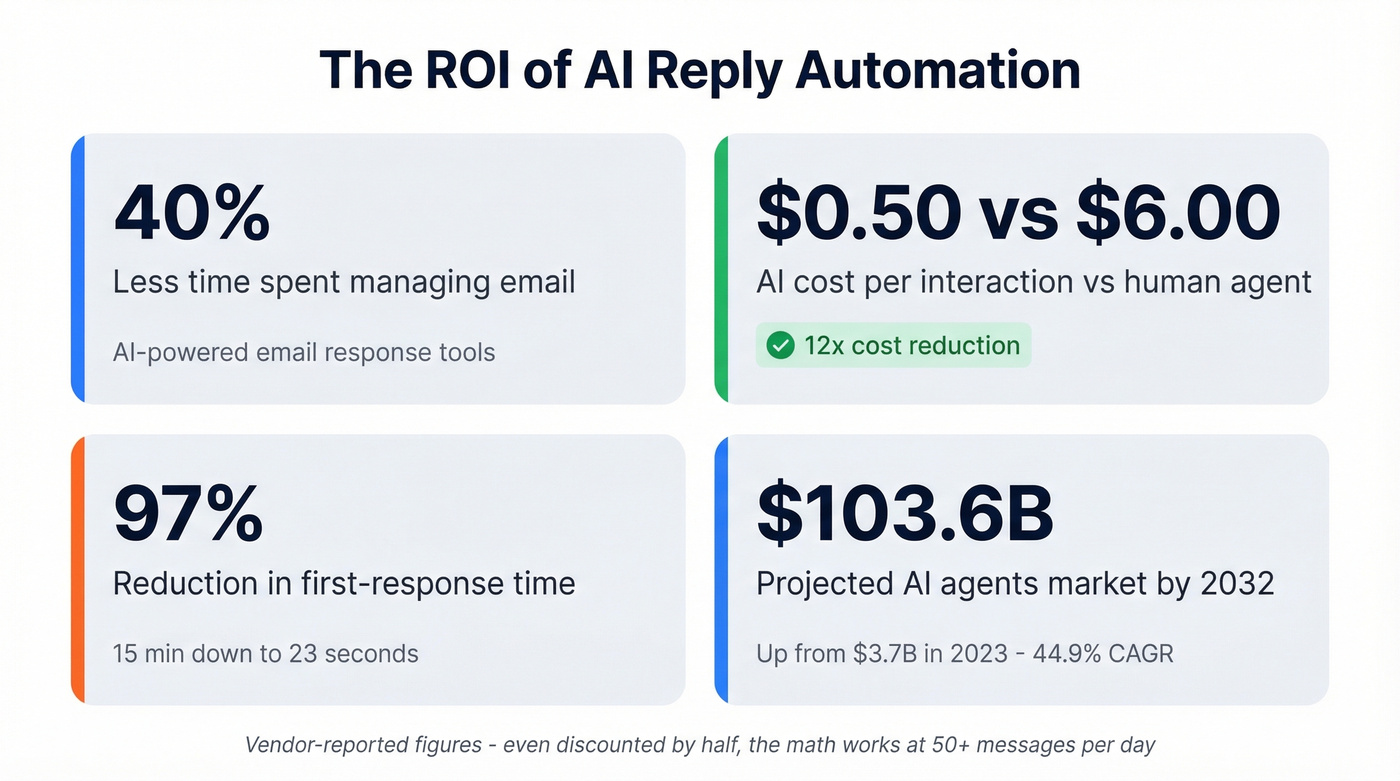
Superhuman's data shows users send 59% more business emails per hour and respond 12 hours faster on average. One case study documented first-response time dropping from 15 minutes to 23 seconds - a 97% reduction. The AI agents market reflects this momentum: $3.7 billion in 2023, projected to hit $103.6 billion by 2032 at a 44.9% CAGR.
These are vendor-reported numbers. But even if you discount them by half, the ROI math still works for any team handling more than 50 messages a day.

Stop paying for bounced emails. Prospeo verifies every contact with 98% accuracy, refreshed every 7 days.
Start free and only pay for verified contacts
How the Workflow Operates
The core workflow follows five steps, regardless of which tool you use:
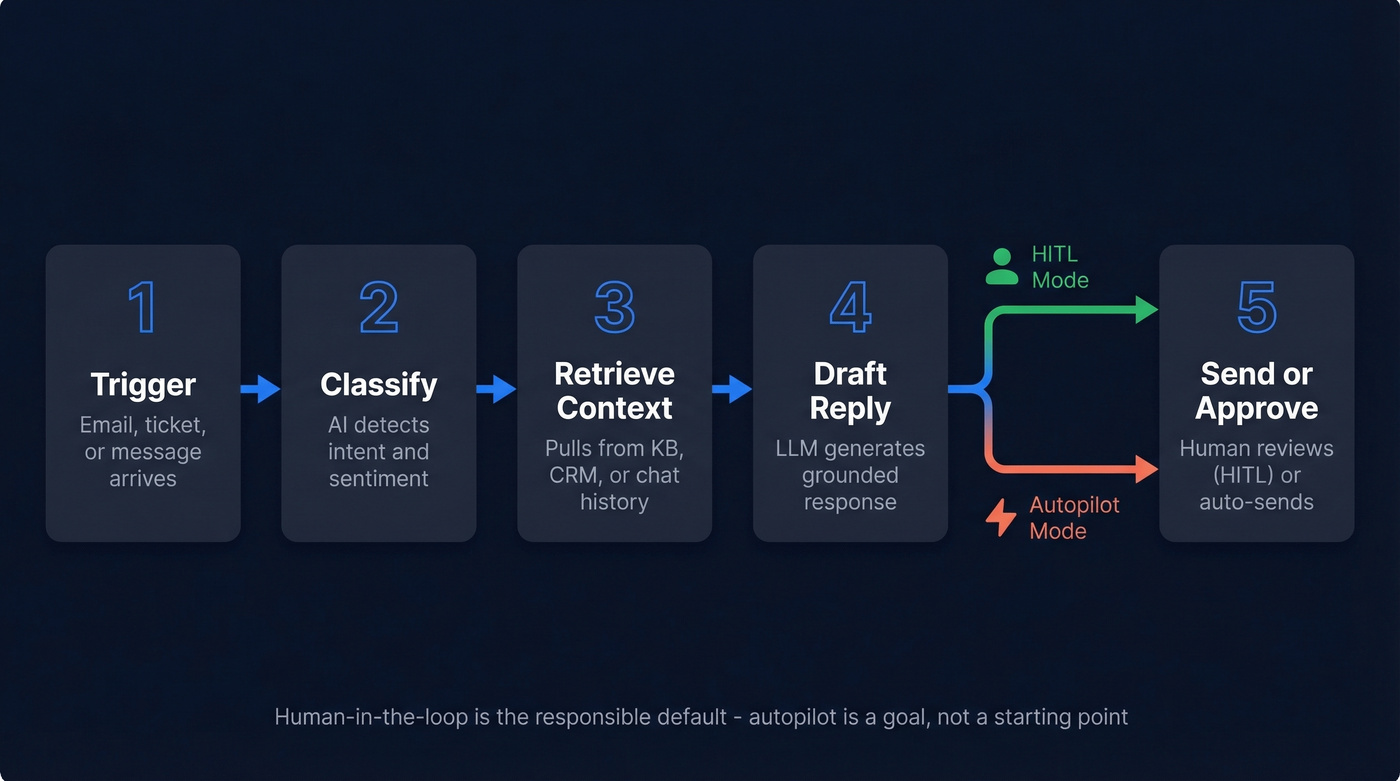
- Trigger - An incoming email, ticket, or message arrives.
- Classify - The AI identifies intent (question, complaint, booking request, objection) and sentiment (frustrated, neutral, interested).
- Retrieve context - The system pulls relevant information from your knowledge base, CRM, or previous conversation history.
- Draft reply - The LLM generates a response grounded in that context, calibrated to your brand voice.
- Send or approve - Either a human reviews and edits the draft (HITL), or the system sends automatically (autopilot).
Instantly's AI Reply Agent is a concrete example. It reads incoming emails, handles objections, shares calendar links, and updates lead/CRM status - all within under 5 minutes, 24/7. Each generated reply costs 5 Instantly Credits, whether you send it or not. You choose between HITL (review every draft) and Autopilot (fully automated). That credit model means you're paying per generated reply, not just a flat monthly fee - a meaningful distinction for teams running high-volume outbound.
Human-in-the-loop isn't a weakness. It's the only responsible default. Autopilot is a goal, not a starting point.
Best Practices and Mistakes to Avoid
Calibrate brand voice early. Involve marketing when setting up tone parameters. A support reply and a sales follow-up shouldn't sound the same, and neither should sound like ChatGPT's default voice.
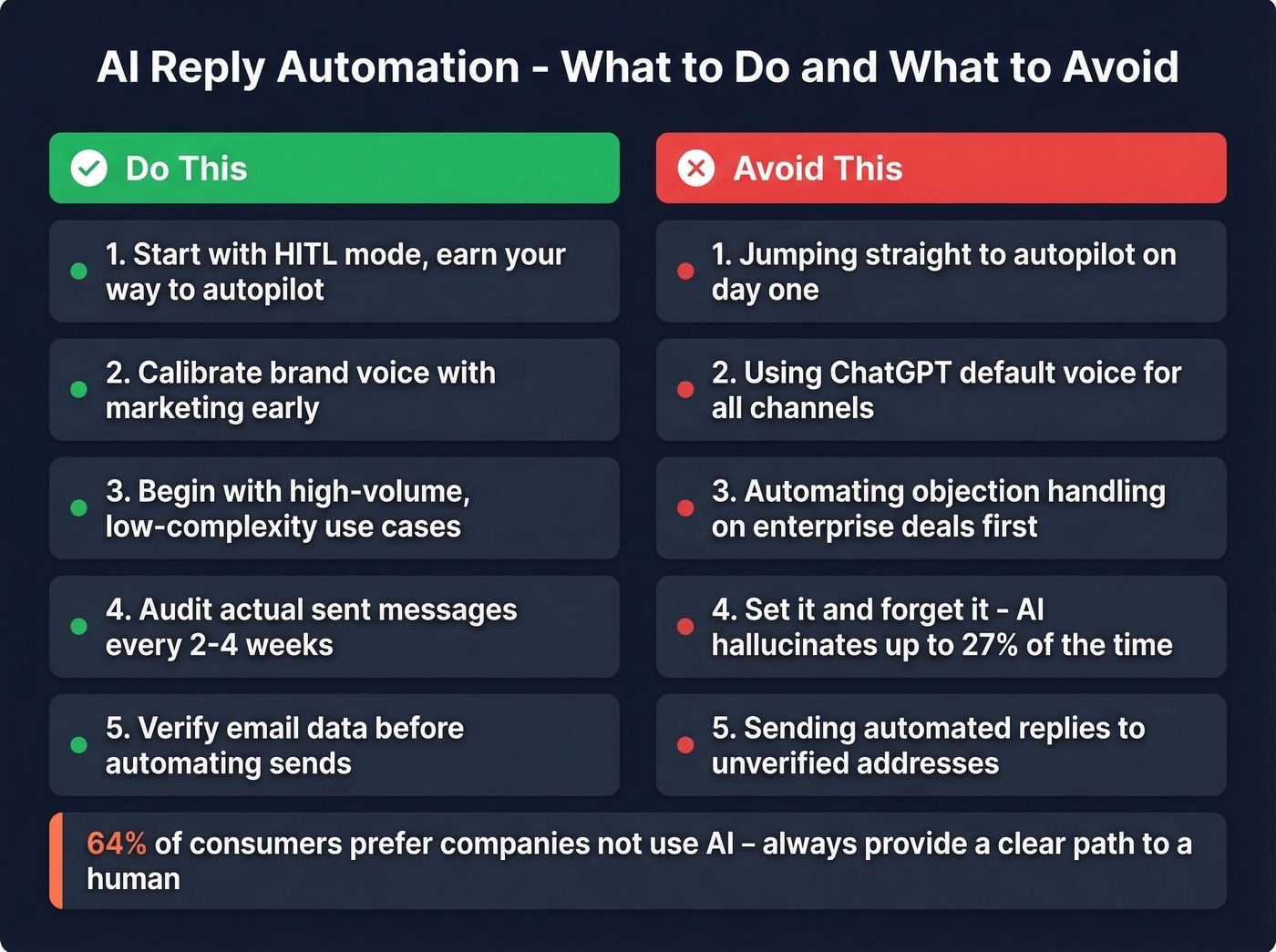
Don't skip the exit rows. 64% of consumers prefer companies not use AI, and 53% would consider switching over it. Always provide a clear, easy path to a human. Doom loops - where a customer can't escape the bot - destroy trust faster than slow response times ever did.
Start with high-volume, low-complexity use cases. Shipping updates, meeting confirmations, FAQ responses. Don't start by automating objection handling on enterprise deals. We've seen teams jump straight to automating replies on $50K+ opportunities and the results were predictably bad - one hallucinated discount nearly cost a deal. (If you need a system for this, start with objection handling techniques.)
Don't set and forget. Review automated reply performance every 2-4 weeks. Audit the actual messages being sent. AI can hallucinate up to 27% of the time, and a wrong answer sent confidently is worse than a slow correct one.
Maintain a single source of truth. Your AI's knowledge base needs to be current, complete, and authoritative. Garbage in, garbage out applies doubly when the AI is generating customer-facing text.
Respect the 15-minute welcome window. For triggered replies like welcome emails and opt-in confirmations, subscriber engagement peaks in the first 15 minutes. Delay kills conversion. (Related: drip campaign templates.)
Comply. GDPR, CAN-SPAM, and CCPA all have implications for automated messaging. Disclose where required. Maintain consent records. Build audit trails. (Use a checklist like B2B compliance.)

Don't ignore data quality. This is the mistake most tools won't warn you about. Your SDR team launches automated follow-ups to 5,000 leads. Three days later, 800 bounce. The AI worked perfectly - the data was garbage. Run your list through a verification tool first. Prospeo's 5-step verification catches catch-all domains, spam traps, and stale addresses with 98% accuracy, and refreshes all records every 7 days so your automated replies actually reach real people. (If you’re troubleshooting bounces, see check bounce and email reputation check.)
Top Tools for Automated Reply Workflows
| Tool | Best For | Starting Price | Key Feature |
|---|---|---|---|
| Prospeo | Data quality layer | Free; ~$0.01/email | 98% email verification, 7-day refresh |
| Instantly | Sales outreach | $37/mo | AI Reply Agent (HITL + Autopilot) |
| Reply.io | Enterprise sales | $49/user/mo (annual) | Jason AI SDR agent |
| Zapier | DIY workflows | Free tier available | Connect any trigger to any AI |
| AutoResponder.ai | Messaging apps | Free (with paid upgrades) | 15+ platforms (WhatsApp, Telegram) |
| Zendesk / Intercom | Customer support | ~$50-150+/agent/mo | KB-grounded ticket resolution |
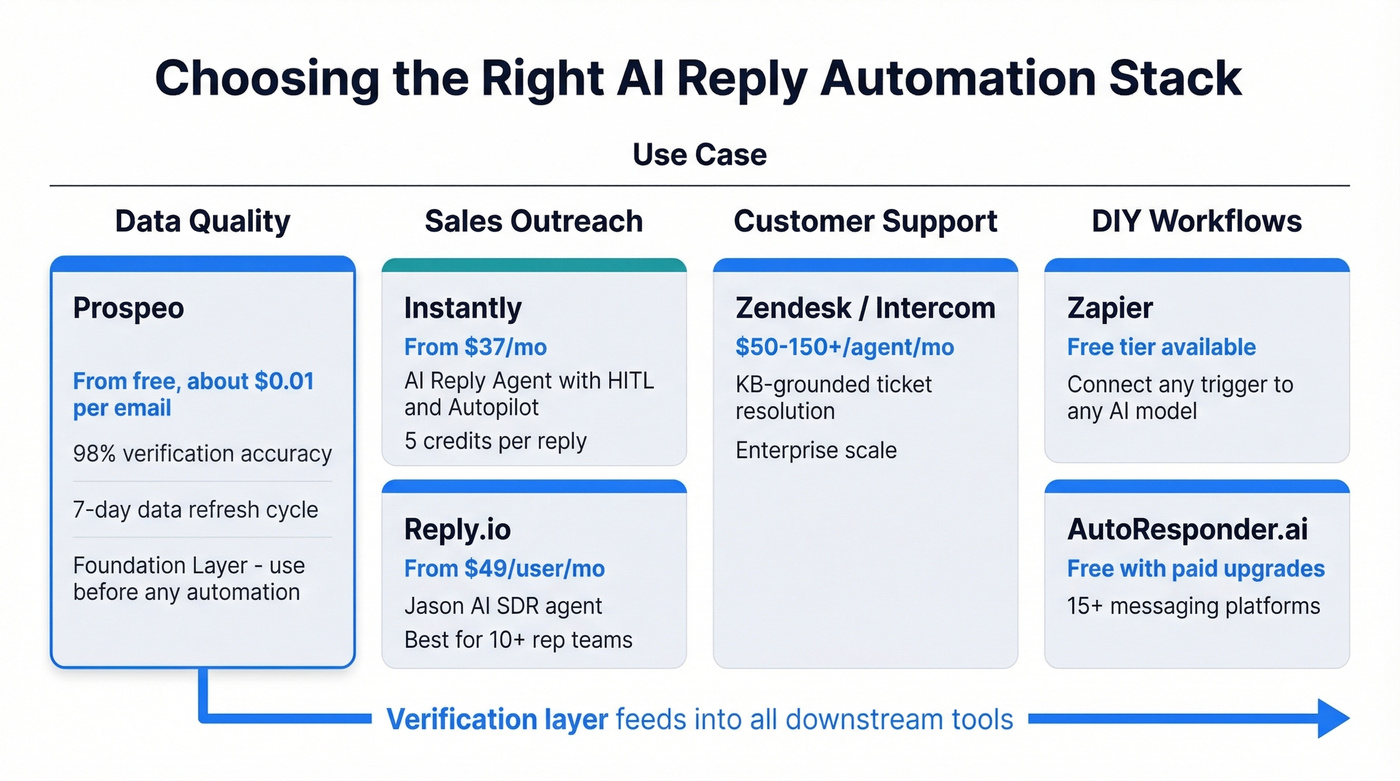
Prospeo isn't a reply tool - it's the verification layer that makes reply tools work. Automating responses to invalid addresses doesn't just waste credits; it damages your sender reputation. The 5-step verification process covers 143M+ verified emails, flags catch-all domains and spam traps, and refreshes all records on a 7-day cycle compared to the 6-week industry average. The free tier gives you 75 email verifications per month to test, and for teams running outbound at scale, it plugs directly into Instantly, Lemlist, and Smartlead via native integrations. Stack Optimize has maintained 94%+ deliverability and under 3% bounce rates across all client domains using this as their data foundation. (If you’re comparing options, start with email verifier and best verified contact databases.)
Instantly is the standout for AI reply automation in sales. The AI Reply Agent reads inbound replies, handles objections, books meetings via Calendly, and updates lead status - all within minutes. Plans start at $37/mo (Growth), scaling to $97/mo (Hypergrowth) and $358/mo (Light Speed) with deliverability infrastructure like SISR (Server & IP Sharding & Rotation). The 5-credit-per-reply model keeps costs predictable. (For the broader stack, see outbound email automation.)
Reply.io targets enterprise sales teams with Jason AI, an SDR agent that handles multi-channel sequences. Email Outreach pricing starts at $49 per user/month billed annually, and Jason AI starts at $500/month. Skip this if you're a small team - the price-to-value ratio doesn't make sense below about 10 reps.
Zapier is the Swiss Army knife. Connect Gmail or Outlook to OpenAI, add a CRM lookup step, and you've got a custom automated reply workflow without writing code. AutoResponder.ai covers messaging platforms most tools ignore: WhatsApp, Telegram, Messenger, and more. Zendesk's autoreply optimization and Intercom's Fin agent both handle KB-grounded support automation at enterprise scale. (If you’re standardizing processes, consider CRM automation software.)
Your outbound is only as good as your data. With 300M+ profiles and verified emails at ~$0.01 each, Prospeo keeps your pipeline full.
Try it free - no credit card required
FAQ
Will AI replies sound human?
Modern tools calibrate tone using your knowledge base, historical conversations, and brand voice settings. Track your edit rate - if humans modify more than 30% of AI drafts before sending, your grounding data needs work. 90% of consumers still prefer dealing with a human, so every automated reply needs to clear a high bar. In our experience, the teams that get the best results spend their first two weeks exclusively in HITL mode, feeding corrections back into the system before they ever flip the autopilot switch.
Is automated reply sending safe for my domain?
It can be, with guardrails. The two risks are hallucination - chatbots get facts wrong up to 27% of the time - and deliverability damage from bounced messages. Start with HITL mode to catch errors. Meritt cut their bounce rate from 35% to under 4% by verifying addresses before they entered any automation, which is the kind of upstream fix that protects your domain long-term.
Can agencies run this for multiple clients?
Yes, and an agency model is emerging fast. The key challenge is maintaining distinct brand voices and knowledge bases per client while keeping deliverability high across all sending domains. Bulk verification with a 92% API match rate and Instantly's multi-account infrastructure make this operationally viable, but you'll need strict domain separation and per-client tone calibration from day one.
Should I start with autopilot or human-in-the-loop?
Always start with human-in-the-loop. Review AI-generated drafts for accuracy, tone, and hallucinations over several weeks. Measure your edit rate and error frequency. Graduate to autopilot only for message categories where the AI consistently produces replies you'd send unchanged - and keep HITL active for high-stakes conversations like deals above $25K.