

Automated Lead Re-Engagement: The 2026 Workflow Playbook
You can spend $15,000/year on sequencing tools and "AI personalization" and still get smoked if your dormant list is decayed and your routing's sloppy. Automated lead re-engagement works when you treat it like an ops system: hygiene gate, tight triggers, compliance, and stop rules. Do that, and you'll revive pipeline you'd otherwise throw away.
Most teams don't have a copy problem.
They've got a systems problem.
What you need (quick version)
- Define "inactive" per segment (default windows: 30/60/90 days of meaningful activity, not opens).
- Run a hygiene gate before any send (bounce <=2% ideal / <=5% max).
- Use a deliverability-safe cadence: 4-7 touches with 3-4 day spacing.
- Make triggers event-driven (pricing/proposal views, no-shows, reply gaps), not calendar-driven.
- Enforce hard stop rules everywhere: Reply, Meet, Unsub, Compl, Bounce, DNC.
- Centralize consent + suppression so email/SMS/calls don't drift across tools.
- Verify/refresh dormant contacts before sending (for example, run them through Prospeo).

Automated lead re-engagement (definition + what it's not)
Automated lead re-engagement is a set of triggers and sequences that reactivate dormant leads: people who were once reachable or interested, then went quiet. The goal isn't "more touches." It's finding the small percent who are still real, still relevant, and now in-market.
Here's what it's not:
Re-engagement vs nurturing
- Nurturing is ongoing education for leads that aren't ready yet.
- Re-engagement is a targeted attempt to restart a stalled conversation.
Re-engagement vs win-back
- Win-back is for churned customers or lost deals with a clear "we want you back" angle.
- Re-engagement is for leads that never fully converted (or went dark mid-funnel).
Also: open tracking's unreliable now. Apple Mail Privacy Protection (MPP) inflates opens and hides real intent, so "no opens in 60 days" is a weak trigger.
Do
- Use behavior triggers (pricing page, demo page, reply history, meeting no-show).
- Use short sequences with clear stop rules.
Don't
- Blast your entire "inactive" database.
- Use opens as your primary segmentation signal.
Why reactivation fails (the 3 failure modes)
Most failures fall into three buckets. Fix these and you'll beat 90% of teams "doing re-engagement."

Use this if you see the symptom -> here's the cause -> here's the fix
Symptom: bounce spikes, spam complaints, domain reputation drops
- Cause: You're re-mailing dead addresses. "Inactive" can mean spam folder, abandoned mailbox, or spam traps, and they look identical in your dashboard.
- Fix: Put a hygiene gate in front of every reactivation entry point. Suppress high-risk categories and enforce bounce thresholds.
Symptom: sequences run, but replies are low and meetings don't move
- Cause: Timing and ownership are wrong. Real talk: AI didn't fix it. Workflow ownership and timing mattered more. I've watched teams obsess over AI copy while their triggers fired two weeks late and nobody owned the handoff.
- Fix: Make triggers event-driven (minutes/hours/days, not "next Tuesday"), and assign a single owner for the system (usually RevOps).
Symptom: leads reply, but the system keeps spamming them anyway
- Cause: Routing's broken. Replies aren't pushing leads into an "Engaged" state, or your CRM and sequencer aren't sharing suppression flags.
- Fix: One state machine, one source of truth, and hard stop rules: reply, meeting booked, unsubscribe, complaint, bounce, do-not-contact.
Deliverability reality check (before you "wake up" a list)
Reactivation's often treated like a growth tactic. Deliverability folks treat it like remediation. That difference matters.
Word to the Wise nails the uncomfortable truth: abandoned addresses, spam-folder delivery, and spam traps can all look like "no engagement." If you "wake up" the wrong chunk of your list, you're not reactivating leads - you're training mailbox providers to distrust you.
The engagement problem (what you can measure vs what matters)
When you segment "inactive," you're mixing three different realities:
- Sender-measured engagement: opens/clicks in your ESP. Useful, but noisy (MPP, image blocking, link scanners).
- Mailbox-provider measured engagement: actions inside the inbox (replying, moving to primary, starring, "not spam," deleting without reading). You don't fully see this, but providers do.
- Unmeasurable engagement: someone reads, thinks "later," bookmarks, forwards, or discusses internally without clicking anything.
That's why "no opens" never equals "no interest." It often equals "you can't see what happened."
Risk checklist before you send
- Last 30 days bounce rate is <=2% ideal / <=5% max
- You suppress: invalid, spam trap, abuse, disposable, do-not-mail, unsubscribes, complaints
- Unsubscribe works and is honored fast
- You're not using opens as the only "inactive" signal
- You're ramping volume (don't dump 50k dormant leads into a warmed domain overnight)
If you're not passing that checklist, don't "test anyway." That's how teams burn domains and then wonder why outbound "stopped working."

Re-engagement campaigns fail when 28% of your list is invalid. Prospeo's 5-step verification with spam-trap removal and honeypot filtering turns your dormant database into a safe-to-send segment. 98% email accuracy, 7-day refresh cycle, $0.01/email.
Stop burning domains. Run your dormant list through Prospeo first.
Clean your data first (the hygiene gate you must pass)
If you only take one thing from this playbook: reactivation starts with list hygiene, not copy.
A ZeroBounce analysis across 10B+ validations (shared via ActiveCampaign's cleaning playbook) found 28% of emails were invalid or high-risk. That's why reactivation campaigns blow up deliverability: you're waking up the most decayed slice of your database.
Hygiene gate checklist (non-negotiable)
- Bounce thresholds
- <=2% ideal, <=5% max. Above 5%: pause sends and clean.
- Suppress high-risk categories
- Invalid
- Spam trap
- Abuse
- Disposable
- Do-not-mail
- Unknown (treat as suppressed unless manually reviewed)
- Dedupe + normalize
- One person = one canonical record.
- Normalize company domains, remove role accounts (info@, sales@) unless you intentionally target them.
- Recency rules
- If a lead hasn't been refreshed in 90-180 days, assume decay.
- If the company changed domains or the person changed jobs, your old email's often wrong.
Mini SOP: "Dormant list -> safe-to-send segment" (45 minutes)
- Export your dormant cohort
Example filter: Last_Activity_Date <= Today-90 AND Lifecycle in (MQL, SQL, Opp Lost) AND Unsubscribed = false.

- Run verification + enrichment You want deterministic outcomes like: valid, invalid, catch-all, risky.
In our experience, this is where teams either save their domain or light it on fire. Prospeo ("The B2B data platform built for accuracy") is built for this exact moment: 98% verified email accuracy, a 7-day data refresh cycle, and GDPR compliance, plus spam-trap and honeypot filtering baked into verification. It also helps when you're doing more than cleanup and need to refresh records at scale: 300M+ professional profiles, 143M+ verified emails, and 125M+ verified mobile numbers.
- Write results back to your CRM Use explicit fields so automation can make deterministic decisions:
Email_Status:valid | invalid | catch_all | spamtrap | abuse | disposable | do_not_mail | unknownEmail_Status_Updated_At: timestampReengage_Eligible: boolean your workflow sets
- Build suppression lists
- Global suppression: unsubscribes, complaints, bounces, do-not-mail, spamtrap, abuse.
- Re-engagement suppression: "already in active pipeline," "in contract," "recently contacted," "open support ticket."
- Only then enroll into sequences
- Start with the cleanest slice (valid + recently refreshed).
- Ramp volume gradually.
One ugly scenario I've seen twice: a team reactivated "inactive 180-day leads" on a Friday, hit 6-7% bounces by Monday, and spent the next month arguing about subject lines while their inbox placement quietly cratered across every outbound motion.
Cadence benchmarks that actually work in 2026
Most teams either (a) send one "just checking in" email and quit, or (b) spam 12 touches and torch reputation. The middle path wins.
Instantly's Cold Email Benchmark Report 2026 (covering Jan-Dec 2025 activity) gives a solid baseline for cadence design:
- Average reply rate: 3.43%
- Top quartile: 5.5%+
- Top 10%: 10.7%+
- Reply distribution: 58% of replies come from step 1, 42% from follow-ups
- Cadence sweet spot: 4-7 touches
- Spacing: 3-4 day spacing
- Follow-ups that read like replies outperform by ~30%
Pick a cadence (and commit to it for 30 days)
| Cadence | Touches | Spacing | Reply band | Stop rules |
|---|---|---|---|---|
| Conservative | 4 | 4 days | 2-4% | Reply/Meet/Unsub |
| Standard | 5-6 | 3-4 days | 3-6% | +Bounce/+Compl |
| Aggressive | 7 | 3 days | 5-10% | +High risk |

Operational guidance (the part teams skip)
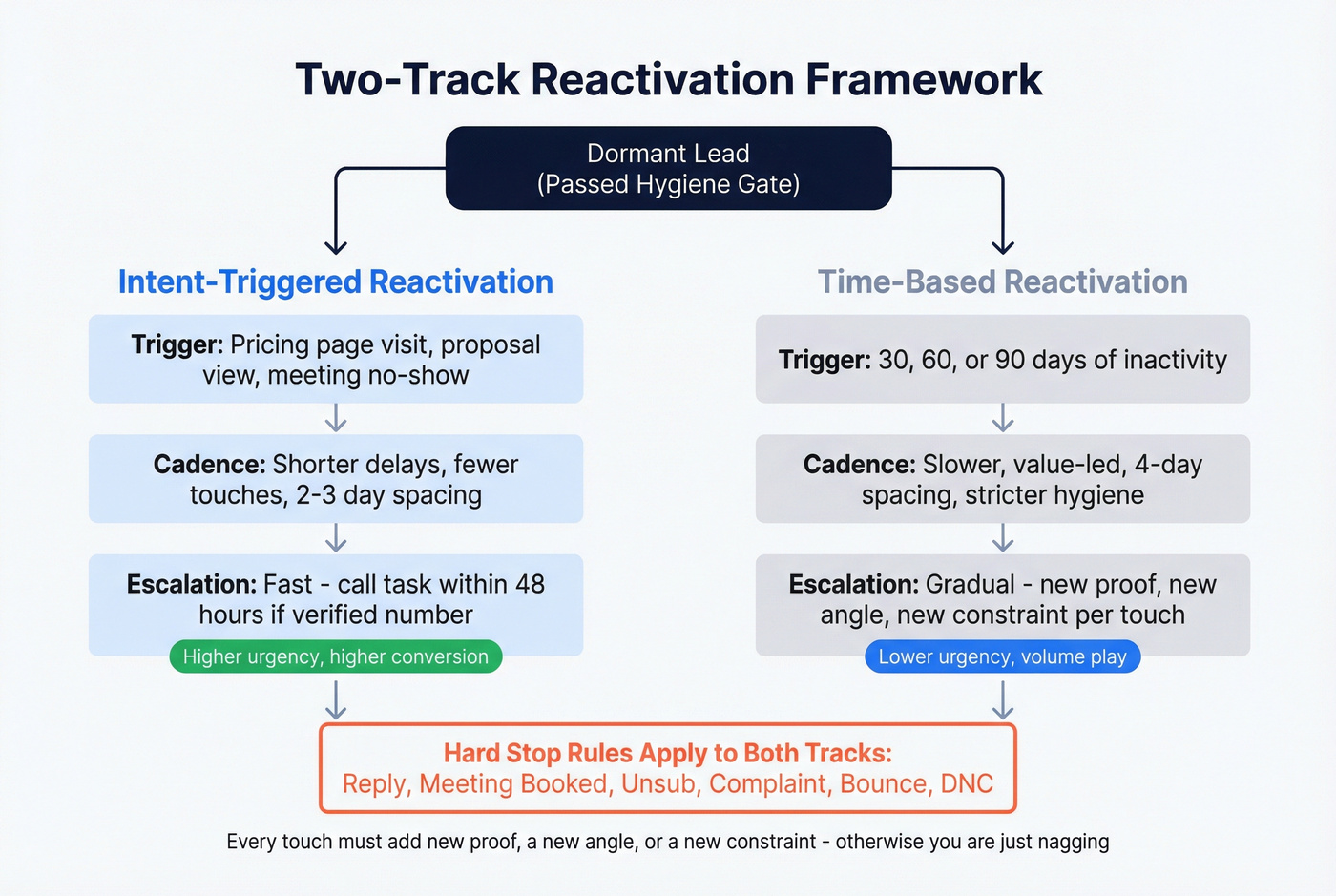
1) Split by intent, not by "inactive days."
Run two tracks:
- Intent-triggered reactivation (pricing/proposal/no-show): shorter delays, fewer touches, faster escalation.
- Time-based reactivation (30/60/90 inactivity): slower, value-led, stricter hygiene.
2) Front-load relevance, not "personalization." Step 1 should answer: why are you emailing me now? If you can't explain that in one line, your sequence is dead on arrival.
3) Use channel escalation like a scalpel.
- Email first for most B2B.
- Add a call task only for leads with verified numbers + consent.
- Add SMS only where you have explicit permission and a real reason to use it (no-show recovery's perfect).
4) Don't let follow-ups become nagging. Every touch must add one of these:
- New proof (case study, benchmark, teardown)
- New angle (different use case, stakeholder, or risk)
- New constraint (timing, budget structure, implementation path)
5) Hot take (and it's true): If your average deal's small, you don't need a "12-step omnichannel reactivation machine." You need clean data, a 5-touch sequence, and ruthless stop rules. Complexity is how small teams cosplay as enterprise and get nothing done.
Message rules (avoid "AI sameness" and get replies)
The fastest way to kill reactivation is sounding like every other AI-generated sequence. People can smell it.
Rules that hold up in 2026:
- Keep it <80 words, single CTA.
- Lead with context: "You looked at X," "we spoke in Y," "you requested Z."
- Ask for a binary response: "Worth revisiting?" / "Should I close the loop?"
- Use one personalization point that's actually relevant (role change, funding, tool stack, hiring).
- Don't over-explain. Re-engagement restarts a thread; it doesn't close a deal.
Micro-templates (copy/paste)
Template: close-the-loop
Subject: close the loop? Hey {{first}}, should I close the loop on {{topic}} for now, or is this worth revisiting this month? If timing's bad, tell me when to circle back.
Template: new angle
Subject: quick update {{first}} - last time we spoke, {{pain}} was the blocker. We've since added {{new_capability}} that fixes that. Want a 10-min walkthrough, or should I send a 2-min summary?
Template: value asset
Subject: thought of you You might like this: {{case_study_or_teardown}} (2 pages). If it's relevant, want me to tailor the same approach to {{company}}?
Opinion: "Should I close the loop?" is the highest-leverage line in reactivation. It lowers pressure, invites a simple response, and gives you a clean exit when the lead's truly dead.
Workflows you can copy/paste for automated lead re-engagement
These are the automations I'd actually put into production. They're written as text flow diagrams so you can map them into HubSpot, Marketo, Customer.io, Braze, or your sequencer + CRM.
Dormant lead reactivation (30/60/90-day track)
Trigger: No meaningful activity for 30 days (or 60/90 based on segment)
This mirrors the DDMA-style 30/60/90 inactivity trigger approach - just don't rely on opens as the signal.
Flow (trigger -> steps -> exit criteria)
- Trigger:
Last_Activity_Date = 30 days agoANDReengage_Eligible = true - Step 1 (Day 0): Email #1 (close-the-loop + one new angle)
- Delay: 3-4 days
- Step 2: Email #2 (value asset + "want me to send X?")
- Delay: 3-4 days
- Step 3: Email #3 (short question + permission)
- Delay: 3-4 days
- Step 4: Optional call task for SDR/AE (only if consent + phone verified)
- Exit criteria (stop rules):
- Reply (any)
- Meeting booked
- Unsubscribe/complaint
- Hard bounce
Risk_Status in (spamtrap, abuse, do_not_mail)
- Suppression logic:
- If
In_Active_Pipeline = true, don't enroll - If
Last_Touched < 14 days, don't enroll - If
Persona = student/consultant(or your non-ICP), suppress
- If
Routing rule:
- Reply -> set
Lead_State = Engaged-> create task for owner -> remove from all sequences.
Default windows (practical):
- SMB-ish cycles: 30/60/90 works well.
- Longer cycles: shift to 60/90/120 so you're not nagging.
No-show recovery (6-month long-tail track)
No-shows often come back 2-3 months later if you stay friendly and consistent.
Trigger: meeting marked "No-show" OR call outcome "No answer" after confirmed booking
Flow
- Trigger:
Meeting_Status = No-show - Step 1 (Immediate): "All good - want to reschedule?" (1 link, 1 CTA)
- Delay: 2-3 days
- Step 2: Gentle follow-up + one sentence of context ("Usually teams come to us when...")
- Delay: 1 week
- Step 3: Send a relevant case study or teardown (no pitch deck)
- Delay: 2 weeks
- Step 4: "Should I close the loop?" message
- Delay: 1 month
- Step 5: New angle (product update, new proof point, new relevant insight)
- Delay: 3 months
- Step 6: "Still a priority for Q__?"
- Delay: 6 months
- Step 7: Final check-in + preference center ("tell me when / or opt out")
Tone rules
- Casual, friendly, zero guilt.
- Assume life happened.
- Keep every email under 80 words.
Exit criteria
- Reply, meeting booked, unsubscribe, complaint, bounce.
Quote/pricing-page abandonment (event-triggered)
This is the highest-intent re-engagement trigger most teams underuse because it requires clean event plumbing.
Trigger: pricing page view OR quote generated OR proposal viewed, then no next step
Flow
- Trigger:
Pricing_Page_View = trueANDNo meeting booked within 24h - Step 1 (Delay 2 hours): Email: "Want the 2-min version?" + one question
- Delay: 2 days
- Step 2: Email: objection handler ("If pricing was the blocker, here's how teams usually structure it...")
- Delay: 4 days
- Step 3: Call task (if consent + phone verified)
- Delay: 7 days
- Step 4: Breakup email ("close the loop?")
Exit criteria
- Meeting booked, reply, unsubscribe, complaint, bounce.
Hot take: this workflow beats generic "30-day re-engagement" because it's tied to real intent. I've seen "dead" deals revive from a single pricing-triggered message that landed the same day.
Inbound ghosting (lead replied once then disappeared)
Your follow-up should read like a reply in an existing thread.
Trigger: lead replied once, then no response after your last message
Flow
- Trigger:
Lead_Replied = trueANDNo reply in 7 days - Step 1 (Day 7): Reply-style follow-up (1-2 lines)
- "Makes sense. If it helps, I can send a quick example for {{use_case}}."
- Delay: 7 days
- Step 2: Reply-style follow-up + binary choice
- "Should I (a) send details, or (b) close this out for now?"
- Delay: 14 days
- Step 3: Value asset + permission
- Exit criteria: reply/meeting/unsub/bounce/complaint
Braze-style 30/45/60/75 inactivity pattern (portable to B2B)
Even if you're not a consumer app, this pattern's gold because it forces you to change the offer and channel as inactivity deepens:
- Day 30: Email: "What's new since you last looked" + 1 update + 1 CTA
- Day 45: Push notification (or in B2B: SMS only with consent / or a rep task): personalized recommendation
- Day 60: Incentive A/B test (discount vs credits vs extended trial; in B2B, "free audit" vs "implementation plan")
- Day 75: Final reminder with urgency + preference center ("tell me when" / "opt out")
Port it to B2B by swapping push -> task + call (or consented SMS) and swapping incentives -> time-saving assets (teardown, benchmark, ROI model).
Workflow architecture (how to build it so it doesn't break)
Here's the thing: most programs fail because they're built as a pile of automations, not a system.
The architecture that holds up
Single pipeline + state machine
- States like:
New -> Engaged -> Nurture -> Re-engage -> Suppress - Every workflow checks state before acting.
- Every reply routes back into the same state machine immediately.
Event-driven delays
- Use delays like "2 hours after pricing view" or "3 days after last touch," not "send next Tuesday at 9am."
- Timing beats AI. Moving from batch campaigns to event-driven delays lifts replies because messages arrive when intent's fresh.
Webhooks + centralized consent
- Webhooks trigger SMS or task creation when the state changes.
- Consent and opt-outs live in one place (CRM or a dedicated consent store), then sync outward.
Routing rules (minimum viable)
- Reply ->
Lead_State = Engaged+ stop all sequences - Meeting booked ->
Lead_State = Engaged+ stop all sequences - Unsubscribe/STOP ->
Lead_State = Suppress+ stop all sequences - Bounce/complaint ->
Lead_State = Suppress+ stop all sequences
If you can't draw your system on a whiteboard in 60 seconds, it's too complicated to survive production.
Integration pitfalls (the stuff that quietly ruins results)
Fix these once and your program stops "mysteriously" breaking:
- Duplicate enrollments: two tools enroll the same lead because they watch different fields. Solve with a single
Reengage_Enrollment_IDand "already enrolled" checks. - Reply detection gaps: replies land in shared inboxes or aliases and never hit the sequencer. Route all replies through one mailbox/inbox tool and sync the "replied" event back to CRM.
- Field mapping drift:
Unsubscribedin CRM !=Opted outin ESP !=DNCin dialer. Create one canonical suppression field and map everything to it. - Timezone mistakes: quiet hours enforced in one tool but not another. Store
Contact_Timezone(or infer from area code) and enforce at the orchestration layer. - Catch-all mishandling: catch-all domains treated as valid and blasted. Treat catch-all as "send only if recent + high intent."
- Ownership desync: lead owner changes in CRM but sequencer keeps the old sender. Sync owner changes as a trigger that updates sender/sequence assignment.
- No global suppression propagation: unsubscribes suppressed in marketing but not in sales sequences. Build a global suppression list and push it to every sending system daily.
Lead scoring for re-engagement (decay + half-life defaults)
Static lead scores are how you end up re-engaging the wrong people. Scoring has to decay.
The clean operational model is a half-life:
Half-life formula (simple and usable)
Let S0 be the score at last activity. Let t be weeks since last activity. Let h be the half-life in weeks.
Score(t) = S0 * (1/2)^(t/h)
If you set h = 6 weeks, a lead becomes half as "hot" every six weeks without new activity. That's a great default for many B2B cycles because it forces old intent to fade naturally.
Operational defaults I use:
- Faster cycles: half-life 4-6 weeks, re-engage window 30-45 days
- Longer cycles: half-life 8-12 weeks, re-engage window 60-90 days
Example table (S0 = 100, half-life = 6 weeks)
| Weeks inactive | Decayed score |
|---|---|
| 0 | 100 |
| 6 | 50 |
| 12 | 25 |
| 18 | 12.5 |
HubSpot ops callout for 2026: HubSpot's scoring migration already happened. If your reactivation logic still depends on legacy score properties, it's fragile. Move scoring into the current scoring framework (or compute decay in your warehouse) and write back a single Reengage_Score your automations can trust.
Skip this if you're a tiny team with no scoring today: just route re-engagement by (1) verified email status, (2) ICP fit, and (3) high-intent events like pricing/proposal views. You'll get 80% of the benefit without building a science project.
Compliance checklist by channel (email vs SMS vs calls)
Automation multiplies risk. One bad list + one misconfigured workflow can create thousands of violations before anyone notices.
Hard numbers to respect:
- TCPA: $500-$1,500 per violation
- CAN-SPAM: civil penalties can reach $53,088 per email
- GDPR: EUR 20M or 4% of global revenue
- Quiet hours: 8am-9pm local time
- SMS governance: carriers filter 30%+ of unverified SMS traffic (deliverability, not just legal)
If you handle US consumer data at scale, align with CCPA/CPRA access/deletion requests, especially if you enrich contact data and store additional identifiers.
The compliance system (what to implement, not just "be compliant")
1) Central consent store (single source of truth) Pick one system to be canonical (CRM, CDP, or a dedicated consent service) and store:
Email_Marketing_Opt_Out(true/false + timestamp + source)SMS_Marketing_Consent(true/false + method + timestamp + proof)Call_DNC(true/false + timestamp)Consent_Source(web form, inbound chat, event, written agreement)Jurisdiction(country/state when known)
Then sync outward to every sending tool. The rule's simple: tools can read consent, but only the canonical store can write it (except for capturing new opt-outs, which must sync back immediately).
2) Audit trail (you need receipts) For every opt-in/opt-out event, log:
- Who/what changed it (user, API, webhook)
- When it changed
- The payload (form ID, page URL, keyword "STOP," etc.)
- The contact identifier used (email/phone)
This is how you survive a complaint without scrambling, and it's also why "we'll fix it later" is a terrible plan once automation's live.
3) Suppression propagation (daily + real-time)
- Real-time: unsubscribes/STOP/complaints must stop sequences instantly.
- Daily: push a global suppression list to every sequencer/dialer/ESP once per day to catch drift.
4) Quiet hours enforcement (or you'll mess it up) Enforce quiet hours at the orchestration layer:
- Store
Contact_Timezone(or infer) - Block sends/calls outside 8am-9pm local time
- Queue tasks for the next valid window
5) Channel-specific defaults you can enforce
Email (CAN-SPAM baseline)
- Truthful headers and subject lines
- Physical mailing address in footer
- Visible unsubscribe link
- Opt-outs processed within 10 business days
- Global suppression (not per-tool)
SMS (TCPA reality)
- Prior express written consent for marketing via automated systems
- Disclosure: automated marketing, "consent not required to purchase," frequency, "msg & data rates may apply"
- STOP works immediately; one opt-out revokes marketing consent across programs
- Enforce quiet hours 8am-9pm local time
- Keep message logs (content + timestamps) for auditability
Calls
- Track consent and DNC status centrally
- Respect quiet hours 8am-9pm local time
- Don't blast numbers you haven't validated; it's a compliance and reputation problem
- Log call outcomes so "no answer" doesn't trigger infinite retries
Opinion: compliance is an engineering problem, not a legal memo. If your system can't enforce it automatically, it won't happen consistently.
KPIs, testing, and "when to stop"
Programs die when teams measure the wrong thing. Opens are the classic trap, especially with MPP.
Measurement plan (track in this order)
- Deliverability layer
- Bounce rate (target <=2% ideal / <=5% max)
- Complaint rate
- Inbox placement (if available)
- Engagement layer
- Reply rate (not open rate)
- Positive reply rate / qualified reply rate
- Conversion layer
- Meetings booked rate
- Show rate (for no-show workflows)
- Revenue layer
- Pipeline created
- Pipeline influenced
- Time-to-revive (days from trigger to meeting)
Holdout testing (the only way to prove lift)
Keep 5-10% of eligible dormant leads as a holdout (no reactivation). Compare outcomes.
Simple example (use this exact math):
- Eligible dormant leads: 10,000
- Holdout: 1,000 -> 6 meetings -> $30k pipeline
- Re-engaged: 9,000 -> 90 meetings -> $540k pipeline
Normalize per 1,000 leads:
- Holdout: 6 meetings / $30k
- Re-engaged: 10 meetings / $60k
Lift:
- Meetings: (10 - 6) / 6 = +67%
- Pipeline: (60 - 30) / (30) = +100%
If lift's small, you're creating activity, not outcomes. Fix hygiene, triggers, and routing before you touch copy again.
"When to stop" checklist
- Stop after 4-7 touches unless each touch adds new value.
- Stop immediately on: reply, meeting booked, unsubscribe, complaint, bounce.
- Stop the whole program if bounce creeps above 5% or complaints spike. Fix hygiene and messaging before you continue.
Tool stack map (what you need, with realistic pricing ranges)
You don't need a monster stack. You need a stack that enforces hygiene, triggers fast, and routes cleanly.
| Category | Examples | Realistic price range (USD) |
|---|---|---|
| Sequencing | Instantly | starts around $37/mo |
| Sequencing | Smartlead | starts around $39/mo |
| Sequencing | Reply.io | starts around $59/user/mo |
| Sequencing | QuickMail | starts around $49/user/mo |
| Sequencing | Mailshake | starts around $29/user/mo |
| Sequencing | Woodpecker | starts around $29/user/mo |
| Sequencing | Saleshandy | starts around $36/user/mo |
| Prospecting/verification | Prospeo | free tier available; paid plans are credit-based |
| Prospecting/verification | Hunter | starts around $49/mo |
| Email verification | NeverBounce | ~$0.003-$0.008 per email (volume-based) |
| Email verification | ZeroBounce | ~$0.002-$0.008 per email (volume-based) |
| Automation | Zapier / Make | ~$20-$100/mo (plus usage) |
| Chat/conv. | Drift Premium | starts around $2,500/mo |
| CRM (SMB) | HubSpot Starter | ~$20-$30/seat/mo (plus platform fees) |
| CRM (mid-market) | HubSpot Pro | ~$90-$150/seat/mo (plus platform fees) |
| CRM (enterprise) | Salesforce Sales Cloud | ~$25-$330/seat/mo (edition-based) |
Recommendation: if you're early, pick one sequencer, one verifier, and one automation layer. The win comes from clean data + clean routing, not from buying five overlapping tools.
If you're building this in a CRM-first way, Monday's take on lead generation automation workflows is a clean mental model of triggers -> routing -> measurement: https://monday.com/blog/crm-and-sales/lead-generation-automation/
Ship this in 7 days (implementation checklist)
- Day 1: Define "meaningful activity" + inactive windows per segment (30/60/90 default).
- Day 2: Add fields:
Lead_State,Reengage_Eligible,Email_Status,Suppressed_Reason,Last_Touched. - Day 3: Build global suppression propagation (unsub/STOP/complaint/bounce/DNC) across every tool.
- Day 4: Implement hygiene gate + volume ramp rules (start with the cleanest 10-20%).
- Day 5: Launch two workflows: (1) pricing/proposal abandonment, (2) 30-day dormant reactivation.
- Day 6: Add reply detection + stop rules + owner routing (test with internal emails first).
- Day 7: Turn on holdout testing (5-10%) and set a weekly KPI review (deliverability -> replies -> meetings -> pipeline).
Job changes and abandoned mailboxes silently kill re-engagement. Prospeo enriches stale CRM records with 50+ fresh data points at a 92% match rate - including updated emails, titles, and verified mobile numbers across 300M+ profiles.
Refresh every contact before your next reactivation sequence fires.
FAQ
What's the best trigger window for automated lead re-engagement (30/60/90 days or buying-cycle based)?
Use buying-cycle logic, with 30/60/90 as the default: 30-45 days for faster cycles, 60-90 days for longer cycles. Prioritize behavioral triggers (pricing view, proposal view, no-show) because they beat time-only inactivity rules.
How many touches should an automated re-engagement sequence have in 2026?
Run 4-7 touches with 3-4 day spacing. Fewer than 4 quits too early; more than 7 creates diminishing returns unless every touch adds new proof, a new angle, or a new channel.
When should you suppress or delete dormant leads instead of re-engaging them?
Suppress immediately on hard bounce, unsubscribe/STOP, complaint, DNC, or high-risk verification status (spam trap, abuse, disposable, do-not-mail). Also suppress non-ICP leads and anyone already in an active sales cycle to avoid duplicate outreach.
How do you automate re-engagement without breaking TCPA/CAN-SPAM/GDPR rules?
Centralize consent and opt-outs, enforce quiet hours (8am-9pm local time) for calls/SMS, honor STOP immediately, and process email opt-outs within 10 business days. Then push suppression to every tool daily and stop sequences instantly on any opt-out or complaint.
What's the fastest way to verify and refresh a dormant lead list before sending?
Export the dormant cohort, run bulk verification/enrichment, write explicit status fields back to the CRM, suppress risky categories, and only then enroll. For most teams, that hygiene gate's the difference between automated lead re-engagement that prints meetings and a campaign that trashes deliverability.