Automated Lead Routing: A Data Problem Disguised as a Workflow Problem
Your lead routing logic is perfect. Leads hit the right rep in under two minutes. Then half the phone numbers are disconnected and a quarter of the emails bounce.
The problem was never the workflow - it was the data feeding it.
Automated lead routing only delivers results when the contact data behind it is accurate. 82% of buyers expect an immediate response to an inbound inquiry, and you can build the fastest routing engine on the planet, but if the contact data is wrong, speed just means you fail faster. We've watched teams spend weeks perfecting assignment rules only to discover their data was the bottleneck all along.
Quick version: (1) Fix your data quality before you touch routing rules - jump to the data quality section. (2) Pick a routing strategy that matches your team size, not the fanciest one available. (3) Build fallback rules before you launch, not after leads start disappearing.
What Is Lead Routing Automation?
Automated lead routing replaces manual lead assignment with rule-based logic that instantly sends inbound leads to the right sales rep. Instead of a manager eyeballing a spreadsheet every morning, the system evaluates criteria - geography, product interest, account ownership, rep availability - and assigns in real time.
Manual assignment introduces hours of delay and human error. Automation eliminates both, which is why every team past about five reps needs it.
Why Speed-to-Lead Is Non-Negotiable
82% of consumers expect an "immediate" response to an inbound inquiry, and most define "immediate" as under ten minutes. Responding within five minutes makes you 100x more likely to get a response. Leads contacted in that window are 9x more likely to convert.
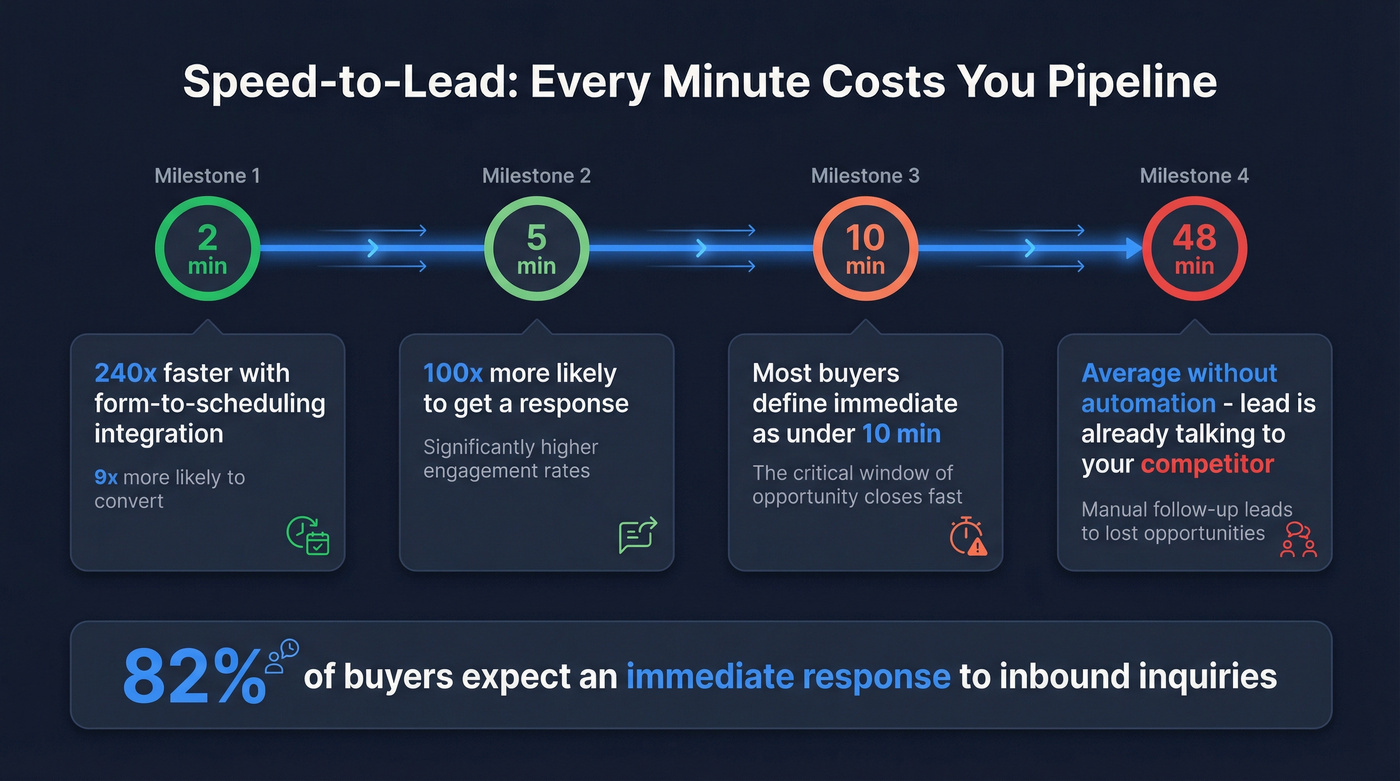
An analysis of 88,047 inbound leads and 19,493 qualified bookings found that integrating scheduling with website forms produced a 240x improvement in speed-to-lead - from 48 minutes down to 2 minutes. That's the difference between a booked meeting and a lead who's already talking to your competitor.
You can't hit a two-minute response time with manual assignment. Lead assignment automation isn't a nice-to-have. It's table stakes.
6 Lead Routing Strategies
| Strategy | Best For | Watch Out For |
|---|---|---|
| Round-robin | Small teams, equal workloads | Mis-matches expertise to lead type |
| Territory-based | Geo-focused sales orgs | Overloads high-volume regions |
| Account-based | ABM, enterprise sales | Lead-to-account matching complexity |
| Availability-aware | High-volume inbound | Requires calendar integration |
| Deal-value / threshold-based | Tiered sales teams | Needs accurate scoring upstream |
| Industry/vertical | Specialist sellers | Requires clean industry data on leads |
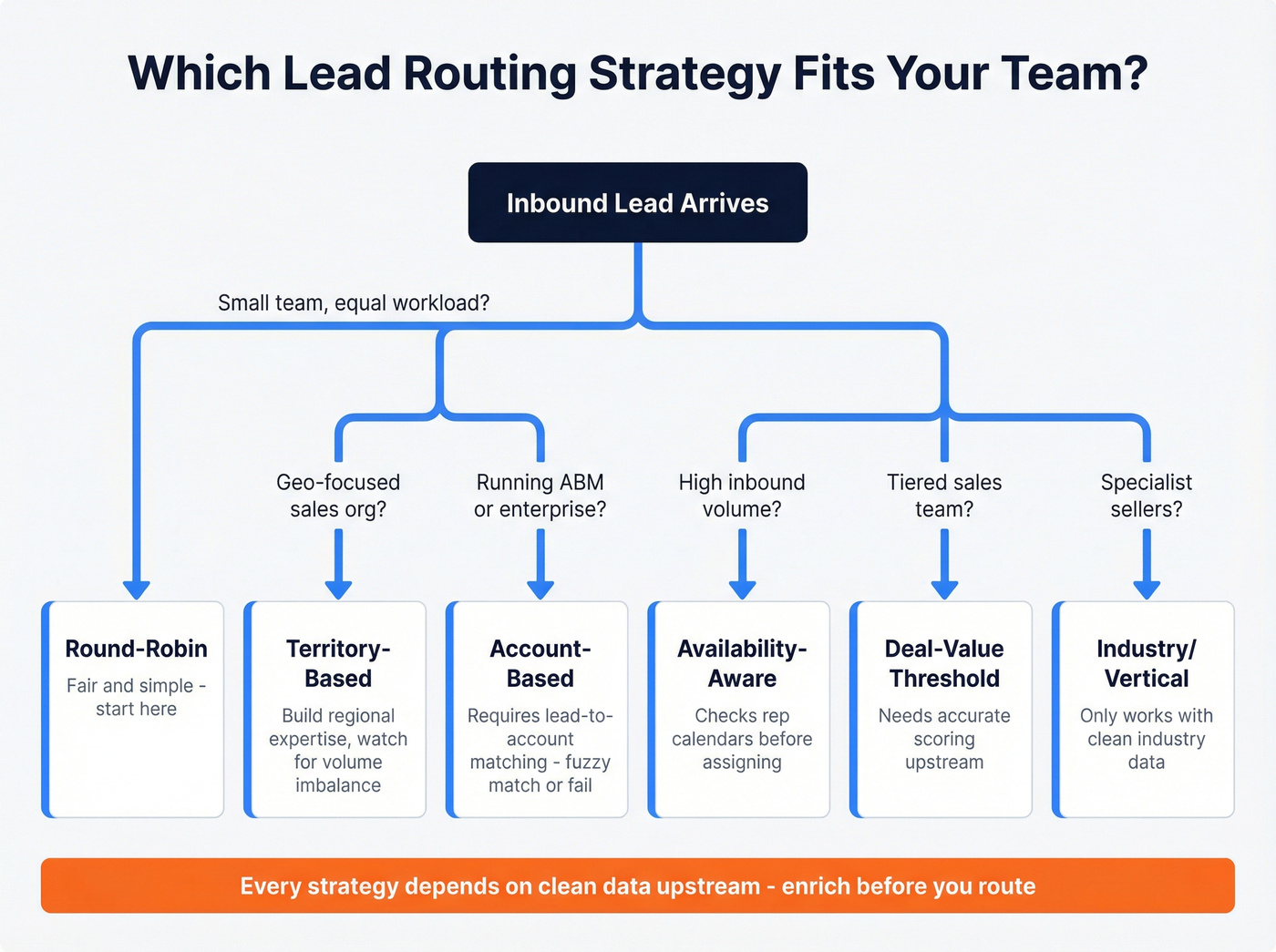
Round-robin is the default starting point - fair and simple. But your enterprise AE shouldn't get the same SMB leads as your junior SDR, so most teams outgrow it fast.
Territory-based routing builds regional expertise and local relevance. The risk is that "Northeast US" and "APAC" generate wildly different volumes, so you'll need rebalancing rules or you'll burn out your top-volume reps while others sit idle.
Account-based routing is essential for ABM motions but depends on lead-to-account matching. When a form says "Zoom Inc." and the CRM has "Zoom Video Communications," fuzzy matching either saves you or creates duplicates. We've seen this single issue cause more routing failures than any other.
Availability-aware routing checks rep calendars before assignment - no more MQLs sitting in a queue while someone's on PTO.
Threshold-based routing sends high-value leads to senior reps once a deal score or company size crosses a defined threshold. Only works if your scoring model is accurate.
Industry/vertical routing matches leads to reps with domain expertise. Powerful for complex sales, but it requires clean industry fields on every inbound record - and that's where most teams fall short.

Routing leads to the right rep in seconds means nothing when 40% of your contact data is wrong. Prospeo enriches every record with 50+ data points - verified emails at 98% accuracy, 125M+ direct dials, plus industry, company size, and geography fields your routing rules actually depend on. Enrich before you route.
Stop routing garbage data fast. Enrich first at $0.01 per email.
5 Mistakes That Kill Your Routing
1. Over-engineering the logic. You don't need 47 rules on day one. Normalize your core fields - Segment = SMB/MM/ENT, Region = NA/EMEA/APAC - and build from there.
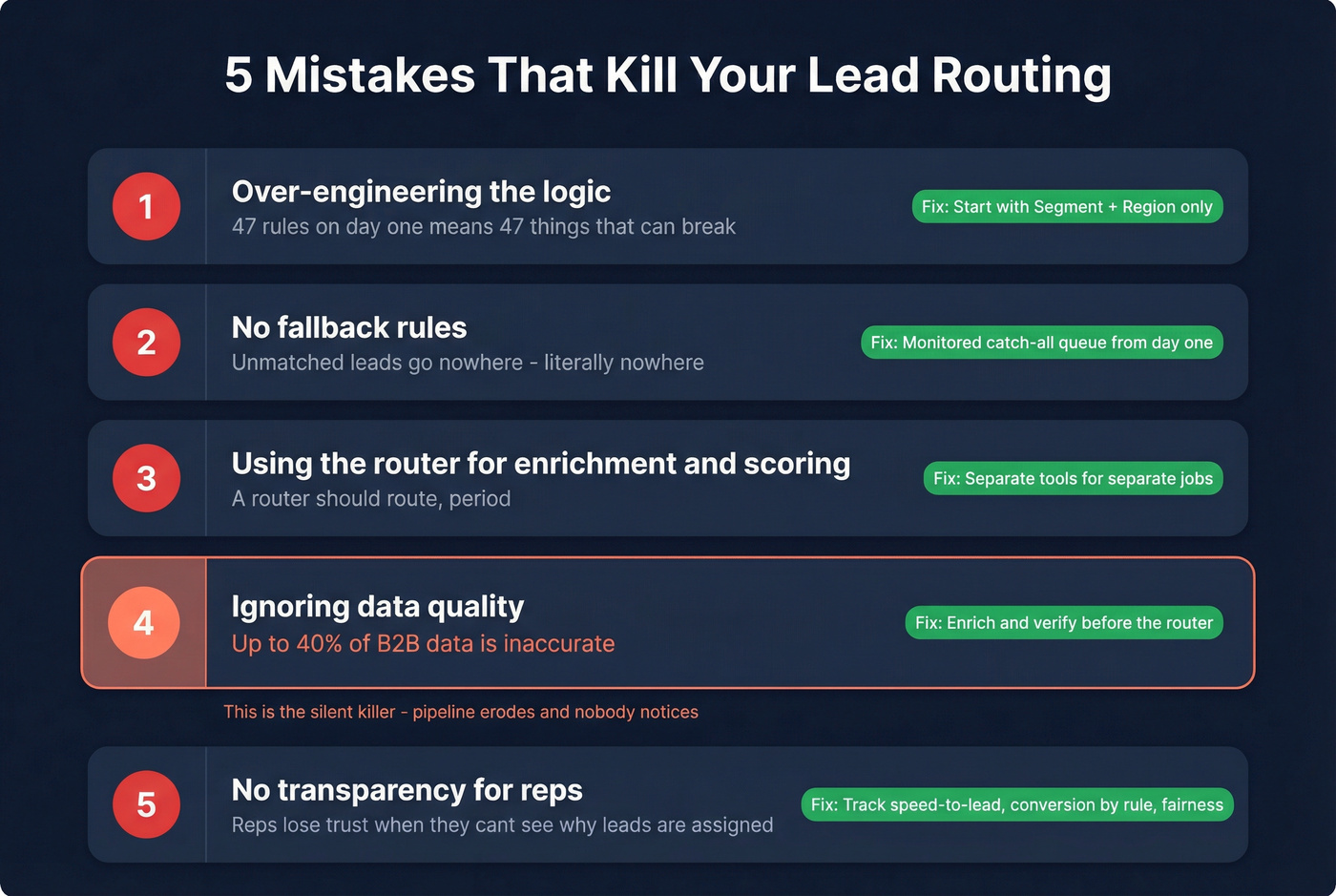
2. No fallback rules. If a lead doesn't match any rule, where does it go? Without a monitored catch-all queue, it goes nowhere. No fallback = lost pipeline.
3. Using the router for enrichment and scoring. A router should route. That's it. Don't ask your routing tool to also enrich contacts, score leads, or store data.
4. Ignoring data quality. Up to 40% of B2B data is inaccurate. Your routing "works," but reps can't actually reach anyone. This is the mistake that erodes pipeline without anyone noticing until it's too late.
5. No transparency for reps. Reps lose trust in routing when they can't see who's next and why. Track speed-to-lead, conversion rate by routing rule, and assignment fairness. Audit quarterly at minimum.
Data Quality - The Step Before Routing {#data-quality}
Here's the thing: your routing works. Leads get assigned in seconds. But reps complain half the phone numbers are disconnected and emails bounce at 15%. The routing logic isn't broken. The data is.

With up to 40% of B2B data being inaccurate, every routing system needs a data quality layer upstream. The smartest RevOps teams use waterfall enrichment - layering multiple data sources so no single provider's gaps become your gaps. Routing a lead to the right rep means nothing if the email bounces or the phone number connects to a fax machine.
In our experience, the fix is straightforward: enrich and verify contacts before they enter the routing engine. When criteria like industry, company size, and geography are populated correctly upstream, the logic just works. When they're not, you're routing garbage - fast. One team we worked with cut their email bounce rate from 35% to under 4% just by adding a verification step before records hit the router. Their routing rules didn't change at all.
Tools for Routing and Enrichment
| Tool | Best For | Starting Price | Notes |
|---|---|---|---|
| Chili Piper | Inbound meeting booking | $30/user/mo | Fast form-to-meeting flow |
| LeanData | Salesforce governance | ~$30K-$100K+/yr | Lead-to-account matching |
| Default | Workflow orchestration | ~$500+/mo (usage-based) | Routing + RevOps automation |
| Calendly Routing | Scheduling + routing | ~$16/user/mo (Teams) | Simple, calendar-native |
| HubSpot (native) | Simple workflows | $15-$150/seat/mo | Good enough for small teams |
| Salesforce (native) | Assignment rules/Flow | $25-$175/user/mo | Free with existing licenses |
For enrichment, you'll see teams using Clearbit or Apollo.io alongside their routing stack. Prospeo's 98% email accuracy and 7-day data refresh cycle deliver what routing needs most: email deliverability and freshness. Its 5-step verification process - catch-all handling, spam-trap removal, honeypot filtering - means reps actually reach the person they're assigned.
Some teams are also exploring AI-driven routing, using machine learning models to dynamically reassign leads based on rep performance and real-time intent signals. It's early, but the direction is clear.
The Governance Model That Works
Let's be honest: the tool you pick matters less than how you define each tool's role. We've seen expensive stacks fail because nobody decided who owns what.
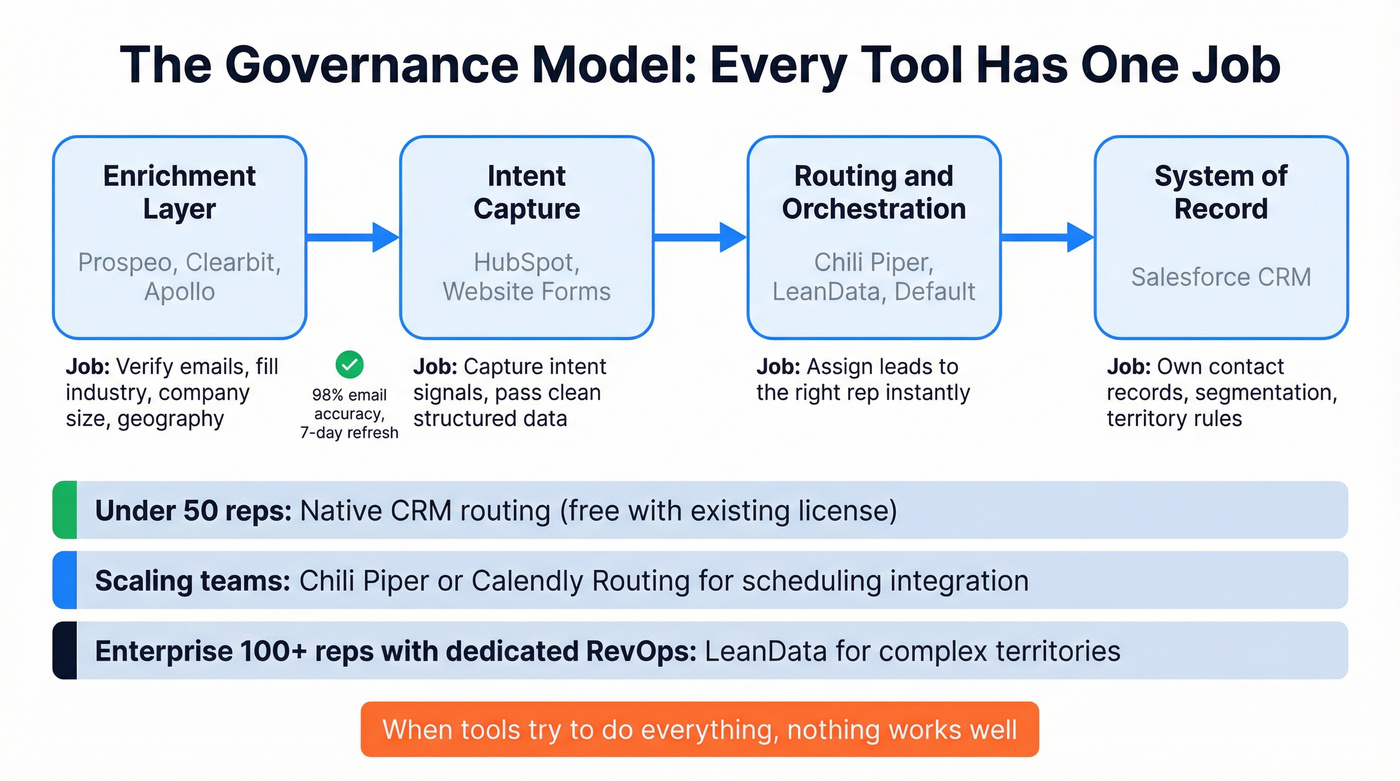
Salesforce should be your system of record for ownership and segmentation. HubSpot captures intent signals and passes clean, structured data. Your routing tool is the orchestration layer. Your enrichment tool sits upstream of all three. When tools try to do everything, nothing works well - and your RevOps team spends more time debugging than building.
By team size:
Teams under 50 reps with straightforward logic should start with native CRM routing - it's free with your existing Salesforce or HubSpot license. Scaling teams that need scheduling integrated with routing should look at Chili Piper or Calendly Routing. Salesforce-heavy orgs with complex territories, hierarchies, and strict ownership rules are where LeanData justifies its enterprise price tag. Skip LeanData if you're under 100 reps and don't have a dedicated RevOps person - you'll pay for complexity you won't use.
One team cut their bounce rate from 35% to under 4% by verifying contacts before the router. Prospeo's 7-day data refresh cycle means your reps never call a disconnected number or email a dead inbox - even weeks after the lead came in. 300M+ profiles, 5-step verification, zero routing waste.
Your routing rules don't need fixing. Your data does.
Best Practices Checklist
- Verify and enrich data before it enters routing. Bad data in, bad routing out - no exceptions. If you need a system for ongoing cleanup, start with CRM hygiene.
- Build fallback and catch-all rules from day one. Every unmatched lead should land in a monitored queue.
- Set a lead scoring threshold. Only route MQLs that meet a minimum qualification bar - threshold-based routing prevents unqualified leads from consuming rep time. (If you need a framework, use a lead scoring system.)
- Audit routing rules quarterly. Check for orphaned leads, response time drift, and conversion by rule.
- Track three metrics religiously: speed-to-lead, conversion rate by routing rule, and assignment fairness across reps.
- Document your routing logic. Any ops person should be able to audit it, not just the person who built it.
FAQ
What's the difference between lead routing and lead scoring?
Lead scoring ranks leads by fit and intent; lead routing assigns scored leads to the right rep. Scoring decides if a lead is worth pursuing, routing decides who pursues it. Most teams implement scoring first, then use score thresholds to trigger routing rules.
Can I use native CRM tools instead of dedicated routing software?
Yes - Salesforce assignment rules and HubSpot workflows handle simple routing for teams under ~50 reps. Once you need availability-aware assignment or lead-to-account matching at scale, a dedicated tool like Chili Piper or LeanData pays for itself in recovered pipeline.
How often should I audit my routing rules?
Quarterly at minimum. Any territory change, team restructure, or new product line should trigger an immediate audit - don't wait for the scheduled cycle. Track orphaned leads weekly as an early warning signal.
How does data quality affect automated lead routing?
Directly and severely. If 40% of your contact records have stale emails or wrong phone numbers, routing speed is irrelevant - reps can't reach anyone. Enrichment tools with high accuracy and frequent refresh cycles can cut bounce rates from 30%+ to under 5%, which is the difference between a routing system that generates pipeline and one that just generates activity reports.