

B2B Sales Workflow Automation: What to Automate, In What Order, and What Breaks If You Don't
You just watched your team send 2,000 emails from a "verified" list and 23% bounced on the first sequence. The domain's flagged, the SDR manager is furious, and the VP of Sales wants to know why you're paying for three tools that don't talk to each other. Meanwhile, reps still spend 40% of their time on manual admin - CRM updates, meeting prep, follow-up emails - instead of actually selling.
A founder on r/SalesOperations put it bluntly: even teams at successful SaaS companies with access to Salesforce Flow, Zapier, and n8n still lose nearly half their selling hours to busywork. The tools exist. The adoption doesn't.
Most sales automation guides are tool lists pretending to be strategy. Listing 15 platforms doesn't help you automate anything. What follows is the actual playbook: which workflows to automate first, in what order, and the specific mistakes that'll tank your ROI before you see any.
The Priority Stack (Quick Version)
If you're short on time, here's what matters:
- Fix your data first. 87% of organizations have low confidence in their data quality. Automation on bad data just scales mistakes faster. Verify before you automate anything.
- Start with three high-ROI workflows: speed-to-lead routing, post-meeting CRM hygiene, and high-intent lead nurture. Done right, sales automation typically recovers 6-12 hours per rep per week.
- You need 3-4 tools that talk to each other, not 10 that don't. A CRM, a data layer, a sequencer, and a glue tool. That's the whole stack for most teams.
One more thing worth knowing upfront: 30-50% of initial automation projects fail. Almost always because of bad data, poor process design, or zero change management - not because the tool broke.
What B2B Sales Workflow Automation Actually Means
This isn't "buying Zapier and connecting stuff." It's a system design discipline built on a simple framework: trigger → action → exit.
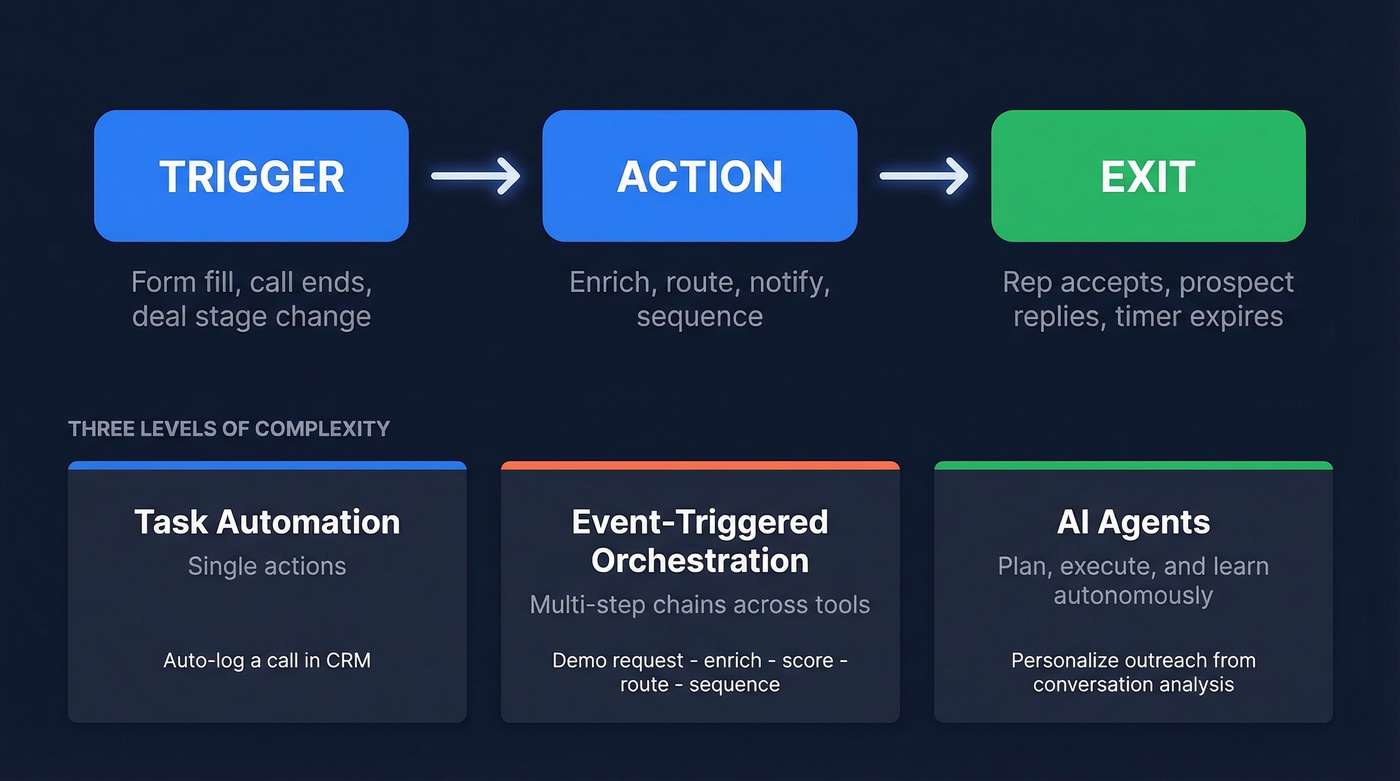
A trigger is a business event - a form fill, a Gong call ending, a deal hitting a specific stage. The action is what happens automatically: enrich the contact, route to a rep, fire a Slack notification, add to a sequence. The exit condition defines when the automation stops: rep accepts the lead, prospect replies, or a timer expires.
That framework covers three levels of complexity. Task automation handles single repetitive actions like auto-logging a call in your CRM. Event-triggered orchestration chains multiple actions across tools - new demo request → enrich → score → route → sequence. AI agents, the newest layer, plan, execute, and learn with minimal human input, handling variable situations like personalizing outreach based on conversation analysis.
The market reflects this evolution. The global sales force automation market hit $8.6B in 2023 and is projected to reach $19.5B by 2030 at a 10.4% CAGR. Companies aren't debating whether to automate anymore. They're debating what to automate first.
The Business Case (With Dollar Signs)
"Automation saves time" isn't a business case. Let's be honest - your CFO doesn't care about saved hours unless they translate to revenue.
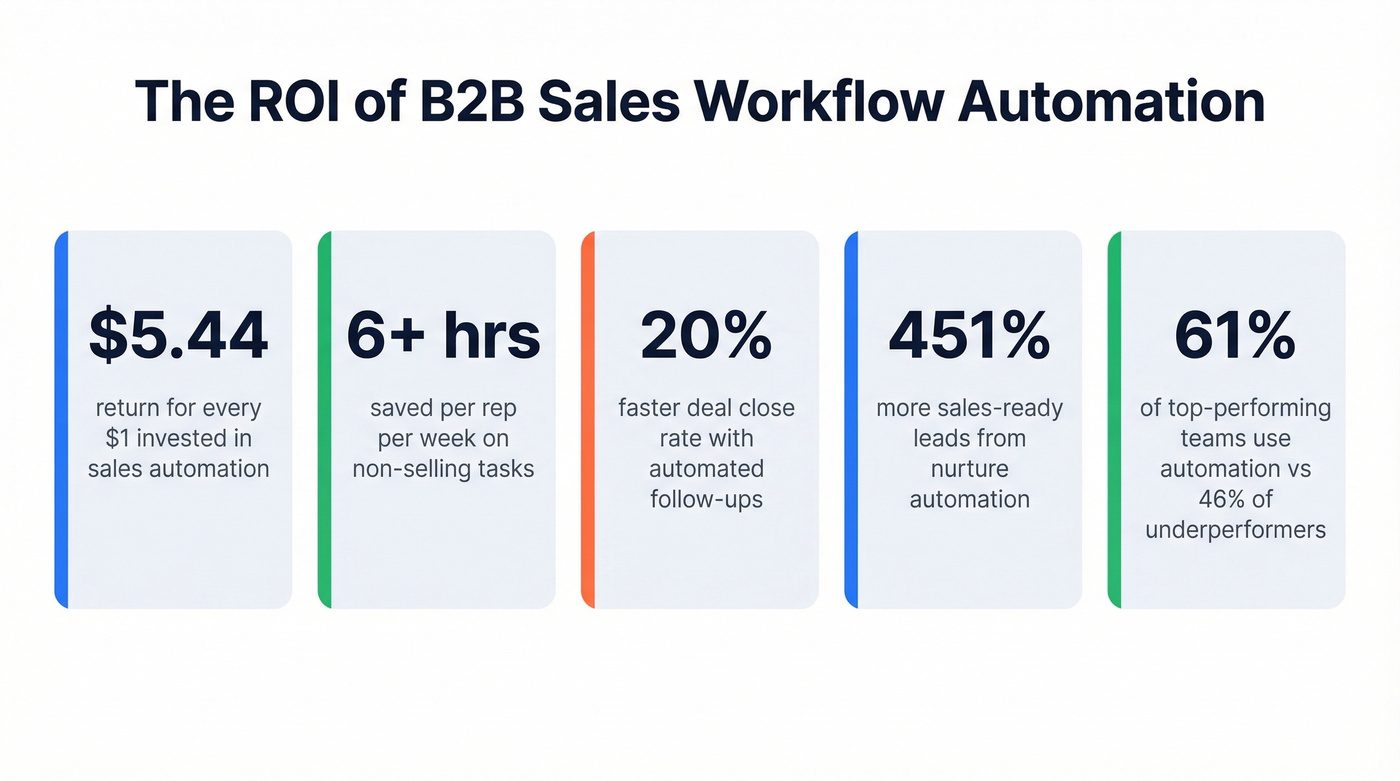
The ROI on sales process automation runs $5.44 for every $1 invested, with some studies pushing that to $8 per dollar. That's not theoretical. It comes from reduced admin time, faster deal velocity, and fewer leads falling through cracks. Reps using automation save 6+ hours per week on non-selling tasks. Automated follow-ups close deals 20% faster. Lead nurturing automation generates 451% more sales-ready leads. And proposal generation - once a 3-week slog - can be cut to under 2 hours with the right workflow.
The performance gap is stark: 61% of overperforming sales teams use automation, compared to just 46% of underperformers. That's a compounding advantage. The teams that automate lead routing respond faster. The teams that automate CRM hygiene have cleaner pipeline data. The teams that automate nurture sequences don't lose deals to silence.
For many organizations, the question of CRM automation vs. hiring SDRs comes down to math - automation handles the repetitive volume so your existing reps can focus on conversations that close. B2B buyers now do 70% of their research online before ever talking to a rep, and buying committees include 6-10 decision makers. You can't manually track, nurture, and multi-thread across that many stakeholders. Your reps have finite hours, and the buying process has gotten more complex, not less.
Data Quality: The Foundation Nobody Wants to Talk About
Here's the opinion most automation guides won't give you: stop buying more tools. Fix your data first.
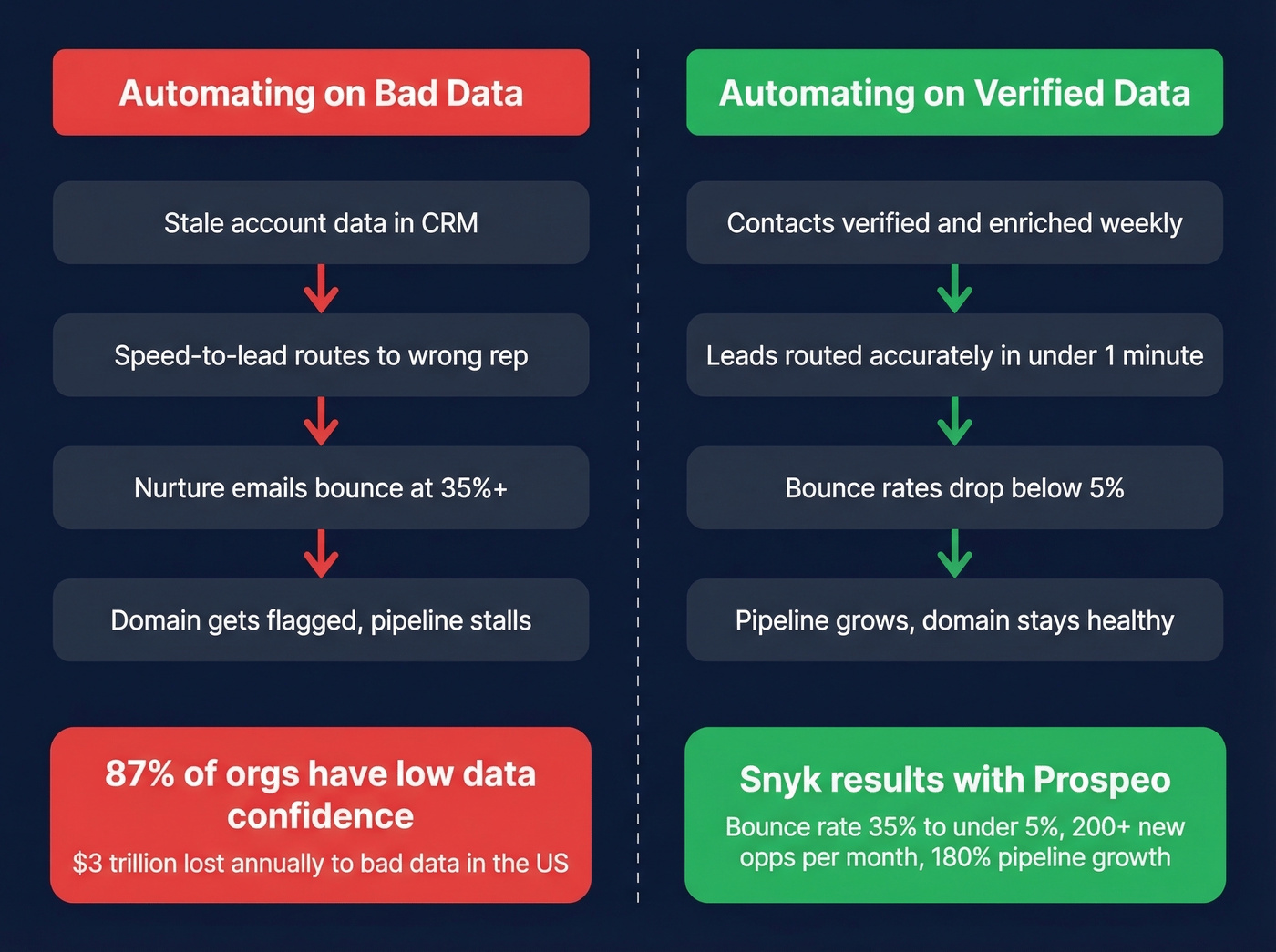
87% of organizations report low confidence in their data quality. Up to 30% of sales data becomes outdated within 12 months - people change jobs, companies get acquired, phone numbers rotate. Bad data costs businesses $3 trillion annually in the U.S. alone.
Now imagine building automation on that foundation. Your speed-to-lead workflow routes a new inbound to the wrong rep because the account data is stale. Your nurture sequence fires emails to addresses that bounce. Your CRM hygiene bot enriches contacts with outdated information. Automation on bad data is automated failure - it just fails faster and at scale.
The proof is in production results. When Snyk rolled out Prospeo to their 50-person AE team, bounce rates dropped from 35-40% to under 5%. AE-sourced pipeline jumped 180%, generating 200+ new opportunities per month. That's what happens when you fix the data layer before you automate everything on top of it.

Your speed-to-lead workflow is only as good as the data feeding it. Prospeo's 5-step verification delivers 98% email accuracy and 125M+ verified mobiles - refreshed every 7 days, not every 6 weeks. Snyk's 50 AEs dropped bounce rates from 35% to under 5% and added 200+ opportunities per month.
Fix the data layer before you automate everything on top of it.
Every workflow in your automation stack - routing, enrichment, nurture sequences - breaks when contact data decays. Prospeo enriches leads with 50+ data points at a 92% match rate, integrates natively with Salesforce, HubSpot, Clay, and Zapier, and costs ~$0.01 per email. No contracts, no sales calls.
Build your 3-4 tool stack on data that actually holds up.
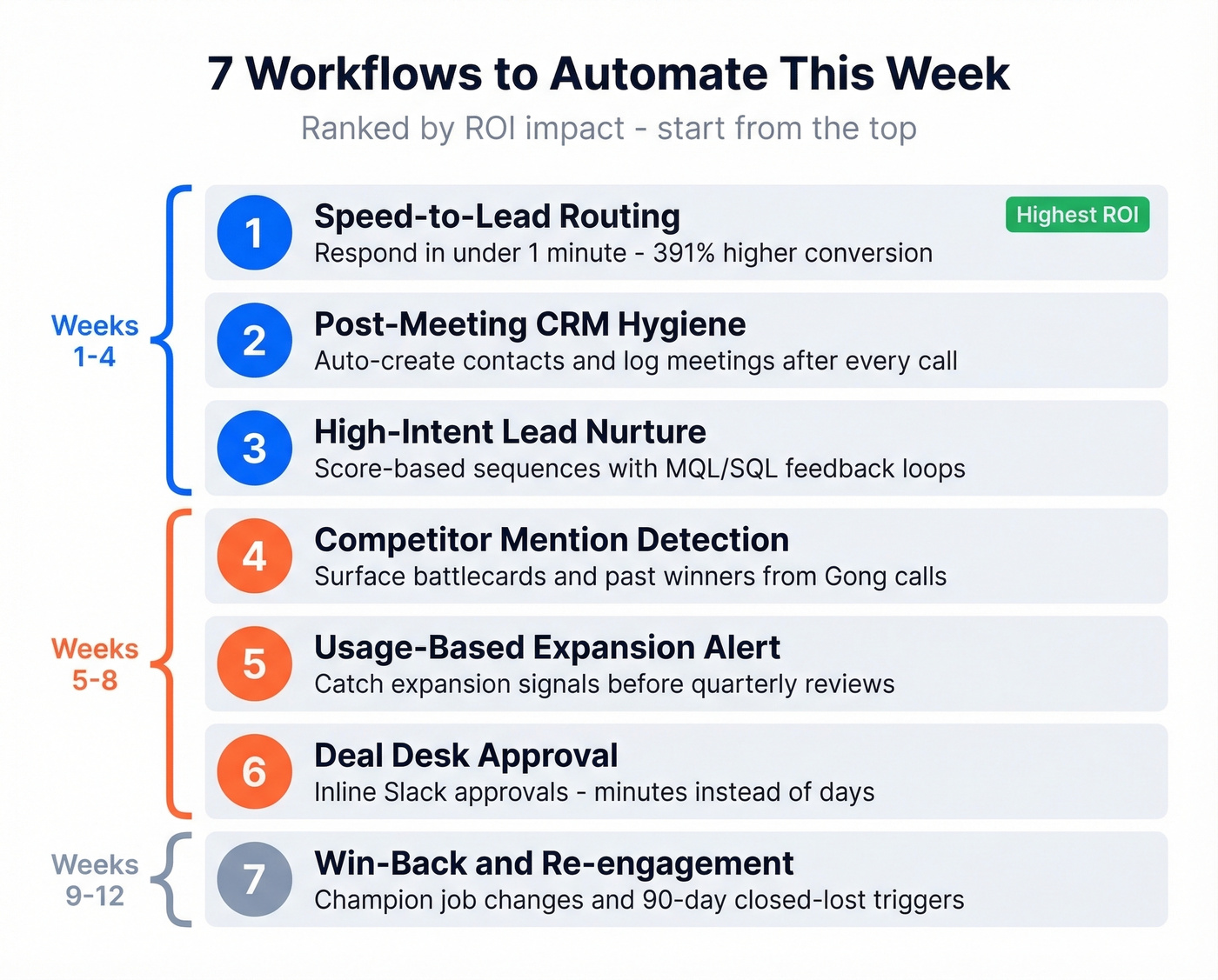
7 Workflows to Automate This Week
These aren't theoretical. Each follows the trigger → action → exit framework, and each can be built with standard tools in a day or less.
Speed-to-Lead Routing
This is the single highest-ROI workflow you can build. A lead contacted within one minute is 391% more likely to convert than one contacted after 30 minutes. Most teams respond in hours. Automating this alone justifies the cost of your entire stack.
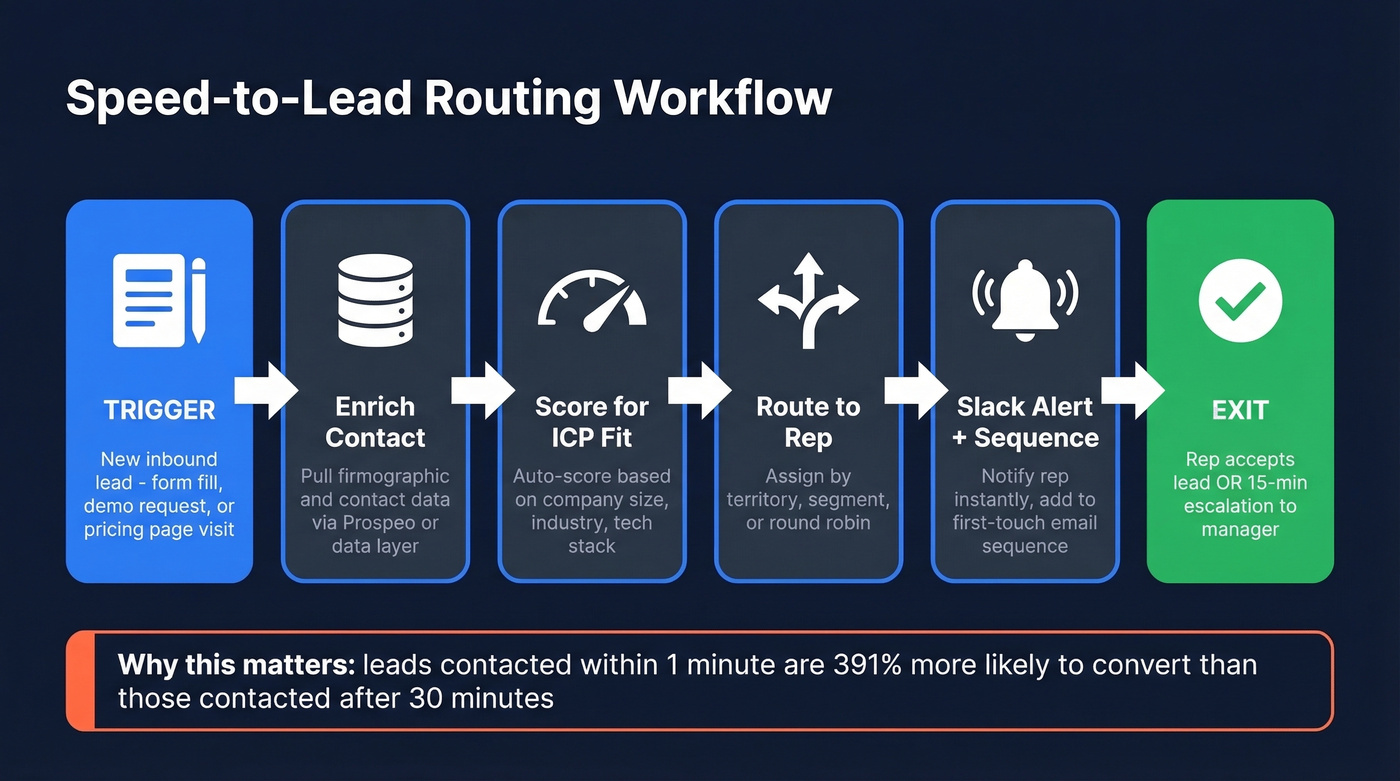
Trigger: New inbound lead - form fill, demo request, or pricing page visit.
Actions: Enrich the contact with your data layer → score based on ICP fit → auto-assign personas based on firmographic data → route to the right rep by territory or segment → fire a Slack alert → auto-add to a first-touch sequence.
Exit: Rep accepts the lead, or a 15-minute escalation timer kicks it to a manager.
Post-Meeting CRM Hygiene
Picture this: your AE just finished a killer demo with four stakeholders. She's pumped, jumps straight into prepping the proposal - and never logs the contacts. We've seen teams where 30-40% of meetings never get logged properly. This workflow eliminates that gap without asking reps to change their behavior.
Trigger: Calendar event - 5 minutes before a meeting ends.
Actions: Bot prompts the rep to create any missing contacts → enriches via your data provider → confirms employer and account match → creates the contact record and, optionally, an opportunity → shares a direct link to the new record.
Exit: CRM record created, or rep dismisses the prompt.
High-Intent Lead Nurture
Trigger: Lead score crosses a threshold (say, 100 points) or prospect visits your pricing page.
Actions: Tag as MQL → notify the assigned rep via Slack or email → launch a 3-email sequence over 5 days with relevant content. You can also send sales collateral automatically based on browsing behavior - pricing sheets for pricing page visitors, case studies for product page visitors.
Exit: Prospect replies, meeting is booked, or rep manually removes them. If none of those happen, move to a long-term drip.
One critical detail most guides skip: define your MQL/SQL criteria explicitly and build a rejection loop. If the rep disqualifies the lead, it should flow back to marketing with a reason code. Without that feedback loop, marketing keeps sending garbage and sales keeps ignoring it.
Competitor Mention Detection
Most reps don't know who on their team has beaten a specific competitor before. Surfacing that knowledge automatically turns tribal knowledge into a system.
Trigger: Competitor name mentioned during a Gong call.
Actions: Send the relevant battlecard to the rep → tag reps who've won deals against that competitor → update the CRM opportunity's competitor field.
Exit: Rep acknowledges receipt.
Usage-Based Expansion Alert
Expansion revenue is cheaper than new logo revenue - and most teams discover expansion opportunities during quarterly reviews, months too late.
Trigger: Product usage crosses a threshold, like 80% seat utilization or a spike in API calls.
Actions: Pull account context from CRM and product analytics → generate a templated account health report → share with the account owner. For subscription products, pair this with renewal management so expansion conversations happen before the renewal date, not after.
Exit: Account owner creates an expansion opportunity or dismisses the alert.
Deal Desk Approval
Trigger: Discount request submitted in CRM.
Actions: Post in a dedicated Slack channel and tag the approver → approve/reject buttons inline → bot updates CRM deal status and notifies the rep.
Exit: Approved or rejected.
I've watched deals stall for days because an approval sat in someone's email. Moving this to Slack with inline buttons cuts approval time from days to minutes.
Win-Back / Re-engagement
Trigger: Closed-lost deal hits the 90-day mark, OR a champion from a lost deal changes jobs.
Actions: Re-score the account → if the score qualifies, add to a re-engagement sequence → notify the original rep.
Exit: Prospect replies, meeting is booked, or the sequence completes.
The champion job-change trigger is the real gold here. When your buyer moves to a new company, they already know your product. That's the warmest "cold" outreach you'll ever send.
Implementation Order
Don't try to build all seven at once. Here's the phased rollout:
- Weeks 1-2: Data audit and verification. Clean your CRM, verify your contact list, establish a data quality baseline.
- Weeks 3-4: Speed-to-lead routing and post-meeting CRM hygiene. Highest ROI, lowest complexity.
- Weeks 5-8: High-intent nurture, expansion alerts, and competitor detection. These require cross-tool orchestration.
- Weeks 9-12: AI layer and optimization. Add conversation intelligence, predictive scoring, and iterate on everything you've built.
The Right Stack for Your Stage
You don't need 10 tools. You need 3-4 that actually talk to each other.
| Layer | Seed / SMB | Mid-Market | Enterprise |
|---|---|---|---|
| CRM | HubSpot (free; paid from $9/user/mo) | Salesforce ($25-$175/user/mo) | Salesforce + CPQ |
| Data | Prospeo (free tier; ~$0.01/email) | + Clay ($134/mo) | API + internal pipeline |
| Sequencing | Apollo ($49/user/mo) | Outreach (~$100/user/mo) | Outreach / Salesloft |
| Pipeline | Pipedrive ($14/user/mo) or monday CRM ($12/user/mo) | Built into Salesforce | Clari for forecasting |
| Glue / iPaaS | Zapier ($19.99-$49/mo) | Zapier or n8n (free) | Workato (~$10K+/yr) |
| Conversation | - | Gong (from ~$5K/yr) | Gong enterprise |
Seed / SMB (Under 50 Reps)
Your total stack cost can be under ~$100/month before per-user sequencing costs. HubSpot's free CRM handles pipeline management. Prospeo's free tier gives you 75 verified emails per month with no contract - enough to validate your ICP before you scale spend. Apollo or Lemlist ($69/user/mo) handles sequencing. Zapier's free tier covers 100 tasks/month for basic glue.
At this stage, the biggest mistake is overbuying. You don't need Gong. You don't need an iPaaS. You need clean data and a sequencer that works. Skip the enterprise tools until your team actually outgrows the basics.
Mid-Market (50-200 Reps)
This is where integration complexity spikes. Salesforce becomes the CRM of record, and you need a real data enrichment layer - a waterfall enrichment approach using multiple providers gives you coverage and flexibility. Outreach or Salesloft replaces the SMB sequencer. Gong adds conversation intelligence. An iPaaS becomes essential because you're connecting five or more systems that need to share data reliably.
Budget runs $200-400/user/month. The gap between mid-market and enterprise isn't tools - it's governance and adoption. Teams at this stage also benefit from webhook-based triggers, firing actions across systems in real time when deal stages change or new contacts are created.
Enterprise (200+ Reps)
The tool choices matter less than the architecture. You're running Salesforce with CPQ, Outreach or Salesloft enterprise, Gong, and Workato for complex multi-system orchestration. Your enrichment API plugs into your internal pipeline. Add Clari for forecasting.
Total cost is custom, but expect $500+/user/month fully loaded. The real cost isn't the software - it's the RevOps headcount to manage it.
AI vs. Traditional Automation
Here's the thing: AI automation without process redesign is just faster bad process. Bain's research found that applying AI to existing processes yields only small gains. The teams seeing 30%+ improvement in win rates redesigned their workflows first, then applied AI.
Use traditional (rules-based) automation for stable, repetitive, high-volume processes with low variability. CRM field updates, lead routing by territory, deal desk approvals, meeting reminders - these don't need machine learning. They're if/then problems that need reliable execution.
Use AI automation for pattern recognition, variable inputs, or personalization at scale. Lead scoring that adapts to new signals, email categorization that sorts inbound by intent, conversation analysis from Gong calls, next-best-action recommendations. AI fits when the inputs are messy and the optimal response changes based on context.
Use neither when you don't have clean data yet. An AI model trained on garbage CRM data will produce garbage predictions with high confidence. And 60% of customers feel uncomfortable with AI-driven customization - another reason to keep high-touch, high-ACV deals human.
Hot take: if your average deal size is under $10K, you probably don't need AI-powered sales automation at all. Rules-based workflows with clean data will get you 80% of the results at 20% of the cost. Traditional automation is the workhorse. AI is the optimizer. Most teams need far more of the former than they think, and far less of the latter than vendors want to sell them.
5 Mistakes That Kill Automation ROI
30-50% of initial automation projects fail. These five mistakes are why.
1. Automating before fixing data. If your email bounce rate is above 5%, your contact data is stale, or your CRM has duplicate records everywhere, no automation tool will save you. Audit your data, verify your contacts, and assign a data quality owner before you build a single workflow.
2. Over-automating high-value touchpoints. 80% of B2B buyers prefer personalized outreach over generic automation for deals over $50K. Your enterprise AE shouldn't be sending templated sequences to a CISO evaluating a six-figure contract. Keep high-ACV deals human. Automate the surrounding work - research, CRM updates, internal routing - not the conversation itself.
3. Buying tools that don't integrate. 25% of sales tech ROI is lost to integration issues. That's a quarter of your investment evaporating because Tool A can't talk to Tool B. Before you commit to any tool, test the full workflow end-to-end with a fake lead. If the data doesn't flow cleanly from enrichment → CRM → sequencer → reporting, walk away.
4. Skipping change management. 34% of CRM buyers regret their choice - usually not because the tool is bad, but because nobody adopted it. Assign a process owner for every workflow. Train reps on what changed and why. Measure adoption weekly for the first 90 days, not just at launch.
5. Never auditing after launch. Workflows decay. Data rules drift. Exit conditions stop matching reality. Only 1% of companies successfully scale to 50+ bots - usually because nobody audits and iterates after launch. Run quarterly CRM cleanups, review every active workflow's performance metrics, and kill the ones that aren't delivering.
What's Coming: 2026-2028
The next wave isn't more automation - it's autonomous automation. Gartner predicts that by 2028, 90% of B2B buying will be AI-agent-intermediated, pushing $15 trillion through AI agent exchanges. That's not a typo. We're talking about AI agents on the buyer side negotiating with AI agents on the seller side.
60% of Fortune 100 companies are expected to appoint a head of AI governance by the end of 2026. That tells you where the friction is heading - not "can we use AI?" but "how do we govern AI that makes decisions on our behalf?"
Agentic AI - systems that plan, execute, and learn with minimal human input - is already showing up in sales tools. Today's agents draft emails and summarize calls. Tomorrow's agents will run entire prospecting workflows autonomously, from identifying target accounts to booking meetings. Expect intelligent email sequences that adapt in real time based on buyer behavior: opens, clicks, site visits, and product usage patterns feeding back into the sequence logic.
The teams that'll thrive in that world are the ones building clean data foundations and well-structured workflows now. If your CRM is a mess in 2026, an AI agent will just make a mess faster in 2028.
FAQ
What's the best workflow to automate first?
Speed-to-lead routing. Leads contacted within one minute are 391% more likely to convert than those contacted after 30 minutes. It's high-impact, low-complexity, and proves ROI fast - making it the easiest win to get buy-in for further automation investment.
How much does automation cost for a small team?
A functional stack runs under ~$100/month before per-user sequencing costs. HubSpot's CRM is free, Prospeo's free tier includes 75 verified emails/month, Apollo starts at $49/user/month, and Zapier's free tier handles 100 tasks. Scale spend as you scale pipeline.
What's the difference between AI and rules-based automation?
Rules-based automation follows fixed if/then logic - ideal for stable, repetitive tasks like CRM updates and lead routing. AI automation uses machine learning to adapt over time, excelling at pattern recognition, lead scoring, and personalization. Most teams need both, but start with rules-based workflows.
Why do most sales automation projects fail?
Bad data is the top culprit, with 87% of organizations reporting low confidence in data quality. Integration issues eat 25% of ROI, and lack of change management kills adoption. The tool usually works fine - the foundation underneath it doesn't.
How long does it take to see ROI?
Simple workflows like lead routing and CRM hygiene show results within weeks. Complex multi-step sequences take 2-3 months to optimize. Email-based workflows deliver the fastest signal - open rates, reply rates, and meetings booked give you clear metrics within 30 days. Forrester TEI studies show 6-month payback periods for full automation platforms.