

Best Time to Send B2B Emails in 2026 - And Why Timing Is the Third Thing You Should Fix
Everyone wants to know the best time to send B2B emails. But 77% of cold sales emails never get opened. You can obsess over whether to hit send at 10:07 AM or 10:23 AM - if your emails are landing in spam or bouncing off invalid addresses, the timestamp is irrelevant.
Here's what the data says about timing, and the two things you should fix first.
Quick Answer: Optimal Send Windows
The consensus across HubSpot, Mailchimp, and Brevo is remarkably consistent: Tuesday through Thursday, around 10 AM in the recipient's local time zone. That's your safe default.
But "10 AM Tuesday" treats every prospect the same. They're not. Here's the role-based breakdown that actually matters:
| Recipient Role | Best Days | Best Time Window (Local) |
|---|---|---|
| C-suite / Founders | Tue-Thu | 7:45-9:15 AM |
| VP / Directors | Tue-Thu | 10:15-11:45 AM |
| Ops / Finance / IT (ICs) | Tue-Thu | 1:30-3:30 PM |
Now here's the contrarian part: timing is the third thing you should optimize. Deliverability infrastructure comes first. Data quality comes second. Timing just amplifies both.
Why Timing Is Third
Litmus found that [70% of emails show](https://www.litmus.com/blog/the-difference-between-deliverability-and-delivery-rate) at least one spam-related issue. That's not a timing problem - it's an infrastructure problem.
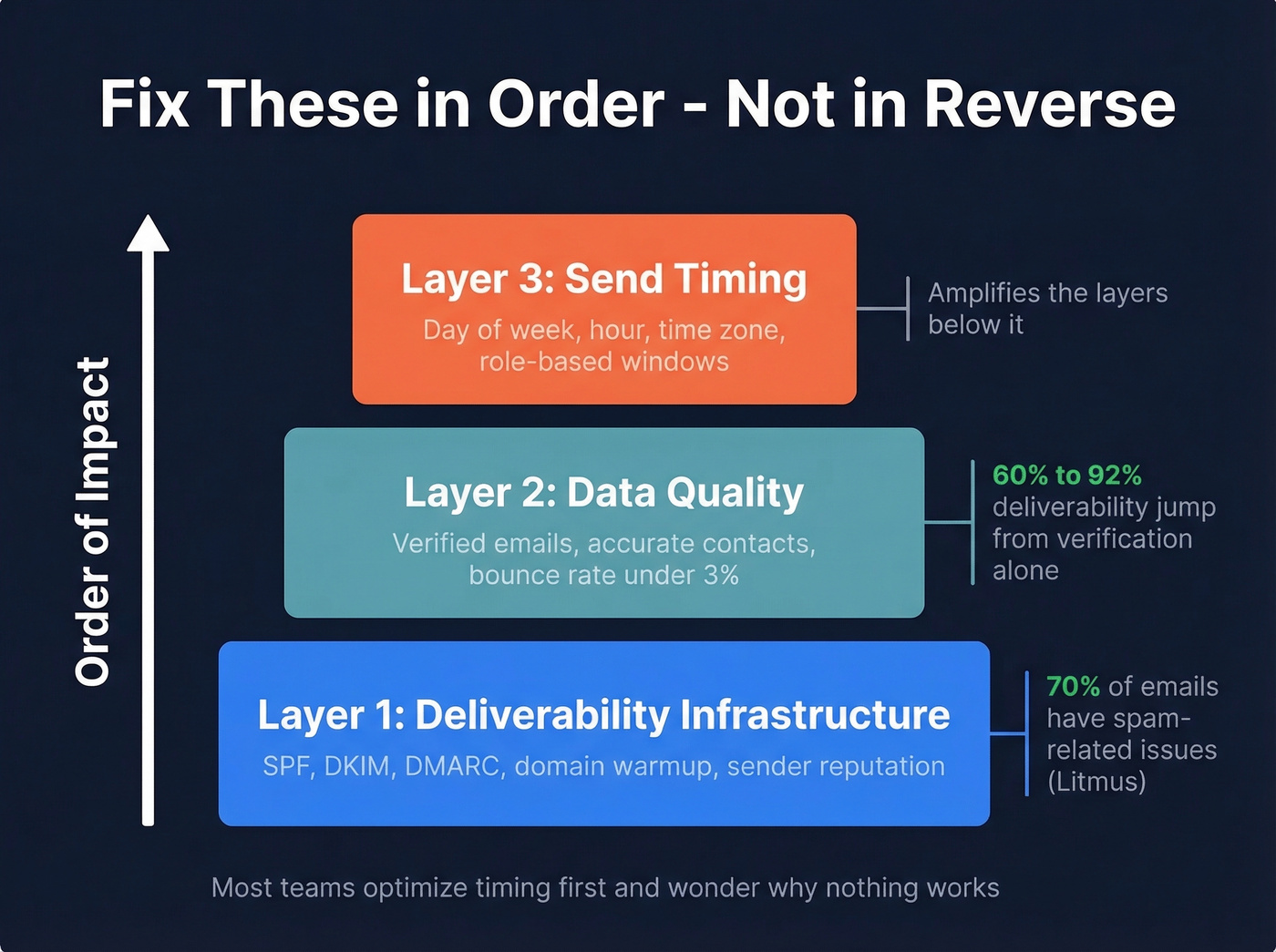
Think of it as a stack. At the base, you need deliverability infrastructure: proper DNS records, warmed-up domains, clean sender reputation. On top of that, you need accurate data - verified emails that don't bounce and contacts who are still at the company you think they're at. Only then does your send schedule become a meaningful lever.
Sending a perfectly timed email to a bad address does nothing. Sending a perfectly timed email from a domain with a trashed reputation does less than nothing - it trains spam filters to distrust you further. The consensus on r/coldemail backs this up: technical setup and deliverability hygiene move results more than copy or timing alone.
Here's the thing: if your bounce rate is above 3%, stop reading timing guides and go fix your list. You could send at the mathematically perfect moment and still lose because inbox providers have already decided you're low-quality.
What the Data Says About Days and Hours
Best Days for B2B Email
HubSpot surveyed 150+ marketing and advertising professionals in the U.S. and the results were clear: Tuesday wins at 27%, followed by Monday at 19% and Thursday at 17%. Brevo's data tells a similar story - weekdays account for over 85% of open volume and nearly 95% of click volume.
| Day | HubSpot Vote | Best For | Avoid |
|---|---|---|---|
| Monday | 19% | Late morning (11 AM+) | Early AM (inbox overload) |
| Tuesday | 27% (top) | 9 AM-12 PM, 1-3 PM | - |
| Wednesday | Strong clicks | 10 AM, 3:30 PM | - |
| Thursday | 17% | 9 AM-12 PM, 1-3 PM | - |
| Friday | Low | Morning only | Afternoon |
| Sat-Sun | Negligible | - | Everything (B2B) |
Monday mornings are a trap. Everyone's clearing their weekend inbox, triaging what's urgent, and deleting everything that isn't. If you must send Monday, wait until 11 AM. Friday afternoons are equally dead - people have mentally checked out by 1 PM.
Best Hours
The data points to a two-peak model. Brevo's analysis highlights 10:00 AM as the top peak, with an afternoon peak where opens cluster around 3:00 PM and click-through peaks around 4:00 PM - 3:30 PM consistently shows up as a top-performing send time across industries.
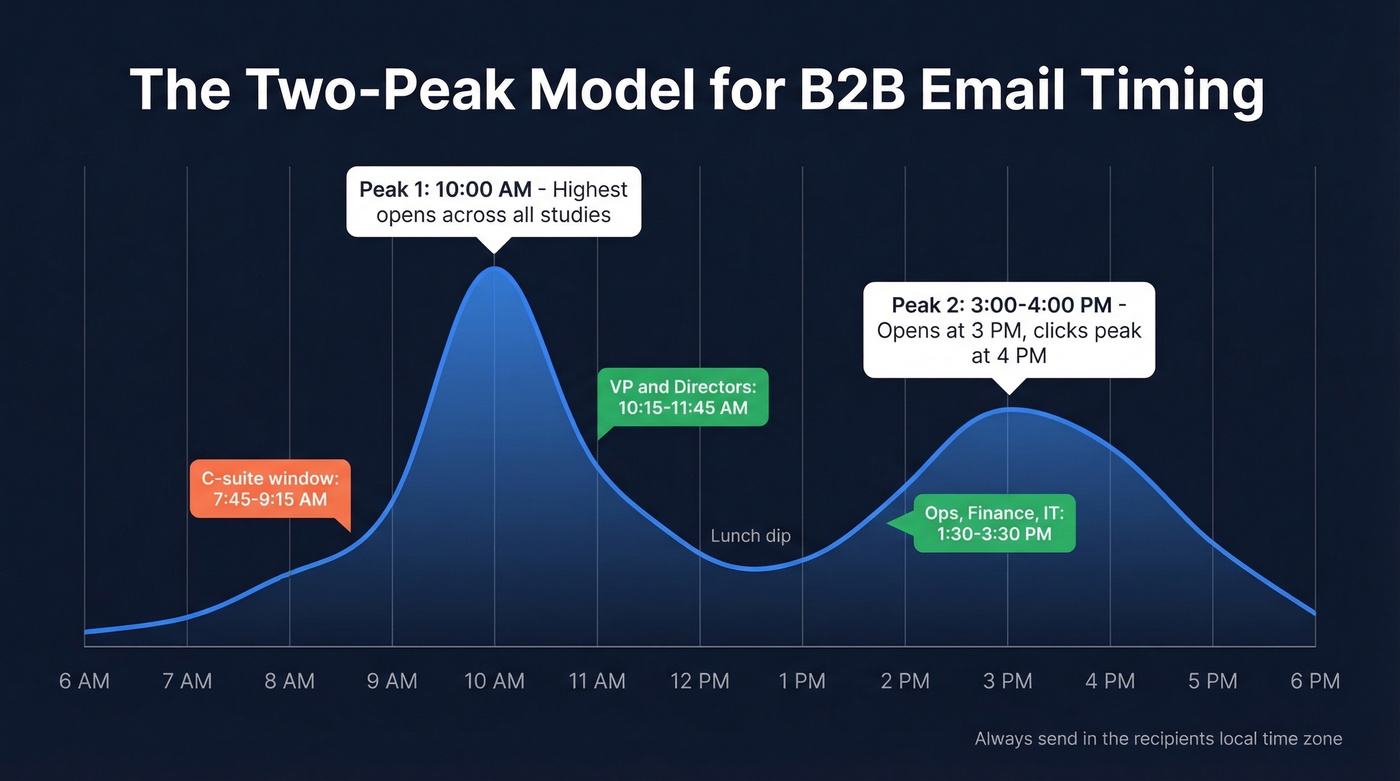
One detail most guides skip: always send in the recipient's local time zone. Mailchimp's Timewarp feature exists specifically because blasting at 10 AM Eastern means hitting West Coast prospects at 7 AM - before they've opened their laptop. If your tool supports time-zone-aware sending, use it. If it doesn't, segment your list by geography and stagger sends. UK and EU open patterns also skew slightly earlier than US patterns, so a blanket "10 AM" without geo-segmentation leaves performance on the table.
Worth noting from Martal's cold email stats: 70%+ of cold sales emails are read on mobile, so keep subject lines under 40 characters and front-load your value proposition regardless of send time.
Cold Email vs. Marketing Email
Most "best time to send" studies are based on marketing email - newsletters, nurture sequences, promotional blasts. Cold outreach plays by different rules.
Marketing email optimizes for opens and clicks across large lists. You've got send-time optimization tools, thousands of recipients per campaign, and the luxury of A/B testing at scale. Cold outreach optimizes for replies and meetings with much smaller volumes - 50 emails per mailbox per day, not 50,000. Conflating the two leads to bad decisions.
Belkins' 16.5M-email study dropped open-rate tracking from their 2024 dataset because tracking pixels were hurting deliverability. That's a cold-email-specific tradeoff that marketing teams don't face. If you're running cold outreach, the timing tables above still apply, but deliverability mechanics matter far more than shaving 15 minutes off your send window.

This article just told you timing is the third thing to fix. The second? Data quality. Prospeo's 5-step email verification delivers 98% accuracy and refreshes every 7 days - so the contacts you're timing perfectly are still at the company you think they're at. Starting at $0.01 per verified email.
Stop perfecting your send schedule on a list full of dead addresses.
Timing by Recipient Role
Generic timing advice assumes every inbox behaves the same way. A CEO's inbox at 10 AM looks nothing like an IT manager's inbox at 10 AM.
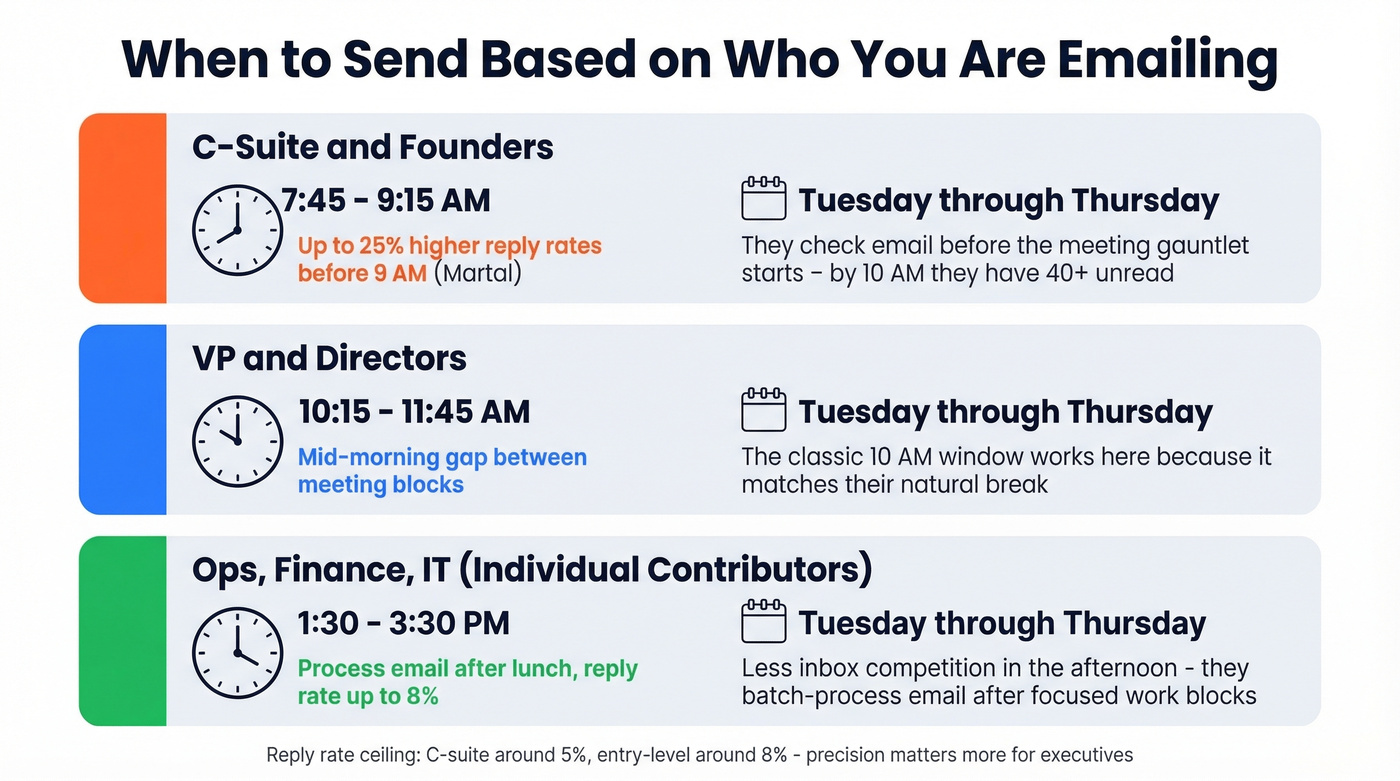
Zeliq's role-based timing research breaks this down precisely. C-suite executives check email early - before the meeting gauntlet starts. VPs and directors have a mid-morning window between their first and second blocks of meetings. Individual contributors in ops, finance, and IT tend to process email after lunch.
Martal Group's data supports the early-morning C-suite play: emails sent between 6-9 AM see up to 25% higher reply rates for decision-makers. That tracks with what we've seen in practice - by 10 AM, a VP of Sales has 40+ unread emails. By 8 AM, they might have 8.
Company size matters too. The 16.5M-email dataset shows small businesses start at a 9.2% reply rate, while enterprise contacts ghost quickly and punish persistence with spam reports. If you're selling into large organizations, tighter timing and fewer follow-ups aren't optional - they're survival.
There's a persona dimension as well. C-suite contacts respond at roughly 5% overall, while entry-level contacts hit 8%. That doesn't mean you should stop emailing executives - it means you need to be more precise about when you reach them and accept that the reply rate ceiling is lower.
The Deliverability Layer Most Guides Skip
You can nail your B2B email send time and still fail if your emails never reach the inbox.
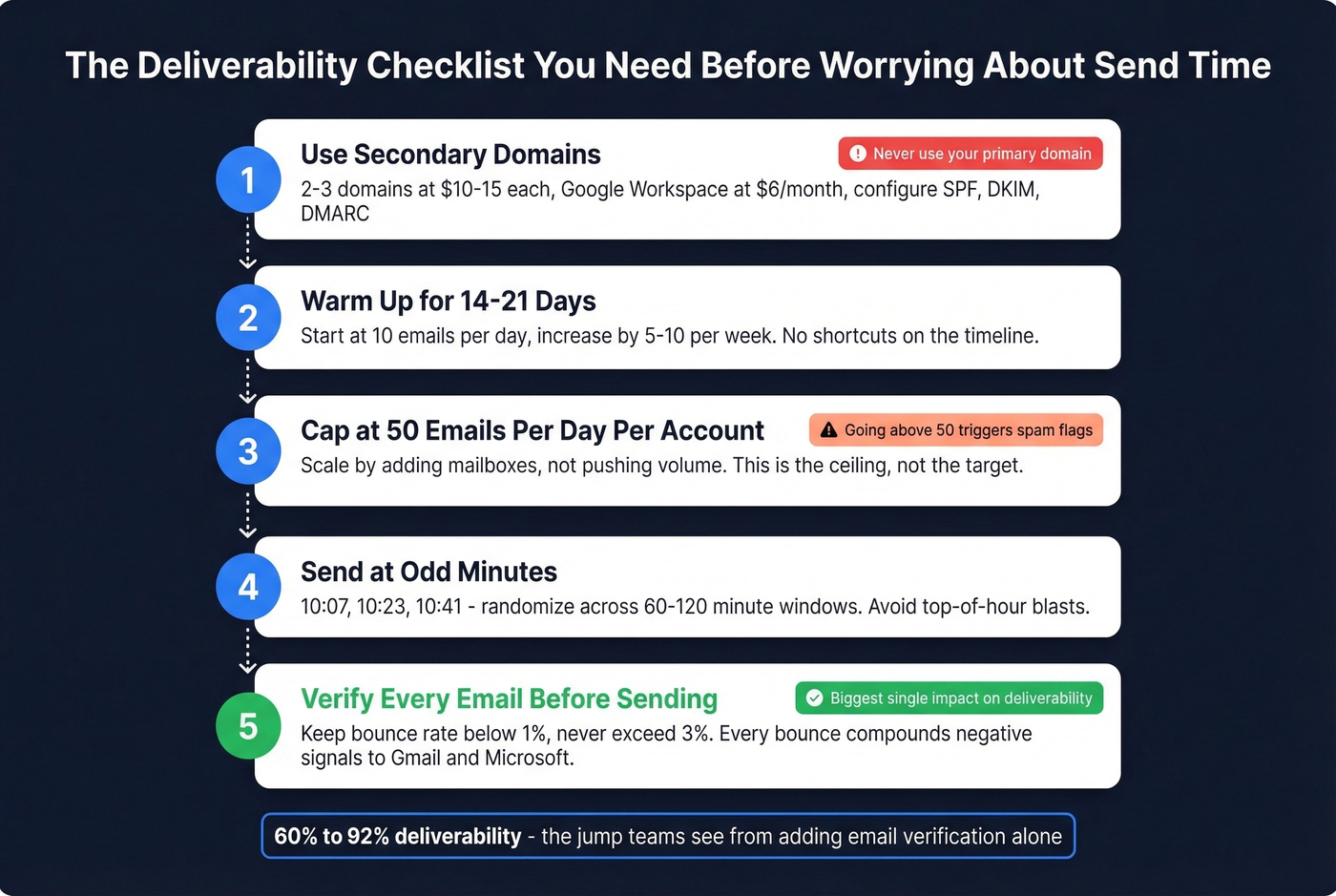
Use Secondary Domains
Never cold email from your primary domain. Buy 2-3 secondary domains at $10-15 each, set up Google Workspace at $6/month per account, and configure SPF, DKIM, and DMARC.
Warm Up Before You Send
Every new mailbox needs 14-21 days of warmup. Start at 10 emails per day, increase by 5-10 per week. Tools like Instantly or Smartlead automate this, but there's no shortcut on the timeline. If you need a deeper playbook, see email warmup tools.
Cap at 50 Emails Per Day
This is the ceiling, not the target. Going above 50 sends per day per account is the fastest way to trigger rate limiting and spam flags. If you want to go deeper on safe sending limits, use this email velocity guide.
Send at Odd Minutes
Top-of-hour blasts create obvious traffic spikes that trigger throttling and hurt inbox placement. Send at odd minutes - 10:07, 10:23, 10:41 - and randomize delivery across 60-120 minute windows rather than blasting your entire list simultaneously. This is one of the easiest wins in cold email. For a full workflow, see automated cold email scheduling.
Disable Tracking Initially
Tracking pixels are a real deliverability tradeoff in cold email. Belkins stopped tracking open rates because the pixels were hurting deliverability, and most cold-email playbooks recommend plain text in the first touch - no links, no attachments, no images. If you want the technical why, read about email tracking pixels.
Verify Every Email Before Sending
This is where most deliverability problems actually live. We've seen teams go from 60% deliverability to 92% just by adding email verification to their workflow - a bigger jump than any timing change produces. If you want bounce benchmarks and what “good” looks like, see email bounce rate.
Prospeo's 5-step verification catches invalid addresses, spam traps, and honeypots before they damage your sender reputation. The 98% email accuracy rate means you're not burning domain health on dead addresses, and a 7-day data refresh cycle - versus the 6-week industry average - means you're not sending to contacts who changed jobs last month. Keep bounce rates below 1% and never let them exceed 3%; every bounce compounds the negative signal to Gmail and Microsoft. For a full foundation checklist, use this email deliverability guide.
Bounce rates above 3% make your send time irrelevant - inbox providers flag you as low-quality regardless of when you hit send. Teams switching to Prospeo cut bounce rates from 35%+ to under 4% with 143M+ verified emails and catch-all domain handling built in.
Fix the foundation before you fine-tune the timestamp.
Follow-Up Timing and Cadence
The 16.5M-email study produced a counterintuitive finding: the highest reply rate - 8.4% - came from a single email with no follow-ups. Each additional touch showed diminishing returns, and sending 4+ emails in a sequence more than tripled unsubscribe and spam complaint rates.
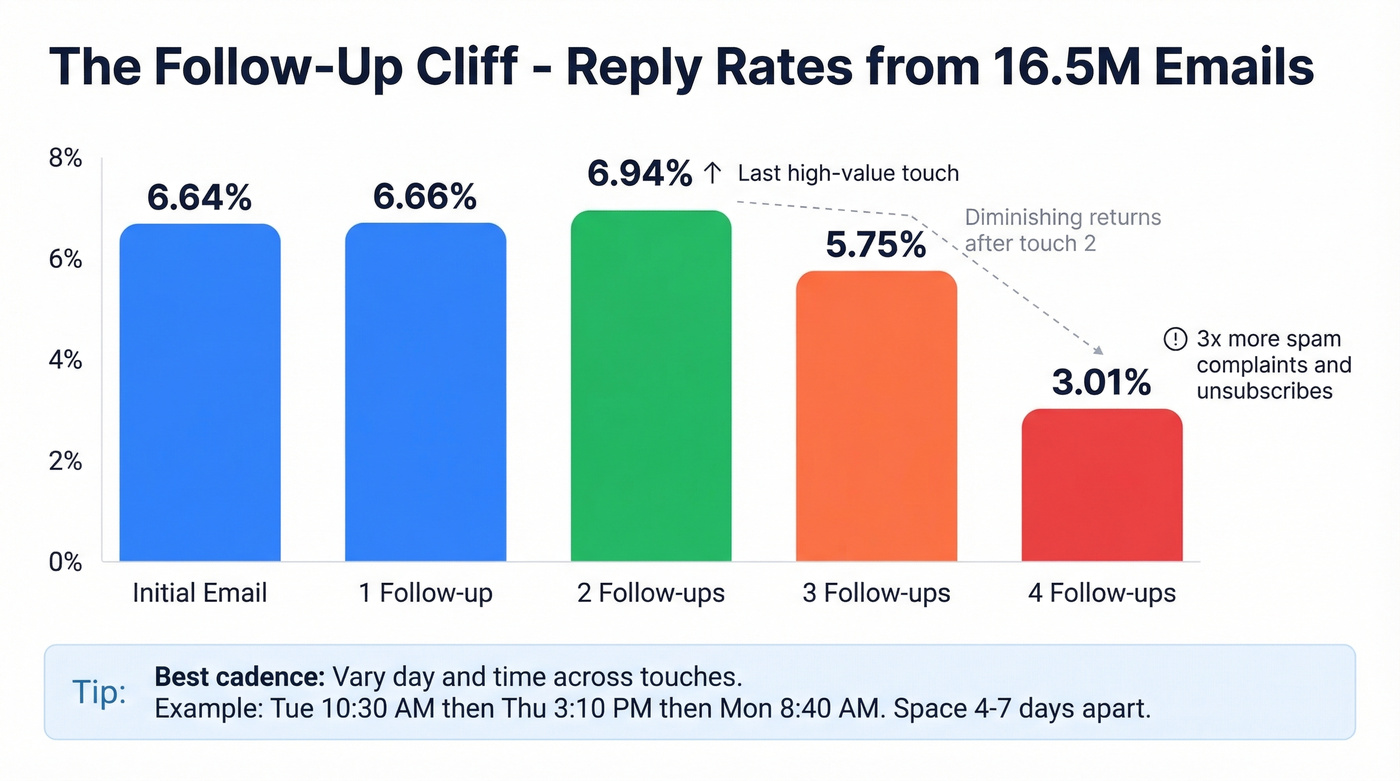
The founder-specific response curve tells the story: 6.64% on the initial email, 6.66% after one follow-up, a slight bump to 6.94% after two. After that, it drops sharply - 5.75% after three and 3.01% after four. The second follow-up is your last high-value touch.
Some practitioners say 80% of their meetings come from follow-ups 2-4, which seems to contradict this data. The difference is likely volume-dependent: at scale, aggressive follow-up generates more spam complaints, but for targeted outreach to warm-ish leads, persistence pays. Know which game you're playing.
Space follow-ups 4-7 days apart and vary the day and time across touches to avoid "same-slot blindness." If you want ready-to-send copy, use these sales follow-up templates. If you're optimizing for cold outreach specifically, these cold email follow-up templates are a better fit.
How to Test Send Times
If you've got the volume, test. If you don't, use the defaults and optimize other variables first.
Litmus recommends a minimum of 10,000 recipients per variant for meaningful A/B test results. Most cold email campaigns don't come close to that, which means your "test" is just noise dressed up as data.
For teams with the list size to test properly: send the STO cohort first and the blast cohort last (blast-first eliminates the throttling benefit and skews results), wait 48 hours after the last email before analyzing, and test one variable at a time. Send-time optimization algorithms in tools like HubSpot or Seventh Sense need at least 90 days of data before they're reliable - early results are biased toward historical patterns.
Let's be honest: if your list is under 10,000 contacts, skip A/B testing on send time entirely. Use Tuesday-Thursday, 10 AM local, and spend your optimization energy on deliverability infrastructure and message quality. If you want a full outbound framework, see AI cold email outreach. Those levers have 10x the impact of shifting your send window by 30 minutes.
FAQ
Does send time matter more for cold email or marketing email?
Marketing email benefits more from send-time optimization because you've got larger lists and STO tools that learn from engagement patterns. Cold email results depend primarily on deliverability infrastructure and data quality - timing is a multiplier, not the foundation. Fix your bounce rate and domain reputation before worrying about whether 10:07 AM beats 10:23 AM.
What's the best day to send B2B emails in 2026?
Tuesday remains the top performer, with 27% of marketers reporting highest engagement on that day, followed by Thursday. Avoid Monday mornings and Friday afternoons. The day matters less than sending during business hours in the recipient's local time zone - a Tuesday email at 3 AM local time will underperform a Thursday email at 10 AM.
How do I improve cold email reply rates beyond timing?
Verify your contact list before every campaign to catch invalid addresses, spam traps, and honeypots before they damage your sender reputation. Use secondary domains with proper warmup, cap sends at 50 per day per mailbox, disable tracking pixels on initial outreach, and limit sequences to 2-3 follow-ups spaced 4-7 days apart. These infrastructure changes move reply rates far more than timing adjustments.
Fix your deliverability, clean your data, then worry about whether Tuesday or Thursday is 0.3% better.