

The Best Way to Send Mass Email (Without Getting Flagged)
You exported 5,000 contacts, pasted them into Gmail's BCC field, hit send - and three hours later your account was locked. Google doesn't warn you first. It just shuts you down, and your team can't send anything for 24 hours.
The best way to send mass email depends on your list size and how often you're sending. Here's the short version:
- Under 500 contacts, one-time send: Gmail BCC or mail merge. Free, good enough.
- 500-10,000 contacts, recurring sends: Brevo's free plan gives you 300 emails/day on real ESP infrastructure.
- 10,000+ contacts or a developer on staff: Amazon SES at $0.10 per 1,000 emails, or SMTP2GO with 95.5% average deliverability in EmailToolTester's tests.
- Any list you haven't emailed in 6+ months: Verify it first. Stale lists destroy sender reputation faster than anything else.
That last point is the one most guides skip entirely - and it's the single biggest factor in whether your bulk send actually reaches inboxes.
Five Methods at a Glance
Every mass email approach trades cost against control:
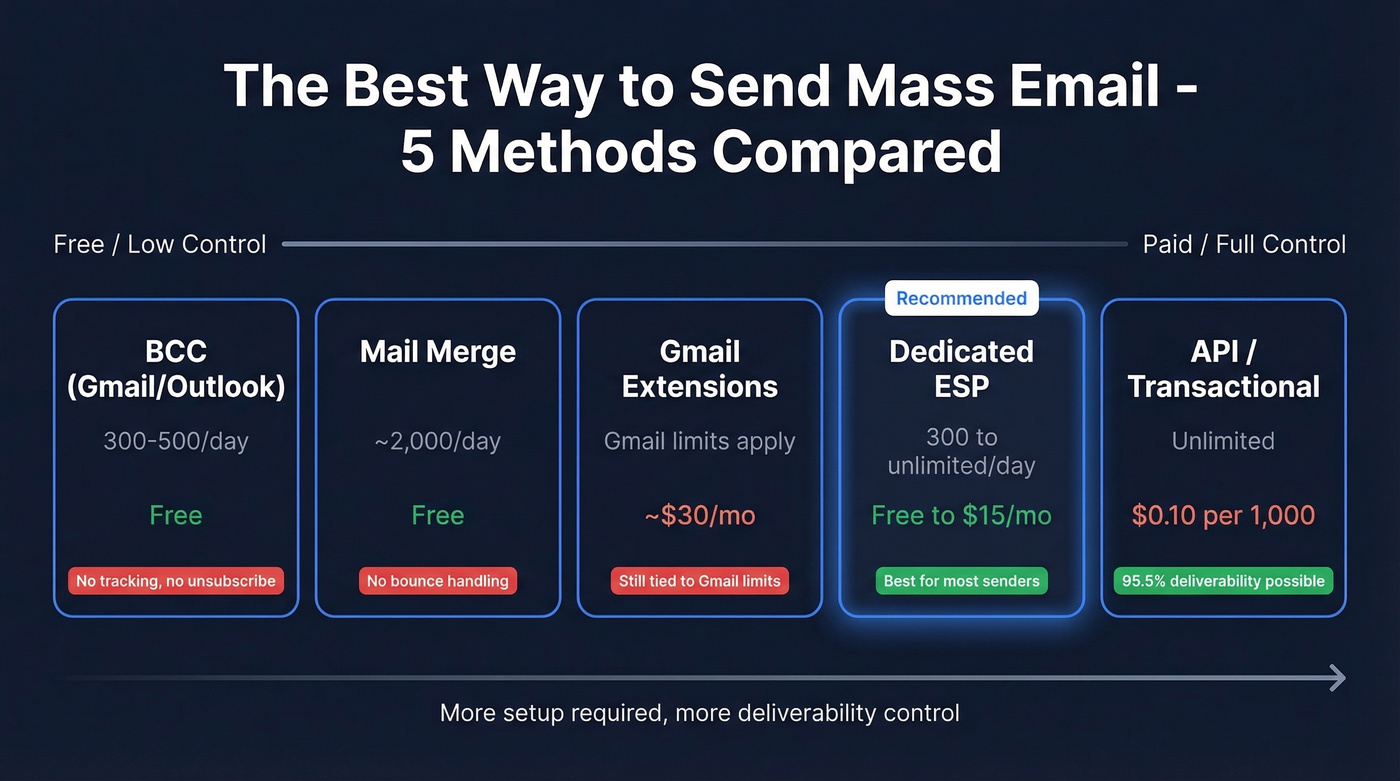
| Method | Best For | Daily Limit | Cost |
|---|---|---|---|
| BCC (Gmail/Outlook) | Quick one-offs under 500 | 300-500/day | Free |
| Mail Merge | Personalized under 2K | ~2,000/day | Free |
| Gmail Extensions | Gmail power users | Gmail limits apply | ~$30/mo |
| Dedicated ESP | Newsletters, campaigns | 300-unlimited/day | Free-$15/mo |
| API/Transactional | High-volume, dev teams | Unlimited | $0.10/1K+ |
BCC in Gmail or Outlook
Use this if you're sending a quick update to under 300 people and don't need tracking.
Skip this if you're sending to more than 500 contacts, need open/click tracking, or plan to do this regularly.
Gmail free accounts cap you at 500 emails per day on a rolling 24-hour window. Outlook.com free accounts are even tighter - 300 recipients per day, 100 per message. Microsoft 365 bumps that to 5,000 recipients per day, but only 1,000 of those can be "non-relationship" recipients - people you've never emailed before.
The real problem isn't limits. It's reputation. BCC offers no unsubscribe link, no tracking, and no bounce handling. Hit a few spam traps and your personal domain takes the damage.
Mail Merge
Mail merge - Word + Excel + Outlook, or Gmail + Google Sheets - lets you personalize each message with merge fields like name and company. It feels more sophisticated than BCC, and it is, slightly. But Gmail's native merge can't personalize subject lines and sometimes auto-fills missing fields with incorrect guesses.
The limitation is everything it doesn't do: no built-in unsubscribe mechanism, no bounce management. You're still sending through your personal email infrastructure, so the same reputation risks apply. When it's enough: internal communications, one-time personalized sends under 2,000 recipients, or situations where you genuinely don't need analytics.
Gmail Extensions (GMass, Mailsuite)
If your entire workflow lives in Gmail and you need basic tracking without switching platforms, GMass is the most popular option. As of January 2026, Standard runs $29.95/mo, Premium $39.95/mo, and Professional $59.95/mo. Their SMTP add-on gives you 10,000 free sends, then $5 per 10,000 after that. Mailsuite offers a free tier for basic tracking.
Here's the thing: these tools are duct-taping mass sending onto Gmail. They're clever workarounds, not solutions. You're still subject to Gmail's sending limits, and Google can throttle or suspend you without notice. For anything beyond occasional campaigns, a dedicated ESP is worth the $9/mo. We've watched too many teams learn this the hard way.
Dedicated ESPs
This is where most people should land. A dedicated email service provider gives you proper infrastructure - deliverability management, unsubscribe handling, analytics, and list segmentation - without requiring a developer.
| Tool | Free Tier | Paid Starting | Best For |
|---|---|---|---|
| Brevo | 300/day (~9K/mo) | $9/mo (5,000 emails/month) | Best free starting point |
| Sender | 15K/mo (2,500 subs) | $7/mo (12K emails) | Email + SMS combo |
| Moosend | 30-day trial only | $9/mo (500 contacts + unlimited sends) | SMBs wanting simplicity |
| Mailtrap | 4K/mo + 100 contacts | $15/mo (10K emails) | Analytics-heavy teams |
In our experience, Brevo is the fastest way to get a real ESP running at zero cost. You get 300 emails per day on proper infrastructure, up to 100,000 contacts stored, and Brevo claims 99.98% delivery within 20 seconds. Paid plans start at $9/mo when you need more volume. Sender's free tier is generous too - 15,000 emails per month - but Brevo's deliverability infrastructure and its separation of transactional and marketing streams give it the edge.
One detail worth knowing: SendGrid's free tier is limited to 100 emails/day and expires after 60 days. Brevo's free plan has no expiration.
API and Transactional Providers
For teams sending 50,000+ emails per month, or anyone with a developer who can handle setup, API-based providers offer the best cost-per-email and the most control.
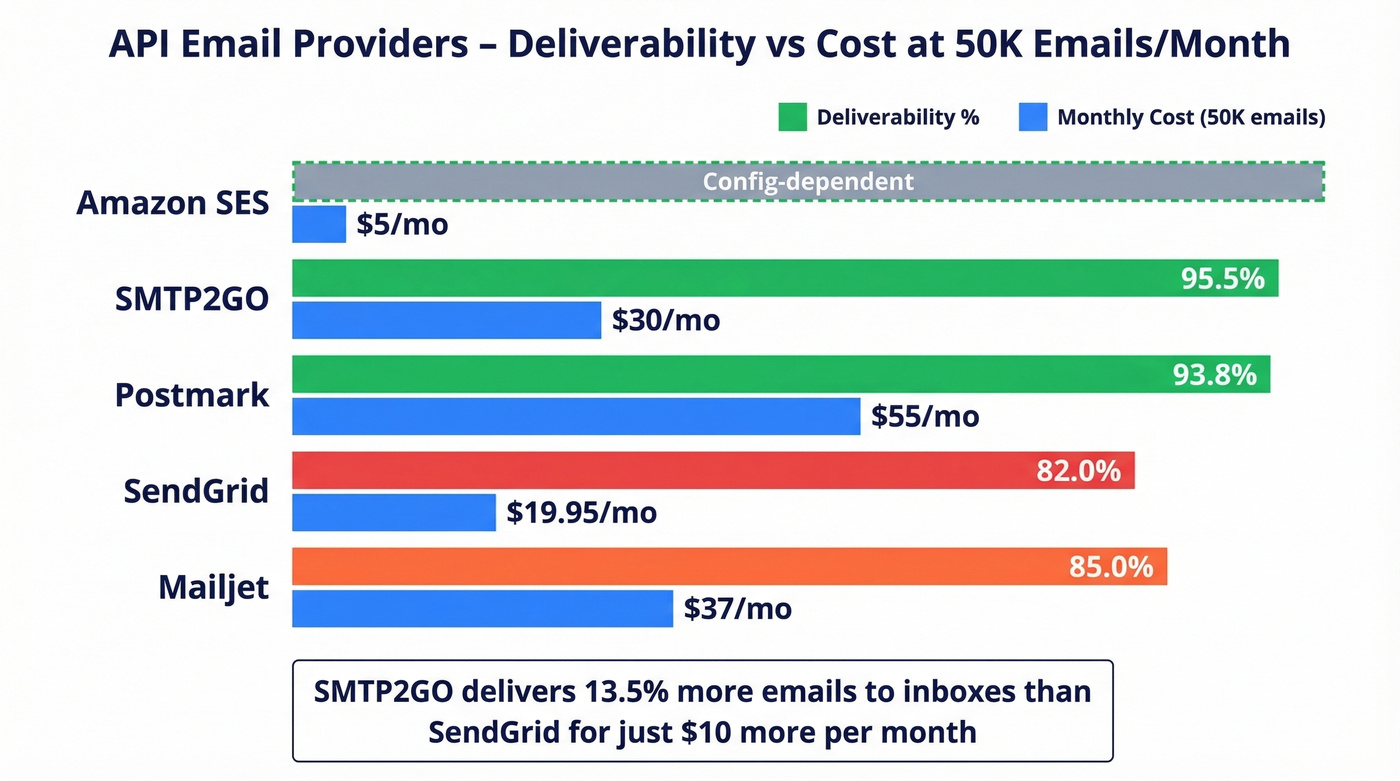
| Provider | Entry Plan | 50K/mo Cost | Deliverability |
|---|---|---|---|
| Amazon SES | $0.10 per 1,000 emails | $5 | Good (config-dependent) |
| SMTP2GO | $15 (10K/mo) | $30 | 95.5% |
| Postmark | $15 (10K/mo) | $55 | 93.8% |
| SendGrid | Free (100/day limit) | $19.95 | 82.0% |
| Mailjet | $17 (15K/mo) | $37 | 85.0% |
Amazon SES is the cheapest option at scale, but only if you have a developer to handle setup, authentication, and bounce processing. There's no drag-and-drop builder, no built-in analytics dashboard, and no hand-holding.
SMTP2GO hits 95.5% deliverability in EmailToolTester's benchmarks - meaningfully better than SendGrid's 82%. If inbox placement matters more than saving a few dollars per thousand, SMTP2GO or Postmark are the better picks.
Let's be honest: if your average deal size is under $5,000, you probably don't need an API-based provider at all. Brevo's paid plan at $9/mo handles most use cases, and the hours you'd spend configuring SES are better spent writing better emails.

You just read that stale lists destroy sender reputation faster than anything else. Prospeo's 5-step verification catches spam traps, honeypots, and catch-all domains before they tank your deliverability. 98% email accuracy, refreshed every 7 days - not the 6-week industry average.
Clean your list before you hit send. Bounces don't forgive.
Sending Limits Cheat Sheet
These are the numbers that matter before you pick a method:
| Provider | Daily Limit | Per Message | Notes |
|---|---|---|---|
| Gmail Free | 500/day | 500 recipients | Rolling 24hr window |
| Google Workspace | 2,000/day | 500 external | 10K total recipients/day |
| Outlook.com Free | 300/day | 100 recipients | 20 messages/min cap |
| Microsoft 365 | 5,000/day | 500 recipients | 1,000 non-relationship |
Gmail doesn't warn you until you've already hit the limit and your account is temporarily suspended. You'll get an error on your next send and have to wait it out.
Verify Your List Before Sending
Every ESP guide tells you to "clean your list." None of them explain what that actually means in practice.
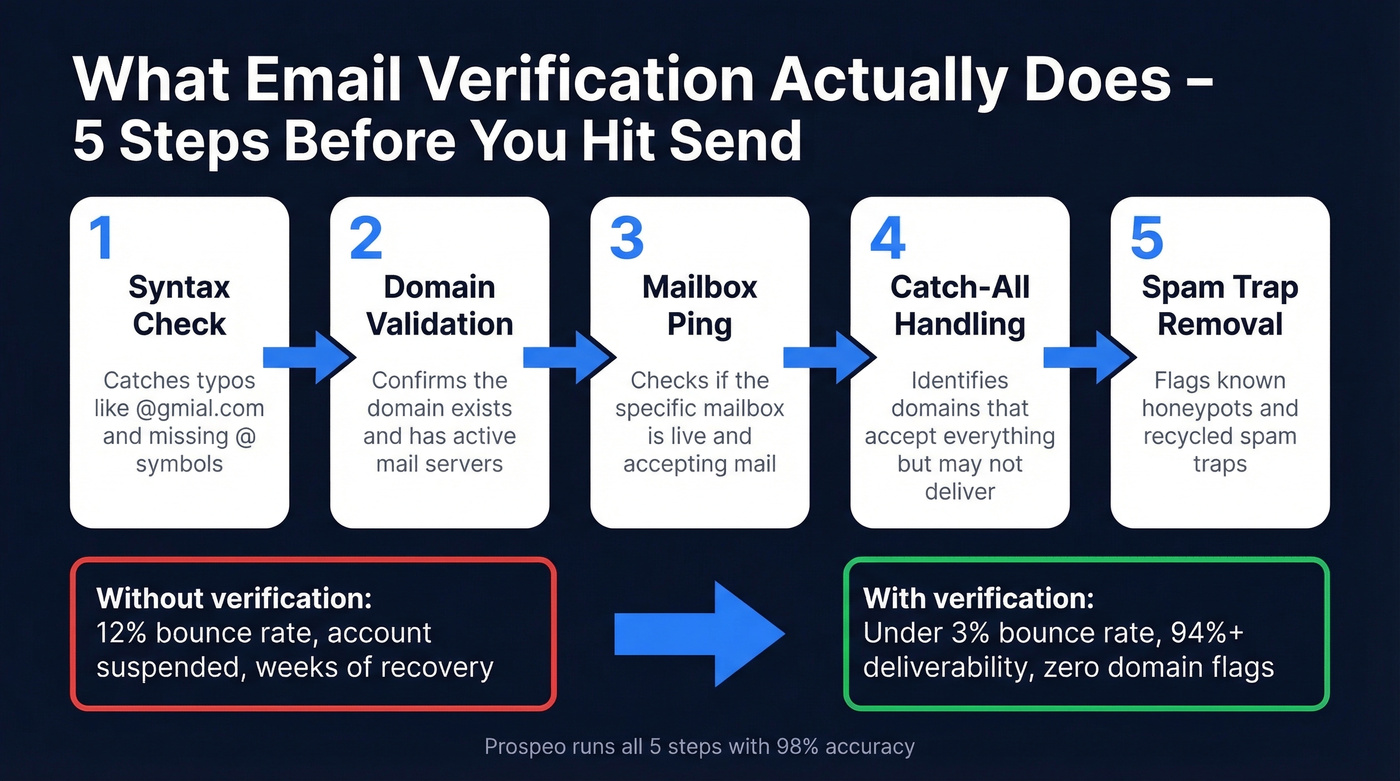
When you skip verification, bounced emails spike your bounce rate above 2-3%, your ESP flags your account, and your sender reputation takes damage that can take weeks to recover. If you're emailing a list you haven't touched in six months, expect 15-30% of those addresses to be dead. We've seen teams lose weeks of sending capacity from a single unverified blast - one agency we talked to had their entire Brevo account suspended after a 4,000-email send with a 12% bounce rate.
Prospeo's email verification runs every address through a 5-step process: syntax check, domain validation, mailbox ping, catch-all handling, and spam-trap removal. The result is 98% email accuracy, which is the difference between a clean send and a reputation disaster. Stack Optimize used Prospeo to maintain 94%+ deliverability and under 3% bounce rates across all their client campaigns - zero domain flags.

Upload a CSV, verify in bulk, and export the clean list. The free tier gives you 75 verifications per month - enough to test the workflow before committing.
The best ESP in the world can't save a bad list. Prospeo verifies 143M+ emails with proprietary infrastructure - no third-party providers, no recycled data. At $0.01 per email, verification costs less than a single bounced message costs your domain reputation.
Stop paying for sends that never reach an inbox.
Deliverability Best Practices
Getting your email delivered isn't just about choosing the right tool. These fundamentals determine whether your messages hit the inbox or the spam folder.
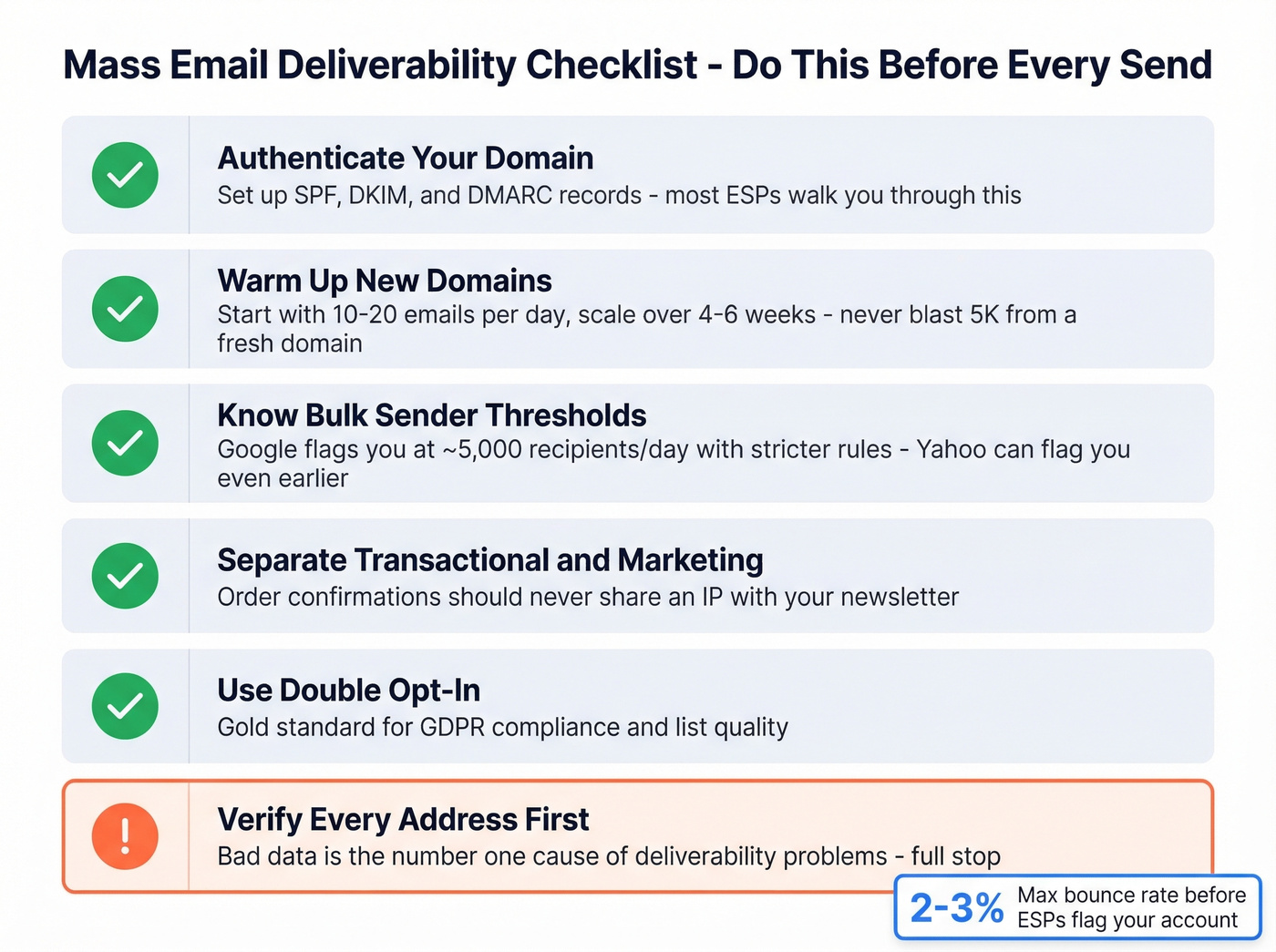
Authenticate your domain. Set up SPF, DKIM, and DMARC records. Most ESPs walk you through this - don't skip it. (If you want to go deeper, start with SPF and DMARC.)
Warm up new domains and IPs. Start with 10-20 emails per day and scale gradually over 4-6 weeks. Blasting 5,000 emails from a fresh domain is the fastest way to land in spam. If you're trying to systematize this, track your email velocity.
Know the bulk sender thresholds. Google classifies you as a bulk sender at ~5,000 recipients per day, which triggers stricter authentication and unsubscribe requirements. Yahoo doesn't publish a hard cutoff - they can classify you as a bulk sender at lower volumes based on sending patterns. (More detail: bulk email threshold.)
Separate transactional and marketing streams. Your order confirmations shouldn't share an IP with your newsletter. Brevo, Postmark, and Mailtrap all support this natively. If you're building this out, consider a dedicated tracking domain.
Use double opt-in where possible. It's the gold standard for GDPR compliance and dramatically improves list quality. And before any of this: verify every address. Bad data is the number one cause of deliverability problems, full stop. If you're troubleshooting, use email reputation tools to spot issues early.
Legal Compliance
Mass email isn't illegal. Mass email without compliance is. The penalties are severe enough that this section isn't optional reading.
CAN-SPAM (US) applies to all commercial messages, including B2B. The FTC requires accurate headers, non-deceptive subject lines, clear ad identification, a valid physical postal address, a working unsubscribe mechanism, and opt-out requests honored within 10 business days.
The penalty: up to $53,088 per email in violation. A 5,000-email blast with a missing unsubscribe link is a $265 million liability.
GDPR (EU) is stricter. It requires explicit opt-in consent before the first marketing email. Fines run up to EUR 20M or 4% of global revenue, whichever is higher. If you're emailing anyone in the EU, GDPR applies regardless of where your company is based.
| Requirement | CAN-SPAM | GDPR |
|---|---|---|
| Consent model | Opt-out | Opt-in (explicit) |
| Unsubscribe | Required | Required |
| Physical address | Required | Not required |
| Max penalty | $53,088/email | EUR 20M or 4% revenue |
The consensus on r/coldemail is consistent: permission-based sending, never buying lists, and treating compliance as table stakes - not an afterthought. (If you're unsure where the line is, see Is It Illegal to Buy Email Lists?.)
2026 Email Benchmarks
Before you send, know what "good" looks like. MailerLite's 2025 dataset - 3.6M campaigns across 181,000 accounts - gives us the best available benchmarks heading into 2026:
| Metric | Overall | E-commerce | Non-profits |
|---|---|---|---|
| Open rate | 43.46% | 32.67% | 52.38% |
| Click rate | 2.09% | 1.07% | 2.90% |
| Unsubscribe rate | 0.22% | - | - |
One caveat: Apple Mail Privacy Protection pre-loads tracking pixels, which inflates open rates. Real open rates are lower than these numbers suggest, but they're still useful for relative comparison across industries and campaigns.
Pre-Send Checklist
Run through this before every bulk send:
- Verify your list - remove invalid, catch-all, and spam-trap addresses
- Authenticate your domain - SPF, DKIM, and DMARC all configured
- Check compliance - unsubscribe link present, physical address included
- Warm up if it's a new domain or IP - start at 10-20/day, scale over weeks
- Segment your audience - don't send the same message to your entire list
- Personalize subject line and body - at minimum, first name and company (use these email subject lines examples if you need ideas)
- Test rendering on multiple email clients - Gmail, Outlook, and Apple Mail all render differently
- Schedule smart - Tuesday through Thursday mornings tend to perform best
- Monitor bounces and spam complaints within the first hour after sending
- Clean non-engagers after 90 days - they're dragging down your deliverability
FAQ
How many emails can I send from Gmail for free?
Gmail free accounts allow 500 emails per day on a rolling 24-hour window. Google Workspace increases that to 2,000 per day but caps external recipients at 500 per message. Exceeding either limit triggers a temporary suspension with no advance warning.
Is it legal to send mass email?
Yes, if you follow CAN-SPAM (US) or GDPR (EU). CAN-SPAM requires an unsubscribe link, physical address, and accurate headers - it's an opt-out model. GDPR requires explicit opt-in consent before the first send. Penalties reach $53,088 per email under CAN-SPAM or EUR 20M under GDPR.
What's the cheapest bulk email provider?
Amazon SES at $0.10 per 1,000 emails is the cheapest at scale, but it requires developer setup. For non-technical users, Brevo's free plan (300 emails/day) or Sender's free tier (15,000/month) are the best starting points - real ESP infrastructure at zero cost.
How do I send bulk email without landing in spam?
Verify your list first to remove dead addresses and spam traps. Then choose a dedicated ESP instead of Gmail's BCC field, authenticate your domain with SPF, DKIM, and DMARC, and warm up gradually on new domains. A clean list on basic infrastructure outperforms a dirty list on the best platform every time.