

Blacklisted by UCEPROTECTL3? Here's What Actually Matters
It's 9 PM. You ran a routine MXToolbox check, and there it is - a red flag screaming that your IP is blacklisted by UCEPROTECTL3. Your stomach drops. You start Googling. You find a site offering to delist you for a few hundred bucks.
Stop. Close that tab. Less than 0.001% of email volume goes to recipients that even use UCEPROTECT for filtering. For the vast majority of senders, this listing has zero measurable impact on deliverability. Let's walk through why, and what you should actually spend your time fixing instead.
The Short Version
- UCEPROTECTL3 almost certainly isn't causing your deliverability problems. Less than 0.001% of email volume goes to recipients that use it.
- Never pay for delisting. "Express delisting" starts around $100, and people have been quoted fees like 249 CHF (~$280), with no guarantee against relisting. Comcast Business refuses to work with them.
- The real fix: check your authentication (SPF/DKIM/DMARC), clean your contact data, and monitor the blacklists that actually matter - Spamhaus and Barracuda.
What UCEPROTECTL3 Actually Is
UCEPROTECT operates three blacklist levels, and understanding the difference matters.
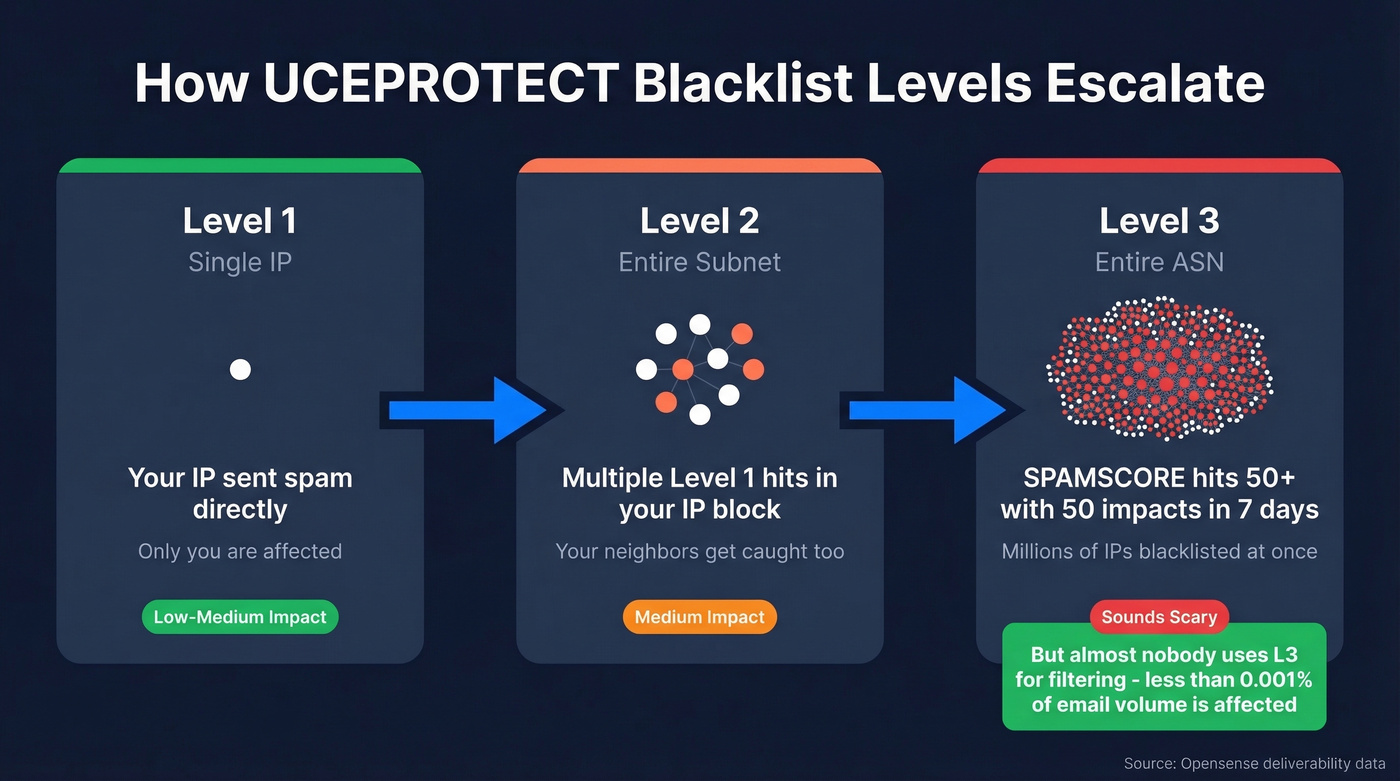
Level 1 lists individual IPs that sent spam. Level 2 escalates to entire IP allocations (subnets) when enough Level 1 listings accumulate. Level 3 is the nuclear option - it blacklists every single IP assigned to an entire Autonomous System Number (ASN), which can mean millions of addresses punished for the behavior of a handful.
The Level 3 trigger mechanics work like this: once an ASN's SPAMSCORE hits 50 or higher, with at least 50 Level 1 "impacts" in the past 7 days, every IP under that ASN gets listed. The definition of "impact" remains vague - even hosting providers can't pin it down. One case documented by Sucuri showed UCEPROTECT blocking over 2.4 million IP addresses from a single provider based on complaints about fewer than 1,000 addresses. Sysadmins on Reddit have reported seeing /9 and /11 ranges blacklisted, catching millions of IPs across different subnets in the blast radius.
| Level | Scope | Trigger | Who's Affected | Real-World Severity |
|---|---|---|---|---|
| L1 | Single IP | Direct spam | Only that sender | Low-Medium |
| L2 | Subnet | Multiple L1 hits | Neighbors on same block | Medium |
| L3 | Entire ASN | SPAMSCORE >= 50, 50+ L1 impacts/7 days | Everyone on that provider | Very Low* |
*Very low because almost nobody uses L3 for filtering decisions.
Does It Actually Affect Deliverability?
Here's the thing: almost certainly not.
Gmail, Outlook, and Yahoo don't reference UCEPROTECT for filtering decisions. Opensense's deliverability monitoring found that less than 0.001% of their email volume routes to recipients that rely on UCEPROTECT in their filtering stack. No measurable deliverability failures have been linked to UCEPROTECT listings in their data.
MailReach reports that across hundreds of customers listed on UCEPROTECTL3, 99% saw zero impact on deliverability. The providers most commonly listed - Namecheap, DigitalOcean, OVH - keep sending mail just fine. In our experience, the senders who panic most about this listing are the ones with the cleanest setups. The tiny minority of gateways that still query UCEPROTECTL3 tend to be self-hosted corporate mail servers or small regional providers with outdated configurations.
The One Exception: Microsoft Alerts
This is where it gets confusing. At least one MS365 user has reported receiving a Microsoft-originated alert about a UCEPROTECTL3 listing. Microsoft can surface UCEPROTECT in diagnostic tooling, which understandably triggers panic. But surfacing a listing in diagnostics isn't the same as using it for filtering. Microsoft's actual spam filtering relies on its own reputation systems. If you see this alert, note it and move on to the checks that matter.

UCEPROTECTL3 isn't killing your deliverability - bad contact data is. Prospeo's 5-step email verification delivers 98% accuracy, keeping bounce rates under 4%. That's the fix that actually moves the needle.
Clean data beats blacklist panic every single time.
The Controversy Around UCEPROTECT
Let's be direct: the consensus on r/sysadmin is that UCEPROTECT is a scam. One post frames it plainly - UCEPROTECT "lists entire IP ranges" and then "charges money to get delisted." The ASN attribution can be flat-out wrong, and the listings exist to pressure payment.
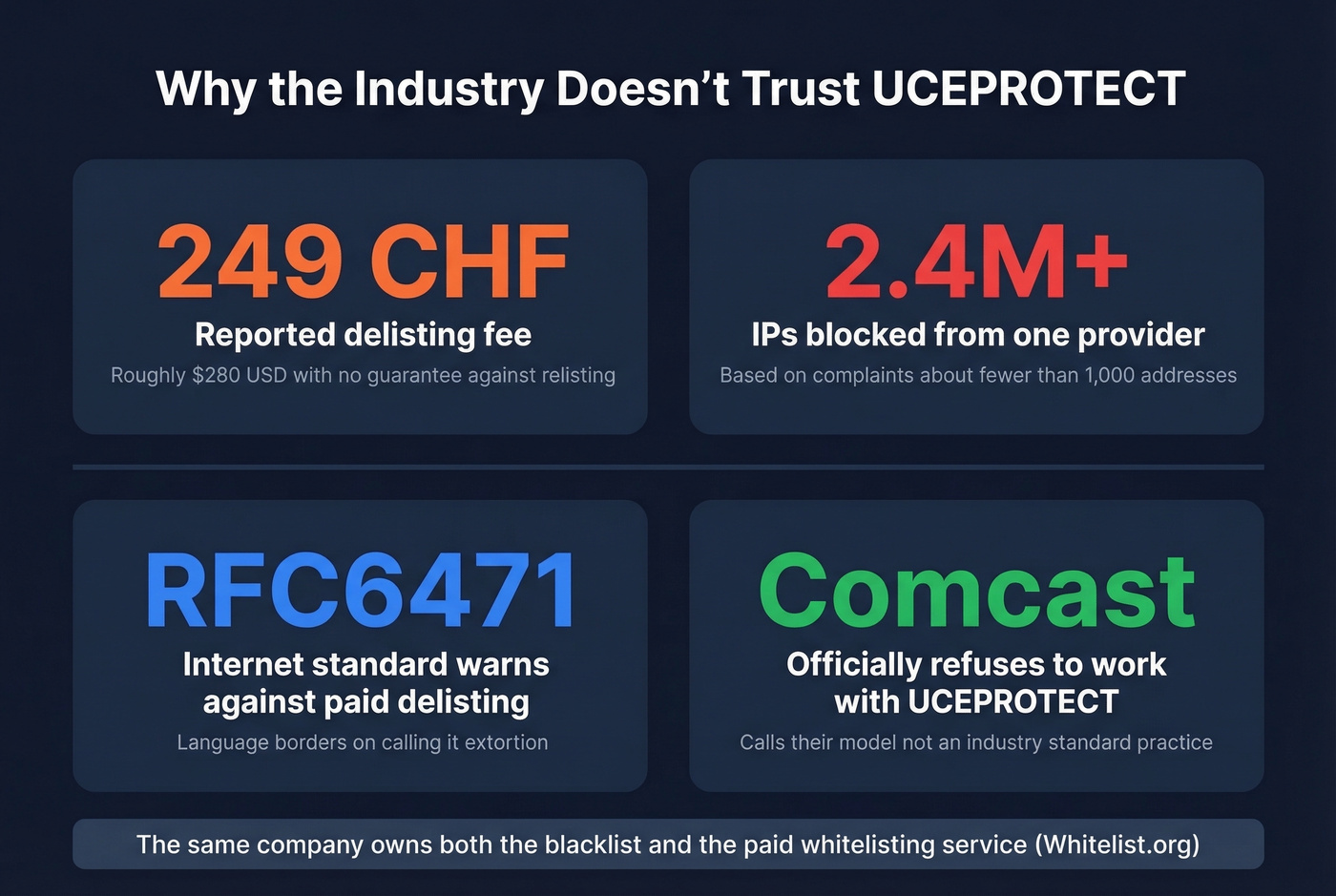
This isn't just Reddit venting. Comcast Business has an official policy refusing to work with UCEPROTECT. Their stated reasons are damning: UCEPROTECT won't explain why an IP is listed unless Comcast pays a monthly fee, charges for manual removal with no guarantee against relisting, and these models are "not an industry standard practice." Comcast calls UCEPROTECT "the only RBL provider" requiring payment for these services.
RFC6471 - the internet standards document on responsible blacklist operation - explicitly warns against paid delisting models, with language that borders on calling them extortion. Digital Pacific warns that Whitelist.org, which offers paid whitelisting, is owned by the same company as UCEPROTECT. A blacklist operator that also sells the cure tells you everything you need to know.
Should You Pay for Delisting?
No. The math doesn't work.
"Express delisting" starts at roughly $100 USD, with reports of fees hitting 249 CHF (~$280). There's no guarantee against relisting - you could pay today and be back on the list next week. Listings auto-expire after 7 days with no new spam activity. The free solution is just waiting.
The only scenario where paying even crosses the threshold of consideration is if you're losing a specific, high-value customer whose mail server actively queries UCEPROTECTL3 and you can't wait 7 days. We've never actually seen this happen in practice.
What to Actually Do
Follow this decision tree when MXToolbox flags a UCEPROTECTL3 listing:
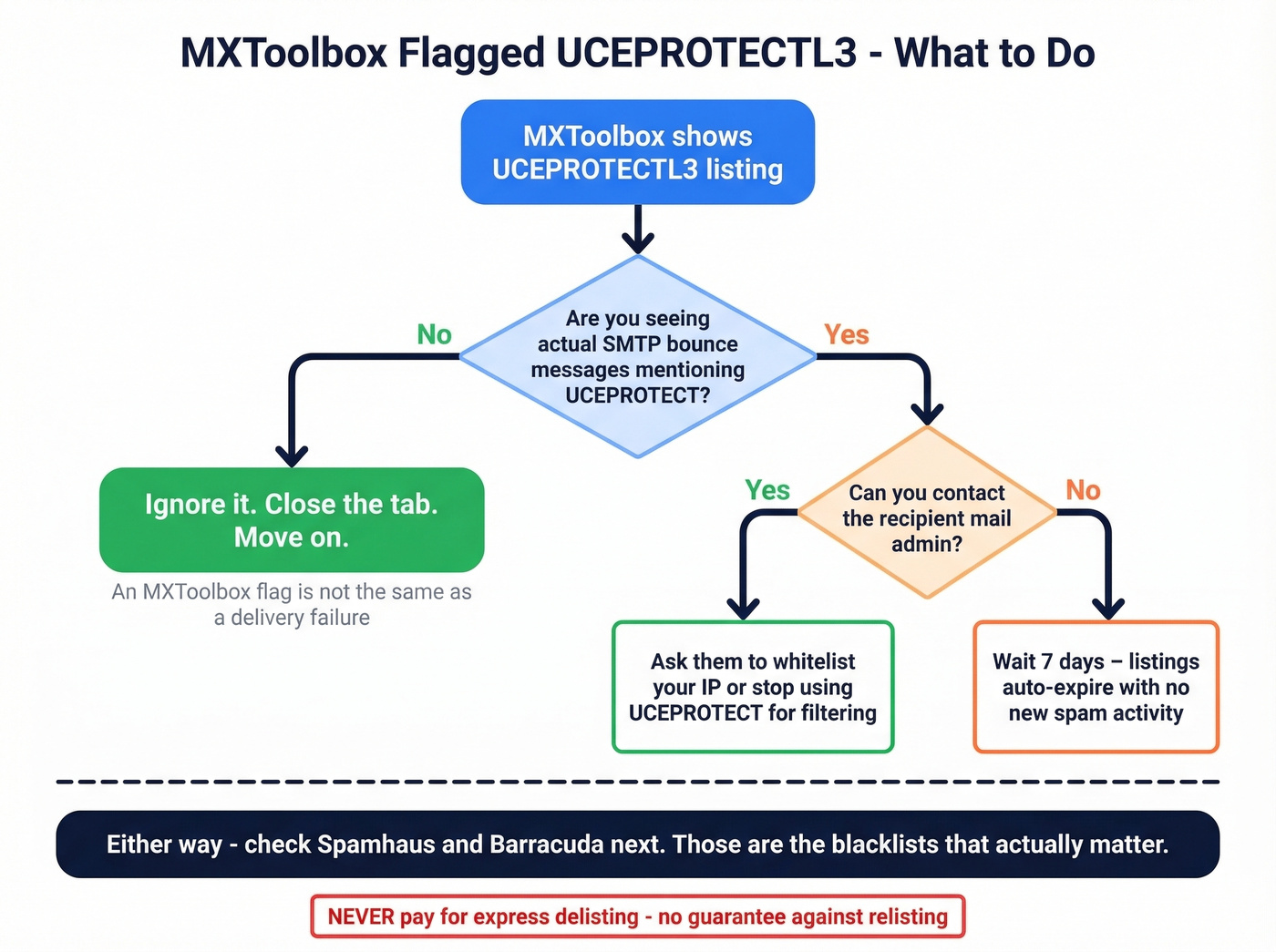
Check for actual SMTP bounces. Search your mail logs or bounce reports for any rejection message that specifically mentions UCEPROTECT. An MXToolbox flag isn't the same as a delivery failure.
No bounces? Ignore it. Seriously. Close the tab. Move on with your life.
Bounces exist? Contact the recipient's mail admin and ask them to whitelist your IP or stop using UCEPROTECT for filtering. This is the remediation Comcast recommends.
Check the blacklists that actually matter. Spamhaus and Barracuda are widely used by corporate gateways and worth monitoring. If you're clean on those, your deliverability problem is somewhere else.
For diagnostics, MXToolbox is the easiest starting point. MultiRBL gives the most thorough multi-list check. UCEPROTECT's own lookup tool shows level-specific detail if you need it.
How to Prevent Future Blacklisting
The irony of UCEPROTECTL3 panic is that it distracts from the things that actually tank your deliverability. With spam accounting for 47.27% of global email traffic, mailbox providers are aggressive about penalizing senders with poor hygiene. Focus here instead.
Fix Your Authentication
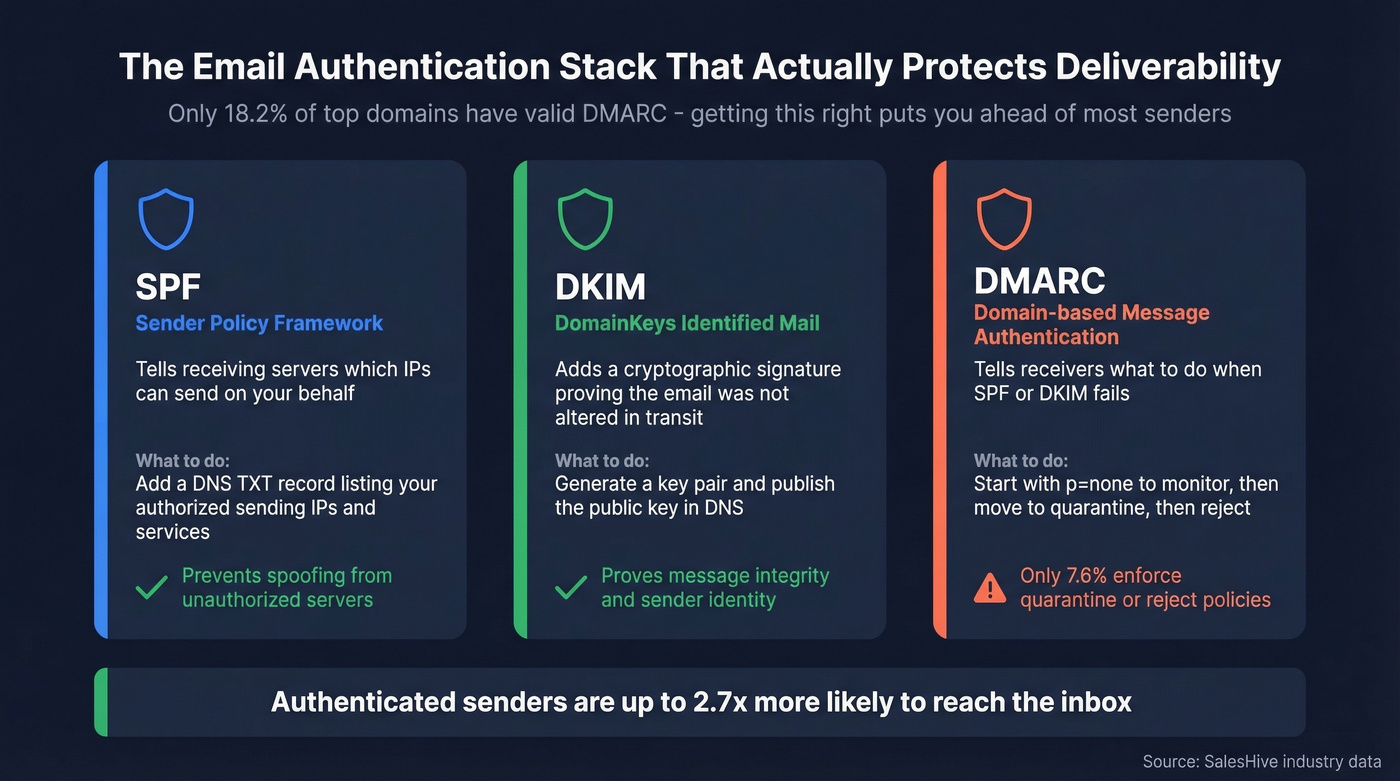
SPF, DKIM, and DMARC are table stakes in 2026, yet only about 18.2% of the top 10 million domains have valid DMARC - and just 7.6% enforce quarantine or reject policies. That's a shockingly low bar, which means getting this right puts you ahead of most senders immediately. Start with p=none to monitor, then escalate to quarantine and eventually reject as you confirm legitimate mail is passing. Make sure your rDNS/PTR records align with your sending domain. Industry data shows authenticated senders are up to 2.7x more likely to reach the inbox.
If you want a quick checklist, start with SPF, then confirm DKIM, and finally tighten DMARC alignment.
Clean Your Contact Data
High bounce rates from stale or unverified emails are a direct contributor to the spam signals that trigger blacklist listings in the first place. Every bounced email tells mailbox providers you don't maintain your lists. Enough of those signals, and you end up on the blacklists that actually matter.
We've seen teams drop bounce rates from 35% to under 4% just by running verification before a campaign. Prospeo's email verification runs a 5-step process with catch-all handling, spam-trap removal, and honeypot filtering - targeting exactly the signals that trigger listings. The free tier gives you 75 email verifications per month to test it, and bulk CSV upload makes it easy to clean an existing list in minutes.
If you're troubleshooting list quality, it also helps to understand your email bounce rate and how it ties into sender reputation.

Monitor What Matters
Set up Gmail Postmaster Tools for your domain - it's free and shows your reputation in real time. Microsoft SNDS does the same for Outlook. Check Spamhaus and Barracuda periodically. These are the systems that can materially affect whether your emails land.
If your deal sizes are under $15k and you're sending fewer than 500 emails a day, you'll never need to think about UCEPROTECT again. Nail your authentication, verify your list, keep cold outbound under 30-50 emails per day per mailbox once it's warmed up (see email velocity), and you'll avoid the blacklists that actually matter - not just the ones that try to scare you into paying.
The real deliverability killer isn't a blacklist that 0.001% of recipients use - it's sending to unverified addresses that trigger spam traps and honeypots. Prospeo removes both before you ever hit send, with a 7-day data refresh cycle that keeps every record current.
Protect your sender reputation at the source for $0.01 per email.
FAQ
How long does a UCEPROTECTL3 listing last?
Listings auto-expire after 7 days with no new spam activity from the ASN. Paid "express delisting" exists but comes with no guarantee against relisting. Waiting is free and equally effective.
Can UCEPROTECTL3 block my emails to Gmail or Outlook?
No. Gmail, Outlook, and Yahoo don't reference UCEPROTECT for filtering decisions. Less than 0.001% of email volume goes to recipients that use it. Check Spamhaus and Barracuda first - those are widely used and can affect real delivery outcomes.
What's the fastest way to reduce bounce rates and avoid blacklists?
Verify your email list before every campaign. Pair verification with proper SPF/DKIM/DMARC authentication, and you've addressed the two root causes of most blacklisting. Tools like Prospeo catch spam traps and honeypots during verification, which are the specific signals that get IPs flagged.
Is UCEPROTECT a legitimate blacklist or a scam?
Most sysadmins and major ISPs treat it as unreliable. Comcast Business officially refuses to work with UCEPROTECT, citing paid-delisting practices that violate industry norms outlined in RFC6471. The same company also operates Whitelist.org, selling paid whitelisting - a clear conflict of interest.