

Boomerang vs Calendly: Different Tools, Different Problems
You sent a Calendly link to a prospect last Tuesday. The conversation was warm - they'd replied twice in an hour. Then the link went out, and silence. No booking, no reply, nothing.
One r/sales thread nails it: conversations die the moment a scheduling link appears. That's the moment most people start weighing Boomerang vs Calendly - and wondering if there's a better way.
Here's the thing: these two tools aren't really competing. They solve different problems, and picking the wrong one wastes more time than it saves.
30-Second Verdict
Use Boomerang if you live in Gmail and want scheduling, send-later, conditional follow-ups, and inbox pause in one extension.
Use Calendly if you need scheduling infrastructure for a team - routing forms, round-robin, managed events, and 100+ integrations.
They're Not the Same Product
Boomerang is a Swiss Army knife for your inbox. It started as an email productivity tool - send later, snooze messages, get reminders when someone doesn't reply - and added meeting scheduling on top. If you're a solo operator who lives in Gmail, it's genuinely hard to beat.
If you're building a repeatable outbound motion, pair scheduling with sales prospecting techniques that keep conversations moving.
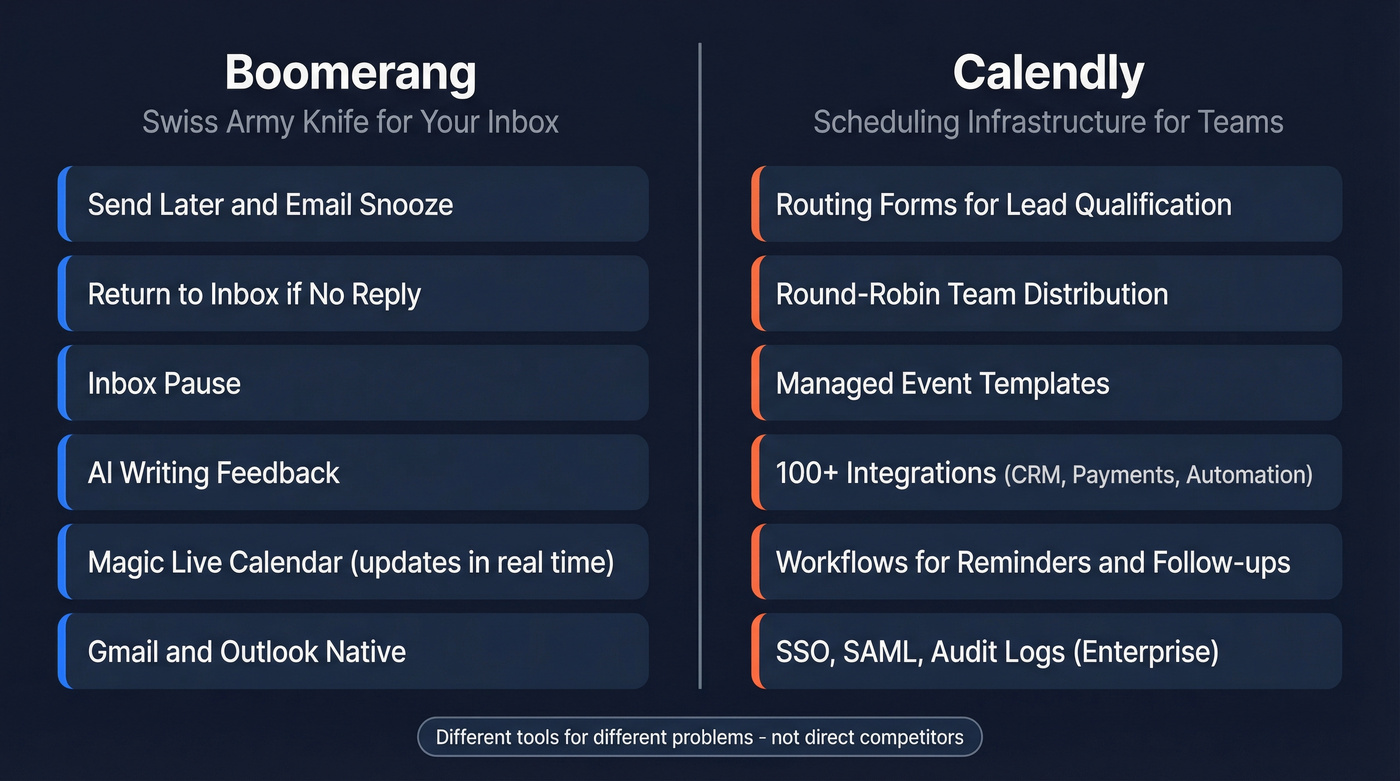
Calendly is a chef's knife. It does one thing - scheduling - with serious depth. Routing forms qualify leads before they book. Round-robin distributes meetings across a sales team. Managed event templates keep every rep's booking page on-brand. Over 100 integrations connect to CRMs, payment processors, and automation platforms. For teams that need scheduling as infrastructure rather than a nice-to-have, Calendly is the obvious pick.
If you're evaluating the CRM side of that stack, see examples of a CRM and how teams typically connect scheduling to pipeline.
Pricing Side-by-Side
Both tools offer free tiers, but what you get for free differs sharply.
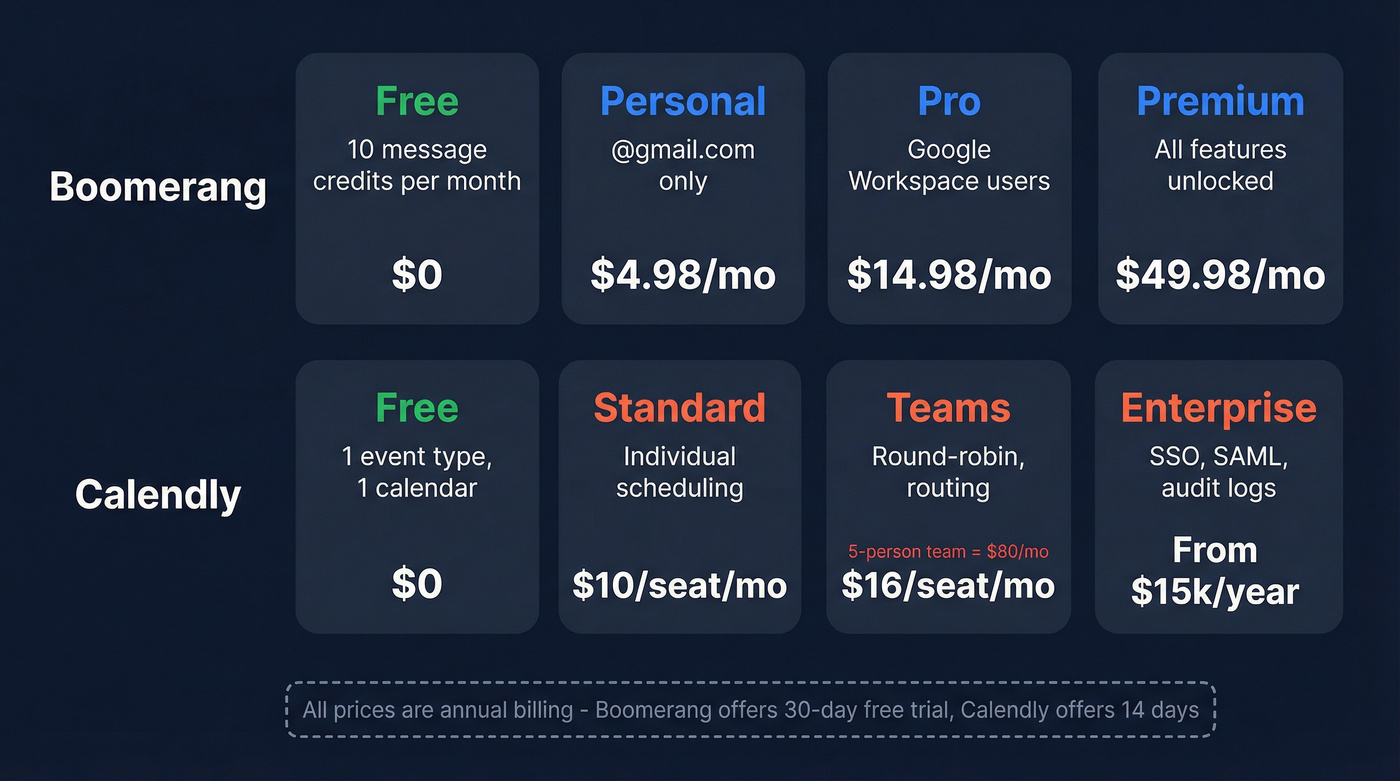
| Boomerang | Calendly | |
|---|---|---|
| Free | 10 message credits/mo | 1 event type, 1 calendar |
| Entry paid | $4.98/mo | $10/seat/mo |
| Mid-tier | $14.98/mo | $16/seat/mo |
| Top tier | $49.98/mo | From $15k/year |
All paid prices are annual billing. Boomerang's $4.98/mo Personal plan only works with @gmail.com addresses - Google Workspace users need Pro at $14.98/mo. Calendly's per-seat pricing adds up fast: a 5-person team on Teams runs $80/mo billed yearly. Boomerang offers a 30-day free trial with no credit card; Calendly gives you 14 days before downgrading.
For enterprise buyers, this isn't close. Calendly has a real enterprise tier with SSO, SAML, audit logs, and domain control. Boomerang doesn't play in that space.
If you're trying to quantify the hidden cost of bounces and wasted seats, start with email bounce rate benchmarks and fixes.

Boomerang and Calendly both assume your prospect's email is real. If 20% of your list is outdated, no embedded calendar or booking link will save you. Prospeo refreshes data every 7 days - not every 6 weeks - so your outreach actually lands.
Fix your data before you fix your scheduling flow.
Key Differentiators
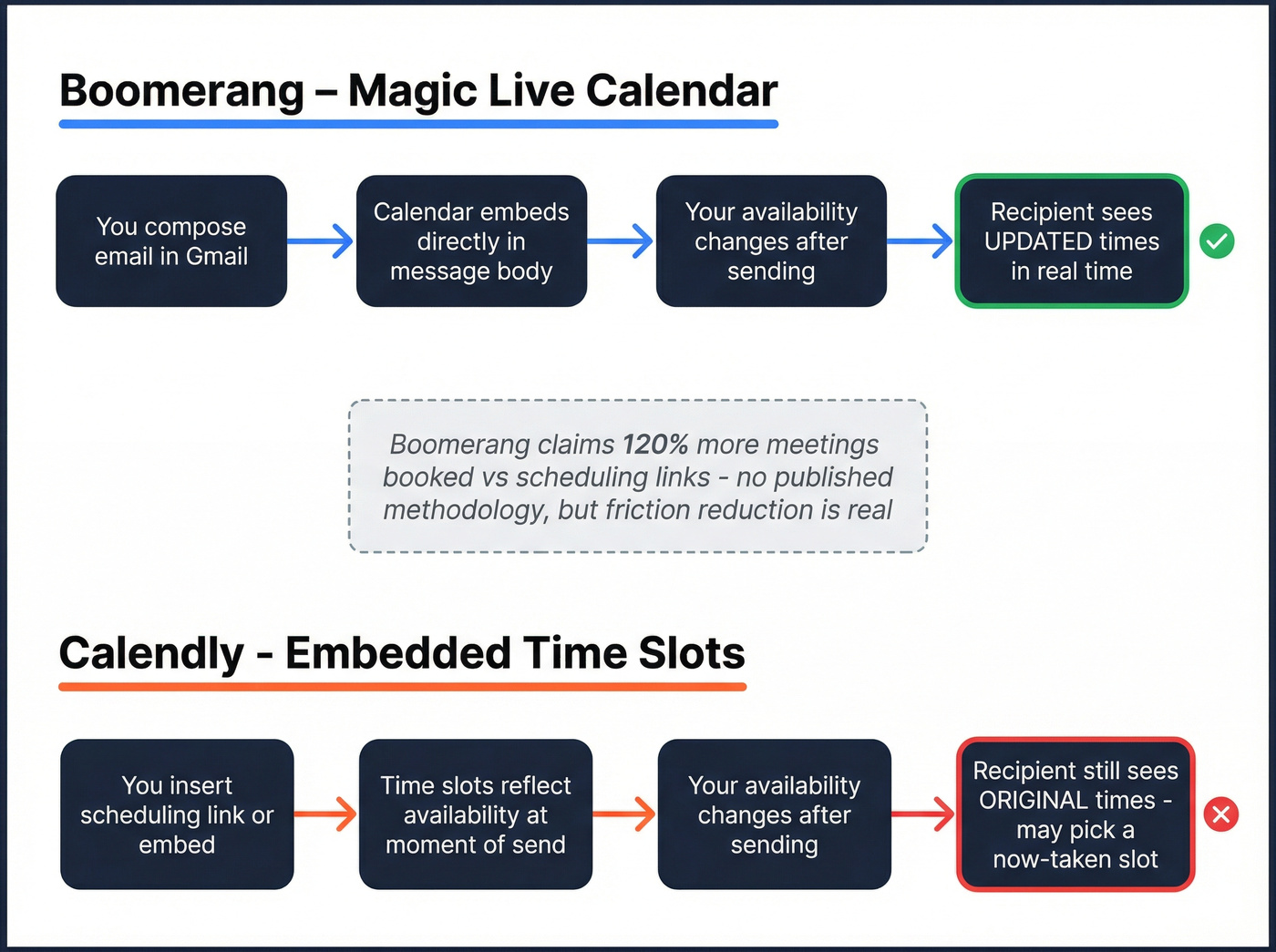
Boomerang's edge: everything inside the email. Its Magic Live Calendar embeds an interactive, always-current calendar directly in the message body - recipients pick a time without leaving their inbox. Boomerang claims 120% more meetings booked versus a scheduling link. No methodology published, but in our testing, the friction reduction is real. People who won't click a Calendly link will tap a time slot sitting right in front of them.
If your follow-ups are the real bottleneck, use proven sales follow-up templates instead of relying on a link to do the work.
Skip Boomerang if you need deep integrations. Its ecosystem is a fraction of Calendly's 100+ connectors.
Calendly's edge: team-scale scheduling. Routing forms qualify leads before they see a booking page. Round-robin distributes meetings evenly. Workflows automate reminders and follow-ups. This is scheduling infrastructure, not a browser extension.
Skip Calendly if you want email productivity. It doesn't touch send-later, inbox pause, conditional follow-ups, or AI writing feedback. Those are the features that make users on r/degoogleyourlife describe themselves as "completely dependent" on Boomerang.
One misconception worth clearing up: Calendly does offer clickable time slots you can embed in emails. The difference is Boomerang's embedded calendar stays up to date if your availability changes after you hit send. Calendly's embedded slots reflect availability at the moment of send.
If you're sending cold outreach at scale, align scheduling with email deliverability basics so your invites actually get seen.
What Users Actually Say
Boomerang - 4.6/5 on G2 across 420 reviews. Users love the Gmail integration and send-later workflows. The "return to inbox if no reply" feature creates genuine dependency. Complaints cluster around the 10-credit monthly limit on the free tier, some recipient hesitation around clicking "Suggest Times," and a mobile app that comes up as a recurring weakness.
Calendly - 4.7/5 on G2 with 2,562 reviews. The integration ecosystem is the top-cited strength, and teams praise routing and round-robin as genuine time-savers. The biggest frustration we've seen surface repeatedly: Calendly handles multiple hosts OR multiple attendees, but not both simultaneously. Need a panel interview with three interviewers and two candidates? You'll hit a wall.
Let's be honest about something: Calendly link fatigue is a real phenomenon, but the fix isn't switching to Boomerang. It's writing better emails. An embedded calendar in a bad cold email still gets ignored. The scheduling tool matters less than the message around it.
To tighten the message itself, borrow patterns from emails that get responses and test stronger email subject lines.
The Verdict - Which to Pick
- Solo Gmail power user - Boomerang. The email productivity suite alone justifies the cost; scheduling is a bonus.
- Sales team of 5+ - Calendly Teams. Round-robin, routing forms, and CRM integrations matter at scale.
- Budget-conscious - Either free tier works to start, but expect to upgrade within a month.
- Enterprise - Calendly. SSO/SAML, audit logs, and domain control are built into the Enterprise tier.
- Outlook-first team - Boomerang for Teams if you want a native Outlook add-in with collective availability and round robin; Calendly still wins on integration depth when you're already in HubSpot or Salesforce.
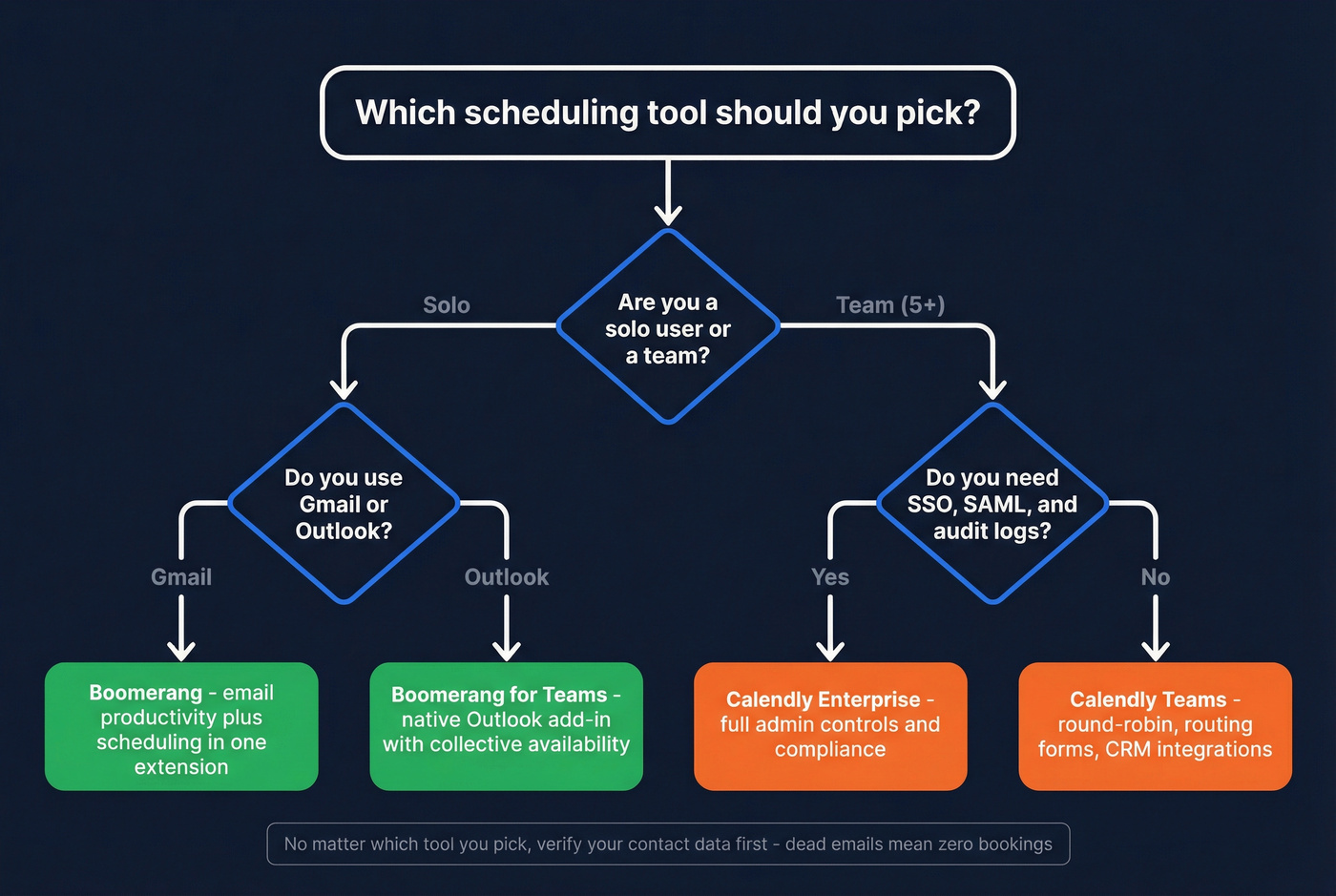
Boomerang vs Calendly isn't a head-to-head fight. They serve different workflows. Pick the one that matches yours.
The Step Before Scheduling
Scheduling tools assume your emails reach real people. We've seen teams spend months optimizing their booking flow when the actual problem was 20% of their emails bouncing before anyone saw the calendar link.

If your contact data is six months old, embedded calendars and booking links land in dead inboxes. One of our customers, Snyk, had bounce rates of 35-40% before switching to verified data - after cleaning their lists, bounces dropped below 5% and AE-sourced pipeline jumped 180%. Prospeo verifies emails in real time with 98% accuracy on a 7-day data refresh cycle. The free tier gives you 75 verifications per month - pair it with whichever scheduling tool you choose.
If you're comparing vendors, this roundup of data enrichment services can help you sanity-check refresh cycles and coverage.
Snyk's sales team had 35-40% bounce rates before switching to Prospeo. After: under 5% bounces and 180% more AE-sourced pipeline. At $0.01 per verified email, cleaning your list costs less than one wasted Calendly seat.
Stop paying per seat to schedule meetings that never happen.
FAQ
Can Boomerang replace Calendly?
Only for basic one-on-one scheduling. If you need routing forms, round-robin, team management, or 100+ integrations, Boomerang can't match Calendly's depth. They solve fundamentally different problems - one's an inbox productivity suite, the other is scheduling infrastructure.
Does Calendly embed time slots in emails like Boomerang?
Calendly offers clickable time-slot embeds via its scheduling links. The key difference: Boomerang's Magic Live Calendar updates in real time inside the sent message if your availability changes, while Calendly's embedded slots reflect availability at the moment of send.
How do I stop scheduling links from killing reply rates?
Verify your contact list before sending - teams using real-time verification typically cut bounce rates below 4%, which means more recipients actually see the booking page. Beyond data quality, embed time slots directly in the email body rather than sending a naked link, and make sure the message itself earns the click.