

Catchy Follow-Up Email Subject Lines That Actually Get Opened
Your SDR just sent 200 follow-ups with "Just checking in" as the subject line. Half the list bounced. The other half got deleted without opening. The subject line wasn't the only problem - but it was the first one.
Follow-ups generate 42% of all campaign replies. If you're writing catchy follow-up email subject lines that earn opens instead of trash-can clicks, the data is surprisingly clear on what works. Get them wrong and you're leaving nearly half your pipeline on the table.
What You Need (Quick Version)
Three patterns outperform everything else in follow-up emails:
- Questions - 46% open rate in a 5.5M-email study
- Personalized references - 46% opens vs. 35% without (+31% lift)
- 2-4 word subject lines - 46% opens (longer lines drop fast)
Aim for 41 characters or fewer as the safest universal target, especially on iPhone. Mobile truncation typically starts around 33-50 characters depending on the device and email client. And before you optimize a single word of copy, fix your email list. Bad data kills deliverability before anyone sees your subject line.
What 5.5 Million Emails Tell Us
A Belkins analysis of 5.5M emails gives us a clear picture of what works in B2B follow-ups. Personalization, brevity, and questions each independently hit 46% open rates.
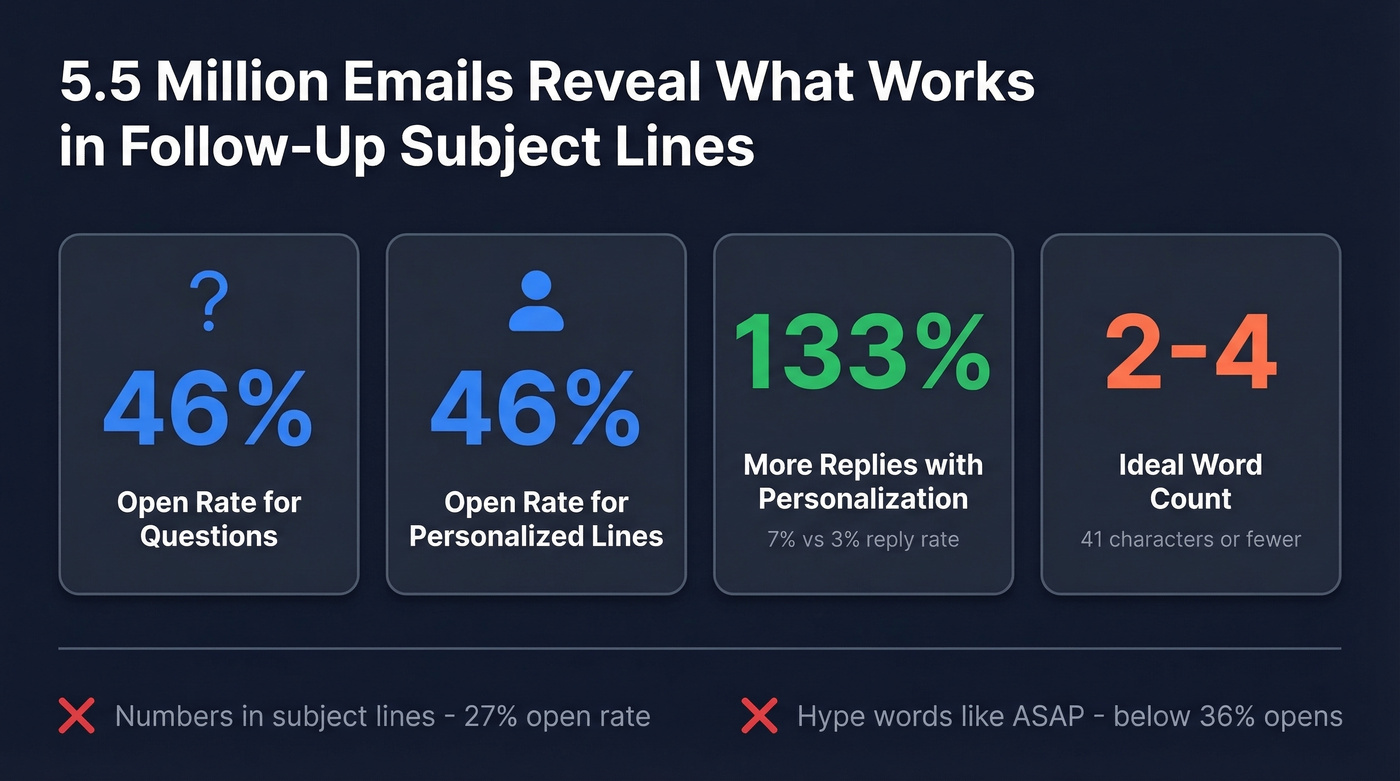
Numbers in subject lines slightly hurt performance (27% vs. 28% without). Marketing hype words like "ASAP" and generic greetings like "Hello, friend" pushed opens below 36%. Write like a colleague, not a marketer.
Short, Personal, and Curious
The ideal follow-up subject line is 2-4 words, includes something specific to the recipient, and is framed as a question. That's the trifecta. "Thoughts on [topic]?" hits all three. "Following Up On Our Previous Conversation Regarding Your Q3 Budget" hits none.
Reply rates tell the same story. Personalized subject lines pulled 7% replies vs. 3% without - a 133% lift. That's the difference between a pipeline and a dead sequence.
One thing most guides skip: preview text matters almost as much as the subject line. It's the second thing recipients see, and on mobile it often gets more screen real estate than the subject itself. Keep preview text to 35-40 characters, front-load your strongest hook, and never let it default to "View this email in your browser." If you want to test it properly, use a dedicated preview text A/B testing workflow.
Character Limits by Device
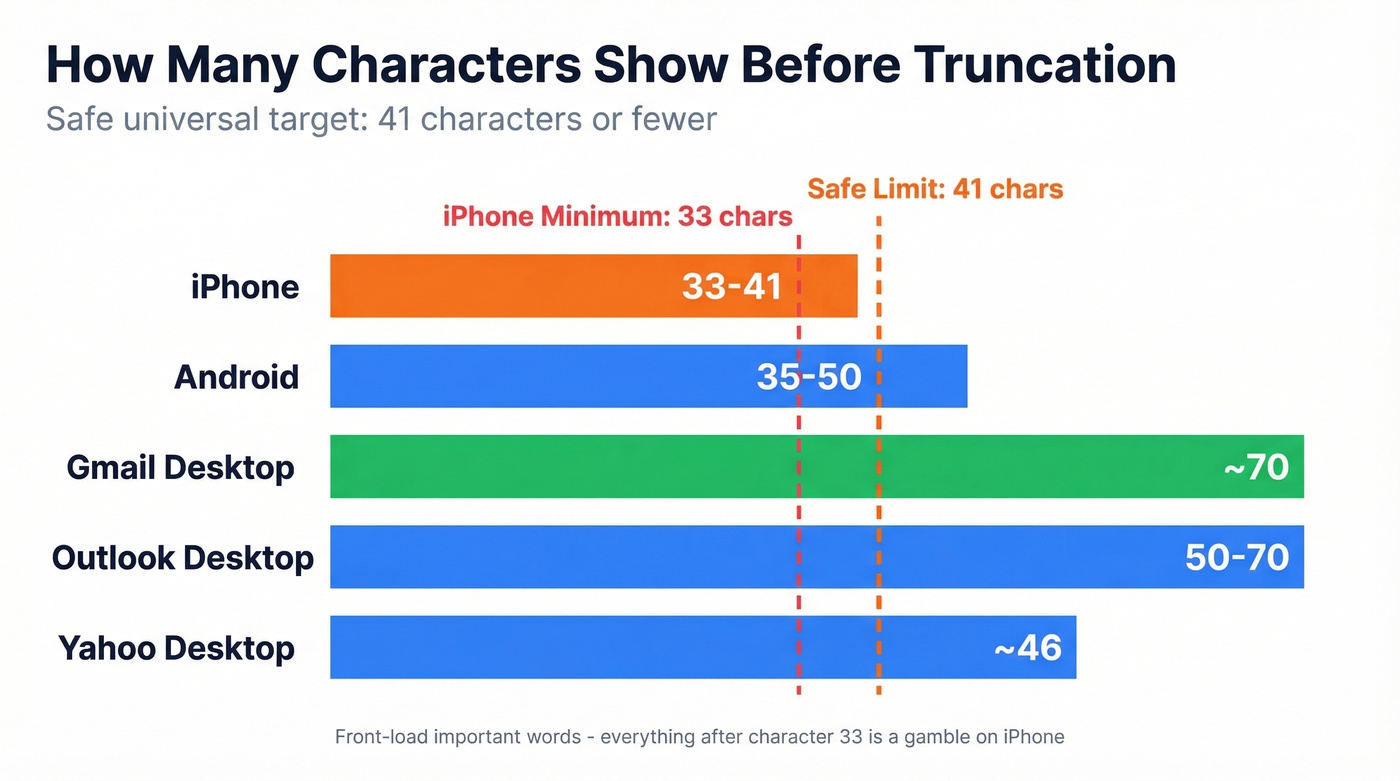
Your subject line gets cut off differently depending on where it's read. Here's the truncation breakdown from Twilio:
| Device / Client | Characters Shown |
|---|---|
| iPhone | 33-41 |
| Android | 35-50 |
| Gmail (desktop) | ~70 |
| Outlook (desktop) | 50-70 |
| Yahoo (desktop) | ~46 |
Safe universal target: 41 characters or fewer. Front-load the important words - everything after character 33 is a gamble on iPhone.
A quick note on open rate data: Apple Mail Privacy Protection pre-fetches tracking pixels, which inflates open rates for Apple Mail users. If a big chunk of your audience uses Apple devices, your real open rates are lower than your dashboard shows. Optimize for reply rate instead.
30 Follow-Up Subject Lines by Scenario
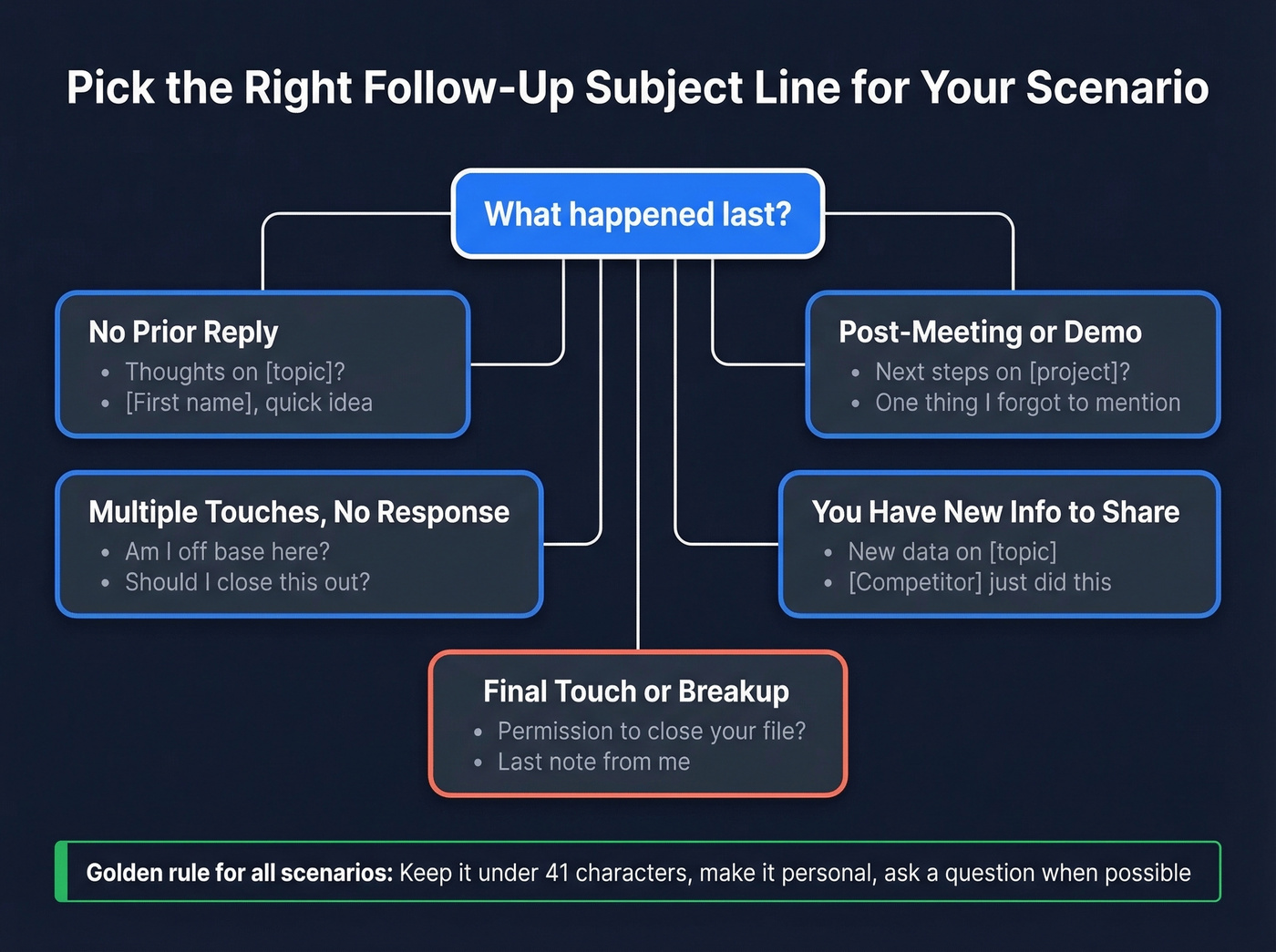
Every line below follows the data rules: short, personalized where possible, question-form when it fits. Swap the bracketed placeholders for real details. For more options, pull from these email subject line examples.
Cold Follow-Up (No Prior Reply)
These trigger curiosity - the recipient wonders what you know that they don't. If you need a full sequence, start with cold email follow-up templates.
- Thoughts on [topic]?
- [First name], quick idea
- Still relevant, [first name]?
- [Company] + [your company]?
- Worth revisiting?
Post-Meeting or Post-Demo
Specificity signals effort. Referencing something concrete from the conversation proves you were paying attention, not blasting a template. Pair these with a strong sales meeting follow-up email.
- Next steps on [project]?
- One thing I forgot to mention
- [First name], recap + next move
- The [metric] we discussed
- Ready to move on [initiative]?
No Response After Multiple Touches
These work because they shift the power dynamic. Instead of chasing, you're giving the prospect an easy out - which paradoxically makes them more likely to re-engage.
- Am I off base here?
- Wrong person, [first name]?
- Should I close this out?
- Did this slip through?
- [First name], still interested?
Value-Add Bump (New Info)
- New data on [topic]
- [Competitor] just did this
- Relevant for [company]?
- Found this - thought of you
- [Industry] benchmark update
Breakup / Final Touch
Loss aversion is the mechanism here. People respond to the threat of losing access more than the promise of gaining it.
- Closing the loop
- Last note from me
- Permission to close your file?
- One last thing, [first name]
- Not a fit right now?
Re-Engagement (Gone Cold)
- Things changed at [company]?
- [First name], been a while
- Still solving [pain point]?
- Quick update since we spoke
- [Company] still exploring this?

You just read that bad data kills deliverability before anyone sees your subject line. That's not hypothetical - 35% bounce rates destroy sender reputation and train spam filters to bury every follow-up you send. Prospeo's 5-step verification delivers 98% email accuracy with a 7-day refresh cycle, so your catchy subject lines actually reach real inboxes.
Stop perfecting subject lines for emails that bounce.
What NOT to Do
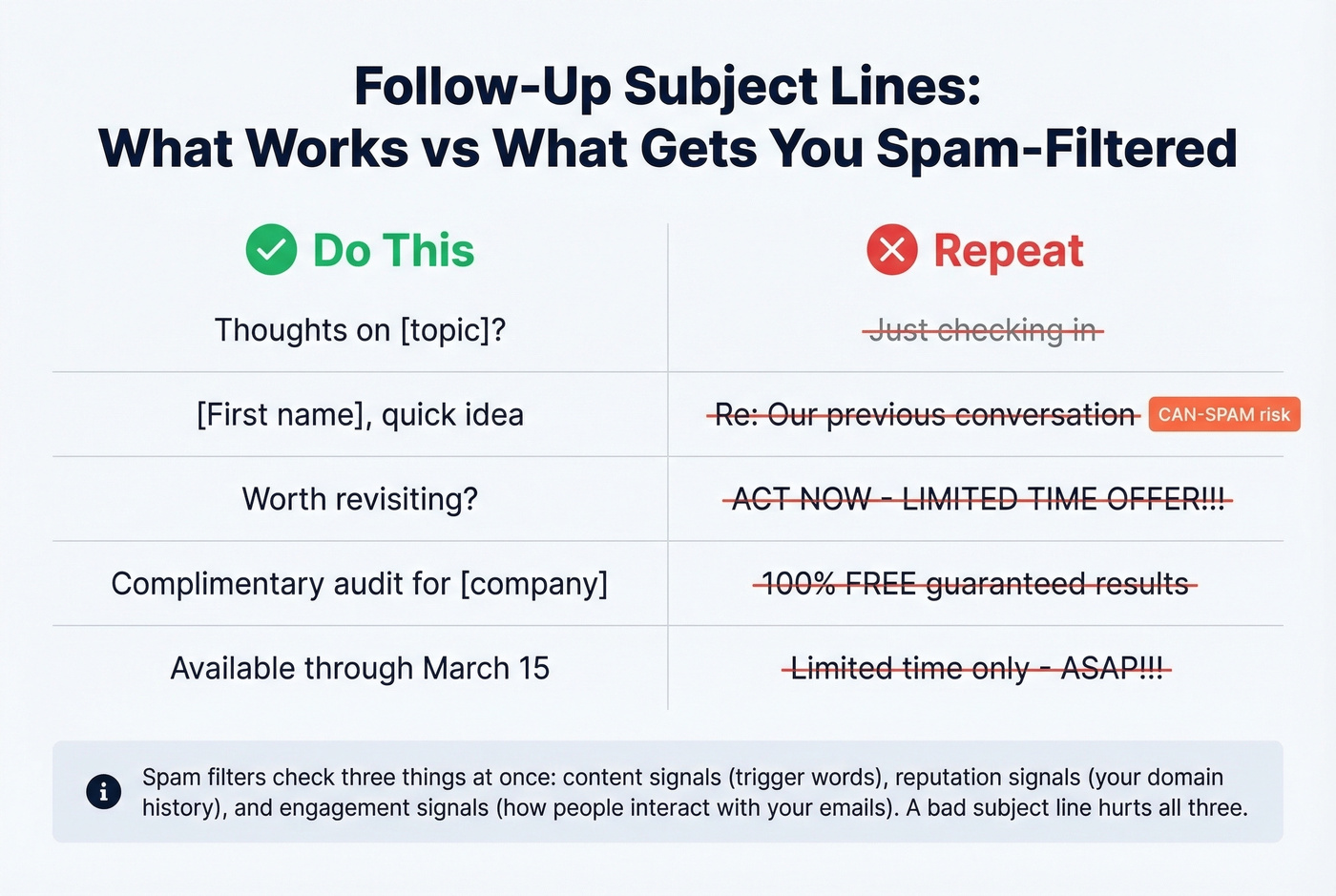
Fake "Re:" and "Fwd:" prefixes are the worst offender. They spike opens temporarily, but they violate CAN-SPAM's prohibition on misleading subject headings. Deceptive "looks like inbound" subjects tank trust the moment the recipient realizes the trick.
Here's the thing: if your deal sizes sit below five figures, you can't afford the reputation damage. Enterprise buyers have long memories and short patience. One fake "Re:" can blacklist you from an entire org.
Other patterns that hurt: ALL CAPS, excessive punctuation, urgency hype ("Act NOW before it's too late"), and vague openers like "Checking in" or "Touching base." Modern spam filters evaluate three signal categories simultaneously - content signals like spam-trigger words, reputation signals tied to your domain and IP history, and engagement signals based on how recipients interact with your emails. A bad subject line doesn't just lose opens. It trains the filter to deprioritize everything you send next. If you're troubleshooting this, start with an email deliverability guide and then tighten your sender reputation.
A few quick rewrites from Folderly's spam-trigger research:
"100% free"-> "complimentary""Limited time only"-> "available through [date]""Guaranteed results"-> "proven results from [customer]"
How to A/B Test Subject Lines
The biggest mistake we see teams make with A/B testing is changing too many variables at once, then drawing conclusions from noise.
Change one variable per test - subject line A vs. B, nothing else different. Send each variant to at least 250 contacts, ideally 500+. And optimize for positive reply rate, not opens. Opens are a vanity metric, especially with Apple Mail Privacy Protection inflating them artificially.
Consider turning off open tracking entirely. A Snov.io analysis of 44M emails found that disabling open tracking doubled reply rates from 1.08% to 2.36%. Tracking pixels hurt deliverability and inbox placement, so removing them can improve downstream engagement across the board. (If you want the technical why, see email tracking pixels.)
The industry benchmark for positive reply rate in cold email is around 4%. If you're hitting 5%+, you're outperforming. Below 2%? The problem is upstream of your copy - it's your list, your targeting, or your domain reputation.
When to Stop Following Up
More follow-ups don't equal more pipeline. Better follow-ups do.
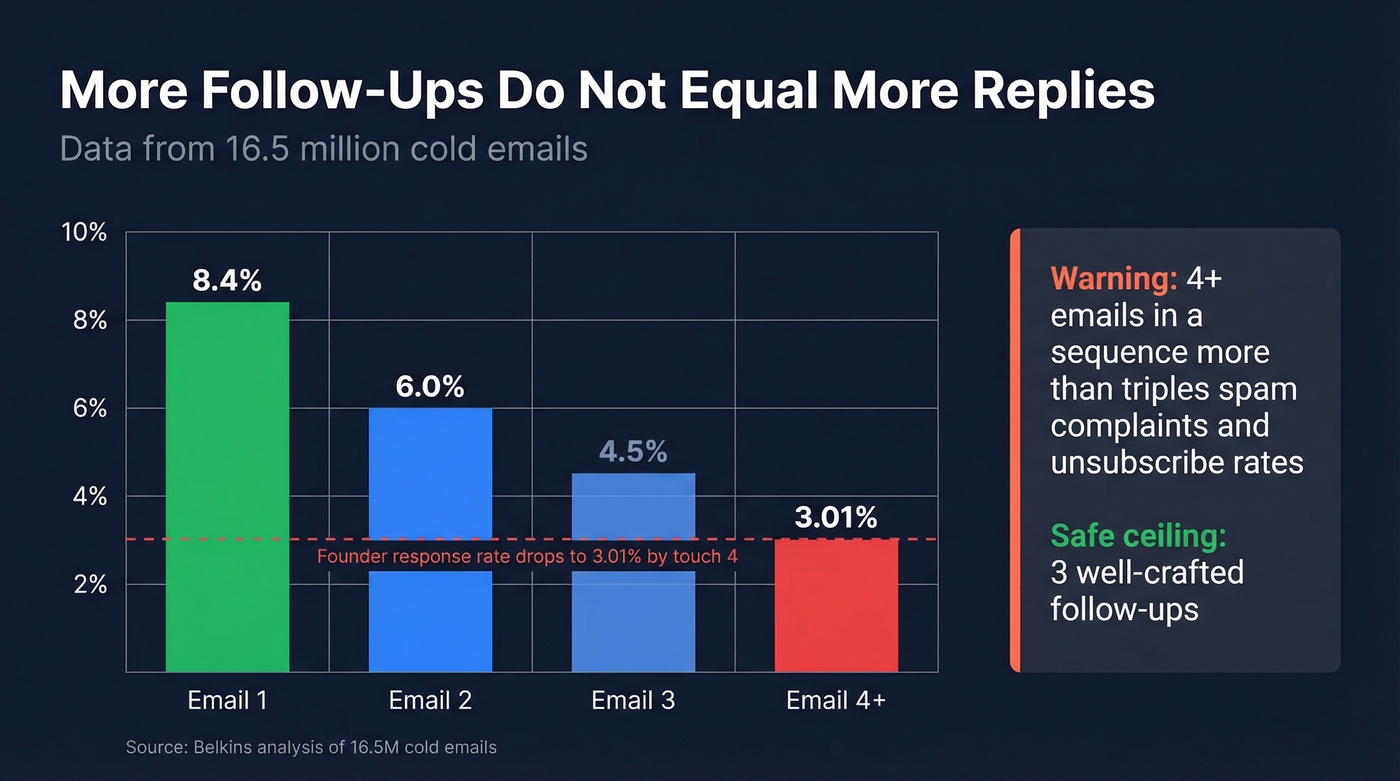
An analysis of 16.5M cold emails found that the first email delivers the highest reply rate at 8.4%. Performance declines steadily after that. Sending 4+ emails in a sequence more than triples spam complaints and unsubscribe rates. Founders' response rates specifically drop from 6.94% to 3.01% by the fourth touch.
Three well-crafted follow-ups is the safe ceiling. After that, you're burning domain reputation faster than you're generating replies. If you need a timing framework, use this guide on when should I follow up on an email.
Fix Your List Before Your Subject Lines
Let's be honest - even the most compelling follow-up subject line bounces if the address is wrong. We've seen teams sitting at 15-35% bounce rates wonder why their open rates are terrible. The answer isn't better copy. It's that ESPs noticed the bounces, routed everything to spam, and now nobody sees anything they send.
Prospeo catches invalid emails, spam traps, and honeypots through a 5-step verification process before they torch your sender reputation. Stack Optimize used Prospeo to keep client bounce rates under 3% and deliverability above 94% while scaling from zero to $1M ARR - zero domain flags across every client. The free tier gives you 75 verifications per month, enough to test whether your list is the real problem. If you're diagnosing bounces, start with email bounce rate.

Personalized subject lines pull 133% more replies - but only if you have accurate data to personalize with. Prospeo gives you 50+ data points per contact including job title, company, and tech stack, so every follow-up subject line can reference something real. At $0.01 per email, fixing your list costs less than one wasted follow-up sequence.
Real personalization starts with real data, not guesswork.
FAQ
How long should a follow-up email subject line be?
Two to four words (41 characters or fewer) is the sweet spot, hitting 46% open rates in a 5.5M-email dataset. Front-load the most important words so they survive mobile truncation, which starts as low as 33 characters on iPhone.
What makes follow-up subject lines effective?
Three factors working together: brevity, personalization, and a question format. Lines combining all three outperform generic alternatives by 30%+ on open rate. The key is sounding like a real colleague sending a relevant message, not a mass campaign.
How many follow-up emails should I send?
Three is the safe ceiling. An analysis of 16.5M emails shows that four or more emails in a sequence more than triples spam complaints and unsubscribe rates. Each additional touch after the third delivers diminishing replies while actively damaging domain reputation.
Why are my follow-up emails getting low open rates?
If you're below 15%, it's almost always a deliverability or data quality issue - not a subject line problem. Bad addresses cause bounces that degrade sender reputation. Verify your list before spending time on copy optimization.