

Cold Email in 2026: The Data-Driven Guide to Getting Replies
Your SDR manager just pulled up the dashboard. Open rates look fine - maybe. Reply rates are down for the third straight quarter. The CEO's asking whether cold email still works, and your team's burning through sending domains faster than you can warm them up.
Cold emailing isn't broken. Your data is.
What You Need (Quick Version)
Here's the hierarchy that matters, in order:
- Clean data first. Verify every email before it touches a sending platform. Bad data kills domains, and domain damage takes weeks to recover from. Run your list through email verification before anything else - 98% accuracy with catch-all handling and spam-trap removal is the baseline you need. If you’re comparing vendors, start with a quick scan of data enrichment services to understand what “clean” should include.
- Authenticated infrastructure second. SPF, DKIM, DMARC on a secondary domain. Warm it up for 4-6 weeks. No shortcuts. Use a sending platform like Instantly or GMass to manage campaigns once your domain is ready. If you’re building a full stack, see the broader landscape of SDR tools.
- Short, relevant copy third. 50-125 words, one CTA, a real observation about the prospect's business. Not a merge tag with their first name. If you need ideas, pull from proven cold email subject line examples.
Most teams invert this priority and spend weeks A/B testing subject lines while sending to lists that bounce 20%.
What Is Cold Email?
It's an unsolicited business email sent to someone you don't have a prior relationship with. No opt-in, no prior conversation, no warm intro. You're reaching out because you can solve a problem they have.
What it isn't: spam. Spam is bulk, untargeted, and indifferent to the recipient. A well-crafted outreach message is targeted, relevant, and offers genuine value to a specific person in a specific role. Email marketing is different too - that's permission-based communication to people who've opted into your list.
While most people associate cold emailing with sales prospecting, the same principles apply to link building for SEO, recruiting candidates, pitching partnerships, and investor outreach. The mechanics are identical: verified contact, relevant message, clear ask.
One critical misconception: there's no B2B exception in CAN-SPAM. The FTC's compliance guide applies to all commercial messages, period. Whether you're selling SaaS to a VP of Engineering or supplements to consumers, the same rules apply.
Does It Still Work in 2026?
Yes, but the margin for error has collapsed.
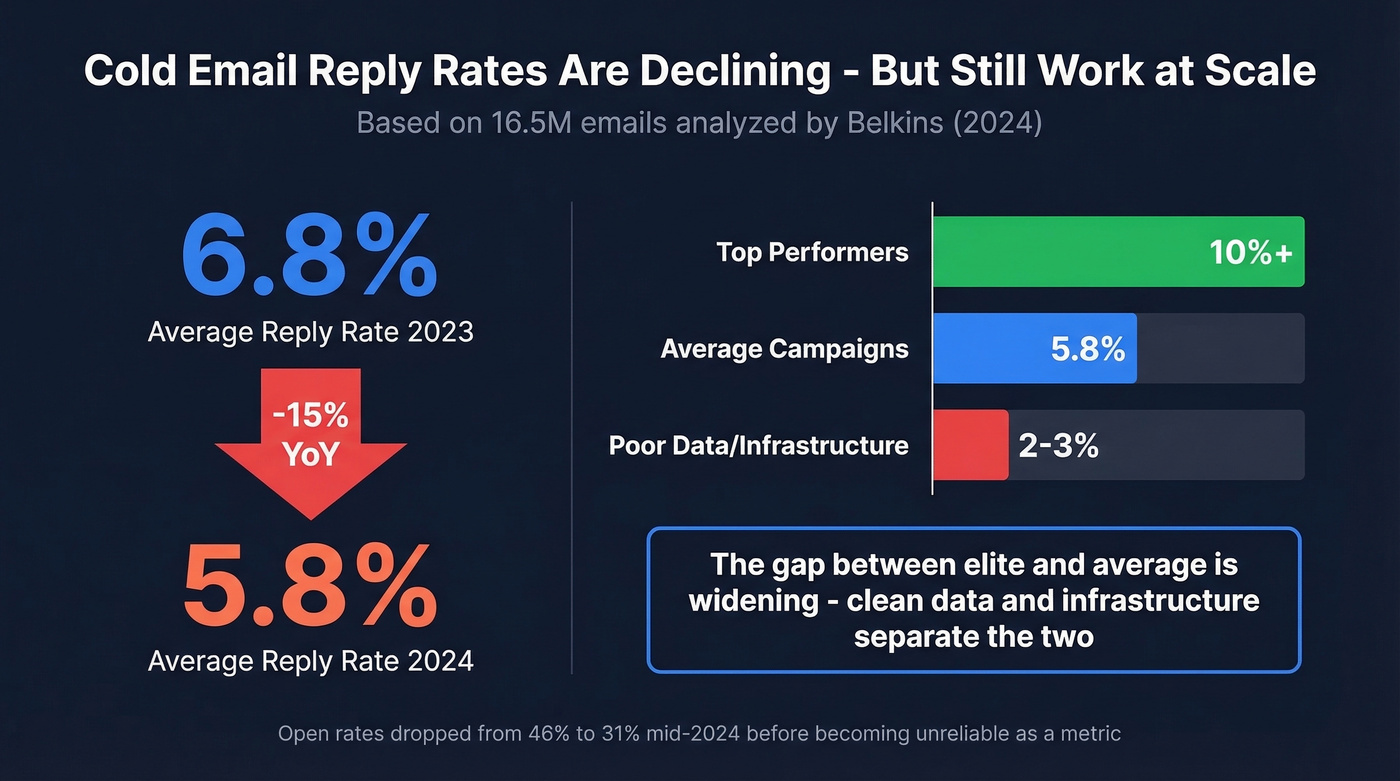
Belkins analyzed 16.5 million cold emails sent between January and December 2024. The average reply rate came in at 5.8% - down from 6.8% in 2023, roughly a 15% year-over-year decline. Open rates hovered around 46% early in 2024, then dropped to 31-32% by mid-year before Belkins stopped tracking them. More on why opens are a dead metric later.
Those numbers aren't catastrophic. A 5.8% reply rate across millions of messages means the channel still generates conversations at scale. Top-performing campaigns exceed 10%. The gap between average and elite is widening - the teams doing it right are pulling further ahead while everyone else fights over scraps.
The Reddit sentiment matches the data. On r/SaaS, founders openly question whether outbound email is viable - "inbox is flooded," "reply rates are way down," "discounts no longer compelling." They're not wrong about the trend. But they're diagnosing a copywriting problem when it's actually a data and infrastructure problem.
Here's the thing: If your average deal size is under $5K, you probably don't need outbound email at all. The infrastructure investment - domains, warmup, verification, tooling - only pays off when each closed deal moves the needle. For low-ACV products, content marketing and product-led growth are cheaper paths to pipeline. But if your deals are $10K+, cold emailing remains the most predictable way to start conversations with decision-makers. (If you’re pressure-testing channel mix, compare against modern sales prospecting techniques.)
Why Most Outreach Fails
It's not your subject line. It's your data.
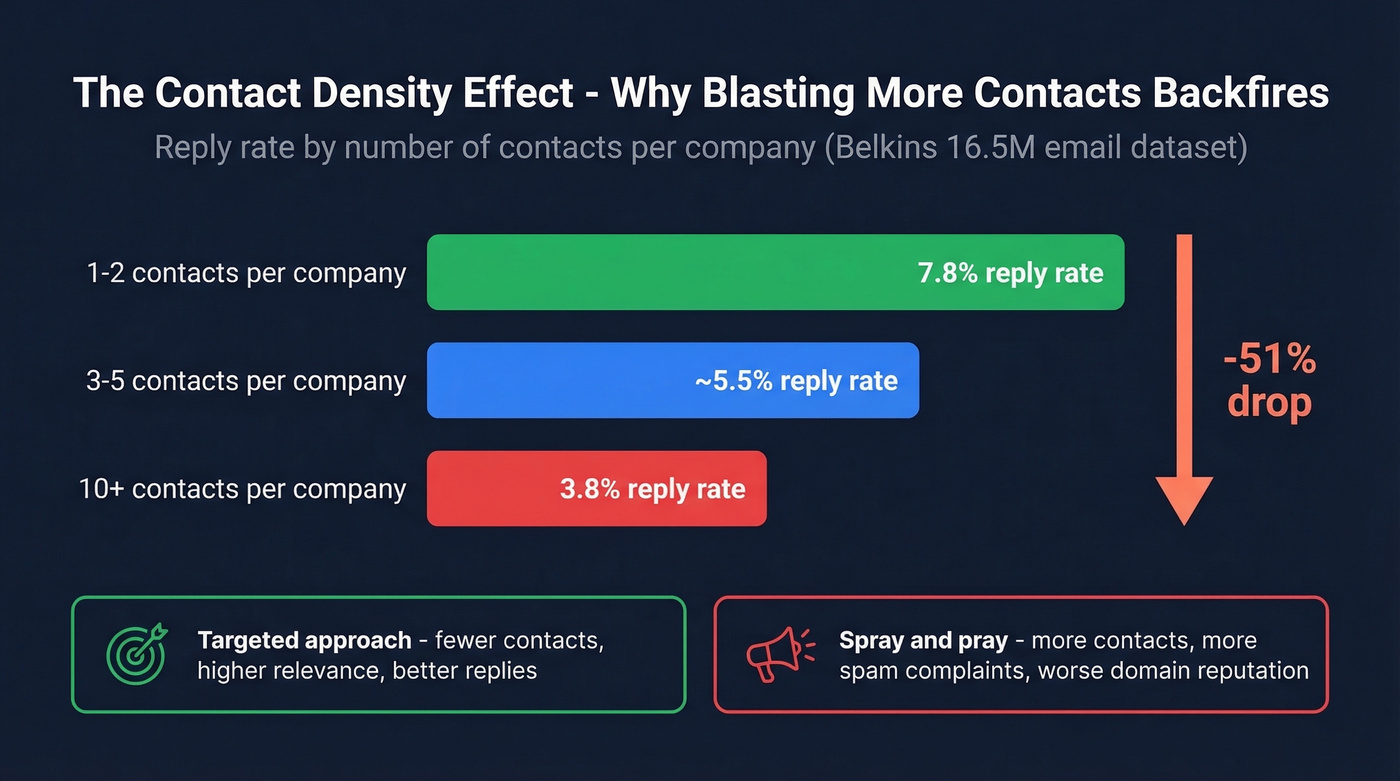
The Belkins dataset reveals something most guides ignore: the contact density effect. When teams contacted just 1-2 people per company, they hit a 7.8% reply rate. Blast 10+ contacts at the same company and that drops to 3.8%. More contacts per account doesn't mean more replies - it means more spam complaints and lower engagement across the board.
The second killer is bounce rate. Every bounced message signals to Gmail, Outlook, and Yahoo that you're sending to bad addresses. Stack enough bounces and your domain reputation tanks - not just for outbound, but for normal business email too. We've watched teams lose the ability to send invoices because their outbound campaigns wrecked their sender reputation. It's painful and entirely preventable. (If you want benchmarks and fixes by code, see email bounce rate.)
Purchased and scraped lists often contain 5%+ invalid addresses. That's enough to damage sender reputation fast. The fix is straightforward: run every list through a verification tool with catch-all handling, spam-trap removal, and honeypot filtering before a single message goes out. If you’re sourcing contacts, it helps to understand the tradeoffs across email list providers.
The System That Works
Cold email isn't a tactic. It's a system with four components, and the order matters.
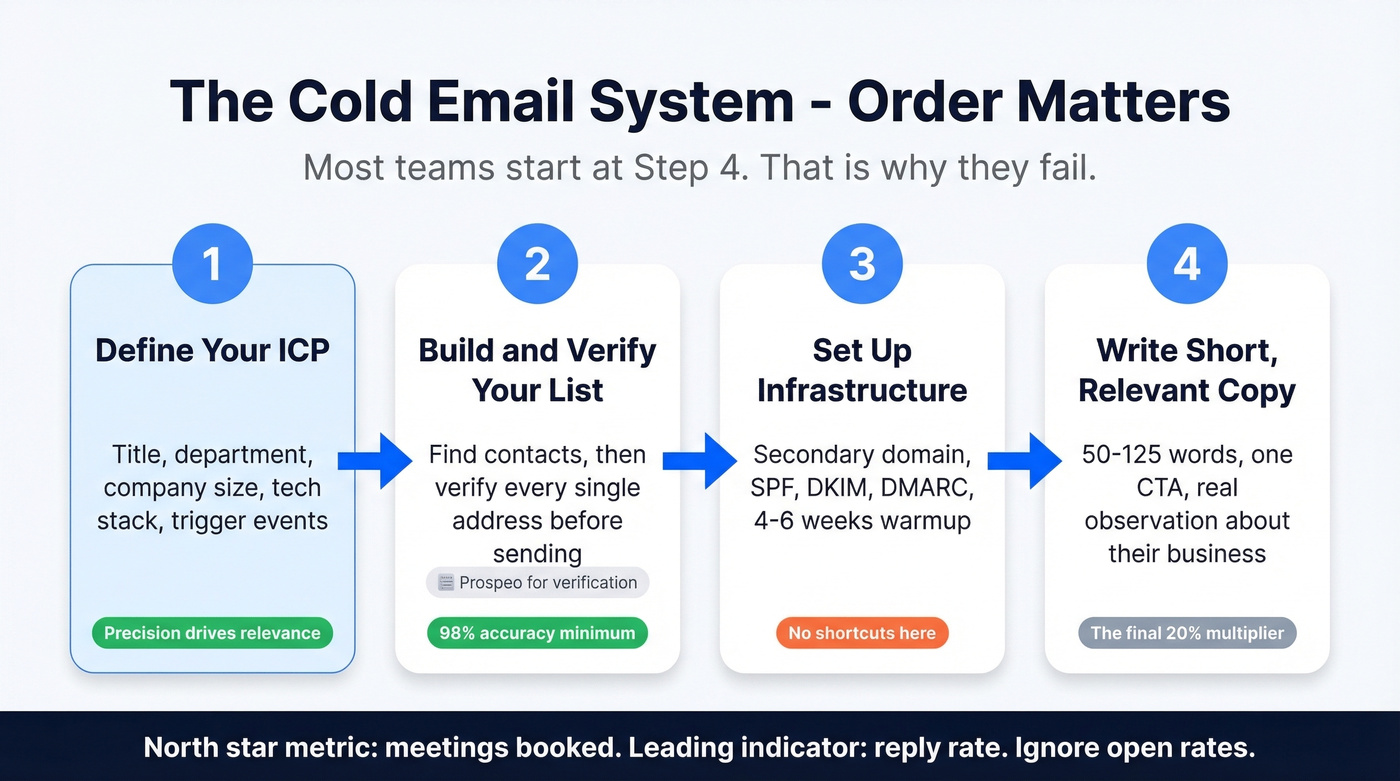
Step 1: Define your ICP with precision. Not "mid-market SaaS companies" - that's a category, not a profile. You need title, department, company size, tech stack, and a trigger event like a funding round, job posting, or leadership change. The tighter your ICP, the more relevant your message, and relevance is the single biggest driver of reply rates. If you need a structure, use an ideal customer profile template.
Step 2: Build and verify your list. Your contact list is inventory - the raw material your entire outbound engine runs on. Bad inventory means bad output, no matter how good your copy is. The non-negotiable: verify every address before it enters your sending platform. Not after your first bounce spike. Before. (Related: how to check if an email exists.)
Step 3: Set up your infrastructure. Secondary domain, DNS authentication, warmup schedule. This takes 4-6 weeks and there's no way to shortcut it. The specifics are in the next section.
Step 4: Write short, relevant copy. Notice this is last. Most guides start here because copywriting is fun and infrastructure is boring. But the best message in the world doesn't matter if it lands in spam or bounces. Copy is the final 20% - the multiplier on top of clean data and solid infrastructure. If you want a deeper framework, see email copywriting.
One more thing: stop measuring opens. Apple's Mail Privacy Protection and Google's image caching have made open rates unreliable since 2022. Your north-star metric is meetings booked. If you want a leading indicator, track reply rate. Everything else is noise.

The article says it plainly: bad data kills domains, and domain damage takes weeks to recover from. Prospeo's 5-step email verification - with catch-all handling, spam-trap removal, and honeypot filtering - delivers 98% accuracy at $0.01/email. Teams using Prospeo data cut bounce rates from 35%+ to under 4% and book 26% more meetings than ZoomInfo users.
Stop burning domains. Start sending to verified addresses only.
Deliverability Setup
Get this wrong and nothing downstream matters.
SPF, DKIM, and DMARC
These three DNS records tell mailbox providers you're authorized to send from your domain. Without them, bulk messages are far more likely to be rejected.
SPF specifies which servers can send on your behalf. One SPF record per domain - no exceptions. Include all your sending services and stay under the 10 DNS lookup limit. A typical record looks like:
v=spf1 include:_spf.google.com include:sendgrid.net ~all
DKIM adds a cryptographic signature to every message. Your sending provider generates a public key that you add as a TXT record using a selector-based format like google._domainkey. This lets the receiving server verify the email hasn't been tampered with.
DMARC ties SPF and DKIM together with a policy. Start with p=none to monitor without blocking, then move to quarantine or reject once you've confirmed everything's passing:
v=DMARC1; p=none; rua=mailto:dmarc@yourdomain.com; pct=100
Verify everything with MXToolbox or Mail-Tester. Check your email headers for spf=pass, dkim=pass, and dmarc=pass before sending a single outreach message.
Domain and Warmup Strategy
Buy a secondary domain for outreach. This is the single strongest action a beginner can take. If your primary domain is acme.com, register acmemail.com or getacme.com and send all outbound from there. If a campaign goes sideways, your primary domain - the one your CEO uses for board emails - stays clean.
Then warm it up:
| Week | Daily Volume | Notes |
|---|---|---|
| 1 | 5-10 | Reply to warmup emails manually |
| 2 | 10-20 | Mix warmup + small real sends |
| 3 | 20-30 | Monitor bounce rate closely |
| 4 | 30-40 | Check Postmaster Tools |
| 5-6 | 50-75 max | Full sending, rotate inboxes |
Never exceed 50 outbound messages per inbox per day. Need more volume? Add inboxes - don't increase per-inbox limits. The consensus on r/coldemail is consistent: once you push volume too hard per inbox, deliverability falls off a cliff. If you want a more technical view of safe limits, see email velocity.
A note on automated warmup: Google cracked down on automated warmup patterns hard enough that GMass stopped its warmup tool. Manual warmup or reputable tools that use real engagement are safer bets. Both Instantly and Smartlead include built-in warmup - treat these as your warmup layer alongside your sending platform.
The 2024-2025 Enforcement Timeline
The rules changed fast:
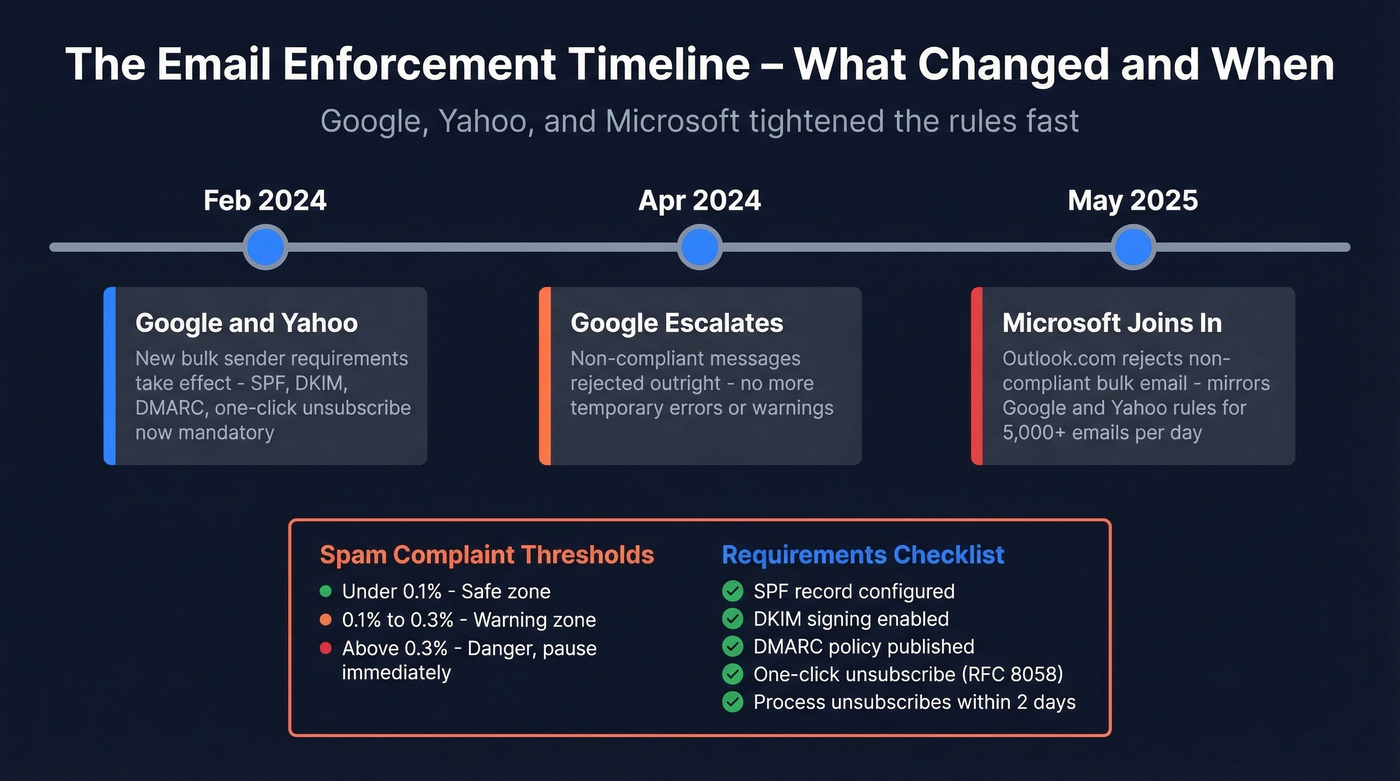
- February 2024: Google and Yahoo begin enforcing new bulk sender requirements - SPF, DKIM, DMARC, one-click unsubscribe.
- April 2024: Google starts rejecting non-compliant messages outright, escalating from temporary errors.
- May 2025: Microsoft begins rejecting non-compliant bulk email to Outlook.com domains, mirroring Google/Yahoo's requirements for senders hitting 5,000+ emails/day.
The spam complaint thresholds are tight. Mailgun's deliverability report puts the numbers at less than 0.1% recommended, with 0.3% as the danger zone. One-click unsubscribe via RFC 8058 is now required, and you must process unsubscribe requests within 2 days.
If you're not monitoring Google Postmaster Tools and your spam complaint rate, you're flying blind. Pause campaigns immediately if complaints hit 0.1%.
Writing Emails That Get Replies
The Rules
Keep it short. The Belkins data shows 6-8 sentence emails hitting a 6.9% reply rate - the best-performing length bracket in their 16.5M-email dataset. MarketingProfs recommends 120 words or less. Anything longer and you're writing for yourself, not the prospect.
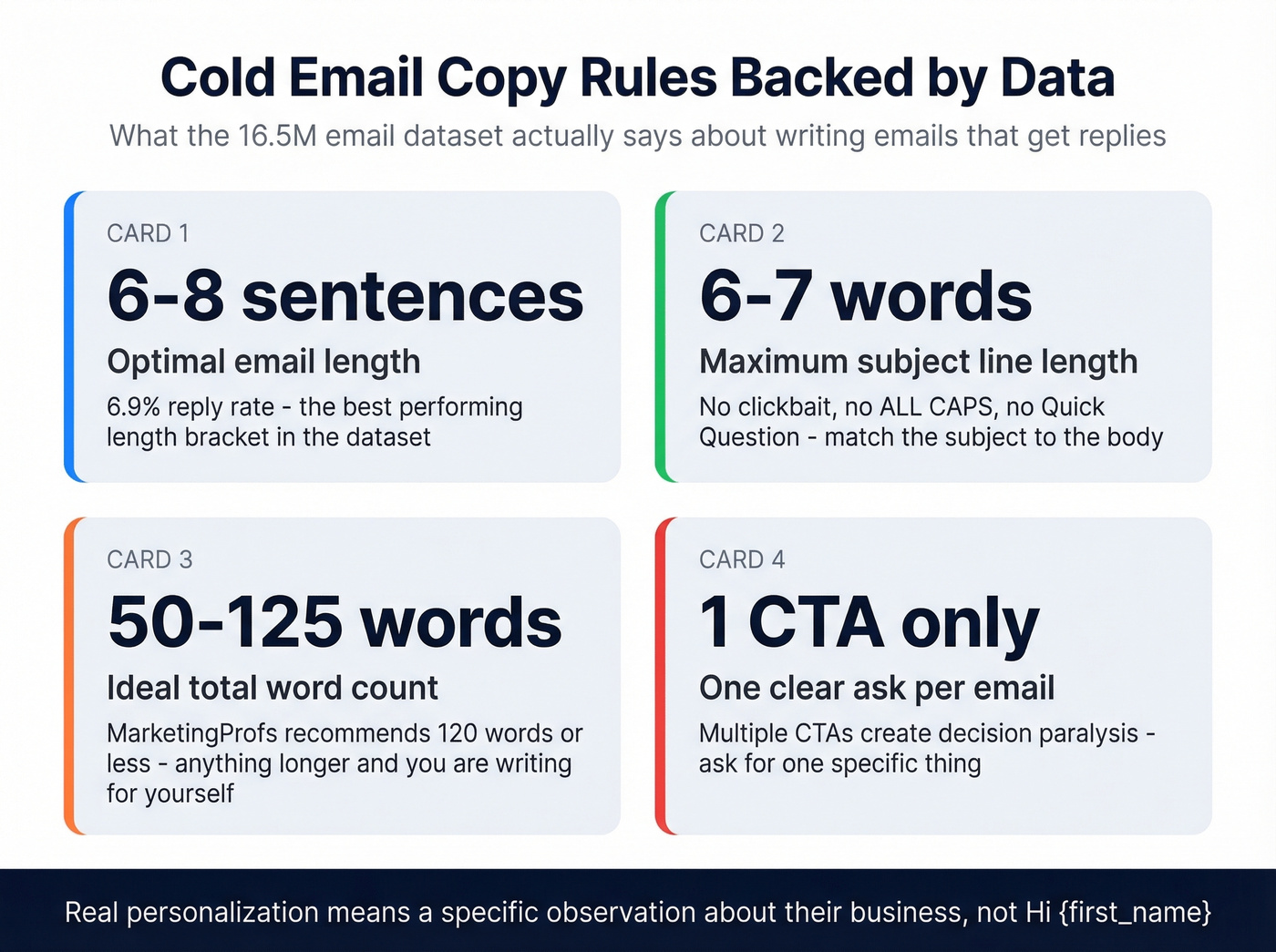
Subject lines: 6-7 words maximum. No clickbait, no ALL CAPS, no "Quick question" - everyone's using it. The subject line should match the body. If there's a disconnect, the prospect feels tricked and you've lost them.
Personalization means a real observation about the prospect's company or role. Not Hi {first_name}. Something like: "Saw you just opened a London office - that usually means the SDR team is scaling faster than ops can keep up." That takes 30 seconds of research and signals you're not mass-blasting. Think of every outreach message as a tiny product experience you're designing for one person - the recipient should feel like you wrote it specifically for them, not like they're receiving version 4,312 of a template.
Where AI fits in 2026: AI tools can accelerate the research phase - pulling trigger events, summarizing 10-K filings, drafting initial personalization lines. Use them for that. But the final message should read like a human wrote it for one person. The moment a prospect detects AI-generated copy, you've lost the authenticity that makes outbound work. AI is the research assistant, not the author.
Format matters too. Send plain text whenever possible. HTML-heavy messages with images, buttons, and fancy formatting trigger spam filters and signal "marketing blast" rather than genuine one-to-one communication.
A/B testing that actually works: Test one variable at a time - subject line, CTA, or opening line. Send the variant to 20% of your list, then send the winner to the remaining 80%.
One CTA. Frame it as a question, not a demand. "Would it make sense to spend 15 minutes on this?" works. "Book a demo at this link" doesn't - it's too much commitment for a stranger.
Skip tracking pixels if you can. They hurt deliverability, and open rates are unreliable anyway.
Types That Work
Not every outreach message serves the same purpose. The most common types include meeting requests, value-first outreach, referral asks, and event-triggered messages. Let's look at two that consistently perform.
Template 1: The Meeting Request
Subject: [Company]'s outbound data
Hi [Name],
Noticed [Company] just posted 3 SDR roles - usually means outbound is scaling. When that happens, data quality tends to be the first bottleneck.
We help teams like [similar company] keep bounce rates under 4% while scaling send volume 3x. Their pipeline went from $100K to $300K/week.
Worth a 15-minute conversation?
Why it works: Opens with a real observation. Connects it to a relevant problem. Offers a specific proof point. Asks a low-commitment question. 72 words.
Template 2: The Value-First Outreach
Subject: Bounce rates at [Company]
Hi [Name],
Most outbound teams don't realize their contact list is full of invalid addresses until deliverability tanks. We published a breakdown of the 5 DNS records that prevent domain damage - figured it'd be useful given your team's scale.
[Link to resource]
Happy to share what we're seeing across similar companies if it's helpful.
Why it works: Leads with a useful insight. Provides value before asking for anything. The CTA is soft - "if it's helpful" gives the prospect an easy out that paradoxically increases replies. 68 words.
Follow-Up Strategy
The first follow-up is the most valuable message in your sequence. Belkins data shows it can lift replies by up to 49% in high-performing campaigns. After that, diminishing returns hit hard.
Single-email campaigns had the highest reply rate in the Belkins dataset at 8.4%. Every additional follow-up diluted the average. Spam complaint rates escalated from 0.5% on the first message to 1.6% by the fourth. Unsubscribe rates climbed to 2% by round four.
The 7-step sequence is a relic of pre-enforcement outbound. In 2026, three to four total emails is the sweet spot. Space them 3-5 days apart. Each follow-up should add new value - a different angle, a relevant case study, a useful resource - not just "bumping this to the top of your inbox." If you want ready-to-use options, use these cold email follow-up templates.
Timing matters at the margins. Thursday pulls the highest reply rate at 6.87%, while Monday lags at 5.29%. Evenings between 8-11 PM drive 6.52% reply rates, likely because prospects are clearing their inbox without the pressure of a packed workday. These aren't transforming your results on their own, but they compound with everything else.
The contrarian take on follow-ups: if your first message doesn't get a reply, the problem usually isn't that you didn't follow up enough. It's that your targeting was off, your data was bad, or your email wasn't relevant. Fix the root cause before adding more touches.
Compliance Essentials
CAN-SPAM (US)
The FTC's checklist is straightforward, and the penalties aren't: up to $53,088 per violating email.
- No false or misleading header information
- No deceptive subject lines
- Identify the message as an ad
- Include a valid physical postal address
- Provide a clear opt-out mechanism - can't require extra steps beyond a reply or single web page
- Honor opt-outs within 10 business days
- Opt-out mechanism must work for 30 days after sending
- You're responsible even if a third party sends on your behalf
That last point catches people. If you hired an agency that emailed prospects on your behalf and they violated CAN-SPAM, you're on the hook.
GDPR, CASL, and International Rules
When you're sending internationally, the law that applies is based on your recipients' location - not your company's.
| Law | Region | Consent Model | Max Penalty | Unsubscribe |
|---|---|---|---|---|
| CAN-SPAM | US | Opt-out | $53,088/email | 10 business days |
| GDPR | EU/EEA | Legitimate interest (B2B) | EUR 20M or 4% revenue | Prompt |
| CASL | Canada | Opt-in (express/implied) | $10M CAD/violation | 10 business days |
GDPR commonly supports B2B outreach under "legitimate interest," but the recipient has the right to object, and you must honor that promptly. CASL is the strictest - implied consent exists for limited scenarios like published business contact info, but express consent is the safe default.
The 2024+ addition: one-click unsubscribe via RFC 8058. Your emails need a List-Unsubscribe header, and you must process the unsubscribe within 2 days. This isn't optional - it's an enforcement requirement from Google, Yahoo, and Microsoft.
Cold Email Tools
The outbound stack has three layers: data and verification, sending platform, and warmup. Most teams try to solve all three with one tool and end up with mediocre performance across the board. Warmup is now built into most sending platforms, so the real decision is choosing your data layer and your sending layer separately.
Data and Verification
The database covers 300M+ professional profiles with 143M+ verified emails, all refreshed on a 7-day cycle versus the six-week industry average. The 5-step verification process handles catch-all domains, removes spam traps, and filters honeypots - the edge cases that trip up basic verification tools. Email accuracy runs at 98%. If you’re evaluating options, compare against other Bouncer alternatives.
In our experience, the proof points tell the story better than any feature list. Meritt dropped their bounce rate from 35% to under 4% and tripled pipeline from $100K to $300K per week. Stack Optimize maintains 94%+ deliverability across all clients with zero domain flags. Pricing starts at roughly $0.01 per email with a free tier of 75 emails plus 100 Chrome extension credits per month, no contracts.

Sending Platforms
Instantly.ai is the go-to for teams scaling volume. The Hypergrowth plan runs $97/month with unlimited sending accounts, built-in warmup, and agency-friendly multi-client management. If you're running 5+ inboxes and need centralized campaign management, it's the obvious choice. Pair it with verified data from a dedicated verification tool.
GMass is the opposite philosophy: zero learning curve for anyone who lives in Gmail. Plans run $25-$55/month with A/B testing and solid reporting. No built-in warmup, so you'll need a separate warmup tool or manual process. The Gmail-native interface means you're up and running in minutes, but you're also capped by Gmail's sending limits. Best for solopreneurs and founders sending under 200 emails a day.
Saleshandy splits the difference between GMass simplicity and Instantly scale at $25/month on annual billing with a 7-day trial. You get sequence automation, a unified inbox, and decent analytics. Skip this if you're already committed to Instantly's ecosystem - the feature overlap isn't worth paying for two platforms.
Smartlead starts around $39/month and competes directly with Instantly on sending infrastructure and built-in warmup. Popular with agencies managing multiple client inboxes. The price advantage over Instantly is real, but Instantly's campaign management interface is more polished. Pick Smartlead if budget matters more than UI.
Lead Database + Outreach Combo
Apollo offers a free tier with 100 credits/month and paid plans from $59/month per user. The appeal is having database and outreach in one platform. The tradeoff: email accuracy is lower than dedicated verification tools, so run Apollo-sourced contacts through a verification layer before sending. We've seen teams cut their bounce rate in half just by adding that step between Apollo and their sending platform.
Pricing Quick-Reference
| Tool | Starting Price | Best For |
|---|---|---|
| Prospeo | Free (75 emails/mo) | Verification + data quality |
| Instantly | $97/mo | Scaling volume + agencies |
| GMass | $25/mo | Gmail solopreneurs |
| Saleshandy | $25/mo (annual) | Mid-market sequences |
| Smartlead | ~$39/mo | Agency inbox management |
| Apollo | Free (100 credits/mo) | Database + outreach combo |
You just read that ICP precision and verified contacts drive reply rates more than any subject line tweak. Prospeo's database gives you 300M+ profiles with 30+ filters - buyer intent, tech stack, funding, job changes, headcount growth - so every email lands with a real person who matches your ICP. Data refreshes every 7 days, not the 6-week industry average.
Build a list that actually converts. Filters, intent data, and verification in one platform.
FAQ
Is cold email legal?
Yes, in most jurisdictions - with specific rules. CAN-SPAM requires opt-out mechanisms, honest headers, and a physical address. GDPR supports B2B outreach under legitimate interest but requires honoring objections promptly. CASL requires express or implied consent. Always follow the strictest law that applies to your recipients' location.
What's a good reply rate?
The average across 16.5 million emails in 2024 was 5.8%. Anything above 8% is strong. Below 3% signals a data quality or targeting problem, not a copywriting one. Elite campaigns push past 10% by running verified lists with tight ICP targeting and properly warmed domains.
How many follow-ups should I send?
Three to four total emails maximum. The first follow-up lifts replies by up to 49%, but complaint rates jump from 0.5% to 1.6% by the fourth message. In a post-enforcement world, those complaint spikes can damage your domain for weeks.
Should I use my primary domain?
Never. Buy a secondary domain, warm it up for 4-6 weeks, and keep your primary domain clean for internal and customer communication. One bad campaign can tank your sender reputation, affecting every email your company sends - including invoices and support replies.
What's the best free tool for verifying emails?
Prospeo's free tier includes 75 verified emails and 100 Chrome extension credits per month with full 5-step verification - catch-all handling, spam-trap removal, and honeypot filtering included. Apollo offers 100 free credits monthly but with lower accuracy (79% vs. 98%), so pairing it with a dedicated verification step is worth the extra minute.