

Cold Email Generator Guide: What They Do, What They Don't, and What You Actually Need
You pasted your offer into a free cold email generator, hit Generate, sent to 500 people, got zero replies. The generator worked fine - it gave you words. The problem is that words are about 10% of what makes cold email work.
You don't need a generator. You need a cold email system.
Reply rates dropped from 6.8% to 5.8% year-over-year in a 16.5-million-email dataset. Roughly 17% of cold emails never reach the inbox due to bounces and spam filtering before the recipient sees a single word. The copy isn't what kills most campaigns - it's bad data, broken deliverability, and sending infrastructure nobody bothered to set up. A generator handles the first draft. This guide covers everything else.
What You Need (Quick Version)
- Free first draft: Lemlist's generator (trained on 400M campaigns) or Copy.ai's free tier
- Real AI personalization at scale: SmartWriter ($49/mo annual)
A generator gives you words. The rest of this guide gives you everything those words need to actually book meetings.
What Generators Do (and Don't)
A cold email generator is an AI-powered tool - usually built on GPT or a fine-tuned LLM - that takes your offer, target audience, and tone preferences and produces a draft email or sequence (see AI cold email outreach for a practitioner-level workflow). Some are free widgets on a landing page. Others are premium platforms that research each prospect individually before writing.
They handle structure, tone, first-draft speed, and subject line variations well. What they don't touch: whether the email address is valid, whether your domain is warmed up, whether your sending infrastructure will land in the inbox or the spam folder, or whether the person you're emailing is even the right buyer.
Ask any outbound rep what killed their last campaign. It's almost never the copy. It's bounced emails and spam folder placement. The generator did its job. Everything downstream failed.
Data-Backed Cold Email Formulas
Let's ground this in real numbers instead of "best practices" pulled from thin air. Belkins published the largest publicly available cold email dataset - 16.5 million emails across 93 business domains - and the findings challenge a lot of conventional wisdom.
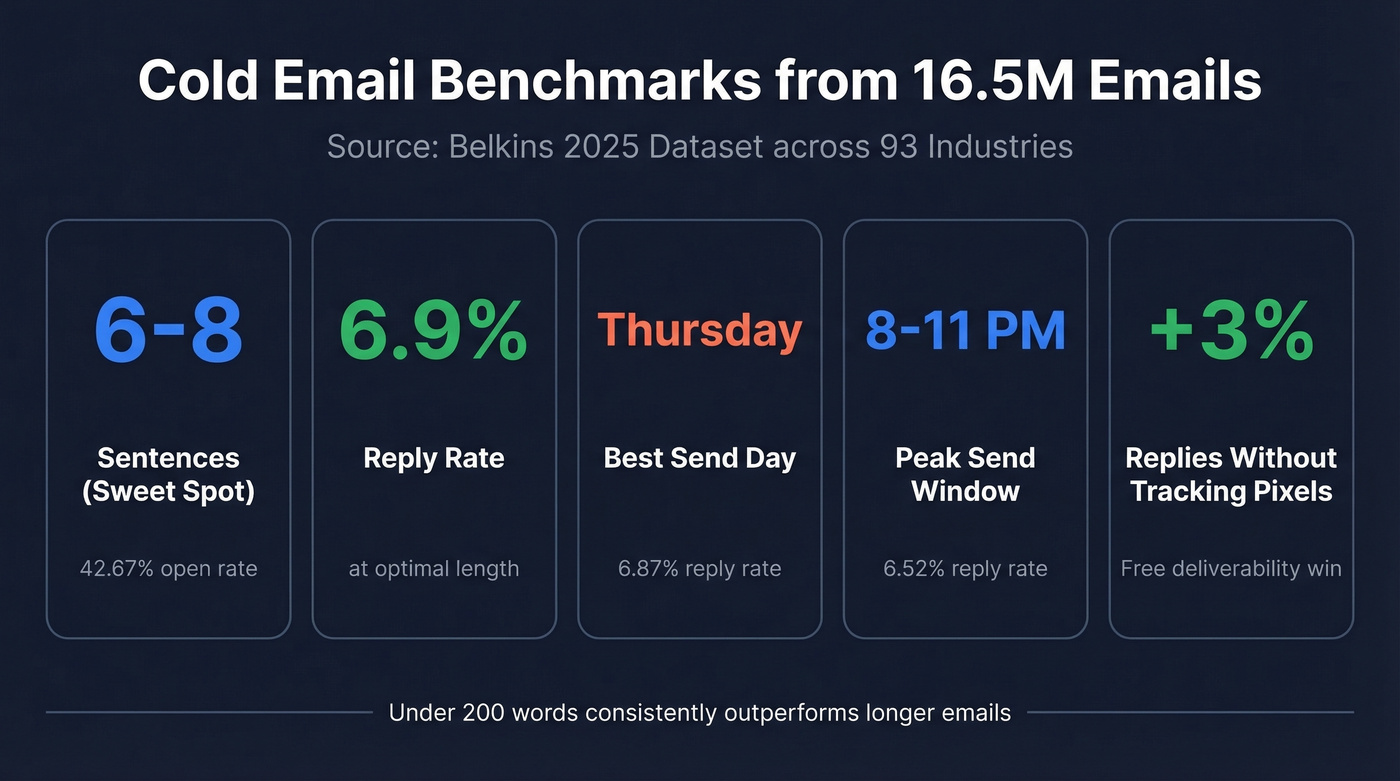
The sweet spot for email structure is 6-8 sentences, which hit a 42.67% open rate and 6.9% reply rate. Messages under 200 words consistently outperform longer ones. Thursday is the best send day at 6.87% reply rate, and evenings between 8-11 PM peak at 6.52%. One finding that surprised us: turning off open tracking pixels produced ~3% higher response rates in an internal experiment. Tracking pixels trigger spam filters, and removing them is a free deliverability win most teams ignore (more in our email tracking pixels guide).
Subject Lines That Get Opened
A separate study on 5.5 million subject lines makes the case clearly: personalization isn't optional.
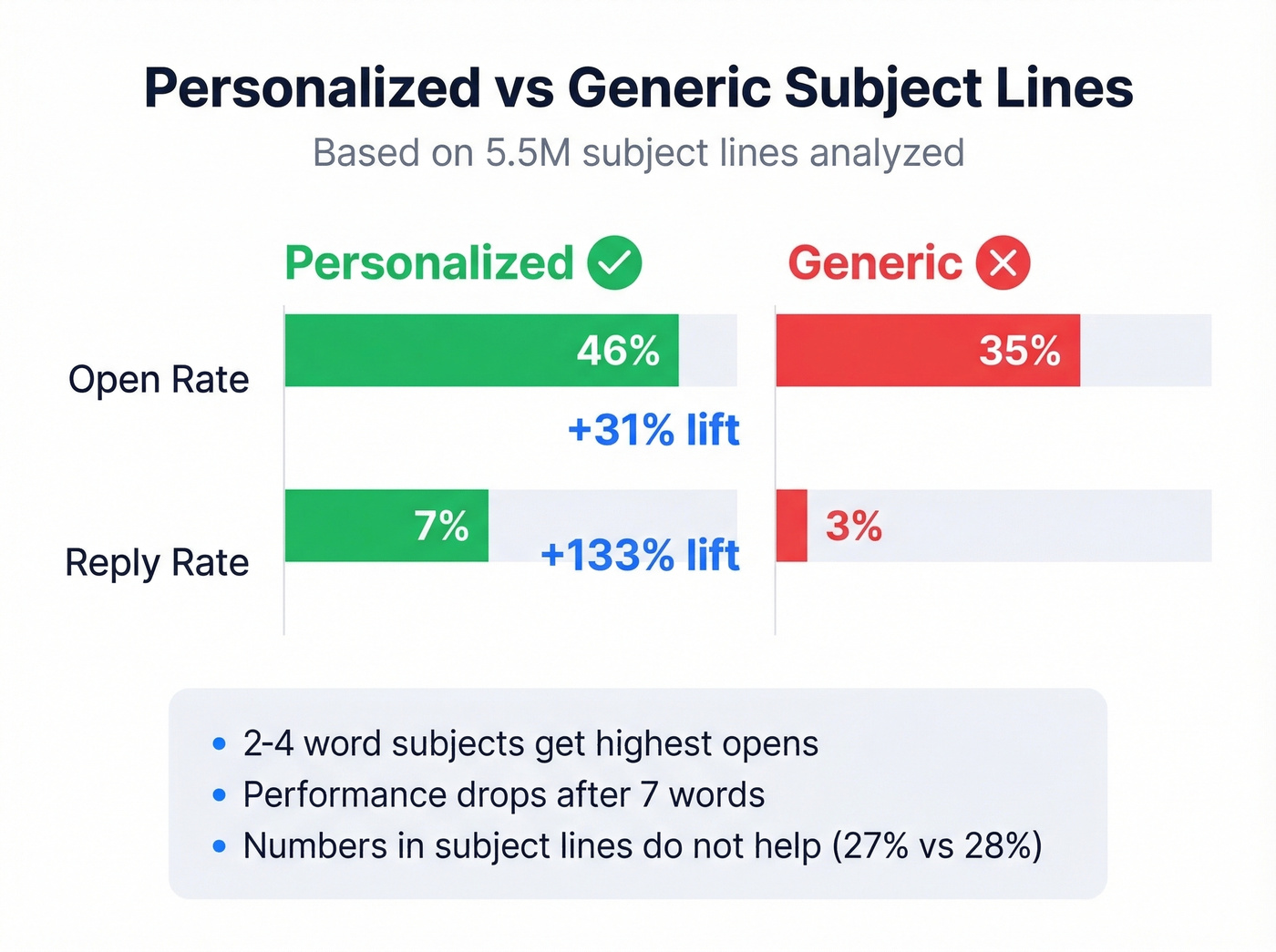
| Metric | Personalized | Generic |
|---|---|---|
| Open rate | 46% | 35% |
| Reply rate | 7% | 3% |
That's a 31% lift in opens and a 133% increase in replies just from personalizing the subject line. Question-based subjects matched that 46% open rate. Length matters too - 2-4 words yields the highest opens, and performance drops noticeably after 7 words. Numbers in subject lines didn't move the needle (27% vs 28% without), so don't force a stat into your subject just because a blog post told you to. If you want more patterns, see these cold email subject line examples.
Follow-Ups: Less Is More
Here's the thing: single-email campaigns hit an 8.4% reply rate in the same dataset. That's higher than multi-touch sequences.
Spam complaint rates climb from 0.5% on the first email to 1.6% by the fourth, and unsubscribe rates push toward 2%. Yes, follow-ups generate roughly 42% of all campaign replies - but that stat doesn't account for the sender reputation damage from escalating spam complaints. The math changes fast when your domain gets flagged. Most sequences are too long. The average reply rate sits around 2-5%, and teams try to brute-force their way to better numbers by adding more follow-ups. Every additional email after the first carries diminishing returns and increasing risk. If your first email doesn't earn a reply, the problem is targeting or relevance, not volume (use these cold email follow-up templates if you need a tighter sequence).

17% of cold emails never reach the inbox because of bad data - not bad copy. Prospeo's 5-step email verification catches bounces, spam traps, and catch-all domains before you hit send. At 98% accuracy and $0.01 per email, fixing your data costs less than one wasted campaign.
Stop feeding polished copy into dead email addresses.
Best Cold Email Generators in 2026
SmartWriter - Best for Deep Personalization
SmartWriter is the only generator we've found worth paying for if you want real personalization. We've tested dozens of free tools - most produce output indistinguishable from a ChatGPT prompt. SmartWriter is different because of research depth.
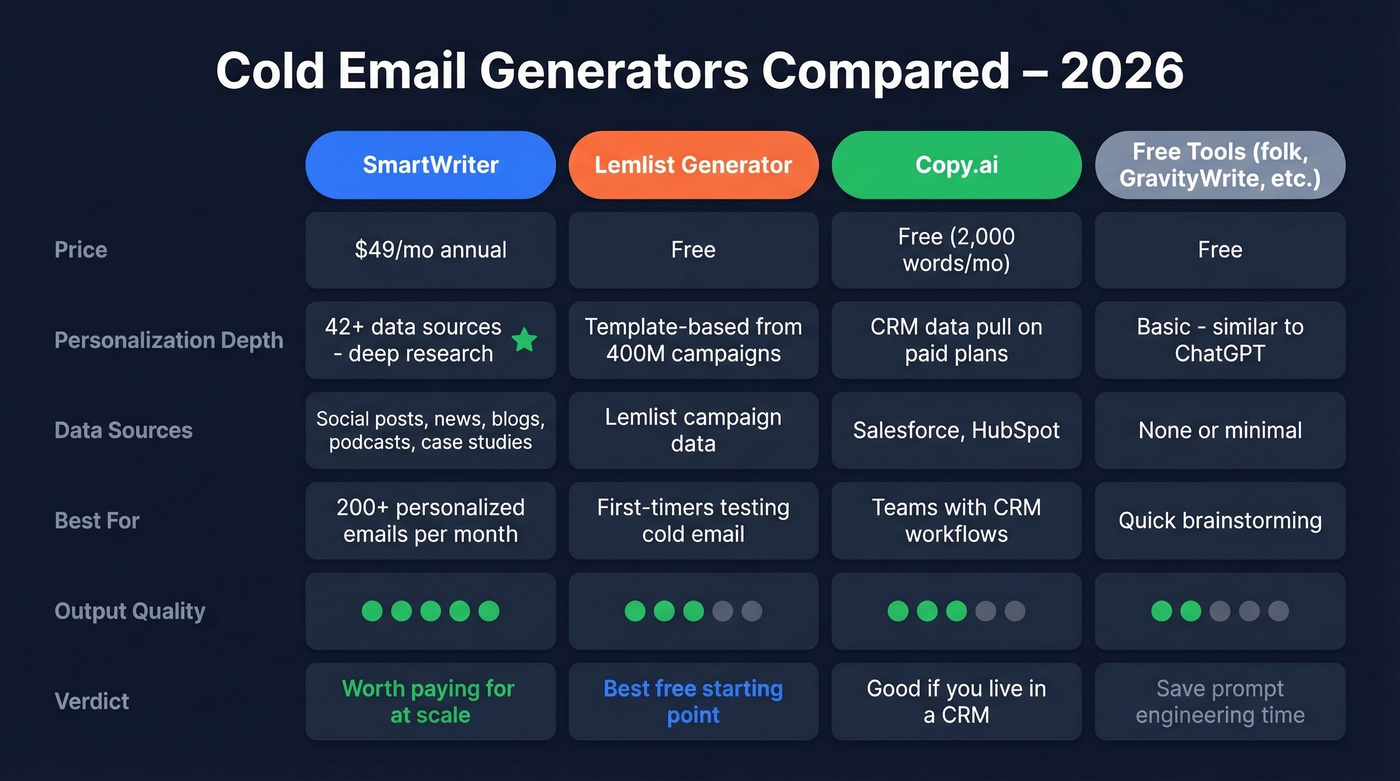
It pulls from 42+ data sources - social posts, company news, blog content, podcast appearances, case studies - and writes a unique opening for each prospect. It's not swapping {{first_name}} into a template. It's generating context-specific copy that references what the prospect actually cares about. The platform carries a 4.8/5 Trustpilot rating.
Pricing runs $49/mo annually or $59/mo monthly for the Basic plan with 400 credits. Popular ($79/$149) and Pro ($129/$359) tiers scale to 1,200 and 3,500 credits respectively.
Use this if: You send 200+ personalized emails per month and need each one to reference the prospect's actual context. The ROI math works when your deal sizes justify the per-email cost.
Skip this if: You're testing cold email for the first time. Spend $0 first, prove the channel works, then invest in personalization.
Lemlist Generator - Best Free Option
Lemlist's free generator is trained on 400M campaigns and produces a 3-email sequence from a simple prompt. It recommends 75-125 words per email, which aligns perfectly with the data on optimal length. You get a solid template, not a bespoke message - but Lemlist is refreshingly honest about that. They say you won't hit a 15% reply rate with the free tool alone.
Free to use. The full Lemlist platform starts at $59/mo for advanced sequencing and personalization features.
Copy.ai - Best for CRM Workflows
Copy.ai's free tier gives you 2,000 words per month - enough for a handful of email drafts. The real value is on paid plans, where Salesforce and HubSpot integrations let you pull CRM data directly into your email generation workflow. Output quality is decent for first drafts but generic enough that you'll spend real time editing. Think of it as a brainstorming partner, not a finished-product machine.
Other Free Generators
folk offers a free CRM-integrated generator useful if you're already in their ecosystem. GravityWrite gives 1,000 free words per month with basic cold email templates. Mailmeteor offers a free Cold Email AI tool and supports mail-merge style sending at scale. Inframail includes an AI email writer. None of these produce output meaningfully better than prompting ChatGPT directly, but they save you the prompt engineering.
Beyond the Generator: The Full Outreach Stack
A generator handles one step. Here's the full workflow that actually books meetings.
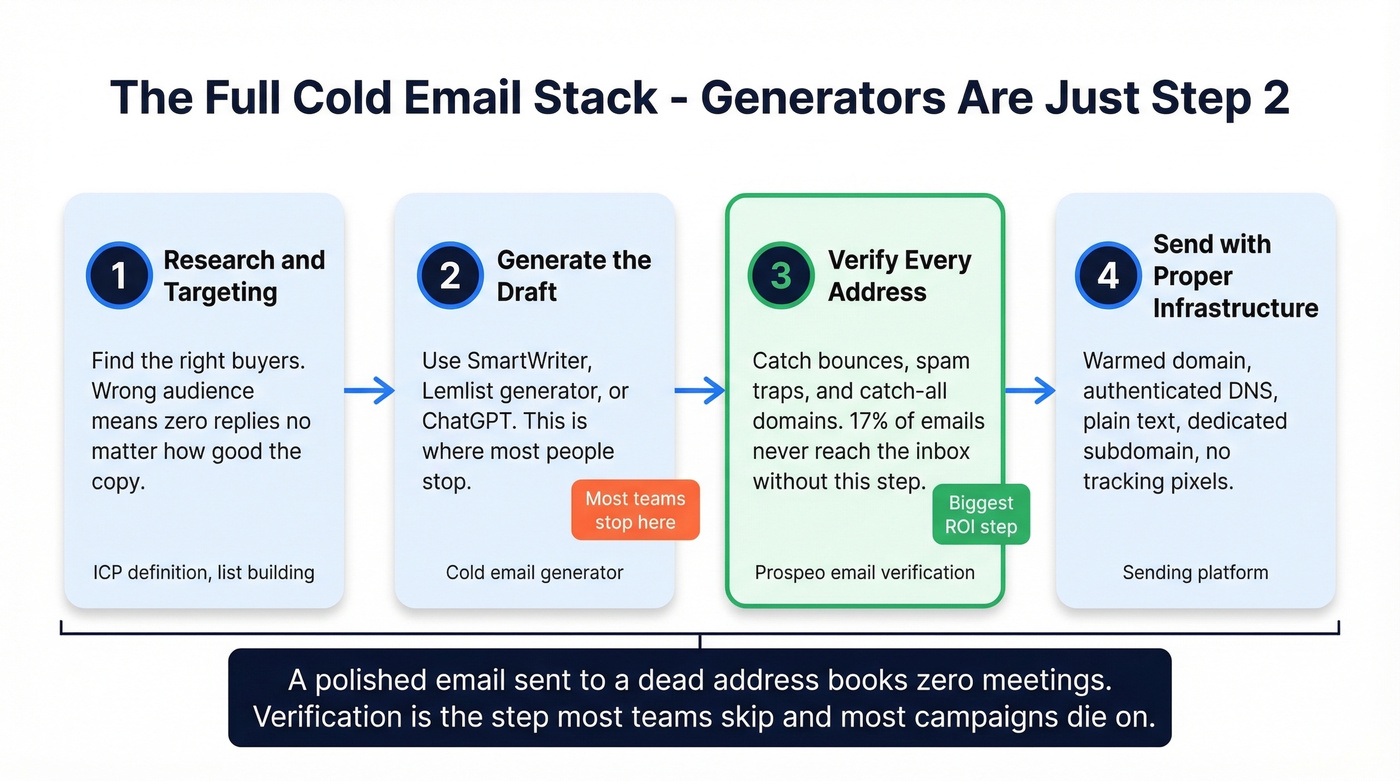
Step 2 - Generation. Use SmartWriter, Lemlist's generator, or even a well-crafted ChatGPT prompt to draft your emails.
Step 3 - Verification. The best AI-generated email bounces if the address is dead. In our experience, verification is where most teams cut corners and pay for it later. Before anything enters your sending platform, verify every contact. Prospeo's email finder runs a 5-step verification process that catches spam traps, honeypots, and catch-all domains. With 143M+ verified emails and a proprietary email-finding infrastructure, it delivers 98% accuracy on a 7-day data refresh cycle - compared to the 6-week industry average. Free tier covers 75 verified emails per month. Paid plans run ~$0.01 per email. Native integrations with Instantly, Smartlead, Lemlist, and HubSpot mean verified data flows straight into your sending tool without manual exports. (If you're comparing tools, start with our AI email checker breakdown.)
Step 4 - Sending. Pick a platform that handles warmup, scheduling, and reply tracking (and keep an eye on email velocity as you scale).
Here's what the sending platforms cost at entry level:
| Platform | Starting Price | Best For |
|---|---|---|
| Woodpecker | $29/mo | Small teams |
| Mailshake | $29/mo | Simple sequences |
| Saleshandy | $36/mo | Budget scaling |
| Instantly | $37/mo | Agencies |
| Smartlead | $39/mo | Multi-client agencies |
| Hunter | $49/mo | SMB end-to-end |
| Quickmail | $49/mo | Deliverability focus |
| Reply.io | $59/mo | In-house sales |
Pricing sourced from Hunter's 2026 cold email software roundup. Instantly and Smartlead CRM integrations run through Zapier only - factor that in if native CRM sync matters to your workflow.
Deliverability Checklist Generators Skip
Look, it's wild that every cold email generator page says nothing about whether the email will actually reach anyone. Here's the checklist that matters more than your copy:
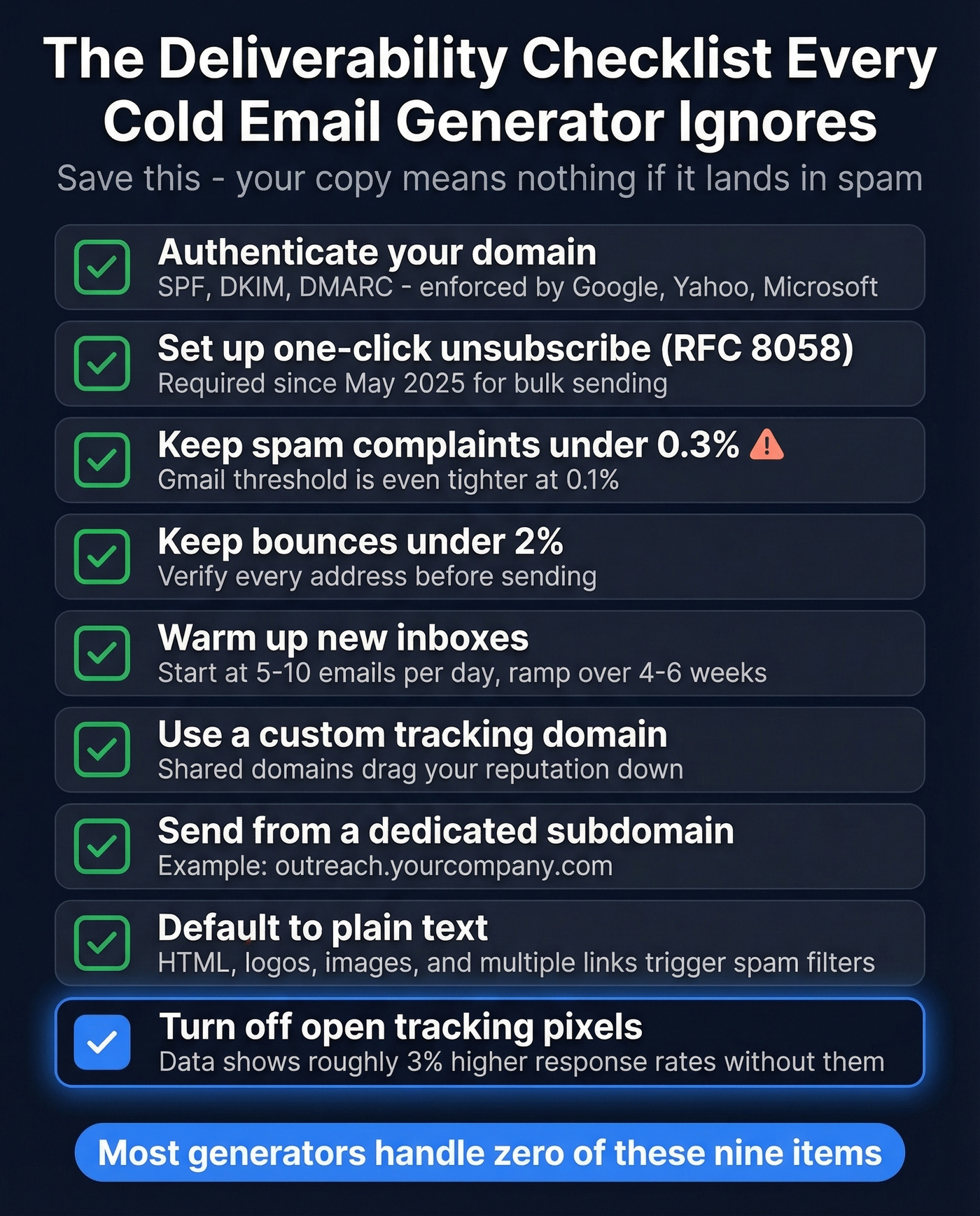
- Authenticate your domain. SPF, DKIM, and DMARC are non-negotiable. Google, Yahoo, and Microsoft all enforce these for bulk senders. (If you want the technical details, start with DMARC alignment.)
- Set up RFC 8058 one-click unsubscribe. Required as of May 2025 for bulk sending. Your sending platform should handle this automatically.
- Keep spam complaints under 0.3%. Gmail's threshold is even tighter at 0.1%.
- Keep bounces under 2%. Verify every address before you send. A 98% accuracy rate with a 7-day refresh cycle means you're working with current data, not a stale export from last quarter (see email bounce rate benchmarks and fixes).
- Warm up new inboxes. Start at 5-10 emails per day, ramp over 4-6 weeks. Don't scale until you hit 80%+ inbox placement on seed tests.
- Use a custom tracking domain. Shared tracking domains drag your reputation down with everyone else's mistakes (full tracking domain setup guide).
- Send from a dedicated subdomain. Protect your primary domain - use something like outreach.yourcompany.com.
- Default to plain text. HTML, logos, images, and multiple links trigger spam filters. One link, one CTA, plain text.
- Turn off open tracking pixels. The data shows ~3% higher response rates without them.
Hot take: If your average deal size is under five figures, you probably don't need SmartWriter-level personalization. A free generator plus verified data and solid deliverability will outperform an expensive AI writer sending to bad addresses every single time. Fix the pipes before you upgrade the faucet. (For a deeper framework, use our email deliverability guide.)
Generators handle the first draft. Prospeo handles the other 90% - verified emails refreshed every 7 days, 30+ filters to find the right buyer, and intent data across 15,000 topics so your personalized copy reaches someone who's actually in-market.
Build the list your cold emails deserve.
Cold Email Compliance in 60 Seconds
| Requirement | US (CAN-SPAM) | EU (GDPR) | Canada (CASL) |
|---|---|---|---|
| Prior consent | Not required | Legitimate interest (with LIA) | Implied consent in specific scenarios |
| Key rules | ID, subject, address, opt-out | LIA, identity, opt-out | Unsubscribe in 10 days |
| Opt-out window | 10 business days | Immediate | 10 business days |
| Max penalty | Up to $53,088/message | EUR 20M | $10M CAD |
Don't use deceptive "Re:" subject lines implying a prior conversation. It's a CAN-SPAM violation, it tanks trust, and it's the fastest way to get flagged. GDPR's legitimate interest basis requires a Legitimate Interest Assessment proving your outreach is relevant to the recipient's role. Most B2B cold email is legal. Lazy, deceptive cold email is where you get into trouble.
FAQ
Are cold email generators free?
Most offer free tiers. Lemlist, Copy.ai, folk, and GravityWrite all produce serviceable first drafts at no cost. Premium personalization through SmartWriter starts at $49/mo annually. Free generators don't personalize per prospect - you'll customize the template yourself.
What's a good cold email reply rate?
Industry average sits between 1% and 5%. Well-targeted campaigns with personalization reach 7-8%, and advanced setups can push 18%. If you're below 3%, check your data quality and deliverability before rewriting copy.
How do I keep cold emails out of spam?
Authenticate your domain with SPF, DKIM, and DMARC. Warm up new inboxes for 4-6 weeks. Keep bounce rates under 2% by verifying every address before sending. Use a custom tracking domain, send plain text, and keep spam complaints below 0.3%.
Is cold email legal?
Yes, in most jurisdictions with proper compliance. US CAN-SPAM requires accurate sender info, non-deceptive subjects, an opt-out mechanism, and a physical address. EU GDPR allows B2B cold email under legitimate interest with proper documentation. Penalties reach up to $53,088 per message under CAN-SPAM or EUR 20M under GDPR.
What's the best free alternative to paid AI email writers?
Lemlist's free generator (trained on 400M campaigns) produces the strongest free output - a full 3-email sequence from a single prompt. Pair it with a free verification tier for data quality, and you've got a working outbound stack at $0 before committing to paid tools.