

Company Email Address: How to Create One, Find One, or Both
It's Monday morning. You're either an LLC founder who needs a professional email before your first client call, or a sales rep who needs the VP of Engineering's company email address before your sequence goes live at noon. Two completely different problems, same search query.
Most guides only cover one half. This one handles both - the overlap matters more than people think. A badly set up company email tanks your deliverability just as fast as sending to the wrong address does.
The Quick Version
Creating a company email: Register a domain ($10-$20/year), pick a host (Google Workspace at $7/user/month on an annual plan, or Hostinger at ~$0.35/month per mailbox on a long-term plan), set up SPF/DKIM/DMARC. Done in 30-60 minutes.
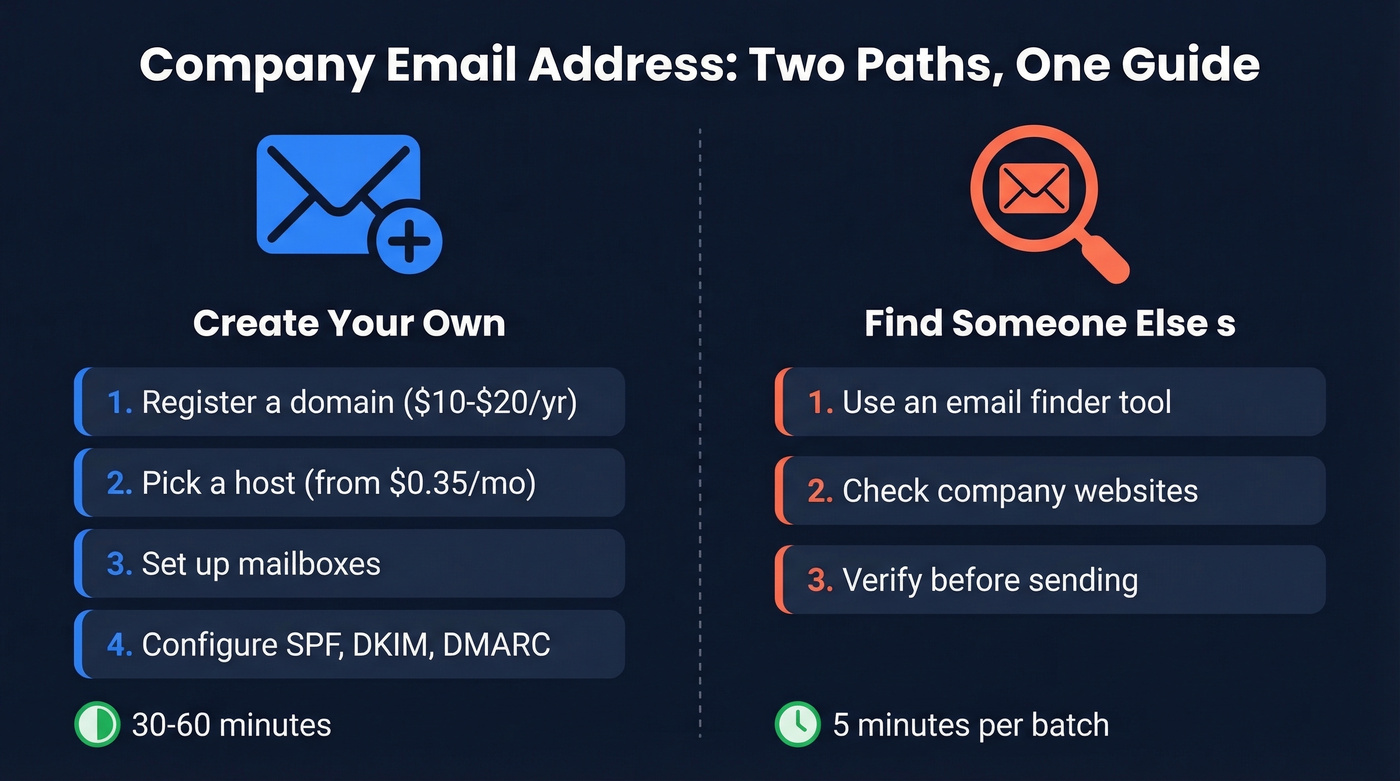
Finding someone's company email: Use an email finder like Prospeo (75 free emails/month, 98% accuracy), verify before sending. Five minutes per batch.
What Is a Custom Domain Email?
A company email address uses a custom domain instead of a free provider: name@yourcompany.com rather than name@gmail.com. That's the entire distinction.
The format signals legitimacy. When a prospect sees an email from sarah@acmecorp.com, they register it differently than sarah.jones.sales2024@gmail.com. Custom domains build brand recognition and give you control over mailbox management when employees leave. And they let you configure authentication records that keep your messages out of spam folders - which we'll get to shortly.
Do You Actually Need One?
The knee-jerk answer is yes. The nuanced answer: yes for outbound, but don't be a zealot about it on inbound forms.
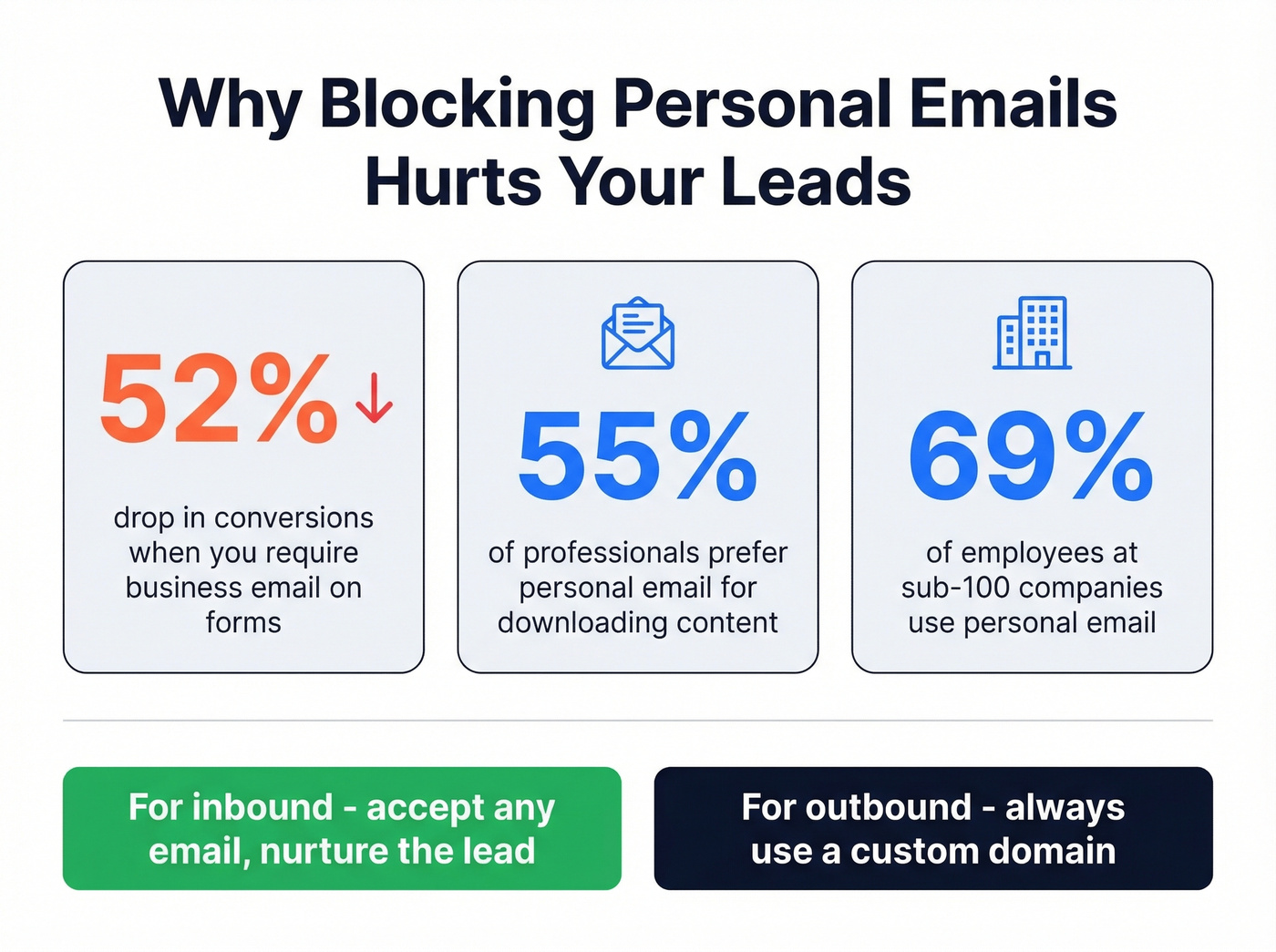
Requiring a professional email address on lead-gen forms causes an average 52% decrease in conversion rate, per Gartner Digital Markets research. C-level executives use personal email addresses about half the time, and 55% of professionals prefer personal email for downloading long-form content, according to MarketingSherpa data. The pattern is even more pronounced at smaller companies - individual contributors at sub-100-employee firms use personal email 69% of the time, compared to 49% at enterprises with 5,000+ employees.
If you're gatekeeping your whitepaper behind a "business email only" field, you're filtering out a huge chunk of your best leads.
For outbound, though, the math changes completely. Sending cold emails from a @gmail.com address is a credibility killer. Prospects don't trust it, spam filters don't trust it, and you can't properly authenticate your domain. Get a custom domain. It takes an hour and costs less than lunch.
How to Create a Company Email Address
Register Your Domain
Your domain is the foundation. Grab a .com or .org that matches your business name - avoid hyphens, numbers, and creative spellings that'll confuse people when they try to type your email from memory.
Registrars like Namecheap, Cloudflare, and GoDaddy all charge $10-$20/year for a standard .com. Cloudflare sells domains at cost with no markup, making it the cheapest option for most TLDs. Namecheap runs frequent promotions on first-year registrations. GoDaddy is fine but upsells aggressively during checkout. Register for at least two years upfront - it's a minor trust signal for domain reputation, and you won't forget to renew.
Choose an Email Hosting Provider
Here's the thing: most people overthink this step. You need email that works, syncs to your phone, and doesn't go down.
| Provider | Starting Price | Key Feature | Best For |
|---|---|---|---|
| Google Workspace | $7/user/mo (annual) | Gmail + Drive ecosystem | Most teams |
| Microsoft 365 | ~$6/user/mo | Outlook + Office apps | Microsoft shops |
| Zoho Mail | Free-~$1/user/mo | Generous free tier | Solo founders |
| Hostinger | $0.35/mo per mailbox (long-term) | Cheapest real option | Budget-first |
| Fastmail | ~$3/user/mo | Privacy + speed | Privacy-conscious |
| Proton Mail | ~$4/user/mo | Security-first email | Security-first |
If budget is the constraint, Hostinger works. If you want the ecosystem everyone already knows, Google Workspace is the default for good reason. If your team already lives in Microsoft, don't fight it. Every other choice is a niche pick.
Set Up Your Mailboxes
Decide on a naming convention before you start creating addresses. Consistency matters more than the specific format you choose.
| Format | Example | Pros | Cons |
|---|---|---|---|
| first.last@ | sarah.jones@ | Professional, clear | Long; common names collide |
| first@ | sarah@ | Short, friendly | Runs out fast at scale |
| firstinitiallast@ | sjones@ | Compact, scalable | Less personal |
| last@ | jones@ | Formal | Confusing with common names |
For outbound sales and client-facing roles, first.last@ or first@ reads best. For inbound inquiries, set up role-based addresses like info@, support@, or hello@ - but never use those for cold outreach. People want to hear from a person, not a department.
Avoid numbers, underscores, and symbols beyond the period. Adding "sarah.jones2@" because the first one was taken looks spammy and can trigger filters, per Twilio's guidance.
Configure SPF, DKIM, and DMARC
This is the step most people skip, and it's the step that matters most. We've seen teams spend thousands on email tools and then wonder why half their messages land in spam - the answer is almost always missing or broken authentication.
If you want the full playbook, start with an email deliverability guide and then validate your setup with how to verify DKIM is working.
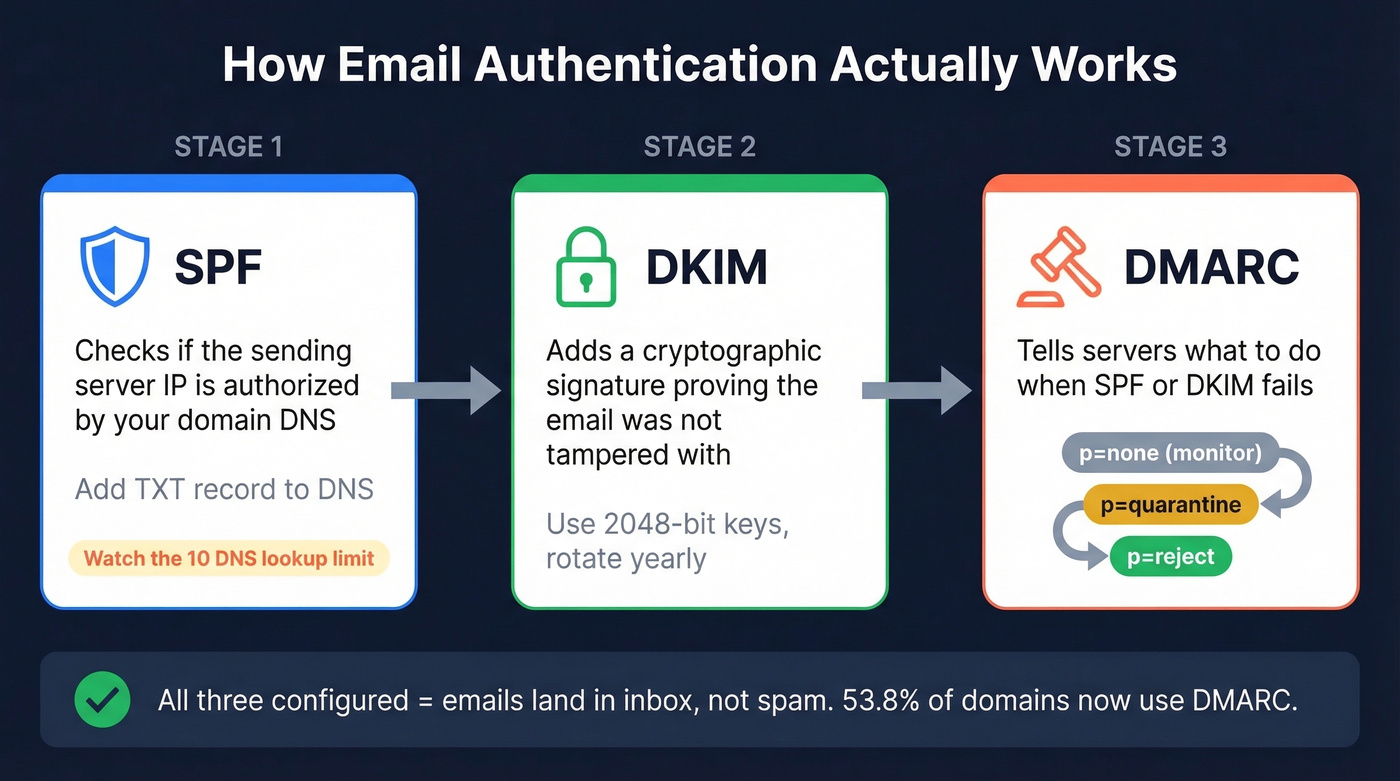
DMARC adoption reached 53.8% by the end of 2024, up from 42.6% the year before. Gmail and Yahoo now require DMARC for anyone sending 5,000+ emails. Without proper authentication, emails see 10-20% lower inbox placement.
SPF tells receiving servers which IP addresses can send email on behalf of your domain. Add a TXT record to your DNS that includes your email provider - for example, include:_spf.google.com - and end with -all to reject unauthorized senders. Watch the 10 DNS lookup limit; exceeding it silently breaks your SPF record. (If you need syntax help, use these SPF record examples.)
DKIM adds a cryptographic signature to every outgoing email, proving it wasn't tampered with in transit. Use 2048-bit keys, rotate them annually, and set up separate DKIM selectors for each sending service. This prevents one compromised service from poisoning your entire domain's reputation.
DMARC ties SPF and DKIM together and tells receiving servers what to do when authentication fails. Start with p=none to monitor without blocking, then progress to p=quarantine, and finally p=reject once you're confident everything's aligned. Use relaxed alignment mode if you're running cold email - strict alignment breaks too many legitimate sends. (More on this in DMARC alignment.)
The whole setup takes 30-60 minutes. Your email host's documentation walks you through each DNS record.

You've got your company email configured. Now you need the company email addresses of the people you're selling to. Prospeo's email finder delivers 98% accuracy across 300M+ professional profiles - and your first 75 lookups are free every month.
Stop guessing email formats. Find verified company emails in seconds.
How Much Does a Business Email Cost?
Most business email plans run $1-$25 per user per month. Add $10-$20/year for domain registration. For a five-person team, you're looking at $60-$1,500/year depending on the provider and tier.
| Provider | Starting Price/User/Mo | Annual (5 Users) | Notes |
|---|---|---|---|
| Google Workspace | $7 | $420 | Most popular choice |
| Microsoft 365 | ~$6 | ~$360 | Includes Office apps |
| Zoho Mail | $0 | $0 | Free tier (limited) |
| Hostinger | ~$0.35 per mailbox | ~$21 | Lowest-cost paid option |
| Fastmail | ~$3-$5 | ~$180-$300 | Privacy-focused |
| Proton Mail | ~$4 | ~$240 | Security-first |
Let's bust the "free business email" myth. Google Workspace offers a 14-day trial. Neo offers 15 days. These aren't free plans - they're trials with a credit card gate. Zoho's free tier is the only genuinely free option that lasts, and it caps at five users with limited storage. Budget $1-$7/user/month and move on. The time you'll spend hunting for a free solution costs more than the hosting itself.
How to Find Someone's Company Email
Creating your own email is half the equation. The other half is finding the addresses of the people you need to reach.
Use an Email Finder Tool
This is the fastest path for anyone doing outbound at volume. Paste a URL or upload a CSV of names and companies, and the tool returns verified email addresses.
If you're comparing options, start with email search tools and then narrow down to a dedicated email ID finder.
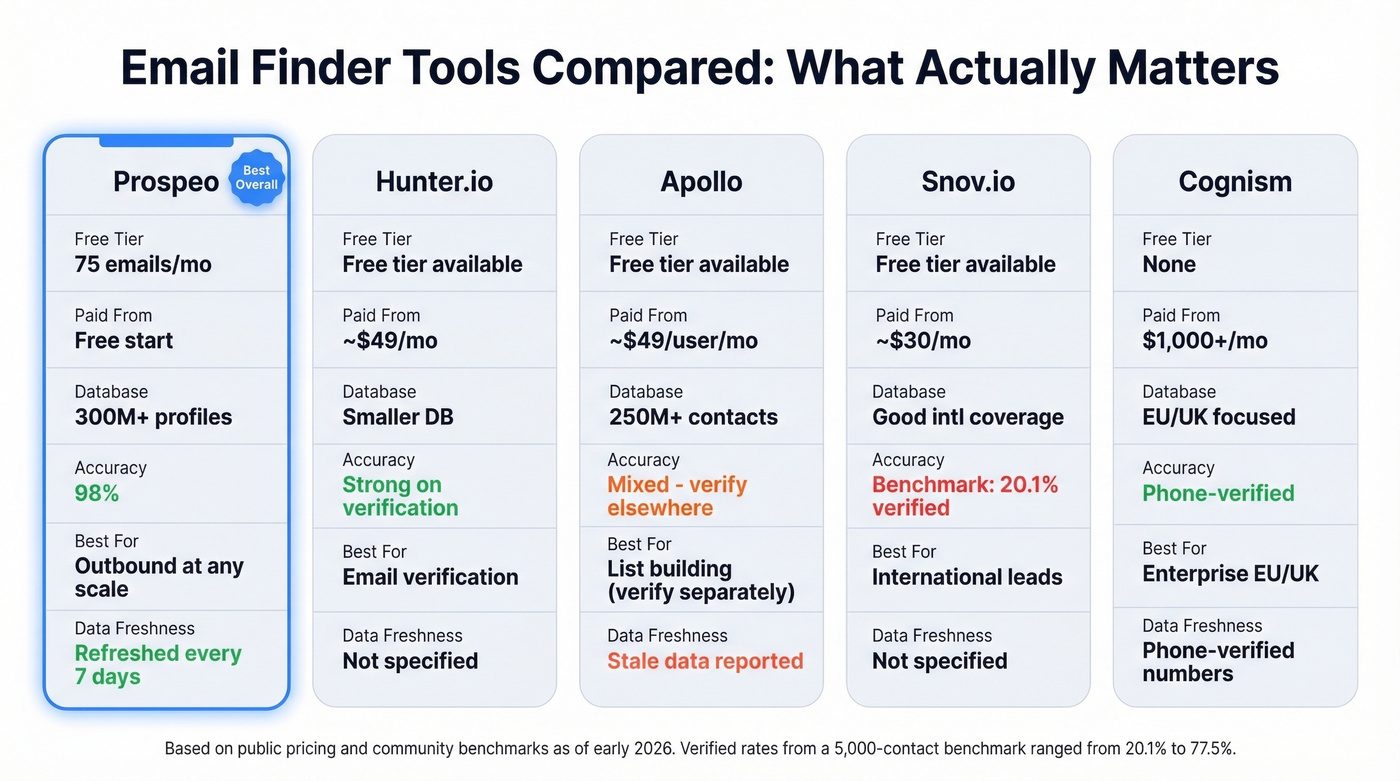
Prospeo searches across 300M+ professional profiles, returns emails at 98% accuracy, and refreshes its data every 7 days - which matters because stale data is a major reason emails bounce. The free tier gives you 75 emails per month, enough to test the workflow before committing. For bulk work, upload a CSV and get results in minutes, then push verified contacts directly to Lemlist, Instantly, or your CRM.
Hunter.io (free tier available, paid from ~$49/mo) is a solid verification layer. Its accuracy on known emails is strong, but the underlying database is smaller than competitors. Think of Hunter as a verification tool that happens to have a finder, not the other way around. (If you're shopping around, see these Hunter alternatives.)
Apollo (free tier available, paid from ~$49/user/mo) has a massive database at 250M+ contacts, but data quality is the persistent issue. The consensus on r/coldemail is blunt: Apollo exports often come back with thousands of "no email found" records, and older contacts bounce at high rates. It's a decent starting point for building lists, but verify everything through a second tool before sending.
Snov.io (free tier available, paid from ~$30/mo) is worth a look for international leads - affordable credits and decent coverage outside North America.
Cognism is the enterprise play for EU/UK data, with strong GDPR compliance and phone-verified mobile numbers. Pricing starts in the four-figure monthly range, so skip this if your budget doesn't match.
How much does tool choice actually matter? More than most people realize. In a 5,000-contact benchmark of fresh professional contacts, verified rates ranged from 20.1% for Snov.io to 77.5% for Anymail Finder, with Hunter.io landing at 37.6%. That's not a marginal difference - it's the gap between a sequence that fills your pipeline and one that destroys your domain reputation.
Our honest take: Most teams don't need the most expensive tool. If your deal sizes sit under five figures, a simple email finder with good verification will outperform a $2,000/month data platform that your reps barely use.
Check the Company Website
The simplest method is often overlooked. Hit the company's About, Team, or Contact page. Many startups and mid-market companies still list team members with email addresses, especially for public-facing roles like sales, marketing, and support.
The caveat: larger companies have moved to contact forms and chatbots. You'll find emails for maybe 20-30% of the companies you check this way. It's free and takes seconds, so try it first - just don't rely on it as your primary method.
Guess the Format and Verify
If you know someone's name and company domain, you can guess their email format with reasonable accuracy. The four most common patterns cover the vast majority of companies:
- first.last@company.com (most common)
- firstinitiallast@company.com
- first@company.com
- last@company.com
The critical step: never send to a guessed address without verifying it first. An incorrect guess doesn't just bounce - it signals to email providers that you're spraying unverified lists, which damages your sender reputation. Run your guesses through a verification tool to confirm deliverability before hitting send. (If you're stuck, this name to email guide walks through the workflow.)
Google Advanced Search Operators
For public-facing employees - speakers, authors, executives who publish content - Google operators can surface email addresses buried in PDFs, presentations, and old blog posts.
Try: site:company.com "@company.com" "firstname lastname"
This works surprisingly well for people who've spoken at conferences or been quoted in press releases. It doesn't scale, and it won't find most employees, but for high-value targets it's a free five-second check worth running.
Ask Directly
Sometimes the most effective method is the most obvious. Send a message through the company's contact form, reach out via social DMs, or call the main line and ask. It's the slowest approach, but for a high-priority prospect where nothing else has worked, a direct ask has a high success rate.
Email Verification: Why It Matters
Finding an address is only half the job. Verifying it before you send is what separates professionals from spammers.
Verification tools check whether an address is deliverable without actually sending a real email. They return one of three statuses: Valid (confirmed deliverable), Risky (usually a catch-all domain or graylisted server), or Not Found (the address doesn't exist or the server rejected the probe).
If you want to go deeper on bounce prevention, start with email bounce rate benchmarks and fixes.
Catch-all domains are the tricky ones. These servers accept mail for any address at the domain, whether it exists or not - so verification can't definitively confirm the specific mailbox. Graylisting temporarily rejects the first connection attempt as a spam-filtering technique, causing false "not found" results in tools that don't retry.
Teams that verify before sending consistently keep bounce rates under 3-4%, while teams sending to unverified lists regularly hit 15-35%. A recurring theme on r/coldemail: teams that skip verification burn through 2-3 domains before learning the lesson. The stakes are real - email providers track your bounce rate at the domain level. Cross 5% and inbox placement drops. Cross 10% and you risk getting blacklisted. Verification isn't a nice-to-have; it's insurance for your most important outbound asset.
You just spent an hour setting up SPF, DKIM, and DMARC to protect your deliverability. Don't waste it by sending to bad addresses. Prospeo verifies every email through a 5-step process with catch-all handling and spam-trap removal - so your carefully authenticated domain stays clean.
Perfect authentication deserves perfect data. Start at $0.01 per verified email.
Common Mistakes to Avoid
- Skipping SPF/DKIM/DMARC. The single most common mistake. Your emails will land in spam, and you won't know why until deliverability is already damaged.
- Using @gmail.com for business outbound. It screams "I'm not serious enough to spend $7/month." Prospects notice.
- Sending to unverified email lists. Even one bad batch can tank your domain reputation for weeks.
- Choosing a provider because it's "free." Free trials end. Free tiers have crippling limitations. Budget $1-$7/mo and get something reliable.
- Using role-based addresses for cold outreach. Sending from info@ or sales@ instead of a personal address drops reply rates significantly.
- Never rotating DKIM keys. Set a calendar reminder to rotate annually. Stale keys are a security risk and a deliverability liability.
FAQ
What's the difference between a company email and a business email?
Nothing. They're interchangeable terms. Both refer to a custom-domain address (name@yourcompany.com) used for professional communication, as opposed to a free provider like Gmail or Yahoo. Some people say "corporate email" too. Same thing.
Can I create a company email address for free?
Zoho Mail's free tier is the only lasting free option, capped at five users with limited storage. Most "free" offers from Google Workspace and Neo are 14-15 day trials requiring a credit card. Budget $1-$7/user/month for a reliable setup, plus $10-$20/year for domain registration.
How do I find someone's company email without paying?
Check the company website's team or contact page first, then try Google operators like site:company.com "@company.com" "name". If those fail, guess common patterns (first.last@, first@) and verify with a free-tier tool before sending.
How long does it take to set up a professional email?
About 30-60 minutes total. Domain registration takes 5 minutes, email hosting setup another 10, and the remaining 15-30 minutes go to configuring SPF, DKIM, and DMARC records in your DNS - the step most people skip and later regret.
Is Google Workspace worth it for a small team?
At $7/user/month on an annual plan, it's the most popular choice for good reason - tight Gmail, Drive, and Calendar integration that most people already know. If you only need email without the productivity suite, Hostinger at $0.35/month per mailbox or Zoho's free tier work fine.