

How to Build a Competitor Database That Doesn't Die After One Quarter
It's Monday standup. Your VP of Sales just lost a $180K deal to a competitor nobody on the team had heard of six months ago. The AE scrambles to explain: "They undercut us on price and had a feature we didn't know about." The room goes quiet. Someone suggests building a competitor database. Everyone nods. By Friday, there's a Google Sheet with three tabs and twelve rows. By April, it's abandoned.
We've watched this pattern repeat across dozens of teams. About 44% of companies admit to having zero visibility into their competitors, and the ones that do often rely on a stale spreadsheet nobody trusts. Organizations with mature competitive intelligence programs see 23% higher revenue growth, 8-18% higher win rates in competitive deals, and 15-25% faster sales cycles. The gap between "we should track competitors" and "we actually use competitive data to win deals" is where most teams get stuck. Let's close it.
What You Need (Quick Version)
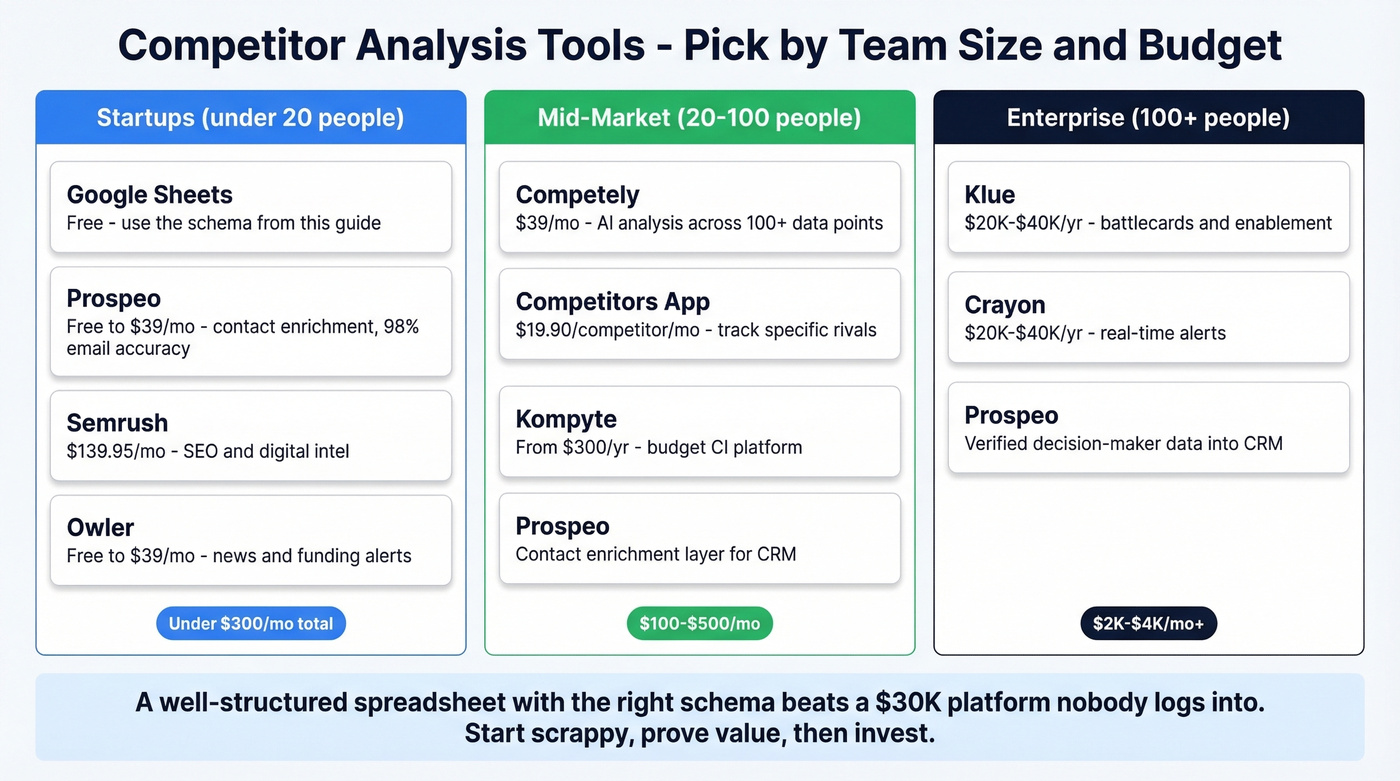
Teams under 20: Google Sheets with the schema below, a contact enrichment tool, and Semrush or Similarweb for digital intel. Under $300/month total. That covers 90% of what you need.
Mid-market (20-100 people): Competely ($39/month) or Competitors App ($19.90/competitor/month) for automated monitoring. You get continuous updates without hiring a dedicated CI analyst.
Enterprise (100+): Klue or Crayon (~$20K-$40K/year) for battlecards and sales enablement, with a contact enrichment layer feeding verified decision-maker data into your CRM.
What Is a Competitor Database?
A competitor database is a structured repository of everything you know - and need to know - about the companies you compete against. It's not a one-time research project. It's a living system that feeds sales conversations, product decisions, and marketing positioning.
In practice, it takes three forms. The simplest is a spreadsheet with tabs for each competitor and columns for pricing, features, positioning, and contacts. The second is a SaaS platform like Klue or Crayon that automates collection and pushes battlecards to reps. The third is a data marketplace approach, where you pull structured competitive data from providers - including alternative sources like credit card transaction data or survey intelligence panels - and layer it into your own systems.
The CI tools market is projected to reach $1.46B by 2030 at roughly 20% annual growth. But the distinction that matters isn't which format you pick. It's whether your competitive tracker is a filing cabinet or a sales weapon that reps actually open before calls.
What to Track - The Schema
Most competitor analysis templates are, as Klue puts it, "way too basic" - a couple of bullets for strengths and weaknesses, maybe a pricing column. That's not a database. That's a napkin sketch.
The schema below holds up in production, adapted from frameworks that have worked across dozens of teams we've spoken with:
Five Core Sections
| Section | What to Capture | Update Cadence |
|---|---|---|
| Company Profile | Revenue, headcount, funding, HQ, segments | Quarterly |
| Product & Features | Feature matrix, roadmap signals, integrations | Monthly |
| Pricing & Packaging | Tiers, discounts, contract terms | Monthly |
| Marketing & Positioning | Homepage headline, messaging, content themes | Monthly |
| SWOT Synthesis | Strengths, weaknesses, opportunities, threats | Quarterly |
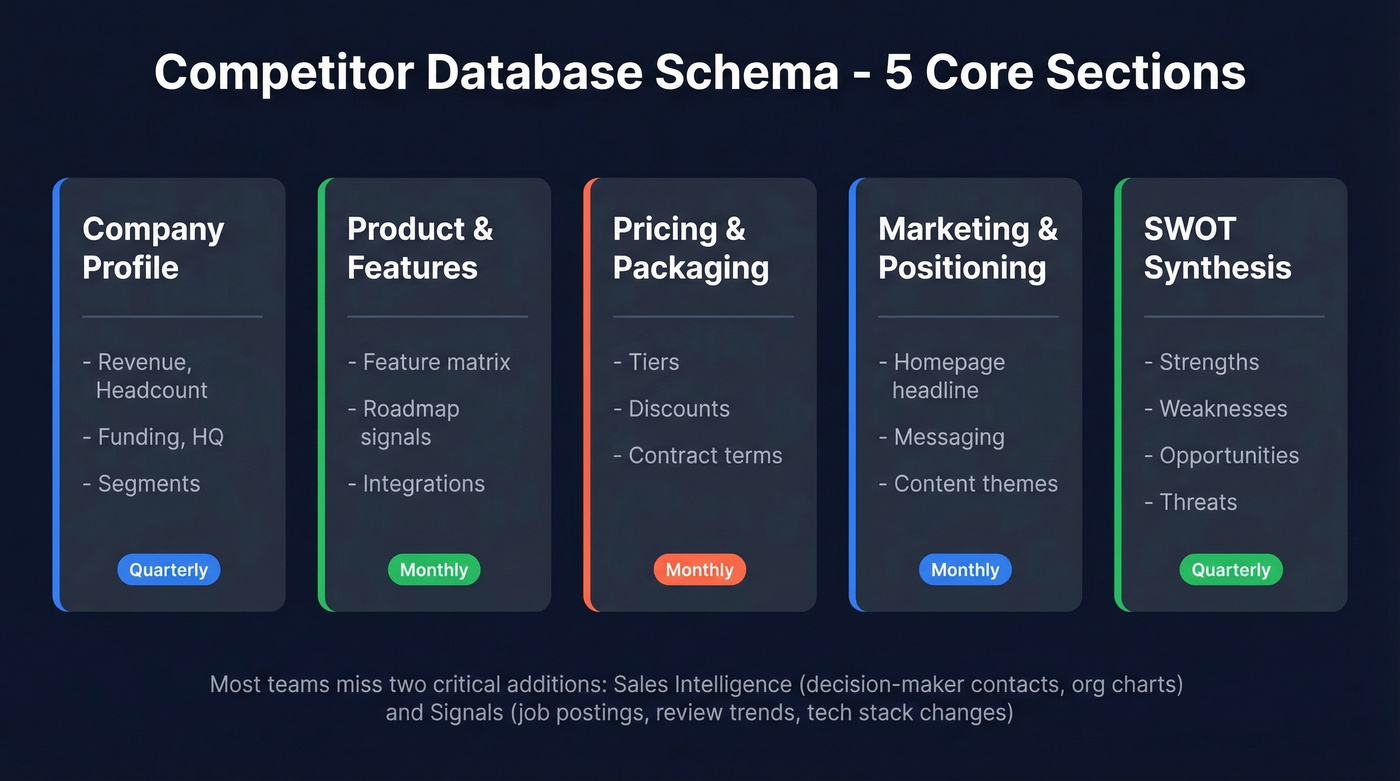
These five come from a battle-tested framework that treats the repository as a command center, not a filing cabinet.
Sections Most Teams Miss
Sales intelligence. Who are the decision-makers at each competitor's key accounts? What does their org structure look like? When you're in a competitive deal, knowing the VP of Engineering's name and having a verified email is the difference between a generic pitch and a multi-threaded play. (If you want to operationalize this, start with an Ideal Customer Profile so your competitor account list stays focused.)
Signals. Job postings are a 6-12 month roadmap in plain sight. A competitor hiring three mobile engineers? Expect a mobile product refresh. Posting for an SMB-focused product marketing manager? They're pushing downmarket. Regional sales hires in DACH? European expansion is coming. Layer in review sentiment trends from G2 and tech stack changes from Wappalyzer, and you've got an early warning system most competitors don't have. This kind of intelligence data is often more actionable than anything published on a pricing page.
How to Build One Step by Step
Define Key Intelligence Questions
Before you open a spreadsheet, define your Key Intelligence Questions. KIQs are the 5-8 specific questions your competitor database needs to answer - things like "Which competitors are winning deals in our mid-market segment?" or "How does Competitor X's pricing compare to ours at the 100-seat tier?"
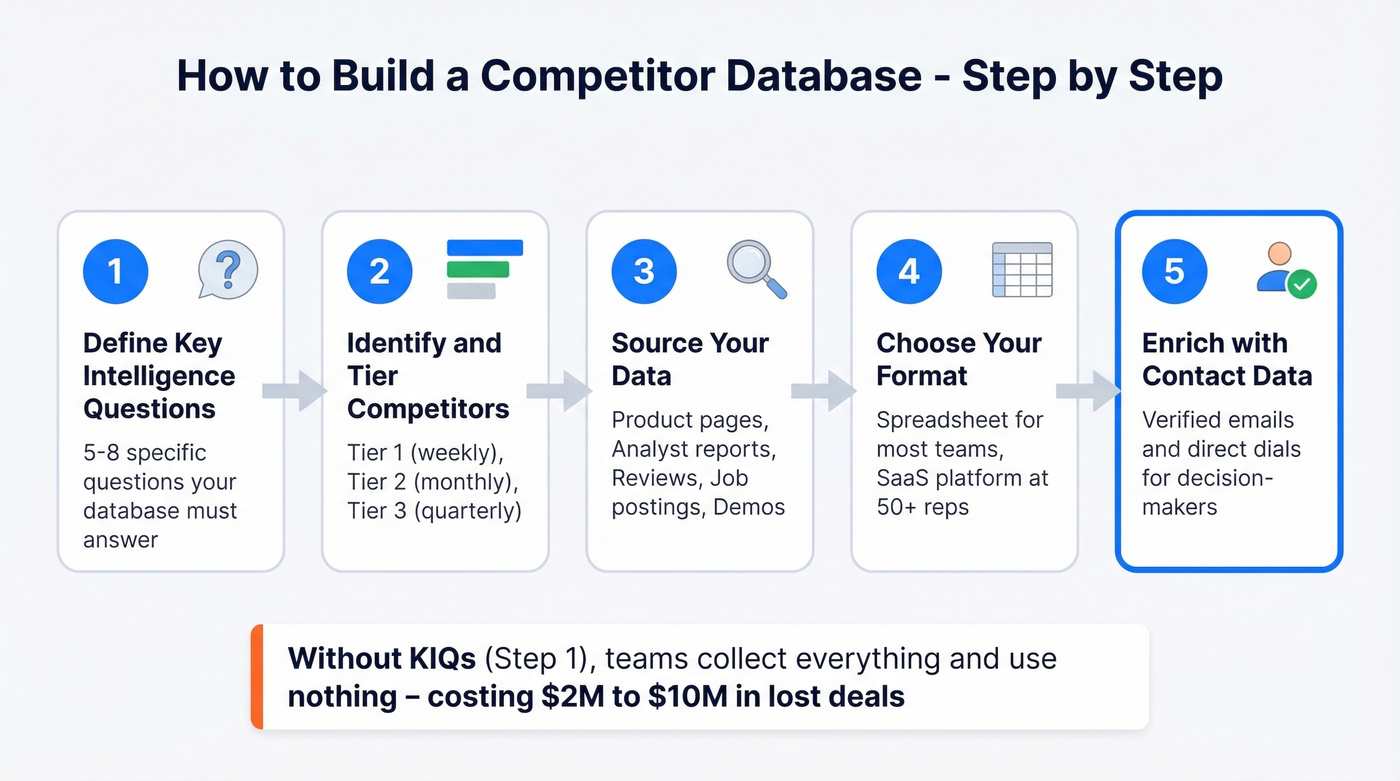
Without KIQs, you'll fall into the #1 failure mode: collecting everything, using nothing. Companies lose $2-$10M due to inadequate competitive intelligence, and the root cause is usually unfocused collection, not missing data.
Identify and Tier Competitors
Not every competitor deserves the same attention. Use a three-tier system based on market overlap and threat level:
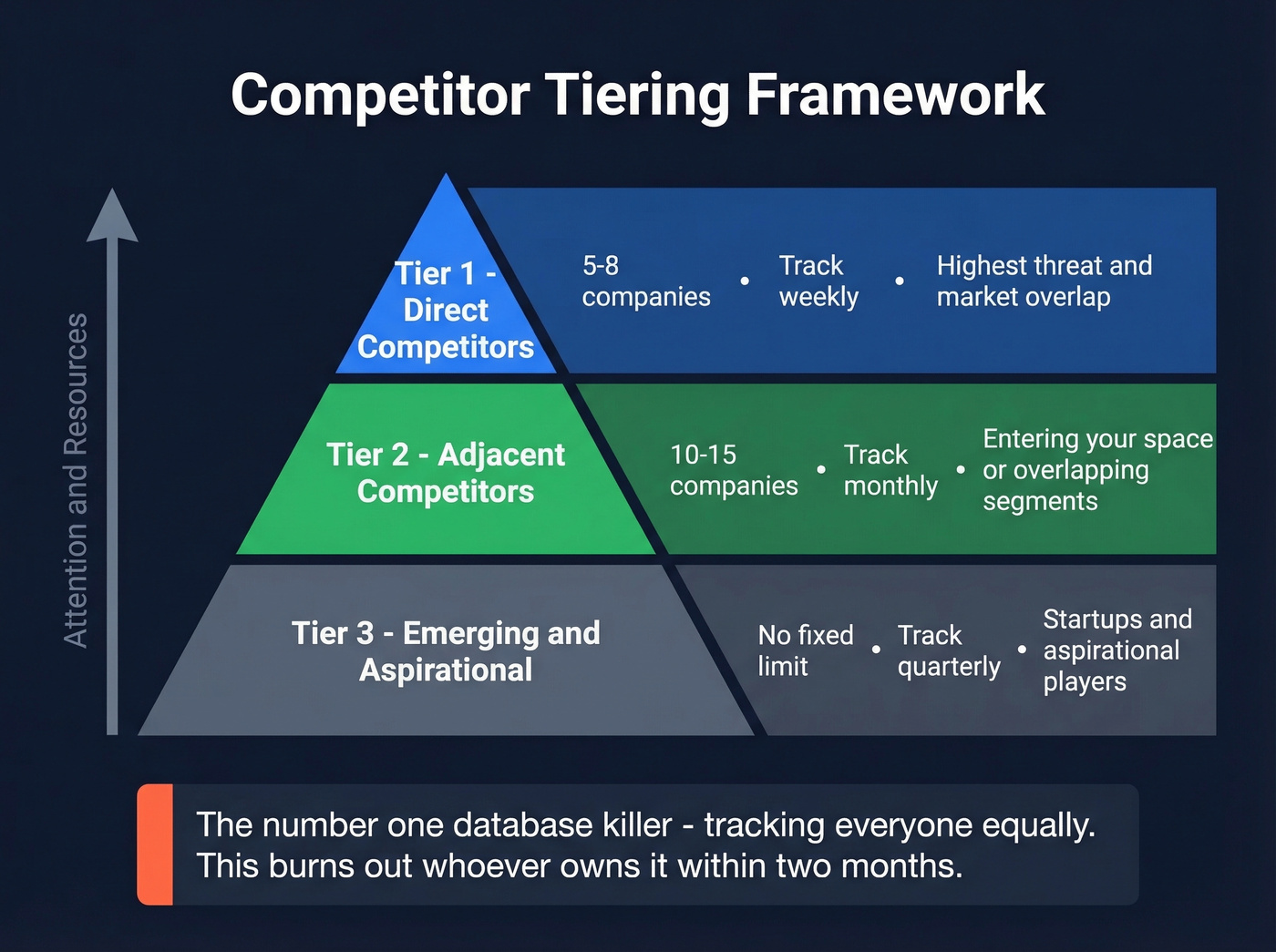
- Tier 1 - Direct competitors in your segment. Track weekly. Typically 5-8 companies.
- Tier 2 - Adjacent competitors or those entering your space. Track monthly. 10-15 companies.
- Tier 3 - Aspirational players or emerging startups. Track quarterly. No limit, but keep it manageable.
This tiering prevents the "track everyone equally" trap that burns out whoever owns the database within two months.
Source Your Data
Five data sources cover 80% of what you need, per Klue's methodology.
Competitor product pages give you features and value statements - not just feature lists, but how they frame the value. Analyst reports from Gartner and Forrester provide strengths and weaknesses (the narrative matters more than the quadrant placement). Review sites like G2, Capterra, and TrustRadius surface perceived strengths and weaknesses from actual users. Job postings reveal strategic direction. Product demos and videos let you understand the product without buying it - screenshot key screens and link them in your database.
Choose Your Format
Here's the honest decision framework: if you have a dedicated CI analyst and 50+ reps consuming battlecards, a SaaS platform like Klue or Crayon pays for itself. Everyone else should start with a Google Sheet.
A well-structured spreadsheet with the right schema beats a $30K platform nobody logs into. You can always migrate to SaaS later once you've proven the database has internal demand. Start scrappy, prove value, then invest.
Enrich with Contact Data
This step turns a static competitor tracker into a prospecting asset. Once you've mapped competitor accounts and their org structures, enrich them with verified contact data for decision-makers - for competitive deals, win/loss interviews, and multi-threading into accounts where you're displacing an incumbent. Tools like Prospeo let you search by company, filter by title and department, and export verified contacts directly into your CRM with a 98% email accuracy rate and 7-day data refresh cycle. (If you're comparing vendors, see our roundup of the best data enrichment tools.)


You just mapped competitor org structures and key accounts. Now enrich them with verified emails and direct dials. Prospeo returns 50+ data points per contact at 98% email accuracy - so your competitor database becomes a live prospecting weapon, not a static spreadsheet.
Turn your competitor database into a pipeline machine for $0.01 per email.
Best Competitor Analysis Tools
| Tool | Category | Starting Price | Best For |
|---|---|---|---|
| Prospeo | Contact enrichment | Free (75 emails/mo) | Competitor account enrichment |
| Competely | AI competitor analysis | $39/mo | Automated monitoring |
| Competitors App | Competitor monitoring | $19.90/competitor/mo | Tracking specific rivals |
| Klue | Enterprise CI | ~$20K-$40K/yr | Battlecards + enablement |
| Crayon | Enterprise CI | ~$20K-$40K/yr | Real-time alerts |
| Kompyte | CI platform | From $300/yr | Budget CI |
| Semrush | SEO/digital intel | $139.95/mo | SEO competitor analysis |
| Similarweb | Digital analytics | From $199/mo | Traffic + audience overlap |
| Ahrefs | SEO analysis | $129/mo | Backlink + content gaps |
| Owler | Company intel | Free; Pro ~$35-$39/mo | News + funding alerts |
Prospeo
Every competitive tracking system eventually hits the same wall: you know who the competitors are, what they charge, and how they position - but you can't reach the people making buying decisions at those accounts. Prospeo fills that gap with 30+ search filters covering buyer intent, technographics, job changes, headcount growth, and more across 300M+ professional profiles. The 98% email accuracy and 30% mobile pickup rate mean your outreach actually lands. Export to your CRM or push directly to Lemlist, Instantly, or Smartlead for outbound sequences. Self-serve pricing starts free, with paid plans from ~$39/month. No contracts, no sales calls required. (To pressure-test providers, compare options in our best verified contact database guide.)
Competely
Use this if: You're a startup or small team that needs automated competitor analysis without hiring a CI analyst. Competely runs AI-powered analysis across 100+ data points - pricing, features, messaging, marketing, customer sentiment, SWOT - and delivers it as a structured report you can export to CSV or PDF.
Skip this if: You need battlecards pushed to a sales team or deep CRM integration. Competely is an analysis tool, not a sales enablement platform.
The monitoring feature automatically re-analyzes competitors every 2-4 weeks and sends brief email digests with key changes. At $39/month, it saves 30-60 hours of manual research per month. For teams that don't have the budget for Klue or Crayon, it's the most practical automated option we've found.
Klue
We watched a 200-person SaaS company implement Klue last year. The first three months were rough - onboarding, data migration, getting reps to actually open battlecards. By month six, their competitive win rate had climbed measurably, and the sales team was requesting updates instead of ignoring them. That's the Klue trajectory: painful setup, real payoff.
Klue combines automated competitor monitoring with battlecard creation, sales enablement, and win/loss analysis. They acquired Ignition to bolster win/loss capability, and their Compete Agent AI feature pushes toward automated insight generation. Pricing runs ~$20K-$40K/year with custom contracts, and setup and integration fees are common on top of the base.

It only makes sense if you have a dedicated CI analyst - or at least someone spending 50%+ of their time on competitive intel - and 50+ reps who'll consume the output. Below that threshold, you're paying enterprise prices for a tool that'll gather dust.
Crayon
Crayon occupies similar territory to Klue: enterprise CI with real-time competitive alerts, battlecard templates, and a 4.5/5 rating on Capterra. The battlecard creation workflow is praised as "simple and efficient," and the real-time notification system catches competitor changes quickly.
The challenge is adoption. One Capterra reviewer flagged the core issue: "Getting internal teams to consistently engage and contribute field intelligence can be difficult." That's not a Crayon-specific problem - it's an enterprise CI problem. But at ~$20K-$40K/year with no free trial, you're making a significant bet that your organization will actually use it.
Semrush
At $139.95/month, Semrush is the go-to for marketing teams tracking organic and paid competitor strategies. Traffic estimates, keyword gaps, backlink profiles, content analysis - it's the digital intelligence layer that complements your core competitive repository. Not a CI platform, but an essential data source for the marketing and positioning sections of your schema.
Tier 3 Mentions
Competitors App ($19.90/competitor/month) does straightforward competitor monitoring - website changes, social posts, ad/keyword tracking, and review monitoring. Useful if you're watching 3-5 specific rivals. Owler offers free company profiles with news and funding alerts; Pro runs ~$35-$39/month depending on billing. Kompyte is a budget CI platform starting from $300/year. Similarweb (from $199/month) excels at website traffic and audience overlap analysis. Ahrefs ($129/month) is the backlink and content gap specialist.
Mistakes That Kill It
1. Gathering everything without KIQs. Without Key Intelligence Questions, your database becomes a data graveyard. You'll spend hours tracking metrics nobody uses while missing the three data points that would've changed a deal outcome.
2. Over-emphasizing price. Price is the most visible competitive dimension, so teams obsess over it. The result is margin-eroding discounting driven by incomplete competitive context. Price matters, but it's one column in a schema that should include positioning, feature differentiation, and customer sentiment. (For a practical framework, see overcoming the price objection.)
3. Manual, occasional monitoring. You built the spreadsheet in January. By April, half the pricing is wrong and the last person to open it was you. I've seen this kill more competitive tracking efforts than any other single factor. Automate what you can - even a $39/month tool beats a quarterly manual refresh.
4. No internal adoption plan. One person builds it, nobody uses it. Build distribution into the plan from day one: Slack alerts, pre-call battlecards, deal-stage triggers in your CRM. (If you need a system, map it into your sales enablement planning.)
5. Ignoring non-obvious signals. Most teams track pricing and features. Few track job postings, tech stack changes, or hiring patterns. These signals are often more predictive than anything on a competitor's website, and they're available for free.
How to Maintain It
A competitor database without a maintenance cadence is a research project with an expiration date.
| Competitor Tier | Update Cadence | What to Check |
|---|---|---|
| Tier 1 (direct) | Weekly | Pricing, features, key hires, deals lost |
| Tier 2 (adjacent) | Monthly | Positioning, product launches, funding |
| Tier 3 (emerging) | Quarterly | Still relevant? Promote or archive |
Automation handles the heavy lifting. Competely's 2-4 week re-analysis cycle covers product and positioning changes. Crayon and Competitors App send real-time alerts for website updates, ad launches, and content changes. Layer in Google Alerts for news coverage and G2 review monitoring for sentiment shifts.
The quarterly review is non-negotiable. Every 90 days, sit down with sales, product, and marketing to audit the database. Promote Tier 3 competitors that are showing up in deals. Archive Tier 2 competitors that have gone quiet. Refresh the KIQs based on what the business actually needs to know right now. (If you want a repeatable meeting structure, borrow from these QBR questions to ask.)
Here's the thing: most teams don't need a $30K CI platform. They need a $0 spreadsheet with the right schema, a $39/month monitoring tool, and one person who cares enough to run the quarterly review. The companies pulling ahead aren't the ones spending the most on CI software - they're the ones that built the maintenance habit. AI adoption within CI teams increased 76% year-over-year, with 60% of CI teams now using AI daily and team sizes up 24%. The tools are getting cheaper and smarter. The bottleneck is discipline, not budget. (If you're building the broader stack, start with a clean RevOps tech stack.)
Tracking competitor hiring signals and account moves is step one. Step two is multi-threading into those accounts with verified contact data. Prospeo's 300M+ profiles, 125M+ verified mobiles, and 30+ search filters let you find every decision-maker at competitor accounts - refreshed every 7 days.
Stop tracking competitors passively. Start reaching their customers directly.
Free Templates to Start
You don't need to build from scratch. These templates give you a working structure to customize:
| Template Source | Format | Access | Notes |
|---|---|---|---|
| Smartsheet | Excel, Word, Google Docs | Free download | Dated (2018) but solid structure |
| HubSpot | Sheets, Docs, Excel, PDF | Requires email | Multi-format, well-designed |
| Notion | Living wiki database | Requires Notion account | Best for ongoing collaboration |
| Miro | Visual/workshop boards | Requires Miro account | Great for team workshops |
The Smartsheet templates are the fastest to grab - no account required, immediate download. The structure dates to 2018, but the fundamentals haven't changed: company profile, product comparison, SWOT, and market positioning. Add the signals and sales intelligence sections from the schema above, and you've got a modern competitor database without spending a dollar on software.
The template matters less than the habit. Pick one, customize it with the schema from Section 3, and commit to the maintenance cadence. A mediocre template that gets updated weekly beats a perfect template that gets opened once. (If you're running this inside a CRM, consider adding lightweight workflows with CRM automation software.)
FAQ
What's the difference between a competitor database and competitive intelligence?
A competitor database is the structured repository where you store competitive data - the spreadsheet, the platform, the wiki. Competitive intelligence is the broader discipline of collecting, analyzing, and acting on that data to inform business decisions. The database is the foundation; CI is the practice built on top of it. When teams layer in signals like job postings, tech stack changes, and deal outcomes, the static reference becomes a decision-making engine.
How many competitors should I track?
Keep Tier 1 to 5-8 direct competitors with weekly attention. Tier 2 can run 10-15 adjacent players tracked monthly. Tier 3 is unlimited but reviewed quarterly. More than 8 in your active tier creates noise that dilutes focus and burns out whoever maintains the system.
Can I build one in a spreadsheet?
Yes - and you should start there. A Google Sheet with the right schema beats a $30K platform nobody logs into. Most teams that jump straight to enterprise CI software regret it because they haven't proven internal demand. Start scrappy, prove value, then upgrade when manual maintenance pain outweighs automation cost.
How do I get contact data for competitor accounts?
Use a B2B data platform to enrich company records with verified emails and direct dials. Prospeo lets you search by company name, filter by job title and department, and export verified contacts - 75 free lookups per month is enough to start enriching your Tier 1 accounts immediately.
How often should I update it?
Tier 1 competitors weekly, Tier 2 monthly, Tier 3 quarterly. Automate where possible - Competely, Crayon, and Competitors App handle monitoring and send alerts on changes. The quarterly cross-functional review with sales, product, and marketing is the single most important ritual to keep the data alive and relevant.