

Contact Data Enrichment: What It Is, What Goes Wrong, and How to Do It Right
A RevOps lead we know ran enrichment on 50,000 CRM contacts last quarter. Thirty percent came back worse - wrong titles, stale emails, 2,400 brand-new duplicates. The tool worked exactly as configured. The process was the problem.
That's the dirty secret of contact data enrichment. The average organization loses $12.9-15M per year to poor data quality, and most of that damage comes from enrichment done badly, not enrichment skipped entirely. The market's projected to hit $5.48B by 2034, which means more tools, more vendors, and more ways to get this wrong.
If your enriched records are bouncing or breaking your CRM, the problem is almost always freshness and governance - not database size.
What Is Contact Data Enrichment?
Contact data enrichment takes a bare-bones CRM record - maybe a name and company - and fills in the gaps. Verified email, direct dial, current job title, company revenue, tech stack, funding stage, even buyer intent signals. A raw record might have 3-5 fields. An enriched one carries 50+.
It's easy to confuse enrichment with related processes:
| Process | What It Does | Example |
|---|---|---|
| Enrichment | Adds missing fields | Appends mobile number |
| Cleansing | Fixes or removes bad data | Corrects misspelled domain |
| Appending | Adds records, not fields | Imports net-new contacts |
The data you're enriching falls into four categories. Contact-level data covers email, phone, title, and seniority. Firmographic data includes revenue, headcount, industry, and HQ location. Technographic data tells you what software a company runs. And intent data reveals whether they're actively researching your category - which is where the real money is, because you're reaching people who already have budget conversations happening internally. The best enrichment tools handle all four. Most handle two or three.
Here's the thing: teams often buy an enrichment tool expecting it to clean their existing data. It won't. If your CRM is full of duplicates and formatting inconsistencies, enriching those records amplifies the problems. Clean first, then enrich.
Why Enrichment Matters More Than You Think
Your CRM is rotting right now. Not metaphorically. B2B contact data decays at roughly 2.1% per month - that's 22.5% annually across your entire database. Some fields decay much faster.
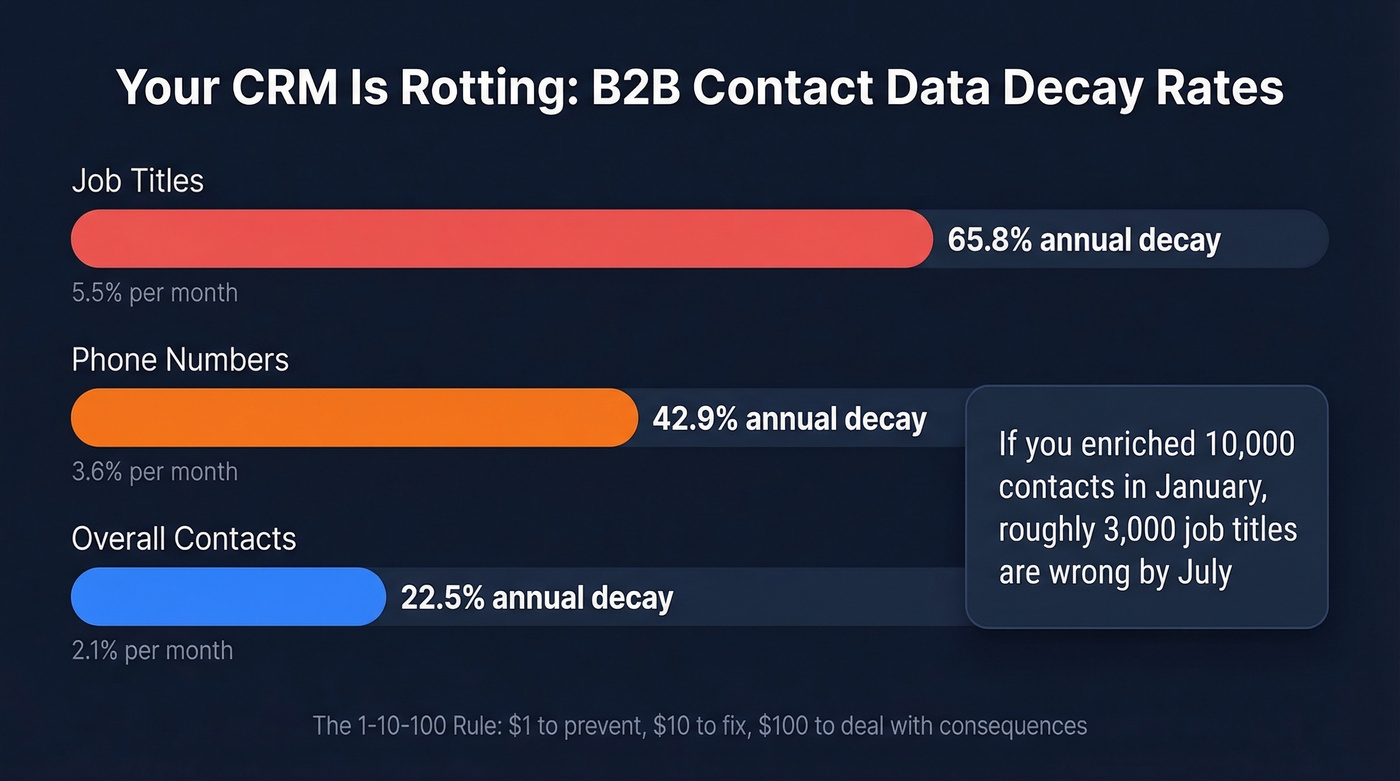
| Field | Monthly Decay | Annual Decay |
|---|---|---|
| Job titles | 5.5% | 65.8% |
| Phone numbers | 3.6% | 42.9% |
| Overall contacts | 2.1% | 22.5% |
Think about what 5.5% monthly title decay means. If you enriched 10,000 contacts in January, by July roughly 3,000 of those job titles are wrong. Your reps are pitching "VP of Marketing" to someone who's been "CMO" for five months, or worse, someone who left the company entirely.
IBM pegged the annual cost of bad data to the US economy at $3.1 trillion. The micro version is the 1-10-100 rule: $1 to prevent a data error, $10 to fix it after entry, $100 to deal with downstream consequences - bounced sequences, wasted rep time, damaged sender reputation.
This is why refresh cadence matters as much as initial accuracy. A tool that verifies an email once and never checks again gives you a snapshot, not a living database.
What Goes Wrong (The Part Nobody Talks About)
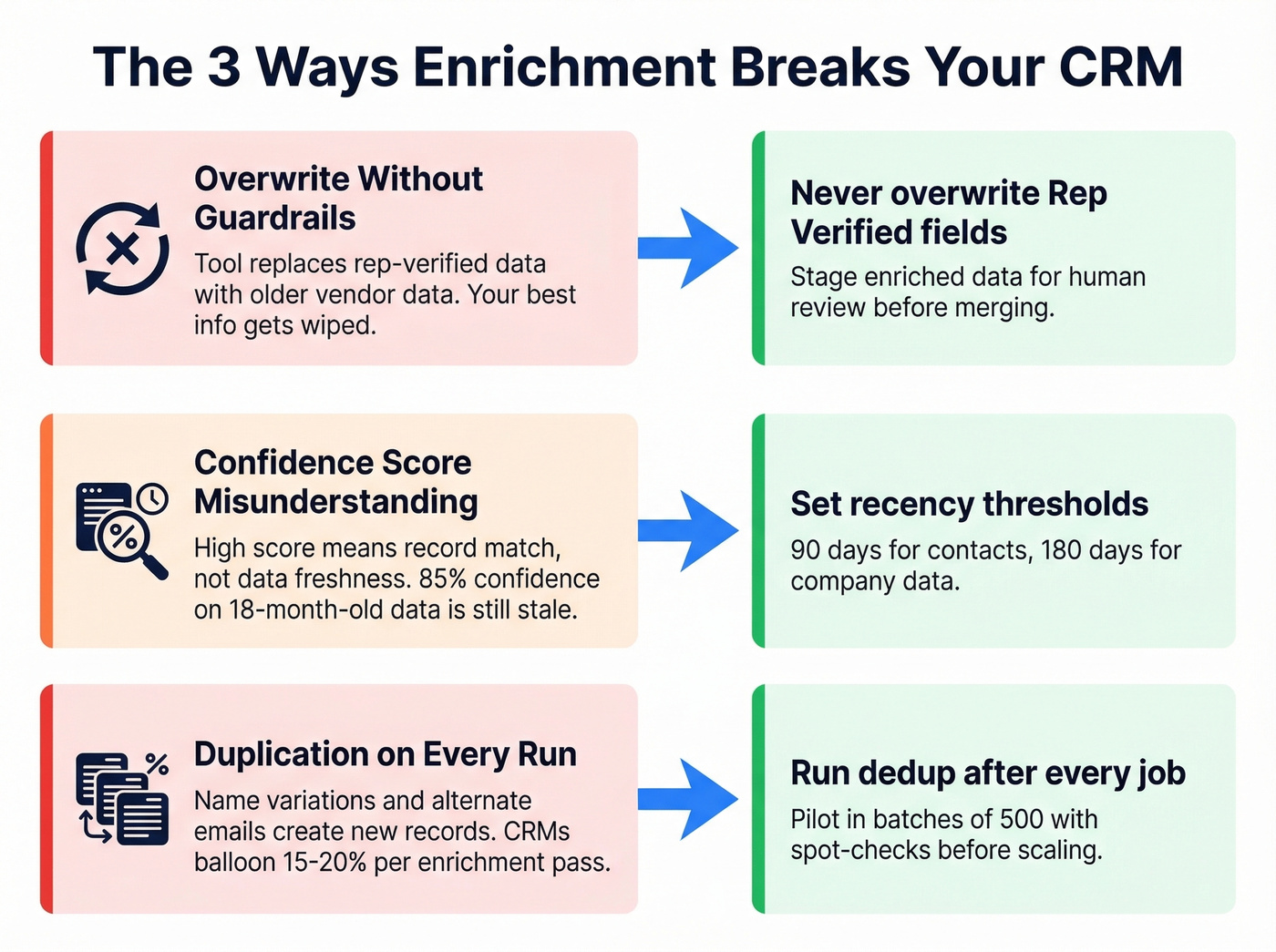
Let's talk about the 50,000-contact enrichment disaster. A team ran a bulk enrichment job, and roughly 15,000 records came back worse. The tool overwrote rep-verified phone numbers with stale vendor data. Confidence scores looked great - 85%+ across the board - but those scores measured match-to-record confidence, not data freshness. The normalization logic created 2,400 duplicates by generating alternate email formats for contacts that already existed.
Separately, a HubSpot user reported enriching ~2,000 records and finding wrong profiles attached to contacts - incorrect last names, wrong titles, mismatched social profiles. In Reddit threads on r/sales and r/LeadGeneration, the most common enrichment complaint isn't accuracy. It's the overwrite problem. Reps lose data they manually verified, replaced by whatever the vendor database returns.
Three failure modes show up repeatedly:
Overwrite Without Guardrails
The enrichment tool replaces a field your rep manually verified with whatever the vendor database returns. The vendor data is often older than what you already had. This one drives us crazy because it's entirely preventable.
Confidence Score Misunderstanding
Teams treat a high confidence score as "this data is correct." It's not. It means "we're confident this record matches this person." The data itself might be 18 months stale.
Duplication on Every Run
Alternate email formats, name normalization differences, and company name variations create new records instead of updating existing ones. We've seen CRMs balloon by 15-20% after a single enrichment pass.
The fix is governance, not a better tool:
- Never overwrite fields flagged as "Rep Verified" or "Customer Provided"
- Append, don't replace - stage enriched data for human review before merging
- Pilot in batches of 500 records with spot-checks before scaling
- Run dedup after every enrichment job, not before
- Set recency thresholds: 90 days for contact-level, 180 days for company-level
Batch, Real-Time, and Waterfall Enrichment
Not all enrichment works the same way. The model you choose affects accuracy, speed, cost, and coverage.
| Model | How It Works | Best For |
|---|---|---|
| Batch | Periodic bulk refresh | Quarterly CRM hygiene |
| Real-time | Live query at request | Form fills, inbound |
| Waterfall | Cascades through sources | Outbound list building |
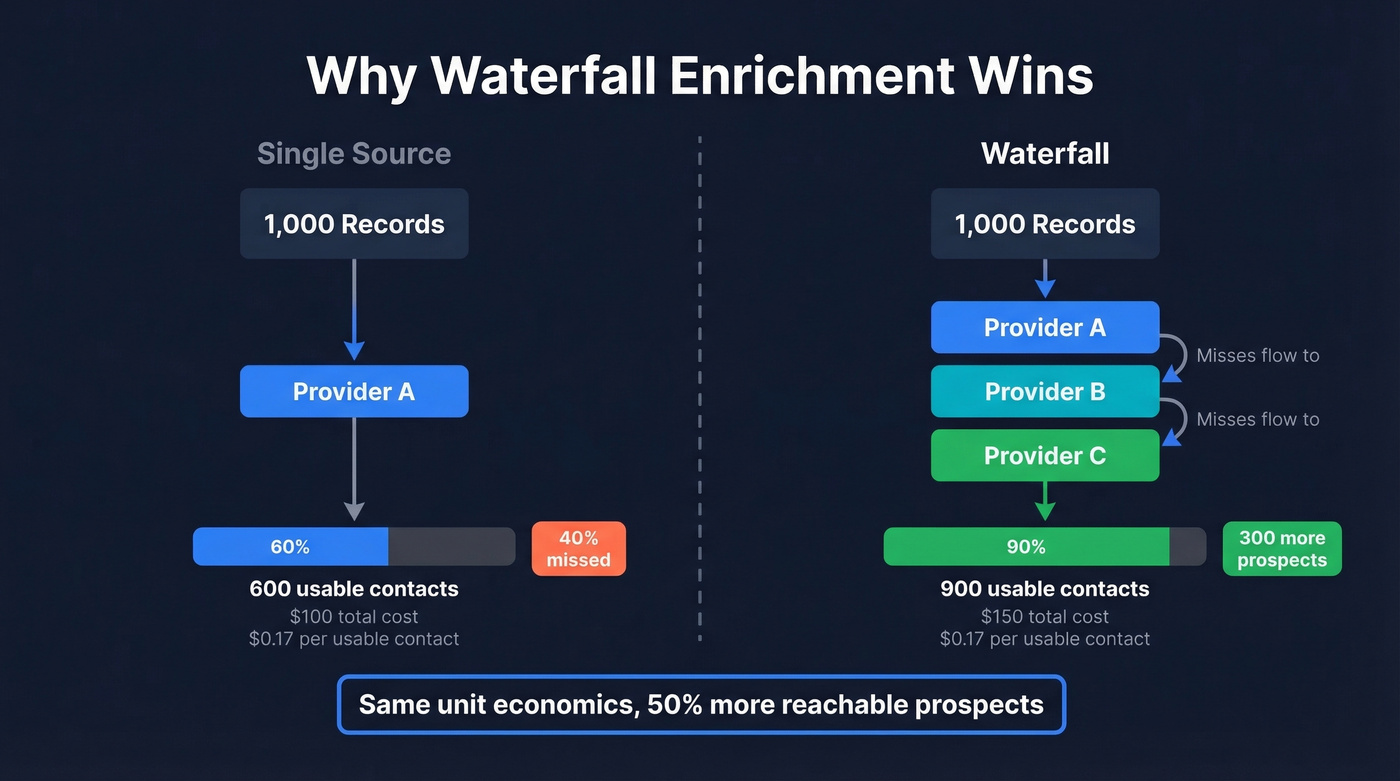
A single provider typically covers 50-70% of your list. Waterfall enrichment - where a query cascades through multiple providers until it finds a match - pushes that to 85-95%.
A comparative study across six providers found individual match rates of 35-52%, while waterfall reached 85-90%. That's not a marginal improvement. That's the difference between 100 reachable contacts per week and 180.
The cost math works out, too. Single-source: 1,000 records at $0.10 each = $100, with 60% coverage giving you 600 usable records at $0.17 per usable contact. Waterfall: 1,000 records at $0.15 each = $150, with 90% coverage giving you 900 usable records at the same $0.17 per usable contact. Same unit economics, 300 more reachable prospects.
An emerging fourth model worth watching: AI-agent enrichment. Tools like Clay's Claygent use AI agents to reason through ambiguous records, try alternate lookup methods, and scrape unstructured web data when standard queries fail. It's early, but 59% of organizations already use AI-driven algorithms for data quality tasks, and agent-based enrichment is the logical next step.

Prospeo returns 50+ data points per contact with a 92% match rate and 98% email accuracy - on a 7-day refresh cycle, not the 6-week industry average. No overwrites, no stale data replacing what your reps already verified.
Stop enriching records that come back worse than they started.
Best Tools for Contact Data Enrichment in 2026
Quick picks: Prospeo for email accuracy and self-serve simplicity, Apollo if you want enrichment bundled with sequencing on a budget, ZoomInfo if you're enterprise and need integration depth, Clay if you're building custom waterfall workflows.
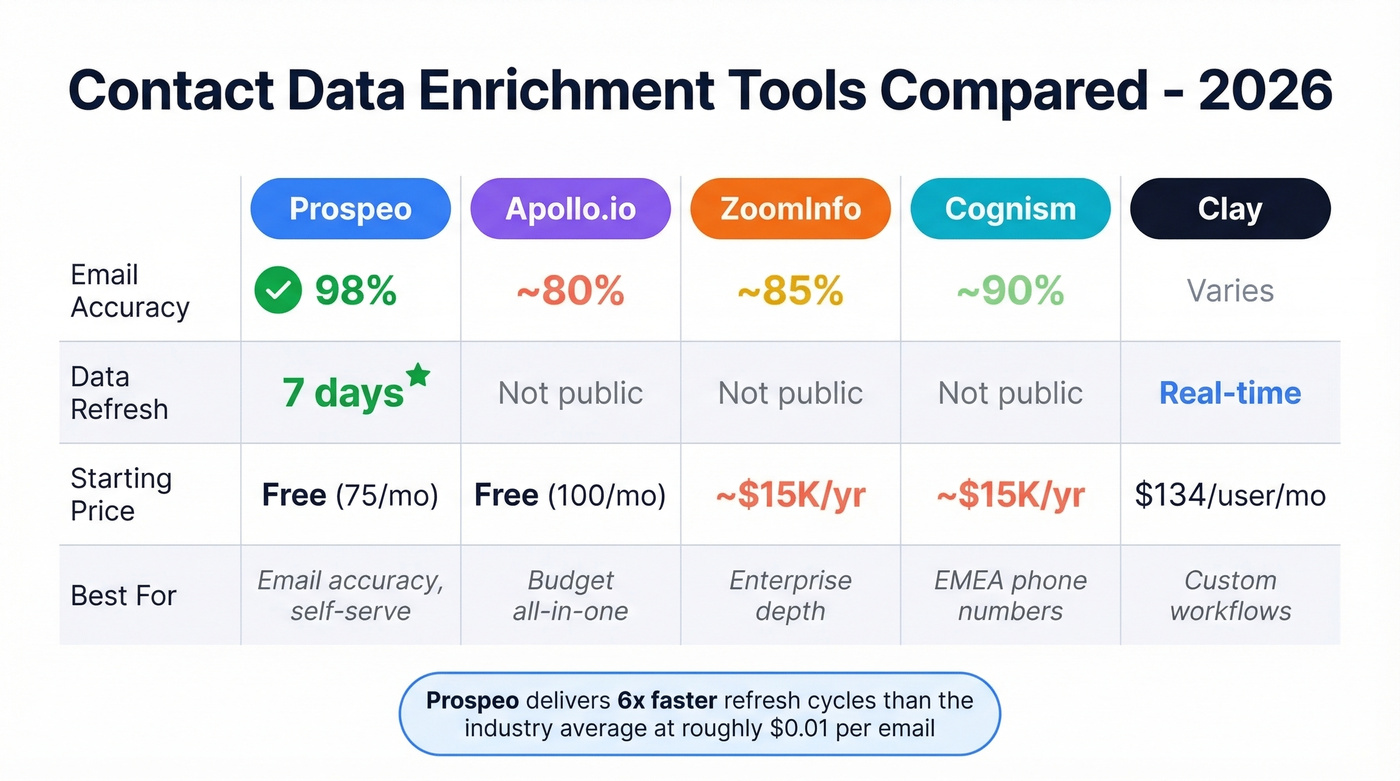
| Tool | Best For | Email Accuracy | Refresh | Starting Price |
|---|---|---|---|---|
| Prospeo | Email accuracy | 98% | 7 days | Free (75 emails/mo) |
| Apollo | Budget all-in-one | ~80% | Not public | Free (100 credits/mo) |
| ZoomInfo | Enterprise depth | ~85% | Not public | ~$15K/yr |
| Cognism | EMEA phones | ~90% | Not public | ~$15-25K/yr |
| Clay | Custom workflows | Varies by source | Real-time | $134/user/mo |
| Breeze Intelligence | HubSpot native | ~85% | Varies | $45/mo |
| FullEnrich | Waterfall-native | Varies | Real-time | Free (50 leads) |
| Lusha | Quick lookups | ~80% | Varies | Free / $36/user/mo |
Prospeo
Prospeo's database covers 300M+ professional profiles with 143M+ verified emails and 125M+ verified mobile numbers. 98% email accuracy, backed by a proprietary 5-step verification process with catch-all handling, spam-trap removal, and honeypot filtering. The 7-day refresh cycle means you're not sending sequences to people who changed jobs last month - and that refresh cadence is roughly six times faster than the industry average.

Enrichment returns 50+ data points per contact at an 83% match rate. CRM enrichment plugs directly into Salesforce and HubSpot, or you can upload a CSV and get results in minutes. The API runs a 92% match rate for programmatic workflows. Pricing starts free (75 emails/month), and paid plans work out to roughly $0.01 per email - no annual contracts, no sales calls required.
Real results: Meritt went from a 35% bounce rate to under 4% after switching, tripling their pipeline from $100K to $300K per week.
Apollo.io
Your SDR team is three people and the budget is tight. Apollo is your play. The free tier gives you 100 credits per month, and the Basic plan at $49/user/month includes 5,000 credits. The all-in-one workflow - find, enrich, sequence - eliminates the need to stitch together five tools.
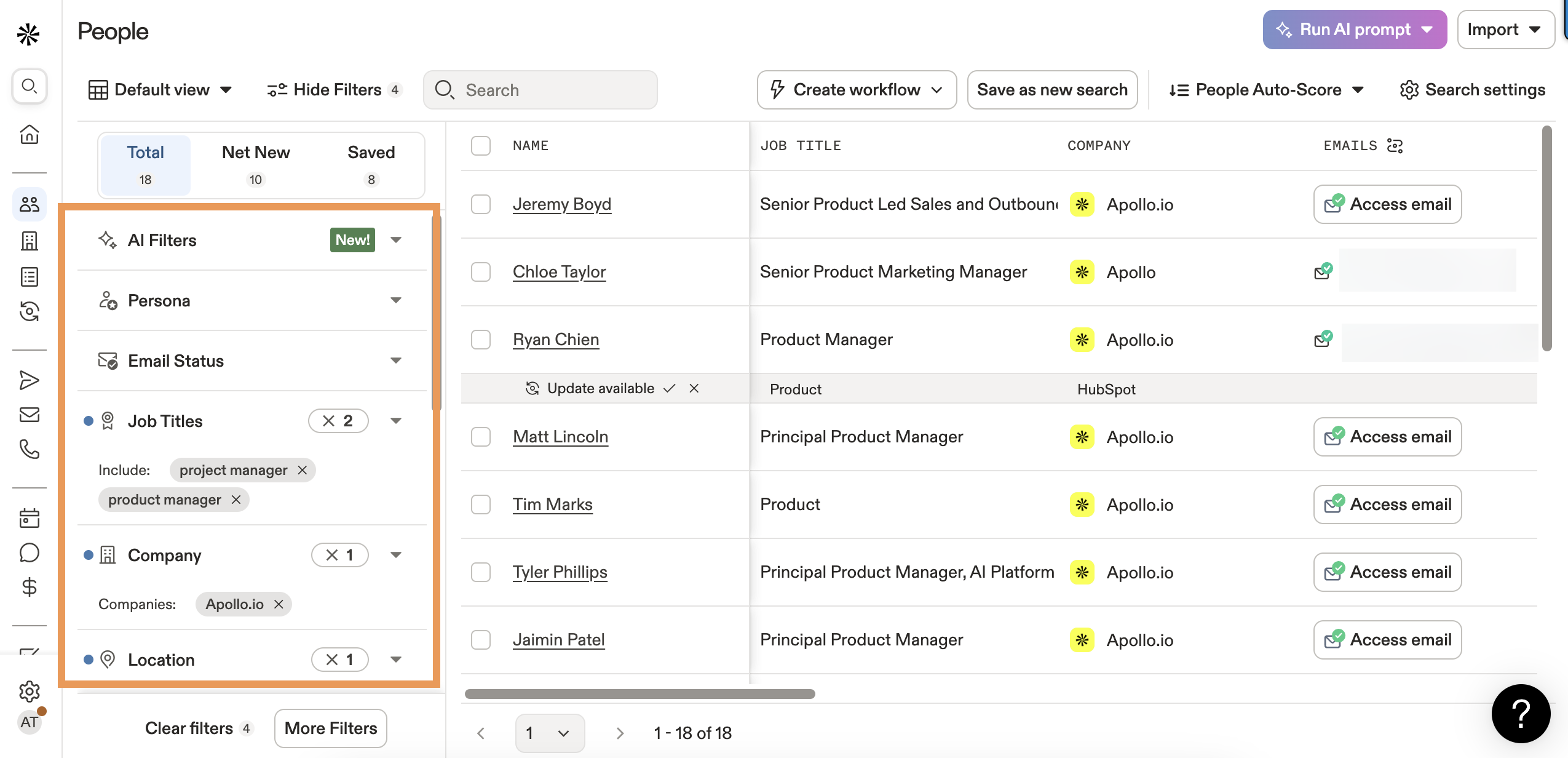
The tradeoff is accuracy. A third-party analysis found 25-35% bounce rates at scale for Apollo-sourced lists, despite Apollo's claimed ~91% accuracy. Extra credits run $0.20 each, which adds up fast if you're burning through them on bad data. For teams where deliverability is the top priority, pair Apollo's sequencing with a higher-accuracy data source.
ZoomInfo
The uncomfortable truth about ZoomInfo: it's overkill for 80% of the teams that buy it. We've seen companies paying $40K/year when reps only use the search bar and export function.
That said, if you're an enterprise team that needs deep integrations across Salesforce, Marketo, Outreach, and a dozen other tools - and you have the budget - ZoomInfo's 235M+ business professionals and workflow breadth (intent data, chat, form enrichment, audience targeting) are unmatched. Email accuracy benchmarks land around 85%. Pricing starts at $14,995/year, but mid-market contracts typically run $25-60K once you add seats and modules.
Skip ZoomInfo if you're under 50 seats or your primary need is email accuracy. You'll pay enterprise prices for features you'll never activate.
Cognism
Cognism is the clear winner for teams selling into Europe. The Diamond Data program uses human verification on mobile numbers, and connect rates for EU decision-makers run about 40% higher than competitors. The compliance posture - GDPR/CCPA focused, ISO 27001 and SOC 2 certified - satisfies even the most cautious legal teams. Cognism also layers intent signals from Bombora, giving reps context on which accounts are actively in-market.
Pricing sits around $15-25K/year. Skip it if your market is primarily North America - that spend is hard to justify when EMEA isn't a core revenue driver.
Clay
Clay isn't a database. It's a programmable orchestration layer that pulls from 75+ data providers in a single workflow. The Claygent AI agent reasons through ambiguous records and tries alternate lookup methods when standard queries fail. SOC 2 Type II compliant.
This is a power tool for RevOps teams, not a quick-start solution for individual reps. Pricing starts at $134/user/month with yearly credit limits, and there's a real learning curve. But if you want full control over your enrichment logic - custom waterfall sequences, conditional branching, AI-powered research steps - nothing else comes close. (If you're evaluating this approach, see Clay list building.)
Breeze Intelligence
HubSpot's native enrichment play at $45/month on top of your existing subscription. Solid for teams already deep in HubSpot who want auto-enrichment on form fills and inbound leads. Limited value outside that ecosystem.
FullEnrich
Waterfall-native enrichment across 20+ sources with a free tier of 50 leads. Worth testing if you want to experiment with waterfall without committing to Clay's complexity or pricing. Still early-stage, so don't expect enterprise-grade support.
Lusha
Free plan available, Pro from $36/user/month. Best for individual reps who need quick contact lookups via the Chrome extension rather than bulk enrichment workflows. The database depth doesn't compete with Apollo or ZoomInfo at scale, but for one-off lookups it gets the job done.
Single-source enrichment covers 50-70% of your list. Prospeo's enrichment API hits a 92% match rate with 83% of leads returning usable contact data - at roughly $0.01 per email. No contracts, no sales calls.
Get 300M+ profiles with data refreshed every 7 days, not every 6 weeks.
How to Choose the Right Tool
Don't start with features. Start with these six questions for every vendor on your shortlist:
- What's your published email accuracy, and how was it measured? If they can't point to a methodology, the number is marketing. (If you're comparing vendors, start with our roundup of data enrichment tools.)
- How often do you refresh records? Anything longer than 30 days means stale data by default.
- How do you handle suppression and opt-outs? A vendor that can't explain their suppression workflow is a compliance liability. (More on suppression lists.)
- Can you prove lawful basis for the data you sell? "We scraped it from the web" isn't a lawful basis under GDPR.
- What happens when a data subject requests deletion? The vendor needs a process that cascades to your CRM.
- Do you integrate with my existing stack? Native Salesforce/HubSpot connectors save weeks of implementation time. (See CRM automation software if you're tightening ops.)
Let's be honest: if your average deal size is under $10K, you probably don't need ZoomInfo-level data. A $99/month tool with 98% email accuracy will outperform a $40K/year platform your reps barely use. Match the tool to the deal size.
Compliance: GDPR, CCPA, and Enrichment
B2B data isn't exempt. GDPR applies to business email addresses. CCPA/CPRA includes employment-related data. If you're enriching contacts in the EU or California, you're handling regulated personal data regardless of whether it's a work email.
GDPR fines run up to EUR 20M or 4% of global revenue. CPRA statutory damages sit at $100-750 per violation - and "per violation" means per record, per incident. One bad enrichment batch touching 10,000 EU contacts without proper basis could theoretically generate seven-figure exposure.
Practical rules for compliant enrichment:
- Establish a lawful basis before enriching - legitimate interest is most common for B2B, but document your balancing test
- Limit data collection to what you actually need; enriching 50 fields when you use 8 is a storage limitation violation waiting to happen
- Maintain an audit trail of where every enriched data point originated
- Respond to data subject access and deletion requests within 30 days
- Vet your enrichment vendor's compliance posture - their gaps become your gaps (use a GDPR compliant database checklist)
Implementation Playbook: Pilot to Scale
Don't enrich your entire CRM on day one. Follow this sequence:
1. Start with 500 records. Pick a representative sample across industries, titles, and data ages.
2. Spot-check 50 manually. Call 10 phone numbers, send 20 emails to a test domain, verify 20 titles against professional profiles. Below 85% accuracy? Escalate with the vendor before scaling.
3. Set governance rules. Flag "Rep Verified" and "Customer Provided" fields as protected. Configure append-only mode. This single step prevents the overwrite disasters we talked about earlier.
4. Run dedup after every enrichment job. Enrichment creates duplicates through name normalization and alternate email formats. Catch them immediately, not three months later when your marketing team asks why email volume doubled but engagement halved.
5. Establish refresh cadence. Active leads: every 30-90 days. Cold contacts: every 90-180 days. The goal is keeping enriched records fresh enough to act on.
6. Never overwrite rep-verified data. This is the single most important rule.
The pilot-to-scale cycle takes 2-3 weeks. Resist the urge to skip the spot-check. That 50-record manual review separates teams that get value from contact data enrichment and teams that create a bigger mess than they started with.
FAQ
What's the difference between data enrichment and data cleansing?
Enrichment adds missing fields like emails, direct dials, and titles to existing records. Cleansing fixes or removes bad data you already have - duplicates, formatting errors, outdated entries. Always cleanse first, because enriching dirty data amplifies the mess.
How often should I re-enrich my CRM?
Re-enrich active leads every 30-90 days and cold contacts every 90-180 days. Job titles decay at 5.5% per month, so quarterly refreshes are the bare minimum for any pipeline you're actively working.
Is waterfall enrichment worth the extra cost?
For most outbound teams, yes. Cost per usable record stays roughly the same (~$0.17), but waterfall delivers 85-95% coverage versus 50-70% from a single source - that's 30-50% more reachable contacts from the same list.
Can enrichment tools damage my CRM data?
Absolutely. Without governance rules, enrichment overwrites correct data with stale information and creates thousands of duplicates. Always pilot with 500 records and spot-check 50 manually before scaling.
What's a good free tool for contact data enrichment?
Prospeo offers 75 verified emails per month on its free tier with full enrichment - 50+ data points per contact, 98% email accuracy, and a 7-day refresh cycle. Apollo's free plan gives 100 credits monthly but with lower accuracy (~80%). FullEnrich offers 50 free leads with waterfall coverage.