

The Complete Guide to Contact Management Systems in 2026
You need tagging, search, reminders, and maybe bulk email. You don't need a 200-feature platform that takes three months to implement and costs more than your office lease. That's the gap most teams fall into - somewhere between Google Sheets and Salesforce - and it's exactly where a contact management system lives.
91% of companies with more than 11 employees already use some kind of CRM. But a huge chunk of those teams are overpaying for features they'll never touch. The pain point on r/sales and r/smallbusiness is consistent: people want "something more capable than a spreadsheet but much less complicated and expensive" than the bloated platforms their industry defaults to.
Here's the quick version:
- Best overall for small teams: HubSpot CRM (free) or Less Annoying CRM ($15/mo)
- Best budget pick: Bigin by Zoho ($7/user/mo)
- Best "better spreadsheet": Airtable
- Best for Google Workspace: Copper ($9/user/mo)
- Before you pick anything: Clean your data first. Garbage in, garbage out applies to every tool on this list.
What Is Contact Management?
A contact management system is a digitized address book with superpowers. It stores contact info, tracks interactions, lets you tag and segment people, and reminds you to follow up. That's it. It's not a full CRM with pipeline forecasting, marketing automation, and 47 dashboard widgets.
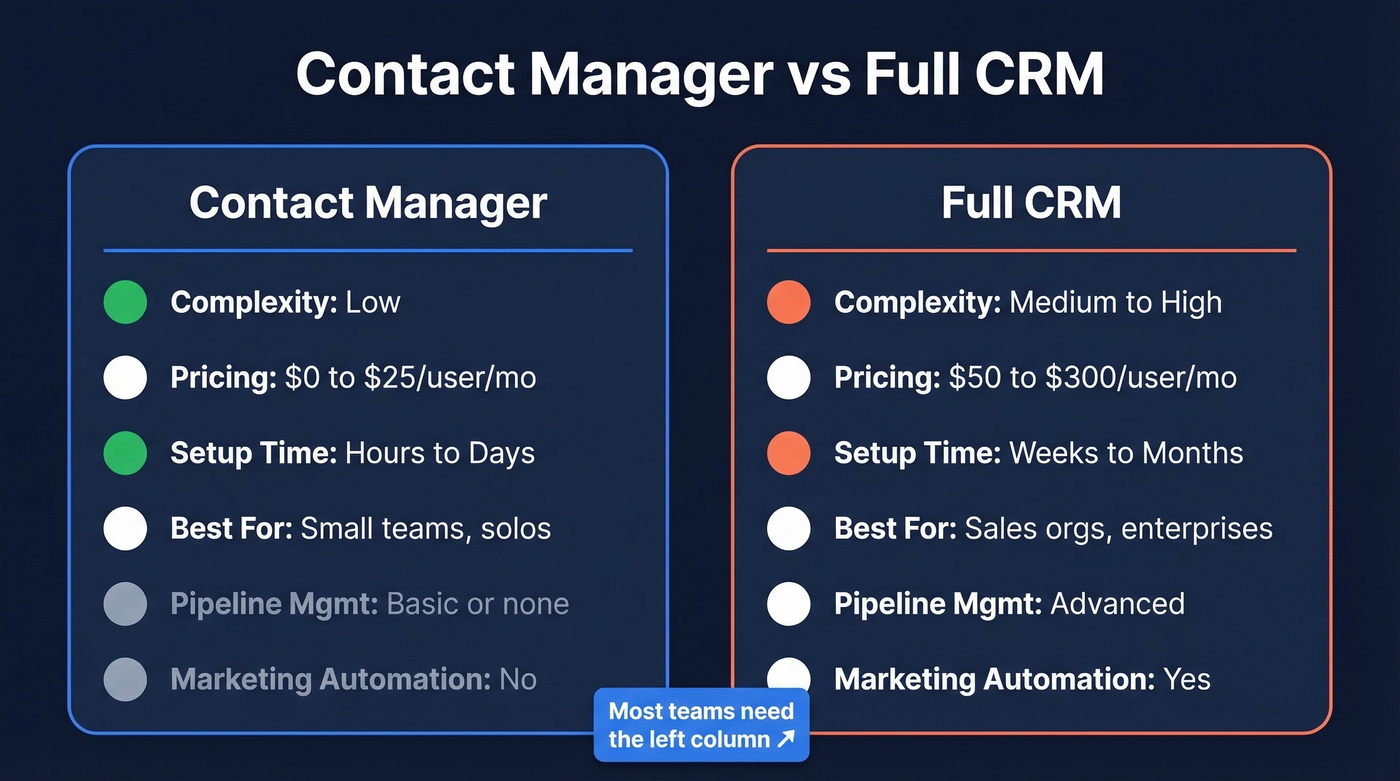
The CRM market is projected to hit $126.17B in 2026, and the average ROI runs $8.71 for every $1 spent. Those numbers reflect the full CRM spectrum, though. For teams that just need to track contacts and manage basic workflows, the distinction matters.
| Feature | Contact Manager | Full CRM |
|---|---|---|
| Complexity | Low | Medium-High |
| Pricing | $0-$25/user/mo | $50-$300/user/mo |
| Setup time | Hours to days | Weeks to months |
| Typical user | Small teams, solos | Sales orgs, enterprises |
| Pipeline mgmt | Basic or none | Advanced |
| Marketing automation | No | Yes |
If you're a 2-person team that wants tasks, call logging, notes, and a mobile app - not reporting dashboards and dollar-value pipelines - you want the left column.
Features Worth Paying For
Not every feature on a vendor's checklist matters. Here's what actually earns its place in your monthly bill:
- Contact profiles + custom fields. You need to store more than name and email. Notes, interaction history, social links, and custom attributes you define. If a tool is rigid about customizing columns, skip it - that's a consistent frustration in "simple CRM" threads.
- Tagging and segmentation. The ability to group contacts by industry, deal stage, geography, or any custom criteria. Automated tagging rules save hours. (If you want a practical framework, start with an ideal customer profile and tag from there.)
- Universal search. You should find any contact in under 5 seconds. If search is clunky, the whole system fails.
- Contact activity history. Every call, email, meeting, and note should log against the contact record automatically, eliminating the "wait, when did we last talk to them?" problem and keeping your whole team aligned without anyone having to ask around.
- Integrations. Gmail, Outlook, calendars, Zapier at minimum. If it doesn't connect to your email client natively, you won't use it.
- Automation. Follow-up reminders, workflow triggers, touch alerts when you haven't contacted someone in 6 months. This is where a contact manager earns back its cost. Business card scanning and OCR capture also fall here - manual entry doesn't scale.
Mobile access, security (role-based access control, 2FA, GDPR compliance), and data export round out the essentials. Mobile matters if your team logs calls on the go. Security is non-negotiable once you're storing customer data. And if you can't get your data out easily, you're locked in - always test the export before committing.

How to Choose the Right Tool
Five questions, in order. Answer them honestly and the right tool becomes obvious.
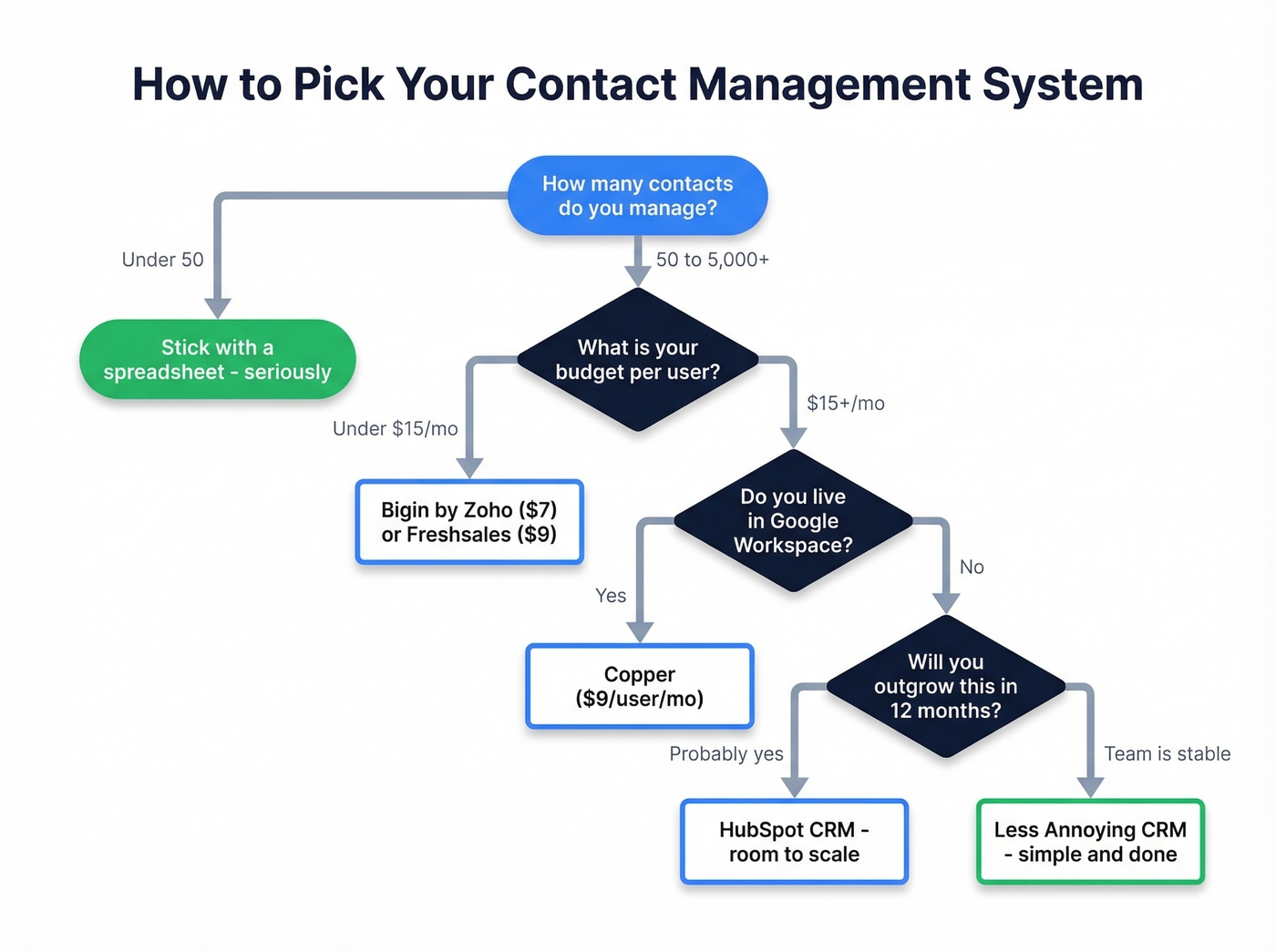
How many contacts do you actually manage? Under 50? A spreadsheet is fine. Seriously. Don't buy software you don't need yet. Between 50 and 5,000 is the sweet spot for a lightweight contact manager. Above that, you're probably looking at a real CRM (here are a few examples of a CRM to sanity-check what “full CRM” really means).
What's your real budget? SMB tools run $10-$50/user/mo. Enterprise platforms hit $100-$300/user/mo. Sticker price is never the full story, though - add 20-40% for integrations, onboarding, and add-ons you'll inevitably need.
What tools must it connect to? If your team lives in Google Workspace, Copper makes sense. If you're already on monday.com, their CRM module is the path of least resistance. Integration fit matters more than feature lists (especially if you need to connect outreach tool to CRM for sequencing).
How much complexity can your team tolerate? A tool nobody uses is worse than no tool at all. If your team won't sit through a 30-minute setup, pick something that works out of the box.
Will you outgrow this in 12 months? If you're hiring aggressively or moving upmarket, start with something that scales (HubSpot). If your team size is stable, optimize for simplicity (Less Annoying CRM).

Every contact management system on this list has the same weakness: garbage data in means garbage results out. Prospeo's 300M+ profiles are verified through a 5-step process and refreshed every 7 days - not the 6-week industry average. Import contacts you can actually reach.
Stop organizing bad data. Start with emails that are 98% accurate.
What It Actually Costs
A "$20/user/month CRM can cost 3-10x more in practice" once you factor in implementation, training, admin time, and the add-ons you didn't know you needed.
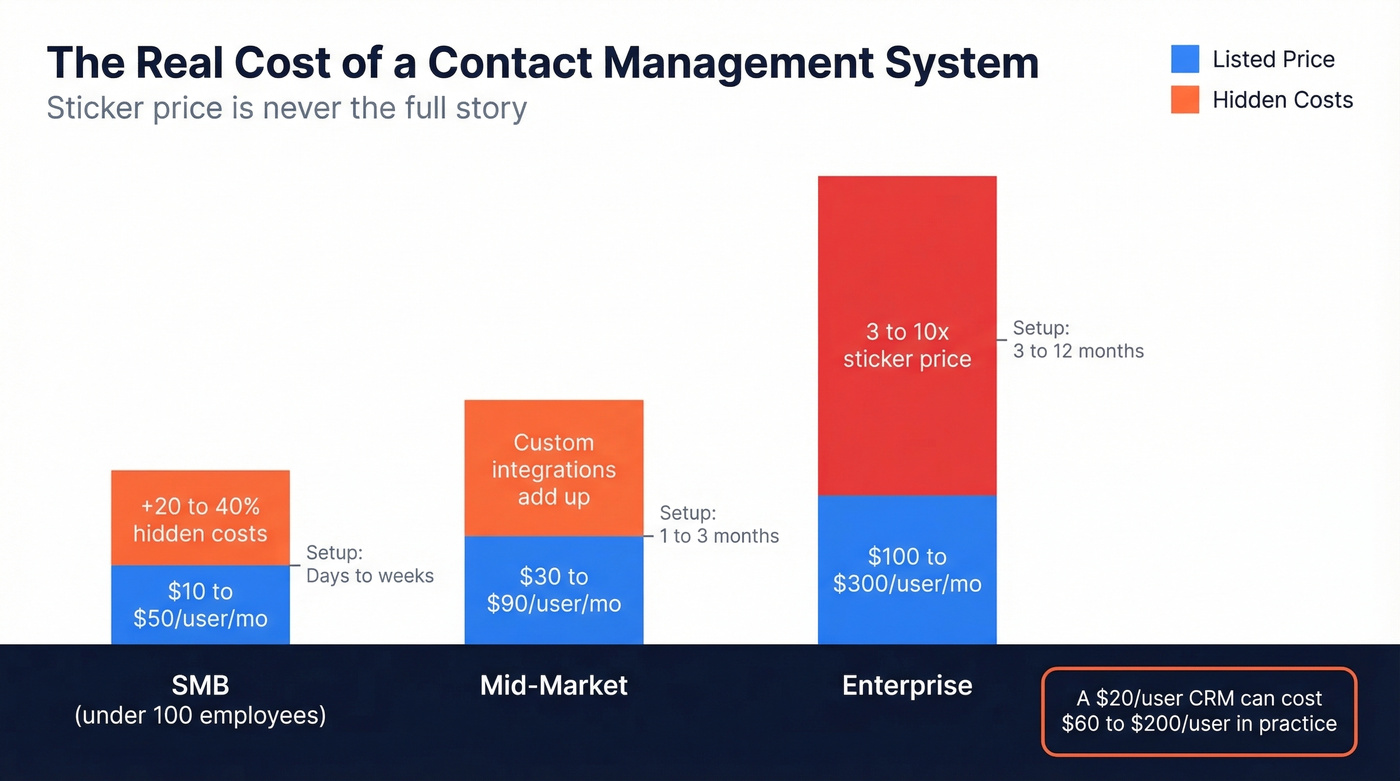
| Company Size | Typical Range | Implementation | Hidden Cost Reality |
|---|---|---|---|
| SMB (<100) | $10-$50/user/mo | Days to weeks | +20-40% uplift |
| Mid-Market | $30-$90/user/mo | 1-3 months | Custom integrations |
| Enterprise | $100-$300/user/mo | 3-12 months | 3-10x sticker price |
Free tiers deserve a reality check. HubSpot's free plan supports 2 users, and automation is pushed into paid tiers. Bigin's free plan covers 1 user. These are trial ramps, not long-term solutions. Budget for the paid plan you'll actually need within 3-6 months.
Best Contact Management Software in 2026
We evaluated these tools on setup speed, contact organization features, integration depth, data export ease, and pricing transparency - testing realistic workflows like importing messy lists and syncing inboxes. (If you want a longer shortlist, see our best contact management software roundup.)
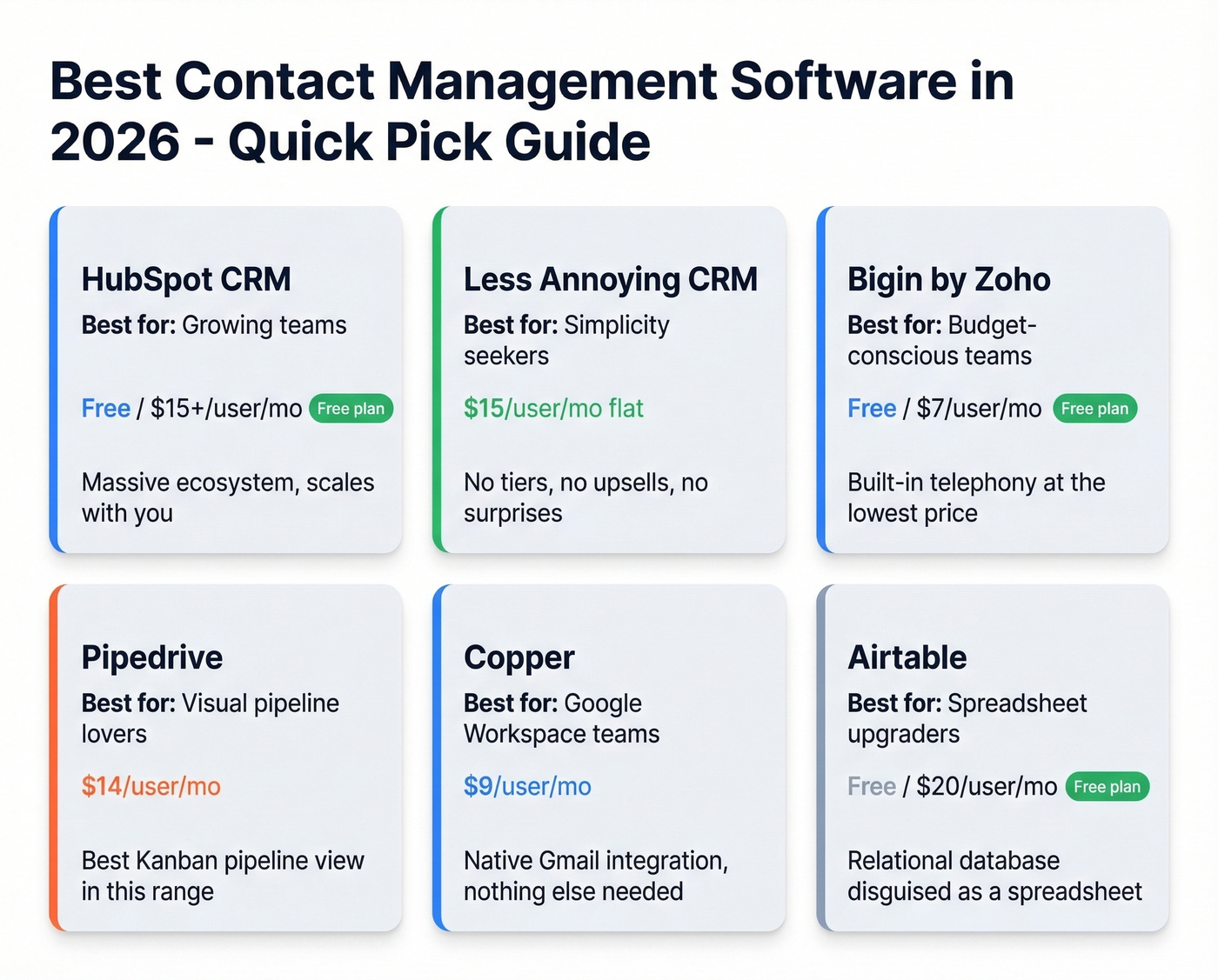
| Tool | Best For | Starting Price | Free Plan? | Standout Feature |
|---|---|---|---|---|
| HubSpot CRM | Growing teams | Free / $15/user/mo | Yes (limited) | Ecosystem breadth |
| Less Annoying CRM | Simplicity seekers | $15/user/mo | No | Flat pricing, zero upsells |
| Bigin by Zoho | Budget-conscious | Free / $7/user/mo | Yes (1 user) | Built-in telephony |
| Freshsales | Budget CRM with room to grow | Free / $9/user/mo | Yes (limited) | Simple sales CRM |
| Pipedrive | Pipeline-focused | $14/user/mo | No | Kanban pipeline view |
| Copper | Google Workspace | $9/user/mo | No | Native Gmail integration |
| monday CRM | monday.com users | $12/user/mo | No | Flexible board structure |
| Nimble | Social prospecting | $24.90/user/mo | No | Social profile enrichment |
| Airtable | Spreadsheet upgraders | Free / $20/user/mo | Yes (1,000 records) | Relational databases |
| Contacts+ | Device syncing | Free / $9.99/mo | Yes (basic) | Cross-platform sync |
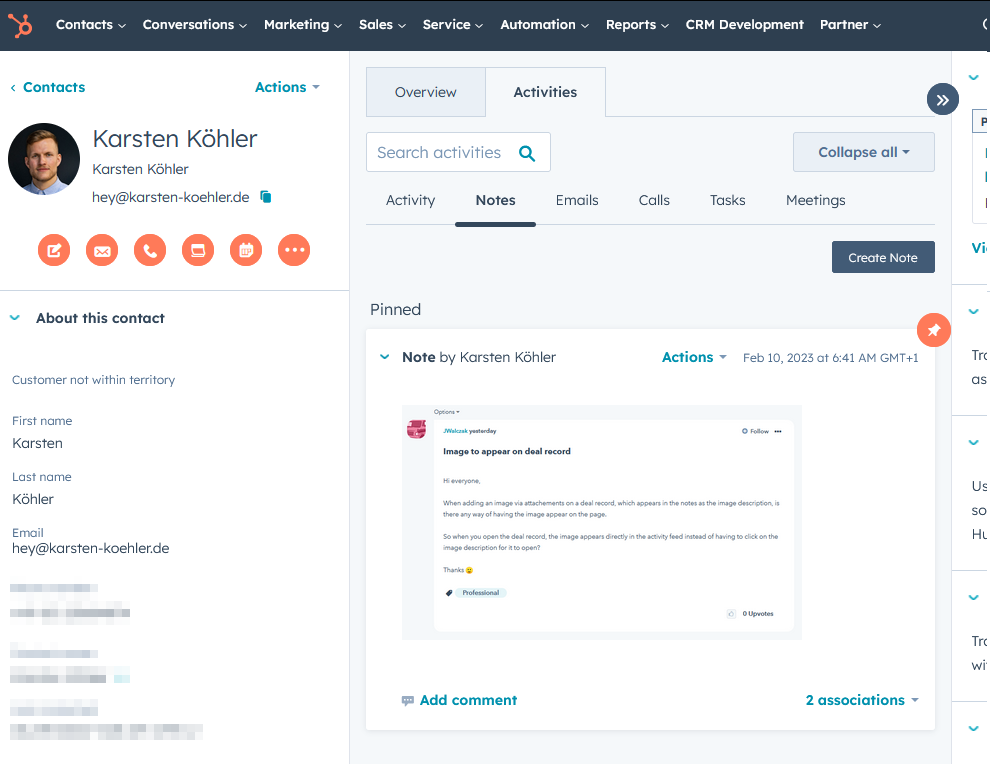
HubSpot CRM
The free tier is a gateway drug. Genuinely useful to start - but once you need automation and more advanced capabilities, you'll move into paid tiers fast. Starter plans begin at $15/user/mo depending on product and billing.
HubSpot's real strength is ecosystem breadth. Marketing Hub, Sales Hub, Service Hub, and CMS all share the same contact database. If you're a 5-person team today but plan to be 50 in two years, starting on HubSpot means you won't have to migrate later. That's worth something.
The Capterra comparison tells the story: 4.5/5 across 4,446 reviews. Users love the feature depth but consistently flag the pricing jump from free to paid. We've seen teams get comfortable on the free plan, then face a much bigger per-user bill when they need the features that actually matter. Budget accordingly from day one.
Less Annoying CRM
Most underrated contact tracking tool on the market. $15/user/mo, flat. No tiers. No upsells. No annual contract. No "talk to sales for enterprise pricing." Just one plan that includes everything. Data export is dead simple - CSV download, no hoops - which is more than some tools twice the price can say.
Use this if: You want a tool your whole team will actually use within 30 minutes of signing up. Less Annoying CRM scores higher than HubSpot on value for money, ease of use, and customer service on Capterra - 4.8/5 across 645 reviews.
Skip this if: You need marketing automation, advanced reporting, or a platform you'll grow into for years. Less Annoying CRM does exactly what it promises and nothing more. That's the whole point.
Bigin by Zoho
We watched a team of 4 spend two weeks evaluating CRMs, build a scoring matrix, run demos - then pick Bigin because it was $7/user/mo and did everything they needed. Sometimes the boring answer is the right one.
Free for 1 user. Paid plans start at $7/user/mo billed annually. You get pipeline management, workflow automation, built-in telephony, and a mobile app that's solid for logging calls on the go. The catch is the Zoho ecosystem: integrations outside of Zoho's product suite are more limited than tools built around broad app marketplaces. If you're already using Zoho Mail or Zoho Books, Bigin is a no-brainer.
Freshsales
Freshsales offers a free tier and paid plans starting at $9/user/mo. For teams that want a straightforward CRM with room to expand into more advanced workflows later, it's a strong value pick at the entry level.
Pipedrive
Built for salespeople who think visually. The Kanban-style pipeline view is genuinely the best in this price range - drag deals between stages, see your entire funnel at a glance. Starts at $14/user/mo with no free plan.
The downside: add-ons stack up. If you're comparing Pipedrive against "all-in-one" tools, price it out fully before committing.
Copper
Use this if: Your team lives in Gmail and Google Calendar. Copper is built for Google Workspace teams, with deep Gmail integration. Starts at $9/user/mo.
Skip this if: You use Outlook, or you need a tool that stands on its own. Copper's value proposition collapses outside the Google ecosystem.
monday CRM
Best for teams already paying for monday.com's project management platform. The CRM module ($12/user/mo) inherits monday's flexible board-and-column structure, which means you can customize almost anything. The flip side: costs scale quickly with seats, and the CRM-specific features feel lighter than dedicated tools like Pipedrive or HubSpot.
Nimble
Social-enrichment-focused contact manager at $24.90/user/mo. It pulls in social profiles and company data automatically. Premium pricing for what's essentially a smart address book - but if social selling is your primary motion, the enrichment saves real time. (If you want more ways to fill the top of funnel, use these sales prospecting techniques.)
Airtable
Not a CRM. Not trying to be. But if you want a "better spreadsheet" with relational databases, custom views, and automations, Airtable at $20/user/mo (free for up to 5 creators with 1,000 records) is the answer. Build your own contact database exactly how you want it - just know you're trading convenience for flexibility.
Contacts+
Pure contact syncing across devices and platforms. Free basic plan, premium from $9.99/mo billed annually. Good for individuals who need one clean address book across everything, not teams running sales workflows.
Also considered: Streak (great for Gmail-native CRM but limited outside email), Zendesk Sell (strong for support-heavy teams, starts at $25/user/month), and Folk (rising option for relationship-focused teams). None offered enough differentiation to crack the top 10 for general contact management.
Mistakes That Kill Your Data
The tool doesn't matter if your data is garbage. These are the mistakes we see over and over.
No data entry standards. Without required fields, validation rules, and formatting guidelines, your database becomes a mess within weeks. Set rules before you import a single contact.
No segmentation strategy. Dumping every contact into one list defeats the purpose. Set up tags and automated segmentation rules from day one - by industry, deal stage, source, whatever matters to your workflow.
Isolated tools. Your contact manager needs to talk to your email client, calendar, and sequencer. If you're manually copying data between systems, you've already lost.
Ignoring permissions and backups. Role-based access and 2FA aren't optional once you're storing customer data. Neither are scheduled backups - set them up during implementation, not after a breach or data loss event.
No automation. Manual follow-up reminders don't scale. Even basic workflow triggers - "alert me if no contact in 90 days" - prevent leads from going cold. If you need copy you can plug into those reminders, keep a set of sales follow-up templates handy.
Outdated contact info. Contact data decays 20-30% annually. An enrichment tool that refreshes data on a weekly cycle cuts the manual audit burden dramatically. (More on vendors and workflows in our guide to data enrichment services.)
Bulk importing without cleanup. This is the fastest way to ruin a new CRM: dump 50,000 unverified contacts into it on day one. Deduplicate first. Standardize phone numbers to E.164 format. Verify emails before import. Then load in batches of 500, not 50,000.

The Data Quality Problem Nobody Talks About
Let's be honest: most teams spend weeks picking the perfect contact management system and zero time cleaning the data that goes into it. That's backwards. A $7/mo tool with clean data will outperform a $300/mo platform full of bouncing emails and dead phone numbers every single time.
You import 5,000 contacts from a trade show or an old spreadsheet. 30% of the emails bounce on your first sequence. Your domain reputation tanks. Your deliverability craters. The CRM wasn't the problem. The data was. (If this is already happening, start with an email deliverability guide and work backward.)
Prospeo handles this upstream - it verifies every email through a proprietary 5-step process with no third-party providers, covering 300M+ professional profiles at 98% accuracy. Every record refreshes on a 7-day cycle while the industry average sits at 6 weeks. The free tier gives you 75 email verifications and 100 Chrome extension credits per month. No contracts, no sales calls. Verify your list before it ever touches your CRM.
You picked a contact manager to escape spreadsheet chaos. Now fill it with data that works. Prospeo enriches your CRM or CSV with 50+ data points per contact at a 92% match rate - verified emails, direct dials, job titles, and company intel. At $0.01 per email, it costs less than the time you'd waste on bounced messages.
Enrich your entire contact database in minutes, not weeks.
FAQ
What's the difference between contact management and CRM?
Contact management stores and organizes contact information - names, emails, notes, tags, and interaction history. A CRM adds pipeline tracking, marketing automation, reporting, and forecasting on top. If you just need to organize contacts and set reminders, a dedicated contact manager is enough and far cheaper.
What's the best free option in 2026?
HubSpot CRM's free tier is the most feature-rich, supporting 2 users with strong contact organization and a broad ecosystem. Bigin by Zoho is free for 1 user with basic pipeline features. For data verification before import, Prospeo offers 75 free email verifications per month - useful alongside any tool you choose.
How do I migrate from spreadsheets?
Clean your data first - deduplicate, standardize phone numbers to E.164 format, and verify emails before import. Map your spreadsheet columns to CRM fields, then import in batches of 500, not all at once. Most tools accept CSV uploads and offer field-mapping wizards.
How often should you clean contact data?
At minimum, quarterly. Contact data decays 20-30% annually as people change jobs and emails go stale. Automated enrichment tools with weekly refresh cycles cut most of the manual audit burden.
Do small teams really need dedicated software?
If you manage fewer than 50 contacts, a spreadsheet works fine. Once you need tagging, search, reminders, or shared access, a dedicated system pays for itself. At $7-$15/user/mo for the best budget options, the ROI bar is low.