

The Best CRM Automation Tools in 2026
The average sales rep spends a painful amount of time after every call updating contact records, tagging deal stages, and scheduling follow-ups. Meanwhile, the lead they just spoke with goes cold because nobody triggered the nurture sequence. That's not a people problem - it's a plumbing problem. The right CRM automation tools fix it.
The CRM market is on track to hit $126.17B in 2026, and automated CRM software has never been more capable. Teams that automate well reclaim 5-6 hours per week per rep - Affinity estimates 200+ hours per user per year (https://www.demandsage.com/crm-statistics/). Teams that automate poorly just create faster messes.
You don't need 15 options. You need one CRM and one data layer. We signed up for each tool below, built at least one automation workflow, and documented which plan tier was actually required to unlock real automation. Pricing was verified as of March 2026.
Our Top Picks at a Glance
| Pick | Tool | Best For |
|---|---|---|
| Best data layer | Prospeo | CRM enrichment + verification |
| Best for sales teams | Pipedrive | Pipeline automation without bloat |
| Best AI at SMB pricing | Freshsales | Freddy AI + automation from $11/mo |
| Best all-in-one | HubSpot Starter | Email marketing + CRM together |
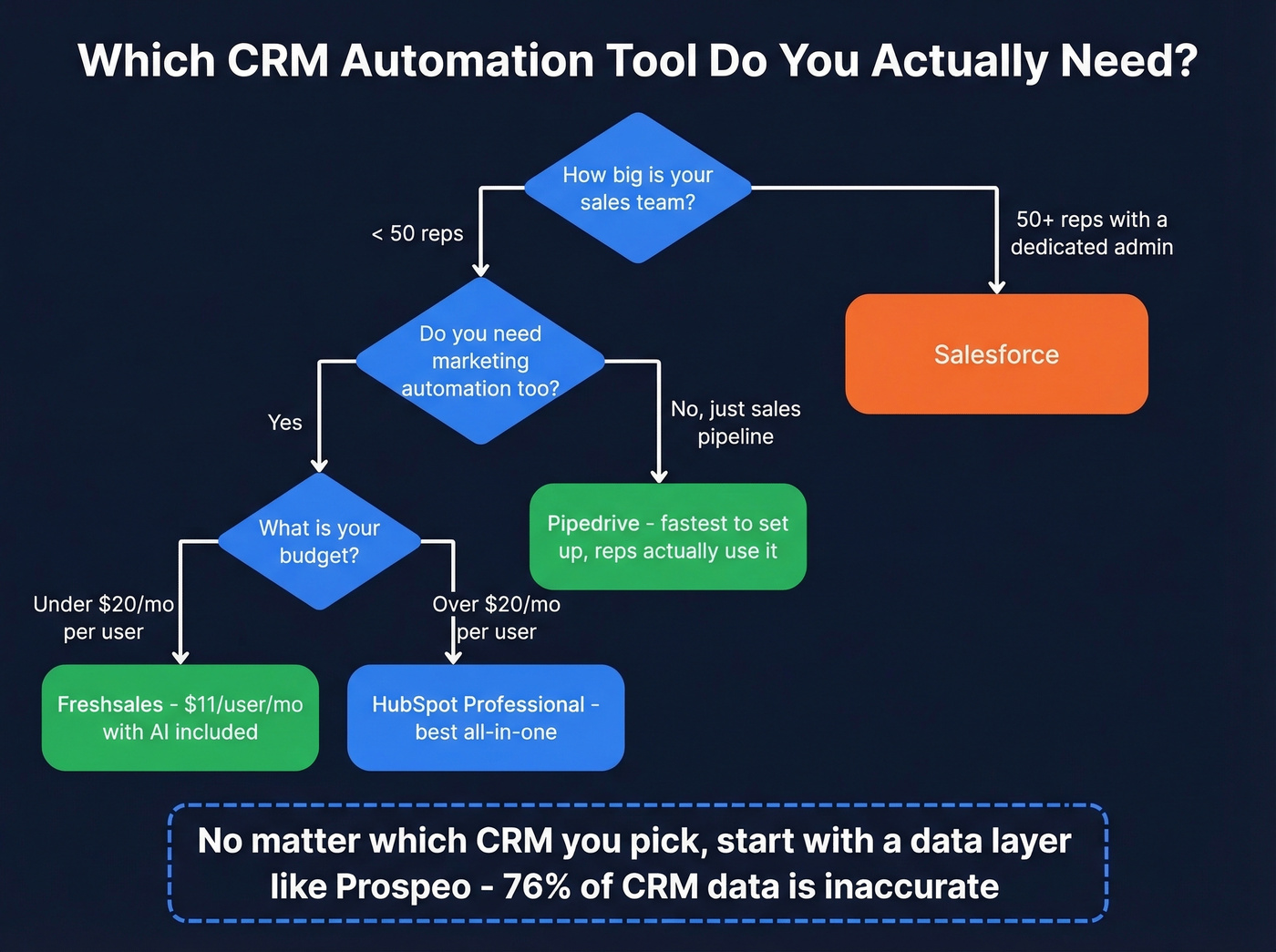
If you only read this table and leave, you'll still make a decent choice. But the real edge isn't which CRM you pick - it's the data you feed it.
What Is CRM Automation?
CRM automation uses software to handle the repetitive work that eats your reps' days: data entry, lead routing, follow-up emails, deal-stage updates, task assignments. At its simplest, it's rule-based workflows - "when a deal moves to Stage 3, assign a task to the AE and send a pricing email." At its most advanced, it's AI agents that read context and act autonomously. Any CRM with automation features worth evaluating should cover at least the basics: triggers, conditions, and multi-step actions.
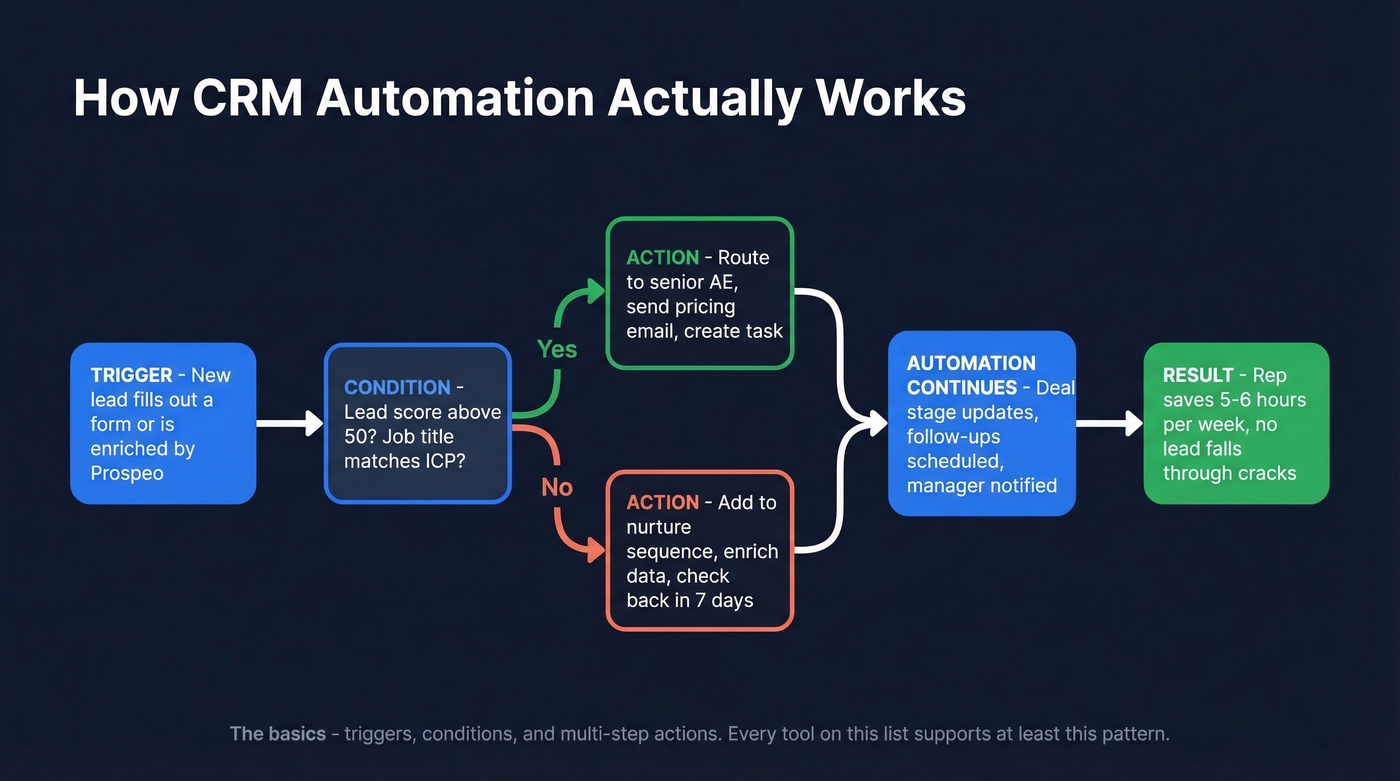
91% of companies with more than 11 employees (https://www.demandsage.com/crm-statistics/) now use a CRM. The ROI benchmark is $8.71 back for every $1 spent (https://www.demandsage.com/crm-statistics/). But that return only materializes if the automation runs on accurate data - which brings us to the part most guides skip entirely.
Why Data Quality Beats Tool Choice
Here's the thing: 76% of CRM users say less than half their data is accurate or complete (https://cyntexa.com/blog/crm-statistics/). That's not a minor gap. 37% report losing revenue directly because of bad data, and 45% say their CRM data isn't even ready for AI features. Only 28% of companies actively enrich their CRM data, which means 72% are automating on records they've never validated.
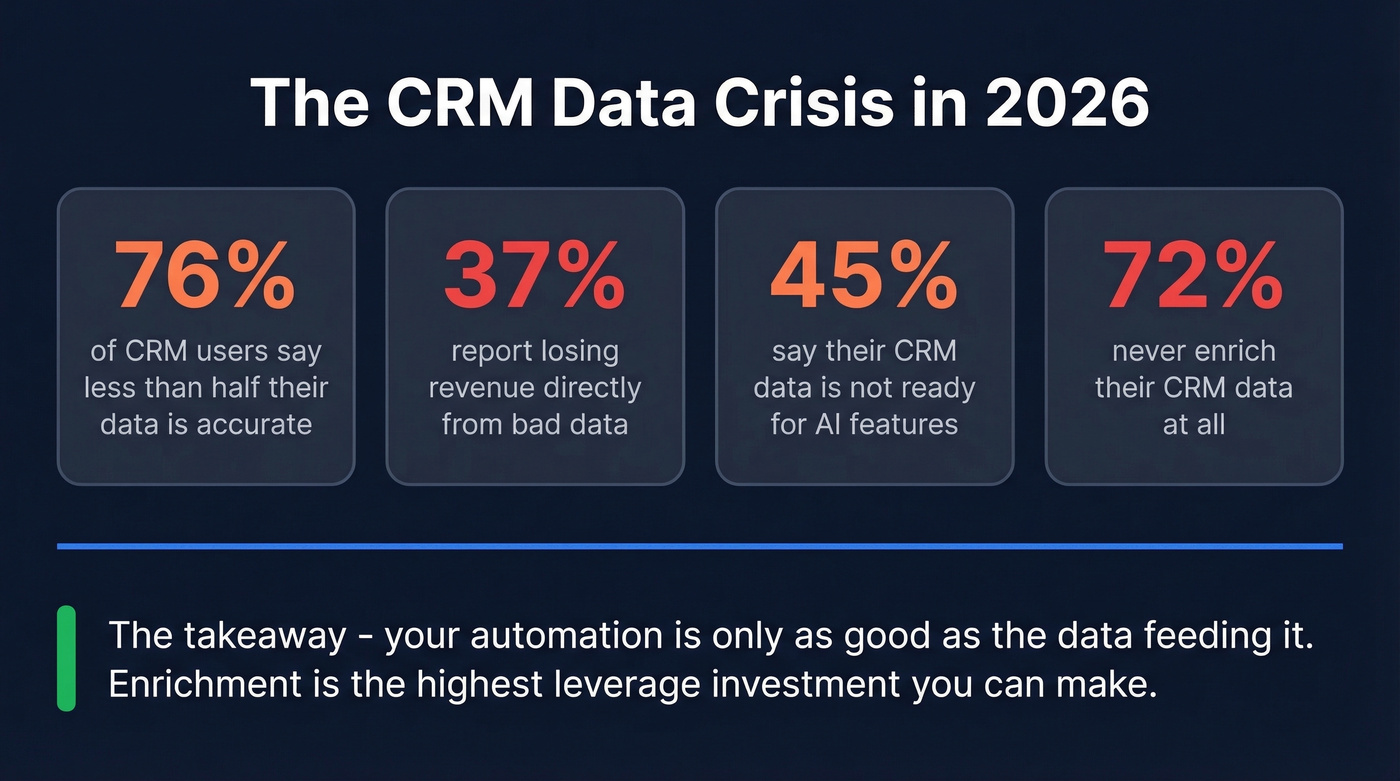
Think about what that means in practice. Your automation fires on a lead-routing rule, but 40% of the contacts have wrong titles, stale emails, or missing phone numbers. The "hot lead" gets routed to the wrong rep. The follow-up email bounces. The nurture sequence targets a VP who left the company six months ago. You didn't have an automation problem - you had a data problem.
This is why we put the data layer first in every CRM automation stack we evaluate. Enrichment tools that verify emails, fill in missing fields, and refresh stale records before automations fire are the single highest-leverage investment you can make. Meritt tripled their pipeline from $100K to $300K/week after switching their data layer. Snyk took bounce rates from 35-40% down to under 5% across 50 AEs, driving 180% more AE-sourced pipeline.


76% of CRM users say their data is incomplete. Prospeo's native HubSpot and Salesforce integrations enrich every record with 50+ data points, 98% email accuracy, and a 7-day refresh cycle - so your automations never fire on stale contacts.
Stop automating on bad data. Fix the foundation first.
Full Feature Comparison
Every CRM advertises automation, but most gate it behind higher-priced tiers. We dug into which plan you actually need to unlock real workflows - not just which plan exists.
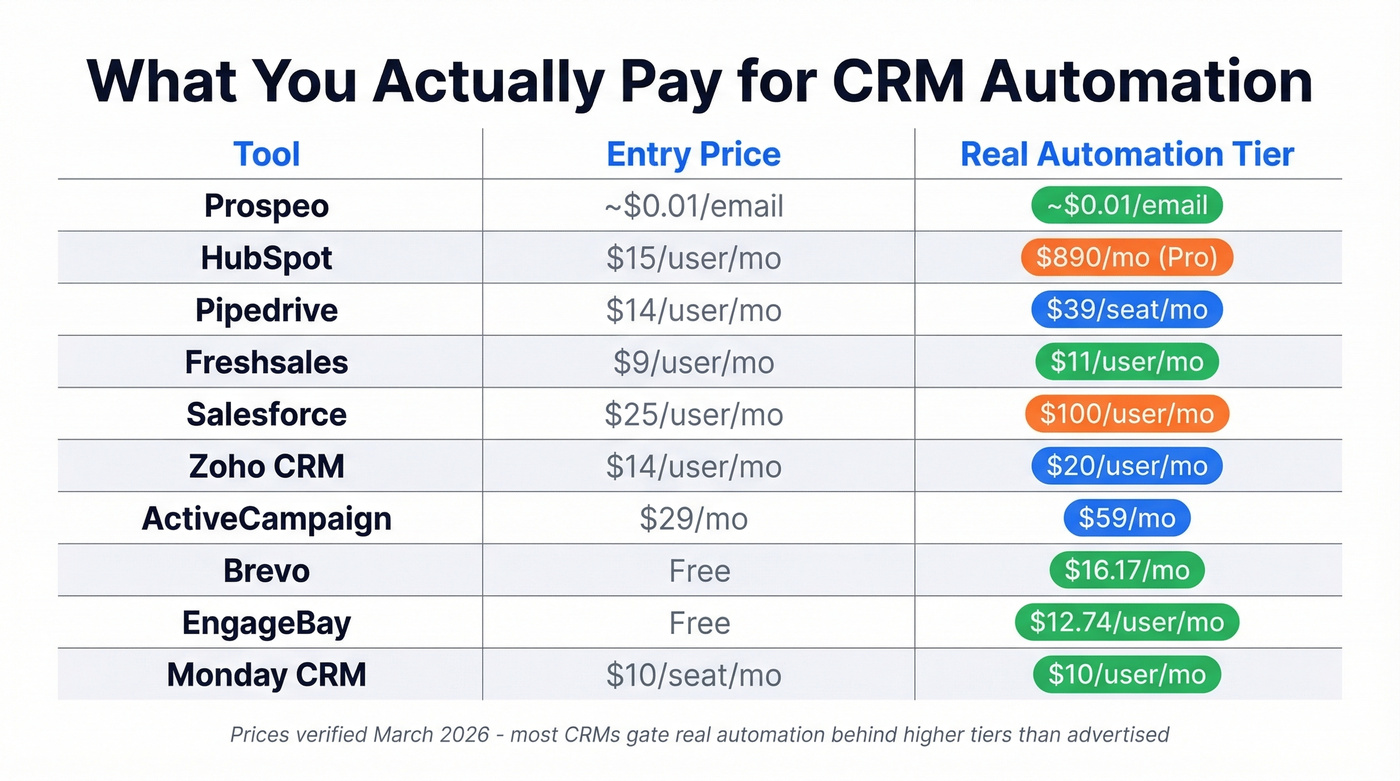
| Tool | Best For | Price (Automation Tier) | Free Plan | AI |
|---|---|---|---|---|
| Prospeo | CRM data quality | ~$0.01/email (free tier avail.) | ✅ 75 emails/mo | Intent (Bombora) |
| HubSpot | Marketing + sales | $15/user/mo → $890/mo for advanced workflows | ✅ Limited | Breeze AI |
| Pipedrive | Sales pipeline | $14/seat/mo → $39/seat/mo for automation | ❌ | AI Assistant |
| Freshsales | SMB AI features | $11/user/mo (automation included) | ✅ 3 users | Freddy AI |
| Salesforce | Enterprise | $25/user/mo → $100/user/mo for practical automation | ❌ | Einstein/Agentforce |
| Zoho CRM | Budget breadth | $20/user/mo (automation included) | ✅ 3 users | Zia AI |
| ActiveCampaign | Automation depth | $19/mo → $59/mo for branching automation | ❌ | Predictive send |
| Brevo | Email-first teams | $9/mo → $16.17/mo for full automation | ✅ 300/day | AI email writer |
| EngageBay | Micro-teams | $12.74/user/mo (automation included) | ✅ 250 contacts | Basic scoring |
| Monday CRM | Monday.com users | $8/user/mo → $10/user/mo for more automation | ✅ 1K contacts | AI assistant |
Snyk cut bounce rates from 35% to under 5% across 50 AEs and grew pipeline 180% - by fixing their data layer before scaling automation. Prospeo delivers verified emails at $0.01 each with no contracts.
Feed your CRM automation clean data or watch it create faster messes.
The 10 Best Tools Reviewed
Prospeo - Best Data Layer for CRM Automation
Prospeo isn't a CRM. It's the data foundation that makes your CRM automation actually work. With 300M+ professional profiles, 98% email accuracy, and a 7-day refresh cycle, it keeps your CRM records current so automations don't fire on stale contacts.
Native HubSpot and Salesforce integrations mean enrichment runs inside your existing CRM - no CSV gymnastics. The 5-step verification catches spam traps and honeypots before they torch your domain. The Chrome extension (40K+ users) lets reps enrich contacts from any website in one click, and the free tier gives you 75 emails and 100 Chrome extension credits per month. Paid plans run ~$0.01 per email with no annual contracts.
If you're comparing vendors, start with data enrichment and lead enrichment before you obsess over CRM features.

HubSpot - Best All-in-One Platform
HubSpot is the right choice for teams that need email marketing, landing pages, and pipeline management in one platform - and are willing to pay for Professional tier when they outgrow Starter.
Don't confuse "free CRM" with "free automation," though. HubSpot's free plan is a lead magnet, not a workflow engine. Contact caps and very limited automation make it a glorified spreadsheet for growing teams. The r/CRM thread on best free CRMs highlights this - SMBs outgrow HubSpot Free because of these limits.
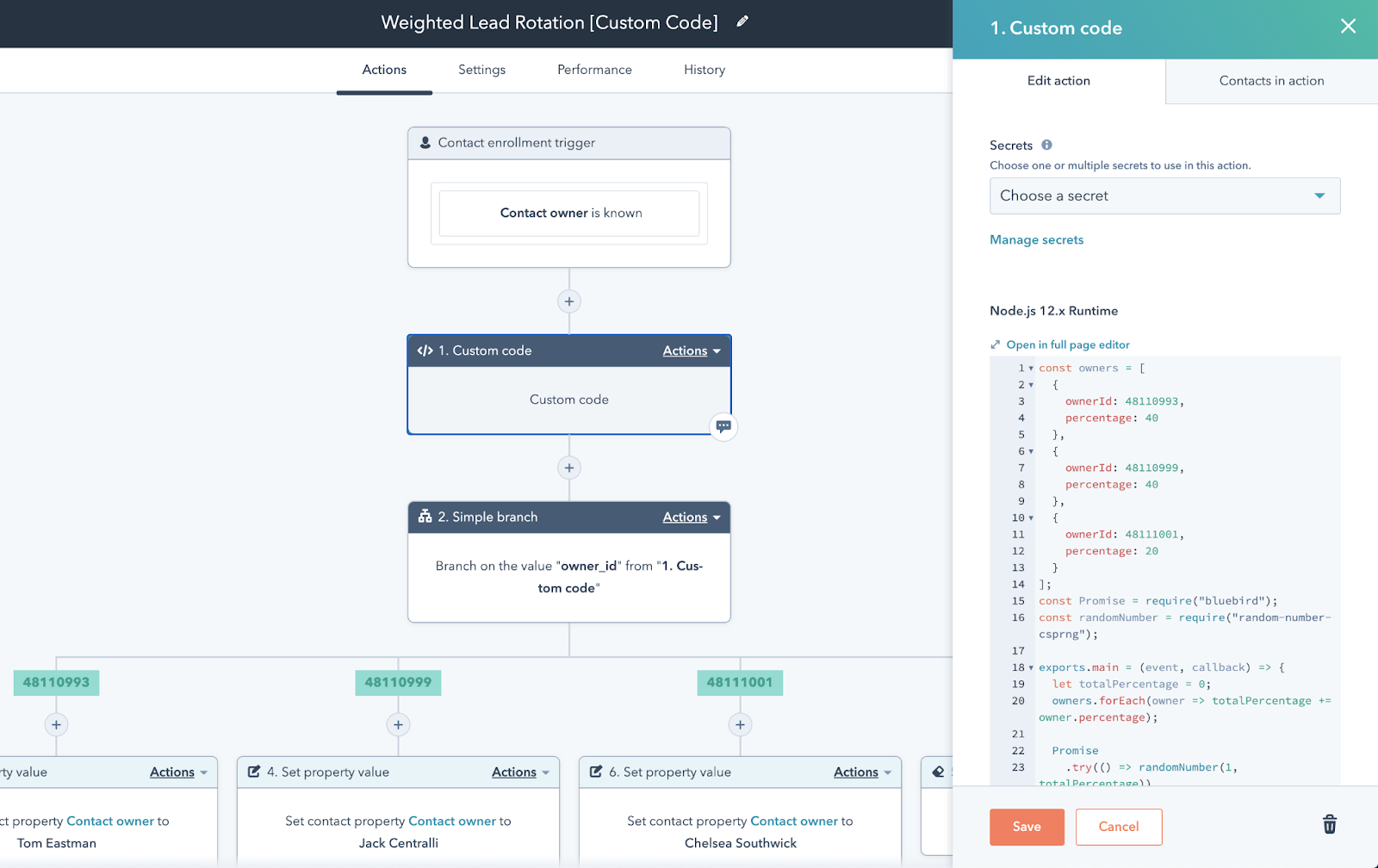
Starter runs $15/user/mo and adds basic automation. Real workflow power - branching logic, custom triggers, lead scoring - lives in Professional tiers, where Marketing Hub Professional starts at $890/mo billed annually. That's a steep jump. Breeze AI adds generative features, but it's still early. For teams that need marketing and sales automation under one roof, HubSpot Professional remains the benchmark. Just be ready for the price tag.
Pipedrive - Best for Pipeline Teams
If your team lives in the pipeline view and doesn't need marketing automation, Pipedrive is the answer. It's opinionated about pipeline management and nothing else - and that focus is exactly why reps actually use it.
We built the same lead-routing workflow in five of these tools. Pipedrive took 4 minutes. HubSpot took 12. The interface just gets out of your way.
Pricing is straightforward: Lite at $14/seat/mo gets you the pipeline but no automation. Growth at $39/seat/mo unlocks automated emails and follow-ups - that's where Pipedrive starts earning its keep. Premium ($59) and Ultimate ($79) add reporting depth and permissions. Marketing features like Campaigns ($13.33/mo) and LeadBooster ($32.50/mo) exist as add-ons but don't match HubSpot's depth. Adoption beats features every time, and Pipedrive wins on adoption.
If your follow-ups are the bottleneck, steal a few sales follow-up templates and standardize the workflow before you automate it.
Freshsales - Best AI at SMB Pricing
Freshsales Growth at $11/user/mo with automation included is the best entry point on this list. Full stop. In our testing, it was also the fastest to set up a working automation - under 10 minutes from signup to a live lead-scoring workflow. For teams exploring automated CRM software that doesn't require a dedicated admin, Freshsales is the easiest on-ramp.
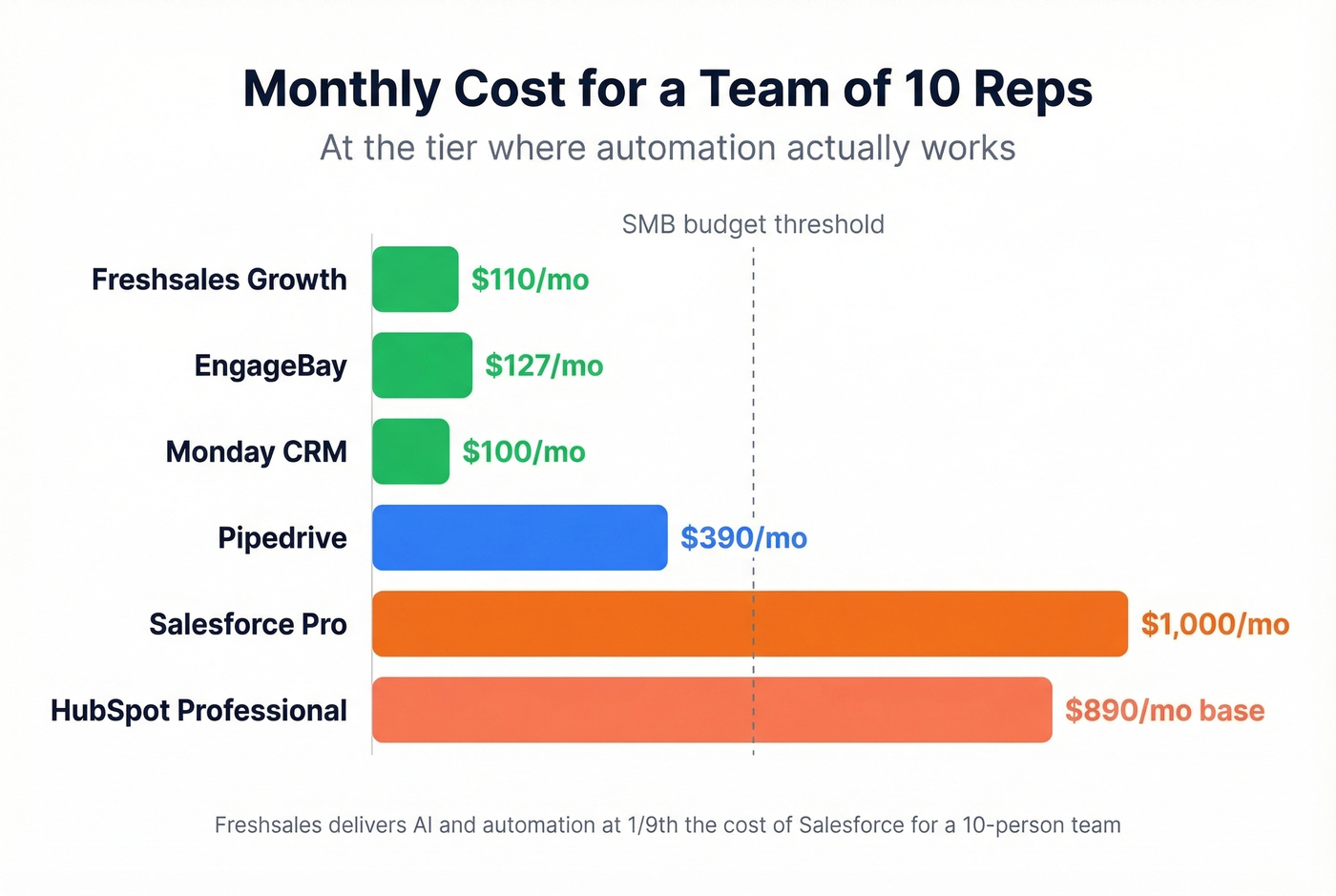
The free plan supports 3 users with basic CRM features. Growth ($11) adds workflows and Freddy AI for lead scoring. Pro ($47) brings territory management and multiple pipelines. Enterprise ($71) adds custom modules and AI forecasting. Gartner Peer Insights rates it 4.4/5 across 248 ratings. For a team of 10 reps, you're looking at $110/mo total on Growth - hard to beat.
Where Freshsales falls short is its integration ecosystem. It connects through Zapier and Segment, but it doesn't have HubSpot's 2,000+ native integrations. If your stack is complex, factor in the middleware cost.
If you're building outbound motions, pair it with proven sales prospecting techniques so automation amplifies the right behaviors.
Salesforce - Enterprise Only
Salesforce is the wrong answer for 80% of teams reading this. Skip it if you have fewer than 50 reps and no dedicated admin.
Starter Suite runs $25/user/mo, but Pro Suite at $100/user/mo is where workflow automation becomes practical. Einstein AI features live in higher tiers, with Sales/Service Cloud plans ranging from $175-$550/user/mo. Agentforce - Salesforce's AI agent platform - is genuinely impressive for enterprise workflows, but it demands clean data, governance, and a team to manage it. One Reddit thread on r/sales captures the SMB sentiment perfectly: people consider Salesforce, then realize it's built for a different scale.
If you're still evaluating it, read a full breakdown of Salesforce pricing before you commit.
Zoho CRM - Best Budget Breadth
Zoho does everything adequately and nothing spectacularly - which is exactly what budget-conscious teams need. Free for 3 users. Standard at $20/user/mo unlocks workflow automation. Professional ($35), Enterprise ($50), and Ultimate ($65) add progressively deeper customization and Zia AI capabilities.
The Zoho ecosystem is massive. If you're already using Zoho Books, Zoho Desk, or Zoho Projects, the CRM plugs in without friction. For teams that want one vendor for everything at a reasonable price, Zoho is the pragmatic choice.
ActiveCampaign - Best Automation Builder
ActiveCampaign has the best visual automation builder on this list. Branching logic, conditional paths, multi-channel triggers - nothing else comes close for pure automation design.
There's a catch most guides haven't caught up with, though: since late 2025, new accounts are charged for all contacts including unsubscribed and bounced. That changes the math significantly. Starter runs $19/mo for 1,000 contacts but limits you to 5 actions per automation with no branching - basically an autoresponder. Plus ($59/mo) unlocks real automation. CRM Pipelines are a $50/mo add-on. If automation depth is your priority and you've budgeted for Plus, ActiveCampaign delivers. Just read the fine print on contact billing.
If deliverability is part of your automation ROI, keep an eye on email bounce rate and fix list hygiene before scaling sends.
Brevo - Best for Email-First Teams
Brevo (formerly Sendinblue) is ideal for teams where email marketing is the primary automation use case. Free tier gives you 300 emails/day. Starter begins at $9/mo billed annually. Business at $16.17/mo unlocks full marketing automation, A/B testing, and send-time optimization. The Sales CRM add-on runs $12/mo.
It's not a sales-first CRM, but for e-commerce teams or content-driven businesses that need email workflows with light pipeline management, Brevo punches above its price.
EngageBay - Best Free for Micro-Teams
EngageBay bundles CRM, marketing automation, and helpdesk into a free plan supporting 250 contacts. Basic starts at $12.74/user/mo, Growth at $24.99. For teams under 10 who need everything in one place without paying HubSpot prices, it's the most generous free option on the market. Don't expect deep customization - but at zero dollars, that's a fair trade.
Monday CRM - Best for Monday.com Users
Monday CRM only makes sense if your team already lives in Monday.com for project management. The free plan includes a basic contact board for up to 1,000 contacts; paid plans start from $8/user/mo with a minimum of 3 users.
We tested it and found the automations adequate for task management but shallow for sales-specific workflows like lead scoring or multi-step nurture sequences. The automation builder mirrors Monday's project automation - familiar if you're already in the ecosystem, but not CRM-deep. If you aren't already a Monday.com shop, there's no reason to start here.
AI Agents vs. Rule-Based Workflows
The buzzword in 2026 is "agentic AI." Salesforce has Agentforce. HubSpot has Breeze. Every vendor is pitching AI agents that read context, make decisions, and act autonomously. AI adoption among CIOs has jumped 282%.
Here's my honest take: most SMBs should ignore AI agents for now and master rule-based automation first.
If/then workflows - "when deal stage changes, create task and send email" - are predictable, debuggable, and don't require governance frameworks. AI agents amplify whatever data you feed them. If your CRM data is 40% stale, an AI agent will just make bad decisions faster.
Clean the data first. Automate the basics. Then layer in AI when you've earned the right to trust it. If your CRM's native automation falls short in the meantime, Zapier (from $19.99/mo) or Make can bridge the gap by connecting it to 8,000+ apps.
If you're building multi-step sequences, a dedicated guide to sequence management helps you avoid spaghetti automations.
5 Automation Mistakes That Kill ROI
1. Automating without a strategy. Audit your processes before you build a single workflow. Automate the highest-impact, most repetitive tasks first - not everything at once.
2. Skipping training. Adoption kills ROI faster than bad tools. If reps don't understand the automation, they'll work around it. Budget time for onboarding, not just implementation.
3. Over-automating. The R in CRM stands for relationship. Automated birthday emails are fine. Automated "just checking in" messages to a prospect who asked for space? That's how you get blocked.
4. Automating on stale data. Run your CRM contacts through an enrichment tool before activating any automation. At ~$0.01 per email, enrichment costs less than a single bounced outreach - and it prevents your automations from targeting people who left the company six months ago.
5. Set-and-forget. Review automations quarterly. Triggers break. Data schemas change. The workflow you built in Q1 might be routing leads to a rep who left in Q2.
Let's be honest - every CRM vendor wants you on the highest tier. The fact that they gate automation behind premium plans and then advertise the free plan is the SaaS equivalent of a bait-and-switch. Know which tier you actually need before you sign up.
How to Choose the Right Tool
Solo or micro-team (under 5 people, under $50/mo): Freshsales Growth at $11/user/mo is the best value. EngageBay Free works if you need marketing automation included and can live with contact limits.
SMB sales team (5-25 people, $50-500/mo): Pipedrive Growth for pure sales teams. HubSpot Starter if you need marketing and sales in one platform. At this size, prioritize adoption speed over feature depth - the tool reps actually use beats the one with the longest feature list. Budget for the jump to HubSpot Professional if you'll need advanced workflows within 12 months.
Growth or enterprise (25+ people, $500+/mo): HubSpot Professional or Salesforce Pro Suite, depending on whether you have a dedicated admin. Salesforce wins on customization depth; HubSpot wins on time-to-value. At this scale, inside sales automation becomes critical - reps handling high call volumes need automated logging, task creation, and deal-stage updates that fire without manual input.
Regardless of which CRM you pick: clean your data first. Every scenario above benefits from running contacts through enrichment before you flip on a single automation. The best CRM automation tools in the world can't fix bad inputs.
If you're still deciding on the base system, compare a few examples of a CRM and pick the one your team will actually adopt.
FAQ
What is CRM automation?
CRM automation uses software to handle repetitive sales and marketing tasks - data entry, lead routing, follow-up emails, pipeline updates - so reps spend time selling instead of clicking. Most platforms offer rule-based workflows with triggers, conditions, and actions. Newer tools add AI agents that act on context rather than rigid if/then rules.
Which CRM has the best automation for small businesses?
Freshsales Growth at $11/user/month offers the best automation-to-price ratio for small teams. Pipedrive Growth ($39/seat/month) is the strongest sales-focused option. HubSpot Starter ($15/user/month) works best if you need marketing automation bundled with your CRM.
Do free CRMs include automation?
Rarely in a meaningful way. HubSpot Free, Zoho Free, and Freshsales Free store contacts and manage pipelines but gate workflow automation behind paid tiers. EngageBay's free plan includes basic automation for up to 250 contacts - the most generous free option available in 2026.
How do I keep CRM data clean for automation?
Use a dedicated enrichment tool to verify emails, fill missing fields, and refresh stale records before activating automations. Schedule quarterly data audits and standardize entry with dropdowns instead of free-text fields. At ~$0.01 per email, enrichment is the cheapest way to prevent wasted automation cycles.
What's the difference between CRM and marketing automation?
CRM automation focuses on sales workflows: deal progression, task assignment, lead routing, and follow-up reminders. Marketing automation handles email sequences, segmentation, lead scoring, and nurture campaigns. Platforms like HubSpot, ActiveCampaign, and Brevo combine both under one roof.