

Customer Data Enrichment: What It Is, Why It Matters, and How to Do It Right
Your SDR just sent 500 cold emails. 47 bounced. Another 120 went to people who changed jobs six months ago. The campaign that was supposed to generate pipeline instead torched your deliverability score and left your sales manager fuming. That's what happens when your CRM runs on stale data - and 85% of businesses say poor-quality customer data is actively harming their operations. The fix isn't another database. It's a systematic approach to customer data enrichment.
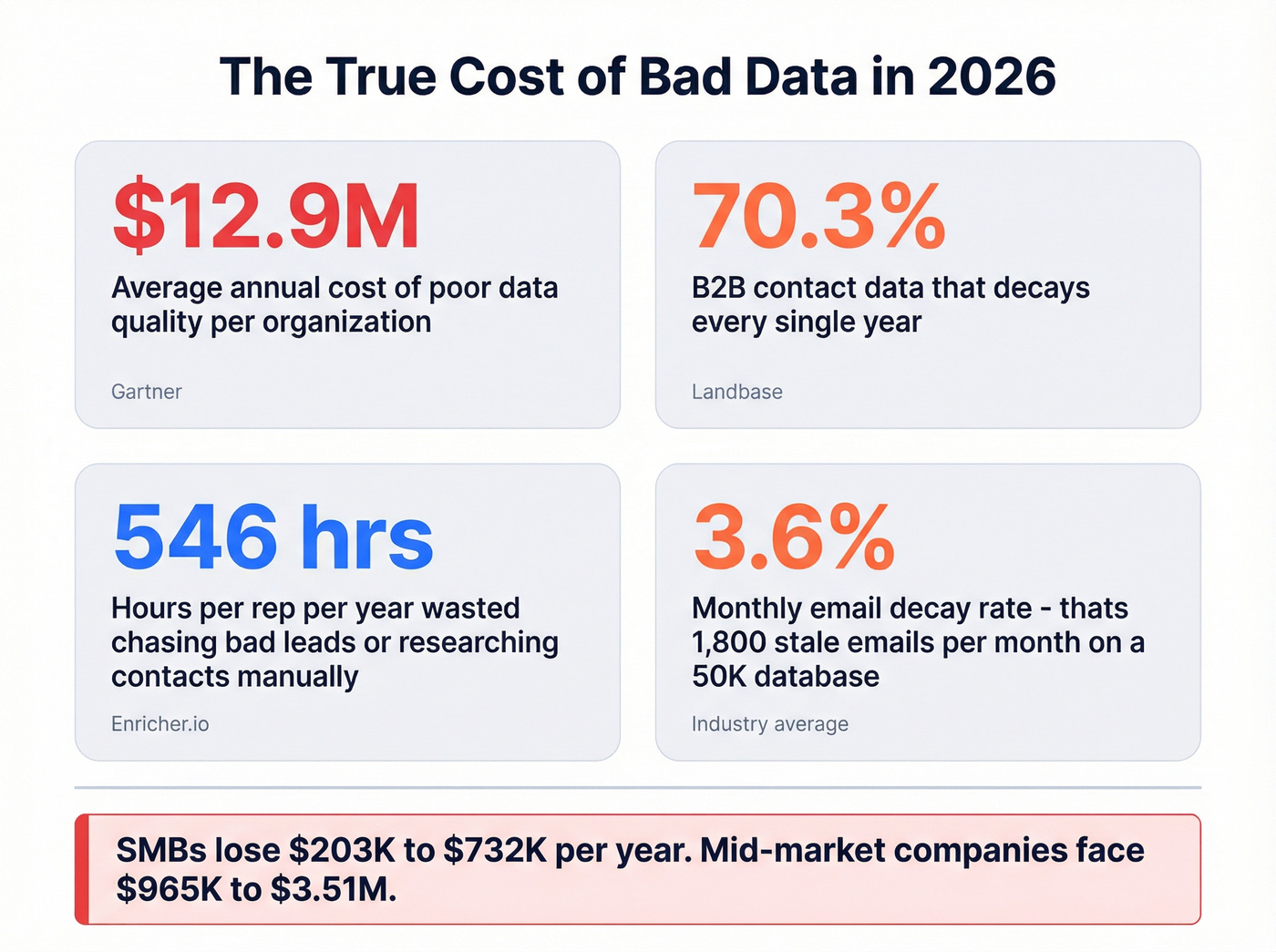
Poor data quality costs organizations roughly $12.9M per year in wasted effort, missed opportunities, and broken automations. Even at a 50-person company, the proportional damage adds up fast: bounced emails, misdirected outreach, reps burning hours researching contacts manually. The enrichment market is projected to grow from $1.97B to $5.48B by 2034, and for good reason. Companies that invest see 20% better campaign response rates and 15% higher close rates within six months.
What You Need (Quick Version)
Customer data enrichment appends missing attributes to your existing records: verified emails, direct dials, firmographics, technographics, intent signals. Three outcomes matter most:
- Better segmentation - you can't target VP-level buyers at SaaS companies with 50-200 employees if you don't have those data points attached to each record.
- Fewer bounces - enriched and verified contact data keeps your sender reputation intact (and protects email deliverability).
- Shorter sales cycles - reps spend time selling instead of researching.
Skip enrichment and your sales reps waste 27.3% of their time - roughly 546 hours per year - chasing bad leads. For the full tool breakdown, jump to the tools section below.
What Is Customer Data Enrichment?
Customer data enrichment is the process of taking your existing records - a CRM full of names and email addresses, a CSV from a webinar, a list of target accounts - and layering on additional data points from external sources. The goal is to turn a thin record into a rich profile that your sales, marketing, and RevOps teams can actually act on.
It's not the same as data cleansing, which focuses on fixing what you already have - deduplicating records, standardizing formats, correcting typos. And it's not data wrangling, which is about transforming raw data into usable structures. Enrichment specifically adds new information from external sources.
The underlying mechanism is identity resolution: matching a record in your system to a profile in an external database using identifiers like email address, company domain, or a name-plus-company combination. When the match hits, the provider appends dozens of attributes - job title, seniority, department, company revenue, tech stack, funding stage, and more. Internal data only gets you so far. External enrichment fills the gaps your forms can't capture without creating friction that kills conversion rates.
Types of Profile Data Used in Enrichment
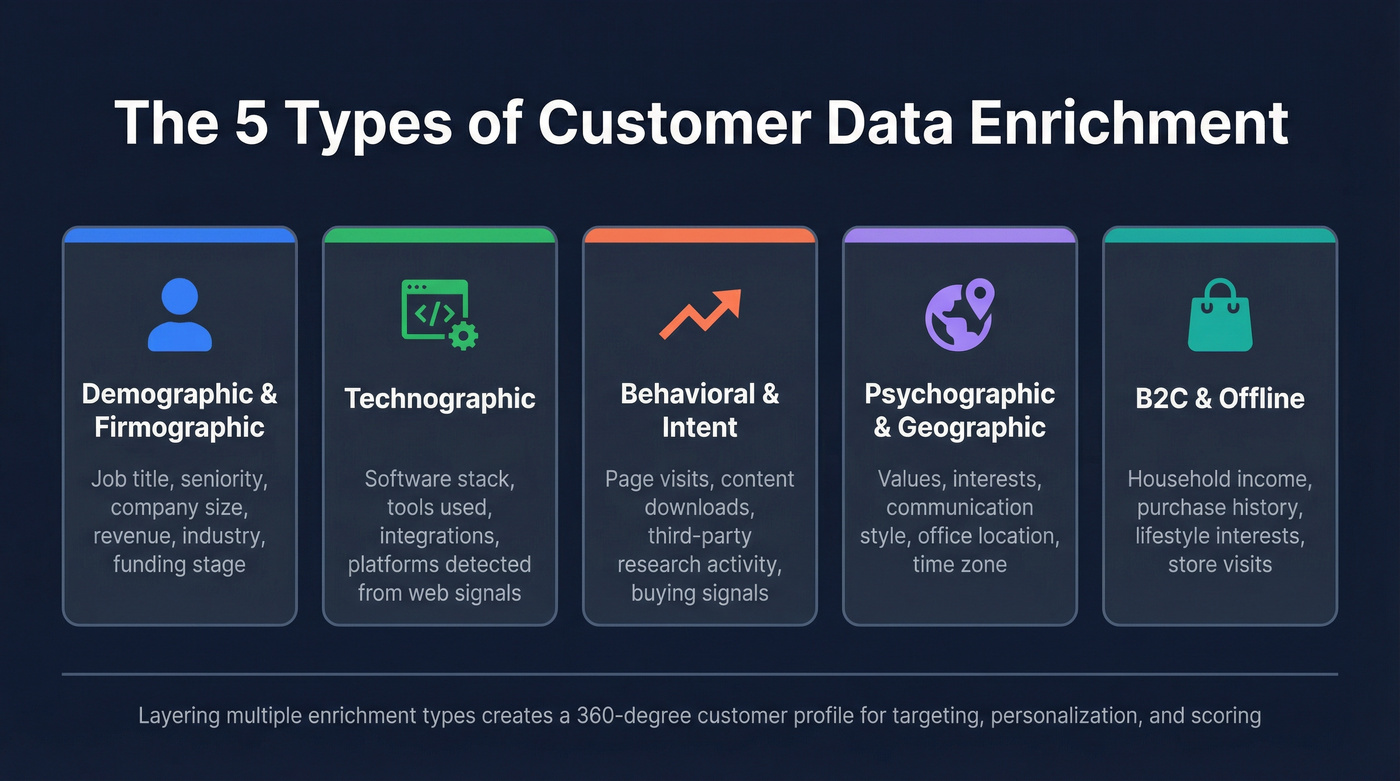
Demographic and Firmographic
This is the foundation. Demographic enrichment adds individual-level attributes: job title, seniority, department, education, years of experience. Firmographic enrichment covers the company side: industry, employee count, revenue range, headquarters location, funding stage. Together, they're what makes ICP-based targeting possible. Without them, you're guessing.
If you want a deeper breakdown of what to capture and how teams use it, see our guide to firmographics and technographics.
Technographic
What software does the prospect's company use? Technographic enrichment answers this by scanning job postings, website code, and third-party signals to identify tools in a company's stack. If you sell a Salesforce integration, knowing which companies run Salesforce before you reach out is the difference between a relevant pitch and a wasted email.
Behavioral and Intent
Here's where enrichment gets predictive. Behavioral data tracks how prospects interact with your content - page visits, email opens, webinar attendance. Intent data goes further, monitoring third-party research activity across the web to identify companies actively exploring topics related to your product. When a target account starts reading about "CRM migration" across multiple publications, that's a buying signal worth acting on immediately.
If you're operationalizing this, pair enrichment with a clear intent signals framework so reps know what to do next.
Psychographic and Geographic
Psychographic enrichment adds attributes like values, interests, and communication preferences - more common in B2C but increasingly relevant for B2B personalization. Geographic enrichment appends precise location data: office addresses, time zones, regional market indicators. For global sales teams, knowing a prospect's time zone before scheduling outreach directly lifts response rates.
B2C and Offline Enrichment
B2B gets most of the attention, but B2C enrichment is a massive market in its own right. It combines first-party data with third-party sources to add attributes like household income, purchase history, lifestyle interests, and offline behaviors like store visits. 72% of customers expect companies to understand their unique needs - and you can't deliver that personalization without enriched profiles.
The Real Cost of Bad Data
Let's put numbers on this. A cost model published by Cleanlist breaks the damage into seven buckets:
| Cost Bucket | SMB Estimate | Mid-Market Estimate |
|---|---|---|
| Bounced emails | $2K-$8K/yr | $10K-$40K/yr |
| Wrong phone numbers | $15K-$60K/yr | $75K-$300K/yr |
| Duplicate records | $10K-$36K/yr | $50K-$180K/yr |
| Sales research time | $100K-$360K/yr | $500K-$1.8M/yr |
| Failed automations | Hard to quantify | Hard to quantify |
| Missed opportunities | $50K-$200K/yr | $250K-$1M/yr |
| Reputation damage | Hard to quantify | Hard to quantify |
Total SMB exposure runs $203K-$732K annually. Mid-market companies face $965K-$3.51M. And 65% of companies still rely on manual Excel methods to manage their data. That's not a strategy - it's a liability.
The biggest line item isn't bounced emails. It's sales research time. Reps spend 27.3% of their working hours - 546 hours per year per rep - pursuing bad leads or manually researching contacts. At a fully loaded cost of $50-$75/hour, that's $27K-$41K per rep per year burned on non-selling activity. Multiply by your headcount and the business case for enrichment writes itself.
B2B contact data decays at up to 70.3% annually. People change jobs, companies get acquired, email domains shift. Monthly email decay alone runs 3.6%. On a 50,000-record database, that's 1,800 emails going stale every single month. (If you want the benchmarks and KPIs behind this, see B2B contact data decay.)

You just read that bad data costs SMBs up to $732K per year - mostly from reps wasting 546 hours chasing stale leads. Prospeo's CRM enrichment returns 50+ data points per contact at a 92% match rate, with every record refreshed on a 7-day cycle. At $0.01 per email, fixing your data costs less than one bounced campaign.
Stop bleeding pipeline to data decay. Enrich your CRM in minutes.
How the Enrichment Process Works
The 6-Step Workflow
- Audit your existing data. Export a sample from your CRM and check fill rates for critical fields: email, phone, title, company size, industry. Most teams discover 30-50% of records are incomplete. This is also where basic CRM hygiene work pays off fast.
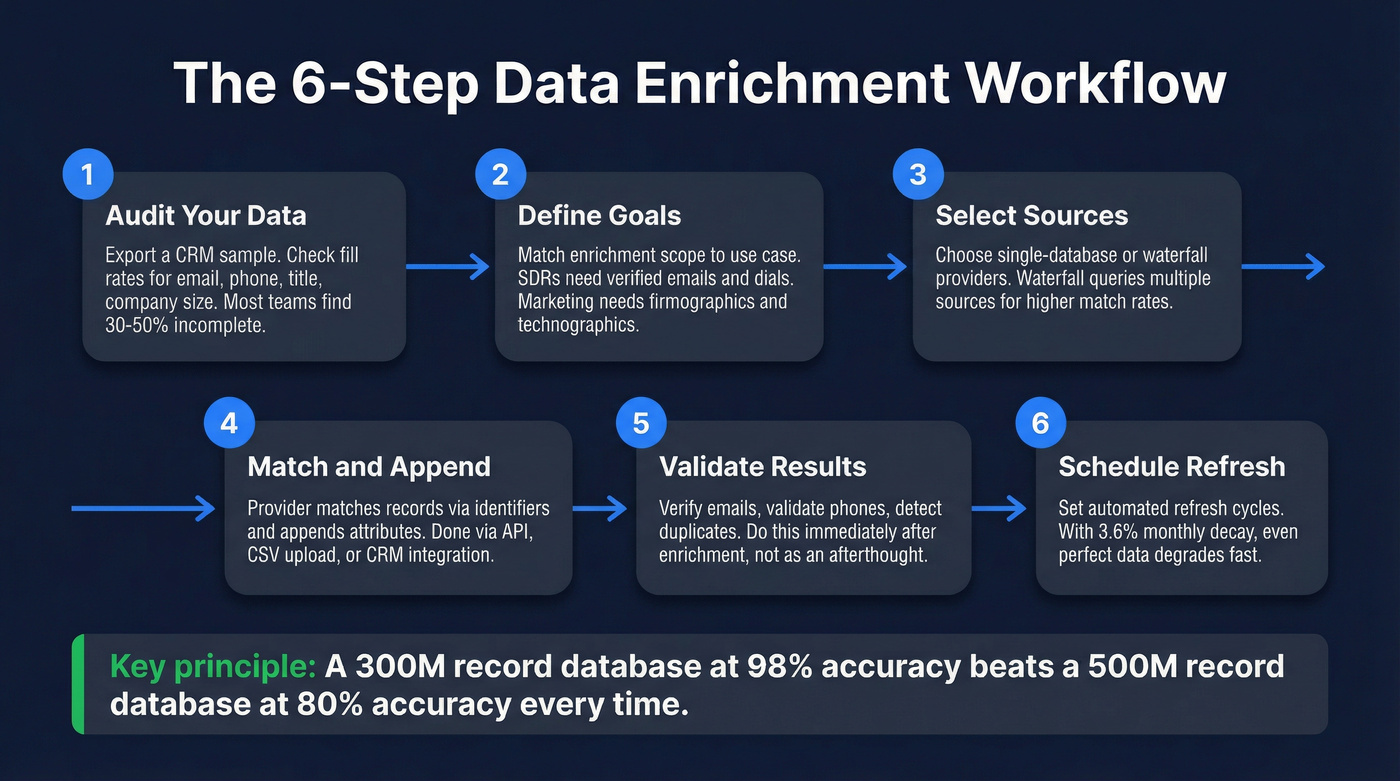
Define your enrichment goals. Not every record needs every data point. An SDR prospecting list needs verified emails and direct dials. A marketing segmentation project needs firmographics and technographics. Match your enrichment scope to the use case.
Select your data sources. Single-database providers pull from one proprietary dataset. Waterfall providers query multiple sources sequentially, improving match rates and accuracy. Waterfall approaches typically outperform single-source enrichment on fill rates. (If you're comparing orchestration options, start with waterfall alternatives.)
Match and append. The provider matches your records against their database using identifiers and appends the requested attributes. This happens via API call, bulk CSV upload, or native CRM integration depending on the tool.
Validate the results. Enrichment without verification is just adding more data you can't trust. Email verification, phone validation, and duplicate detection should happen immediately after enrichment - not as an afterthought. Use a dedicated email ID validator if your enrichment tool doesn't verify deeply.
Maintain a refresh schedule. Enrichment isn't a one-time project. With 3.6% monthly email decay, even a perfectly enriched database degrades fast. Set automated refresh cycles based on record priority.
API vs. Batch vs. Waterfall
Three approaches, each with a sweet spot.
API enrichment works in real time - a lead fills out a form, the API fires, and the record is enriched before it hits your CRM. Best for high-velocity inbound. Batch enrichment processes thousands of records at once via CSV upload or scheduled CRM sync. Best for database cleanup projects. Waterfall enrichment queries multiple providers sequentially, using the best result from each. It's more complex to set up but delivers the highest accuracy.
Here's the thesis that should guide every enrichment decision you make: a 300M-record database with 98% accuracy will outperform a 500M-record database at 80% accuracy every time. Freshness and verification beat raw size.
Best Enrichment Tools in 2026
You don't need a $30K enrichment platform. You need accurate data and a refresh schedule. The tools below range from free to enterprise-priced, and the most expensive option isn't always the best fit. (If you're building a lean stack around this, use our B2B sales stack blueprint.)
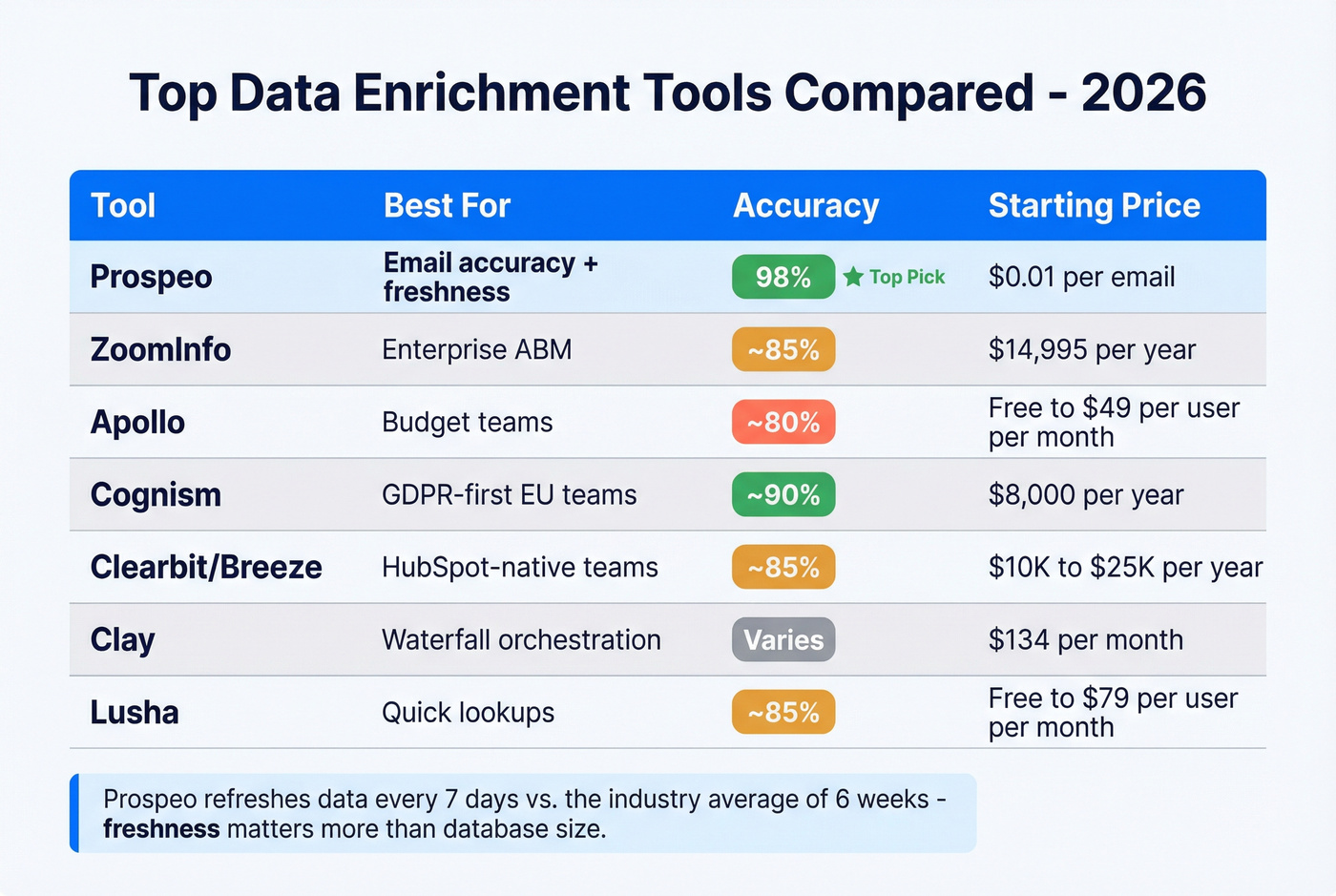
| Tool | Best For | Data Quality | Refresh | Starting Price |
|---|---|---|---|---|
| Prospeo | Email accuracy + freshness | 300M+ profiles, 98% accuracy | 7 days | Free; ~$0.01/email |
| ZoomInfo | Enterprise ABM | 321M contacts, ~85% accuracy | Not public | ~$14,995/yr |
| Apollo | Budget-conscious teams | 210M contacts, ~80% accuracy | Not public | Free; $49/user/mo |
| Cognism | GDPR-first EU teams | Strong EU coverage, ~90% accuracy | Not public | ~$8,000/yr |
| Clearbit/Breeze | HubSpot-native teams | 250+ sources, ~85% accuracy | 30 days | ~$10K-$25K/yr |
| Clay | Waterfall orchestration | 75+ sources, varies | Real-time | $134/mo |
| Lusha | Quick lookups | Undisclosed size, ~85% accuracy | Not public | Free; up to $79/user/mo |

Prospeo
Prospeo's database covers 300M+ professional profiles with 143M+ verified emails and 125M+ verified mobile numbers with a 30% pickup rate, all refreshed on a 7-day cycle. That refresh cadence is the real differentiator - when the industry average sits at six weeks, weekly refresh means you're working with data that's genuinely current. Intent data tracking across 15,000 topics via Bombora lets you layer buying signals on top of contact data, so reps reach the right person at the right time.
Email accuracy hits 98%, backed by a proprietary 5-step verification process that includes catch-all handling, spam-trap removal, and honeypot filtering. The API match rate runs 92%, and enrichment returns 50+ data points per contact at an 83% match rate. We've seen these numbers hold up in production across thousands of campaigns.
Real-world results back this up: Snyk's team of 50 AEs saw bounce rates drop from 35-40% to under 5% after switching, with AE-sourced pipeline up 180%. Meritt tripled pipeline from $100K to $300K/week while keeping bounce rates under 4%. Pricing is transparent and self-serve - roughly $0.01 per email, with a free tier. No annual contracts, no sales calls required. Integrates natively with Salesforce, HubSpot, Lemlist, Instantly, Clay, and Zapier.
ZoomInfo
ZoomInfo remains the enterprise default for a reason: 321M contacts, 104M companies, and the broadest feature set in the category - intent data, website visitor tracking, conversation intelligence, workflow automation. If you're running a full ABM motion with 10+ BDRs and need everything in one platform, ZoomInfo delivers.
The tradeoff is cost and accuracy. A mid-market contract with intent data and mobile numbers typically runs $25K-$40K+ per year. Email accuracy benchmarks around 85% in deliverability tests, and refresh cycles are measured in weeks, not days. APAC and EMEA coverage gets thinner compared to North America. The consensus on r/sales is that ZoomInfo's data quality has slipped in recent years while pricing has climbed - a frustrating combination for teams that don't use the full GTM suite.
Here's the thing: if finance is asking why you're paying $25K/year for a tool that three people actually use, you already know the answer. The #1 complaint on G2 reviews is paying for modules that sit idle. For teams that primarily need accurate contact data without the full platform, there are better options at a fraction of the cost.
Apollo
Use this if: You're a startup or SMB that needs a free tier to get started, wants built-in sequencing, and primarily targets North American prospects.
Skip this if: Email accuracy is critical to your domain reputation, or you need strong EMEA/APAC coverage.
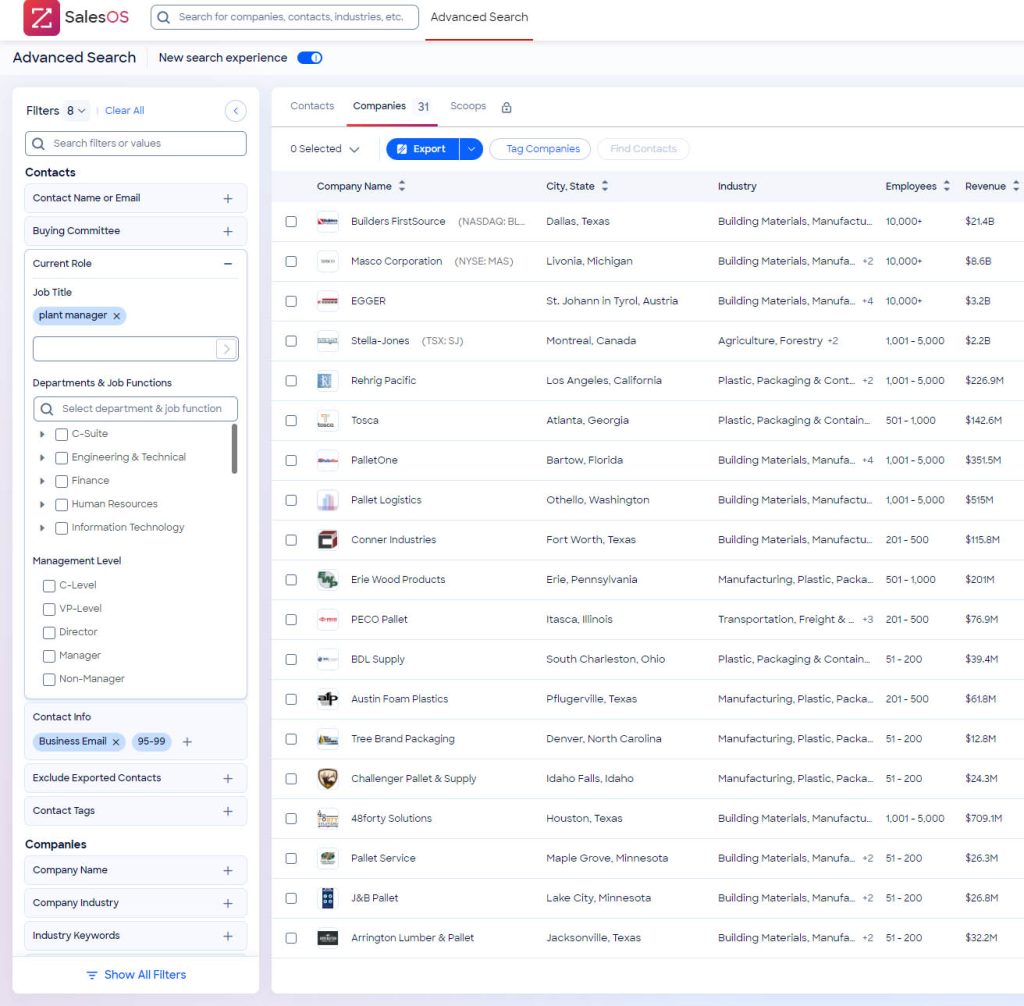
Apollo's 210M-contact database and generous free plan make it the obvious entry point for budget-conscious teams. Paid plans run $49-$119/user/month with built-in email sequences, a dialer, and basic intent signals. The limitation is accuracy - deliverability tests put email accuracy around 80%, which means roughly 1 in 5 emails won't land. For high-volume outbound where some bounce tolerance is acceptable, Apollo works. For teams where every bounced email damages sender reputation, it's a risk.
Cognism
Cognism is the pick for teams selling into Europe. GDPR compliance is baked into the product - phone-verified mobile numbers, DNC list checking, and consent-based data collection. Email accuracy benchmarks around 90%. European coverage is notably stronger than most US-centric competitors.
Pricing typically starts around $8,000/year for small teams and scales to $15,000+ for larger deployments. Where ZoomInfo wins on US depth and feature breadth, Cognism wins on EMEA compliance and mobile verification.
Clearbit / HubSpot Breeze
Breeze Intelligence lives inside the HubSpot ecosystem. It pulls from 250+ data sources, refreshes every 30 days, and enriches records natively within HubSpot workflows. If your entire GTM stack runs on HubSpot, the integration works without extra configuration.
Users consistently flag the credit-based system as unintuitive after the rebrand, and you're locked into the HubSpot ecosystem. Pricing is bundled with HubSpot contracts, typically ranging $10K-$25K/year depending on credit volume. Teams running Salesforce or other CRMs should look elsewhere.
Clay, Lusha, and FullContact
Clay is a waterfall orchestration platform, not a database. It aggregates 75+ data sources and lets you build enrichment workflows that query multiple providers sequentially. Powerful for RevOps teams who want maximum coverage, but the learning curve is steep. Starts at $134/month.
Lusha is built for quick lookups - browser extension, fast results, simple UI. Free tier available, paid plans up to $79/user/month. Good for individual reps, less suited for bulk enrichment.
FullContact focuses on identity resolution and privacy-compliant consumer data enrichment, making it more relevant for B2C use cases than B2B prospecting. Pricing starts around $99/month for basic plans.
Let's be honest: if your average deal size is under $10K, you almost certainly don't need a $25K+ enrichment platform. A tool with 98% email accuracy and a 7-day refresh cycle will outperform a bloated enterprise suite that your team uses at 20% capacity. Spend the savings on better outbound copy (or upgrade your cold email tactics).
Firmographics, technographics, intent signals across 15,000 topics, verified emails at 98% accuracy, 125M+ direct dials - Prospeo appends exactly the enrichment layers this article covers, all from a single platform. No annual contracts. No sales calls. 83% of leads come back with contact data.
Every enrichment type above, one platform, 7-day refresh. Try it now.
How Often to Refresh Enriched Data
The math is simple. At 3.6% monthly email decay, a 50,000-record database loses 1,800 valid emails every month. After six months without a refresh, nearly 20% of your email data is stale.
| Record Priority | Refresh Frequency | Why |
|---|---|---|
| Active opportunities | Monthly | Stale data kills live deals |
| MQLs and SALs | Every 2 months | Keep pipeline data current |
| General database | Quarterly | Prevent bulk decay |
| Cold/dormant leads | Annually | Verify before re-engagement |
The gap between a tool refreshing weekly and one refreshing every six weeks matters more than most teams realize. A six-week cycle lets nearly 5% of your emails go stale between refreshes. A weekly cycle catches decay before it compounds. In our experience, teams that move from quarterly to monthly refreshes on active pipeline records see bounce rates drop by 40-60% within the first cycle.
Compliance Checklist for Enrichment
Enrichment without compliance is a liability. Here's what your operational checklist should include:
GDPR - Maximum penalties of €20M or 4% of annual revenue. Cumulative fines have hit €5.88B since 2018, with €1.2B issued in 2024 alone. You need a lawful basis for processing, consent records, and the ability to purge on request.
CCPA/CPRA - Up to $7,988 per intentional violation and $2,664 for unintentional violations (inflation-adjusted). Honor Global Privacy Control signals. Maintain suppression lists for opted-out consumers.
US state privacy laws - 20 states now have privacy laws covering roughly 150M Americans, with more taking effect through 2026.
Consent management - Deploy a CMP that blocks non-essential scripts until consent is granted. Make sure "Reject all" has equal prominence to "Accept all."
Suppression and DPIAs - Suppress opted-out contacts from all enrichment and remarketing workflows. Run Data Protection Impact Assessments for any new enrichment data source.
Vendor due diligence - Your enrichment provider's compliance posture is your compliance posture. Verify GDPR compliance, DPA availability, and opt-out enforcement before signing.
Enrichment Mistakes That Kill ROI
Set-and-forget enrichment. You ran a bulk enrichment six months ago and haven't touched it since. With 70.3% annual data decay, that enriched database is already significantly degraded. Enrichment without a refresh schedule is a depreciating asset.
Over-enrichment and data hoarding. Appending 100 fields to every record sounds thorough. In practice, it creates bloated CRM records, slows down workflows, and confuses reps. Enrich only the fields your team actually uses for segmentation, routing, or outreach.
Enriching at the wrong funnel stage. A website visitor who downloaded a whitepaper doesn't need 50 data points yet. Match your enrichment depth to funnel stage: basic firmographics at capture, full contact enrichment at MQL, intent and technographic data at the opportunity stage.
Treating all data sources as equal. A provider claiming 90% accuracy and one actually delivering it are different things. We've seen teams trust a single vendor's self-reported accuracy only to discover 15-20% bounce rates in production. Run a pilot with your own CRM sample before committing - 500 records is enough to spot problems.
Ignoring privacy regulations. "We'll deal with GDPR later" is a sentence that precedes a €20M fine. Build compliance into your enrichment workflow from day one, not as a retrofit. (If you're running outbound, align this with GDPR for sales and marketing.)
Poor CRM integration. Enrichment data that lives in a spreadsheet instead of flowing into your CRM fields is enrichment you're not using. Native integrations or API connections that map enriched fields directly to CRM properties aren't optional - they're the whole point.
Failing to validate after enrichment. Enrichment appends data. Verification confirms it's accurate. These are separate steps, and skipping verification means you're trusting unvalidated data to power your outreach. Always verify emails and phones post-enrichment.
FAQ
What's the difference between data enrichment and data cleansing?
Data cleansing fixes what you already have - deduplicating, standardizing formats, removing invalid entries. Customer data enrichment adds new information from external sources, like job titles, company revenue, or verified phone numbers. Most teams need both: cleanse first, then enrich with the attributes that drive segmentation and personalization.
How much does enrichment cost?
Self-serve tools run roughly $0.01 per email with free tiers available. Mid-range platforms like Apollo charge $49-$119/user/month. Enterprise solutions like ZoomInfo start around $15,000/year and scale to $40,000+. The better question: how much is bad data already costing you in bounced emails and wasted rep time?
How often should I re-enrich CRM data?
Monthly for active opportunities, every two months for MQLs, and quarterly for your general database at minimum. The 3.6% monthly email decay rate means waiting longer than a quarter lets significant rot accumulate - nearly 11% of emails go stale in just three months.
What accuracy rate should I expect?
Single-database providers typically deliver 80-90% email accuracy. Waterfall approaches and providers with proprietary verification push into the 90-98% range. Anything below 85% will create noticeable bounce rate problems. Always run a pilot test with your own CRM sample before committing to an annual contract.
Can small teams afford enrichment tools?
Yes. Free tiers exist across several platforms, and paid enrichment runs as low as $0.01 per email. Enterprise-grade data quality isn't gated behind $15K+ annual contracts anymore - a two-person sales team can start enriching today for under $50/month.