

Customer Email Verification: What It Is, How It Works, and How to Get It Right
Your last campaign bounced 6%. Your ESP flagged you. Your domain reputation dropped a tier - and now you're scrambling to stop the bleeding. Customer email verification is the fix, but here's what nobody tells you: it takes months to rebuild sender reputation and about one bad send to torch it.
What Is Email Verification?
Customer email verification confirms that an email address is real, active, and deliverable before you hit send. Two terms get thrown around interchangeably, but they mean different things: verification confirms a real person controls an inbox (think activation links, OTP codes at checkout), while validation refers to frontend checks - format, typos, whether there's an @ symbol at all.
Context matters here. If you're running an e-commerce site or SaaS product, verification means double opt-in flows and OTP challenges that confirm signups are legitimate humans. If you're running outbound sales, it means cleaning prospect lists so cold emails actually land. Most businesses need both, but almost every guide covers only one.
The Short Version
- Keep total bounce rate under 2%. Hard bounces under 1%. (If you need a deeper breakdown, see bounce rate.)
- Re-verify lists monthly - roughly 2% of verified addresses go invalid every four weeks.
- Use double opt-in for marketing lists. Block disposable emails at signup.
- For bulk list cleaning, ZeroBounce. For raw speed, Bouncer. For budget, EmailListVerify.
Why This Matters More in 2026
Google and Yahoo's 2024 deliverability rule changes raised the stakes permanently. SPF, DKIM, and DMARC authentication are table stakes now, spam-rate thresholds are enforced, and one-click unsubscribe is mandatory for bulk senders. The margin for error on list quality shrank overnight.
The ROI of getting this right is tangible. One team on r/GrowthHacking reported that after systematically cleaning their lists - removing invalid addresses, duplicates, and inactive contacts - outreach efficiency improved roughly 30% within a few weeks. That tracks with what we've seen across dozens of outbound operations. Bad data doesn't just cause bounces. It wastes rep time, tanks sender reputation, and quietly kills reply rates before anyone notices. (If you're fixing reputation after a bad send, start with sender reputation.)


Prospeo runs every email through a 5-step verification process - including catch-all detection, spam-trap removal, and honeypot filtering - before it ever reaches your list. 98% accuracy. No post-send cleanup.
Stop cleaning lists. Start with emails that are already verified.
How Email Verification Actually Works
Modern verification runs a 5-layer process:
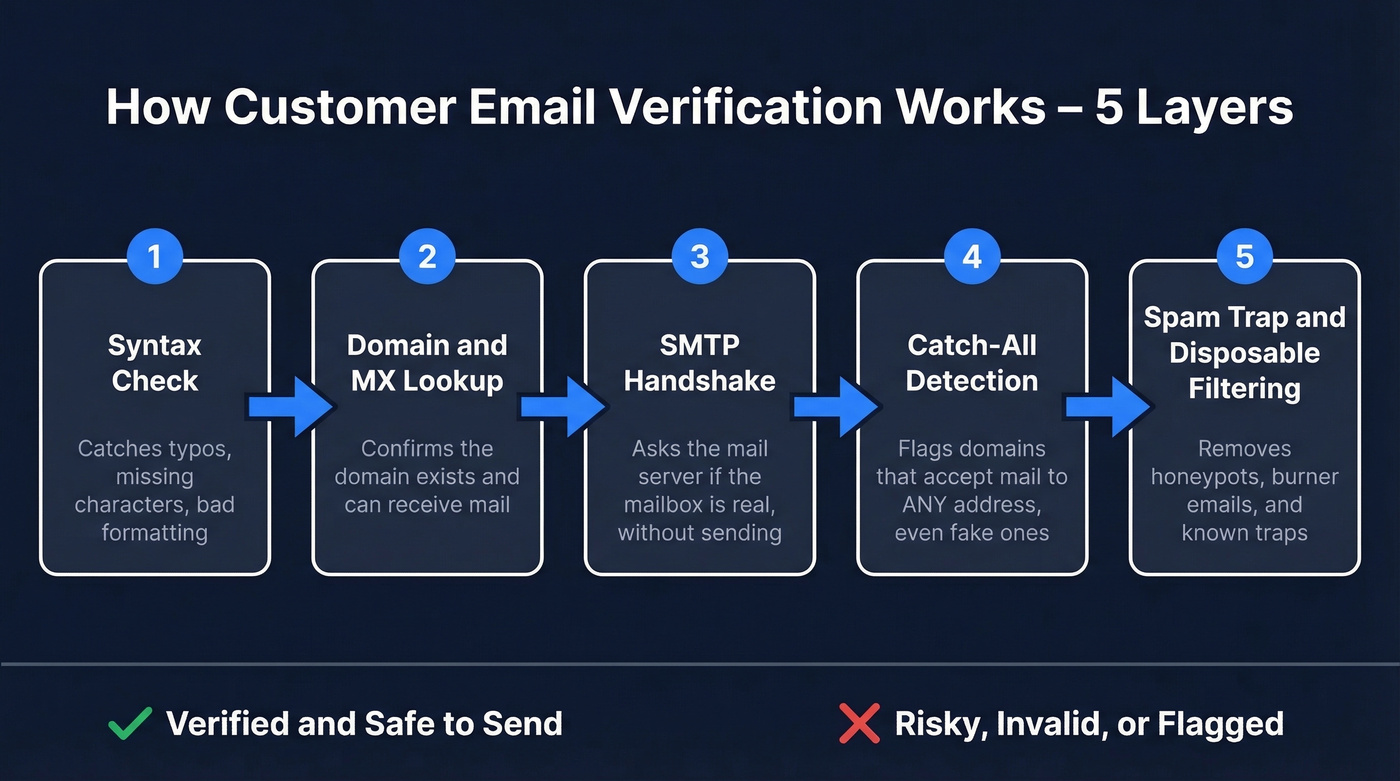
- Syntax check - confirms valid email formatting. Catches typos, missing characters, malformed strings.
- Domain and MX lookup - verifies the domain exists and has mail exchange records configured to receive email.
- SMTP handshake - simulates delivery by connecting to the mail server and asking whether the specific mailbox exists, without actually sending a message.
- Catch-all detection - identifies domains that accept mail to any address, even nonexistent ones. These return "valid" on basic SMTP checks, but the mailbox may not actually exist. (If you're doing outbound, this is a core part of email deliverability.)
- Disposable and spam-trap filtering - removes temporary/burner addresses, known spam traps, and honeypot addresses that damage sender reputation. If you’re cleaning a damaged list, prioritize spam-trap removal.
Here's the thing about catch-all domains: they're one of the biggest blind spots in the entire process. Catch-all is extremely common in B2B, which means SMTP checks alone often can't confirm whether a specific mailbox is real. Tools that treat catch-all as "valid" are setting you up for bounces. Demand tools that surface this distinction clearly - Prospeo, for instance, flags catch-all addresses as risky rather than confirmed, which is the only honest way to handle them.
Best Practices Checklist
Verify at the point of capture. Whether it's a signup form or a prospect list import, validate before the address enters your database. Cleaning after the fact costs more and takes longer. (If you’re building lists from scratch, use a repeatable lead generation workflow.)
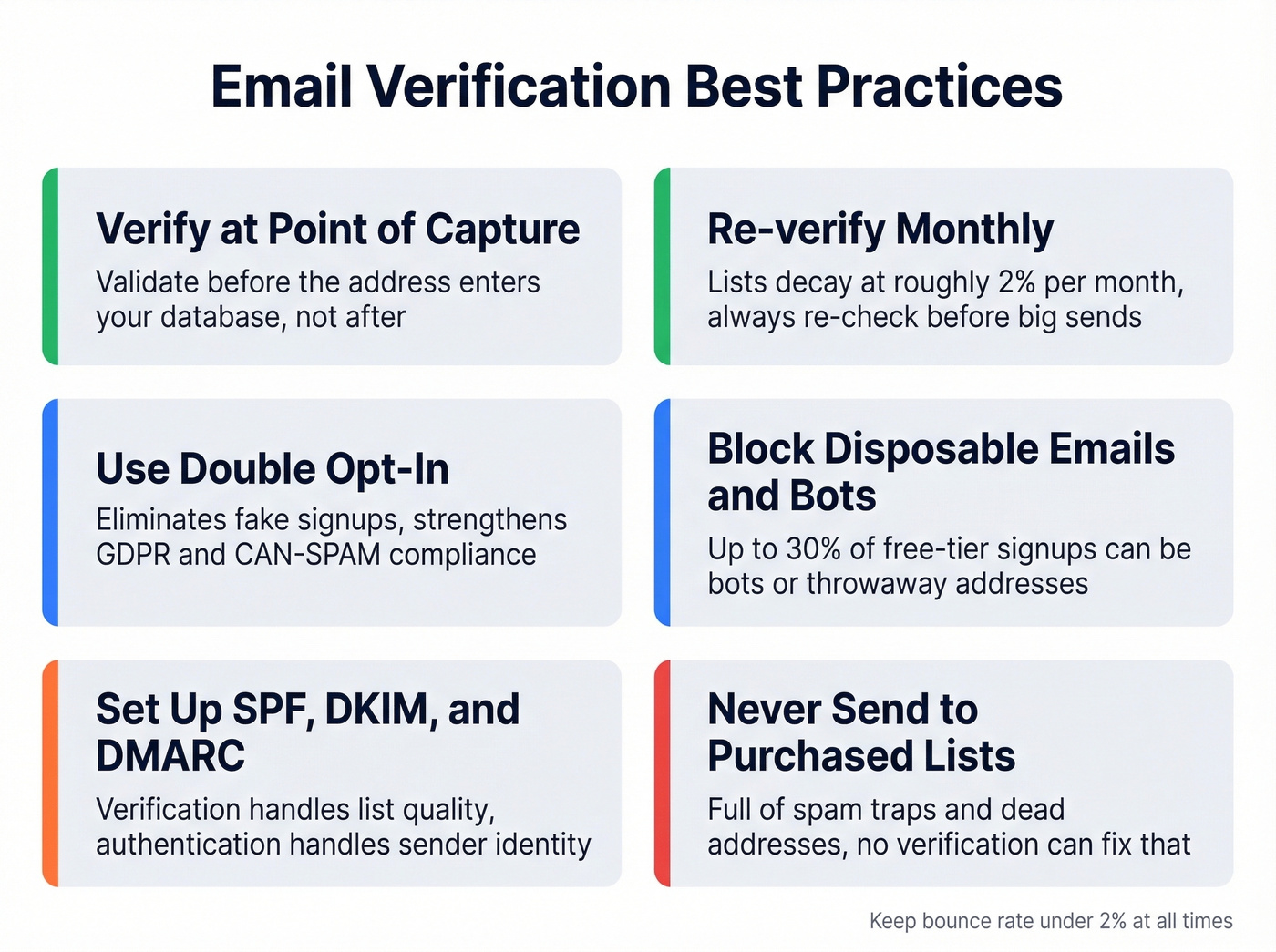
Re-verify monthly. Lists decay at ~2% per month. Always re-verify before any large send, even if the list was clean 30 days ago.
Use double opt-in for marketing lists. It adds friction, but it eliminates fake signups and gives you a defensible compliance position under GDPR and CAN-SPAM. For e-commerce specifically, require email verification before users can complete checkout or access gated features - this blocks throwaway accounts and reduces fraud chargebacks.
Block disposable emails and bots at signup. Up to 30% of free-tier signups can be bots or disposable addresses. Pair real-time API detection with CAPTCHA to stop bot submissions before they reach your verification layer. Static domain blocklists go stale fast - you need something that updates dynamically.
Set up SPF, DKIM, and DMARC. Verification handles list quality; authentication handles sender identity. You need both. Start DMARC at p=none, monitor reports, then move to quarantine and eventually reject. (If you want the technical checklist, see DKIM verification and DMARC alignment.)
Never send to purchased lists. They're full of spam traps and dead addresses. No amount of verification will make a purchased list safe - the signal-to-noise ratio is too low to justify the risk. (If you’re unsure where the line is, read buying email lists.)
Common Mistakes That Tank Deliverability
Verify-and-forget. You cleaned your list in January. It's now April. That list has lost ~6% of its valid addresses. Re-verification isn't optional - it's maintenance, like changing oil.
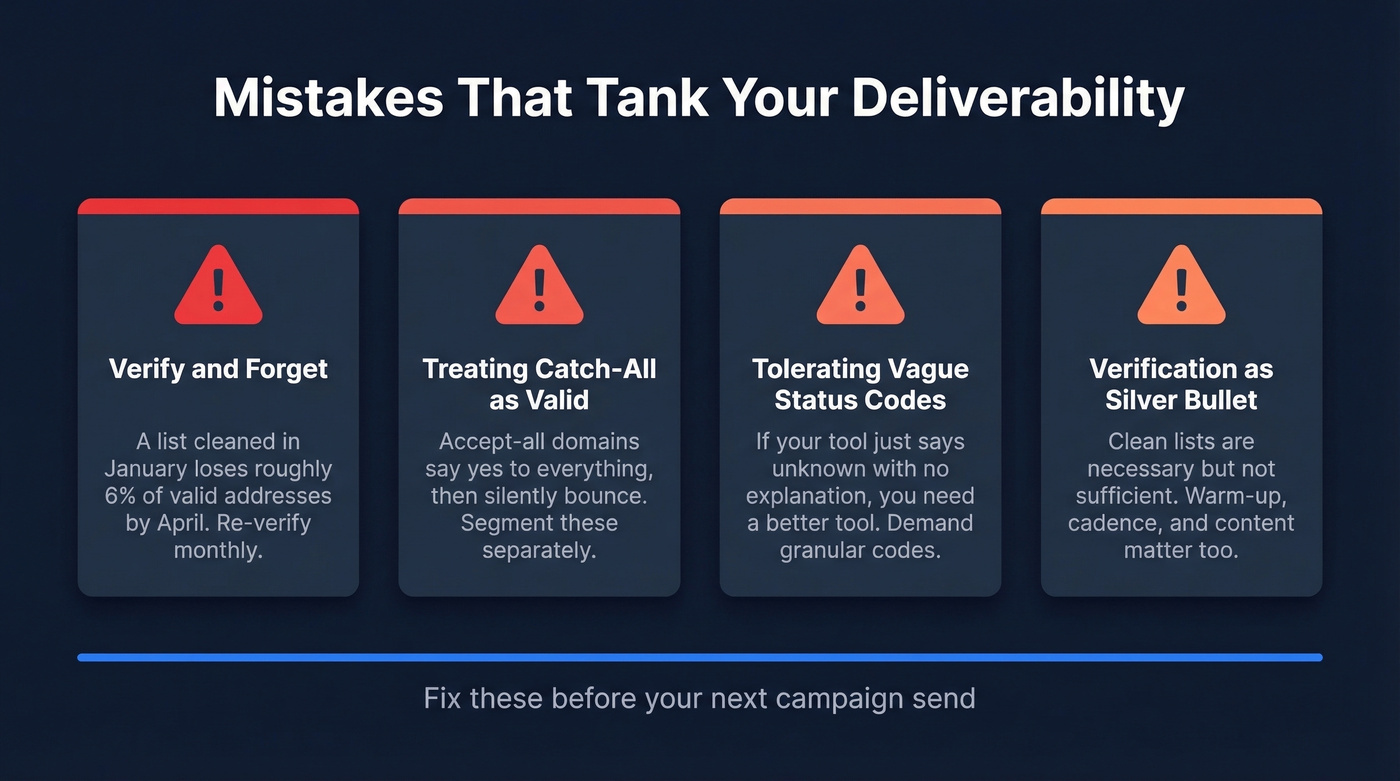
Treating catch-all as valid. Accept-all domains will happily accept your email at the server level and then silently bounce or blackhole it. Segment catch-all results separately and send with caution, or skip them entirely for cold outreach. (For safe sending limits, use an email velocity plan.)
Tolerating vague status codes. Verification tools that return "unknown" with zero explanation aren't worth paying for. One practitioner on r/Emailmarketing tested multiple services and found the same valid Yahoo address marked "unknown" in bulk API mode but "OK" in single-check mode. Look for tools with granular classifications - EmailListVerify offers 18 distinct status codes, which is the kind of transparency you should demand.
Treating verification as a silver bullet. Let's be honest: clean lists are necessary but not sufficient. Warm-up schedules, sending cadence, and content quality all affect deliverability. Verification fixes one variable. Don't ignore the others. (If you’re scaling outbound, pair this with cold email marketing.)
Verification Tools Compared
| Tool | Accuracy | Free Tier | Price / 10K | Best For |
|---|---|---|---|---|
| Prospeo | 98% | 75 emails/mo | ~$0.01/email | Pre-verified outbound |
| ZeroBounce | 99% (claimed) | 100/mo | $64 | Bulk list cleaning |
| Bouncer | 99%+ (claimed) | 100 | $45 | Speed (180K/hr) |
| EmailListVerify | 97% | 100 | $24 | Budget + granular codes |
| NeverBounce | Not public | None | $50 | Pay-as-you-go simplicity |
| Hunter | Not public | 100/mo | $149 | All-in-one prospecting |
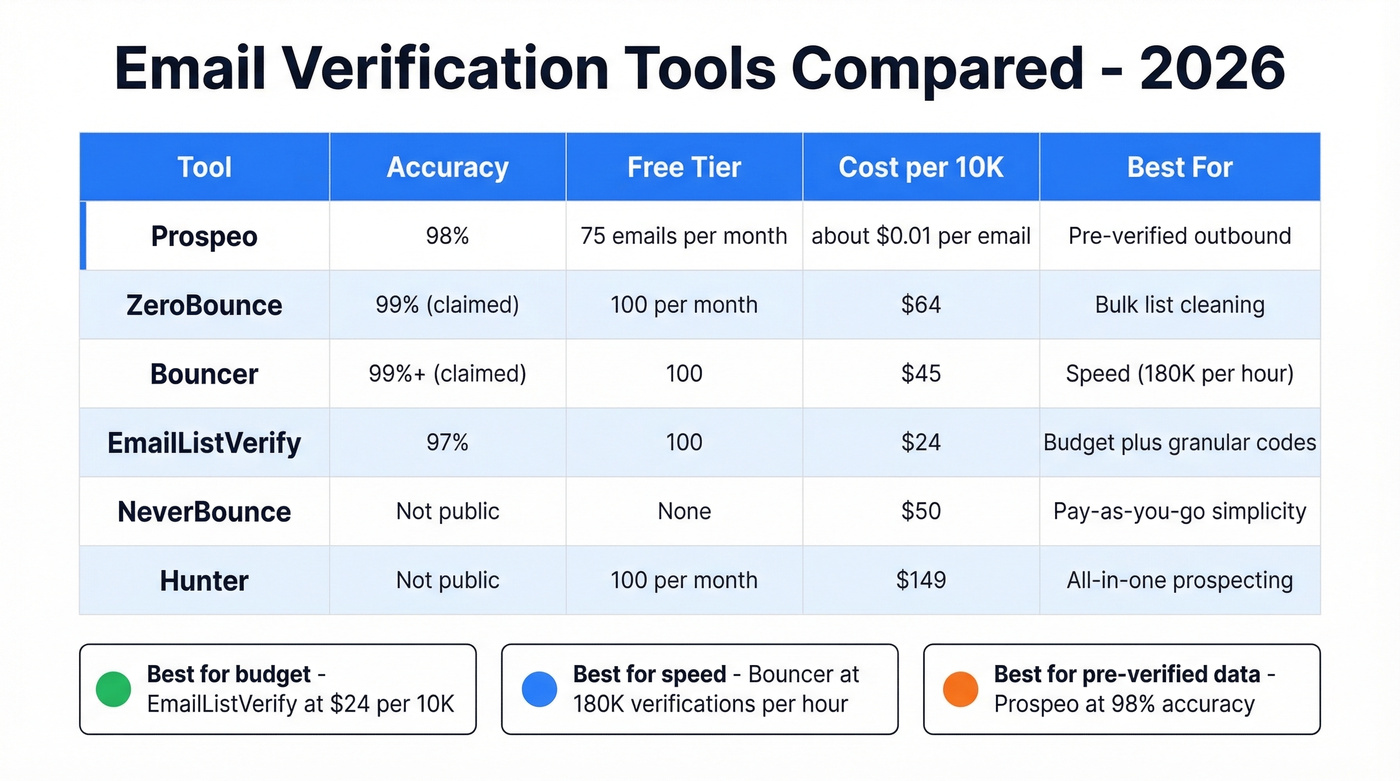
ZeroBounce is a strong dedicated bulk cleaner with 45+ integrations and solid reporting - if you're sitting on a massive legacy list, start here. Bouncer processes 180K verifications per hour, which makes it the pick for big lists on a deadline. EmailListVerify is the budget option at $24 per 10K, and its 18 status classifications give you the granularity practitioners actually want. NeverBounce keeps it simple with pay-as-you-go pricing and no commitments. Hunter bundles verification into a broader prospecting suite, which makes sense if you're already in their ecosystem. (If you’re evaluating alternatives, compare Bouncer alternatives or Hunter alternatives.)
Skip NeverBounce if you need detailed status breakdowns - it's built for simplicity, not diagnostic depth. And skip Hunter's verification as a standalone; you're paying a premium that only makes sense if you use the full prospecting toolkit.
List decay costs you 2% of valid addresses every month. Prospeo refreshes its entire 143M+ email database every 7 days - not the 6-week industry average - so you're always pulling fresh, verified contacts.
Fresh data weekly at $0.01 per email. No contracts required.
FAQ
How often should I re-verify my email list?
Monthly at minimum. Roughly 2% of addresses go invalid every four weeks, so a list that was clean in January could be sitting at 6%+ invalid by April. Always run a fresh check before any large campaign, even if the list was cleaned recently.
What's a catch-all email and why is it risky?
A catch-all domain accepts mail to any address, including nonexistent mailboxes. SMTP checks return "valid," but the actual inbox may not exist. Treat these as risky - send cautiously at low volume or exclude them from cold outreach entirely. Mailgun's deliverability guide has a solid breakdown of how catch-all domains affect bounce metrics.
Can I verify emails and find them in one step?
Yes. Platforms like Prospeo run real-time 5-step verification during the email-finding process, so every address you export is already verified. No separate cleaning tool, no second workflow - and at 98% accuracy with catch-all flagging, it eliminates the most common source of bounces.
What bounce rate should I target?
Keep total bounce rate under 2% and hard bounces under 1%. Above 2%, ESPs start throttling or flagging your domain. Above 5%, you're likely already on a blocklist. Google's bulk sender guidelines spell out the thresholds explicitly. Customer email verification before every send is the simplest way to stay in the safe zone.