

Dedicated IP Benefits: What Actually Matters in 2026
You're about to drop $25/month on a dedicated IP because someone told you it'll fix your deliverability. Maybe it will. More likely, you're chasing benefits that don't apply to your situation - and you'll spend six weeks warming an IP only to realize your list quality was the real problem. Let's sort out when a dedicated IP actually matters, when it's a waste, and the one layer most guides completely ignore.
The Short Answer
Before you read 1,700 words, here's the quick version for three common scenarios:
Email senders: If you're sending fewer than 100K emails/month, stay on a shared IP. Above 150K with consistent volume, a dedicated IP makes sense - but only if you've got clean data and a warm-up plan. Without both, you'll tank your reputation faster than on shared infrastructure.
VPN and remote workers: A dedicated IP add-on typically runs $3-$8/month (or roughly $14/month for a full dedicated-IP VPN plan from providers like TorGuard), and it's worth it if you need allowlisting for company resources or you're tired of CAPTCHAs every time you log into your bank. Otherwise, shared VPN IPs work fine.
SEO hopefuls: A dedicated IP does nothing for your search rankings. Zero. Save your money.
What Is a Dedicated IP Address?
Think of a shared IP like an apartment building - your mail reputation depends partly on your neighbors. If someone on the same IP blasts purchased lists, your deliverability suffers too. A dedicated IP is a private house: the reputation is yours alone, for better or worse.
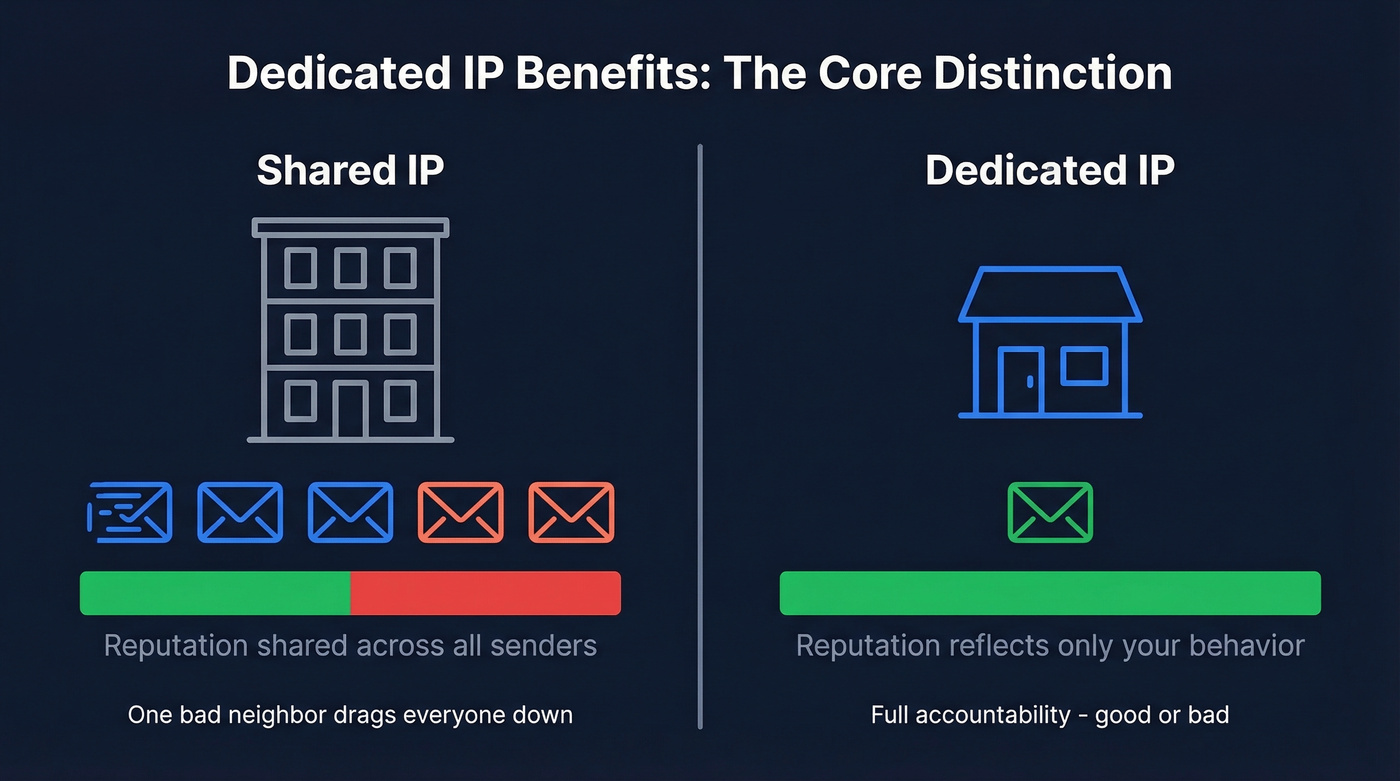
Every bounce, every spam complaint, and every positive engagement signal maps directly to your behavior. It's full accountability - powerful when your practices are clean and dangerous when they're not. Understanding dedicated IP benefits starts with this core distinction: ownership of your sending reputation.
7 Benefits That Actually Matter
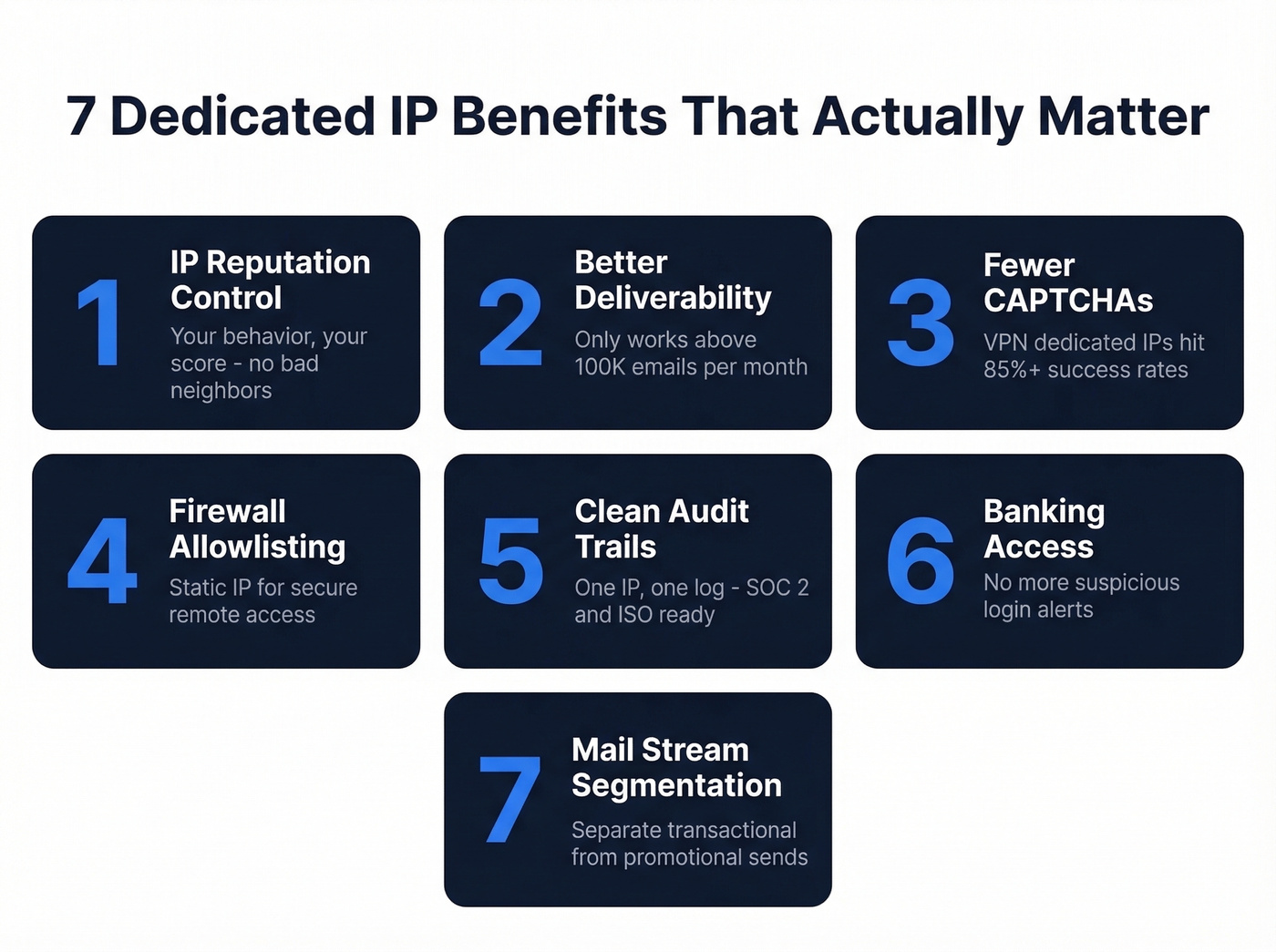
1. Full Control Over IP Reputation
This is the headline benefit. On a shared IP, a single bad sender in the pool can drag everyone's deliverability down. With a dedicated IP, your reputation reflects your sending behavior exclusively. Troubleshooting becomes straightforward - if inbox placement drops, the problem is yours to diagnose and fix.
A dedicated IP also makes you eligible for programs like Validity's Sender Certification, an allowlist program that can boost inbox placement by getting your mail pre-approved by major mailbox providers. You can't qualify for that on shared infrastructure.
2. Better Email Deliverability (With a Volume Caveat)
A dedicated IP improves deliverability, but only if you're sending enough volume to build and maintain a reputation. Major ESPs note that senders below 100,000 emails/month should stick with shared IPs. Below that threshold, your IP doesn't get enough signal for mailbox providers to trust it. Think of it like a credit score - you need transaction history before anyone extends you credit.
If you want the full framework, start with an email deliverability baseline before you change infrastructure.
3. Reduced CAPTCHAs and VPN Blocks
Shared VPN IPs get flagged constantly. Banks trigger security alerts, Google throws CAPTCHAs at you, and government portals sometimes block access entirely. A dedicated VPN IP gives you a consistent identity that services learn to trust.
A 2026 DataPrixa benchmark showed success rates on datacenter VPNs around 40%, while residential and dedicated IP approaches pushed above 85%. If you're doing anything beyond casual browsing, the shared IP tax adds up fast.
4. Secure Remote Access via Allowlisting
For IT teams, this is the killer use case. A static dedicated IP can be allowlisted on firewalls, SaaS dashboards, and internal tools. Remote workers connect through a predictable address, and everything else gets blocked. Simple, effective access control.
5. Consistent Audit Trail for Compliance
When all your traffic routes through one IP, your logs tell a clean story. Compliance teams can trace activity to a single address, which simplifies SOC 2 audits, ISO 27001 reviews, and any security framework that requires identifiable network access points. For companies in regulated industries, this alone justifies the cost.
6. Smoother Access to Banking and Government Portals
Online banking, government portals, streaming services, and enterprise SaaS platforms often flag logins from shared IPs because those addresses change constantly or appear in multiple geolocations. A dedicated IP eliminates the "suspicious login" friction that remote workers deal with daily.
One tradeoff worth knowing: a dedicated VPN IP is less anonymous than shared, since your activity maps to one address. For most business use cases, that's a feature, not a bug.
7. Mail Stream Segmentation
Here's one most people miss. Multiple dedicated IPs let you segment mail streams - transactional emails on one IP, promotional campaigns on another, re-engagement sequences on a third. If a promotional blast takes a reputation hit, your transactional emails (password resets, order confirmations) keep flowing uninterrupted.
This also helps you keep SPF and DKIM alignment clean across different types of mail, which matters as authentication requirements tighten. Stream segmentation is one of the most overlooked dedicated email server benefits, especially for teams running both marketing and transactional mail at scale.
If you're seeing reputation volatility, it helps to monitor it with dedicated email reputation tools.
Dedicated IP Benefits by Use Case
| Use Case | Top Benefit | Who It's For | Typical Cost |
|---|---|---|---|
| Email Marketing | Reputation control | Senders >100K/mo | ~$25/mo |
| Cold Outreach | Stream isolation | High-volume teams | $350-$650/mo infrastructure |
| VPN / Remote | Allowlisting | IT teams, remote workers | $3-$14/mo |
| Web Hosting | Firewall rules | Devs, sysadmins | $2-$5/mo add-on |
The cost gap between use cases is significant. A VPN dedicated IP add-on is pocket change. Full dedicated cold outreach infrastructure - with proper domain setup, warm-up, and monitoring - runs $350-$650/month before you even count the sending tool.
If you're doing outbound, make sure your cold email marketing setup is solid before you add more infrastructure.

You just read that a dedicated IP only works above 100K emails/month with clean data. That's the part most teams get wrong - the data. Prospeo delivers 98% verified email accuracy with a 7-day refresh cycle, so your dedicated IP builds reputation on contacts that actually exist.
Stop warming an IP on bad data. Start with emails that land.
When a Dedicated IP Can Hurt You
Look, a dedicated IP won't fix bad practices. If you're sending to purchased lists, ignoring opt-in hygiene, or blasting irrelevant content, a dedicated IP makes things worse. On a shared pool, mediocre senders benefit from the good senders around them. On a dedicated IP, there's nowhere to hide.
If you're tempted to buy lists, read this first: Is It Illegal to Buy Email Lists?
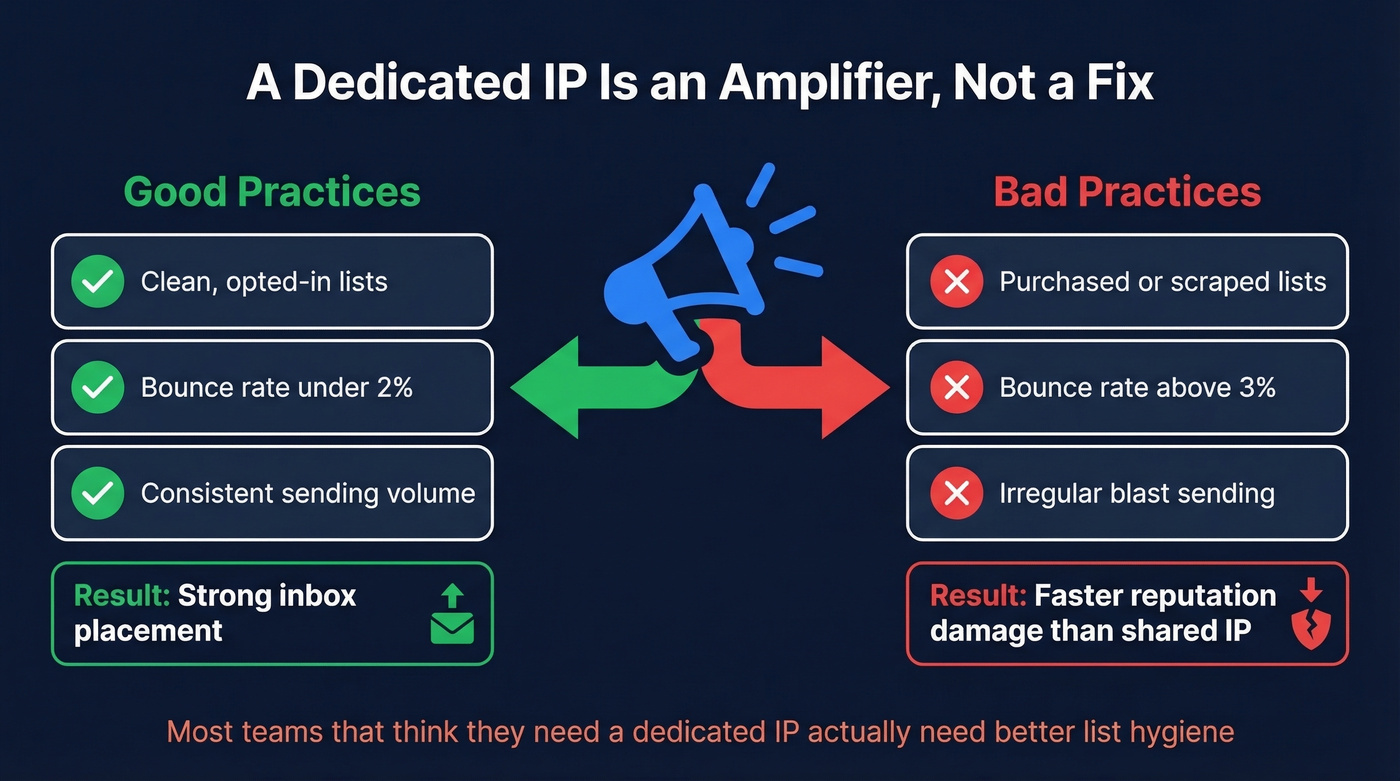
The practitioner consensus in the HubSpot community is clear: a dedicated IP isn't a deliverability fix. It's a deliverability amplifier. Good practices get amplified. Bad practices get amplified faster.
85-90% of cold emailers run on shared infrastructure and do fine.
The Hidden Gotcha: Shared Tracking Domains
There's a subtler risk that even experienced senders miss - and most guides skip it entirely. Even if your IP is dedicated, shared tracking pixels and link redirects can create "bad neighbor" effects. We've seen inbox placement drop from 55-60% to roughly 35% after Google and Yahoo's authentication changes, even with SPF/DKIM/DMARC in place and bounce rates under 3%. The IP wasn't the problem. The shared tracking domain was.
If you're investing in a dedicated IP, audit your tracking domains too. Otherwise you're locking the front door while leaving the back window open.
Does a Dedicated IP Help SEO?
No. Full stop.
Google's John Mueller has stated directly that sharing an IP doesn't negatively affect rankings. Google evaluates sites independently, regardless of what else lives on the same IP. The "bad neighborhood" penalty is a myth from the early 2000s - only extreme cases where an entire IP range is flagged for spam would trigger action, and even then Google targets domains, not IPs.
The other outdated argument was that you needed a dedicated IP for SSL certificates. That hasn't been true since SNI (Server Name Indication) became universally supported around 2015. Every modern browser and server handles it. If someone's selling you a dedicated IP for SEO or SSL purposes in 2026, they're selling you something you don't need.
How to Warm Up a Dedicated IP
If you do go dedicated for email, the warm-up period is non-negotiable. Skip it and you'll land in spam folders immediately. Plan for 4-6 weeks of gradual ramp-up.
For a deeper look at safe ramping, see email velocity best practices.
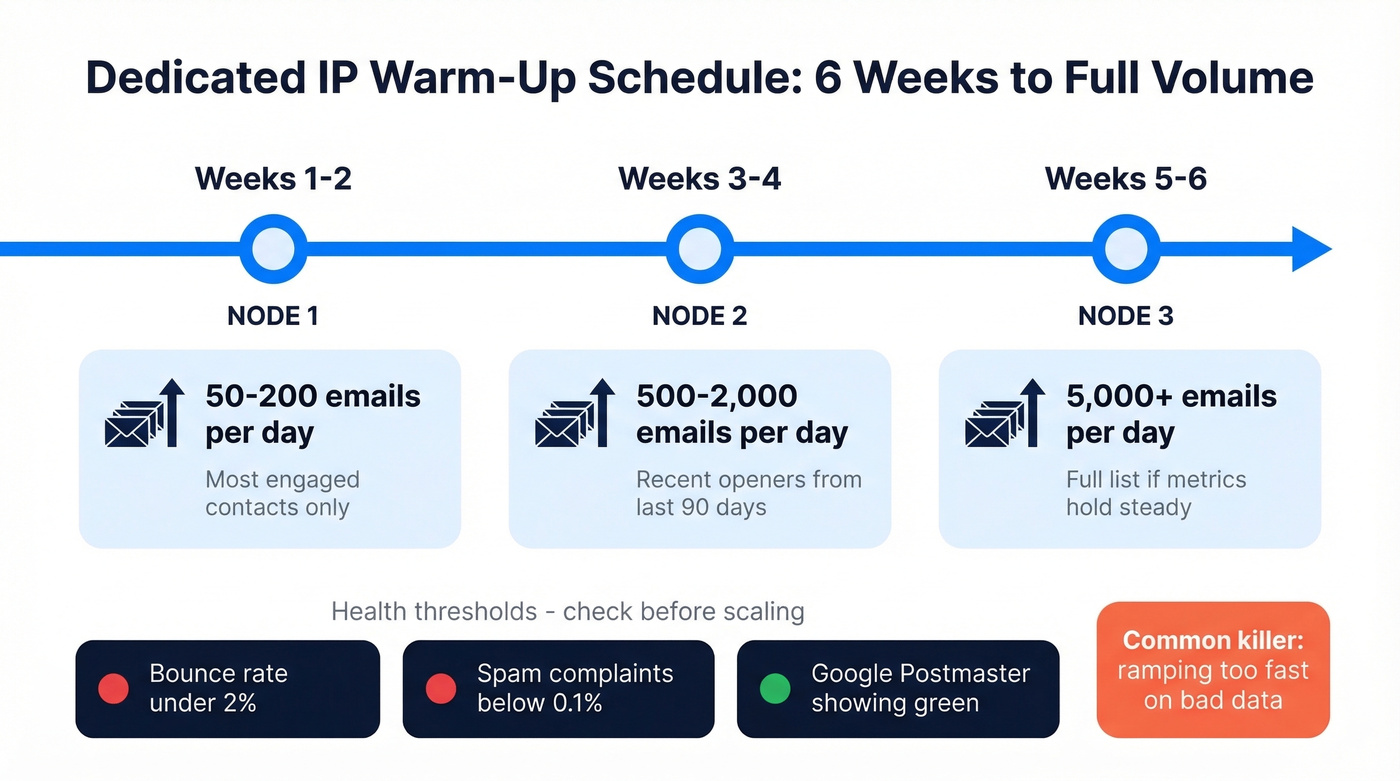
| Week | Daily Volume | Notes |
|---|---|---|
| 1-2 | 50-200 | Most engaged contacts only |
| 3-4 | 500-2,000 | Recent openers (90 days) |
| 5-6 | 5,000+ | Full list if metrics hold |
Health thresholds to watch before scaling:
- Bounce rate under 2%
- Spam complaint rate below 0.1%
- Gmail reputation via Google Postmaster Tools showing green
The most common failure modes we see: ramping volume too fast (impatience kills IPs), poor list quality feeding bounces into a fresh reputation, and missing SPF/DKIM/DMARC configuration. A dedicated IP also needs steady volume. If you send 10,000 emails on Monday and zero for two weeks, mailbox providers get suspicious. Consistency matters as much as volume.
If you're troubleshooting, start with email bounce rate benchmarks and fixes.
Do You Actually Need One?
| Monthly Volume | Recommendation |
|---|---|
| Under 50K | Shared IP - dedicated adds complexity with no benefit |
| 50K-100K | Shared IP - unless issues are clearly IP-specific |
| 100K-150K | Lean dedicated - if volume is consistent week to week |
| 150K+ | Dedicated - if you have ops capacity for warming and monitoring |
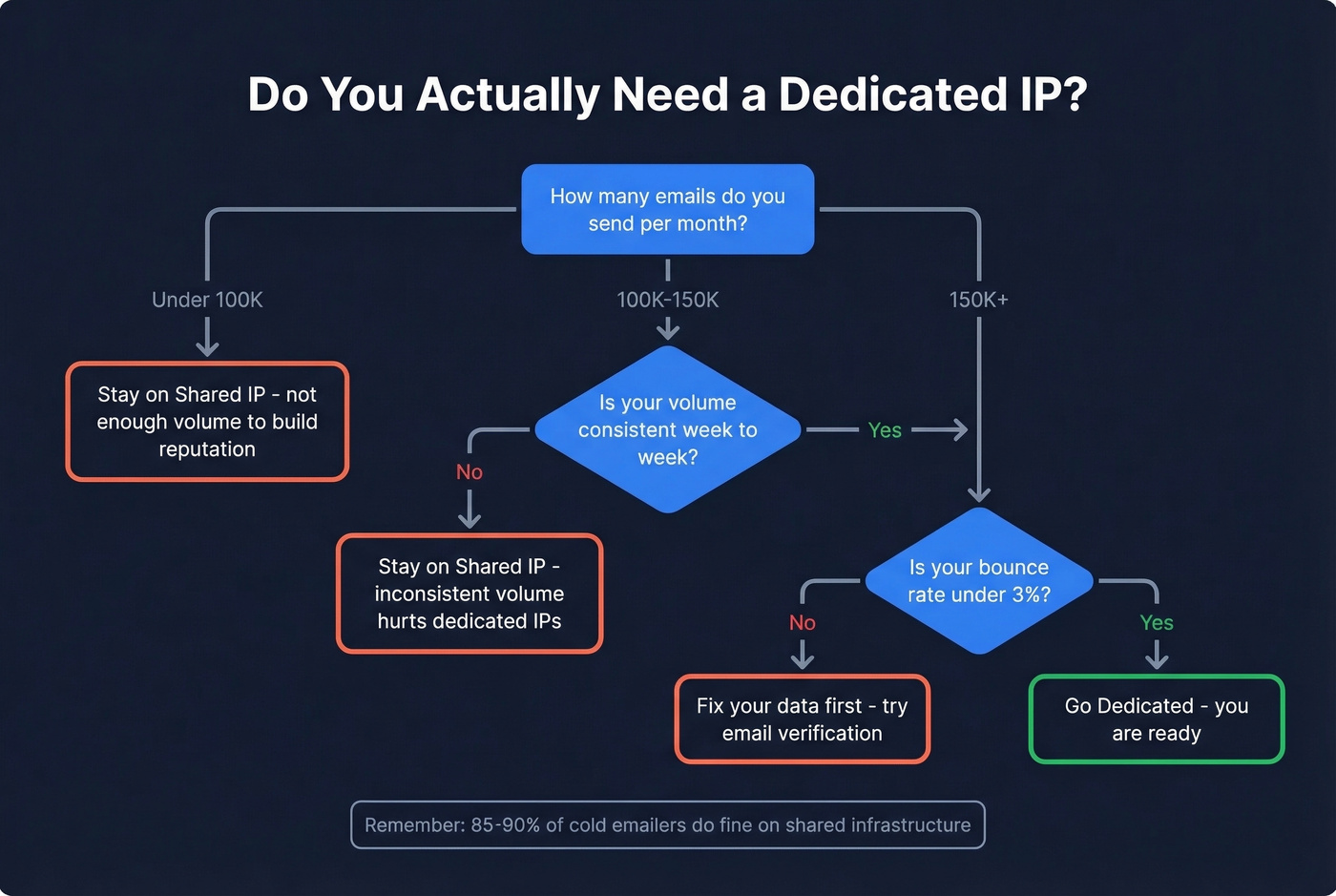
Both the 100K threshold from Validity and the 150K threshold from Smartlead point to the same reality: dedicated IPs only make sense at scale with consistent volume. Below that, you're adding operational overhead for marginal gain.
And watch out for the upsell. One AWS SES user on Reddit was told to buy four additional dedicated IPs for another $100/month just to increase throughput. Providers love selling you more IPs. Make sure you actually need them before signing.
Our hot take: Most teams that think they need a dedicated IP actually need better list hygiene. If your bounce rate is above 3%, no amount of IP infrastructure will save you. Fix the data first. The IP is a lever, not a foundation.
If you want a practical checklist, use this guide on how to improve sender reputation.
The Layer That Matters More Than Your IP
A dedicated IP's reputation is only as good as the data you're sending to. Bad email addresses mean bounces. Bounces mean reputation damage. Reputation damage means your shiny new dedicated IP - the one you spent six weeks warming - is now flagged. The whole investment, wasted.

This is where data quality tools earn their keep. Prospeo runs every email through a 5-step verification process - catch-all handling, spam-trap removal, honeypot filtering - delivering 98% email accuracy with a 7-day data refresh cycle. Meritt went from a 35% bounce rate to under 4% after switching, which is exactly the kind of improvement that protects a dedicated IP investment. If you're going to spend money on infrastructure, spend a fraction of that making sure your list won't burn it down.
If you’re cleaning lists at scale, compare options in our data enrichment services roundup.
Segmenting mail streams across dedicated IPs is smart - but only if your cold outreach list isn't the thing tanking your sender reputation. Teams using Prospeo cut bounce rates from 35%+ to under 4% and tripled pipeline. At $0.01 per email, clean data costs less than one month of a dedicated IP.
Your IP reputation is only as good as the emails you're sending to.
FAQ
How much does a dedicated IP cost?
VPN add-ons typically run $3-$8/month, while full dedicated-IP VPN plans like TorGuard's cost around $14/month. Hosting add-ons cost $2-$5/month. A dedicated email-sending IP is often priced around $25/month on common provider plans. Full cold outreach infrastructure - domains, IPs, warm-up, monitoring - runs $350-$650/month.
How long does it take to warm up?
Plan for 4-6 weeks minimum. Start with 50-200 emails per day to your most engaged contacts, then ramp gradually. Don't scale until your bounce rate stays under 2% and spam complaints stay below 0.1%. Rushing the warm-up is the single most common mistake that tanks a fresh IP.
Can I use a dedicated IP for cold email?
Yes, but 85-90% of cold emailers run on shared infrastructure successfully. A dedicated IP only makes sense above 150K emails/month with consistent volume. What actually protects reputation is keeping bounce rates low - and that starts with verifying your list before you hit send.
What are the main dedicated email server benefits?
Running a dedicated sending IP gives you full reputation isolation, the ability to segment mail streams, and eligibility for allowlist programs like Sender Certification. These advantages compound over time as mailbox providers build a longer history with your sending patterns, but they only pay off if your volume exceeds roughly 100K emails per month and your list hygiene is solid.