

DKIM Record vs DKIM Header: What's the Difference?
You've seen both terms in email authentication guides and you're not sure if they're the same thing. They're not. The DKIM record and the DKIM-Signature header are two distinct pieces that work together - one lives in your DNS, the other rides along with every outbound email. If either one is missing or misconfigured, DKIM verification fails silently, and your messages land in spam.
A quick note on terminology: people use "DKIM header" and "DKIM signature" interchangeably, but the DKIM-Signature header field is the container, and the b= value inside it is the actual cryptographic signature. That distinction matters when you're debugging with a DKIM checker.
Here's the short version. The DKIM record sits in DNS and holds the public key. The DKIM-Signature header sits in every outbound email and holds the signature plus metadata. The selector in the header tells the receiving server which DNS record to query. One without the other means authentication fails.
Quick Comparison
| Attribute | DKIM Record | DKIM-Signature Header |
|---|---|---|
| Location | DNS (TXT record) | Email message headers |
| Purpose | Stores the public key | Carries the signature |
| Format | DNS TXT record | RFC 5322 header field |
| Created by | Domain admin (you) | Sending mail server |
| Used when | Receiver queries DNS | Outbound email is signed |
| Contains | Public key, version, flags | Signature, algorithm, hashes |
| Key tags | v=, k=, p=, t= |
v=, a=, d=, s=, b=, bh= |
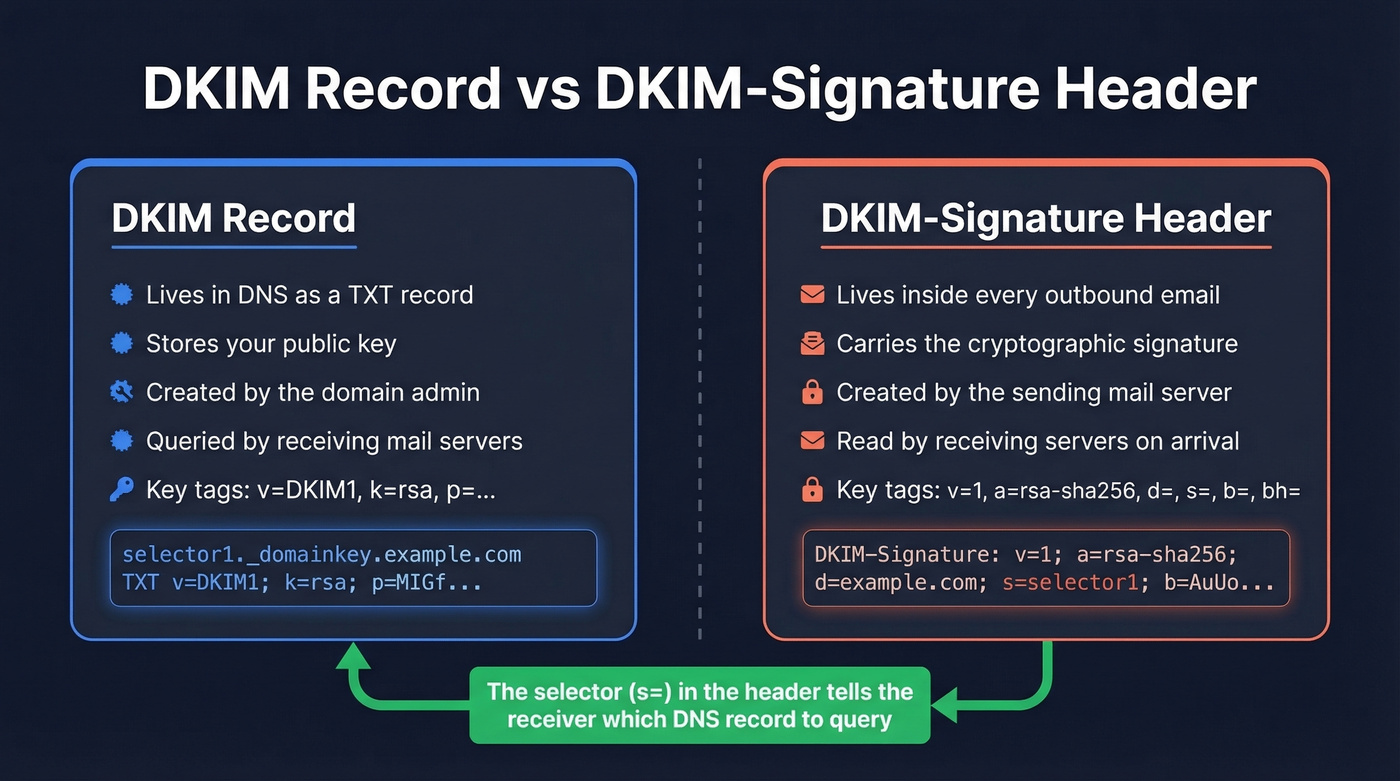
Anatomy of a DKIM DNS Record
The DKIM record is a specially formatted DNS TXT record, defined in RFC 6376. It's published at a specific subdomain following the naming convention <selector>._domainkey.<domain>.
Here's what one looks like:
selector1._domainkey.example.com IN TXT "v=DKIM1; k=rsa; p=MIGfMA0GCSqGSIb3DQEB..."
Breaking down the tags:
v=DKIM1- Version identifier. AlwaysDKIM1.k=rsa- Key type. Usually RSA.p=- The base64-encoded public key. Receivers use this to verify the signature in your email headers.t=y- Optional flag.ymeans testing mode.
If the p= value is long - and with 2048-bit keys, it will be - some DNS providers automatically split it across multiple strings. That's normal. Just make sure the record isn't getting truncated. This is especially common on hosts like GoDaddy, where a 2048-bit key produces a base64 string that can exceed per-record character limits, causing silent truncation that breaks verification without any visible error. (If you're on GoDaddy, follow a dedicated DKIM setup for GoDaddy walkthrough.)
What the DKIM-Signature Header Contains
The DKIM-Signature header is what your sending server appends to an email when it signs the message. It's defined in RFC 6376 Section 3.5 and looks something like this:
DKIM-Signature: v=1; a=rsa-sha256; d=example.com; s=selector1;
    c=relaxed/simple; q=dns/txt; h=from:to:subject:date;
    bh=2jUSOH9NhtVGCQWNr9BrIAPreKQjO6Sn7XIkfJVOzv8=;
    b=AuUoFEfDxTDkHlLXSZEpZj79LICEps6eda7W3deTVFOk...
Each tag=value pair separated by semicolons is one discrete piece of information:
| Tag | Meaning | Example |
|---|---|---|
v= |
Version (always 1) | 1 |
a= |
Signing algorithm | rsa-sha256 |
d= |
Signer's domain | example.com |
s= |
Selector for DNS lookup | selector1 |
c= |
Canonicalization method | relaxed/simple |
q= |
Query method | dns/txt |
h= |
Signed headers | from:to:subject:date |
bh= |
Body hash | Base64 string |
b= |
The signature value | Base64 string |
The c= tag deserves a plain-English explanation. Canonicalization is the set of rules that normalize minor formatting changes - extra whitespace, header case differences - so signatures survive transit through different mail servers. Think of it as a tolerance setting for how much the message can change before the signature breaks.

You're fixing DKIM to protect deliverability. But authentication only works if you're sending to real inboxes. Prospeo's 5-step email verification - including catch-all handling, spam-trap removal, and honeypot filtering - keeps bounce rates under 4%.
Stop fixing signatures for emails that were never valid in the first place.
How the Selector Bridges Both
The selector is the linchpin connecting the DKIM-Signature header to the DNS record. Here's the verification flow:
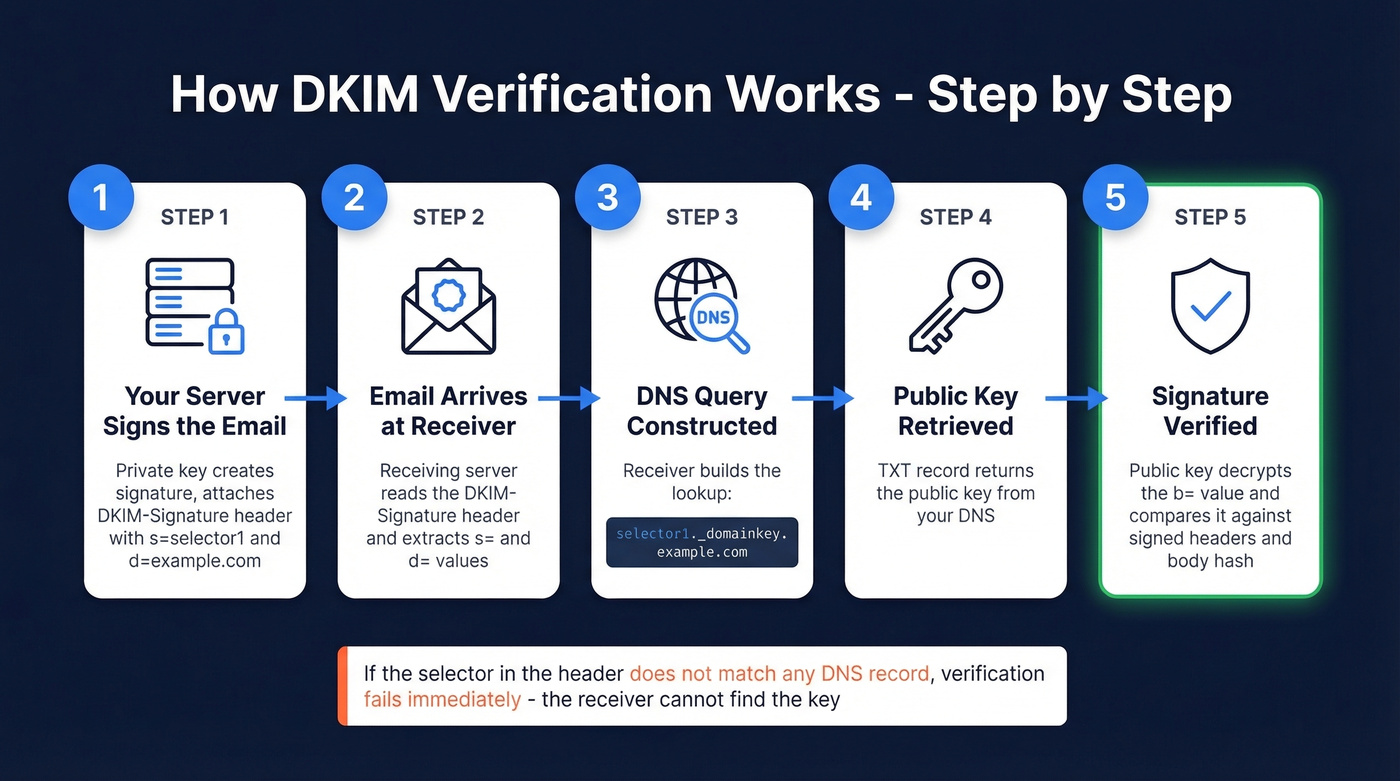
- Your mail server signs the outbound email using your private key and attaches the DKIM-Signature header, including
s=selector1andd=example.com. - The receiving server reads those two values from the header.
- It constructs the DNS query:
selector1._domainkey.example.com. - It retrieves the TXT record containing your public key.
- It uses that public key to verify the
b=signature value against the signed headers and body hash.
If the selector in the header doesn't match any published DNS record, verification fails immediately. The receiver can't find the key, so it gives up.
One nuance worth knowing: some ESPs use CNAME records that point to their own key infrastructure instead of publishing a TXT record directly. The RFC specifies TXT, but CNAME delegation is standard practice at Google, SendGrid, and Mailchimp. You can find your ESP's default selector by sending a test email to yourself and checking the raw headers for the s= value. (If you're using Microsoft, this DKIM Office 365 guide is the fastest path.)
Common Misconceptions
Publishing a Record Doesn't Mean You're Signing Emails
We've seen this more times than we can count. You publish the DKIM TXT record, run it through MxToolbox, get a green checkmark - and your next campaign still shows dkim=none (message not signed). Reddit threads are full of this exact problem. One Office 365 admin had selectors validating in every checker tool, but every email still showed dkim=none.
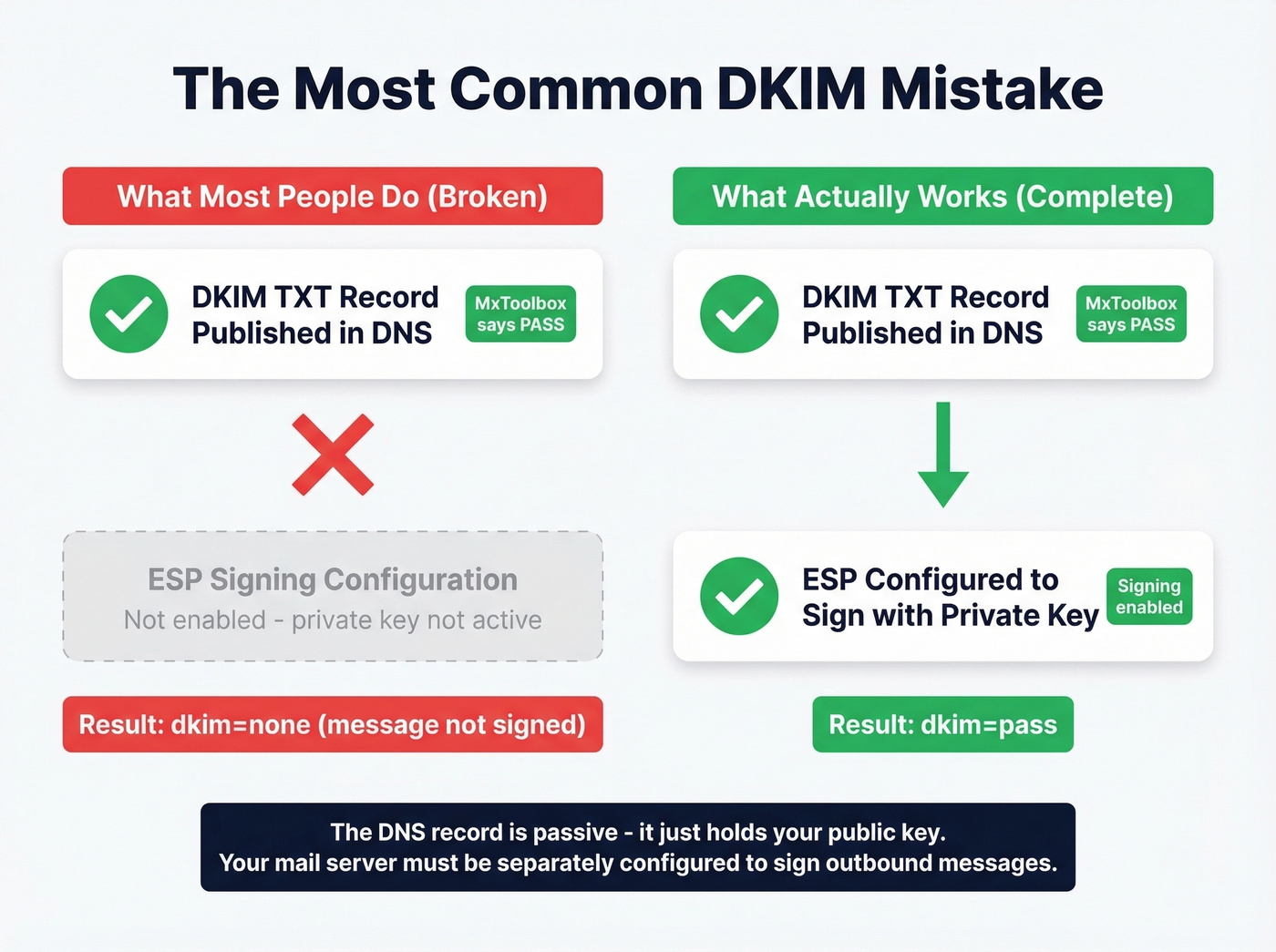
The DNS record is passive. It just sits there holding your public key. Your ESP or mail server must be separately configured to actually sign outbound messages with the corresponding private key. Publishing the record alone does nothing - it's like installing a lock on your front door but never turning the key. If you need the full end-to-end flow, start with DKIM explained.
DKIM Pass Doesn't Mean DMARC Pass
This one trips up even experienced admins. SPF passes, DKIM passes, and DMARC still fails. The missing piece is alignment.
DKIM's d= domain must match - or be a subdomain of - the From header domain for DMARC alignment to succeed. When a third-party vendor signs emails with their own d= domain on your behalf, DKIM technically passes because the signature is valid. But DMARC fails because the signer's domain doesn't align with your visible From address. RFC 6376 explicitly separates signer identity from author identity, and DMARC is the layer that enforces the connection between them. (If you're debugging this, run a DMARC alignment check.)
Troubleshooting DKIM Failures
When DKIM fails, the cause usually falls into one of two buckets: selector/DNS issues or messages that simply aren't being signed.
DNS and configuration problems:
- Selector mismatch - the
s=value in the header doesn't match any published DNS record - Syntax errors in the TXT record: missing semicolons, extra spaces, or malformed base64 keys
- Key truncation - 2048-bit keys exceeding DNS string limits if not properly split
- DNS propagation delays - after publishing or updating a record, wait 24-48 hours before testing production sends
Transit and content problems:
- Forwarding services or security gateways adding disclaimers or rewriting content after signing, which breaks the body hash
- Canonicalization set to
simple/simpleinstead ofrelaxed/relaxed- the stricter mode breaks on minor whitespace changes that are common in transit - Expired keys that haven't been rotated (plan a DKIM key rotation)
Here's the thing: if you're setting up DKIM for the first time, use relaxed/relaxed canonicalization. It's more forgiving and handles the reality of how email actually moves through infrastructure. We've debugged dozens of DKIM failures that came down to simple/simple breaking on a trailing space added by a relay server.
DKIM, SPF, and DMARC Together
Every DKIM guide should explain how it fits into the broader authentication stack. Most don't, so let's fix that.
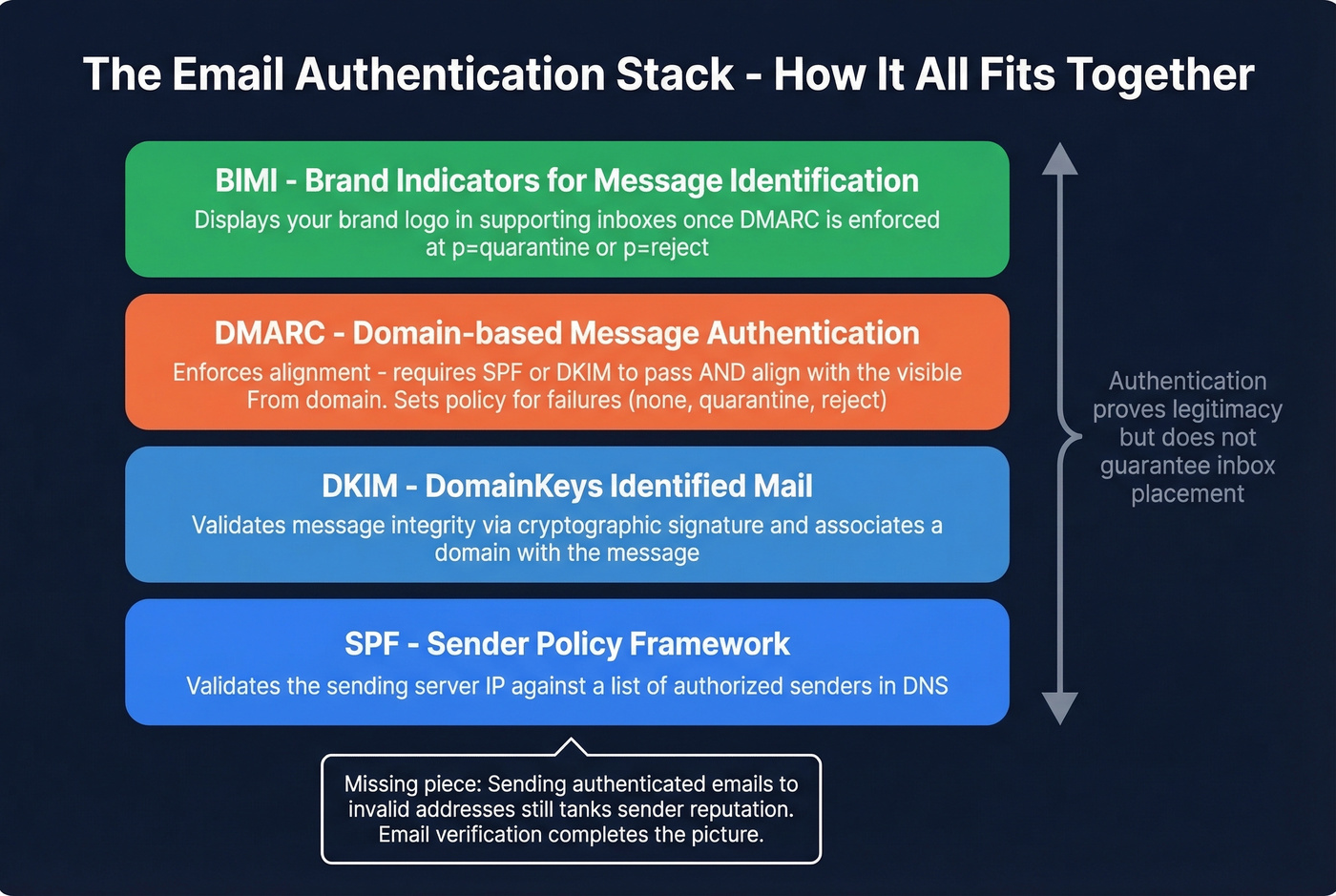
SPF validates the sending server's IP against a list of authorized senders. DKIM validates message integrity and associates a domain with the message via cryptographic signature. DMARC ties them together by enforcing alignment - requiring that at least one of SPF or DKIM passes and aligns with the visible From domain - then sets a policy for what happens when authentication fails. BIMI is the emerging layer on top, displaying your brand logo in supporting inboxes once DMARC is enforced.
Now for the part most deliverability guides won't tell you: perfect authentication is table stakes, not a competitive advantage. Every spammer worth their salt has valid DKIM and SPF. What actually separates your emails from the spam folder is the combination of authentication and sending behavior - bounce rates, engagement signals, complaint rates. Authentication proves your emails are legitimate, but sending authenticated messages to invalid addresses still tanks your sender reputation (see email deliverability best practices).
This is where email verification becomes critical. Tools like Prospeo run a 5-step verification process that catches invalid addresses, catch-all domains, and spam traps before they destroy your deliverability, maintaining 98% accuracy across 143M+ verified emails. You can have flawless DKIM and still wreck your domain if you're sending to dead addresses. If you're comparing vendors, use this list of the best email validation tools.
DKIM alignment failures wreck sender reputation fast. So does bad data. Prospeo refreshes 300M+ profiles every 7 days - not the 6-week industry average - so you're never emailing stale addresses that spike bounces and trigger spam filters.
Protect the domain reputation you're working so hard to authenticate.
FAQ
Can an email have multiple DKIM-Signature headers?
Yes. Each DKIM-Signature header is independent, with its own selector pointing to its own DNS record. The receiving server checks each one separately. An email forwarded through a security gateway might carry two or three valid signatures from different signing domains - that's perfectly normal.
How do I find the DKIM selector for my ESP?
Send a test email to yourself, open the raw message headers, and find the s= value in the DKIM-Signature line. Common defaults: Google uses google, SendGrid uses s1, Mailchimp uses k1 or k2. Cloudflare's DKIM explainer has a solid visual walkthrough of this process.
How does email verification relate to DKIM?
DKIM proves your domain sent the message. It doesn't protect your sender reputation from bounces. Sending perfectly signed emails to nonexistent addresses racks up hard bounces that ISPs use to flag you. Verifying addresses before you send - especially handling catch-all domains - ensures the deliverability that DKIM alone can't guarantee.
What's the difference between DKIM record and DKIM header in plain terms?
The DKIM record is a DNS entry you publish once - it holds your public key. The DKIM header is added to every outbound email by your mail server - it holds the cryptographic signature. The record verifies the header. Without both configured correctly, DKIM authentication fails on every message.