

DKIM Checker: How to Verify & Fix DKIM in 2026
You sent a cold email campaign last Tuesday and half your messages bounced or landed in spam. Your SPF record looks fine. Your DMARC policy is set. So what broke?
Odds are it's DKIM - misconfigured, pointing at the wrong selector, or silently failing because a DNS tool told you everything was fine when it wasn't. Here's how to actually check it, read the results, and fix what's broken.
What you need (quick version):
- Quick DNS check: MxToolbox or EasyDMARC - enter your domain + selector, get instant results.
- End-to-end validation: Send an email to dkimvalidator.com - it catches issues DNS checkers miss.
- Don't know your selector? Open any sent email, view the original headers, and search for
s=in the DKIM-Signature line.
Why Checking DKIM Matters Right Now
Google began stricter bulk-sender enforcement in late 2025, and those rules are fully in effect for 2026. If you're sending 5,000+ messages per day to Gmail or Yahoo recipients, SPF and DKIM alignment isn't optional - it's mandatory. Microsoft is rolling out similar authentication expectations for high-volume senders.
Here's the thing: most teams set up DKIM once and never verify it again. Then they switch ESPs, rotate domains, or add a new sending tool, and the signature quietly breaks. Nobody notices until deliverability craters.
A DKIM checker isn't a one-time setup tool. It's something you should run every time you change anything in your sending infrastructure.
How DKIM Works (60-Second Version)
DKIM uses public-key cryptography to prove an email wasn't tampered with after it left your server. Your mail server signs outgoing messages with a private key. The corresponding public key lives in a DNS TXT record. When a receiving server gets your email, it pulls that public key from DNS and verifies the signature matches.
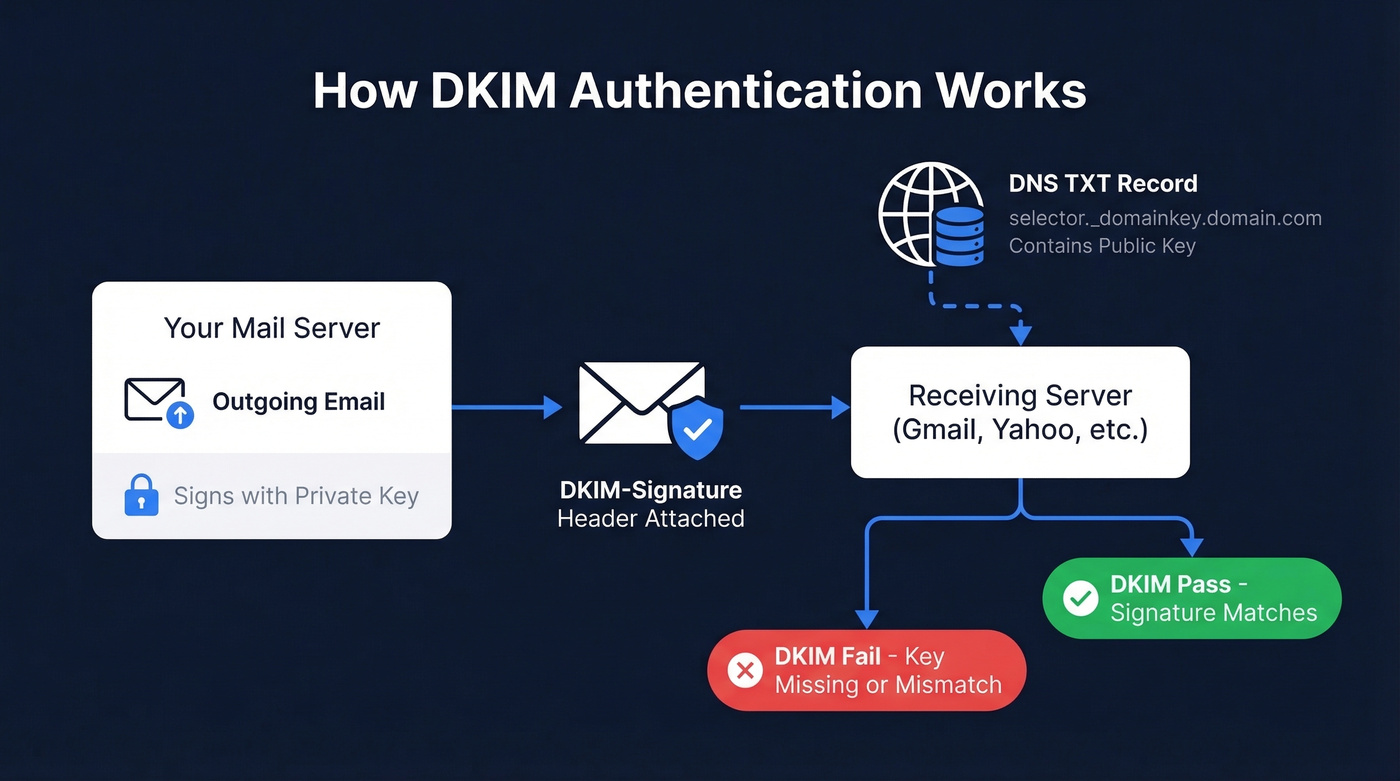
If the signature checks out, the email passes DKIM. If the key is missing, the record is malformed, or the message was altered in transit, it fails.
DKIM doesn't work alone - it's one layer in a three-part authentication stack:
| Protocol | What It Does | What It Checks |
|---|---|---|
| SPF | Authorizes sending IPs | Authorized sending IP? |
| DKIM | Verifies message integrity | Message unaltered? |
| DMARC | Sets policy + alignment | SPF/DKIM align with From domain? |
All three need to work together. But DKIM is the one that breaks most often - and the hardest to debug when it does.
If you want the full breakdown of how these protocols interact, see SPF, DKIM & DMARC.
How to Find Your DKIM Selector
Every DKIM record lives at a specific DNS location: selector._domainkey.yourdomain.com. The selector is the variable part, and you need it before any lookup tool can help you.
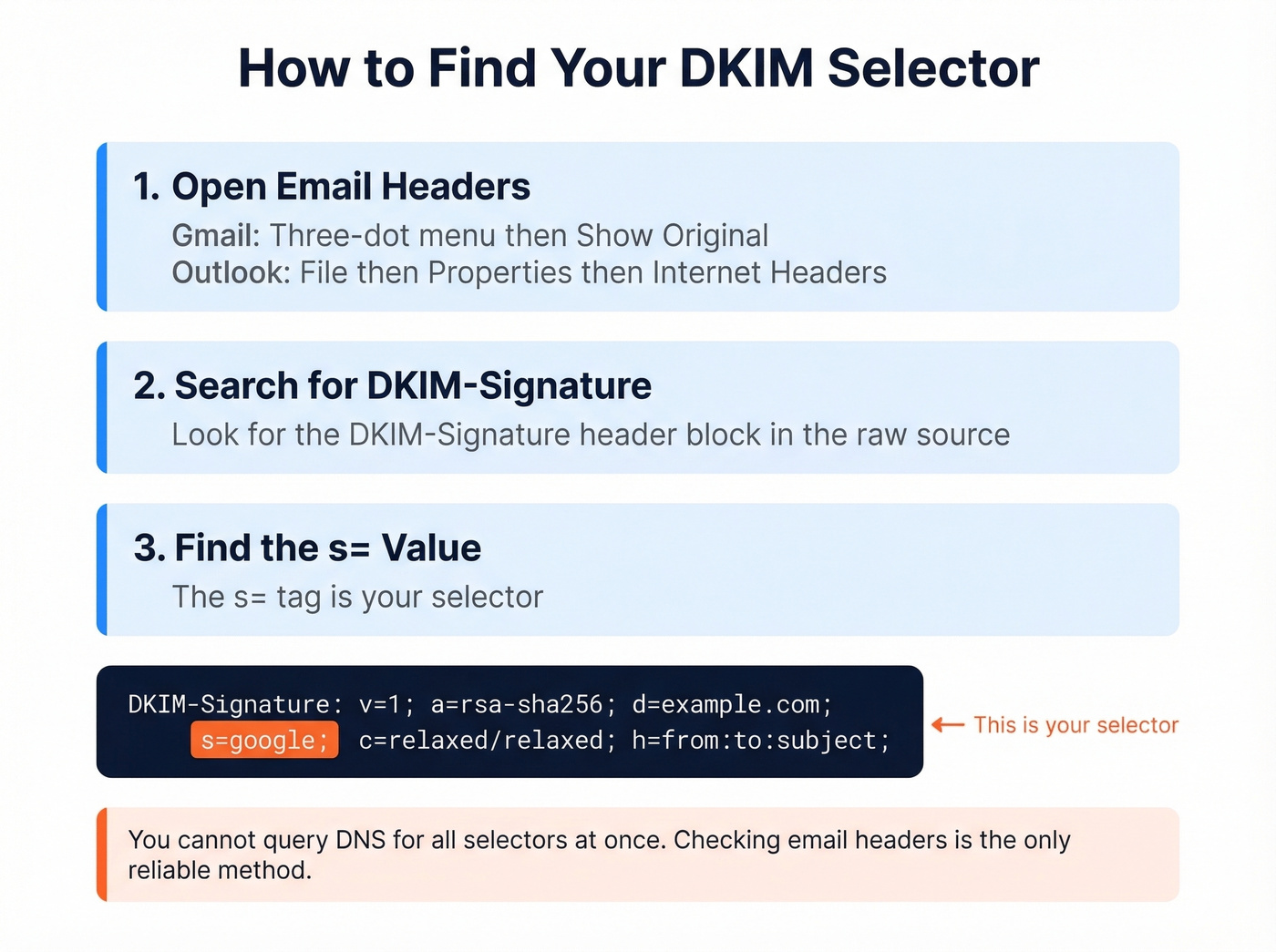
In Gmail:
- Open a sent or received email from the domain you're checking.
- Click the three-dot menu, then Show original.
- Search for
DKIM-Signaturein the headers. - Find the
s=value - that's your selector.
In Outlook:
- Open the message, go to File, then Properties.
- Look in Internet headers for the DKIM-Signature line.
- Extract the
s=value.
Some providers use predictable selectors. Others use custom or randomized strings.
One critical thing to understand: you can't enumerate all DKIM selectors for a domain through DNS. There's no wildcard query that returns every selector. This is a common frustration - admins frequently want to grab all DKIM signatures at once and verify whether they're all 2048-bit, but DNS simply doesn't support that query. Some tools try common selectors, but they'll miss custom ones every time. The only reliable method is inspecting an actual email header. If a scanner says "DKIM record not found," it might just be guessing the wrong selector.
Providers publish DKIM via either TXT records (where the public key sits directly in DNS) or CNAME records that delegate key hosting to the provider. Both are valid. "CNAME instead of TXT" isn't an error - it's a design choice.
For a deeper explanation of where DKIM lives (DNS) vs where it appears (headers), read DKIM Record vs DKIM Header.
How to Run a DKIM Check
There are two fundamentally different ways to validate DKIM, and you should use both.
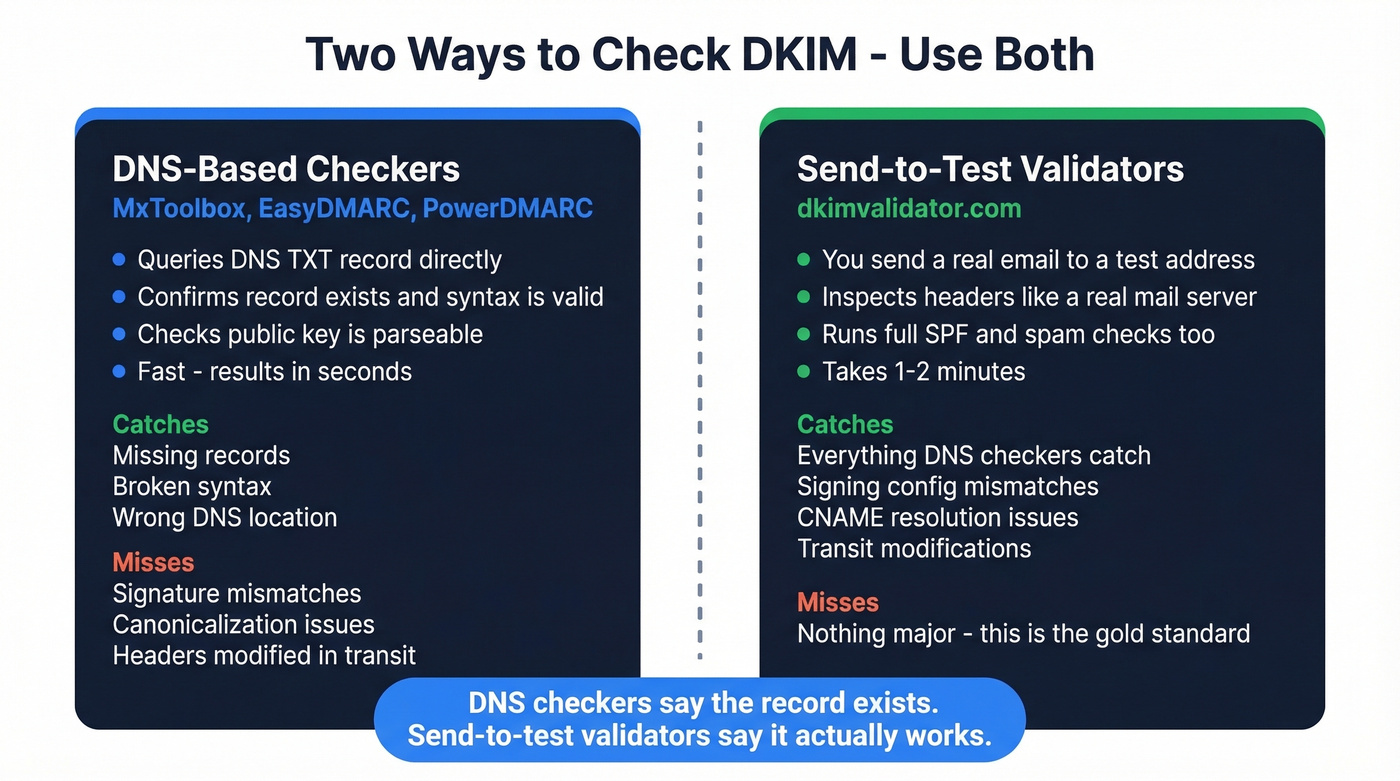
DNS-based checkers like MxToolbox, EasyDMARC, and PowerDMARC query the DNS record at selector._domainkey.yourdomain.com and confirm it exists, has valid syntax, and contains a parseable public key. A DKIM record lookup is fast and great for catching record-level problems: missing keys, broken syntax, wrong DNS location.
Send-to-test validators like dkimvalidator.com work differently. You send an actual email to a test address, and the validator inspects the headers exactly as a real recipient's server would. This catches problems DNS checkers miss - signature mismatches, canonicalization issues, headers modified in transit, and scanner limitations with some CNAME-based setups.
DNS checkers tell you the record exists. Send-to-test validators tell you the record actually works. We've seen cases where MxToolbox shows a clean record but emails still fail DKIM because the signing configuration on the mail server doesn't match what's published. Run both.
If you want a quick checklist for validating end-to-end, use this guide on how to verify DKIM is working.

You're fixing DKIM so your emails actually reach inboxes. But authentication only matters if you're sending to real, valid addresses. Prospeo's 5-step email verification and 98% accuracy rate mean your campaigns survive every spam filter and bounce threshold.
Stop debugging bounces caused by bad data - start with verified contacts.
Best Free DKIM Checker Tools
| Tool | Type | Auto-Detect Selector? | Best For |
|---|---|---|---|
| MxToolbox | DNS lookup | No | Quick checks, industry default |
| EasyDMARC | DNS + domain scan | Tries common ones | Best free UI for multi-domain |
| dkimvalidator.com | Send-to-test | N/A (reads headers) | End-to-end validation |
| PowerDMARC | DNS + monitoring | Tries common ones | Ongoing monitoring |
| dmarcian | DNS + education | No | Learning DKIM/DMARC together |
| Google Admin Toolbox | DNS lookup | No | Google Workspace users |
MxToolbox is the default - everyone's used it. Enter your domain and selector, get a pass/fail. The limitation: it tells you whether your record is broken but not why. For that, you need to read the raw output yourself. It remains the go-to DKIM lookup tool for quick spot-checks.
EasyDMARC has one of the best free UIs for domain-wide scanning. It tries common selectors and gives you a dashboard view of SPF, DKIM, and DMARC together. It also stores DKIM keys discovered via DMARC aggregate reports, which helps with selector auto-detection over time. If you're managing multiple domains, start here.
dkimvalidator.com is the tool most people skip and shouldn't. Send an email to any @dkimvalidator.com address and it runs a full DKIM test along with SPF and SpamAssassin checks against the actual message. It queries authoritative DNS to reduce caching issues. If your DNS-based tool says pass but emails still fail, this will show you why.
Let's be honest: most DKIM problems we've debugged would have been caught in five minutes with dkimvalidator.com. DNS-only checkers give you a false sense of security. If you only use one tool, make it a send-to-test validator - not a record lookup.
PowerDMARC and dmarcian both offer free lookup tools with educational context. PowerDMARC is better for ongoing monitoring; dmarcian is better if you're still learning how the authentication stack fits together.
Google Admin Toolbox is bare-bones but useful for a quick sanity check inside the Google Workspace ecosystem. Skip it if you aren't on Google Workspace - the other tools do more.
If you're troubleshooting broader inboxing issues (not just DKIM), this email deliverability audit walkthrough helps you isolate the real bottleneck.
How to Read Your Results
DKIM Record Tags Explained
When a checker returns your DKIM record, you'll see a string of tag-value pairs:
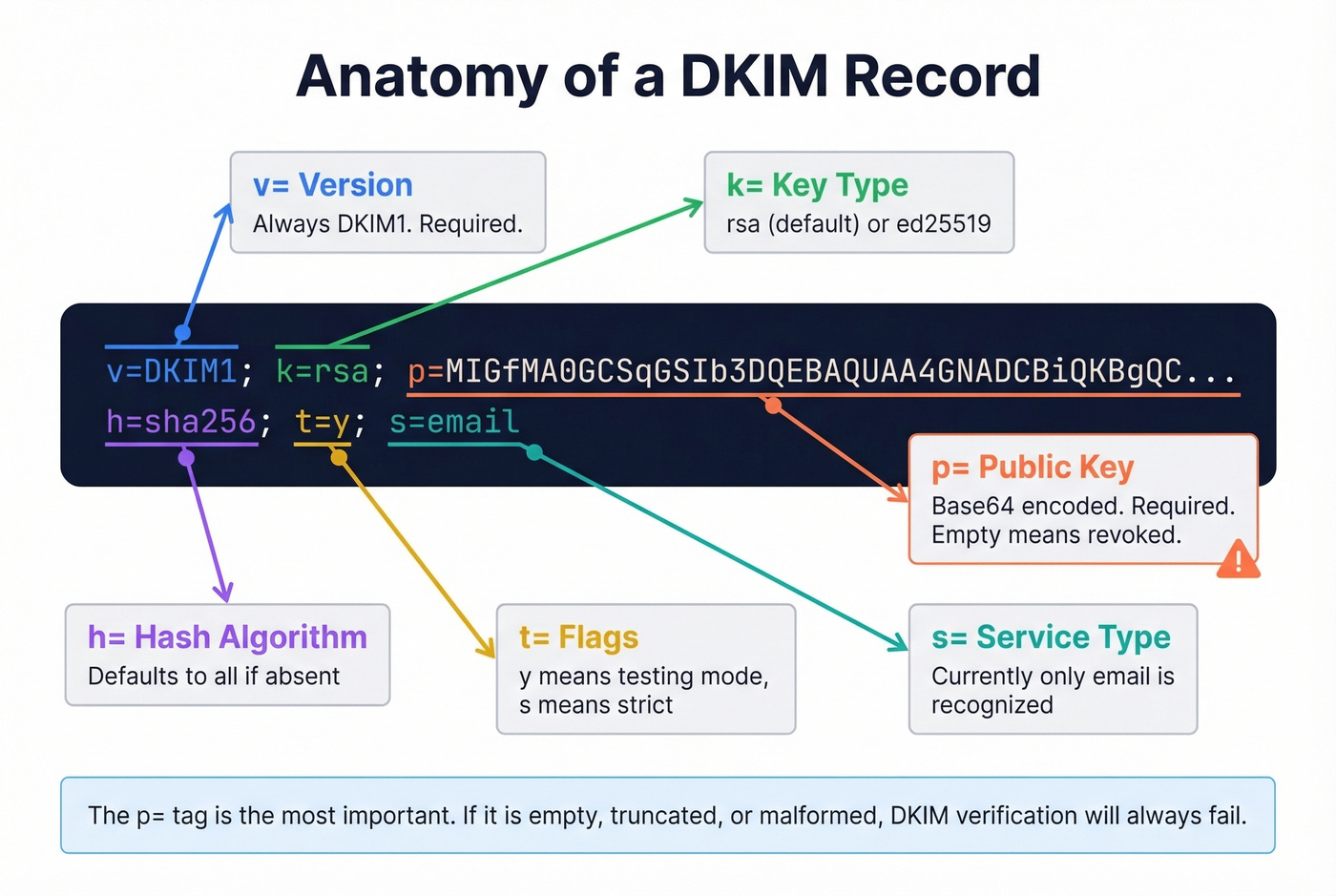
| Tag | Meaning | Default if Absent |
|---|---|---|
v= |
Version (always DKIM1) |
Required |
k= |
Key type (rsa or ed25519) |
rsa |
p= |
Public key, base64 encoded | Required (empty = revoked) |
h= |
Acceptable hash algorithms | All algorithms |
t= |
Flags - y means testing, s means strict |
No flags |
s= |
Service type (currently only email is recognized) |
* |
The p= tag is the one that matters most. If it's empty, the key has been revoked. If it's malformed or truncated, verification will fail.
These are the tags in the DNS record. The DKIM-Signature header in your actual emails contains additional tags you'll encounter during troubleshooting: b= holds the signature data itself, bh= is the body hash, and a= specifies the signing algorithm. They aren't part of the DNS record - they're generated per-message during signing and used by the receiving server during verification.
What "Valid," "Invalid," and "Not Found" Mean
Valid means the record exists, syntax is correct, and the public key is parseable. This doesn't guarantee emails will pass DKIM - it just means the DNS side is clean.
Invalid means the record exists but has a problem: broken syntax, empty public key, unsupported key type, or formatting errors. Check for missing semicolons, line breaks in the key, or extra whitespace.
Not Found means the tool couldn't locate a record at selector._domainkey.yourdomain.com. Three common causes: wrong selector, DNS propagation delay, or scanner limitations with CNAME-based DKIM setups. Don't panic - validate via actual email headers first. A common complaint on r/DMARC is that domain scanners report "DKIM not found" even when emails are passing, usually because the scanner is guessing the wrong selector or can't follow the domain's DKIM publishing model.
How to Troubleshoot DKIM Failures
Step-by-Step Triage
- Pull full email headers. In Gmail: Show original. In Outlook: File, Properties, Internet headers. Look for
Authentication-Resultsand the DKIM result code (pass,fail,temperror,permerror).
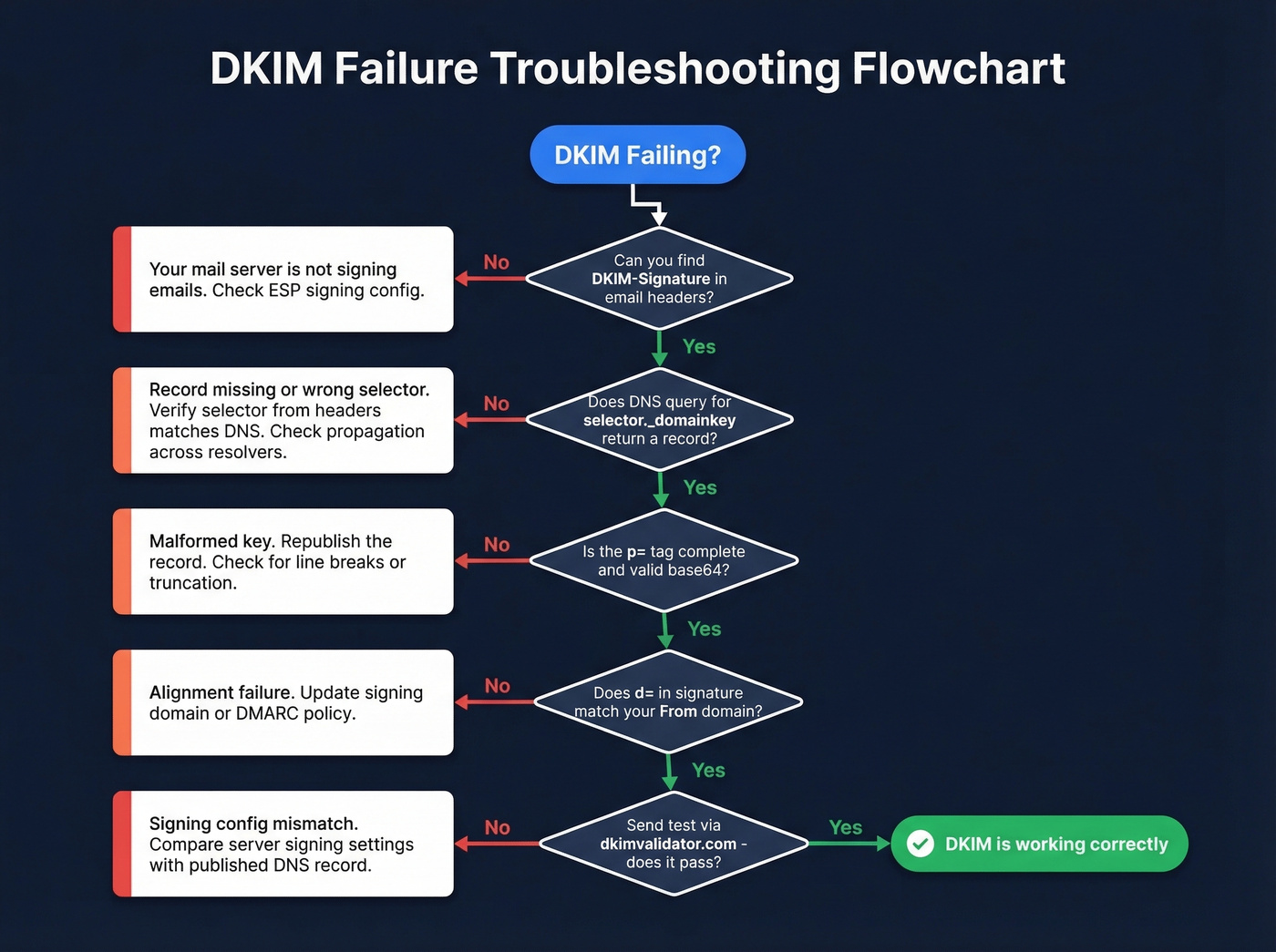
Extract the DKIM-Signature fields. Note
d=(signing domain),s=(selector),c=(canonicalization),h=(signed headers), andx=(expiration timestamp if present).Run a DNS query directly. From your terminal:
dig selector._domainkey.example.com TXTOr on Windows:
nslookup -type=TXT selector._domainkey.example.comTest from multiple resolvers. Query Google (8.8.8.8), Cloudflare (1.1.1.1), and your authoritative nameservers. If results differ, you've got a propagation or sync issue.
Check syntax and key quality. Confirm
v=DKIM1is present,p=contains a complete base64 key, and there are no stray line breaks or missing semicolons.
If you're also seeing bounce errors while debugging authentication, use this bounced email meaning guide to map symptoms to root causes.
"dkim=fail (no key for signature)"
This exact error string shows up in Authentication-Results when the receiving server can't find your public key in DNS. It sounds scary but it's rarely permanent.
The most common cause is DNS inconsistency - your authoritative nameservers have the record, but the resolver the receiving server queried doesn't yet. This happens during propagation windows, after DNS provider changes, or when nameservers aren't synced. Test against your authoritative nameservers first. If the record is correct there, public resolvers will catch up within minutes to 48 hours.
The practical reassurance: authentication failures from DNS issues don't create lasting reputation damage. Once the record propagates correctly, the failure is essentially forgotten.
"DKIM Record Not Found" (But Email Passes)
This scenario drives admins crazy. Your domain scanner says DKIM is missing, but actual emails pass verification. What's happening?
Usually one of two things: the scanner is trying the wrong selector (remember, you can't enumerate selectors), or your DKIM is published via CNAME delegation and the scanner can't resolve it cleanly. The fix is simple - stop trusting the domain scanner for this specific check. Test via actual email headers instead. If dkim=pass shows up in Authentication-Results, your DKIM is working regardless of what a scanner says.
If you suspect the real issue is reputation (not authentication), run a domain reputation check alongside your DKIM tests.
Common DKIM Errors and Fixes
| Error | Cause | Fix |
|---|---|---|
| Missing semicolons / extra spaces | DNS editor formatting | Review raw record; remove whitespace around = signs |
| Line breaks in public key | DNS tool auto-wrapping | Paste key as single continuous string |
| Generic selector reused | "default" reused across tools | Assign unique selectors per sender/tool |
| Wrong DNS location | Missing _domainkey in path |
Publish at selector._domainkey.domain |
| Propagation delay | Recent DNS changes | Wait up to 48 hours; test authoritative NS first |
| Old key deleted too soon | Rotation without overlap | Keep old key published for at least 24 hours after switching |
| Forwarding breaks signature | Third-party modifies headers | Use header-based validation to confirm what breaks and where |
The line-break issue is the sneakiest. Some DNS management interfaces insert line breaks into long TXT values, which invalidates the public key and causes silent failures. Always verify the raw DNS record after saving - don't trust the UI preview.
And the "CNAME instead of TXT" confusion deserves a callout. Whether you use a TXT record with the key published directly or a CNAME record delegating to your ESP's DNS depends entirely on your provider's setup instructions. Neither is inherently wrong. If your ESP says use a CNAME, use a CNAME.
If you're setting up authentication from scratch (or redoing it after a migration), follow this how to set up SPF and DKIM guide.
DKIM Best Practices for 2026
Key Length: 1024 vs 2048 vs Ed25519
If you're still using 1024-bit DKIM keys, upgrade today. 2048-bit RSA is the minimum recommended length, and some providers require it for full compliance.
The operational wrinkle with 2048-bit keys: DNS TXT records have a 255-byte string limit per chunk. A 2048-bit public key often exceeds this, so it must be split into multiple quoted strings within a single TXT record. Most DNS hosts handle this automatically, but if you're editing records manually, split the key yourself:
v=DKIM1; k=rsa; p="MIIBIjANBgkqhki..."
"G9w0BAQEFAAOCAQ8A..."
Ed25519 keys are shorter, stronger, and showing up in more implementations - but not universally supported yet. The pragmatic approach is dual-signing: sign with both Ed25519 and RSA 2048 so you get the benefits where supported and the fallback where you don't.
Key Rotation and Multi-ESP Setup
Rotate DKIM keys at least every 12 months. Many teams do it every six. This limits exposure if a private key is compromised. If you're using multiple ESPs - say Mailchimp for marketing and SendGrid for transactional - each needs its own DKIM key with a unique selector. Sharing selectors across ESPs is a recipe for conflicts and debugging nightmares.
Two details people forget: remove the t=y test flag once you've confirmed DKIM is working in production (this flag tells receivers to treat failures as non-binding), and always keep the old key published for at least 24 hours after rotating to avoid breaking verification for messages still in transit. Some providers offer a DKIM wizard that automates key generation and rotation, which can simplify this process significantly.
If you're running cold outreach, pair DKIM hygiene with a cold email deliverability playbook so you don't fix one lever and ignore the others.
Verify After Every Infrastructure Change
A surprising number of teams break their DKIM setup during routine changes - migrating DNS providers, adding a new sending service, or updating nameservers. Make it a habit to run a DKIM record check after every infrastructure change, not just during initial setup. Even a minor DNS migration can silently drop a _domainkey TXT record.
The Other Half of Deliverability
Authentication gets your emails through the door. But we've seen teams nail their DKIM, SPF, and DMARC setup and still land in spam because 15% of their list was dead addresses. Sending to invalid or outdated contacts triggers bounces that erode sender reputation over time, no matter how clean your authentication is.
If you just spent an hour fixing your DKIM, don't waste that work by sending to a stale list. Prospeo verifies 143M+ professional emails with 98% accuracy on a 7-day refresh cycle, catching dead addresses before they damage your domain.
If bounces are still high after authentication is clean, use this email bounce rate guide to diagnose list quality vs infrastructure issues.
You just spent an hour checking DKIM selectors, fixing DNS records, and validating signatures. Don't waste that clean sending reputation on stale or unverified email lists. Prospeo refreshes 300M+ profiles every 7 days - not every 6 weeks like competitors.
Protect your domain reputation with data that's actually fresh.
FAQ
Can I check DKIM without knowing the selector?
Not reliably. DNS-based tools require a selector to query the correct _domainkey record. Some try common values like google, default, or s1, but they'll miss custom selectors. The only reliable method is inspecting an actual email's DKIM-Signature header for the s= value.
How long does a DKIM DNS change take to propagate?
Typically a few minutes to 48 hours, depending on TTL settings and resolver caching. Test against your authoritative nameservers first - if the record is correct there, public resolvers will catch up. Don't panic if a tool shows the old record for a day.
Does a DKIM failure permanently hurt sender reputation?
No. Temporary authentication failures from DNS propagation or misconfiguration don't create lasting reputation damage. Once the record is correct and fully propagated, receiving servers move on. Fix the root cause promptly and your reputation recovers.
Should I use 1024-bit or 2048-bit DKIM keys?
Use 2048-bit RSA as the minimum in 2026. The only complication is DNS TXT record chunking for the longer key, which most DNS hosts handle automatically. If yours doesn't, split the base64 key into 255-byte quoted strings manually.
How do I make sure emails reach real inboxes after fixing DKIM?
Authentication is necessary but not sufficient. Sending to invalid addresses triggers bounces that damage reputation regardless of DKIM status. Verify your list before sending - tools like Prospeo catch bad addresses before they hurt your domain.