

What Does a Bounced Email Mean? Everything You Need to Know
A user on r/Emailmarketing sent a 50-email blast from three accounts on the same domain. 85% bounced. Their verification tool had said the list was "99% solid and good-to-go." Their first question wasn't about fixing the list - it was "did I just destroy my domain reputation?" That panic is more common than you'd think, and it starts with not understanding what a bounced email actually means.
Quick Version
A bounced email never reached the recipient's inbox. The mail server rejected it and sent back an error - a Non-Delivery Report or Delivery Status Notification - explaining why.
Hard bounces are permanent: bad address, dead domain, blocked sender. Remove them immediately. Soft bounces are temporary: full inbox, server overload, message too large. Retry for up to 72 hours, then suppress or remove if it keeps failing. If your bounce rate climbs above 2%, that usually signals a list hygiene or data quality problem. The fix: verify every email before sending, authenticate your domain with SPF, DKIM, and DMARC, and re-verify older lists before you touch them.
What Is an Email Bounce?
A bounced email is a message rejected by the recipient's mail server and returned to you with an error code. Think of it like a letter marked "Return to Sender" - except the postal service also tells you exactly why it couldn't be delivered.
That error message is your NDR, sometimes called a DSN. It contains an SMTP status code - a three-digit number like 550 or 421 - that tells you whether the failure is permanent or temporary, and what caused it. Understanding the bounce back email meaning behind each code is the first step toward fixing the problem.
How Email Delivery Works
Email delivery is a multi-step relay, and bounces can happen at several points along the way:
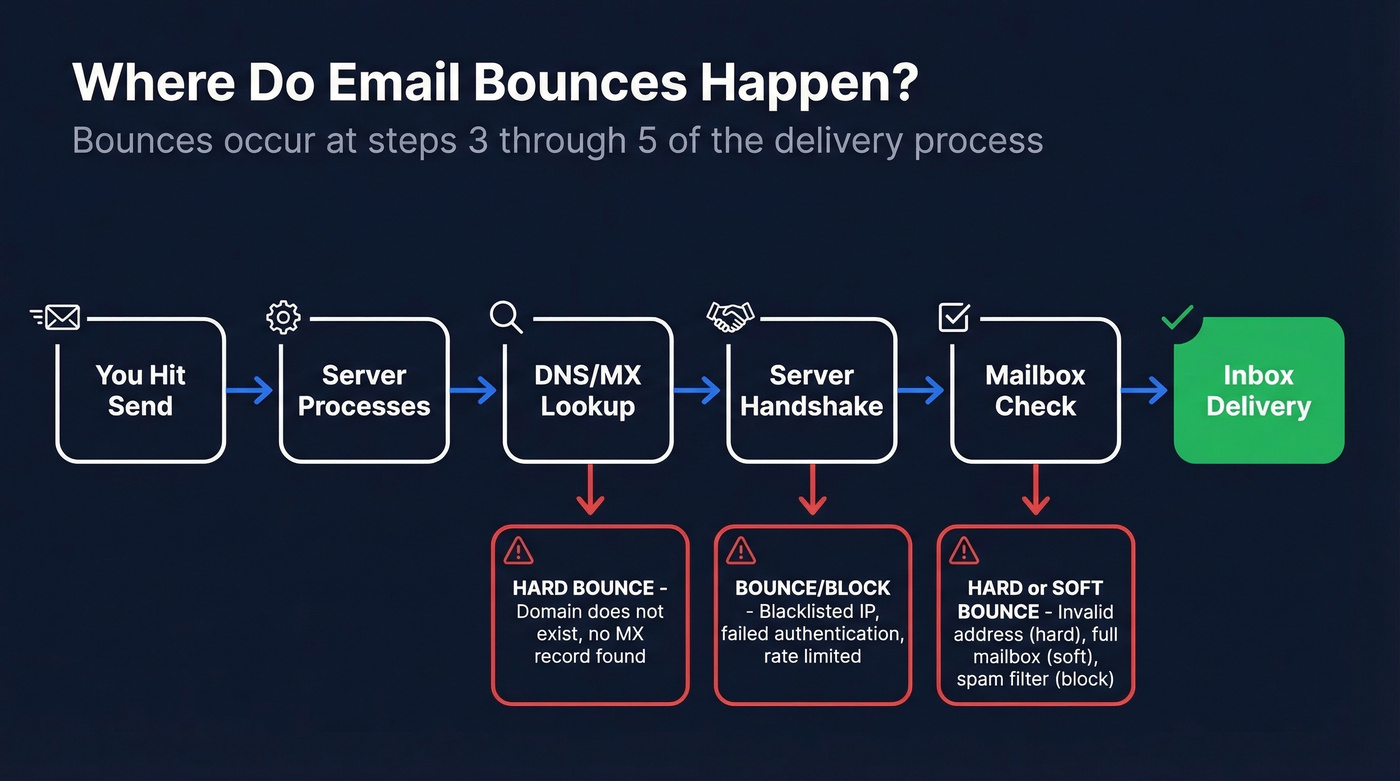
- You hit send - your email client hands the message to your outgoing SMTP server.
- Your server processes it - applies authentication headers and queues the message.
- DNS/MX lookup - your server queries DNS to find the recipient's mail server. Bounce point: if the domain doesn't exist or has no MX record, hard bounce.
- Server handshake - the two servers connect via SMTP. Bounce point: blacklisted IP, failed authentication, or rate limiting triggers rejection.
- Mailbox check - the recipient server verifies the address, checks spam filters, evaluates content. Invalid address = hard bounce. Full mailbox = soft bounce.
- Inbox or spam folder - if everything passes, the email lands. If not, you get an NDR.
Steps 3 through 5 are where bounced emails occur. Everything before that is on your side; everything after is delivery.
Hard Bounce vs. Soft Bounce
Your response should be completely different for each type.
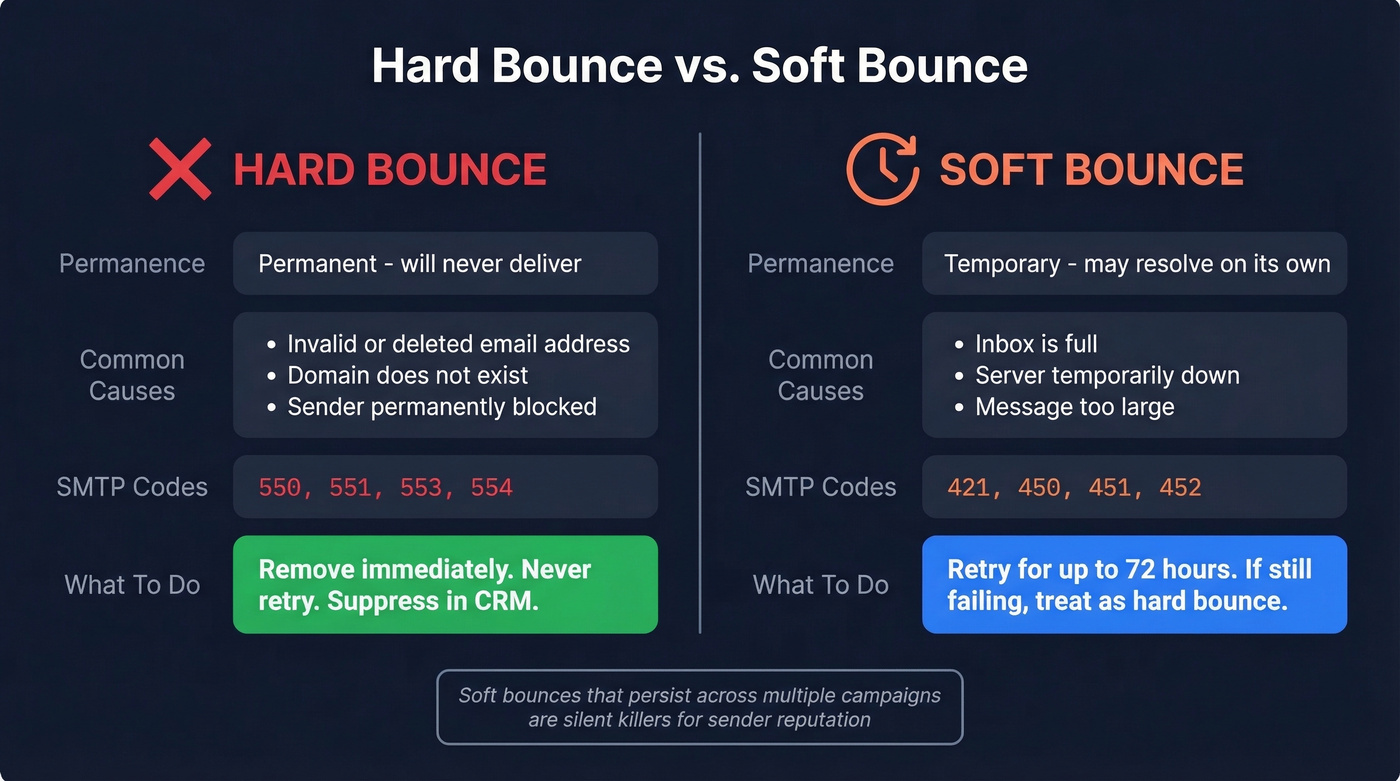
| Type | Permanence | Common Causes | Action |
|---|---|---|---|
| Hard bounce | Permanent | Invalid address, dead domain, sender blocked | Remove immediately |
| Soft bounce | Temporary | Full inbox, server down, message too large | Retry up to 72 hours, then suppress |
A hard bounce means the address is dead. The domain doesn't exist, the mailbox was deleted, or the server has permanently blocked you. Retrying just damages your sender reputation.
A soft bounce means something temporary went wrong - the recipient's inbox hit its storage limit, or their server was briefly overloaded. Most sending platforms automatically retry soft bounces for up to 72 hours. If it still fails after that, treat it as a hard bounce.
Here's the thing: most ESPs auto-suppress hard bounces after one attempt. But soft bounces that persist across multiple campaigns are the silent killers. They inflate your bounce rate slowly, and by the time you notice, your sender reputation has already taken a hit.

That Reddit user's 85% bounce rate? It started with unverified data. Prospeo's 5-step verification - including catch-all handling, spam-trap removal, and honeypot filtering - delivers 98% email accuracy. Teams using Prospeo see bounce rates drop from 35%+ to under 4%.
Stop destroying your domain reputation with bad data.
Bounced vs. Blocked vs. Deferred
These three terms get confused constantly. That Reddit user whose 85% of emails got "Message blocked"? They weren't bounced in the traditional sense - they were blocked. The distinction changes how you fix the problem.
| Status | What Happens | Common Causes |
|---|---|---|
| Bounced | Rejected with error code, NDR sent | Invalid address, full inbox |
| Blocked | Prevented by policy, often silent | Blacklist, auth failure, spam content |
| Deferred | Delayed, retried automatically | Server busy, rate limiting |
Bounces give you a clear error code. Blocks are trickier - the recipient's security layer prevents delivery, and you might not get any notification at all. Deferred emails sit in limbo: the recipient server said "try again later," and your server keeps retrying before eventually giving up.
If you're seeing "Message blocked" errors, don't just clean your list. Check your domain authentication, review your content for spam triggers, and verify you're not on any blacklists. (If you are, start with a proper blacklist removal process.)
Common SMTP Bounce Codes
Every bounce comes with an SMTP status code. 4xx means temporary - retry later. 5xx means permanent - don't retry. Enhanced codes follow the format class.subject.detail per RFC 3463.
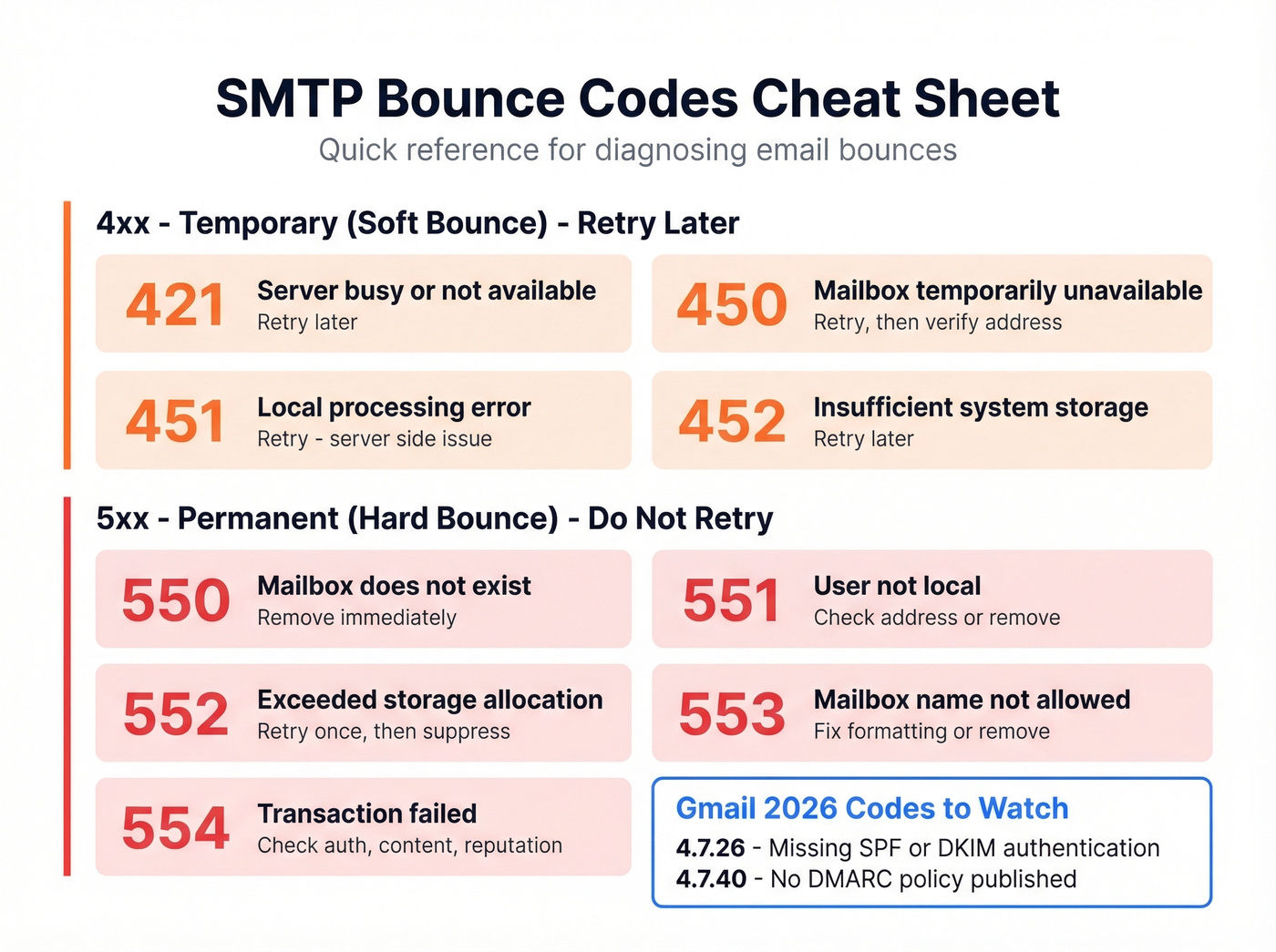
| Code | Type | Meaning | Action |
|---|---|---|---|
| 421 | Temp | Server not available / busy | Retry later |
| 450 | Temp | Mailbox temporarily unavailable | Retry, verify address |
| 451 | Temp | Local processing error | Retry; server-side issue |
| 452 | Temp | Insufficient system storage | Retry later |
| 550 | Perm | Mailbox unavailable, often doesn't exist | Remove immediately |
| 551 | Perm | User not local | Check address, remove |
| 552 | Perm | Exceeded storage allocation | Retry; if persistent, suppress |
| 553 | Perm | Mailbox name not allowed | Fix formatting or remove |
| 554 | Perm | Transaction failed | Check auth, content, reputation |
Two Gmail-specific codes worth knowing in 2026:
- 4.7.26 - "Rate-limited because it is unauthenticated... requires SPF or DKIM." Your domain authentication is missing or broken.
- 4.7.40 - "Rate-limited because the sending domain does not have a DMARC policy." You need a published DMARC record with an actual policy, not just reporting.
Gmail is actively rate-limiting and bouncing emails from senders who haven't set up proper authentication. If you're seeing 4.7.x codes, fix your DNS records before touching anything else. (If you want a deeper walkthrough, see our email deliverability guide.)
What's a Good Bounce Rate?
Under 2% is acceptable, under 1% is ideal. Anything above 2% signals a list hygiene problem, and many ESPs will start restricting sending or flagging your account if you consistently exceed that threshold.
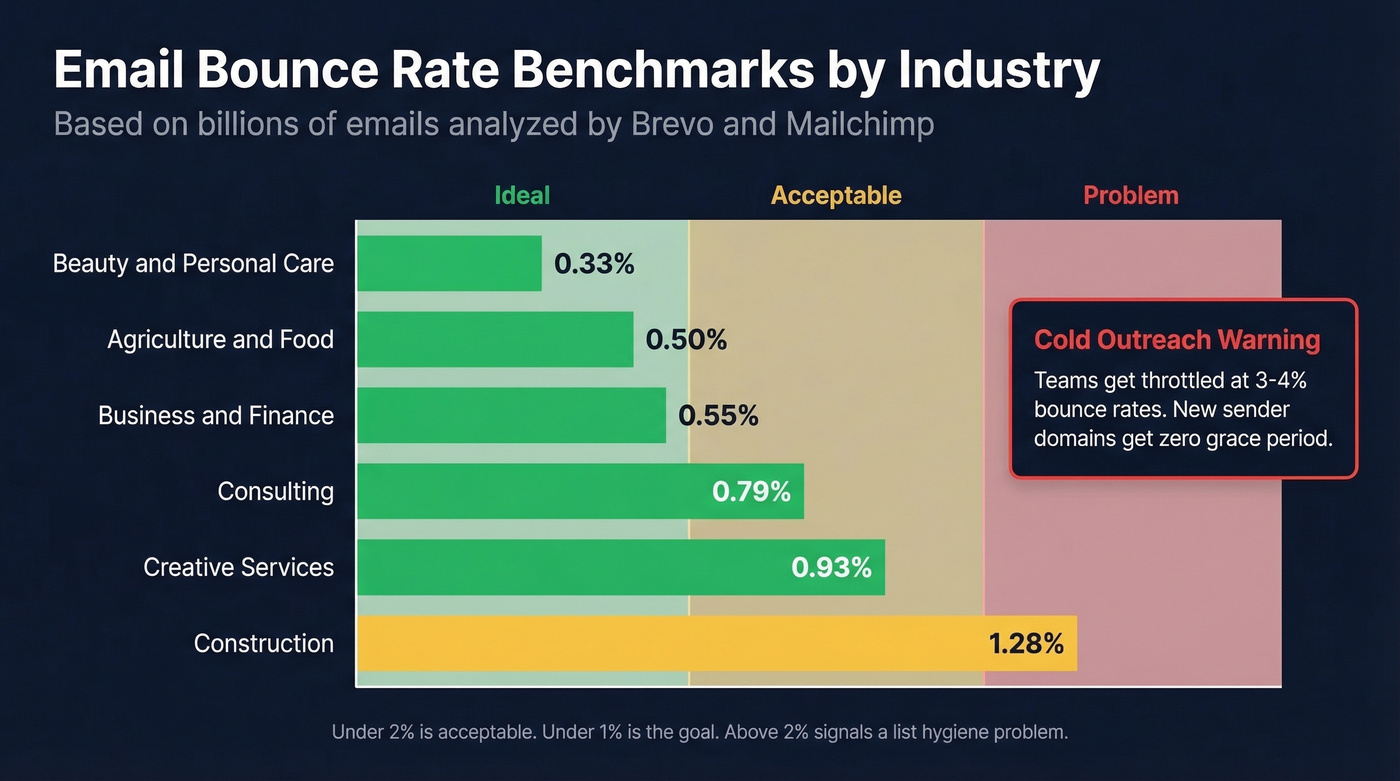
| Industry | Avg. Bounce Rate |
|---|---|
| Beauty & personal care | 0.33% |
| Agriculture & food | 0.50% |
| Business & finance | 0.55% |
| Consulting | 0.79% |
| Creative services | 0.93% |
| Construction | 1.28% |
These numbers come from datasets spanning billions of emails - Brevo's benchmark analyzed 44B+ emails, and Mailchimp's methodology covers billions more. Well-maintained lists in most industries sit well below 1%. (More detail: email bounce rate benchmarks and what to do when you’re above them.)
For cold outreach, the bar is even more unforgiving. We've seen teams get their sending throttled after a single campaign with a 3-4% bounce rate. New sender domains get zero grace period.
Why Verified Emails Still Bounce
This is the question that drives people to Reddit at 2 AM. You ran your list through a verification tool, it came back 99% valid, and then your campaign bounced 85%. Three things are usually at play.
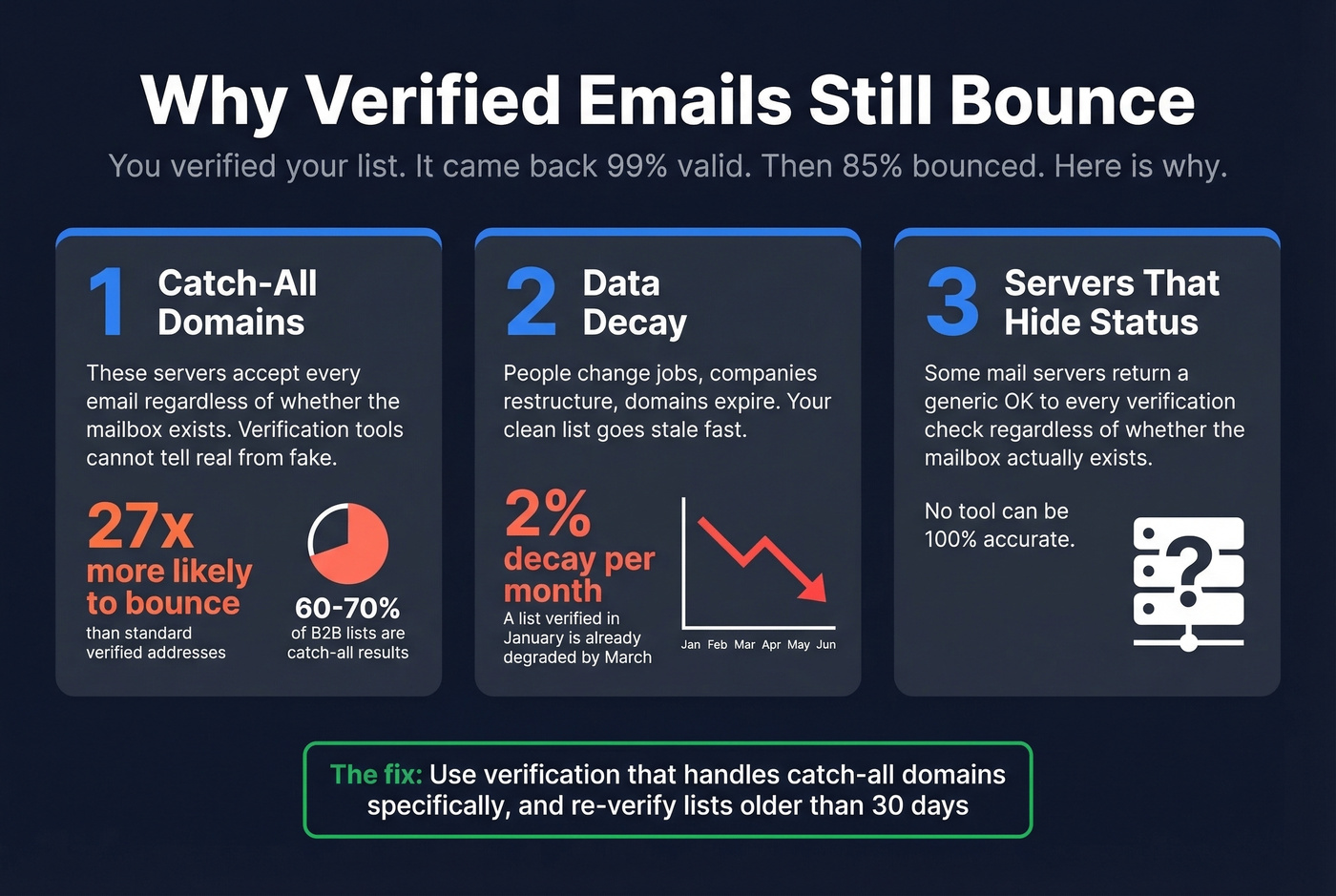
Catch-all domains are the biggest culprit. A catch-all server accepts every email sent to its domain regardless of whether the specific mailbox exists. Verification tools can't distinguish real addresses from fake ones on these domains - the server says "yes" to everything. Accept-all addresses are 27x more likely to bounce than standard addresses, and in some B2B lists, catch-all results make up 60-70% of the data. That's not a minor edge case.
Data decays faster than you think. Email data goes stale at roughly 2% per month. People change jobs, companies restructure, domains expire. A list that was clean in January is already degraded by March.
Some servers deliberately hide mailbox status. Verification works by performing an SMTP handshake - essentially asking the recipient's server "does this mailbox exist?" Some servers return a generic "OK" regardless. No verification tool is 100% accurate because of this fundamental limitation. (If you need a practical workflow, see how to check if an email exists.)

Solving the catch-all problem alone can dramatically cut your bounce rate. It's the single biggest driver of "verified but bounced" complaints.
How to Fix and Prevent Bounces
Even users who validate their lists beforehand report persistent bounces on r/coldemail - the issue is usually what happens between verification and sending. Here's the checklist that actually moves the needle, ranked by impact.
1. Verify every email before sending. Non-negotiable. A complete verification workflow runs five checks: syntax validation, domain and MX record check, disposable and role-based address detection, SMTP handshake to confirm the mailbox exists, and spam trap filtering. Skip any step and you're leaving gaps. Prospeo's email finder runs all five through proprietary infrastructure with catch-all handling built in, delivering 98% email accuracy. Snyk's sales team saw their bounce rate drop from 35-40% to under 5% after switching their verification workflow.
2. Authenticate your domain. Set up SPF, DKIM, and DMARC - all three. Gmail's 2026 enforcement means unauthenticated senders get rate-limited or bounced entirely. SPF or DKIM alone isn't enough anymore. (If you’re troubleshooting, start with how to verify DKIM is working.)
3. Suppress hard bounces immediately. Don't wait for a second attempt. A 550 is permanent. Suppress it in your CRM rather than just deleting - you want to prevent anyone from re-adding it later. (This is easier with solid contact management software.)
4. Sunset unengaged contacts after 6 months. If someone hasn't opened or clicked in 6 months, they're either not interested or the address is going stale. Remove them.
5. Never use purchased lists. Purchased lists are the fastest way to tank your sender reputation. They're full of outdated addresses, spam traps, and catch-all domains. Every experienced email marketer has learned this lesson - most of them the hard way. (If you’re considering it anyway, read Is It Illegal to Buy Email Lists?.)
Let's be honest about list size: if your deals average under $15K, you probably don't need a 50,000-contact list. A smaller, verified list of 500 contacts will outperform a massive unverified one every single time. We've tested this across dozens of client campaigns, and the teams with the smallest, freshest lists consistently book the most meetings.
Keeping your bounce rate under 2% means verifying every email before it leaves your outbox. Prospeo refreshes its 143M+ verified emails every 7 days - not every 6 weeks like competitors. At $0.01 per email, clean data costs less than one bounced campaign.
Verify first, send second - 75 free emails to prove it.
FAQ
What does it mean when an email bounces?
A bounced email was rejected by the recipient's mail server and never reached the inbox. The server returns a Non-Delivery Report with an SMTP error code explaining the cause - invalid address, full mailbox, or authentication failure. Hard bounces are permanent; soft bounces are temporary and can be retried for up to 72 hours.
Can a bounced email be delivered later?
Soft bounces can be retried - most servers attempt delivery for up to 72 hours. If the temporary issue resolves (the recipient clears inbox storage, for example), the email goes through. Hard bounces are permanent and should be suppressed immediately to protect sender reputation.
What's the difference between a hard bounce and a soft bounce?
A hard bounce is a permanent failure: invalid address, deleted mailbox, or non-existent domain. A soft bounce is temporary - the address exists but something prevented delivery right now, like a full inbox or server timeout. Soft bounces that persist after 72 hours of retries should be treated as hard bounces and removed.
How do I reduce my email bounce rate?
Verify every address before sending using a tool with catch-all detection and spam-trap filtering. Authenticate your domain with SPF, DKIM, and DMARC. Suppress hard bounces instantly, sunset unengaged contacts after 6 months, and never send to purchased lists.
What is a bounce back email?
A bounce back email is the automated NDR your mail server returns when a message can't be delivered. It contains an SMTP error code - like 550 for invalid address or 452 for full storage - that tells you exactly why delivery failed and whether the issue is permanent or temporary.