

How to Run a Domain Reputation Test (and What to Do When Results Are Bad)
Every green checkmark on your blacklist checker says you're clean. SPF passes. DKIM aligns. DMARC is set to quarantine. And yet your open rate is sitting at 8%, half your outbound sequences land in spam, and your team is wondering if anyone actually reads email anymore.
Here's the thing: blacklist checks and a domain reputation test measure completely different things. Inbox placement globally sits at 83.5% - roughly 1 in 6 legitimate emails never reaches the inbox. For teams with damaged sender reputation, that number is far worse. The gap between "not blacklisted" and "good reputation" is where most deliverability problems actually live.
Your Baseline Testing Stack
Set up these four free tools today. Together they cover the major providers:
- Google Postmaster Tools - how Gmail scores your domain
- Microsoft SNDS - how Microsoft's consumer mail filters see your IP sending behavior
- Sender Score - cross-provider heuristic, 0-100 scale
- MXToolbox - checks your mail servers against 100+ blacklists in one sweep
That's your triangulation stack. Everything else is optional refinement. One prerequisite: if your bounce rate is above 2%, clean your list with a verification tool before running any reputation check. Bad data skews every result (and it’s worth tracking your bounce rate closely).
What Domain Reputation Actually Is
Think of domain reputation like a credit score, but one that every major email provider calculates independently. Gmail maintains its own score for your sending domain. Microsoft maintains a separate one. Yahoo has yet another view. Each provider only sees the mail you send to their users, so their assessments can - and often do - diverge.

Your reputation is a composite signal built from how recipients interact with your messages: read rate and positive engagement (opens, clicks, replies), spam complaints, bounces, and spam trap hits. It travels with your domain name everywhere you go. Switch ESPs, change IPs, migrate platforms - your domain reputation follows.
This is the distinction most people miss, and it's the single most common question in email deliverability forums on Reddit and elsewhere: "I'm clean on every blacklist, why am I still going to spam?" A blacklist is binary - you're listed or you're not. Reputation is a spectrum. You can be off every blacklist in existence and still have terrible reputation because Gmail noticed that 40% of your recipients delete your emails without reading them.
Domain Reputation vs. IP Reputation
These two concepts get conflated constantly, and the confusion costs teams weeks of misdiagnosed problems.
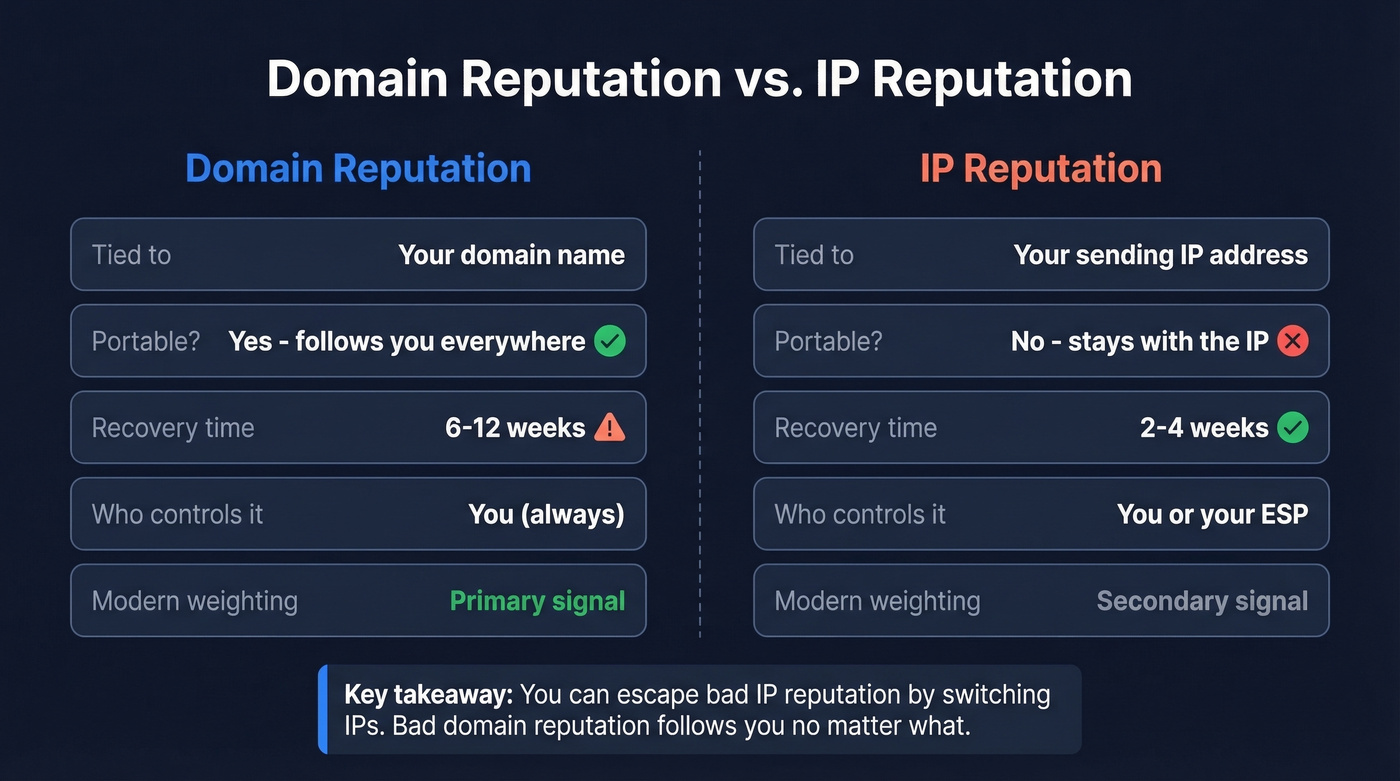
| Domain Reputation | IP Reputation | |
|---|---|---|
| Tied to | Your domain name | Your sending IP |
| Portable? | Yes - follows you across ESPs | No - stays with the IP |
| Recovery time | 6-12 weeks | 2-4 weeks |
| Who controls it | You (always) | You or your ESP |
| Modern weighting | Primary | Secondary |
The portability piece is what makes domain reputation both more important and harder to fix. Bad IP reputation? Move to a new IP and rebuild in weeks. Bad domain reputation? There's no escape. Modern providers like Gmail weight domain reputation more heavily precisely because it can't be gamed by switching infrastructure.
What Factors Affect Your Score
Not all signals carry equal weight. Here's what actually moves the needle, roughly in order of impact.
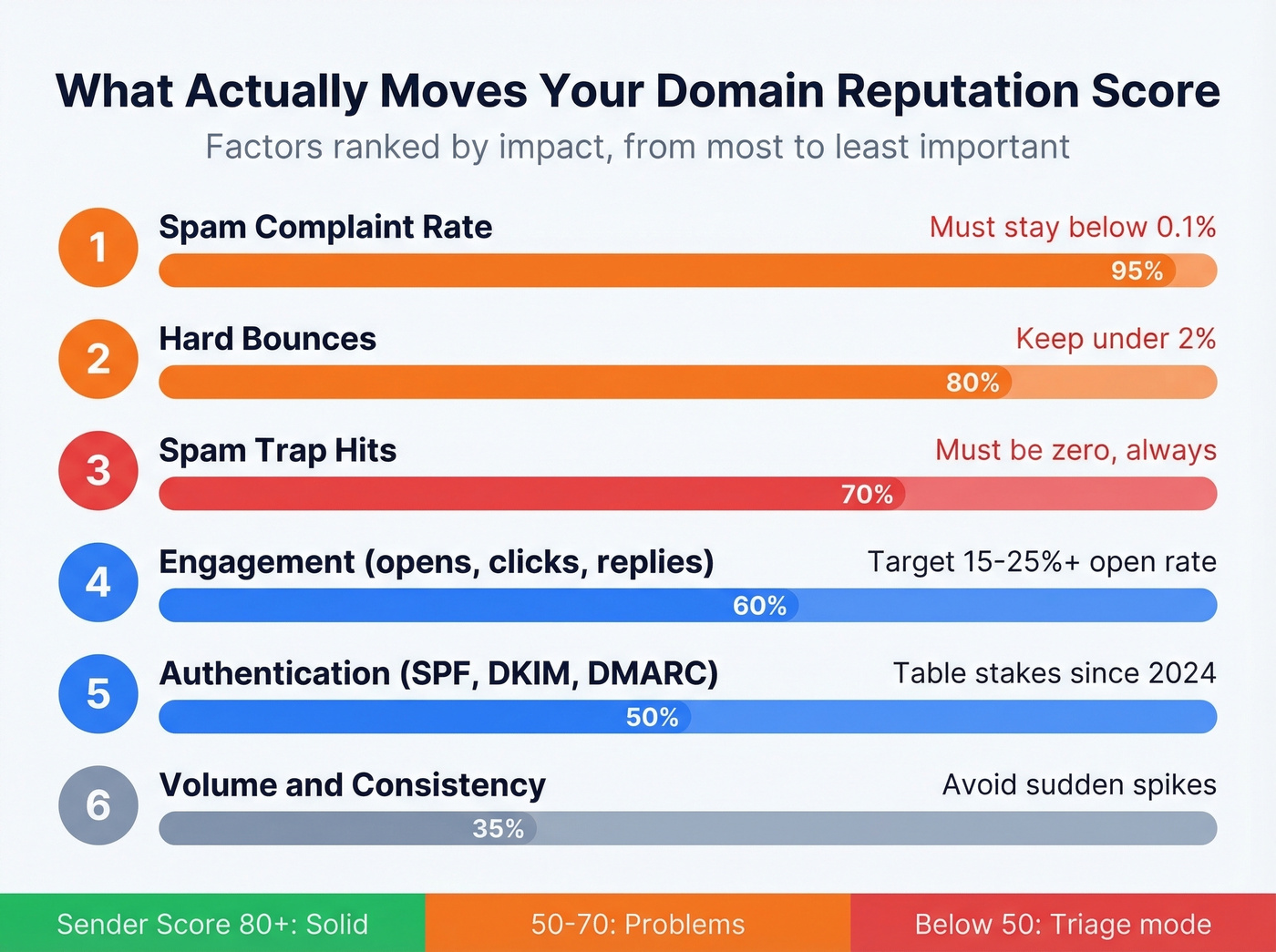
Spam Complaint Rate
The single most important metric. Gmail and Yahoo require bulk senders to stay below 0.1%, and hitting 0.3% triggers enforcement. Microsoft's threshold is similar - anything above 0.5% is a serious problem.
Hard Bounces
Hard bounces signal you're sending to addresses that don't exist. Providers interpret this as poor list maintenance or, worse, scraped addresses without verification. Soft bounces matter less individually but accumulate over time.
Spam Trap Hits
Should be zero. Always. Any spam trap hit tells providers you're buying lists or not cleaning them. Prospeo's 5-step verification removes spam traps and honeypots before sending, which directly protects sender reputation at the source (see a full spam trap removal playbook).
Engagement and Authentication
Engagement signals - opens, clicks, replies, forwards, and "not spam" rescues - round out the picture. Low engagement tells providers recipients don't want your mail, even if they haven't complained.
Authentication via SPF, DKIM, and DMARC is now table stakes after the 2024-2026 bulk sender mandates from Gmail, Yahoo, and Microsoft. Sending volume and consistency also matter: sudden spikes look like spam behavior, while steady patterns build trust (more on safe sending limits in our email velocity guide).
On the Sender Score scale, anything above 80 is solid. Below 70, you've got deliverability problems. Below 50, you're in triage mode.

Every hard bounce chips away at your domain reputation. Prospeo's 5-step verification - with spam-trap removal, honeypot filtering, and catch-all handling - keeps bounce rates under 4% across 15,000+ companies. At $0.01 per verified email, fixing your data costs less than one more week of landing in spam.
Stop diagnosing reputation damage. Eliminate the cause.
How to Run a Domain Reputation Check
No single tool gives you the full picture. You need at least three data points to triangulate your actual reputation. We've tested this across dozens of client domains, and triangulation is the only approach that consistently prevents misdiagnosis (for a broader tool list, see our roundup of email reputation tools).
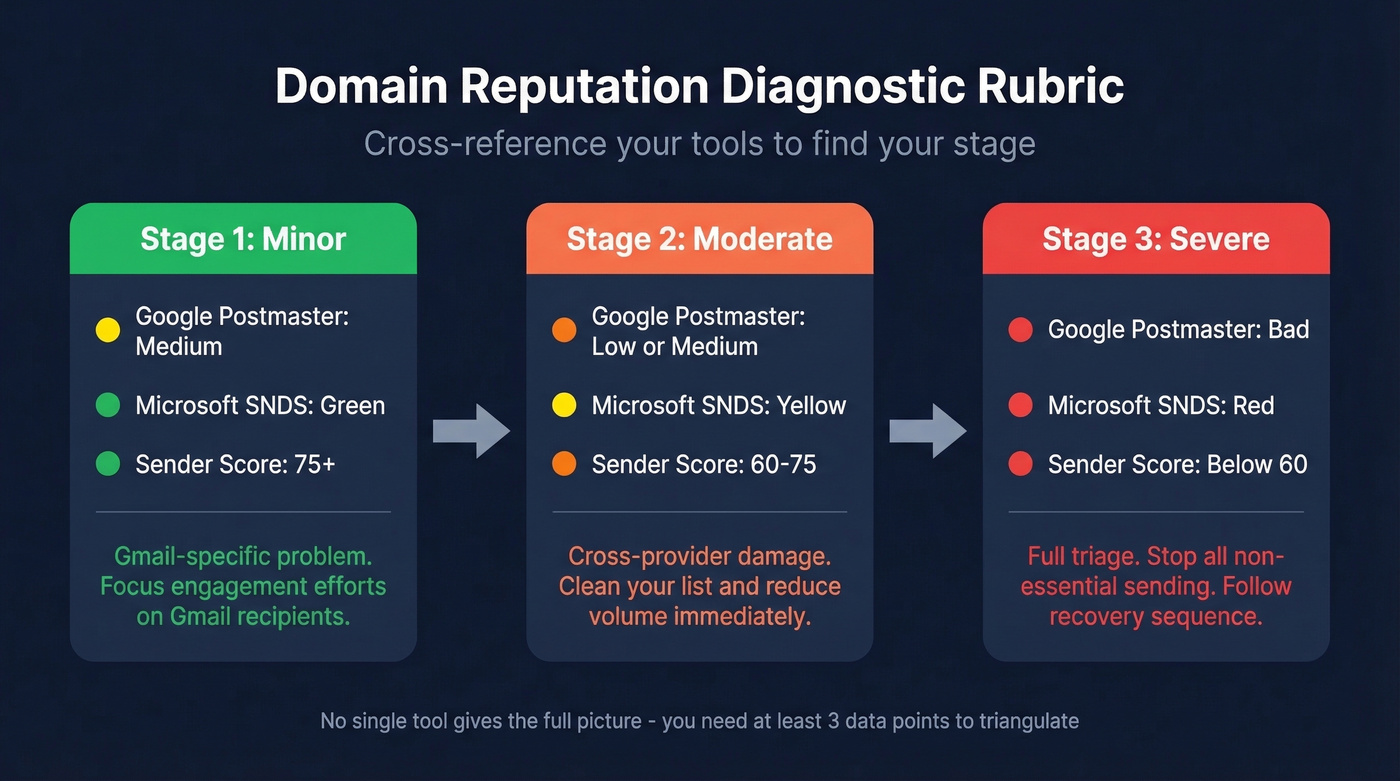
Cross-reference your results using this diagnostic rubric:
- Stage 1 (minor): Postmaster = Medium, SNDS = Green, Sender Score > 75. You have a Gmail-specific problem - focus engagement efforts there.
- Stage 2 (moderate): Postmaster = Low/Medium, SNDS = Yellow, Sender Score 60-75. Cross-provider damage. Clean your list and reduce volume immediately.
- Stage 3 (severe): Postmaster = Bad, SNDS = Red, Sender Score < 60. Full triage. Stop all non-essential sending and follow the recovery sequence below.
Google Postmaster Tools
The most common frustration with Postmaster Tools: you set it up and see no data. That happens when you're sending fewer than ~100 emails per day to Gmail recipients. It doesn't mean your reputation is bad - Google just won't show anything until volume is high enough for anonymized reporting. If that's you, lean on Sender Score and SNDS for your baseline.
Navigate to postmaster.google.com and add your domain. Verify ownership via a DNS TXT record. Data flows within 24-48 hours once you meet the volume threshold.
The older V1 interface was retired on September 30, 2025, but the core reputation dashboards remain available in the newer V2 view. Monitor spam rate (keep below 0.1%), domain reputation across four tiers - Bad, Low, Medium, High - IP reputation, and Gmail-specific compliance dashboards. Check weekly during normal operations, daily during recovery.
Microsoft SNDS
The biggest limitation up front: SNDS covers Outlook.com, Hotmail, Live.com, and other Microsoft consumer domains but not business Exchange Online / Office 365 mailboxes. If you're primarily B2B, that's a significant blind spot.
Also important: SNDS is IP-based, not domain-based.
Setup requires a dedicated sending IP - shared-IP senders typically can't access it. Data appears within 1-2 days after you hit the ~100 messages/day threshold. The SmartScreen filter uses a color-coded system: Green means less than 10% flagged as spam, Yellow covers 10-90%, and Red means over 90% spam verdict. For complaint rates, below 0.1% is healthy, 0.1-0.5% is concerning, above 0.5% requires immediate action.
Other Reputation Tools
Sender Score at senderscore.org provides a 0-100 rating based on Validity's network data. IP-based, not domain-based, but a useful cross-provider heuristic.
MXToolbox runs your mail servers against 100+ blacklists simultaneously - a fast blacklist sweep, though clean blacklists don't guarantee healthy reputation (if you do get listed, follow our Spamhaus blacklist removal guide).
Cisco Talos at talosintelligence.com provides Good/Neutral/Poor reputation signals for IPs and domains. Relevant for enterprise recipients using Cisco email security.
Yahoo Sender Hub is free and often overlooked. Set it up if any meaningful portion of your list uses Yahoo or AOL addresses.
EasyDMARC helps surface SPF, DKIM, and DMARC issues and also offers free IP/domain reputation lookups across major blacklists.
Free vs. Paid Tools
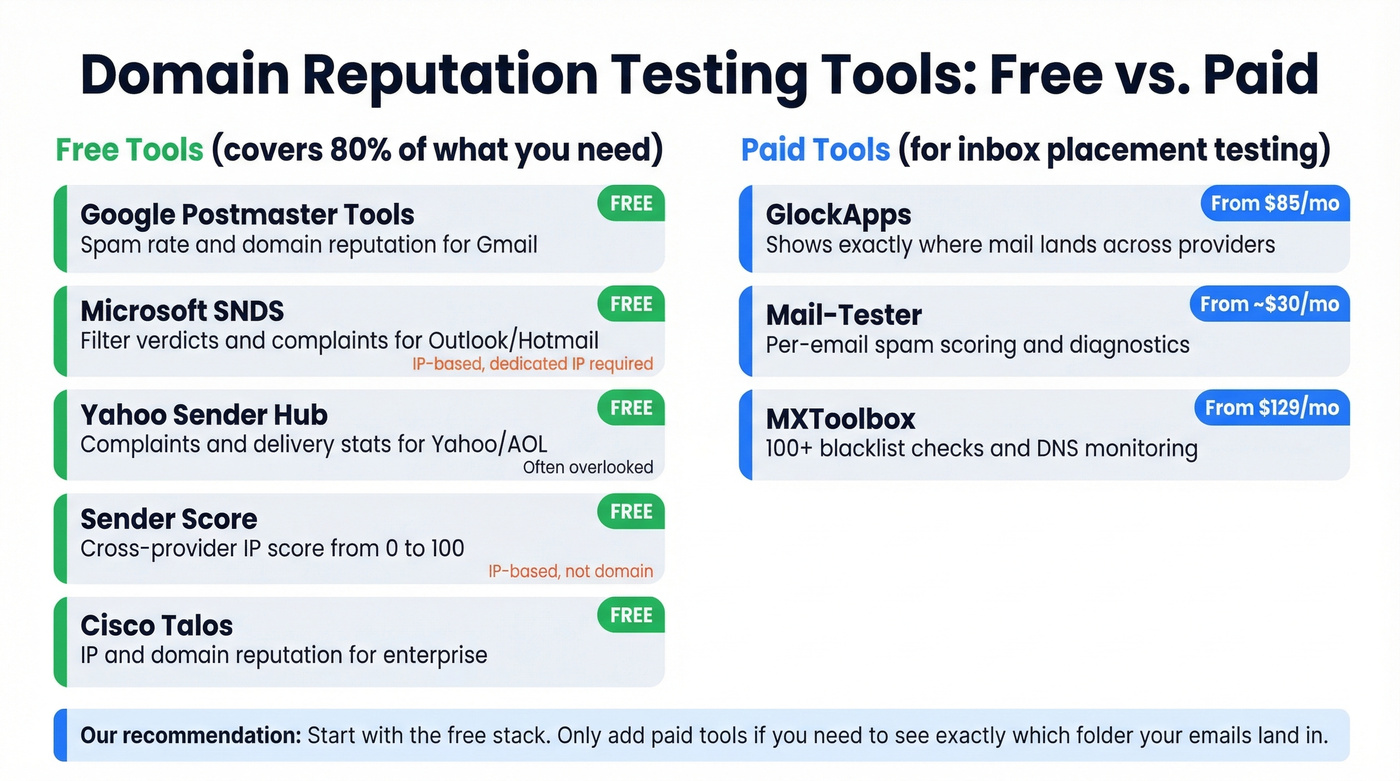
Free Monitoring
| Tool | Measures | Coverage | Notes |
|---|---|---|---|
| Google Postmaster | Spam rate, domain rep | Gmail | Needs ~100+/day volume |
| Microsoft SNDS | Filter verdicts, complaints (IP-based) | Outlook/Hotmail (consumer) | Dedicated IP required |
| Yahoo Sender Hub | Complaints, delivery stats | Yahoo/AOL | Often overlooked |
| Sender Score | IP score (0-100) | Aggregated | IP-based, not domain |
| Cisco Talos | IP/domain reputation | Cisco ecosystem | Good for enterprise |
Paid Testing
| Tool | Measures | Free Tier | Paid From |
|---|---|---|---|
| MXToolbox | 100+ blacklists, DNS | Basic free | $129/mo |
| GlockApps | Inbox placement | Limited free | $85/mo |
| Mail-Tester | Per-email spam score | Free test available | ~$30/mo |
| EasyDMARC | Auth + domain health | Basic free | Paid plans available |
| Spamhaus | Domain/IP blocklists | Lookup free | Commercial services available |
The free tier of Postmaster Tools, SNDS, and Sender Score covers 80% of what most teams need. Skip the paid tools unless you need inbox placement testing - that's where GlockApps and Mail-Tester earn their keep by showing where mail lands, not just how your reputation looks on paper.
How to Interpret Your Results
Here's the scenario we see most often: clean on every blacklist, SPF/DKIM/DMARC all passing, emails still going to spam. This happens because blacklists and authentication are pass/fail gates, while reputation is a continuous score driven by recipient behavior over months.
Your tools will disagree with each other, and that's expected. Google Postmaster shows "Medium" reputation, but your Sender Score is 82? Gmail only sees mail sent to Gmail users. If your Gmail audience has lower engagement than your Outlook audience, the scores diverge. Use the Stage 1/2/3 rubric above to synthesize across tools rather than obsessing over any single number.
Target open rates of 15-25%+. Consistently below 15% across campaigns means reputation damage is either happening or already done (compare against the standard email open rate benchmarks).
How to Fix Domain Reputation
Recovery takes 6-12 weeks. No shortcut exists. But the sequence matters enormously - fix authentication, clean your data, then warm up gradually. We've seen teams recover in as little as 6 weeks when they follow this exact order. Doing these out of order wastes time because you're rebuilding on a broken foundation (for the full system, see our email deliverability guide).
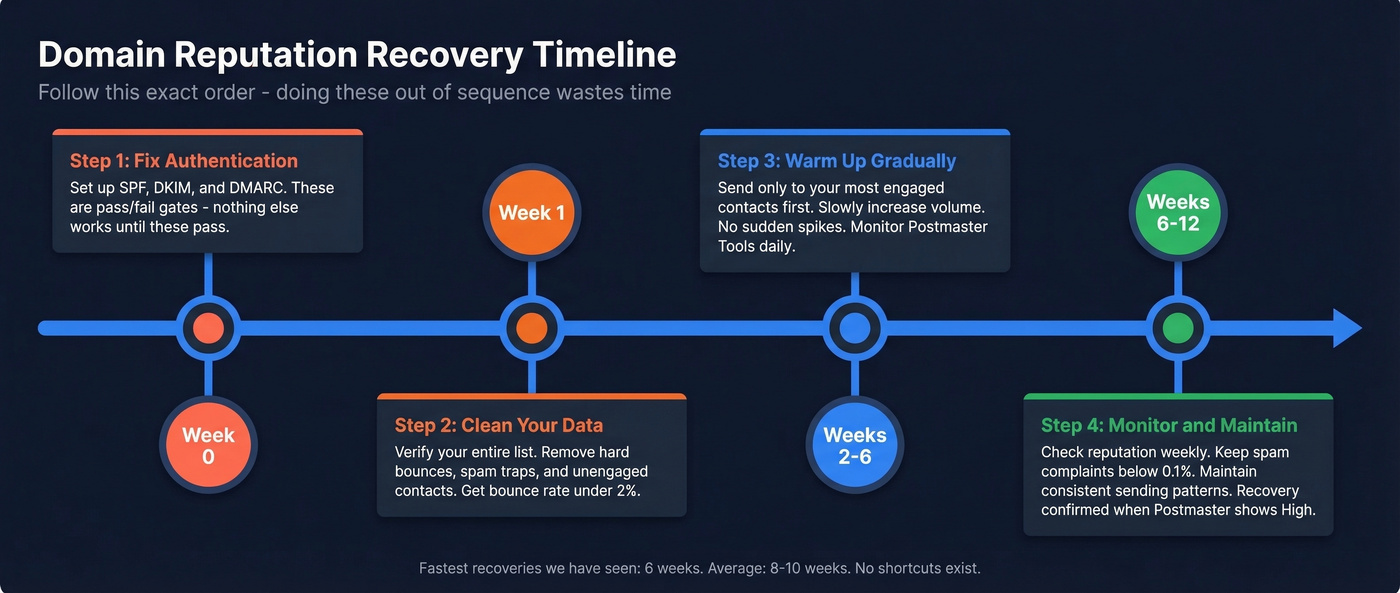
Let's be honest: most teams don't have a "deliverability problem." They have a data quality problem that manifests as poor deliverability. Fix the data and the reputation follows.
Fix Authentication First
- SPF: Include all legitimate sending sources. Stay under the 10 DNS lookup limit - exceeding it causes SPF failures (use these SPF record examples to sanity-check syntax).
- DKIM: Use 2048-bit RSA keys (here’s how to verify DKIM is working).
- DMARC: Start at
p=noneto monitor, move top=quarantine, thenp=reject(and make sure you understand DMARC alignment). - One-click unsubscribe: Required under RFC 8058 for bulk senders. Gmail and Yahoo enforce this.
Clean Your Data
If your bounce rate is above 2%, your list is actively damaging your email domain reputation with every send. Hard bounces tell providers you don't know who you're emailing. Spam traps are worse - silent killers that don't generate bounce notifications but trigger immediate reputation penalties.

Stack Optimize, an outbound agency running Prospeo-verified lists, maintains 94%+ deliverability with zero domain flags across all clients. That's not a coincidence - it's what happens when you verify before you send.
Your domain reputation test showed problems - now what? Teams that switch to Prospeo's 98% accurate, 7-day-refreshed data cut bounce rates from 35%+ to under 4%. Stack Optimize built a million-dollar agency with zero domain flags across all clients using Prospeo data.
Clean data is the fastest path from Bad to High in Postmaster Tools.
Warm Up and Rebuild
Send only to your most engaged segments first - people who've opened or clicked in the last 30 days. Increase volume by 20-30% per week over 4-6 weeks. Consider a subdomain strategy to isolate risk: one subdomain for marketing, another for transactional email. Monitor Postmaster Tools and SNDS weekly during recovery.
FAQ
How often should I check my domain reputation score?
Weekly during active campaigns, daily during recovery or after a major send. Google Postmaster Tools and Microsoft SNDS both have a 24-48 hour data lag, so checking more frequently won't surface new information.
Can I reset reputation by switching domains?
No. A new domain starts blank and requires a full warm-up from scratch. If you don't fix the root cause - bad data, high complaints, low engagement - you'll damage the replacement domain within weeks.
What's the minimum volume for Postmaster Tools data?
Roughly 100 emails per day to Gmail recipients. Below that threshold, Google won't display any reputation data. Use Sender Score and SNDS as primary indicators until you cross that volume.
Does domain reputation affect cold outreach?
Yes, and cold email is especially vulnerable. Every bounce and spam complaint hits harder without prior engagement history to offset it. Run a domain reputation test before launching any new cold campaign to establish your baseline.
Is a blacklist check the same as a domain reputation test?
No. Blacklists are binary - listed or not. Reputation is a spectrum reflecting months of sending behavior. A proper domain reputation test triangulates across Postmaster Tools, SNDS, and Sender Score, not just a blacklist scan.