

Email Address Lookup: Find, Verify, and Actually Deliver
You bought 2,000 "verified" emails from a well-known finder tool, loaded them into your sequencer, and watched your bounce rate climb past 20% by day three. Your domain reputation tanked. Your deliverability cratered. And the tool's dashboard still showed a green checkmark next to every single contact.
We've seen teams lose months of domain reputation over a single bad batch like this. The email address lookup problem nobody talks about honestly is that "verified" doesn't mean deliverable - it means the tool checked an MX record, got a response, and called it a day.
Real verification takes more steps than most tools bother with. The global inbox placement average sits around 84%, and Microsoft inboxes accept only 75.6% of emails even when the address is valid. Start with bad data and those numbers get much worse.
Here's how to find email data that actually holds up under pressure, which tools deliver, and the verification workflow that keeps your domain safe.
What You Need (Quick Version)
- For the biggest US database - Apollo. 250M+ contacts with unlimited email credits at $59/mo. Accuracy is solid but data freshness drops on older contacts.
- For international leads with automation - Snov.io. $39/mo for 1,000 credits, good non-US coverage, and built-in drip campaigns.
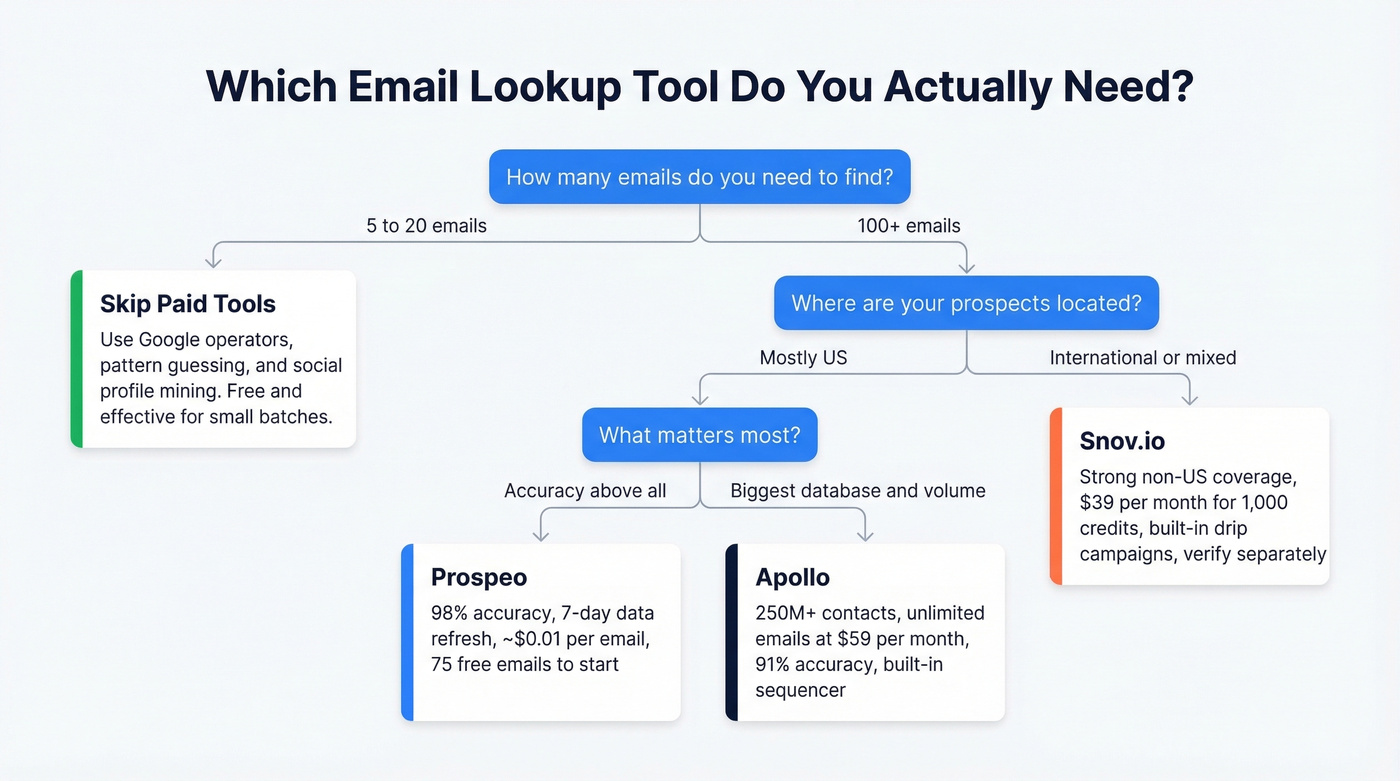
If you just need 5-10 emails right now, skip tools entirely. The free methods below work fine for small-volume research.
What Is Email Address Lookup?
Email address lookup covers two distinct workflows, and mixing them up leads to wasted time and money.
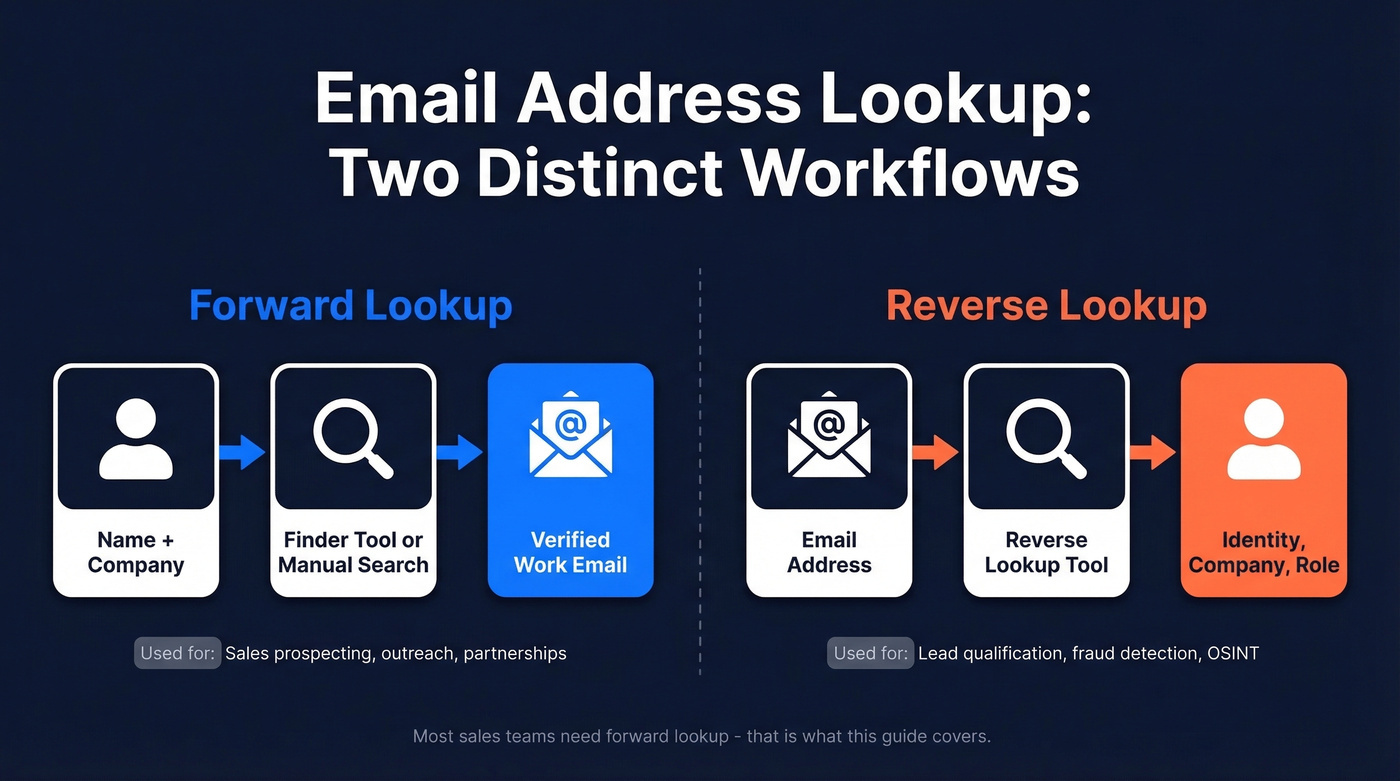
Forward lookup is what most people mean: you have a person's name and company, and you want their work email. This is the bread and butter of sales prospecting - name plus domain in, verified email out. Every tool in this guide handles forward lookup, though accuracy varies wildly depending on the provider. You'll sometimes see this called an email ID lookup, especially in developer or IT contexts where the goal is matching a specific user to a mailbox.
Reverse lookup goes the other direction: you have an email address and want to know who it belongs to. This matters for inbound lead qualification, fraud detection, and OSINT research. Corporate emails are relatively easy to attribute. Free webmail addresses (Gmail, Yahoo) are much harder, and most "free" reverse tools hit you with a paywall before showing useful results.
For the rest of this guide, we're focused on forward lookup - finding work emails for people you want to reach.
Free Methods to Find Any Email
Before you pay for anything, these four methods handle low-volume lookups surprisingly well.
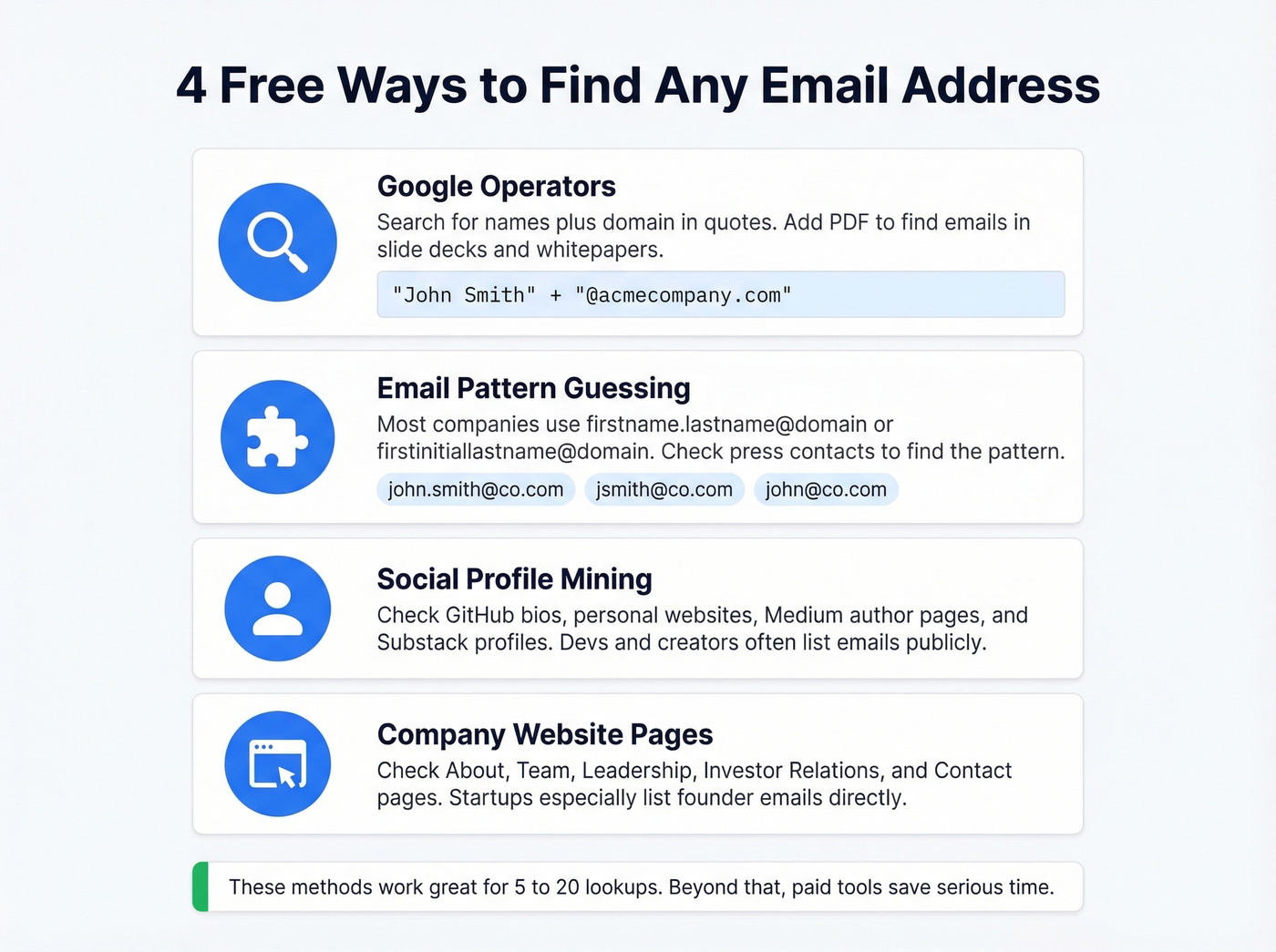
Google operators are the most underrated free method. The right search query surfaces emails buried in press releases, conference speaker lists, whitepapers, and company pages. Try "John Smith" + "@acmecompany.com" or "John Smith" + "email" + site:acmecompany.com. Adding "PDF" to the query often catches emails in downloadable case studies and slide decks that don't show up in normal results.
Email pattern guessing works because most companies use predictable formats: firstname.lastname@domain, firstinitiallastname@domain, or firstname@domain. Check a company's existing emails - press contacts, support addresses - to identify the pattern, then construct your target's address. You'll need to verify it before sending. Don't guess and blast.
Social profile mining catches what tools miss. Check professional profile bios, personal websites, GitHub accounts, and Medium/Substack author pages. Developers and content creators often list contact emails in places that finder tools don't index. Company "About" or "Team" pages are another goldmine, especially for startups where the founders' emails are right there on the page.
Company website contact pages sound obvious, but they're overlooked. Many B2B companies list department-specific or individual emails on their contact, leadership, or investor relations pages. A two-minute site search often beats a paid credit.
These methods work for 5-20 lookups. Beyond that, the time cost makes paid tools worthwhile.
Best Email Lookup Tools Compared
| Tool | Accuracy | Free Tier | Paid From | Best For |
|---|---|---|---|---|
| Prospeo | 98% | 75 emails/mo | ~$0.01/email | Accuracy + freshness |
| Apollo | 91% | Yes (limited) | $59/mo | Large US database |
| Snov.io | 79% | 50 credits/mo | $39/mo | International + automation |
| Hunter.io | 90% | 25 searches/mo | $49/mo | Verification layer |
| RocketReach | 83% | Limited | ~$53/mo | Limited-info lookups |
| GetProspect | 95% | 50 emails/mo | $49/mo | Mid-range balance |
| Anymail Finder | 77.5% | 20 searches | $49/mo | Pay-per-verified |
| Skrapp.io | 42.8% | 50 credits/mo | $49/mo | Budget option |
| Cognism | ~90% | None | ~$1,000+/mo | EU/UK data |
| Voila Norbert | ~36% | 50 searches | $49/mo | Pay-per-found |
Prospeo
Use this if you've been burned by "verified" emails that bounce. Prospeo runs a 5-step verification process - catch-all handling, spam-trap removal, honeypot filtering - that's the most thorough in the self-serve market. The 300M+ profile database with 143M+ verified emails refreshes every 7 days, which matters because the industry average is 6 weeks. That gap is where stale data lives and bounce rates spike.

The numbers back this up. Meritt, an outbound agency, saw their bounce rate drop from 35% to under 4% after switching. At ~$0.01 per email, the cost-per-usable-contact is lower than tools charging 3-5x more but delivering addresses that bounce. The Chrome extension (40,000+ users) lets you pull verified emails directly from professional profiles and company websites without switching tabs - exactly what you need for quick, individual lookups. The free tier gives you 75 emails per month to test before committing.
Skip this if you need a full-stack GTM platform with built-in sequencing and a dialer. Prospeo pairs with tools like Instantly, Lemlist, or Smartlead for the outreach layer, keeping data quality and sending separate by design.
Apollo
Use this if you want the biggest self-serve database in the US market. Apollo covers 250M+ contacts and offers unlimited email credits at $59/mo, which is hard to beat on volume. The Saleshandy benchmark put Apollo at 91% accuracy on a 100-contact test, and the built-in sequencer means you can find and email from one platform.
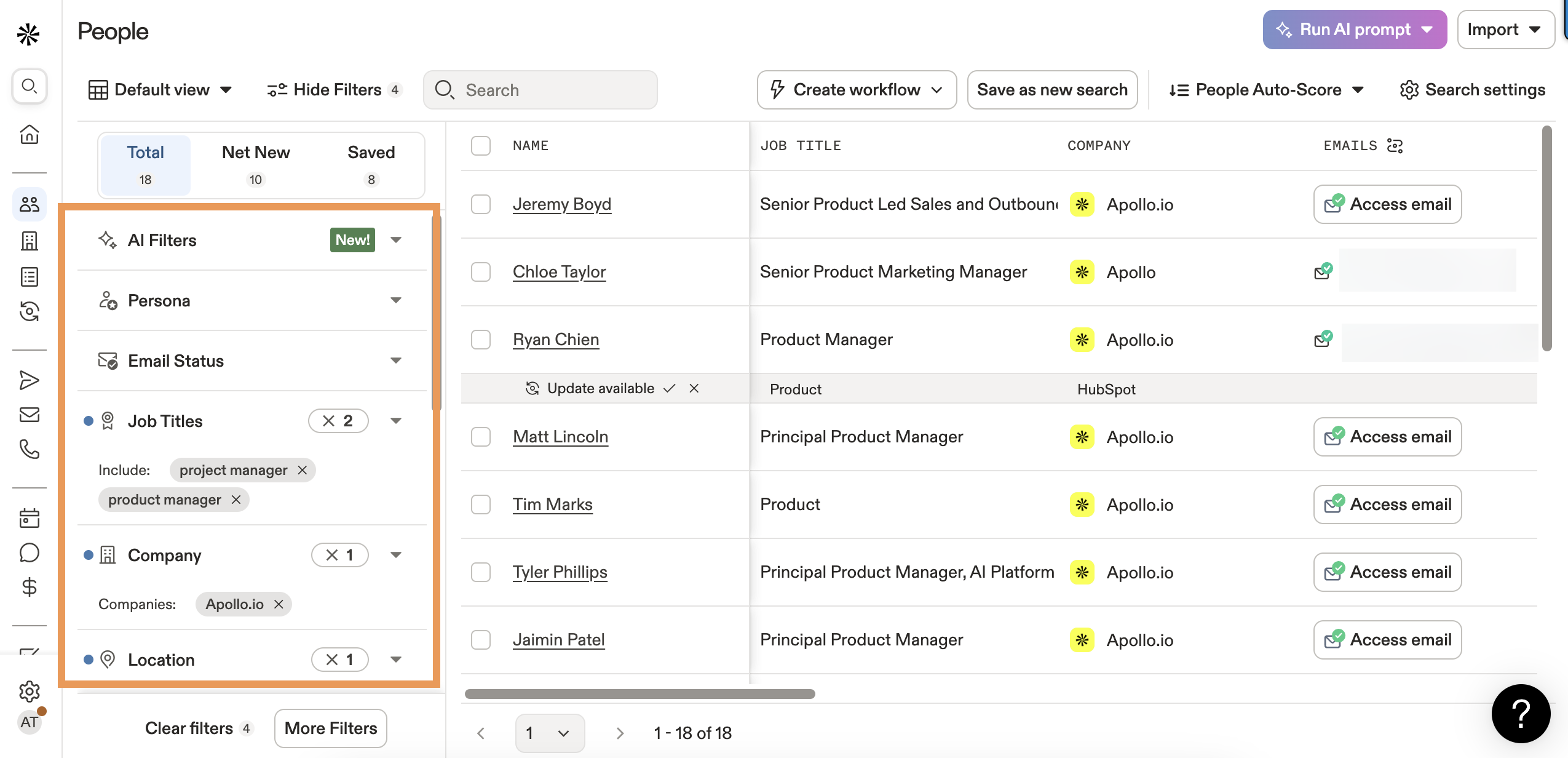
Skip this if you're prospecting internationally or targeting contacts who haven't changed roles recently. Reddit practitioners consistently flag Apollo's data freshness as a weak spot - "data feels bad sometimes" and "lots of bounces on older contacts" are common refrains on r/agency. Per-seat pricing also adds up fast once you're past 3-4 reps.
Snov.io
Use this if you're running outbound outside the US and want automation baked in. Snov.io gets consistent praise on Reddit for international coverage and affordable credits ($39/mo for 1,000). The built-in drip campaigns save you from buying a separate sequencer, which matters for lean teams.
Skip this if accuracy is your top priority. In Tomba's 5,000-search benchmark, Snov.io returned just 20.1% valid emails - the weakest performer in the test, particularly on company-name searches. That's a vendor-authored test, so validate with your own data before committing.
Hunter.io
Hunter is a strong verification-first tool, but it's not the biggest database play. The Saleshandy test showed 90% accuracy, while the Tomba benchmark showed 37.6% across 5,000 searches - a gap that reveals Hunter's strength as a verification layer, not a primary finder.
The free tier (25 searches/month) is genuinely useful for occasional lookups. Credit mechanics are transparent: 1 credit per found email, 0.5 credit per verification, and 1 credit covers up to 10 emails via Bulk Domain Search. Paid plans start at $49/mo. Use Hunter to verify emails found elsewhere - that's where it shines. (If you're comparing options, see our breakdown of Hunter alternatives.)
RocketReach
One Reddit user testing multiple tools chose RocketReach as the most accurate, reporting their bounce rate dropped significantly. It works well even with limited input info - just a name and rough company is often enough. The Saleshandy test confirmed this with 83% accuracy.
The tradeoff is price and scope. Plans run ~$53-99/mo. No built-in sequencer, no database browsing. It's a pure lookup tool - good at one thing, but you'll need other tools around it.
GetProspect
The Saleshandy benchmark put GetProspect at 95% accuracy - one of the highest scores in the test. Free tier gives you 50 emails/month plus 100 verification credits. Paid plans start at $49/mo for 1,000 emails. Lower brand recognition means fewer integrations and a smaller community, but the accuracy numbers speak for themselves.
Anymail Finder
Charges $0.01/email on pay-as-you-go or $49/mo for 1,000 verified emails - and only bills for verified results. The Tomba benchmark showed 77.5% accuracy. Fair pricing model, respectable results.
Skrapp.io
Free tier offers 50 credits/month, with paid plans from $49/mo for 1,000 emails. The Tomba benchmark showed 42.8% accuracy - near the bottom of the pack. Budget-friendly, but you'll absolutely need a verification layer on top.
Cognism
Enterprise-grade data focused on EU/UK markets. Pricing runs ~$1,000-3,000/mo for small teams. Worth evaluating if GDPR compliance and European mobile numbers are your primary need. Skip it if you're a startup or SMB - the price tag doesn't make sense below a certain deal size.
Voila Norbert
50 free searches to start, then $49/mo for 1,000 credits. Only charges for found emails. The Tomba benchmark showed 36% accuracy, so verify everything before sending.

You just read how most email lookup tools slap a green checkmark on addresses that bounce. Prospeo's 5-step verification - catch-all handling, spam-trap removal, honeypot filtering - delivers 98% accuracy on 143M+ emails, refreshed every 7 days.
Look up 75 emails free and see what actual verification looks like.
Accuracy Benchmarks You Can Trust
Most tool comparisons skip actual test data. Two independent benchmarks tell a consistent story.
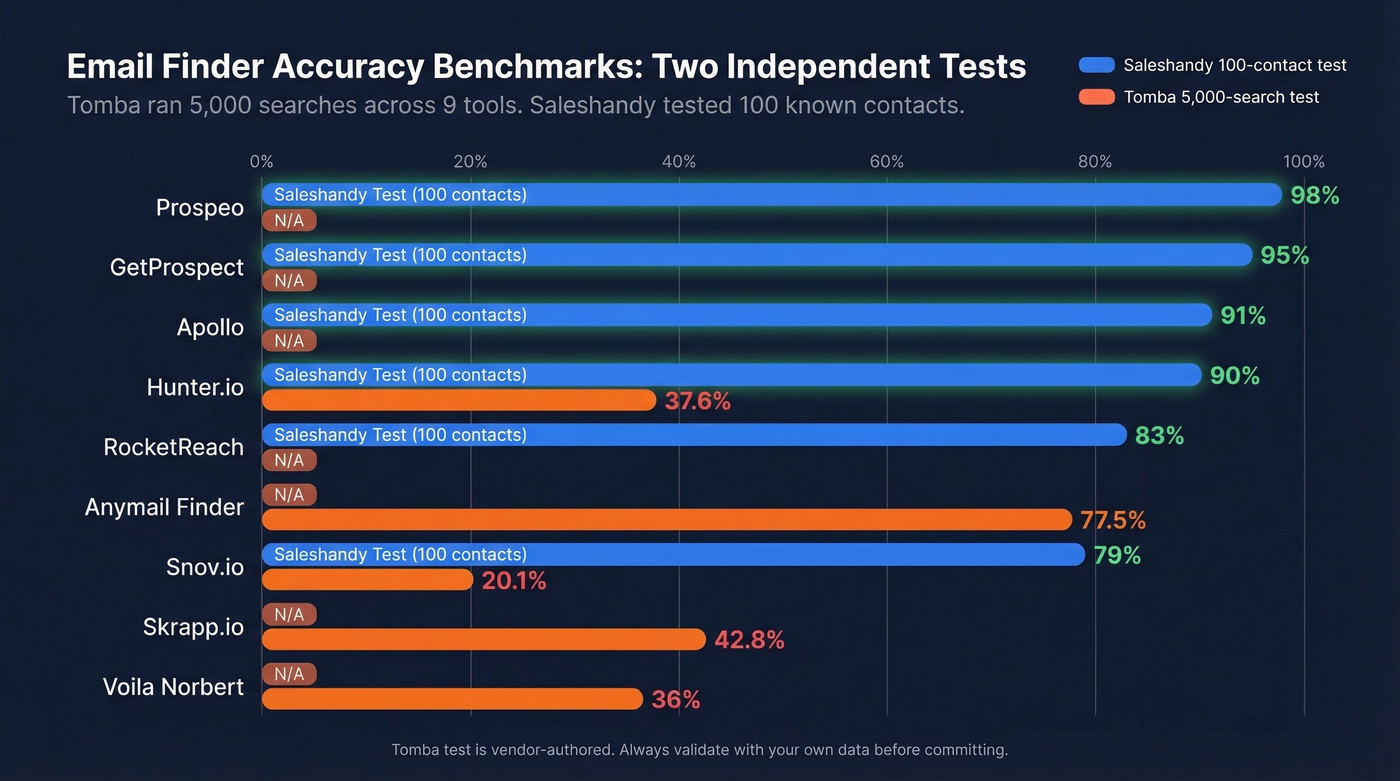
The Tomba 5,000-search test ran 2,500 domain-based and 2,500 company-name searches across 9 tools, verifying every result for deliverability. The Saleshandy 100-contact test checked found-rate against a known-good list.
| Tool | Tomba Test (5,000) | Saleshandy Test (100) |
|---|---|---|
| Apollo | - | 91% |
| GetProspect | - | 95% |
| Hunter.io | 37.6% | 90% |
| RocketReach | - | 83% |
| Snov.io | 20.1% | 79% |
| Anymail Finder | 77.5% | - |
| Skrapp.io | 42.8% | - |

A few things jump out. Accuracy varies from 20% to 95% depending on the tool and test methodology. Company-name searches are dramatically harder than domain-based searches. And the Tomba test is vendor-authored - transparent methodology, but worth validating against your own list.
Prospeo wasn't included in either third-party benchmark, but its 98% email accuracy - verified through a proprietary 5-step process across 143M+ emails - sits above every tool tested. In our experience, the gap between "verified" and "deliverable" is where most tools fall apart. Stop comparing database sizes. Start comparing bounce rates. That's the number that actually affects your pipeline. (If you want a broader view, compare providers in our guide to data enrichment services.)
Here's the thing: if your average deal size is under $5,000, you probably don't need the biggest database. You need the most accurate one. A 98% accuracy tool at $0.01/email will outperform a 79% accuracy tool with unlimited credits every single time, because the real cost isn't the subscription - it's the domain reputation damage from a 15% bounce rate.
How Email Lookup Pricing Works
"1,000 credits" means different things depending on the tool, and this is where teams get burned.
| Tool | Free Tier | Paid From | Credit Mechanics |
|---|---|---|---|
| Prospeo | 75 emails/mo | ~$0.01/email | Pay per verified email |
| Apollo | Limited | $59/mo | Unlimited email credits |
| Snov.io | 50 credits/mo | $39/mo | 1 credit = 1 action |
| Hunter.io | 25 searches/mo | $49/mo | 0.5 credit = 1 verify |
| RocketReach | Limited | ~$53/mo | Per-lookup pricing |
| GetProspect | 50 emails/mo | $49/mo | 1 credit = 1 email |
Hunter charges 1 credit to find an email but only 0.5 credit to verify one - and 1 credit covers up to 10 emails via Bulk Domain Search, making it efficient for domain-wide sweeps. Some tools charge for failed searches, meaning you burn a credit even when they can't find an address. Others charge for unverified results that bounce on first send.
The true cost isn't price-per-credit. It's price-per-usable-email. When you factor in wasted credits on bounced or unfound addresses, a tool at ~$0.01/email with 98% accuracy beats the industry average of $0.03-0.05 per usable contact. Apollo's unlimited credits at $59/mo look great until per-seat pricing pushes a 5-rep team past $300/mo.
The Verification Workflow That Protects Your Domain
Every email goes through verification before entering your sequence. No exceptions. Here's the workflow that keeps bounce rates under control.
1. Find. Use your lookup tool to generate a list of email addresses from names, companies, or professional profiles.
2. Verify. Run every address through a verification tool that checks MX records, SMTP response, catch-all status, spam traps, and honeypots. Most free validators only check MX records - that's why "verified" emails still bounce. (If you need a deeper playbook, start with our email deliverability guide.)
3. Clean. Remove invalid addresses, flag risky catch-all domains, and deduplicate. Roughly 20-30% of B2B domains use catch-all configurations, meaning they accept all incoming mail regardless of whether the specific address exists. A validator can't confirm deliverability with certainty on these. We recommend treating catch-all results as medium-risk until you've validated a sample by sending a small test batch and monitoring bounces. For more on list hygiene, see spam trap removal.
4. Warm up. If you're using a new sending domain, start at 20-30 emails per day and ramp gradually over 8-12 weeks. Skipping warm-up is the fastest way to land in spam, even with perfect data. (Related: email velocity and improve sender reputation.)
5. Send. Target a bounce rate under 3-5% for cold outbound. For context, opt-in marketing lists average 0.21% hard bounce per Mailchimp benchmarks. If you're consistently above 5%, your data source is the problem - switch tools or add a dedicated verification step before sending. And keep spam complaints below 0.3%; anything higher kills inbox placement fast. (More benchmarks: email bounce rate.)
Reverse Email Lookup
Reverse lookup - starting with an email address and identifying the person behind it - is a different beast entirely.
Corporate emails are relatively easy to attribute because the domain maps to a company and the format reveals the name. Free webmail addresses (Gmail, Yahoo, Outlook personal) are much harder. A reverse search on a corporate domain usually returns the person's name, title, and company, while the same query on a Gmail address often returns nothing useful.
The reality: most "free" reverse email lookup tools are paywalled. They'll show you a teaser - "We found results!" - then charge for the full report. The consensus on r/OSINT is that truly free options are rare. Epieos is a commonly mentioned option, but coverage is inconsistent. Reverse Contact is another dedicated tool that enriches via real-time OSINT rather than a stored database.
If reverse lookup is your primary need, expect to pay. For occasional lookups, manual research - searching the email in quotes on Google, checking social profiles - often works faster than dedicated tools.
Legal Compliance Checklist
Cold emailing is legal if you're compliant. The penalties for non-compliance are severe enough to take seriously.
- CAN-SPAM (US): No misleading headers, include a physical address, provide opt-out, and process unsubscribe requests within 10 business days. Penalty: up to $50,120 per violation per email.
- GDPR (EU/UK): Requires explicit consent or legitimate interest. B2B prospecting generally falls under legitimate interest, but you must document your basis. Penalty: up to EUR 20M or 4% of global turnover.
- CASL (Canada): Requires express or implied consent. Unsubscribe links must remain functional for 60 days. Penalty: up to $10M per violation.
The B2B vs B2C distinction matters. B2B cold email under legitimate interest is standard practice across most jurisdictions. B2C cold email without consent is where you get into trouble. When in doubt, include an unsubscribe link, use your real business address, and honor opt-outs immediately. (Related: Is it illegal to buy email lists?.)
Bad email lookups cost more than credits - they cost domain reputation. Meritt cut their bounce rate from 35% to under 4% with Prospeo. At ~$0.01 per verified email, you pay less and actually land in inboxes.
Find emails that deliver, not just emails that exist.
FAQ
Is email address lookup legal?
Yes. B2B email lookup is legal under CAN-SPAM, GDPR (legitimate interest basis), and CASL when you follow opt-out rules and include required disclosures like a physical address. The lookup itself carries no penalty; non-compliance with sending rules does. Include an unsubscribe link, honor opt-outs within 10 business days, and document your legitimate interest basis for GDPR.
What's a good bounce rate for cold email?
Under 3-5% for cold outbound lists. Opt-in marketing lists average 0.21% hard bounce per Mailchimp benchmarks, but cold lists run higher because you're working with unconfirmed addresses. If you're consistently above 5%, switch data providers or add a dedicated verification step before sending.
When should I upgrade from free to paid?
Free tiers (25-75 lookups/month) cover occasional research - checking a handful of prospects before a meeting or verifying a conference contact list. Once you're sending 100+ cold emails per week, a paid plan ($39-59/month) is essential for volume, accuracy, and proper verification. The cost of a bounced campaign far exceeds the tool subscription.
How do I verify a lookup result before sending?
Run every found email through a verification tool that checks MX records, SMTP response, catch-all status, spam traps, and honeypots. Most free validators only check MX records, which catches invalid domains but misses inactive mailboxes. Look for multi-step verification with catch-all detection and honeypot filtering - those steps separate "looks valid" from "will actually deliver."
Can I look up email addresses in bulk?
Yes. Most paid tools support bulk lookup via CSV upload or API. Upload a list of names and domains, and the tool returns matched, verified emails. Always run a verification pass after the bulk find - even tools with high accuracy rates produce some undeliverable results at scale, and a 2% error rate on 10,000 contacts still means 200 bounces that can damage sender reputation.