

Email Deliverability Solutions: The 3-Layer Stack You Actually Need in 2026
17% of cold emails never reach the inbox. Not bounced - silently routed to spam or promotional tabs where nobody looks. And 70% of senders don't even use [Google Postmaster Tools](https://gmail.com/postmaster/) to monitor what's happening.
Here's the thing: most deliverability advice starts with warmup tools and authentication records. That's backwards. The root cause is almost always bad data, and no amount of DKIM configuration fixes a list full of spam traps. We've spent years watching teams throw money at warmup services while ignoring the garbage contact lists feeding their campaigns - and it never works.
This guide breaks down the email deliverability solutions that actually move the needle, organized into the three layers you should fix in order. If you want the broader framework and diagnostics, start with our email deliverability guide.
Our Picks for 2026
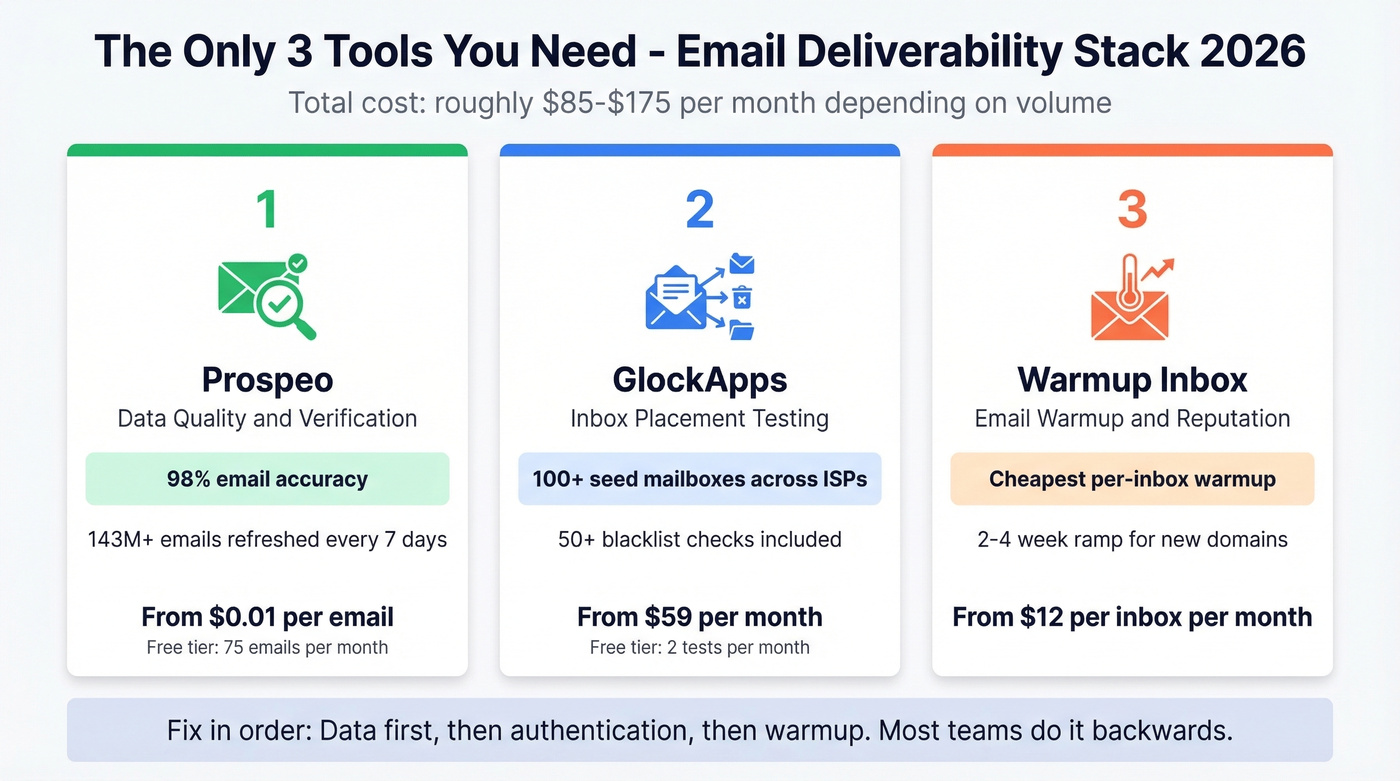
You need three tools, not seventeen. One for clean data, one for testing, one for warmup. The stack runs roughly $85-$175/mo depending on verification volume.
| Need | Pick | Why |
|---|---|---|
| Data quality & verification | Prospeo | 98% email accuracy, spam-trap removal, ~$0.01/email |
| Inbox placement testing | GlockApps | Seed-list testing from $59/mo, free tier available |
| Email warmup | Warmup Inbox | $12/inbox/month or $15/inbox/month on annual Basic |
Most teams chase warmup tools and authentication tweaks when their real problem is a garbage list. Fix your data first. If your bounce rate drops below 4%, you'll find that half your "deliverability problems" vanish without touching a single DNS record (see email bounce rate benchmarks and fixes).
Deliverability vs. Delivery Rate
These aren't the same thing, and confusing them is how teams convince themselves everything's fine while half their emails rot in spam.
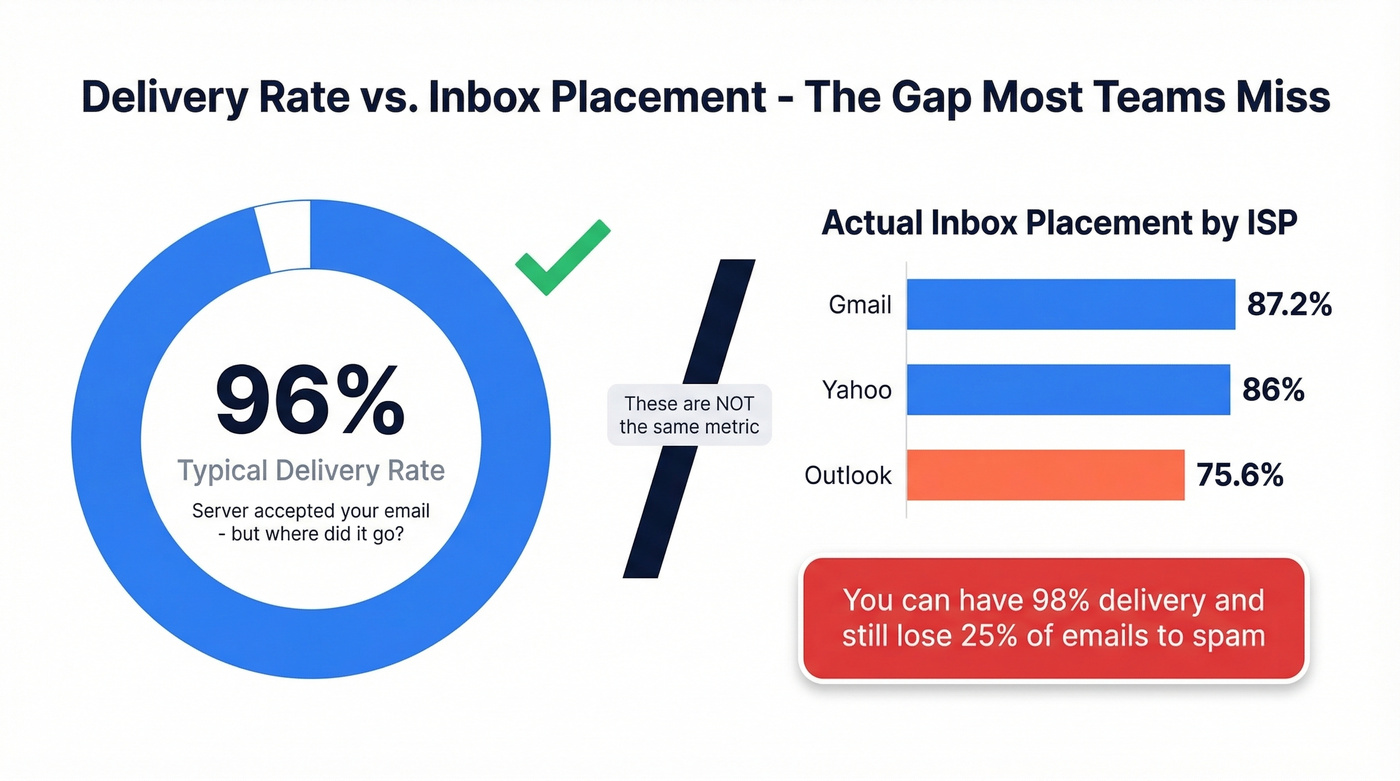
Delivery rate is typically 92-98% - it just means the receiving server accepted your message. Inbox placement measures whether that message actually landed in the primary inbox, and that number is much lower. Validity benchmarks put Outlook around 75.6%, Gmail at 87.2%, and Yahoo at 86%. You can have a 98% delivery rate and still lose a quarter of your emails to spam folders, which is why tracking only delivery rate gives you a dangerously incomplete picture. (More detail: Deliverability vs. Delivery Rate.)

17% of cold emails never reach the inbox - and bad data is the #1 reason. Prospeo's 5-step verification removes spam traps, honeypots, and catch-all risks before they torch your domain. Teams like Snyk cut bounce rates from 35-40% to under 5% and generated 200+ new opportunities per month.
Start with 75 free verified emails - no card, no contract, no bounced sends.
The 3-Layer Deliverability Stack
Every deliverability problem traces back to one of three layers: data quality, authentication, or inbox reputation. Fix them in that order.
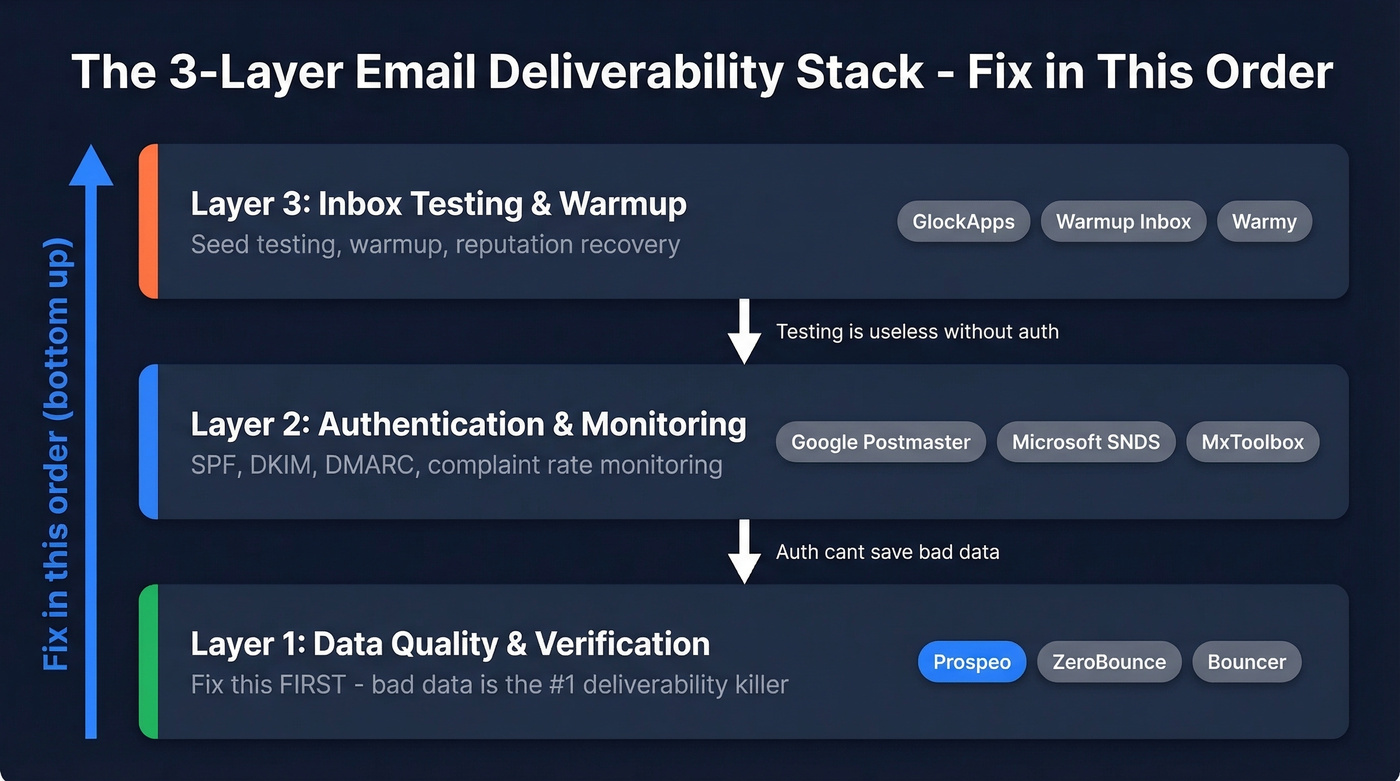
Layer 1 - data quality - is the one every other guide skips. They jump straight to SPF records and warmup tools. But if you're sending to invalid addresses and spam traps, no amount of authentication saves you.
Feature Matrix
| Capability | Layer | Tools |
|---|---|---|
| Email verification & list cleaning | 1 - Data Quality | Prospeo, ZeroBounce, Bouncer |
| SPF / DKIM / DMARC setup & monitoring | 2 - Authentication | Google Postmaster, Microsoft SNDS, MxToolbox |
| Blacklist monitoring | 2 - Authentication | GlockApps, MxToolbox, ZeroBounce |
| Inbox placement (seed testing) | 3 - Testing | GlockApps, Mailgun Optimize, Everest |
| Email warmup | 3 - Reputation | Warmup Inbox, Warmy, Folderly |
| Competitor benchmarking | 3 - Testing | Everest |
Layer 1: Data Quality & Verification
Prospeo
Use this if you're running outbound and need verified emails that won't torch your domain. Prospeo's 5-step verification process includes catch-all handling, spam-trap removal, and honeypot filtering - the three things that actually matter for deliverability. Email accuracy runs at 98% across 143M+ verified emails, with the entire database refreshing every 7 days.
The results speak for themselves. Meritt dropped from 35% bounce to under 4% after switching. Snyk's 50-person AE team went from 35-40% bounce to under 5%, generating 200+ new opportunities per month. Stack Optimize built to $1M ARR while maintaining 94%+ deliverability and zero domain flags across all clients.
Prospeo integrates natively with Smartlead, Instantly, Lemlist, Salesforce, and HubSpot. It's self-serve and GDPR compliant. The free tier gives you 75 verified emails per month to test. Paid plans run ~$0.01 per email with no contracts.
If you're building lists from multiple sources, pair verification with data enrichment services so you’re not sending to partial or outdated records.
Skip this if you only need inbox placement testing or warmup - this solves the data layer, not the monitoring layer.
ZeroBounce
ZeroBounce bundles email validation with basic deliverability monitoring, making it a decent two-in-one for teams that want fewer tools. Validation starts at $18/month for 2,000 credits. The Deliverability Suite adds inbox placement testing and blacklist monitoring from $49/month.
The trade-off is cost at scale. Credit-based validation pricing climbs fast once you're verifying thousands of emails monthly, and the deliverability monitoring isn't as deep as what you'd get from GlockApps. For occasional list cleaning plus light monitoring, it works. For high-volume outbound, you'll outgrow it.
Bouncer
Budget verification. Pay-as-you-go from $8 per 1,000 credits, with a Deliverability Kit starting at $25/month. Good enough for occasional list cleaning on smaller sends.
If you’re comparing options in this category, see our Bouncer alternatives.
Your deliverability stack is only as strong as Layer 1. Prospeo refreshes 143M+ verified emails every 7 days - 6x faster than the industry average - so your lists never go stale. At ~$0.01 per email, it costs 90% less than ZoomInfo with 98% accuracy vs. their 87%.
Stop warming up domains that are sending to dead addresses.
Layer 2: Authentication & Monitoring
If you haven't set up authentication properly, nothing else matters. Here's the checklist:
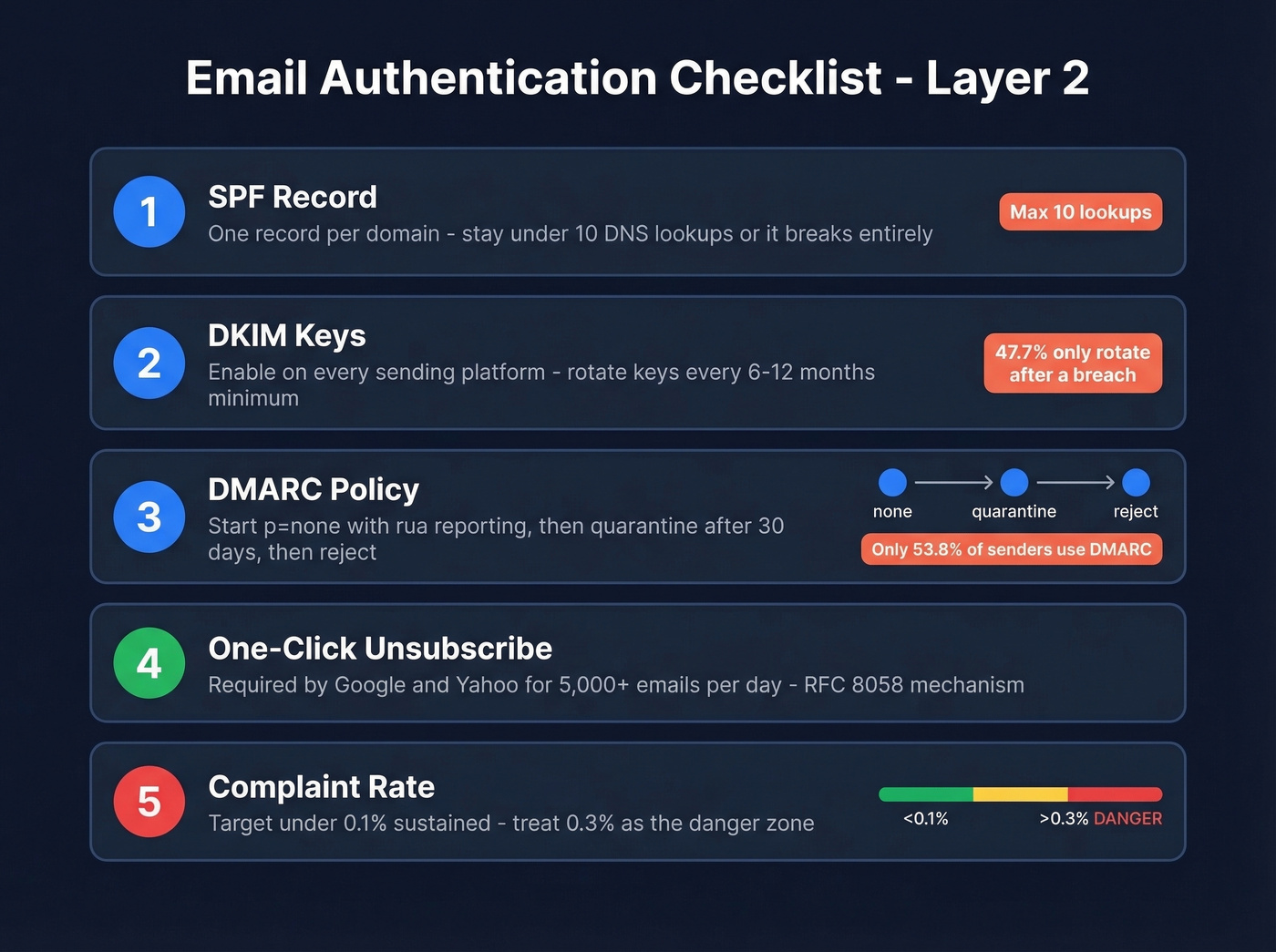
- SPF: One record per domain. Include only active senders. Stay under the 10 DNS lookup limit - exceeding it breaks your authentication entirely. (Need syntax help? See SPF record examples.)
- DKIM: Enable on every sending platform. Rotate keys every 6-12 months minimum. 47.7% of senders only rotate after a security incident - don't wait for a breach. If you want a quick audit, use this guide on how to verify DKIM is working.
- DMARC: Start with
p=noneandruareporting. After 30 days of clean data, move toquarantine, thenreject. Only 53.8% of senders use DMARC at all, so setting it up puts you ahead of half the market. (Deep dive: DMARC alignment.) - One-click unsubscribe: Google and Yahoo require this for bulk senders (5,000+ emails/day) via the RFC 8058 mechanism. Implement both the List-Unsubscribe header and a one-click flow.
- Complaint rate: Aim for under 0.1% sustained. Treat 0.3% as the danger threshold - spikes above it trigger throttling or blocking.
Free Tools for This Layer
Google Postmaster Tools monitors Gmail reputation, spam rate, and authentication status. Free and essential - if you aren't using it, start today. Microsoft SNDS does the same for Outlook domains. MxToolbox handles free DNS and authentication diagnostics for SPF, DKIM, and DMARC records; their paid Delivery Center runs $129/month for ongoing monitoring.
Layer 3: Inbox Testing & Warmup
GlockApps
GlockApps is the default inbox placement tester, and for good reason. It sends your email to a seed list of around 100 mailboxes across major ISPs and shows you exactly where each one lands - inbox, spam, promotions, or missing entirely. It also checks against 50+ blacklists.

Treat seed tests as directional, then validate with real campaign metrics. We use them as early-warning signals, not definitive verdicts. G2 rates GlockApps 4.1/5 across 26 reviews, with users flagging a learning curve and limited reporting depth as the main downsides.
Pricing: Free tier gives you 2 tests per month plus 10,000 DMARC checks. Essential runs $59/mo, Growth $99/mo, Enterprise $129/mo.
Use this if you're sending cold email and need to know your actual inbox placement before scaling volume. Skip it if you're only sending transactional email through a major ESP - they handle most of this internally. If content is the variable you’re testing, pair this with an email spam checker.
Warmup Inbox
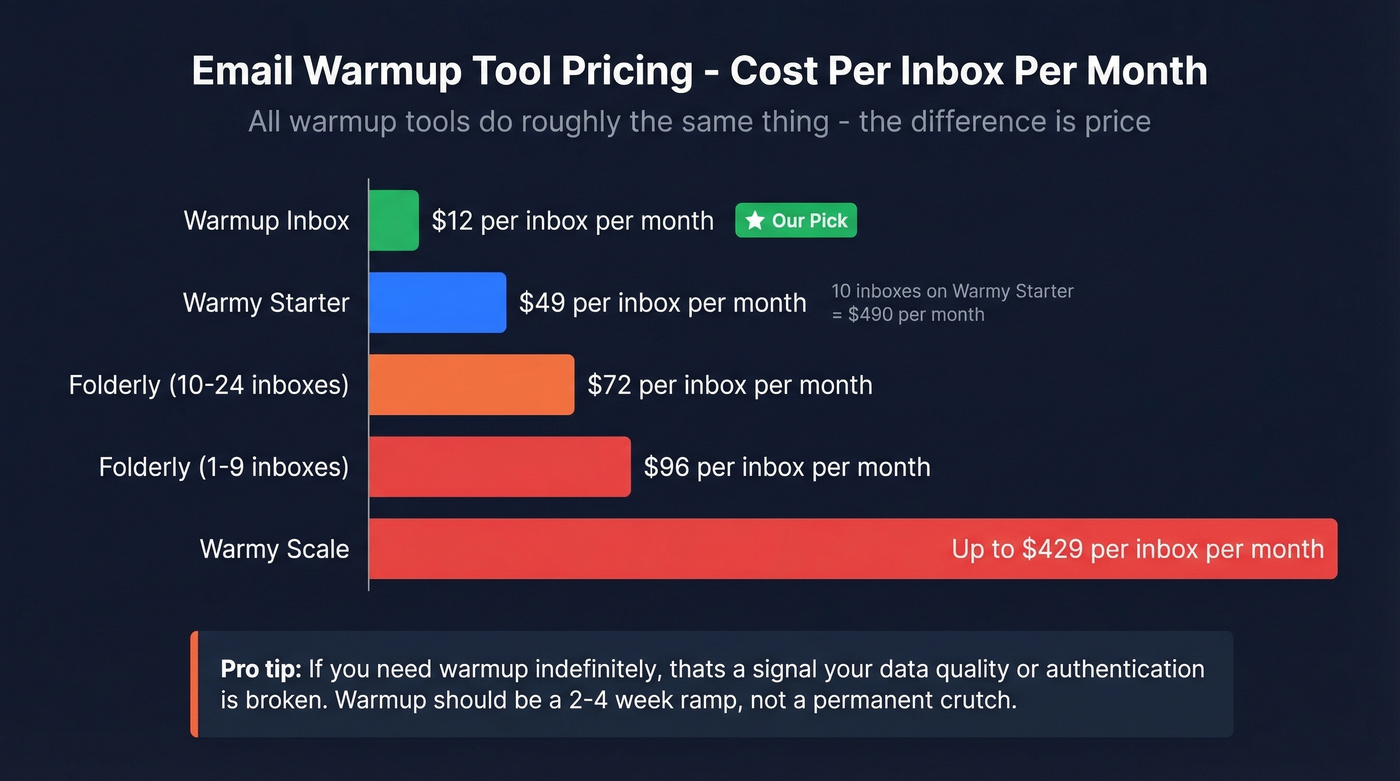
All warmup tools do roughly the same thing: send and receive emails between a network of inboxes to build sender reputation. The difference is price. Warmup Inbox starts at $12 per inbox per month, compared to Folderly at $96/mailbox or Warmy starting around $49/inbox. The value gap is enormous.
In our experience, warmup is a 2-4 week ramp for new domains - not a permanent crutch. If you need aggressive warmup indefinitely, that's a signal your data quality or authentication is broken. Fix those first. (Related: how to improve sender reputation.)
Use this for spinning up new sending domains or recovering from reputation damage. Skip it if your established domains already have clean sender scores.
Warmy
Warmy is the feature-rich warmup option: AI-driven warmup schedules, deliverability dashboards, and template testing. The 7-day free trial with no card required makes it easy to evaluate.
Pricing commonly ranges ~$49-$429/inbox/month, with 15-20% annual discounts available. Ten mailboxes on the Starter plan alone runs roughly $490/month. That's real money for what's essentially an automated email exchange.
Skip this if you're running more than 3-4 sending inboxes - the per-inbox model becomes prohibitive fast.
Mailgun Optimize
Solid inbox testing and monitoring from the Sinch ecosystem. Pilot plan at $49/month, Starter at $99/month, with a 1-month free trial. The testing features are comparable to GlockApps, and the integration is useful if you're already on Mailgun for transactional email.
One cautionary note: a Reddit user described unexplained validation spikes - 10 million on Christmas Day, then another 6 million shortly after - that led to a disputed ~$30K invoice. Watch your usage dashboards and account access closely.
Validity Everest
The enterprise play. Everest scores 4.2/5 on G2 across 189 reviews - the largest sample of any tool here. It offers inbox placement testing, competitor benchmarking, and reputation monitoring across ISPs.
Elements starts at $20/month but is extremely limited. The useful tier, Elements Plus, jumps to $525/month. Professional and Enterprise plans run $10K-$100K+/year.
Use this if you're an enterprise sender doing 500K+ emails/month and need competitive intelligence. For startups and agencies, GlockApps gives you 80% of the value at 10% of the cost.
Folderly
At $96/mailbox/month for 1-9 mailboxes, dropping to $72 for 10-24, Folderly's pricing is hard to justify. Users flag that onboarding takes time and support can be slow. Unless you have a specific enterprise need, Warmup Inbox does the same job for a fraction of the cost.
What We Left Out (On Purpose)
This guide covers solutions for outbound sales and marketing teams. We deliberately excluded developer sandboxes like Mailtrap, rendering/QA tools like Litmus and Email on Acid (they test how emails look, not where they land), ESPs like Postmark, and spam filter testing tools like SpamAssassin. All useful in their own context - just not for the deliverability stack we're building here.
Pricing Comparison
| Tool | Starting Price | Free Tier | Billing Model |
|---|---|---|---|
| Prospeo | ~$0.01/email | 75 emails/mo | Per email |
| GlockApps | $59/mo | 2 tests/mo | Per plan |
| Warmup Inbox | $12/inbox/mo | No | Per inbox |
| ZeroBounce | $18/mo (2K credits) | No | Per credit |
| Bouncer | $8/1K credits | No | Per credit |
| Warmy | ~$49/inbox/mo | 7-day trial | Per inbox |
| Mailgun Optimize | $49/mo | 1-mo trial | Per plan |
| Everest | $525/mo (practical) | No | Per plan/custom |
| Folderly | $72-$96/inbox/mo | No | Per inbox |
| Google Postmaster | Free | Yes | Free |
| Microsoft SNDS | Free | Yes | Free |
| MxToolbox | Free (basic) | Yes | Free/per plan |
2026 Benchmarks
Here's where your numbers should land. If you're below these ranges, start with Layer 1 and work up.
| Metric | Benchmark |
|---|---|
| Delivery rate | 92-98% |
| Inbox placement | 75-87% |
| Open rate | 15-28% |
| Reply rate | 1-8% |
| Meeting conversion | 0.2-2% |
ISP-specific inbox placement: Outlook 75.6%, Gmail 87.2%, Yahoo 86%. DMARC adoption reached 53.8% in the most recent measurement, up from 42.6% the year before - progress, but nearly half of senders still aren't using it.
If you’re scaling volume, also watch your email velocity so you don’t trip ISP throttles.
FAQ
What's the difference between deliverability and delivery rate?
Delivery rate (92-98%) measures whether the server accepted your email. Inbox placement measures whether it reached the primary inbox instead of spam. You can have 98% delivery and still lose 25% of emails to junk folders. Always track both.
Do I need a warmup tool?
For new domains or domains recovering from reputation damage, yes - run warmup for 2-4 weeks before scaling sends. For established domains with clean data and proper authentication, warmup is usually unnecessary. Warmup Inbox at $12/inbox/month is the most cost-effective option we've found.
Can any tool guarantee inbox placement?
No. Inbox placement depends on sender reputation, list hygiene, content, and ISP algorithms - factors no single tool controls. What the best tools guarantee is data accuracy or uptime SLAs. Treat any vendor promising guaranteed inbox rates as a red flag.
What are Google and Yahoo's bulk sender requirements?
SPF + DKIM + DMARC (minimum p=none), one-click unsubscribe via RFC 8058, spam complaint rate below 0.1%, and TLS encryption. These apply to senders exceeding 5,000 emails per day. Non-compliance triggers throttling or outright blocking.