

Email Delivery: What It Means, Why It's Harder, and How to Fix It in 2026
Your delivery rate says 97%. Your reply rate says otherwise. Replies have cratered, meetings are down, and your ESP dashboard shows nothing wrong. This is the silent failure mode of email delivery - and it's far more common than most teams realize. A Mailjet survey found that 88% of senders couldn't correctly define what "delivery rate" even measures. Most assumed it meant "landed in the inbox." It doesn't.
That gap between what senders think delivery means and what it actually measures is costing teams pipeline every single day.
What You Need (Quick Version)
- Delivery ≠ inbox placement. A 98% delivery rate can hide 40% spam placement. "Delivered" just means the server accepted it - not that anyone saw it.
- Authentication is now mandatory for bulk senders. Google, Yahoo, and Microsoft enforce authentication requirements for bulk mail, and non-compliant senders get rejected outright.
- Most problems start with bad data. Sending to invalid addresses causes hard bounces, which tank your sender reputation, which kills everything downstream.
What Is Email Delivery?
Email delivery measures one thing: did the receiving mail server accept your message? That's it. It doesn't tell you whether the email landed in the inbox, the spam folder, the Promotions tab, or some quarantine purgatory. It just tells you the server didn't reject it.
The formula is straightforward:
Delivery Rate = (Emails Delivered ÷ Emails Sent) × 100
A "good" rate sits above 95%. Most legitimate senders hit 97-99% without much effort. And that's exactly why it's a misleading metric - it looks healthy even when your emails are rotting in spam folders.
Here's the thing: "delivered" includes every email that didn't hard bounce. If Gmail accepts your message and immediately routes it to spam, that counts as delivered. If Outlook drops it into Junk, delivered. Your ESP reports a 98% rate, you feel great, and meanwhile half your audience never sees a single message.
Delivery rate alone is nearly useless as a performance metric. The metric you actually care about - inbox placement rate - is the one almost no ESP shows you by default.
Deliverability vs. Delivery
These two terms sound interchangeable. They aren't. Confusing them is the single most common mistake in email operations, and it leads teams to optimize the wrong metric entirely.
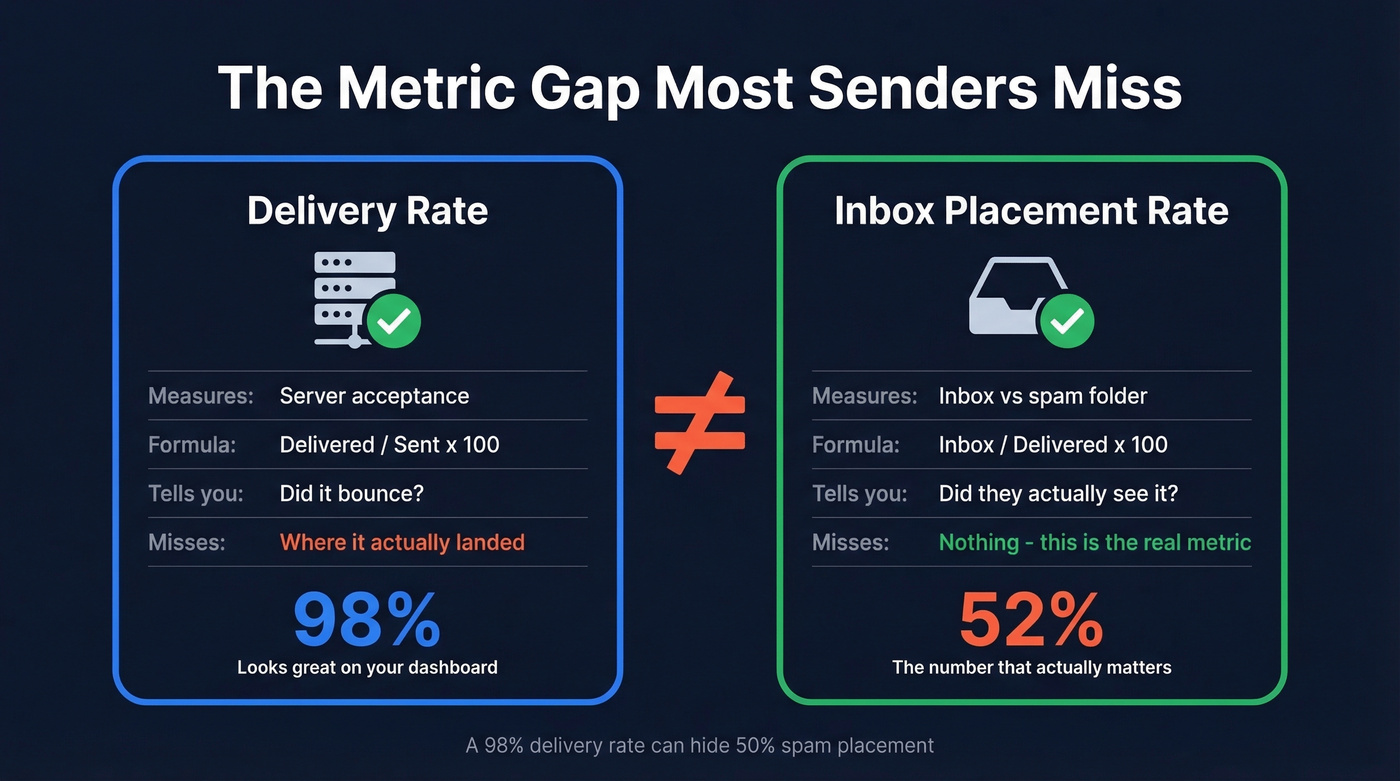
| Delivery Rate | Inbox Placement Rate (Deliverability) | |
|---|---|---|
| Measures | Server acceptance | Inbox vs. spam |
| Formula | Delivered ÷ Sent × 100 | Inbox ÷ Delivered × 100 |
| Tells you | "Did it bounce?" | "Did they see it?" |
| Misses | Where it landed | Nothing - it's the real metric |
Delivery is a binary gate: the server either accepted the message or it didn't. Deliverability is what happens after that gate - inbox, spam, Promotions tab, or silently discarded.
Your ESP shows delivery rate because it's easy to measure. Inbox placement rate requires seed testing or panel data, which most platforms don't offer natively. We've seen teams celebrate a 99% delivery rate while their actual inbox placement sat below 50%. The dashboard looked perfect. The pipeline didn't.
How the Sending Process Works
When you hit send, your email doesn't teleport to the recipient's inbox. It passes through a chain of systems, each with its own job and its own opportunity to reject or reroute your message.
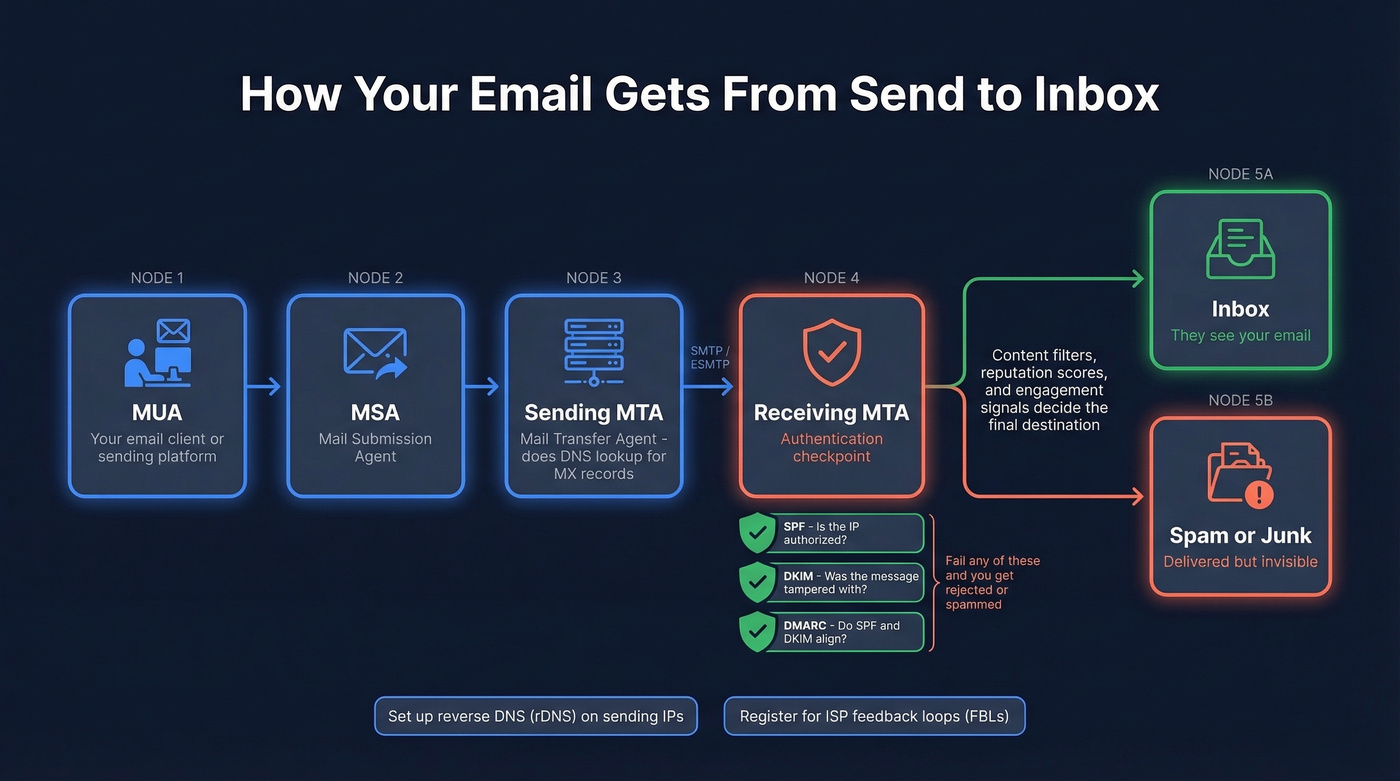
The journey starts at your Mail User Agent (MUA) - your email client or sending platform. From there, the message hits a Mail Submission Agent (MSA), which hands it to a Mail Transfer Agent (MTA). The MTA performs a DNS lookup to find the recipient domain's MX records, then relays the message to the receiving MTA. Finally, a Mail Delivery Agent (MDA) drops it into the recipient's mailbox. This entire process runs on SMTP, a protocol dating back to 1982, with the modern ESMTP extension handling authentication and other features we rely on today.
The critical moment happens at the receiving MTA. Authentication checks fire: SPF verifies the sending IP is authorized, DKIM confirms the message wasn't tampered with, and DMARC ties both together with a policy. If any of these fail, the receiving server can reject the message outright, route it to spam, or quarantine it. Content filtering, reputation scoring, and engagement signals layer on top - but authentication is the first gate.
Two operational details that often get overlooked: make sure your sending IPs have proper reverse DNS (rDNS) configured, and sign up for ISP feedback loops (FBLs) so you receive complaint notifications directly.
What Changed in 2024-2026
Authentication rules shifted dramatically starting in February 2024, and they haven't stopped tightening since. Google and Yahoo moved first, Microsoft followed in May 2025, and the net effect is that unauthenticated bulk email is effectively dead.
| Provider | Auth Required | DMARC | Unsubscribe | Enforced |
|---|---|---|---|---|
| SPF + DKIM (all senders) | Bulk (≥5k/day) | RFC 8058 | Feb 2024 | |
| Yahoo | SPF + DKIM (all senders) | Bulk (≥5k/day) | RFC 8058 | Feb 2024 |
| Microsoft | SPF + DKIM (bulk) | Bulk (p=none min) | Visible unsubscribe option | May 2025 |
| Apple | SPF + DKIM (bulk) | Bulk (p=none min) | Visible unsubscribe option | - |
The split matters: if you send fewer than 5,000 emails per day, you need SPF or DKIM to pass. Cross that threshold, and you need SPF and DKIM to pass, plus DMARC at minimum p=none with alignment.
Google's spam complaint guidance is explicit - stay below 0.10%, and never exceed 0.30%. Cross that line and you'll see error code 550 5.7.26 on your rejections. Microsoft's approach is harsher: starting May 2025, non-compliant bulk mail gets rejected outright, not just filtered to Junk.
These four providers account for roughly 90% of a typical B2C email list. If you aren't compliant with all four, you aren't really sending email. You're sending bounces.

Most delivery problems start with bad data - invalid addresses cause hard bounces that tank your sender reputation. Prospeo's 5-step verification and 7-day data refresh cycle mean every email you send hits a real, verified inbox. 98% accuracy. Under 4% bounce rates for teams who switched.
Stop debugging your ESP when the real problem is your contact list.
2026 Inbox Placement Benchmarks
The numbers paint a sobering picture. GlockApps' Q1 2025 data shows inbox placement dropped across nearly every ESP and mailbox provider compared to the prior year - this is the latest comprehensive data heading into 2026.
Inbox Placement by ESP (Q1 2024 → Q1 2025)
| ESP | Q1 2024 | Q1 2025 | Change |
|---|---|---|---|
| Google Workspace | 50.10% | 45.65% | -4.45 |
| SendGrid | 45.30% | 35.31% | -9.99 |
| Amazon SES | 54.90% | 40.30% | -14.60 |
| Mailgun | 53.80% | 26.05% | -27.75 |
| Klaviyo | 56.90% | 43.66% | -13.24 |
| MailChimp | 51.93% | 32.30% | -19.63 |
SendGrid's deliverability has fallen off a cliff. Mailgun's is worse. MailChimp dropped nearly 20 points.
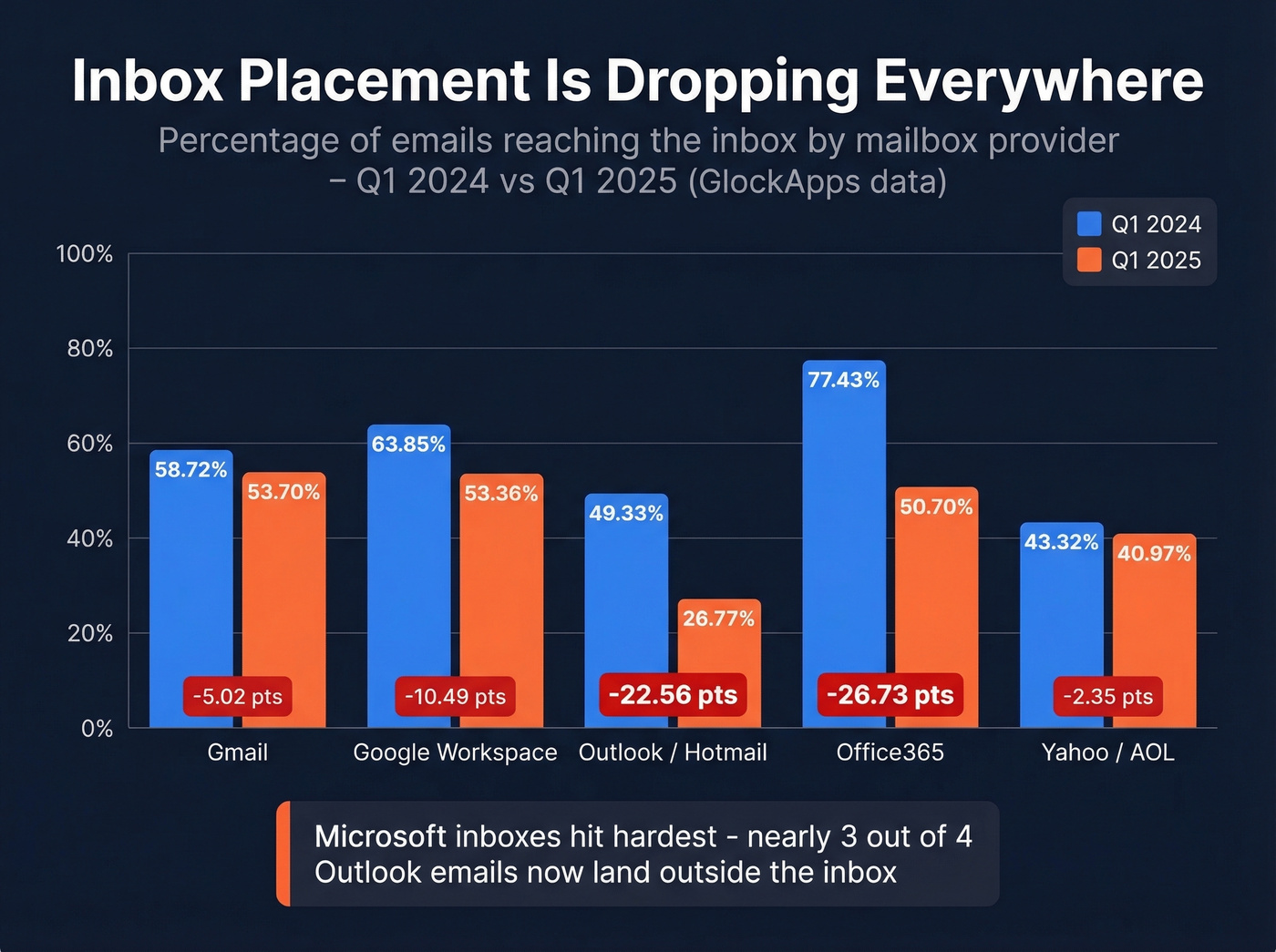
Inbox Placement by Mailbox Provider (Q1 2024 → Q1 2025)
| Provider | Q1 2024 | Q1 2025 | Change |
|---|---|---|---|
| Gmail | 58.72% | 53.70% | -5.02 |
| Google Workspace | 63.85% | 53.36% | -10.49 |
| Outlook/Hotmail | 49.33% | 26.77% | -22.56 |
| Office365 | 77.43% | 50.70% | -26.73 |
| Yahoo/AOL | 43.32% | 40.97% | -2.35 |
Microsoft inboxes were the hardest hit. Outlook/Hotmail dropped to 26.77% inbox placement - meaning nearly three out of four emails land outside the inbox. Office365 fell 27 points. These aren't marginal declines. They're structural.
Inbox Placement by Sending Volume (Q1 2024 → Q1 2025)
| Volume Tier | Q1 2024 | Q1 2025 | Change |
|---|---|---|---|
| 1-10k | 49.40% | 50.20% | +0.80 |
| 10k-50k | 61.89% | 56.69% | -5.20 |
| 50k-200k | 65.01% | 58.29% | -6.72 |
| 200k-1,000k | 49.77% | 60.96% | +11.19 |
| 1,000k+ | 49.98% | 27.63% | -22.35 |
The takeaway: scale amplifies every data quality and authentication problem you have.
The good news: Q4 2025 data shows a rebound. Gmail climbed +5.91 points, Office365 recovered +7.34 points, and high-volume senders saw significant improvements across the board. The tightening has stabilized, and senders who adapted are recovering.
For benchmarking your own performance:
- Excellent: 95%+ inbox placement
- Good: 85-94%
- Average: 83-85% (the global average across ESPs sits around 83%)
- Poor: Below 80%
Why Emails Fail to Deliver
Bounces: Hard vs. Soft
A hard bounce means permanent failure - the address doesn't exist, the domain is dead, or the server has explicitly blocked you. Remove hard bounces immediately. There's no retry strategy that fixes a nonexistent mailbox.
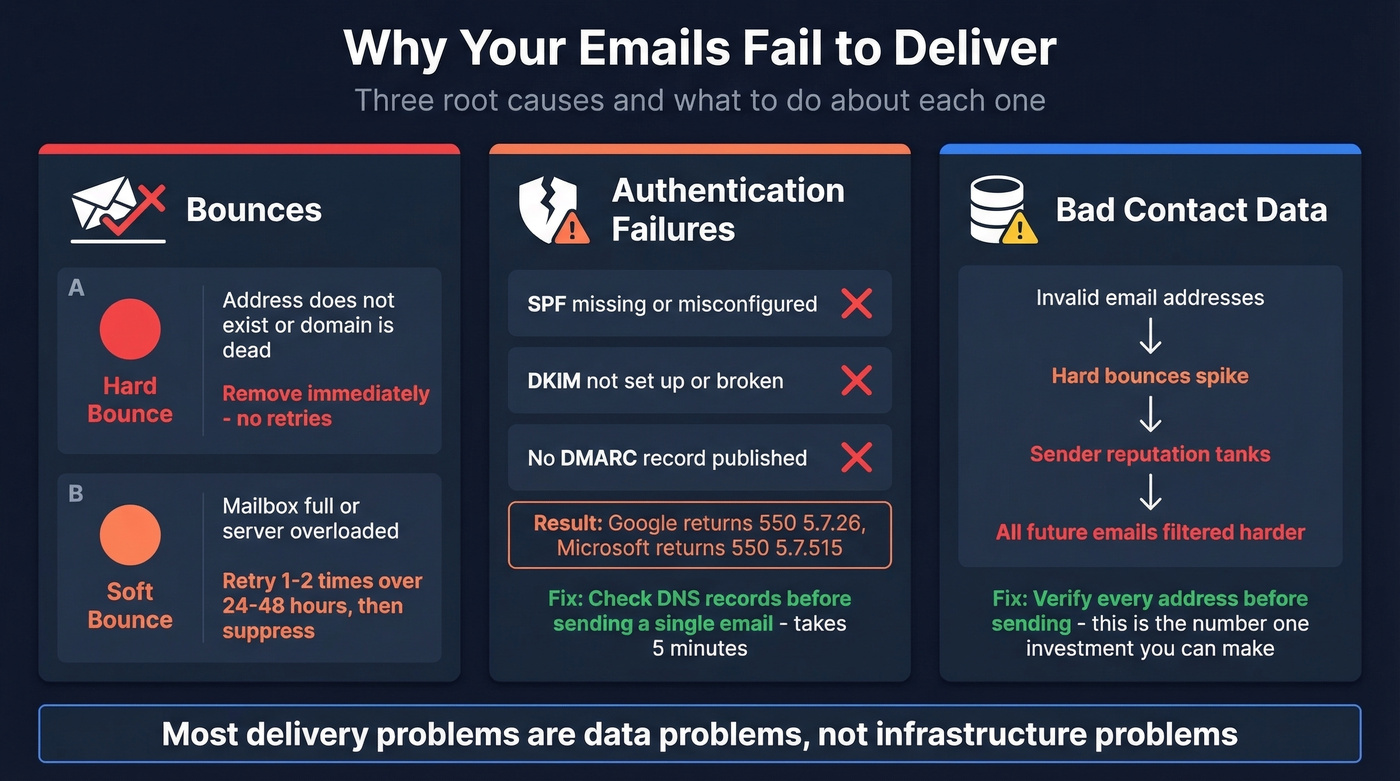
Soft bounces are temporary: the recipient's mailbox is full, the server is overloaded, or there's a transient outage. Retry once or twice over 24-48 hours. If it soft bounces three times across separate sends, treat it as a hard bounce and suppress it. Hard bounces get removed the moment they happen. Soft bounces get one or two chances. Anything else is reputation damage you're choosing to accept.
Authentication Failures
Missing or misconfigured SPF, DKIM, or DMARC records are now an instant path to rejection for bulk sending. Google returns error code 550 5.7.26. Microsoft returns 550 5.7.515 Access Denied. Neither is subtle about it.
Authentication failures are entirely preventable. They're configuration issues, not sending issues. Yet we still see teams running outbound campaigns on domains with no DMARC record, wondering why half their emails vanish. Check your DNS records before you send a single email. Tools like MxToolbox and EasyDMARC make this a five-minute job.
Bad Data - The Silent Killer
Look, most delivery problems are data problems, not infrastructure problems. The chain is predictable: bad contact data → hard bounces → reputation damage → delivery failure. Every invalid email you send teaches mailbox providers that you don't maintain your lists, and they respond by filtering everything harder.
This is the pattern that comes up constantly on r/Emailmarketing - senders watching replies crater with no bounce errors, because the damage is invisible until it's severe.
Verification matters more than any other single investment in your sending stack. Prospeo's 5-step verification catches invalid addresses, handles catch-all domains, removes spam traps, and filters honeypots - all before a single email leaves your system. The result is 98% email accuracy on a 7-day data refresh cycle, so you aren't just verifying once and hoping the data stays good.
The proof is in the numbers: Meritt went from a 35% bounce rate to under 4% after switching their data source. Stack Optimize maintains 94%+ deliverability across all client campaigns with bounce rates consistently under 3%.
Transactional Email Services Compared
If you're evaluating transactional sending platforms, here's what pricing and performance look like across the major players. Deliverability figures from EmailToolTester include inbox + tabs placement.
| Service | 10k/mo | 50k/mo | 100k/mo | Deliverability |
|---|---|---|---|---|
| SMTP2GO | $15 | $30 | $75 | 95.5% |
| Postmark | $15 | $55 | $115 | 93.8% |
| MailerSend | - | $30 | $60 | 86.8% |
| SendGrid | - | $19.95 | $34.95 | 82.0% |
| Amazon SES | $1 (PAYG) | $5 | $10 | 77.1% |
| Mailjet | $17 | $37 | $105 | 85.0% |
Mailtrap's independent inbox-only tests sharpen the picture: Postmark hits 83.3% inbox placement with only 0.9% missing, while SendGrid lands just 61% in the inbox with a staggering 20.9% going missing entirely.
Let's be honest: if your deal sizes are modest - say sub-$15k ACV - you probably don't need a premium ESP. But you absolutely need clean data feeding into whatever you use. A $15/month Postmark account with verified contacts will outperform a $200/month SendGrid setup running on a dirty list every single time.
If we had to pick three: Postmark for reliability, SMTP2GO for the best price-to-deliverability ratio, and Amazon SES for raw cost efficiency at scale. Skip SendGrid unless you have a specific reason to use it - its reputation has deteriorated significantly, and cheap doesn't help if a fifth of your emails vanish into the void.
Building Your Sending Stack
Under 20k Emails/Month
Start with the fundamentals. Verify your list before every campaign. Warm up new IPs and domains gradually - don't blast 10,000 emails from a fresh domain on day one. Authenticate everything: SPF, DKIM, and DMARC at minimum p=none. Run inbox placement tests with GlockApps or a similar tool to establish your baseline.
At this volume, most problems are self-inflicted. Bad lists, missing authentication, no warmup. Fix those three things and you'll clear 90%+ inbox placement without any fancy tooling.
20k-100k Emails/Month
Add mailbox rotation to distribute sending load across multiple addresses. Maintain a global suppression list that syncs across all your sending tools - nothing kills reputation faster than emailing someone who already bounced or unsubscribed on a different platform. Separate your transactional emails from marketing streams. Postmark is built specifically for this split, and it's worth the premium.
100k+ Emails/Month
At this scale, you need infrastructure discipline. Multi-domain sending pools prevent a single domain's reputation from tanking your entire operation. Strict throttling keeps you under provider rate limits. Automated blocklist monitoring catches problems before they cascade.
Continuous reputation monitoring through Google Postmaster Tools and Microsoft SNDS is non-negotiable. Check these dashboards weekly at minimum. At 100k+ volume, a reputation dip on Monday means thousands of missed inboxes by Friday.
Common Mistakes That Kill Email Delivery
These patterns destroy inbox placement over and over:
- No authentication. SPF + DKIM + DMARC takes 30 minutes to configure and prevents the majority of rejections.
- Purchased or scraped lists. Loaded with spam traps and invalid addresses. One bad list can damage a domain for months.
- No list hygiene. Remove inactive contacts after 90-120 days. If someone hasn't engaged in four months, they're hurting your reputation more than helping your pipeline.
- Mixing transactional and marketing on the same IP. A marketing campaign that spikes complaints drags your transactional sending down with it.
- No warmup. New domains and IPs need gradual volume ramps. Jumping from 0 to 10,000 emails triggers every spam filter in existence. (If you need a process, use an email warmup plan.)
- Ignoring spam complaints. Google's threshold is 0.10% ideal, 0.30% maximum. Monitor in Postmaster Tools and act immediately when it rises.
- No segmentation. Segmented campaigns convert 6-10x higher than generic blasts and generate fewer complaints because the content is actually relevant.
Testing and Monitoring
You can't improve what you don't measure, and delivery metrics from your ESP aren't enough. You need independent inbox placement data.
The core toolkit: GlockApps for seed-based inbox placement testing, Google Postmaster Tools for Gmail-specific reputation and spam rate data, Microsoft SNDS for Outlook/Hotmail reputation, MxToolbox for DNS and blocklist checks, and EasyDMARC for authentication monitoring and DMARC reporting. Sign up for ISP feedback loops to receive complaint notifications directly - most major providers offer them free.
One caveat that comes up constantly on Reddit: different testing tools give contradictory results. One says inbox, another says spam, a third says Promotions tab. This is a real limitation of seed-based testing - results vary by seed address, timing, and provider. In our experience, using at least two tools and averaging the results gets you close enough to act on. No single tool gives you the complete picture, but triangulating across two or three is how we've always approached it.
Inbox placement is dropping across every major ESP. The one variable you fully control? Data quality. Prospeo verifies 143M+ emails with catch-all handling, spam-trap removal, and honeypot filtering - so your sender reputation stays clean and your emails land where they belong.
Teams using Prospeo data see bounce rates drop from 35% to under 4%.
FAQ
What's a good email delivery rate?
Above 95% is the benchmark for a healthy sending rate, but this metric alone is misleading because it includes emails that landed in spam. Track inbox placement rate alongside it - aim for 85%+ inbox placement, which is the number that actually correlates with engagement and revenue.
What's the difference between delivery and deliverability?
Delivery means the receiving server accepted your message without bouncing it. Deliverability means it reached the inbox instead of spam. You can have a 99% delivery rate and terrible inbox placement if most accepted messages get filtered. Distinguishing these two metrics is essential for diagnosing where your funnel breaks.
Why are my emails going to spam despite a high delivery rate?
"Delivered" includes the spam folder - a high rate just means servers aren't rejecting your messages outright. Check sender reputation via Google Postmaster Tools, run inbox placement tests with GlockApps, and review SPF/DKIM/DMARC records for misconfigurations. Poor list hygiene is the most common root cause.
How does email verification improve delivery?
Sending to invalid addresses causes hard bounces, which directly damage sender reputation and trigger stricter filtering on future sends. Catching invalid addresses, spam traps, and honeypots before sending is how Meritt cut their bounce rate from 35% to under 4%.
Do I need DMARC for bulk sending?
Yes. Google, Yahoo, and Microsoft all require DMARC at minimum p=none for senders exceeding 5,000 emails per day as of 2024-2026. Even below that threshold, DMARC strengthens your authentication posture and protects your domain against spoofing - there's no reason to skip it.