

How to Check Mail Server Reputation in 2026 (and Fix It)
A RevOps lead we work with uploaded a purchased list of 8,000 contacts into their outbound sequences last quarter. No verification, no hygiene pass - just raw data straight into Instantly. Within 72 hours, bounce rate spiked to 12%, open rates cratered from 45% to 8%, and Google started routing their domain straight to spam. It took six weeks of warm-up to recover. Six weeks of dead pipeline because of one afternoon's shortcut.
That scenario plays out constantly, and it's almost always preventable. The fix starts with knowing where you stand - learning to check mail server reputation before the damage compounds.
What You Need (Quick Version)
If you only set up three monitoring tools, make them these:
- Google Postmaster Tools - the single most important free tool for monitoring Gmail deliverability signals
- MxToolbox - instant blacklist checks across 100+ lists
- Sender Score - aggregate IP reputation on a 0-100 scale
If you send meaningful volume to Outlook or Hotmail, add Microsoft SNDS. And before any of this matters, verify your contact list. Bad data is one of the biggest controllable causes of reputation damage - full stop.
What Is Mail Server Reputation?
Every email you send gets evaluated before it reaches the inbox. Mailbox providers like Gmail, Microsoft, and Yahoo assess your sending infrastructure, and that assessment determines whether you land in the inbox, the spam folder, or get rejected outright. Think of it as a credit score for your email domain and IP address.
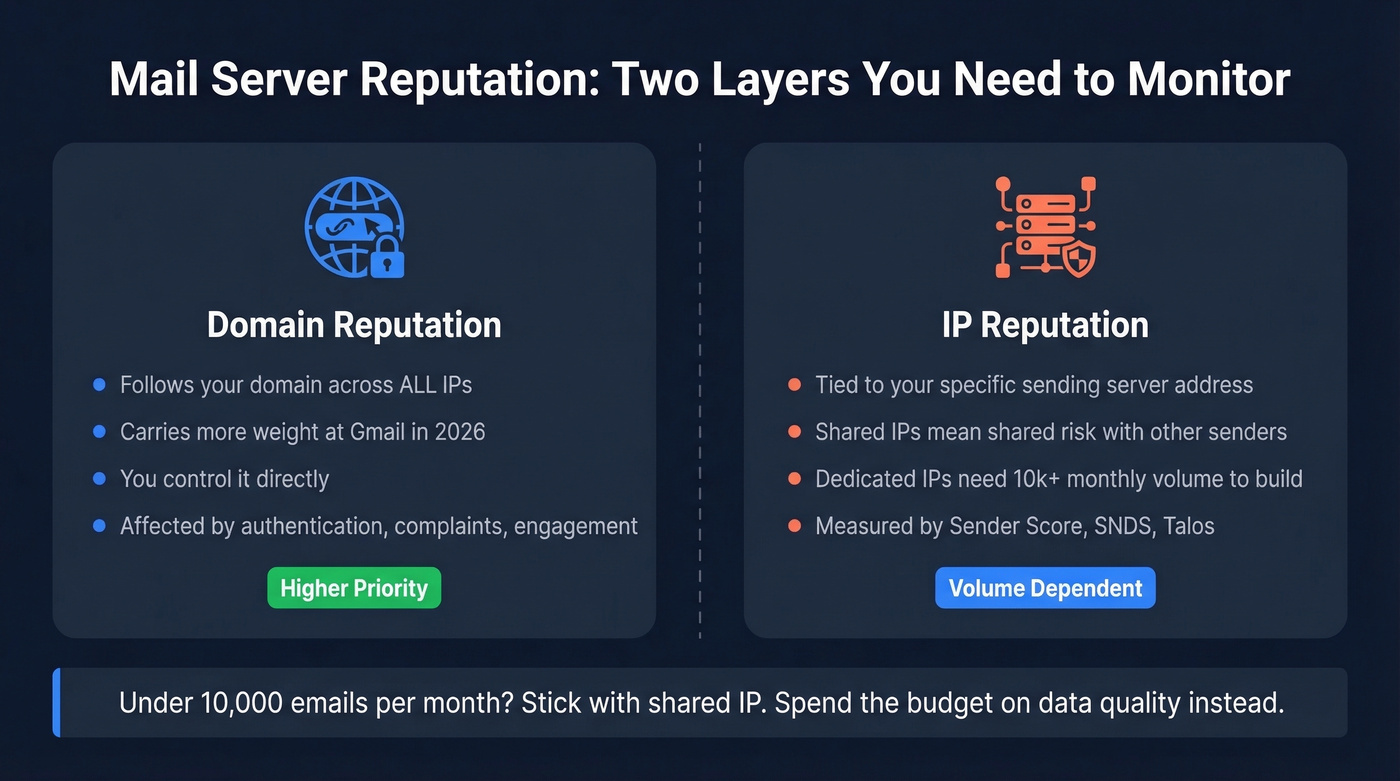
There are two distinct layers. Domain reputation follows your sending domain across any IP address you send from. IP reputation is tied to the specific server address. Both matter, but domain reputation carries more weight at Gmail in 2026.
If you're on a shared IP (standard with ESPs like Mailchimp or SendGrid), your reputation is partially at the mercy of other senders on that IP. Dedicated IPs give you full control but require enough volume to build a reputation in the first place.
Here's the thing: if your team sends under roughly 10,000 emails per month, you probably don't need a dedicated IP. Shared infrastructure with a reputable ESP is the practical choice. The money you'd spend warming up a dedicated IP is better spent on data quality.
Five Factors That Control Reputation
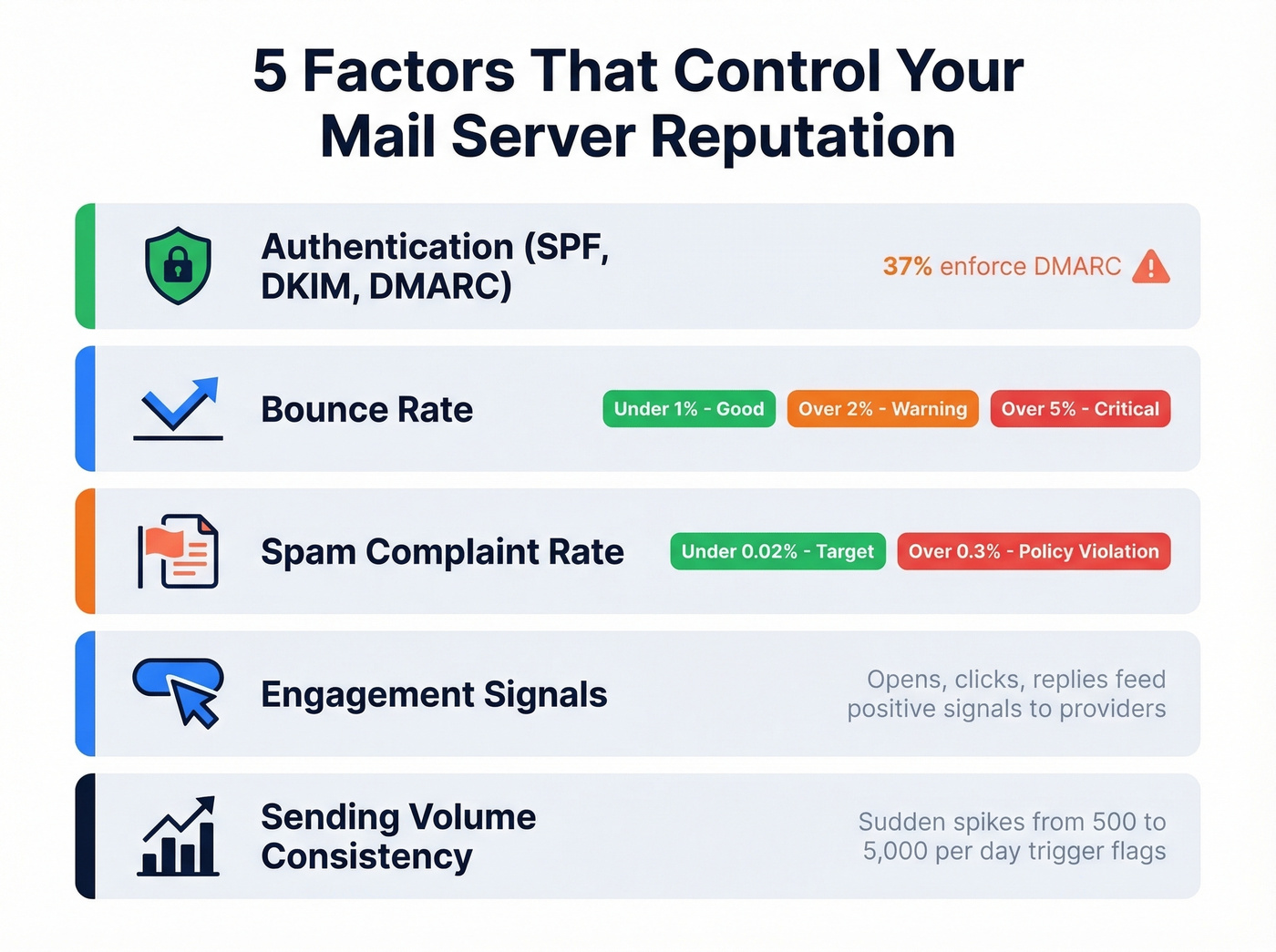
Your sender reputation isn't a mystery. Mailbox providers evaluate a handful of concrete signals, and you can measure every one of them.
Key Thresholds to Memorize
- Bounce rate: under 1% (above 2% = red flag, above 5% = serious trouble)
- Complaint rate: under 0.02% (Gmail/Yahoo ceiling: 0.3%)
- Google Postmaster spam rate: under 0.10% (above 0.30% = policy violation)
Authentication. SPF, DKIM, and DMARC aren't optional anymore. 66% of senders know they use both SPF and DKIM, but only 37% of DMARC users actually enforce with Reject or Quarantine policies. If you haven't set enforcement, you're leaving the door open for spoofing - and mailbox providers notice. (If you need a quick check, see verify DKIM and DMARC alignment.)
Bounce rate. Target under 1%. Anything above 2% triggers warnings. Above 5%, you're in serious deliverability trouble. If you want the deeper breakdown of codes and benchmarks, use this email bounce rate guide.
Spam complaint rate. Gmail and Yahoo enforce a hard ceiling at 0.3%. Cross it and you're looking at policy violations and potential blocking.
Engagement signals. Opens, clicks, and replies all feed positive reputation signals back to mailbox providers. Low engagement tells Gmail your recipients don't want your mail, and over time that means spam folder placement even for contacts who never complained. (For subject testing, pull from these email subject lines.)
Sending volume consistency. Sudden spikes kill reputation. If you normally send 500 emails a day and blast 5,000 on a Tuesday, every major mailbox provider will flag that pattern. Ramp gradually. Keep volume predictable - especially if you're managing email velocity across multiple inboxes.
The Complete Toolkit for Checking Mail Server Reputation
Eight tools cover the full picture. Here's what each one does, where it falls short, and what it costs.
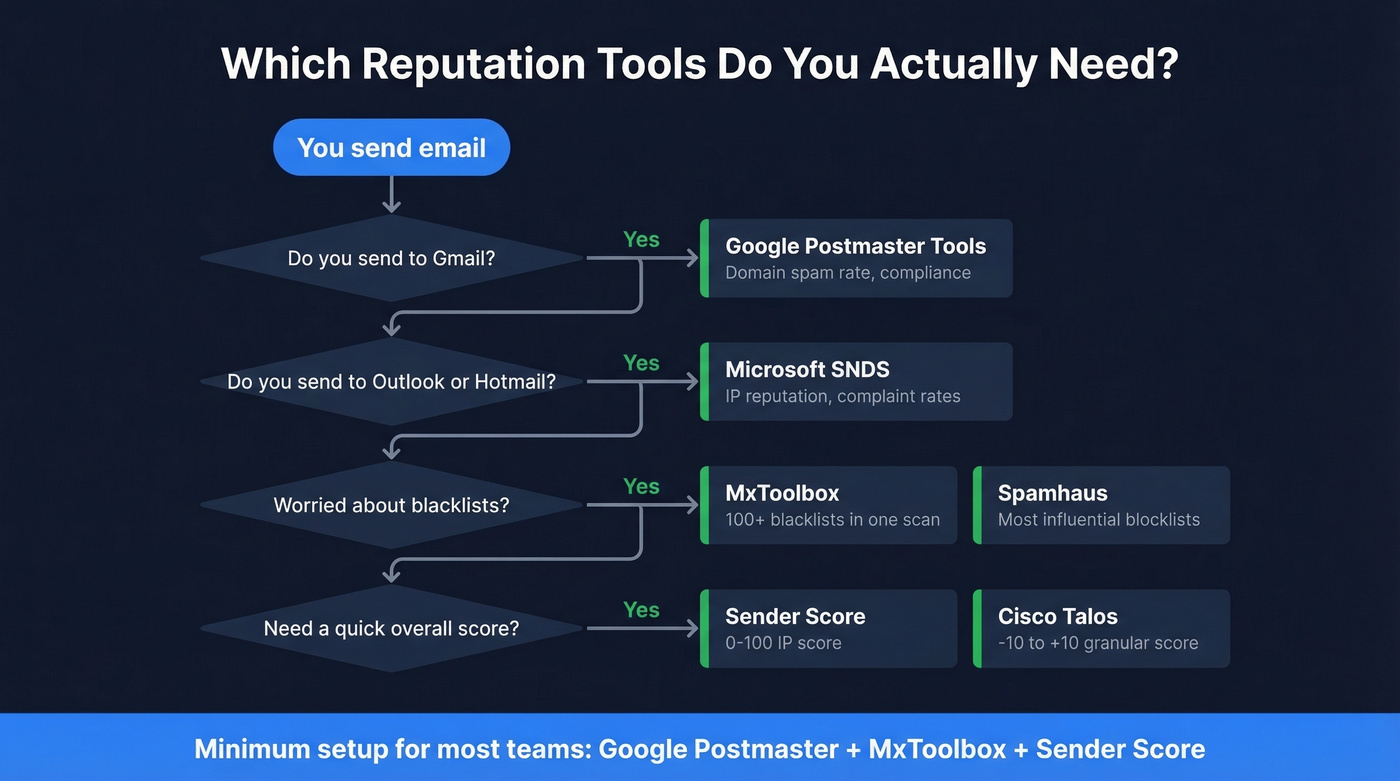
Google Postmaster Tools
This is the single most important reputation tool for anyone sending to Gmail addresses - which, for B2B outbound, is a huge chunk of your list. Google retired the old V1 interface in October 2025, and V2 centers on two primary views: Compliance Status and Spam Rate.
Compliance Status checks your SPF, DKIM, DMARC alignment, PTR/rDNS, TLS, and one-click unsubscribe implementation. Spam Rate reflects manual user spam reports - people clicking "Report Spam" on delivered inbox mail - not automatic filtering. That distinction matters: a low spam rate doesn't guarantee good inbox placement, but a high one guarantees problems.
Google recommends keeping spam rate below 0.10%. Above 0.30% triggers policy violations. Setup requires verifying domain ownership via DNS TXT record, then waiting 24-48 hours for data to populate. Free, authoritative, and there's no substitute.
Microsoft SNDS
Skip this if you don't send to Outlook or Hotmail addresses. But if you do, SNDS (Smart Network Data Services) is Microsoft's equivalent to Postmaster Tools - with some frustrating limitations.
The biggest: it's IP-based, not domain-based. If you're on shared infrastructure, you're seeing aggregate data for everyone on that IP. It also excludes Microsoft 365 enterprise traffic, which is a significant blind spot for B2B senders targeting corporate Outlook addresses. And you need to send at least 100 messages per day to an IP before SNDS shows meaningful data.
One real pain point we've hit: low-volume senders can still get blocked by Microsoft even with SPF/DKIM/DMARC configured correctly, and SNDS often won't show enough data to explain what's happening when you're below that volume threshold. A domain-level Microsoft equivalent to Google Postmaster Tools still doesn't exist.
What you do get is useful: color-coded reputation (green/yellow/red), spam complaint rates, spam trap hits, and RCPT vs DATA gap analysis. If your RCPT count is 1,000 but DATA is only 950, those 50 rejections tell you something's wrong. Free.
MxToolbox
Free for basic lookups, $129/mo for Delivery Center, $399/mo for Plus. For most teams, the free blacklist check plus Google Postmaster Tools covers 80% of what you need.

Punch in your domain or IP and MxToolbox scans 100+ blacklists simultaneously. It's the fastest way to answer "am I blacklisted?" - and that question is usually what sent you searching in the first place. The paid tiers add ongoing monitoring and alerting, but the free tier is genuinely useful on its own.
Sender Score
Validity's Sender Score assigns your sending IP a number between 0 and 100. The bands: 90-100 is excellent, 80-89 is good, 70-79 is fair, and below 70 means your deliverability is actively suffering. Free, takes seconds, gives you a single number to track over time. The limitation is that it's IP-only and updates aren't real-time - treat it as a trend indicator, not a live dashboard.
Spamhaus
If you're on a major Spamhaus blocklist, many providers will block or junk your mail. Spamhaus maintains some of the most influential blocklists in the email ecosystem, and most major mailbox providers check them. Their lookup tool at check.spamhaus.org covers common list types like SBL, XBL, PBL, and DBL. Free lookups; enterprise data feeds are available for high-volume senders. (If you need the step-by-step, see Spamhaus blacklist removal.)
Cisco Talos Intelligence
Talos provides a granular reputation score from -10 to +10, grouped into Good, Neutral, and Poor. The volume display trips people up - it uses a log-base-10 scale where 10 represents 100% of global email volume and each 1-point decrease means 10x less. So a volume reading of 5 means your IP sends roughly 0.001% of global email traffic. Volume is informational, not a reputation factor. Particularly useful for diagnosing issues with Cisco-powered email gateways, which are common in enterprise environments. Free.
Mail-Tester
Mail-Tester scores individual messages, not your server reputation overall. Send a test email to their generated address and get a spam score back. Useful for diagnosing content-level issues - subject lines, HTML structure, authentication headers - before a campaign goes live. Free tests available, with paid plans for higher usage. (Related: email spam checker.)
EasyDMARC
EasyDMARC offers a free IP and domain reputation check alongside its core product: DMARC monitoring and reporting. The free lookup works for a quick pulse check. Paid DMARC monitoring plans start around $35/mo and are worth it if you're managing multiple sending domains or subdomains and need aggregate DMARC reporting in one place.
Yahoo Sender Hub
For senders with meaningful Yahoo or AOL traffic, Yahoo Sender Hub provides domain and IP reputation data through a free dashboard. It's niche, but it fills a gap that no other tool covers.

That RevOps lead's 12% bounce rate? It started with unverified data. Prospeo's 5-step verification and 7-day data refresh keep bounce rates under 1% - the exact threshold mailbox providers demand. 98% email accuracy means your sender reputation stays clean.
Stop fixing reputation damage. Prevent it with verified data.
Tool Comparison at a Glance
Pick based on what you're actually trying to diagnose.
| Tool | Checks | Scoring | Price | Best For | Priority |
|---|---|---|---|---|---|
| Google Postmaster | Domain + spam rate | Compliance + % | Free | Gmail deliverability | Essential |
| MxToolbox | Blacklists (100+) | Listed/Not listed | Free-$399/mo | Blacklist monitoring | Essential |
| Sender Score | IP reputation | 0-100 scale | Free | Trend tracking | Recommended |
| Microsoft SNDS | IP reputation | Green/Yellow/Red | Free | Outlook/Hotmail | Recommended |
| Spamhaus | IP + domain blocks | SBL/XBL/PBL/DBL | Free (lookups) | Blocklist diagnosis | Situational |
| Cisco Talos | IP + domain rep | -10 to +10 | Free | Enterprise gateways | Situational |
| Mail-Tester | Message spam score | 0-10 per message | Free + paid | Pre-send testing | Situational |
| EasyDMARC | IP/domain + DMARC | Pass/Fail + score | Free-~$35/mo | DMARC management | Situational |
| Yahoo Sender Hub | Domain + IP | Dashboard metrics | Free | Yahoo/AOL traffic | Situational |
How to Read Your Score
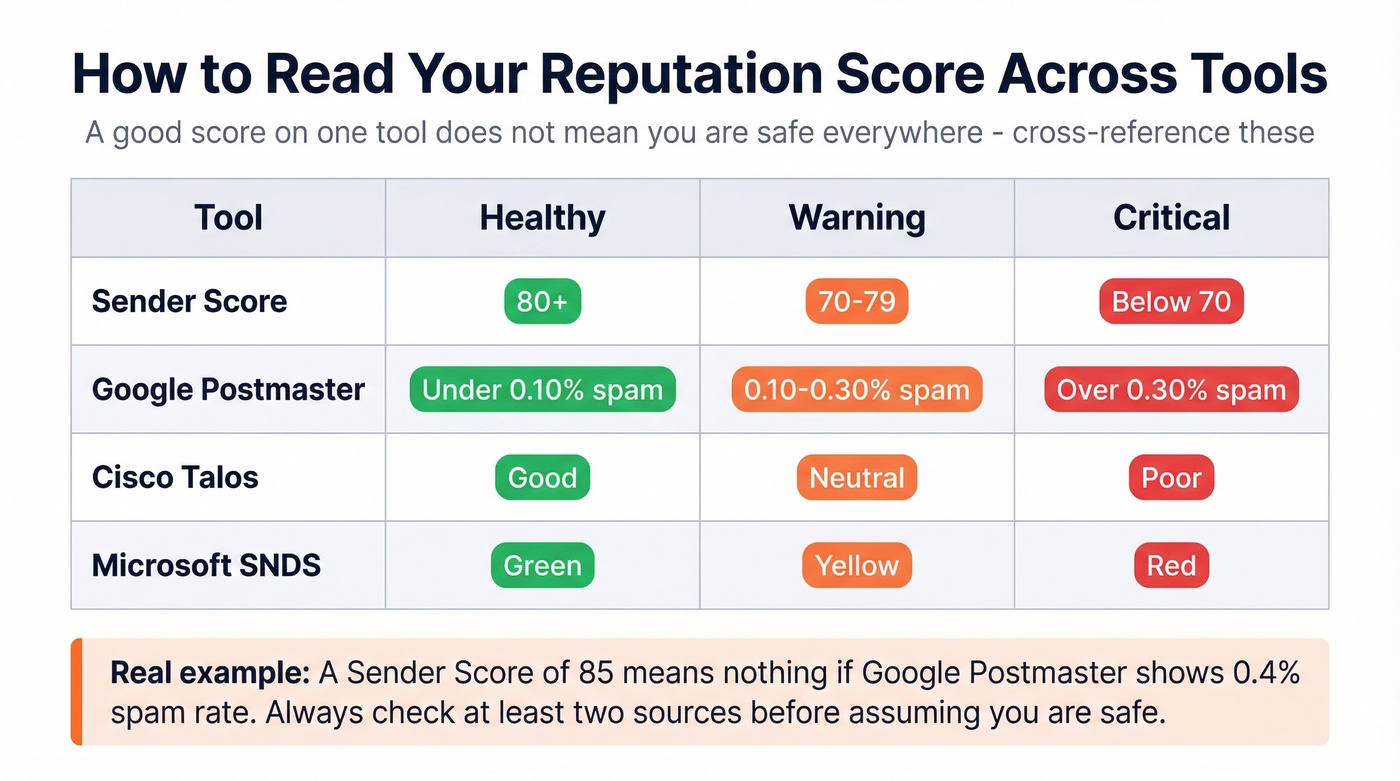
Every tool uses a different scale, and a "good" score on one doesn't mean you're safe everywhere. You need to cross-reference.
| Tool | Healthy | Warning | Critical |
|---|---|---|---|
| Sender Score | 80+ | 70-79 | Below 70 |
| Google Postmaster | <0.10% spam | 0.10-0.30% | >0.30% |
| Cisco Talos | Good | Neutral | Poor |
| Microsoft SNDS | Green | Yellow | Red |
A Sender Score of 85 means nothing if Google Postmaster shows your spam rate at 0.4%. The tools measure different things from different vantage points. SNDS might show green while Talos shows Neutral. That's not a contradiction - it's two providers seeing different slices of your sending behavior.
Let's be honest: most teams check one tool, see a green light, and move on. Don't do that. Check at least three tools before drawing conclusions, and weight Google Postmaster highest for B2B outbound where Gmail addresses dominate your list. (If you want a broader stack, see email reputation tools.)
What to Do If You're Blacklisted
The moment you see a 550 or 554 bounce code referencing Spamhaus or another blocklist, your stomach drops. We've been there. Here's the recovery playbook.
1. Stop or limit sending immediately. Every email you send while blacklisted makes things worse. Pause campaigns and reduce volume to transactional-only.
2. Identify which blacklists you're on. Run your IP and domain through MxToolbox. Check bounce messages - SMTP 550/554 errors often include the specific blacklist name. Know whether it's an IP-based, domain-based, or URI blacklist, because each has different delisting procedures.
3. Fix the root cause. This is where most teams rush past the critical step. Are you dealing with a compromised account sending spam? An unverified prospect list full of dead addresses and spam traps? Missing authentication records? If the root cause is an unverified list, run it through a verification tool like Prospeo's email finder to flag addresses that would have bounced - its 5-step verification catches spam traps and honeypots before they trigger blacklisting. (If you suspect traps, start with spam trap removal.)
4. Follow each blacklist's delisting procedure. Spamhaus, Barracuda, and SORBS all have different processes. Some auto-expire. Some require manual requests. Just fixing the root cause doesn't remove you from the list.
5. Monitor and warm back up gradually. Once delisted, don't blast your full volume on day one. Ramp sending over 2-4 weeks, monitor Postmaster Tools and Sender Score daily, and watch for any re-listing.
How to Prevent Reputation Damage
Most reputation problems aren't caused by blacklists. They're caused by sending to bad email addresses. The blacklist is just the symptom.
Do this:
- Set up SPF, DKIM, and DMARC with enforcement (Quarantine or Reject). Rotate your DKIM keys every 6-12 months - only 37% of DMARC users actually enforce, which means doing it puts you ahead of most senders. (Use these SPF record examples if you’re troubleshooting syntax.)
- Verify every contact list before it touches your sequences. No exceptions. (If you need a method, see check if an email exists and check if email will bounce.)
- Keep sending volume consistent. Ramp new domains and IPs gradually.
- Monitor engagement weekly. If open rates drop below 15%, something's wrong upstream.
- Schedule a recurring task to check mail server reputation at least once a week so issues never go unnoticed.
Don't do this:
- Import purchased lists without verification. Ever. (If you're unsure on compliance, read is it illegal to buy email lists.)
- Spike volume 5x because "we have a big launch this week."
- Ignore bounce rates because "it's only 3%." Three percent is already past the red line.
The upstream fix for almost all of this is data quality. We've seen teams recover in days when they catch the problem early, and teams that take six weeks when they don't. Stack Optimize, an outbound agency managing campaigns across dozens of client domains, maintains 94%+ client deliverability and under 3% bounce rates with zero domain flags - largely by verifying every address before it enters a sequence.
Every reputation tool on this list flags the same root cause: bad contacts. Prospeo removes spam traps, catch-all risks, and dead addresses before they hit your sequences. At $0.01 per email, cleaning your pipeline costs less than one week of warm-up recovery.
One bad list costs six weeks. One verification costs a penny.
FAQ
What's a good sender reputation score?
On 0-100 scales like Sender Score, aim for 80+. Below 70 means deliverability is actively suffering. For Google Postmaster Tools, keep spam rate below 0.10% - above 0.30% is policy violation territory. Cross-reference at least two tools for an accurate read.
How often should I monitor server reputation?
Weekly for steady-state senders. During domain warm-up, after importing new lists, or after any deliverability incident, check daily. Google Postmaster Tools updates automatically once configured - set a calendar reminder so you actually look at it.
What's the difference between domain and IP reputation?
Domain reputation follows your sending domain across any IP. IP reputation is tied to the specific server. If you switch ESPs, domain reputation travels with you but IP reputation resets. For most mailbox providers in 2026, domain reputation carries more weight.
Can I check my reputation for free?
Yes. Google Postmaster Tools, Microsoft SNDS, Sender Score, Cisco Talos, and Spamhaus are all free. MxToolbox offers free blacklist lookups. You can build solid monitoring without spending a dollar.
How does bad email data damage server reputation?
Invalid addresses cause hard bounces, which signal to mailbox providers that you're not maintaining your list. Bounce rates above 2% trigger warnings; above 5%, deliverability craters. Unverified lists often contain spam traps that immediately flag your domain. Prevention is dramatically cheaper than recovery - verifying before sending is the single highest-ROI step you can take.