

Email Delivery Tracking: What It Really Measures (and What It Doesn't)
Most senders think "delivered" means "landed in the inbox." It doesn't. It means a server accepted the message - which includes routing it straight to spam. That gap between what you think email delivery tracking covers and what it actually covers is where deliverability problems hide, quietly killing your campaigns while your dashboard shows green.
Here's the thing: delivery rate ≠ inbox placement. Open tracking is broken in 2026 thanks to Apple Mail Privacy Protection, so you should be tracking clicks and replies instead. And none of this matters if you're sending to bad addresses. Verify your list first.
The 3 Metrics Everyone Confuses
"Email delivery tracking" means three different things depending on who you ask. A marketer means open and click tracking. A deliverability engineer means inbox placement monitoring. A sales rep means "did they read my email?" All three are valid, and all three require different tools.
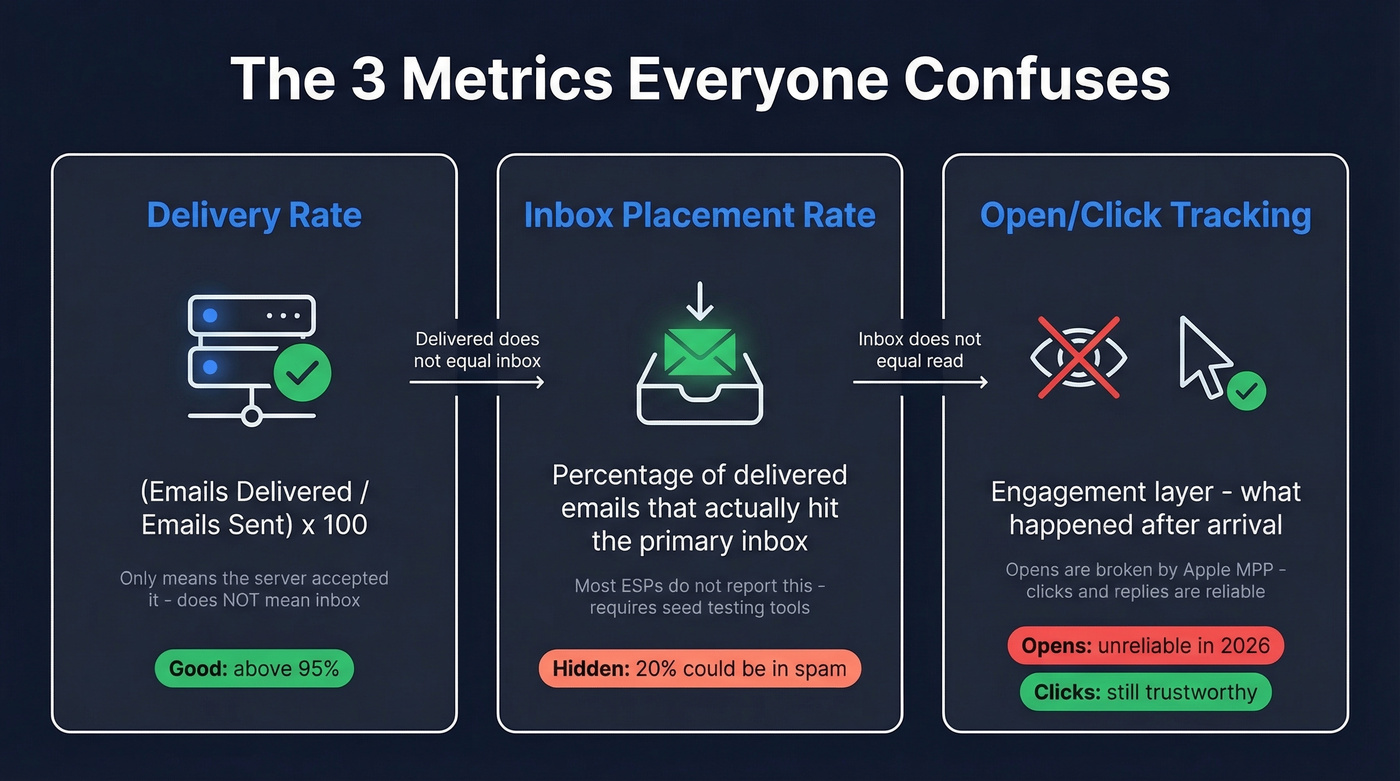
Delivery rate measures whether the receiving server accepted your email - nothing more:
(Emails Delivered / Emails Sent) x 100
A good delivery rate sits above 95%. But that number includes emails that landed in spam. Your ESP says "delivered" and you celebrate. The server thinks "accepted, now I'll route it wherever I want."
Inbox placement rate is what you actually care about - the percentage of delivered emails that reached the primary inbox, not spam or promotions tabs. Most ESPs don't report it. You need seed testing tools like GlockApps or Validity's Everest to get this number. That's why so many teams fly blind: they see a 97% delivery rate and assume everything's fine, while 20% of their "delivered" emails rot in spam.
Open/click tracking is the engagement layer. It tells you what happened after the email arrived. But open tracking has become deeply unreliable.
How Tracking Works Under the Hood
When your ESP sends an email, it embeds an invisible 1x1 pixel image - a tiny, unique URL that loads when the email is opened. When the recipient's email client fetches that image, the ESP logs an open event with a timestamp, IP address, and device info. If you want the technical breakdown, see our guide to email tracking pixels.
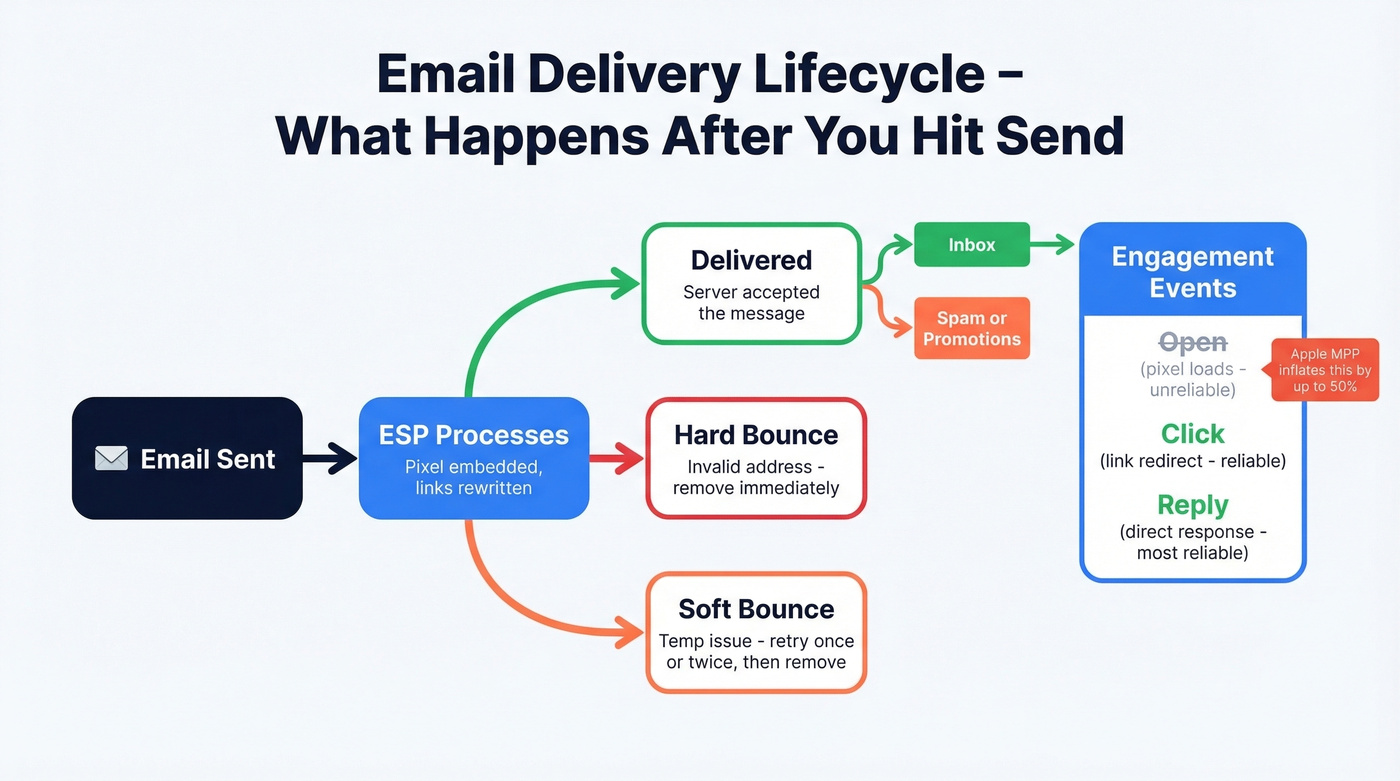
Click tracking works similarly. Your ESP rewrites links to route through a tracking domain first, then redirects to the actual URL. This captures which links were clicked, when, and how many times.
Behind the scenes, the lifecycle looks like this: your email is processed by the ESP, then either delivered (server accepted it), bounced (hard bounce = invalid address; soft bounce = temporary issue like a full inbox), or flagged as a spam complaint. Retry soft bounces once or twice before removing the address; hard bounces should be removed immediately. After delivery, engagement events like opens and clicks layer on top. For bounce benchmarks and codes, see our email bounce rate guide.
For teams operating at scale, ESPs like MailerSend expose these events through APIs and webhooks, letting you pipe delivery data directly into your CRM or analytics stack in real time.
Why Open Tracking Is Broken
Apple Mail Privacy Protection changed everything. Launched on September 20, 2021, MPP preloads email content - including tracking pixels - through Apple's proxy servers before the recipient ever sees the message. For recipients who have MPP enabled, emails register as "opened" even when nobody actually read them.
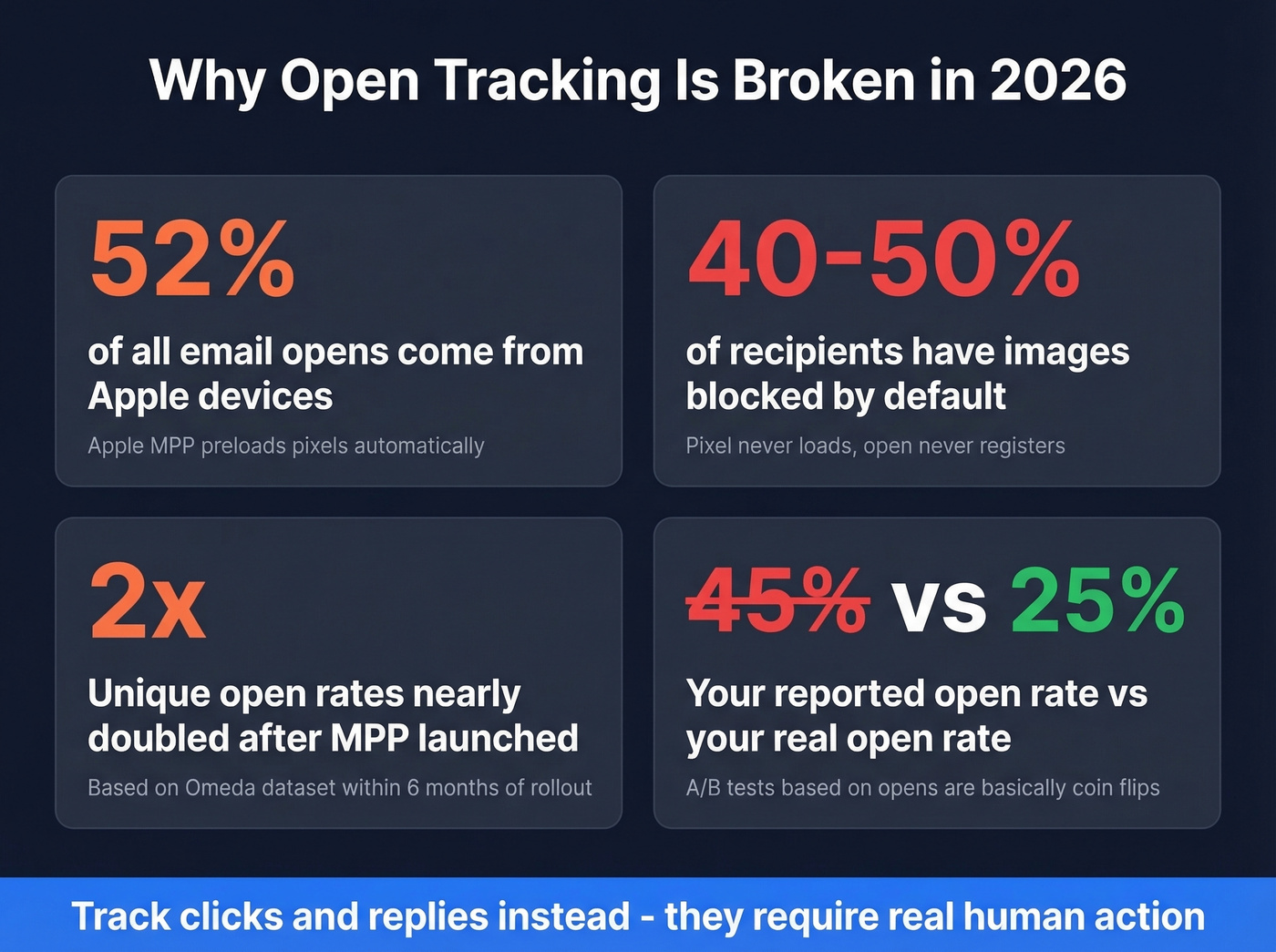
Apple devices account for roughly 52% of all email opens. That's not a rounding error. An Omeda dataset showed unique open rates nearly doubling within six months of MPP's rollout. Your "45% open rate" might really be 25%.
Beyond MPP, around 40-50% of recipients have images blocked or not loaded by default, preventing pixel loads entirely. Apple's Link Tracking Protection can strip tracking parameters (including UTMs) in Mail and Safari, breaking attribution models. And with iOS 18's AI-powered inbox categories and digests, even getting seen in the inbox is harder than it was a year ago.
Open rates aren't just inflated - they're directionally misleading. A "high-performing" subject line might just be the one that happened to hit more Apple Mail users. A/B tests based on opens are essentially coin flips. If you still need subject line ideas, use click-first examples like these cold email subject line examples.
If your entire follow-up strategy is built on open signals, you're making decisions based on data that's wrong half the time. Kill open-based automations. Rebuild around clicks and replies. You'll lose volume but gain accuracy, and accuracy is what closes deals.
What to Track Instead of Opens
Clicks, replies, and conversions. These require deliberate action from a real human - no proxy server can fake a click-through or a reply.
Here are the latest MailerLite benchmarks across 3.6M campaigns and 181K accounts:
| Metric | Benchmark | Notes |
|---|---|---|
| Open rate | 43.46% | Inflated by MPP |
| Click rate | 2.09% | Reliable signal |
| Click-to-open | 6.81% | Deflated (opens inflated) |
| Unsub rate | 0.22% | Stable |
For cross-reference, Mailchimp's benchmarks show 35.63% open and 2.62% click - but that data was last updated December 2023, before the latest iOS 18-era inbox changes.
Treat open rates as rough directional estimates, not actionable data. In our experience, teams that shift reporting from opens to clicks see cleaner data and better decision-making within one quarter. Build your follow-up sequences, segmentation, and reporting around clicks and replies. If you want a deeper KPI framework, use our funnel metrics guide.

Your delivery tracking is only as good as the addresses you're sending to. Prospeo's 5-step email verification - with catch-all handling, spam-trap removal, and honeypot filtering - delivers 98% accuracy. Teams switching from other providers cut bounce rates from 35% to under 4%.
Fix the list first. Every metric downstream depends on it.
Authentication Basics
Before you obsess over tracking metrics, make sure your emails can actually reach a server. SPF is a DNS record that tells receiving servers which IPs are authorized to send on your behalf - consolidate into one record, because multiple SPF records break validation. DKIM adds a cryptographic signature proving the email wasn't tampered with in transit; use 2048-bit keys and rotate every 6-12 months. DMARC is the policy layer that tells servers what to do when SPF or DKIM fails - progress from none (monitor) to quarantine to reject. For a deeper fix-it checklist, see our email deliverability guide.
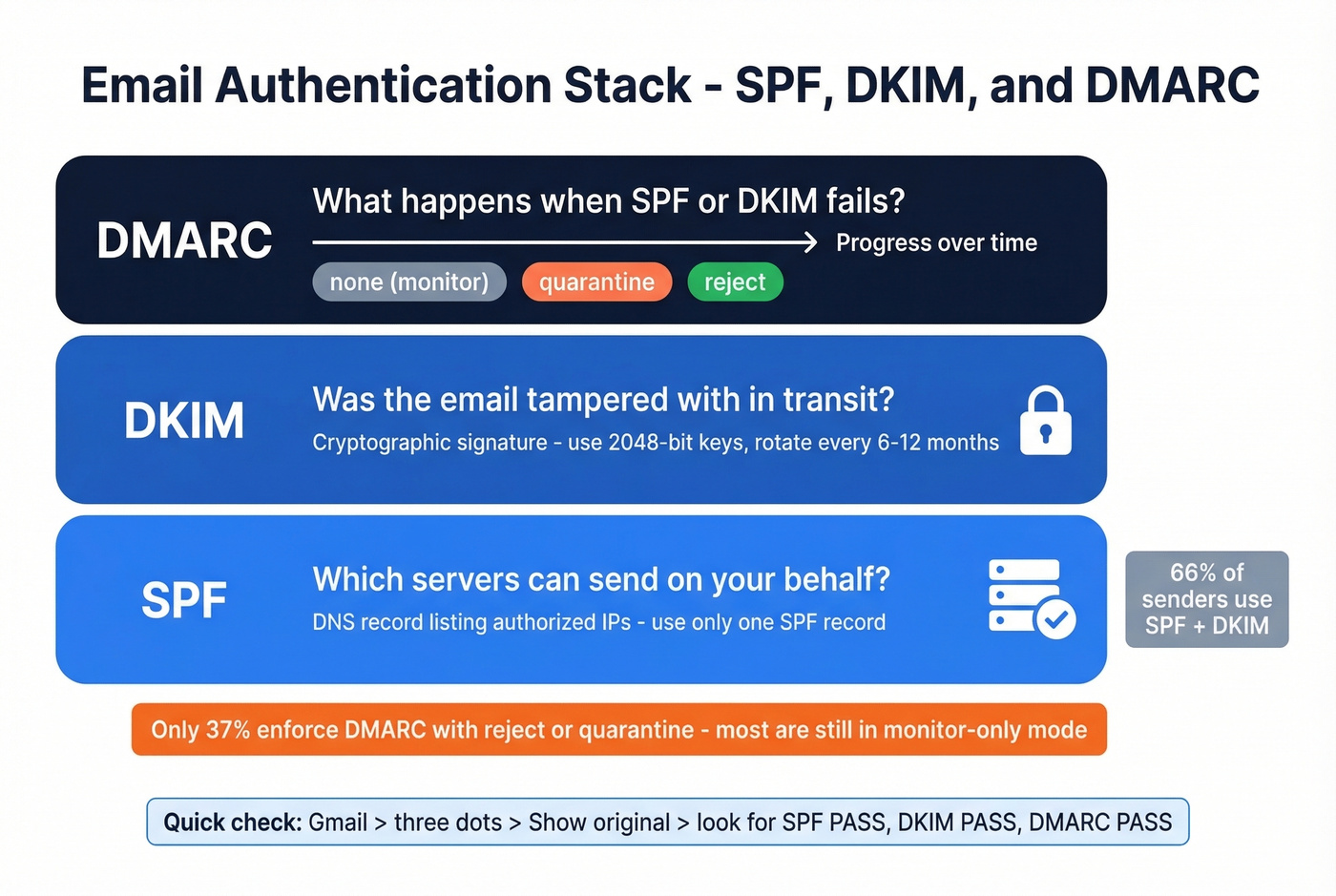
The adoption numbers are better than they were, but still not great. 66% of senders use both SPF and DKIM. 53.8% have DMARC set up. Only 37% enforce DMARC with reject or quarantine policies, meaning most deployments are still in monitor-only mode.
Quick verification: in Gmail, open any email, click the three dots, and select "Show original." You should see SPF PASS, DKIM PASS, and DMARC PASS. If any show FAIL, fix that before worrying about open rates. If you’re troubleshooting alignment specifically, start with DMARC alignment.
Before You Track - Verify Your List
The #1 reason email delivery tracking looks bad isn't your tracking setup. It's your list. Bad addresses cause hard bounces, hard bounces tank your sender reputation, and a damaged reputation means even your valid emails start landing in spam. Every metric you track becomes garbage. If you’re trying to recover, follow this playbook to improve sender reputation.
If your bounce rate is above 3%, you have a data problem, not a tracking problem.

There's a persistent myth on Reddit that tracking pixels themselves hurt deliverability - that disabling open tracking will somehow improve your inbox placement. The consensus on r/coldemail is pretty clear: the pixel isn't the problem. A tiny embedded image doesn't trigger spam filters. What triggers spam filters is sending to invalid addresses, hitting spam traps, and accumulating complaints from unengaged recipients. If you suspect traps, use a proper spam trap removal process.
The fix is straightforward: verify every address before it enters your sending queue. Prospeo's 5-step verification catches invalid addresses, spam traps, and honeypots before they ever become bounces. With 98% email accuracy and a 7-day data refresh cycle, you're working with contacts that are current - not stale records from months ago. Stack Optimize built their agency to $1M ARR using it, keeping bounce rates under 3% and deliverability consistently above 94% across all clients.
Clicks and replies are the only reliable engagement signals left. But they mean nothing if 20% of your list is bouncing and tanking your sender reputation. Prospeo refreshes 300M+ profiles every 7 days - not every 6 weeks - so your data stays clean between campaigns.
Stop tracking metrics on emails that never had a chance of arriving.
Best Tools for Tracking Email Delivery
Once your list is clean and your authentication is solid, here's what's worth using. If you’re building a full outbound stack, compare options in our SDR tools roundup.
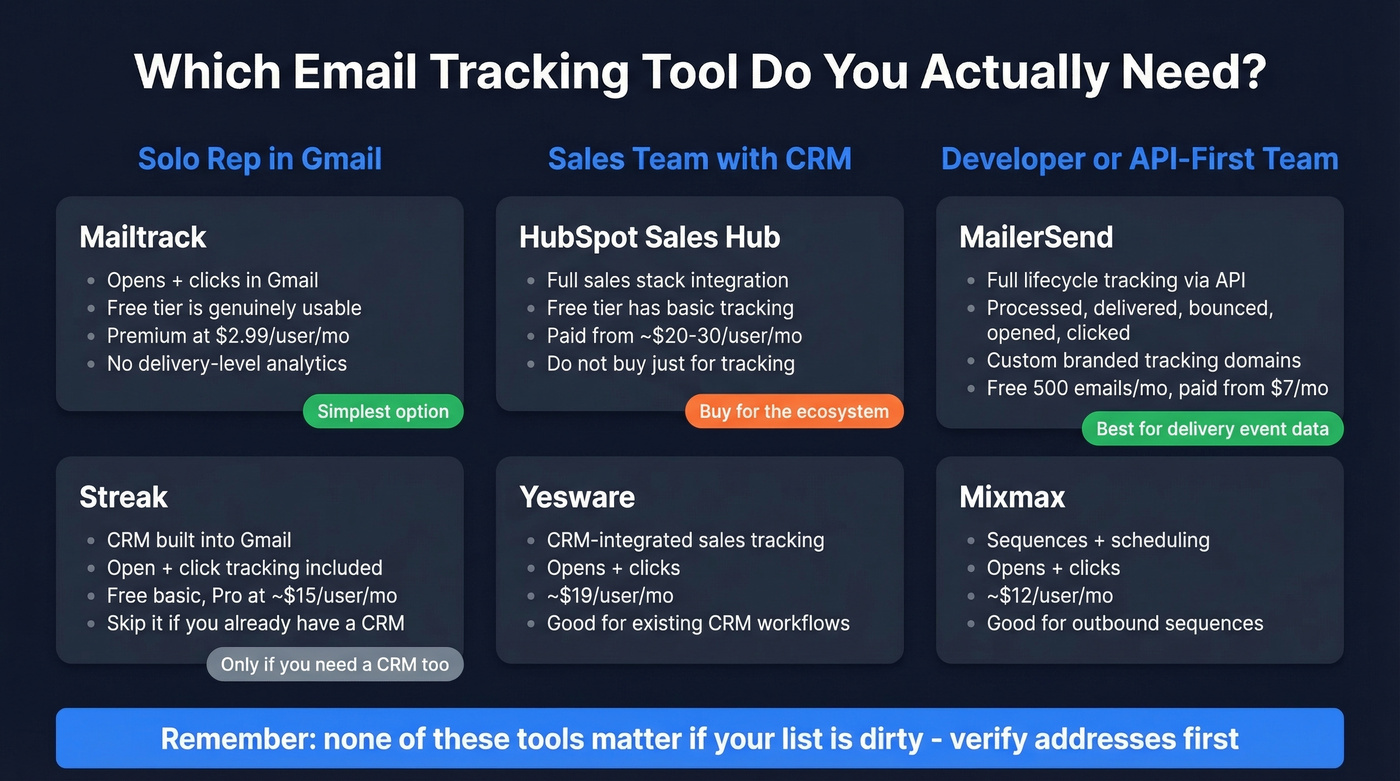
| Tool | Best For | Engagement Tracking | Delivery API | Starting Price |
|---|---|---|---|---|
| Mailtrack | Solo reps, Gmail | Opens + Clicks | No | Free; $2.99/user/mo |
| Streak | Gmail + light CRM | Opens + Clicks | No | Free; ~$15/user/mo |
| MailerSend | Transactional + API | Opens + Clicks | Yes | Free; $7/mo |
| HubSpot Sales | HubSpot ecosystem | Opens + Clicks | Yes | Free; ~$20-$30/user/mo |
| Yesware | CRM-integrated sales | Opens + Clicks | No | ~$19/user/mo |
| Mixmax | Sequences + scheduling | Opens + Clicks | No | ~$12/user/mo |
Mailtrack is the simplest option for individual reps who just want to know if an email was opened. It lives in Gmail, does read receipts and click tracking, and the free tier is genuinely usable. Premium at $2.99/user/month removes branding and adds daily reports. Don't expect delivery-level analytics - this is pure engagement tracking.
Skip Streak unless you actually want a CRM inside Gmail. It bundles pipeline management, mail merge, and open/click tracking in one extension. The free tier covers basic tracking; Pro at ~$15/user/month unlocks the CRM features. Reddit threads on email prospecting tools often mention Streak for solo operators who don't want a separate CRM. If you already have a CRM, Streak adds nothing.
Need delivery event data, not just engagement metrics? MailerSend tracks the full lifecycle - processed, delivered, bounced, opened, clicked, spam complaints - and exposes everything through an API and webhooks. It also supports custom branded tracking domains, which can improve deliverability by keeping tracking URLs on your own domain. Free for 500 emails/month, paid plans from $7/month.
HubSpot Sales Hub gives you tracking inside a full sales stack. Free tier includes basic open and click notifications. Paid plans typically start around $20-$30/user/month depending on tier. Don't buy HubSpot just for tracking - buy it if you need the whole platform.
Yesware (~$19/user/month) and Mixmax (~$12/user/mo) round out the field for sales teams wanting tracking integrated with sequences and CRM sync. Both are solid. Neither is differentiated enough to warrant switching if you're happy with your current setup. If you’re evaluating alternatives, see our Mixmax alternatives.
Tracking Mistakes That Cost You Deals
Treating opens as intent. An open in 2026 might be Apple's proxy server, not a human. Don't call a prospect "hot" because your tracker showed three opens. Wait for a click or a reply.
Following up too fast on a single open. "I saw you opened my email" is the fastest way to creep out a prospect. We've seen reps torpedo deals by responding within minutes of an open notification that was probably a machine prefetch. Just don't. If you need safer language, use these sales follow-up templates.
Missing the forwarding signal. A sales rep sees 10+ opens from a single prospect - that's probably not obsessive interest, it's the email being forwarded internally. Follow up with a multi-threaded approach targeting other stakeholders, not a harder sell to the original contact.
Collecting data without changing messaging. If your click rate is 0.5% and you don't change your CTA, email copy, or targeting, you're just watching yourself lose in slow motion. Let's be honest: most teams hoard tracking data and do nothing with it.
GDPR and Email Tracking
If you're sending to EU recipients, tracking pixels count as personal data processing under GDPR. A single pixel can expose timestamps, IP-derived location, device type, and open frequency - all tied to an identifiable individual.
CNIL (France's data authority) launched a public consultation in June 2025 drawing a clear line: individual-level tracking requires explicit consent, while anonymized campaign-level measurement may be permissible without it.
Get explicit consent before enabling tracking. Disclose what data you collect - opens, clicks, device, location, retention period. Honor data subject requests within 30 days. The fines run up to EUR 20 million. If you're doing cold outreach into the EU, consider whether individual open tracking is worth the compliance overhead. Clicks and replies give you better signal anyway.
FAQ
Does email tracking hurt deliverability?
No. Tracking pixels add a tiny invisible image to HTML emails - this alone doesn't trigger spam filters. What hurts deliverability is sending to invalid addresses, lacking SPF/DKIM/DMARC authentication, and poor sender reputation. Fix your list quality and authentication before tweaking tracking settings.
What's a good email delivery rate?
Above 95% is the standard benchmark, but delivery rate only measures server acceptance - not inbox placement. A 97% delivery rate can still mean 20% of emails land in spam. Use seed testing tools like GlockApps or Validity's Everest to measure actual inbox placement separately.
Do tracking pixels still work in 2026?
Partially. Apple Mail Privacy Protection preloads pixels for MPP-enabled recipients - roughly 52% of all opens - generating false positives. Click tracking and reply tracking remain fully reliable. Build follow-up logic around clicks and conversions, not opens.
How do I fix a high bounce rate before tracking anything?
Verify every address before sending. Bounce rates above 3% signal a data quality problem. Prospeo's 5-step verification catches invalid addresses, spam traps, and honeypots at 98% accuracy, and the free tier includes 75 verified emails per month so you can test whether bad data is your root cause.
Email delivery tracking tells you whether a server said "yes" to your message. It doesn't tell you whether a human ever saw it. Verify your list, authenticate your domain, and stop building strategy on open rates that are wrong half the time. Track clicks. Track replies. That's where the signal lives.