

Email Extractor: Types, Tools, and What Nobody Tells You
A RevOps Manager lead we know scraped a few thousand emails from conference speaker pages, dumped them into Mailchimp, and hit send. Bounce rate was brutal. Mailchimp suspended the account within hours, and the sending domain's reputation took months to recover. That's the email extractor story nobody writes about - the gap between "I got the emails" and "the emails actually work."
The problem isn't extraction itself. It's that fundamentally different categories of tools all get called the same thing, and picking the wrong one for your use case leads to exactly this kind of damage. A regex-based text parser and a verified B2B database platform are about as similar as a phone book and a CRM - but they share a keyword, so they end up in the same search results. Over in r/coldemail, a recurring thread involves extracting emails from ~8,000 websites, a use case where a text parser is useless and even a Chrome extension would take weeks. That's a database job, not an extraction job.
Let's break down what these tools actually are, which type you need, the ones worth using in 2026, and the legal and deliverability landmines that catch people off guard.
What You Need (Quick Version)
Before you read 3,000 words, here's the fast answer:
- Just need to pull emails from a block of text? DeBounce or ConvertCSV. Free, instant.
- Want a Chrome extension for prospecting on the fly? Hunter, Snov.io, and Skrapp all have strong extensions with thousands of reviews.
One-liner version: if you're building a prospecting list - not just parsing a messy spreadsheet - skip the free tools and go straight to a platform that verifies before it delivers.
What Is an Email Extractor?
An email extractor is any tool that identifies and pulls email addresses from a source - text, web pages, documents, or a database. At its simplest, it's a regex pattern that spots anything matching the name@domain.com format.
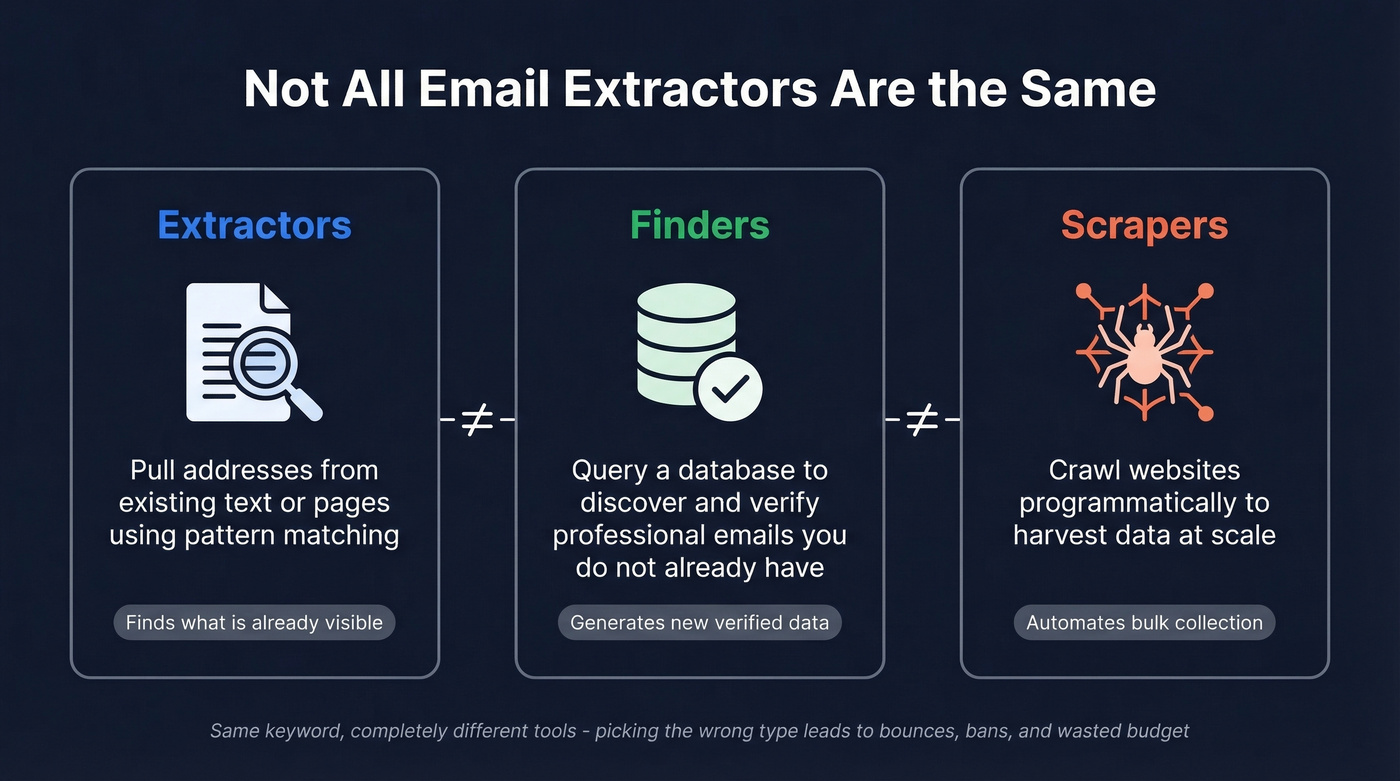
But three different tool types get lumped under this label, and they do very different things:
- Extractors pull addresses from existing text or pages using pattern matching. They find what's already visible.
- Finders query a database to discover and verify professional email addresses you don't already have. They generate new data.
- Scrapers crawl websites programmatically to harvest data at scale. They automate collection.
A thread in r/email once asked "why do people even use email extractor extensions?" - the confusion between personal use and B2B prospecting is real. Someone searching might need a B2B database, or they might need a free text parser that solves their problem in 30 seconds. The taxonomy matters because it determines accuracy, cost, and legal risk.
Four Types of Email Extraction Tools
| Type | How It Works | Best For | Accuracy | Cost |
|---|---|---|---|---|
| Text extractor | Regex scan of pasted text | Cleaning spreadsheets, parsing docs | Low (no verification) | Free |
| Website crawler | Scans URLs for mailto: links | Bulk harvesting from public sites | Low-medium | Free-$100/mo |
| Chrome extension | Extracts from the page you're viewing | Prospecting on professional profiles | Medium-high | Free-$100/mo |
| B2B database platform | Queries a verified contact database | Sales outreach, ABM campaigns | High (pre-verified) | $30-$300/mo |
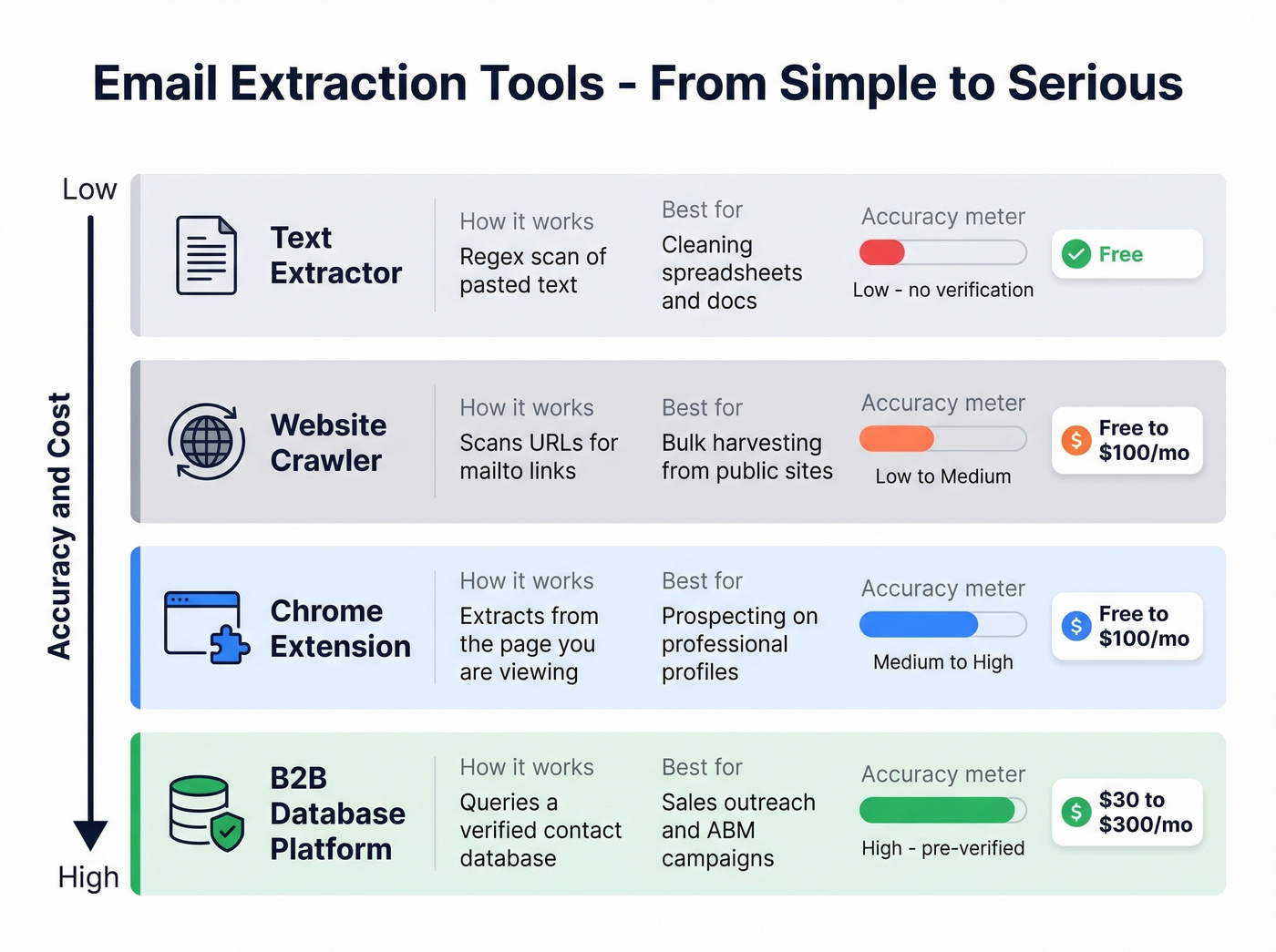
Text extractors are the simplest. Paste in a wall of text, get back a list of email addresses. No verification, no enrichment - just pattern matching. Tools like DeBounce and ConvertCSV live here. They're free and useful for one-off cleanup jobs, but the output is raw and unverified.
Website crawlers scan URLs for publicly visible email addresses. They're a step up in automation but a step down in quality - you're harvesting whatever's on the page, including role accounts like info@ and support@ that'll tank your reply rates.
Chrome extensions sit in your browser and extract addresses from the page you're viewing. The best ones are database-backed, meaning they're not just scraping the page - they're matching the person or company against a verified database. Hunter, Snov.io, and Skrapp all operate here with well-reviewed extensions.
B2B database platforms are the heavy hitters. Instead of extracting what's visible, they query a pre-built, verified database of professional contacts. Every address goes through verification before delivery - discovery plus validation in one step, which is a fundamentally different workflow from extraction.
Best Tools for Email Extraction in 2026
Every tool worth considering, organized by depth. We've weighted this toward tools that solve the B2B outreach use case, since that's where the stakes and the confusion are highest.
Prospeo
Prospeo is the "skip extraction, get verified data" option. Instead of pulling addresses and then running them through a separate verification service, Prospeo delivers pre-verified contacts from a database of 300M+ professional profiles with 143M+ verified emails.
If you're comparing vendors, it also helps to understand the broader landscape of data enrichment services and where "finder vs enrichment" lines blur in practice.
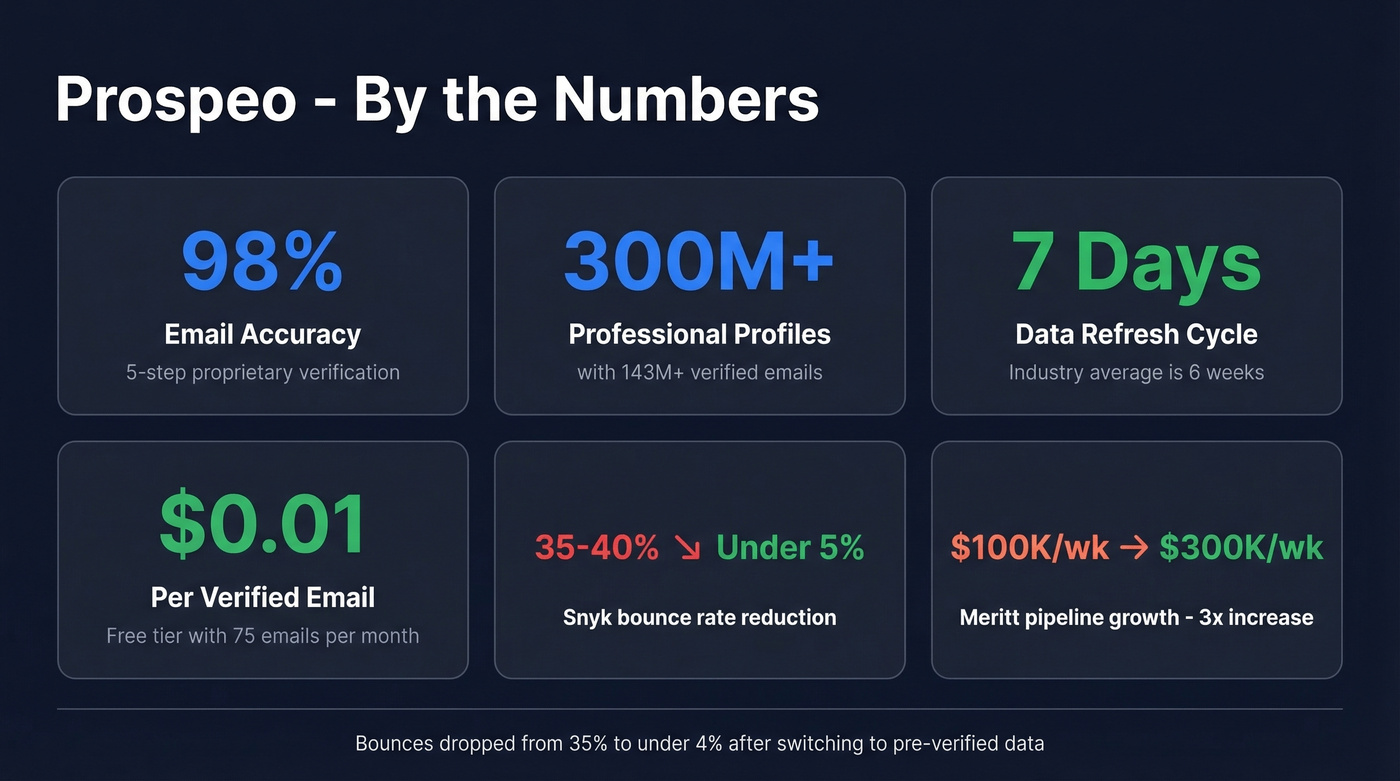
The accuracy numbers are the headline: 98% email accuracy, backed by a proprietary 5-step verification process that handles catch-all domains, removes spam traps, and filters honeypots. Data refreshes every 7 days - the industry average is closer to 6 weeks, which means most platforms are serving you stale contacts while Prospeo's cycling through fresh records. The Chrome extension works on professional profiles and company websites, pulling verified emails and mobile numbers without leaving the page. Search filters include buyer intent data powered by Bombora tracking 15,000 topics, technographics, job changes, and headcount growth.

Real results from teams that switched: Snyk's 50-person AE team went from a 35-40% bounce rate to under 5%. Meritt saw bounces drop from 35% to under 4%, with pipeline tripling from $100K to $300K per week.
Use this if: You're running B2B outreach and data accuracy is non-negotiable.
Pricing: Free tier includes 75 verified emails + 100 Chrome extension credits per month. Paid plans run about $0.01 per email. No contracts, cancel anytime.
Hunter.io
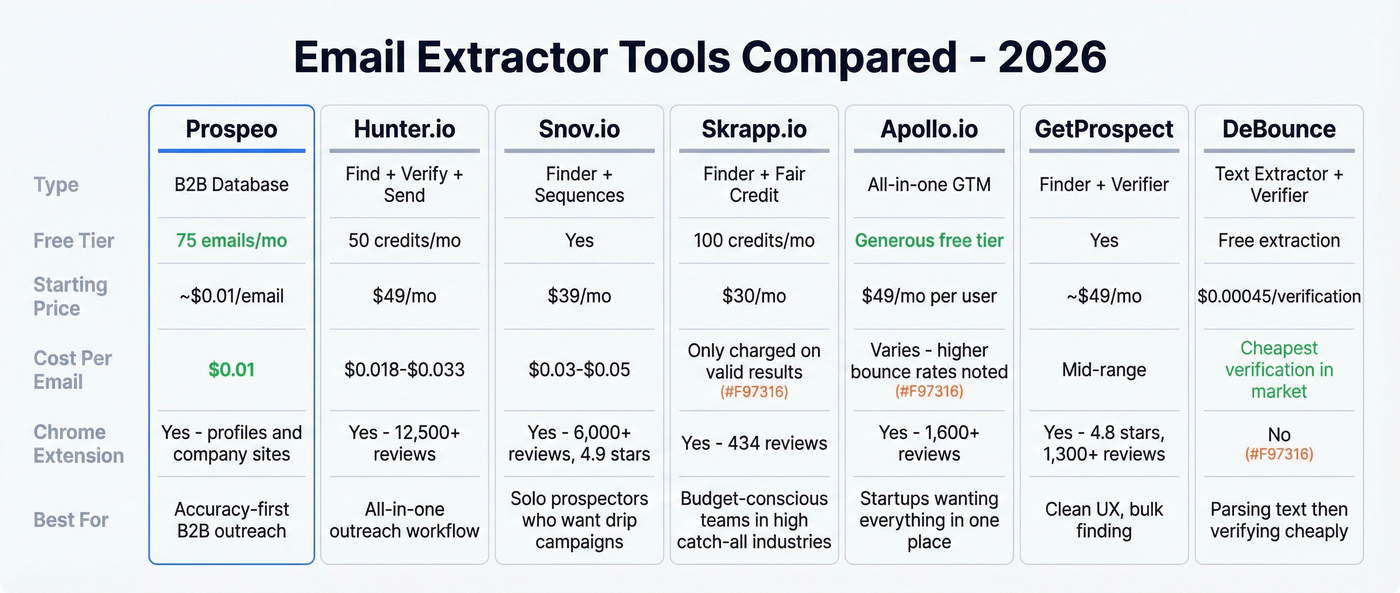
Hunter is the ecosystem play - a find-verify-send platform that handles the entire outreach workflow from a single dashboard. The Chrome extension has 12,500+ reviews at 4.7 stars, and the built-in cold email sequences mean you never have to export a CSV.
The credit model is worth understanding: finding an email costs 1 credit, verifying costs 0.5 credits. At the Starter tier ($49/mo for 2,000 credits), your effective cost per verified email lands around $0.033.

| Tier | Monthly Price | Credits | Effective $/Email |
|---|---|---|---|
| Free | $0 | 50 | - |
| Starter | $49 | 2,000 | ~$0.033 |
| Growth | $149 | 10,000 | ~$0.022 |
| Scale | $299 | 25,000 | ~$0.018 |
Use this if: You want finding, verification, and outreach sequences in one tool and don't mind paying a premium per email at lower volumes.
Skip this if: You need high-volume data at low per-unit cost. Hunter's credit economics get expensive below the Growth tier. (If you're shopping around, see our breakdown of Hunter alternatives.)
Snov.io
4.9 stars across 6,000+ reviews - one of the highest-rated Chrome extensions in the category.
What makes Snov.io different from the other finders is the automation layer. You can find a contact, add them to a multi-step drip campaign, and track engagement without leaving the platform. For individual contributors or small teams running their own outreach, this collapses a lot of tool-switching into a single workflow. The finding and verification are solid, but the real draw is the sequencing engine bolted on top.
The tradeoff is database depth. Snov.io's strength is workflow, not raw data volume. If you're running ABM campaigns against a specific ICP and need to filter by intent signals or technographics, you'll hit limits. But for a solo prospector who wants to find 50 emails and drip on them by Friday? Hard to beat.
Free tier available. Paid plans start around $39/mo. Per-email cost lands in the $0.03-0.05 range depending on volume.
Skrapp.io
Skrapp's standout feature is its Fair Credit Policy: you only get charged when the email comes back as "Valid" or "Catch-all." Invalid or unknown results don't consume credits. That changes the economics meaningfully if you're prospecting in industries with high catch-all rates - financial services and enterprise tech, for example, where 30-40% of domains are catch-all.
The Chrome extension has 434 reviews at 4.7 stars, with 200,000+ total users. The platform has processed 3B+ email searches with a 92% success rate across 200M+ B2B profiles. Pricing starts at $30/mo for 1,000 credits, with a free tier at 100 credits per month.
Use this if: You're budget-conscious and want credit protection against bad results.
Apollo.io
Apollo is the default all-in-one GTM platform for startups, and the free tier is genuinely generous. The Chrome extension sits at 4.7 stars with 1,600+ reviews, and the platform bundles data, sequences, and a lightweight CRM.
Paid plans start around $49/mo per user. The database is broad but accuracy varies - we've seen higher bounce rates from Apollo compared to dedicated data platforms. It's best as a starting point for teams that want everything in one place and can tolerate some data quality tradeoffs.
Use this if: You're a startup wanting an all-in-one GTM stack without multiple vendor contracts.
GetProspect
Clean UX, solid Chrome extension at 4.8 stars with 1,300+ reviews, and a bulk finder that handles volume well. GetProspect doesn't try to be an all-in-one platform - it focuses on finding and verifying emails, and it does that competently. Free tier available, paid from ~$49/mo.
DeBounce
DeBounce occupies a unique niche: free text extraction with paid verification as an upsell. The text parser is genuinely useful - paste in any block of text and it pulls every address. Their own data shows 10-30% of extracted emails are invalid or disposable, with a 12-18% duplicate rate. That's a sobering reminder of why extraction without verification is dangerous.
Verification pricing is the cheapest in the market at $0.00045 per check. Use DeBounce when you already have text to parse and need affordable verification on the output. (If you're evaluating verifiers, compare options in our guide to Bouncer alternatives.)
ConvertCSV
Free, does one thing well: extracts emails from pasted text and lets you control the output format - CSV, TXT, or custom separators. Use it for quick one-off parsing jobs where you need format control.
Lite14
The simplest possible tool in this category. Paste text, get emails, deduplicated. Free. Nothing else to say.
Honorable mentions: Wiza, Lusha, ContactOut, and Evaboot also compete in the B2B email finder space, each with a slightly different angle - Wiza and Evaboot lean into professional profile exports, while Lusha and ContactOut focus on direct dials and verified contacts. Worth evaluating if the tools above don't fit your workflow.

The article you just read exists because extraction and verification are two different problems. Prospeo eliminates both in one step - 143M+ pre-verified emails, 98% accuracy, refreshed every 7 days. No regex. No bounce cleanup. No suspended accounts.
Skip extraction. Start with emails that actually work.
Pricing Comparison
| Tool | Free Tier | Starting Paid | ~Cost/Email | Verification? |
|---|---|---|---|---|
| Prospeo | 75 emails/mo | ~$0.01/email | $0.01 | ✅ 5-step |
| Hunter.io | 50 credits/mo | $49/mo | $0.025 + $0.012 verify | ✅ (0.5 credit) |
| Snov.io | Yes | ~$39/mo | ~$0.03-0.05 | ✅ |
| Skrapp | 100 credits/mo | $30/mo | ~$0.03 | ✅ Fair Credit |
| Apollo.io | Yes (generous) | ~$49/mo/user | ~$0.02-0.05 | ✅ |
| GetProspect | Yes | ~$49/mo | ~$0.03-0.05 | ✅ |
| DeBounce | Free extractor | $0.00045/verify | $0.00045 | Separate paid |
| ConvertCSV | Free | - | Free | ❌ |
| Lite14 | Free | - | Free | ❌ |
The real cost isn't the extraction - it's the bounces, spam complaints, and domain damage from sending to unverified lists. Free text parsers give you raw addresses with zero quality assurance. The $0.01-0.05 per email you'd spend on a verified platform is insurance against burning a sending domain that took months to warm up. If you want the deeper mechanics, start with our email deliverability guide.
How Accurate Are These Tools?
Here's the thing nobody in this space wants to talk about: accuracy claims are almost universally inflated. Every tool says "99% deliverability" on the marketing page, but as Saleshandy puts it, "your bounce rate tells a completely different story."
The Dropcontact benchmark - 15 tools tested against 20,000 real contacts, updated February 2026 - paints a more honest picture. Effective enrichment rates ranged from 31.6% to 54.9%, with hard bounce rates between 0.9% and 3.6%. Those are the best platforms in the market, and even they're bouncing 1-4% of emails.
The benchmark takeaway is stark: if top-performing tools in a controlled test still produce 1-4% hard bounces, imagine what happens with unverified extracted lists. DeBounce's own data confirms it - 10-30% of emails extracted from text are invalid or disposable, with 12-18% being duplicates.
Don't trust accuracy claims. Trust bounce rates from real sends. And if you're using a text parser without verification, assume 10-30% of your list is garbage. (More on benchmarks and fixes in our email bounce rate guide.)

Our take on the ROI math: If your average deal size is under $5K, you probably don't need a $300/mo data platform. But you absolutely need verification. The minimum viable stack is a free parser plus DeBounce verification at $0.00045/check. Once your deal size crosses into five figures, the ROI on a verified B2B database becomes obvious - one closed deal pays for a year of data.
Is Email Extraction Legal?
Short answer: extraction itself isn't illegal in most jurisdictions. What you do with the data afterward is where the legal risk lives.
The core principle is simple: public doesn't equal permission. An email address visible on a website is still personal data under GDPR, and scraping it doesn't create a lawful basis to send marketing emails.
Under GDPR, an address like firstname.lastname@company.com is personal data. You need a lawful basis to process it - for B2B outreach, that's typically legitimate interest, which requires a balancing test: is your interest in contacting this person proportionate to their privacy rights? Article 14 adds another layer: when you obtain data indirectly (which extraction is), you're required to inform the individual within roughly one month. The fine ceiling is up to EUR 20M or 4% of global annual revenue.
This isn't theoretical. CNIL, France's data authority, sanctioned Kaspr over data-scraping practices related to GDPR compliance. The order was eventually closed in 2026 after Kaspr implemented compliance measures - but the enforcement action itself sent a clear signal to the industry.
Under CAN-SPAM (US), the focus shifts to sending behavior: accurate sender information, non-deceptive subject lines, a physical address, and a working unsubscribe mechanism. Scraped lists aren't automatically illegal, but they carry massive deliverability risk - ESPs like Mailchimp and SendGrid explicitly prohibit purchased or scraped lists in their terms of service.
Regulators increasingly treat robots.txt compliance as a factor in legitimate interest assessments. If a site's robots.txt says "don't scrape," ignoring it weakens any legal defense you'd have.
Compliance checklist:
- Record source URL, date, and capture method for every address
- Map your lawful basis in writing before sending
- Exclude addresses found behind logins or paywalls
- Respect robots.txt directives
- Provide opt-out in every message
- Re-verify data regularly - addresses decay
- Check your ESP/CRM terms of service for scraped-list restrictions
Seven Mistakes That Ruin Your List
Harvesting role accounts. Addresses like info@, sales@, and support@ go to shared inboxes. Reply rates are near zero, and spam complaints are high. Filter them out before sending.
Skipping deduplication. Case differences (John@company.com vs john@company.com) create duplicates that inflate your list and trigger spam filters when the same person gets multiple emails.
No verification before sending. This is the most expensive mistake. A 10% bounce rate can get your domain flagged by ESPs within days. Verify every address before it enters a sequence.
Ignoring robots.txt and rate limits. Crawling a site that explicitly blocks scrapers isn't just legally risky - it'll get your IP banned and trigger a cease-and-desist.
Missing disposable domains. Temporary email services like Guerrilla Mail and Mailinator generate addresses that expire within hours. They'll pass a format check but bounce on send.
Treating extracted data as evergreen. Email addresses decay at roughly 2-3% per month. A list that was 95% valid six months ago is probably 80% valid today. Re-verify regularly.
Not documenting data sources. Under GDPR, you need to demonstrate where and when you collected each address. If you can't produce that record, you can't defend a legitimate interest claim.
Safe Extraction Workflow
The safe workflow has five steps. Most teams skip at least two of them.
Step 1: Extract or find. Pull emails from your source - whether that's a text file, a website, or a B2B database search. Choose the right tool type for your source.
Step 2: Deduplicate. Normalize case, remove exact duplicates, and merge records that refer to the same person. This sounds basic, but raw extracted lists carry 12-18% duplicate rates.
Step 3: Verify. Run every address through a verification service that checks MX records, SMTP responses, catch-all status, and known spam traps. Non-negotiable. (If you want a step-by-step, see how to check if an email exists.)
Step 4: Segment by quality. Separate verified addresses from catch-all domains and risky results. Send to verified addresses first, test catch-alls in small batches.
Step 5: Send with warm-up and monitoring. Use a warmed-up sending domain, start with low volume, and monitor bounce rates and spam complaints in real time. If bounces exceed 2%, stop and re-verify. For sending limits and pacing, use our email velocity guide.
The efficiency angle worth noting: B2B database platforms collapse steps 1-3 into a single action. Every email goes through real-time verification before it reaches your list, so you're exporting clean, verified contacts directly into your sequencer. No separate verification step, no CSV juggling, no praying.
Snyk's 50-person sales team dropped their bounce rate from 35-40% to under 5% by switching to Prospeo's verified database. At $0.01 per email with a 5-step verification process that catches spam traps and honeypots, you pay less and bounce less than any extractor workflow.
Extract smarter - 75 free verified emails, no credit card required.
FAQ
What's the best free email extractor?
For parsing emails from text, DeBounce and ConvertCSV are completely free - paste text in, get addresses out. For B2B prospecting, Prospeo's free tier delivers 75 verified emails per month, which is more useful than 500 unverified addresses from a text parser. Verification is what separates usable data from list-burning liability.
Is email extraction legal?
Extraction itself isn't illegal in most jurisdictions - the legal risk is in how you use the data afterward. Under GDPR, email addresses are personal data requiring a lawful basis (typically legitimate interest for B2B). Under CAN-SPAM, the focus is on sending behavior: accurate sender info, non-deceptive subjects, and a working unsubscribe. Document your sources and verify before sending.
What's the difference between an extractor and a finder?
An extractor pulls addresses from existing text, documents, or web pages using pattern matching - it finds what's already visible. A finder queries a verified database to discover professional contacts you don't already have. For B2B outreach, finders produce dramatically better results because the data is pre-verified and enriched with company and role information.
How do I verify extracted emails before sending?
Run your list through a verification service that checks MX records, SMTP responses, and catch-all status. DeBounce offers verification at $0.00045 per check - the cheapest option available. B2B platforms handle this automatically with multi-step processes including spam-trap removal and honeypot filtering before delivery.
Can I extract email addresses from websites automatically?
Yes - website crawlers and Chrome extensions automate extraction from public web pages. But automated scraping raises legal questions around robots.txt compliance, GDPR, and platform terms of service. For professional use, a database platform that's already collected and verified the data is safer, more reliable, and produces higher-quality results than raw crawling.