

The Best Email Format Finder Tools in 2026 (7 Tested)
You send 500 cold emails. 112 bounce. Your domain reputation takes a hit that'll take weeks to repair - and the "verified" label next to every contact in your spreadsheet suddenly feels like a lie.
This is outbound in 2026. We've watched teams cycle through free accounts on Apollo, Lusha, FullEnrich, and three other tools because no single platform covers everything. The tool-stacking gets messy fast - different credit systems, overlapping databases, conflicting verification results. Meanwhile, a Reddit thread on r/coldemail is full of users reporting 20%+ bounce rates on lists their tools labeled "verified." Some tools don't just get the address wrong - they return emails at the wrong company entirely, with wrong-domain rates reaching 11.7% in one Dropcontact benchmark.
The gap between finding an email format and finding a deliverable email address is where most outbound campaigns quietly die. Here are seven tools that actually close that gap, plus the manual methods worth knowing when tools fall short.
Our Picks (TL;DR)
| Category | Tool | Why |
|---|---|---|
| Best for accuracy | Prospeo | 98% accuracy, 7-day refresh, 75 free/mo |
| Best for pattern discovery | Hunter | Domain search reveals company-wide formats |
| Best all-in-one | Snov.io | Finding + sequences + warm-up, one subscription |
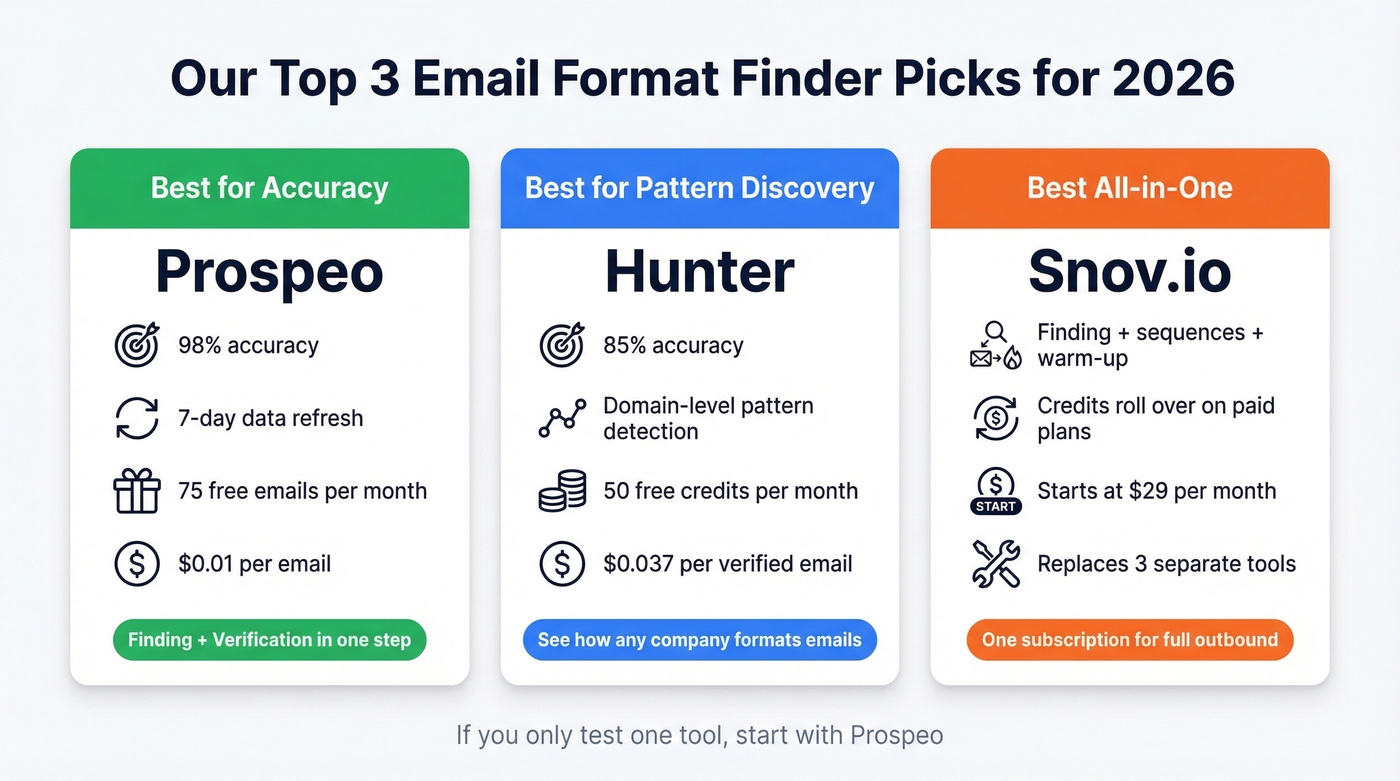
If you only test one tool, make it Prospeo. If you need to see the pattern a company uses before targeting individuals, start with Hunter's domain search - it's the best company email format finder for pattern-level discovery. And if you want finding, sequencing, and warm-up without juggling three subscriptions, Snov.io replaces three separate tools.
Format Finder vs. Email Finder
These terms get used interchangeably, but they solve different problems. An email format finder reveals the pattern a company uses - first.last@company.com, flast@company.com, first@company.com. You're discovering a template, not a specific address. An email address finder takes that a step further: it locates and verifies the actual email for a specific person.
If you're building a full outbound workflow, it helps to separate email search tools (finding) from verification and deliverability controls.
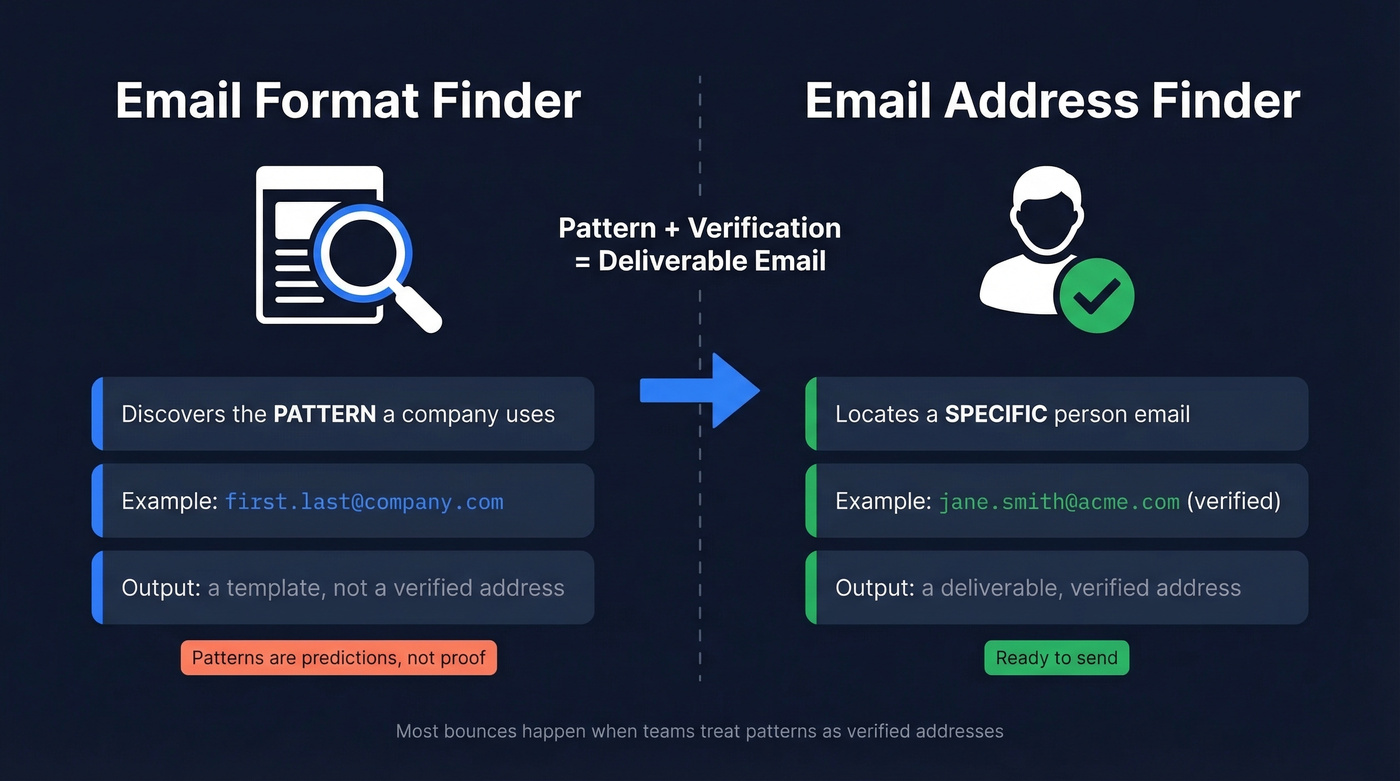
Here's the thing most articles skip: patterns are predictions, not verified addresses. A company might use first.last@ for 90% of employees but first@ for the C-suite, or a completely different format for a recently acquired division. Treating a pattern as gospel without verification is how you end up with a 20%+ bounce rate even on "verified" lists.
The most common B2B patterns, in rough order of prevalence:
| Pattern | Example |
|---|---|
| first.last@ | jane.smith@company.com |
| firstinitiallast@ | jsmith@company.com |
| first@ | jane@company.com |
| flast@ | jsmith@company.com |
| first_last@ | jane_smith@company.com |
How to Find Email Formats Manually
You don't always need software. Here's the manual workflow that still works:
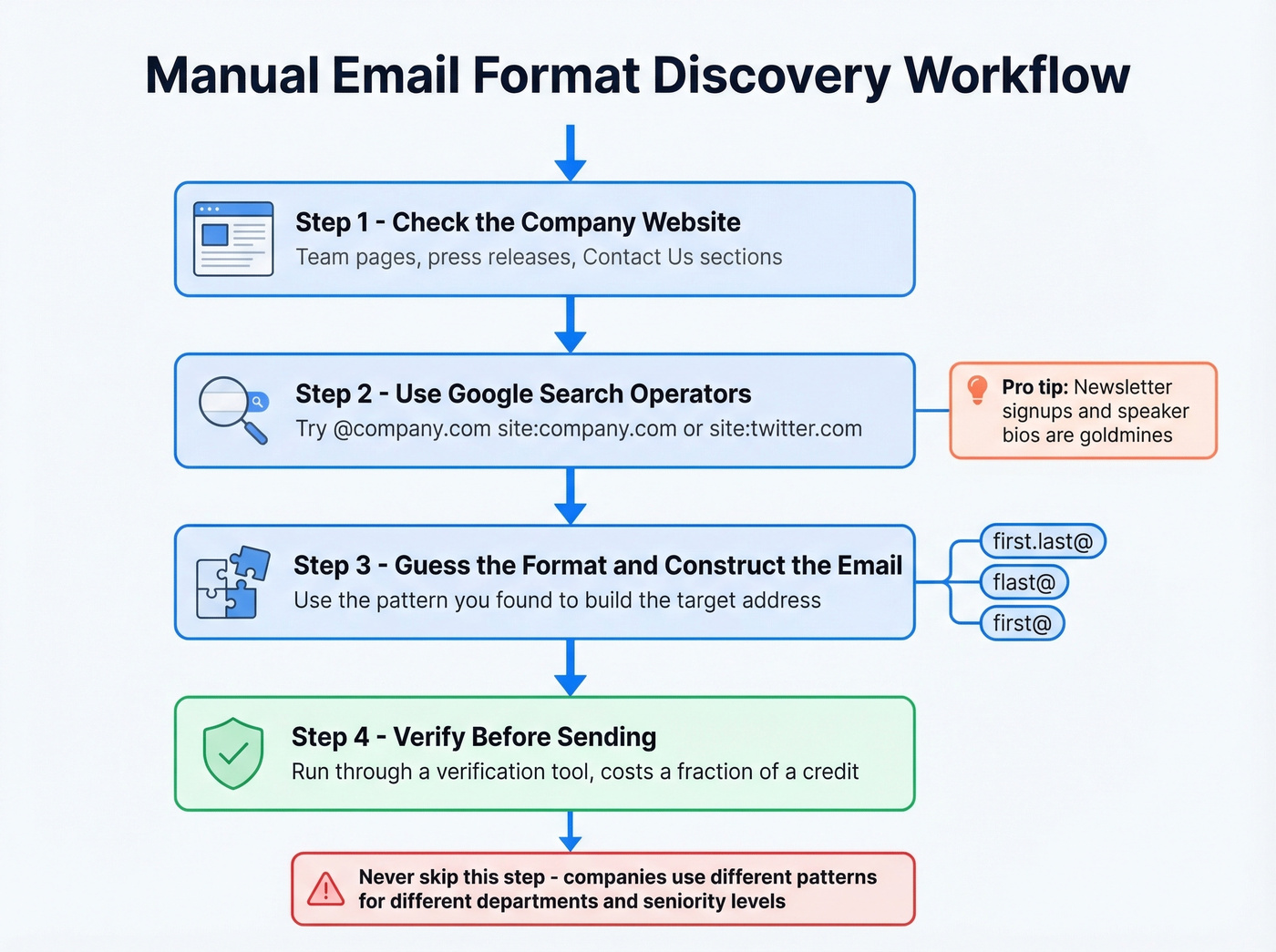
Check the company website. Team pages, press releases, and "Contact Us" sections often expose at least one email address. One address is enough to infer the pattern.
Use Google operators. Search "@company.com" site:company.com or "@company.com" site:twitter.com to surface publicly listed addresses. Newsletter signup confirmations and speaker bios are goldmines.
Guess and verify. Once you've identified the likely convention, construct the target email and run it through a verification tool before sending. This costs a fraction of a credit and saves your domain reputation. If you're seeing issues, start with email bounce rate diagnostics before you scale volume.
Try Hunter's Domain Search. Plug in any domain and Hunter surfaces publicly indexed emails along with the detected pattern. It's free for 50 credits a month and gives you a confidence score for each result - essentially a free company email pattern finder.
One caveat: companies frequently use different patterns for different regions, departments, or seniority levels. Treat any pattern you discover as a starting hypothesis and always verify the specific address before it hits a sequence.
Best Tools for Finding Email Formats
Prospeo
Use this if you care about deliverability above everything else and want finding + verification in a single step.
Skip this if you only need domain-level pattern discovery without individual lookups.
Prospeo's database covers 300M+ professional profiles with 143M+ verified emails, and the accuracy numbers hold up in production. The 5-step verification process includes catch-all handling, spam-trap removal, and honeypot filtering - the three things that separate "technically verified" from "actually deliverable." If you want to go deeper on deliverability mechanics, use this alongside an email deliverability guide.

The proof is in the bounce rates. Snyk's 50-person AE team went from 35-40% bounces to under 5% after switching, generating 200+ new opportunities per month. Meritt saw a similar drop - 35% down to under 4%, with pipeline tripling from $100K to $300K per week. Those aren't marketing numbers; they're the difference between a healthy sending domain and one that's flagged.
Data refreshes every 7 days, which matters more than most teams realize. The industry average is six weeks - that's six weeks of job changes, domain migrations, and role shifts going undetected. The Chrome extension (40,000+ users) lets you pull verified contacts from any website or professional profile in one click. Pricing starts free at 75 emails/month plus 100 Chrome extension credits/month, and paid plans run about $0.01 per email. No contracts, no sales calls.
If you're comparing options specifically for verification, see our roundup of Bouncer alternatives.
Hunter
Hunter is the default choice for domain-level email convention discovery, and for good reason. Plug in any domain and it returns every publicly indexed email it can find, plus the detected pattern and a confidence score for each result. In a 200-profile benchmark of SaaS decision-makers, Hunter hit 85% accuracy - solid, though not best-in-class.

Pricing is straightforward: free for 50 credits/month, Starter at $49/mo for 2,000 credits, Growth at $149/mo for 10,000, and Scale at $299/mo for 25,000. Annual billing drops those by about 30%.
Verification costs 0.5 credits per email, so a found-and-verified contact actually costs 1.5 credits. At Starter pricing, that's roughly $0.037 per verified email. Hunter's the tool you use to figure out how a company formats emails. For the actual finding and verifying at scale, you'll likely pair it with a dedicated finder. If you're evaluating similar tools, start with our list of Hunter alternatives.
Snov.io
The r/coldemail consensus is that tool-stacking gets messy fast. Snov.io bundles finding, verification, sequences, and warm-up into one subscription. Starter runs from ~$29/mo for 1,000 credits and 5,000 unique recipients, with 3 mailbox warm-up slots included. Pro bumps to ~$74/mo with 5,000 credits, 25,000 recipients, and unlimited warm-ups.
Credits cover both search and verification (1 credit each), and unused credits roll over on paid plans. The LinkedIn automation add-on is $69/mo per slot if you need it. The tradeoff: Snov.io's email accuracy doesn't match dedicated finding tools. You're trading some precision for workflow consolidation. If you already have a sequencer you love, skip this and just get a standalone finder. For sequencing best practices, see B2B cold email sequence.
RocketReach
One user on r/coldemail tested multiple tools and landed on RocketReach as "most accurate so far," reporting that their bounce rate "dropped a lot." That's a single data point, but it aligns with what we've seen - RocketReach tends to be conservative, returning fewer results but with higher deliverability.
The conservative approach has a real cost, though. You'll get fewer matches per batch, which means higher effective cost per usable contact. Plans start around $49-99/mo depending on volume, with a limited free tier. If you've been burned by tools that prioritize coverage over accuracy, RocketReach is worth a test. For teams that need volume, look elsewhere.
GetProspect
GetProspect's billing model is its biggest differentiator: you pay only for valid emails found, not for searches that come back empty. In the same 200-profile benchmark, it scored 79% accuracy - below average, but the valid-only billing offsets some of that risk since you aren't paying for misses.
The math works like this: if a tool with 90% accuracy charges per search, you're eating the cost of every failed lookup. GetProspect's 79% accuracy with valid-only billing can actually be cheaper per usable contact than a more accurate tool with per-search pricing. Free tier gives you 50 emails/month. Starter is $49/mo for 1,000 valid emails, scaling up to $399/mo for 50,000. Phone credits are a separate line item and priced significantly higher.
If you're building a broader enrichment stack, compare with other data enrichment services.
Anymail Finder
Budget-friendly option with a 97%+ delivery guarantee - you only pay for verified-valid results. Plans start at $14/mo, and you get 100 free credits to try it. When your volume is under 500 emails/month and budget is tight, start here.
Skrapp.io
Credits are charged only for Valid and Catch-All results, which is a fair model given that Skrapp scored 83% accuracy in the same benchmark. Free tier available. Worth testing if you're dealing with a lot of catch-all domains and want transparency about what you're paying for. If you're cost-modeling, our breakdown of Skrapp pricing can help.

Email patterns are predictions. Prospeo turns them into verified addresses. 143M+ emails verified through a 5-step process with catch-all handling, spam-trap removal, and honeypot filtering - the same data that dropped Snyk's bounce rate from 35% to under 5%.
Start with 75 free verified emails - no credit card, no sales call.
Pricing Comparison
| Tool | Free tier | Entry paid plan | ~Cost per email |
|---|---|---|---|
| Prospeo | 75 emails/mo | ~$39/mo | ~$0.01 |
| Hunter | 50 credits/mo | $49/mo (2K credits) | ~$0.037 (found + verified) |
| Snov.io | 50 credits | ~$29/mo (1K credits) | ~$0.03 |
| RocketReach | Limited | ~$49/mo | ~$0.05-0.10 |
| GetProspect | 50 emails/mo | $49/mo (1K emails) | ~$0.05 |
| Anymail Finder | 100 credits | $14/mo | ~$0.03 |
| Skrapp.io | Free tier | ~$30/mo | ~$0.03-0.05 |
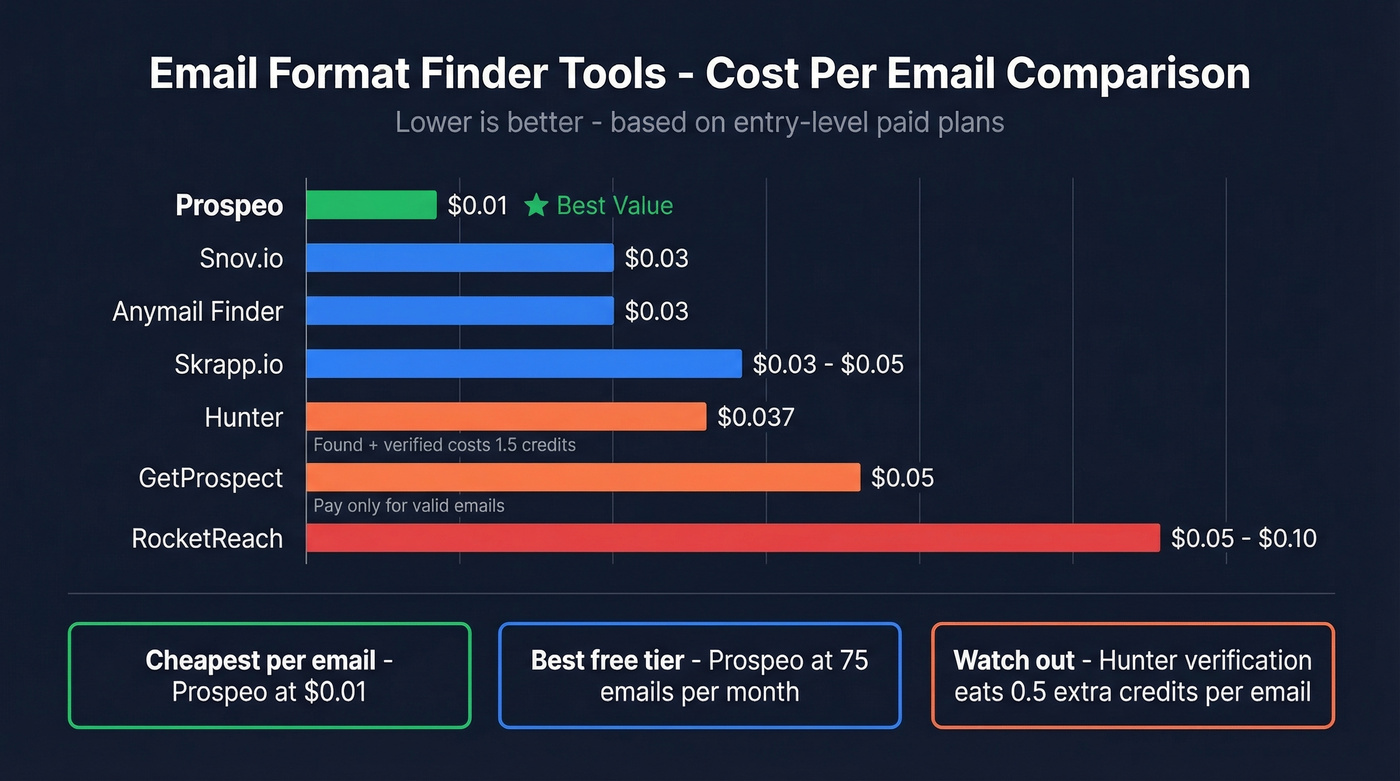
Hunter's verification eating 0.5 credits means a found-and-verified contact actually costs 1.5 credits - nearly 4x Prospeo's per-email rate at Starter pricing. Snov.io's dual system (credits for finding + separate recipient limits for sequencing) means your effective cost depends on whether you're using it as a finder or a full outbound platform.
API Match Rates Matter
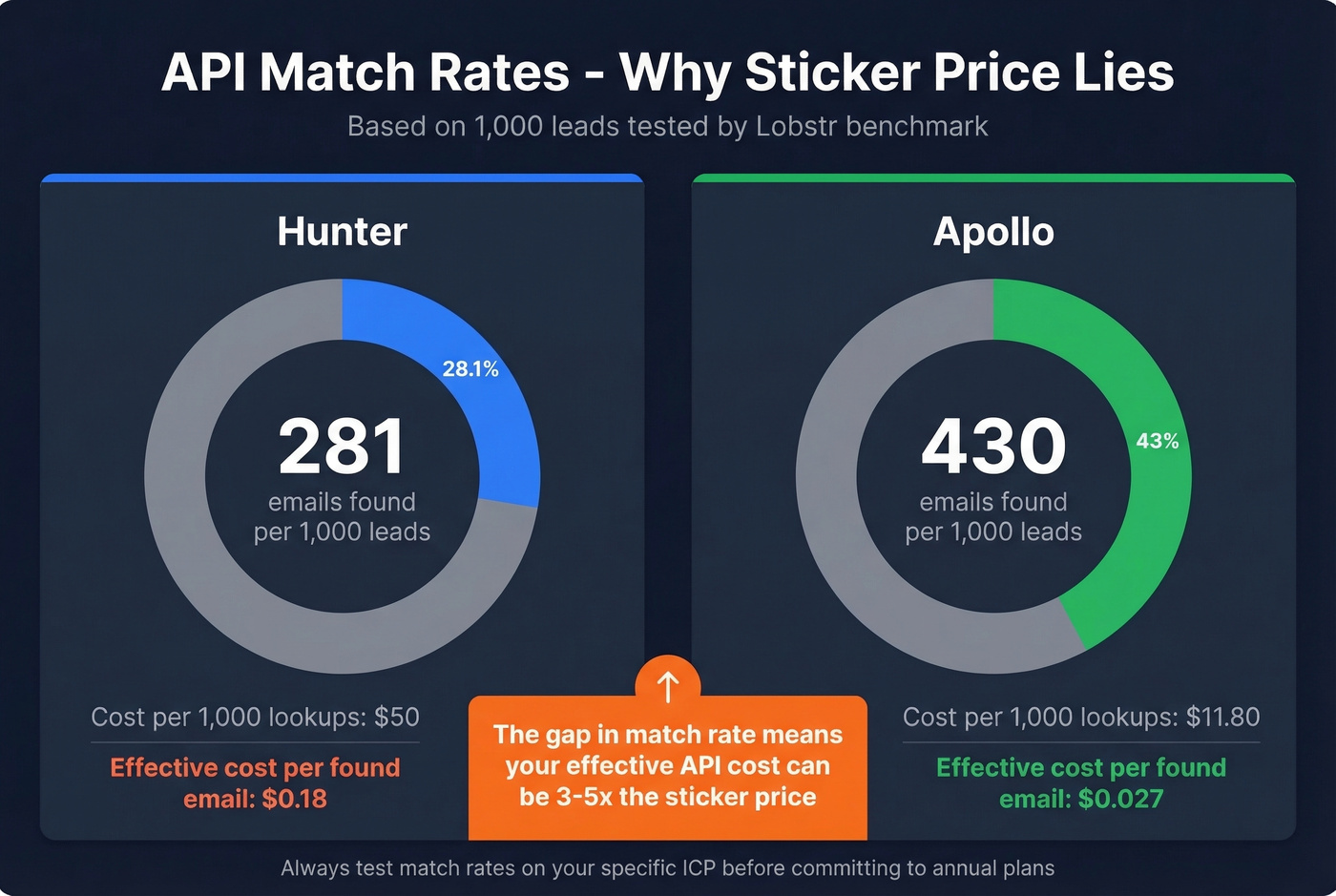
If you're running enrichment workflows through an API, the cost-per-email table only tells half the story. A benchmark by Lobstr tested email finders by feeding them 1,000 leads and measuring how many emails were found. Hunter found 281 emails per 1,000 leads at roughly $50 per 1,000 lookups. Apollo returned 430 per 1,000 at $11.80. The gap in match rate and speed means your effective API cost can be 3-5x what the sticker price suggests. If you're building automations in Clay or Make, factor in match rate - not just price per credit. For list-building workflows, see Clay list building.
Accuracy Benchmarks
Every tool says "95%+" on their marketing page. The actual numbers tell a different story.
The 200-profile benchmark tested 12 tools across SaaS decision-maker profiles. Results ranged from 79% to 90% accuracy. Hunter landed at 85%, Apollo at 88%, GetProspect at 79%, and Skrapp at 83%. These are "valid email found" rates - they don't account for whether those emails actually land in an inbox.
The Dropcontact benchmark went deeper: 15 tools, 20,000 real contacts, and they actually sent emails to measure hard bounces. Hard bounce rates ranged from 0.9% to 3.6% across tools. That's a meaningful spread when you're sending thousands of emails a week. The wrong-domain rate - where a tool returns an email at the wrong company entirely - hit 11.7% for some providers. Imagine sending a pitch to someone's old employer. That's not just a bounce; it's a credibility hit.
Both benchmarks were run by vendors who ranked themselves at or near the top - standard practice in this space. The methodology and relative spreads are still the best public data available.

Let's be honest: if your average deal size is under $15K, you probably don't need the most expensive tool on the market. But you absolutely need the most accurate one. A 5% difference in deliverability across 10,000 emails is 500 wasted touches - and potentially a flagged sending domain that costs you far more than the tool subscription. We've seen teams cut their bounce rate in half just by switching verification providers, without changing anything else about their outbound process. If you're tightening your sending practices, use an email spam checker and monitor email velocity before ramping.
Tool-stacking email format finders and verifiers burns credits twice and still leaves gaps. Prospeo combines finding and verification in a single lookup at $0.01 per email, with data refreshed every 7 days - not the 6-week industry average that lets bounces pile up.
One tool. One credit. One verified email address - every time.
What "Verified" Actually Means
Not all verification statuses are created equal. Here's what each one means and what to do with it:
| Status | Meaning | Action |
|---|---|---|
| Valid | Mailbox confirmed active | Send confidently |
| Catch-All | Server accepts all emails | Send cautiously, throttle volume |
| Invalid | Mailbox doesn't exist | Never send |
| Unknown | Server didn't respond | Re-verify later or skip |
| Pending | Verification still processing | Wait for final result |
Beyond these statuses, good verification tools also check for role-based addresses (info@, sales@), disposable domains, free email providers, and gibberish patterns. In our experience, catch-all domains are where most tools quietly fail - the server accepts everything, so SMTP verification can't tell you if the specific mailbox exists. Dedicated catch-all handling is the single feature that separates tools with real-world accuracy from tools that just look good in a demo.
Staying GDPR Compliant
GDPR enforcement has hit EUR 5.88 billion in fines through 2025, and using any email pattern discovery tool falls squarely within its scope. Keep these rules tight:
- Use legitimate interest (Article 6(1)(f)) as your lawful basis for B2B outreach - it's the standard for sales prospecting, but document your reasoning
- Keep bounce rates under 2% to protect both deliverability and compliance posture
- Maintain an audit trail of where each contact's data originated
- Honor opt-out requests immediately and globally - not just per campaign
- Use a GDPR-compliant data provider that enforces opt-outs globally and provides DPAs on request
Email Format Finder FAQ
What's the most common email format for businesses?
The first.last@company.com pattern dominates B2B email formatting, followed by firstinitiallast@. These two cover roughly 70-80% of professional domains. Always verify the specific address before sending - patterns vary by department, seniority, and region within the same company.
Is there a reliable free email format finder?
Prospeo offers 75 free verified emails per month with full 5-step verification - the most generous free tier with production-grade accuracy. Hunter gives 50 free credits for pattern discovery, and GetProspect provides 50 free valid emails. Test with a batch of known-good addresses before trusting any free tool with a real campaign, since some free tiers throttle their verification pipeline.
Can I find email formats in bulk?
Most tools offer CSV upload or API access for bulk lookups. Match rates vary widely - some competitors drop below 30% on the same inputs where others return 90%+. Hunter and Snov.io both support bulk operations through their respective APIs and dashboard uploads. Check the match rate, not just the price per credit, when evaluating bulk options.
What's the difference between an email finder and an email verifier?
Finders locate the address; verifiers confirm it's deliverable. The best tools combine both steps in a single lookup, saving credits and eliminating the data-staleness gap. Using separate finder and verifier tools increases both cost and error rate, since you're paying twice and introducing a window where contacts can change jobs or domains.
How do I handle catch-all domains?
Catch-all domains accept all emails at the server level, making standard SMTP verification unreliable. Look for tools with dedicated catch-all handling that go beyond basic SMTP checks - features like spam-trap removal and honeypot filtering prevent "valid" labels on undeliverable addresses. This is the feature most worth paying for when prospecting into enterprise companies, where catch-all configurations are common.