

The 8 Best Email Lead Finder Tools in 2026
A 450M-contact database sounds impressive until 10%+ of your first sequence bounces and your domain reputation tanks. Gmail and Yahoo now enforce a hard bounce ceiling of 2% for bulk senders - exceed it and your deliverability craters overnight.
Here's the thing most vendors won't tell you: database size and data quality are almost inversely correlated. The tools with the biggest numbers often have the stalest records. Global average deliverability sits at just 83.1%, meaning nearly 1 in 5 emails never arrives.
These are the 8 email lead finder tools actually worth your time, ranked by what matters: accuracy, freshness, and honest pricing.
Our Top 3 Picks
| Tool | Best For | Starting Price | Free Tier |
|---|---|---|---|
| Prospeo | Email accuracy and data freshness | ~$0.01/email | 75 emails + 100 extension credits/mo |
| Apollo.io | Volume list-building on a budget | ~$49/user/mo | 100 credits/mo |
| Hunter.io | Verification layer | $34/mo (annual) | 50 credits/mo |
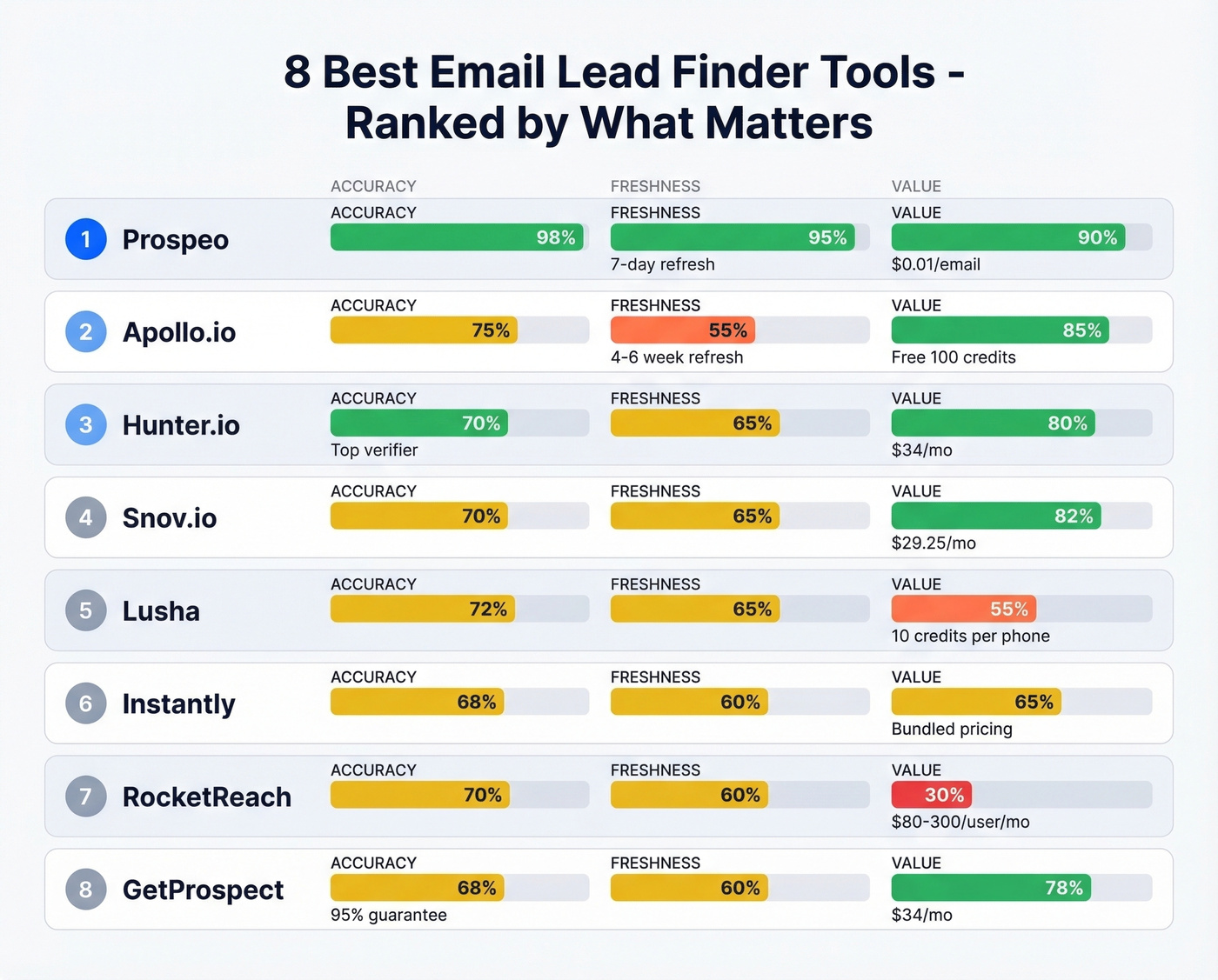
Prospeo leads with 98% email accuracy and a 7-day data refresh cycle. Apollo gives you the biggest free playground. Hunter is the tool you pair with your finder to catch what slips through.
What to Look For in a Lead Finder

Accuracy over database size. A tool with 100M verified emails will outperform one with 400M unverified records every time. Ask vendors what "verified" actually means - is it SMTP-checked, or just pattern-matched? (If you want the benchmarks and fixes, see our bounce rate guide.)
Data freshness. People change jobs constantly. If your provider refreshes data monthly or quarterly, you're sending to ghosts. Look for refresh cycles measured in days, not weeks. When you need to find email addresses for leads in fast-moving industries like SaaS or fintech, stale data is your biggest enemy.
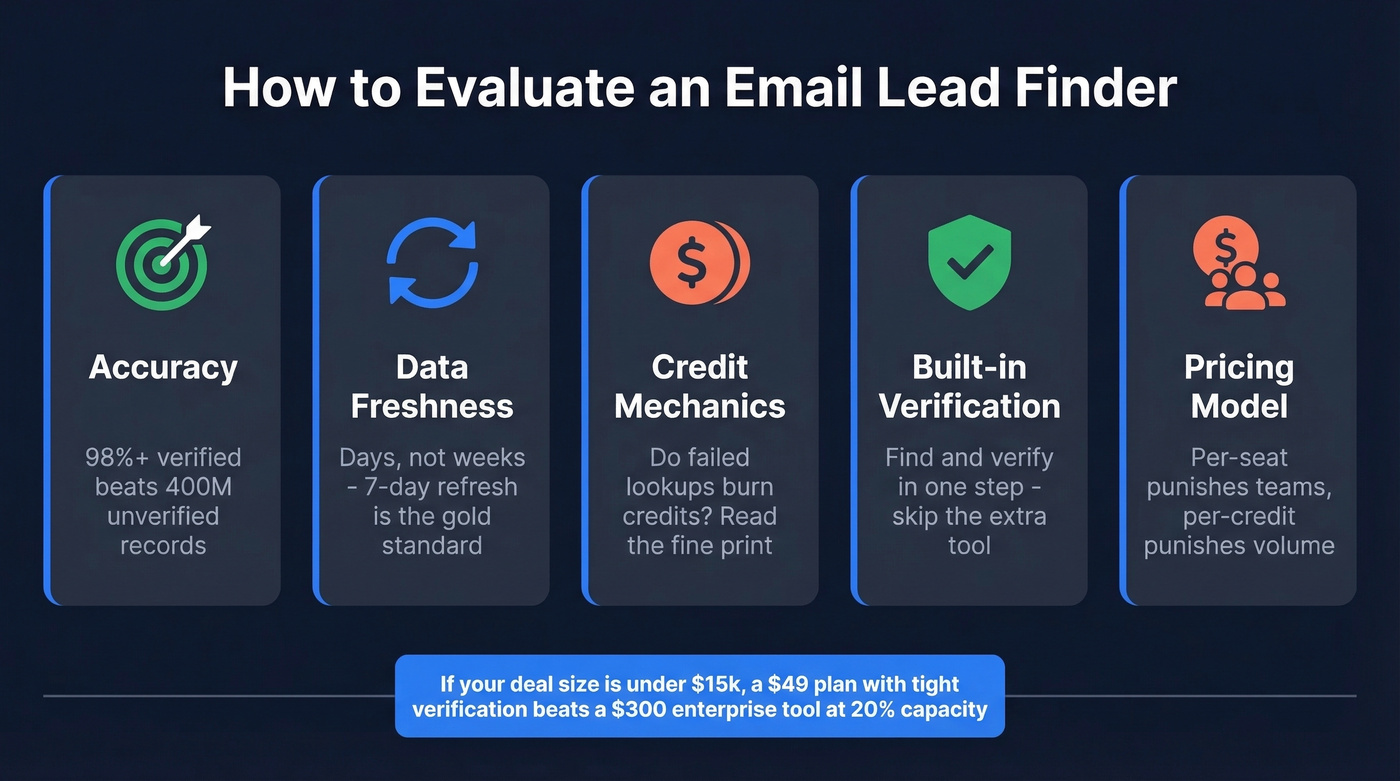
Credit mechanics. Some tools charge 1 credit per email reveal but 10 credits for a phone number. Others burn a credit even when they don't find anything. Read the fine print before you commit.
Built-in verification. If your finder doesn't verify in real time, you'll need a separate verifier - that's another line item and extra hassle. Tools that find and verify simultaneously save you money and steps. (More on the full stack in our email deliverability guide.)
Per-seat vs. per-credit pricing. Per-seat pricing punishes growing teams. Per-credit pricing punishes high-volume users. Know which model fits your usage pattern before you sign anything.
If your average deal size is under $15k, you probably don't need a $300/user/month data tool. A $49 plan with tight verification will outperform an enterprise platform you're only using at 20% capacity.
The 8 Best Tools Ranked
1. Prospeo
Prospeo's database covers 300M+ professional profiles with 143M+ verified emails, and every record refreshes on a 7-day cycle. Most data providers run on 4-6 week refresh cycles - that gap matters when you're prospecting into fast-moving companies where people change roles constantly.

The 5-step verification process handles catch-all domains, strips spam traps, and filters honeypots before you ever export a contact, resulting in 98% email accuracy. The 30+ search filters include buyer intent data across 15,000 topics, technographics, job changes, and headcount growth, so you're not just finding emails - you're finding the right emails. (If you're comparing providers, start with our sales prospecting databases breakdown.)
On the phone side, 125M+ verified mobiles with a 30% pickup rate across all regions. Stack Optimize, a Prospeo customer, runs client deliverability at 94%+ with bounce rates under 3% and zero domain flags across all clients. That's the kind of result that keeps agencies from losing sleep.
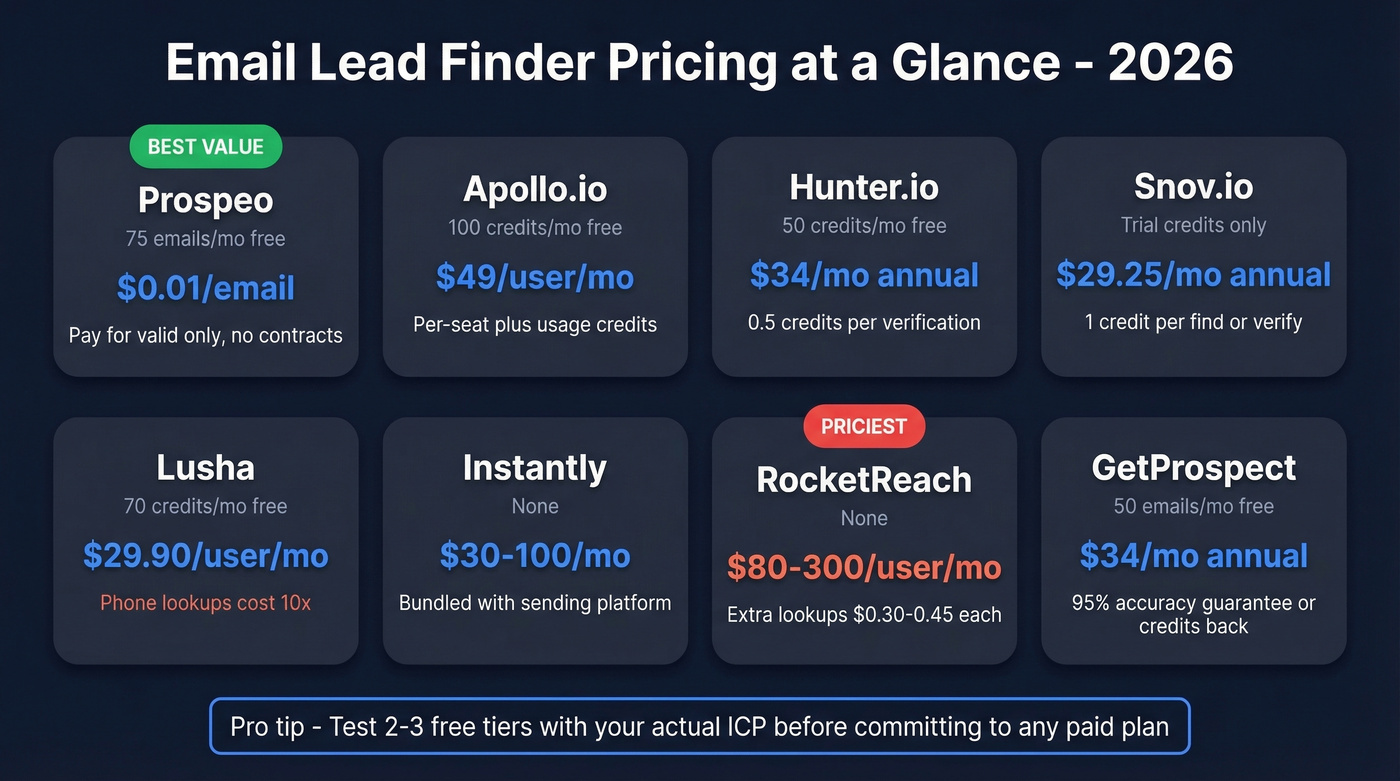
Pricing starts free with 75 emails and 100 Chrome extension credits per month. Paid plans run roughly $0.01 per email with no contracts. If your bounce rate is above 5%, start here.
2. Apollo.io
Use this if: You need volume list-building and want to explore before spending a dollar. Apollo's free tier gives you 100 credits per month against a 250M+ contact database, and the search filters are genuinely useful for building targeted lists fast. (For more options, see our roundup of outbound lead generation tools.)
Skip this if: You need consistently low bounce rates at scale. The #1 complaint on Reddit about Apollo is bounces on older contacts. The database is massive, but data freshness isn't their strong suit - and stale data is what kills deliverability.
Paid plans start around $49-$99/user/month with usage-based credits layered on top. Per-seat pricing gets expensive once you're past 5-10 users. We've seen teams start on Apollo's free tier, validate their ICP, then move to a more accurate provider for actual sending. That's a smart workflow. (If you need a framework, use an ideal customer profile template before you scale.)
3. Hunter.io
Hunter is the verification specialist that also happens to find email leads. Their own benchmark testing 15 verifiers across 3,000+ emails put Hunter at 70% overall accuracy - top of the pack, though they acknowledge their dataset may give them a slight edge.

Pricing: free at 50 credits/mo, Starter at $34/mo annual, Growth at $104/mo annual, Scale at $209/mo annual. (If you're shopping alternatives, see our Hunter alternatives list.)
4. Snov.io
Snov shines for international prospecting at a price point that won't make your finance team flinch. Starter runs $29.25/mo annually for 1,000 credits and 5,000 recipients, with unlimited team seats. Pro bumps to $74.25/mo for 5,000 credits. One credit covers one email find or one verification, and recipients are charged once per new contact - follow-ups are free in the same billing period.
Snov restructured plans in mid-2025, moving team collaboration features off the Starter plan entirely. If you need shared workflows, you're looking at Pro minimum.
5. Lusha
Free tier gives you 70 credits per month. Pro runs $29.90/user/month for 250 credits, Premium $69.90 for 600 credits.
The critical mechanic: email reveals cost 1 credit, but phone number reveals cost 10. That means your 250 Pro credits get you 250 emails or 25 phone numbers. Not both. Be disciplined about which contacts get the phone lookup, or you'll burn through credits in a day and wonder where they went.
The UI is clean and intuitive - Lusha is one of the easiest tools on this list to learn. But per-seat pricing adds up fast for teams larger than 3-4 reps.
6. Instantly
Instantly's lead database of 450M+ contacts with waterfall enrichment comes bundled with their sending platform, typically $30-$100/mo depending on plan. If you're already running Instantly for cold email delivery, adding their lead finder is a no-brainer - one platform, one bill. (If you're evaluating senders, compare with our AI bulk email senders guide.)
For teams not already on Instantly, you're paying for sending infrastructure you don't need just to access the database. That's an awkward fit.
7. RocketReach
Individual plans run $80-$300/user/month. Team plans start at $83/user/month billed annually. Extra lookups cost $0.30-$0.45 each. That's a lot of money for email lookups in 2026. Hard to justify unless you're doing executive-level research where coverage matters more than cost.
8. GetProspect
Budget-friendly option for small teams. Free tier gives you 50 emails per month. Paid plans start at ~$34/mo annually for 1,000 valid emails with a 95% data accuracy guarantee or credits back. Not the deepest database, but the price-to-value ratio is solid for low-volume outreach. If you're sending fewer than 500 emails a month, this does the job without the overhead. (If you're building lists on a budget, start with these free lead generation tools.)

Your email lead finder is only as good as its freshness cycle. Prospeo refreshes every 7 days - not 4-6 weeks like most tools on this list - so you're never sending to someone who changed jobs last month. 98% email accuracy, 5-step verification, $0.01/email.
Start with 75 free emails and see your bounce rate drop below 3%.
Pricing Comparison
| Tool | Free Tier | Paid From | Credit Mechanic | Best For |
|---|---|---|---|---|
| Prospeo | 75 emails/mo | ~$0.01/email | Per-email, pay for valid only | Accuracy and freshness |
| Apollo.io | 100 credits/mo | ~$49/user/mo | Per-seat + usage credits | Volume list-building |
| Hunter.io | 50 credits/mo | $34/mo (annual) | Per-credit, 0.5 per verify | Verification layer |
| Snov.io | Trial credits | $29.25/mo (annual) | Per-credit + recipients | International leads |
| Lusha | 70 credits/mo | $29.90/user/mo | 1/email, 10/phone | Phone + email combo |
| Instantly | None | ~$30/mo | Bundled with sending | All-in-one senders |
| RocketReach | None | $80/user/mo | Per-lookup | Enterprise research |
| GetProspect | 50 emails/mo | ~$34/mo (annual) | Per-valid-email | Budget prospecting |
How to Find B2B Lead Emails at Scale
Experienced cold email operators don't rely on a single tool. The practitioner consensus on r/coldemail frames the stack in layers: data sourcing, verification, inbox infrastructure, then sending platform. (For a deeper playbook, see our guide to cold email marketing.)
We recommend testing the free tiers of 2-3 tools before committing to a paid plan - accuracy varies wildly depending on your target industry and geography. In our experience, a tool that nails 98% accuracy for US-based SaaS contacts might drop to 80% for European manufacturing leads. Test with your actual ICP, not a generic sample.
Even with pre-verified data, the sending layer matters. Keep daily volume to 10-15 emails per inbox, warm up new inboxes for 14-21 days minimum, and scale horizontally with multiple domains rather than blasting from one. The goal is a bounce rate under 2% - that's the threshold Gmail and Yahoo enforce for bulk senders. (To stay safe as you scale, follow an email velocity plan.)
3 Mistakes That Kill Deliverability
Sending stale data. Email addresses decay fast. Verify your list within days of sending, not weeks. A list you built in January is already degrading by March - and by June, you're sending to a graveyard.
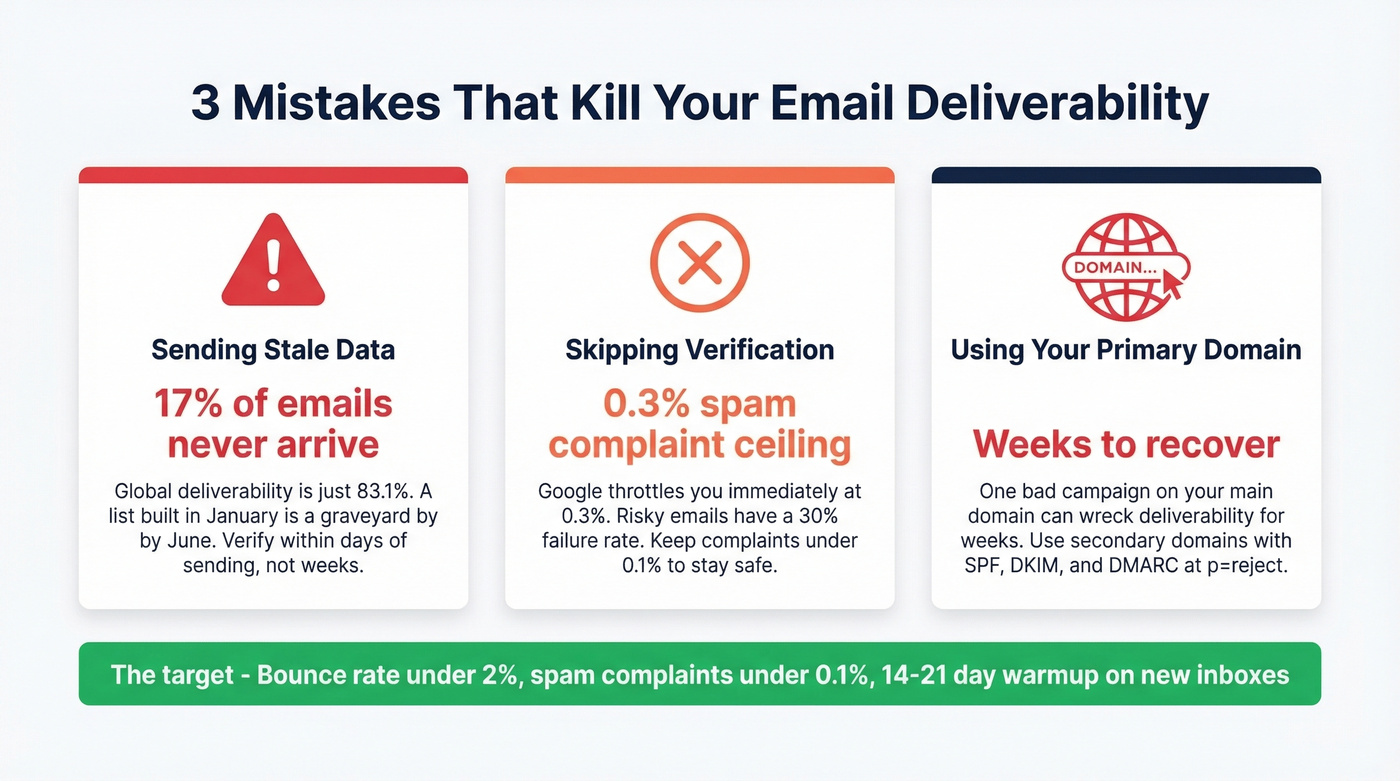
Skipping verification entirely. Even databases that say "verified" include catch-all and risky addresses. Those risky emails have a 70% success rate at best - the other 30% tanks your sender reputation. Keep spam complaints under 0.1%; Google's hard ceiling is 0.3%, and hitting it triggers immediate throttling. (If you need diagnostics, use an email spam checker.)
Sending from your primary domain. Use secondary domains for cold outreach. Set up SPF, DKIM, and DMARC at p=quarantine or p=reject. One bad campaign on your primary domain can take weeks to recover from. We've watched teams learn this the hard way - don't be one of them.
Stack Optimize built a $1M agency on Prospeo data with bounce rates under 3% and zero domain flags. That's what happens when your email lead finder verifies catch-alls, strips spam traps, and filters honeypots before you ever hit export.
Find the right emails, not just more emails. 143M+ verified and counting.
FAQ
What's the difference between a finder and a verifier?
An email finder discovers addresses from names, domains, or company data. A verifier checks whether an existing address is actually deliverable. Many tools do both, but some - like Hunter - are stronger at verification than discovery. Always verify before sending, regardless of which tool you use.
How many emails can I find for free?
Prospeo gives 75 emails plus 100 Chrome extension credits per month, Apollo offers 100 credits, Lusha provides 70 credits, and Hunter gives 50 credits. That's enough to test accuracy across all four before committing to a paid plan.
What bounce rate should I target?
Keep your bounce rate under 2%. Gmail and Yahoo enforce this threshold for bulk senders, and exceeding it triggers deliverability penalties. Above 5%, you risk domain reputation damage that takes weeks to recover from.
What's the fastest way to find a lead's email?
Use a tool with a Chrome extension that pulls verified contact data directly from professional profiles. Prospeo, Apollo, and Lusha all offer browser extensions that surface verified emails in one click while you browse - no tab-switching or manual domain searches needed.