

Email Name Generator: Create a Professional Address That Works
You're reviewing resumes and cooldude2003@hotmail.com lands in your inbox. Before you've read a single bullet point, you've already formed an opinion. Recruiters notice email addresses before they read resume content - that's the power of an email name. It's the first impression before the handshake.
Whether you're job hunting, launching a business, or building an outbound sales machine, the email name you choose carries more weight than most people realize. And while every email name generator online spits out the same ten patterns, none of them tell you which one to actually pick. That's what we're fixing here.
What You Need (Quick Version)
Three scenarios, three answers:
- Job seekers:
firstname.lastname@gmail.com- free, credible, done. If it's taken, add a middle initial. - Business owners and freelancers: Get a custom domain.
you@yourcompany.comtypically runs about $6-$15/user/month through Google Workspace or Microsoft 365. It's the single cheapest credibility upgrade you can make. - Sales and outbound teams: Custom domain on a separate sending domain like
tryyourcompany.com, warmed up for 12+ weeks. Verify your recipient list before your first sequence goes out - bad data kills domain reputation faster than bad copy.
What Is an Email Name?
Every email address has the same anatomy: the local part (the bit you choose), the @ symbol, the domain, and the TLD (top-level domain like .com or .co.uk). When people say "email name," they mean the local part - everything to the left of the @.
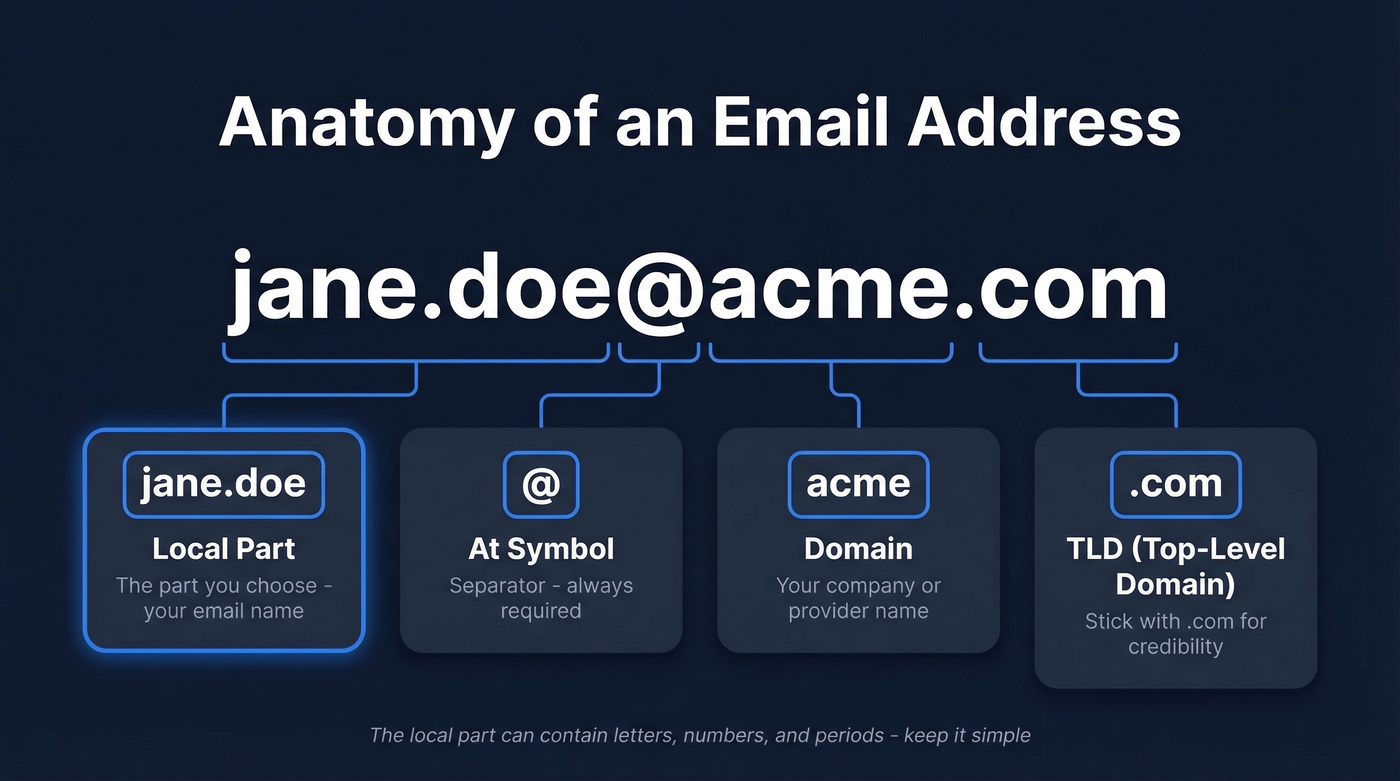
In jane.doe@acme.com, the email name is jane.doe. The domain is acme, and the TLD is .com. You control the local part; everything else depends on your provider or domain. The local part can contain letters, numbers, periods, and certain special characters, though the safest bet is sticking to letters and dots.
One thing worth knowing: rules vary by provider. What characters are allowed, whether dots matter, minimum lengths, what's considered "available" - all of it differs between Gmail, Outlook, and custom hosts. If you're choosing between formats, test your top two or three options on the provider you actually plan to use.
Professional Email Formats That Work
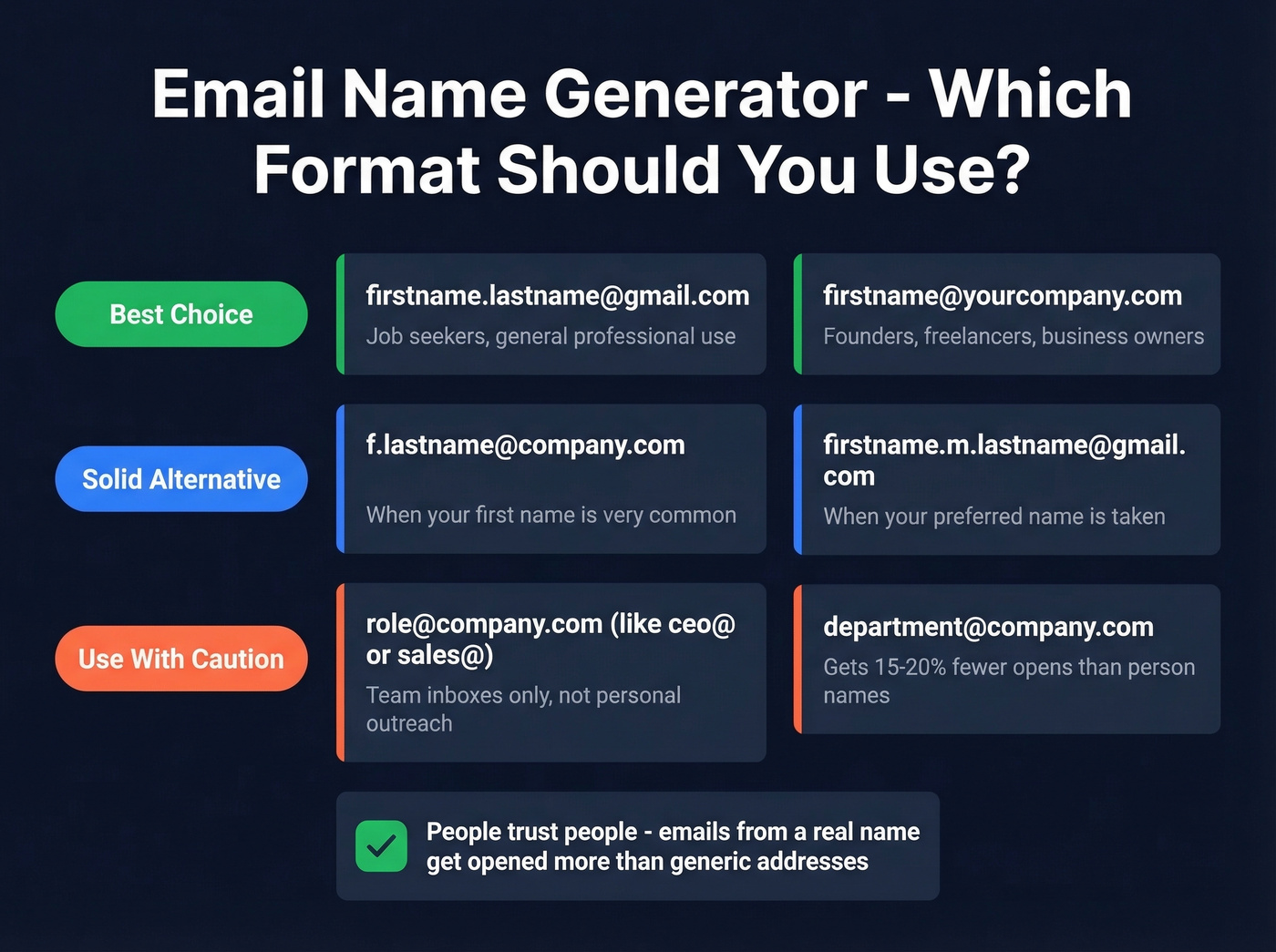
There are hundreds of business email patterns floating around online. These seven are the only ones that matter:
| Pattern | Example | Best For |
|---|---|---|
| firstname.lastname | jane.doe@gmail.com | Job seekers, general |
| f.lastname | j.doe@company.com | Common first names |
| firstname.m.lastname | jane.m.doe@gmail.com | Name already taken |
| firstname@customdomain | jane@acmeconsulting.com | Founders, freelancers |
| firstname.lastname@custom | jane.doe@acme.com | Business employees |
| role@customdomain | ceo@acme.com | Executive branding |
| department@customdomain | sales@acme.com | Team inboxes only |
The top few patterns cover almost every professional use case. The bottom two work for team inboxes but shouldn't be your primary sender address for outreach - emails from a recognizable person-based address get opened 15-20% more often than generic department addresses. People trust people more than they trust marketing@.
For business, firstname@customdomain.com is the gold standard: clean, memorable, and signals brand ownership. For job seekers, firstname.lastname@gmail.com remains the safest default. Any decent email name generator tool will surface these patterns first, because they're the ones that actually perform.
Here's something we see constantly: teams default to info@ or sales@ for outbound campaigns, then wonder why performance is flat. Switch to a person's name and watch the numbers move.
Email Names That Get You Rejected
Skip these entirely.
Childhood nicknames like partygirl123@ or sk8rboi@ are memorable for the wrong reasons. Hostile or edgy handles - ihatepeople@, deathmetalfan@ - you think it's funny, but recruiters don't. Birth years like jdoe1987@ instantly reveal your age, which can trigger unconscious bias in hiring. And dated providers like @aol.com or @hotmail.com signal you haven't updated your digital presence since 2004. Fair or not, it creates an impression.
The r/humanresources community has entire threads dedicated to the worst email addresses they've seen on applications. The takeaway is consistent: unprofessional emails are memorable for the wrong reasons.

Choosing the right email format is step one. Step two is finding the actual email addresses of the people you need to reach. Prospeo's Email Finder covers 300M+ profiles with 98% verified accuracy - so your outreach lands in real inboxes, not bounce logs.
Stop guessing email formats. Find verified addresses for $0.01 each.
When Your Name Is Taken
This is the single biggest frustration people hit with any email name generator. If you're named John Smith, john.smith@gmail.com was taken in 2005. Here's how to handle it without resorting to johnsmith847293@.
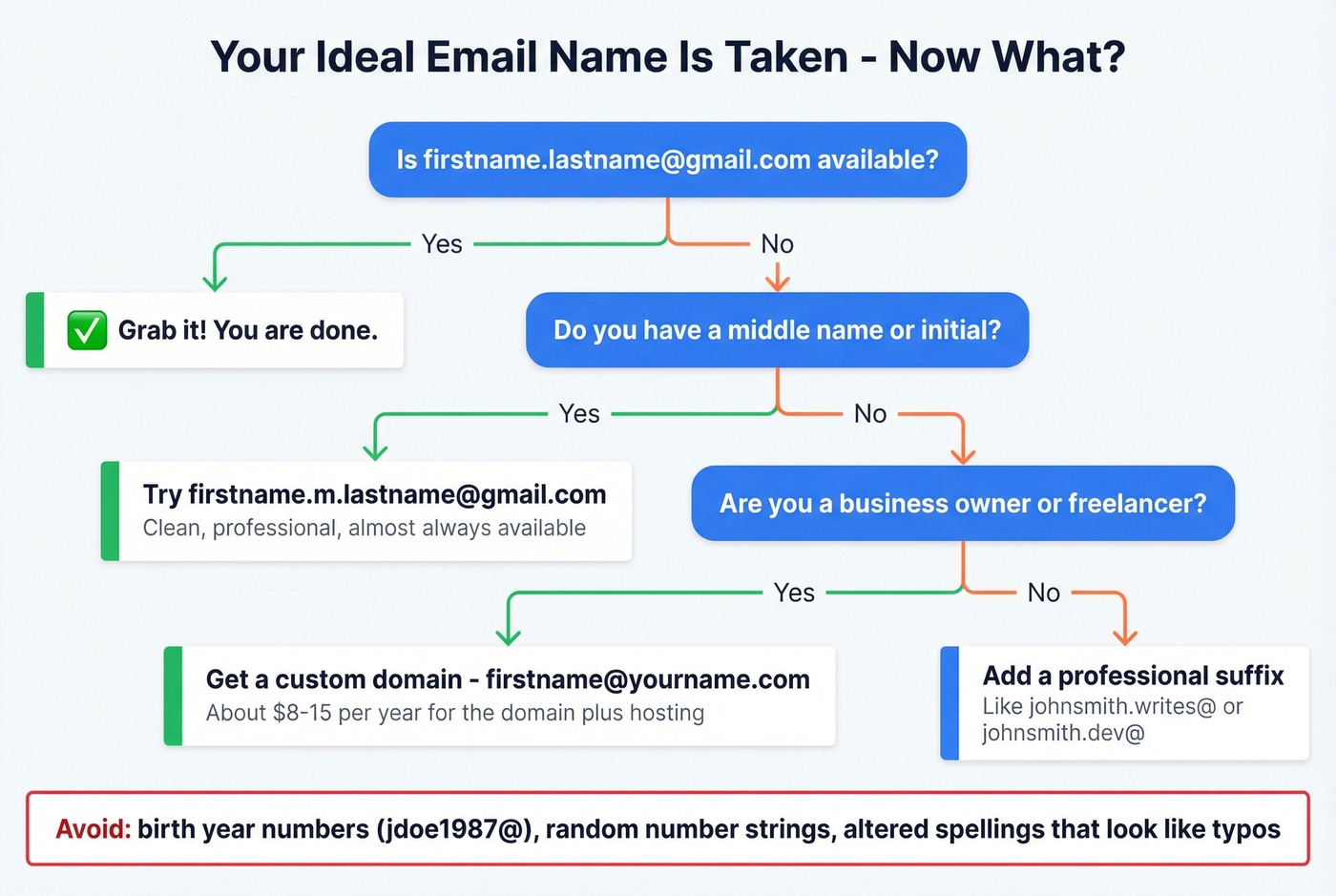
Add your middle initial. john.m.smith@gmail.com is clean, professional, and almost always available. Best first move.
Use a professional suffix word. Think johnsmith.writes@, johnsmith.dev@, or johnsmithHQ@. The consensus on r/LifeProTips is that a descriptive suffix beats a random number every time.
Get a custom domain. For about $8-15/year for the domain plus email hosting, you can own john@johnsmith.com. This is the nuclear option, and it works beautifully.
Avoid numbers that look like birth years, altered spellings (one Reddit thread in r/jobs debated dropping a letter from a middle name - it just looks like a typo), and random number strings that tell the recipient nothing except that you gave up.
Custom Domain vs. Free Provider
| Option | Typical Price | Best For |
|---|---|---|
| Google Workspace | ~$6-$15/user/mo | Business, teams |
| Microsoft 365 | ~$6-$15/user/mo | Outlook-native orgs |
| Budget email hosting | ~$1-$5/user/mo | Solo operators |
| Domain registration | $8-15/yr (.com) | Everyone above |
If you're a job seeker, a clean firstname.lastname@gmail.com is perfectly fine. No recruiter will reject you for using Gmail.
If you're a freelancer or business owner, a custom domain is non-negotiable. sarah@sarahdesigns.com communicates legitimacy in a way that sarahdesignsmail@gmail.com never will. You can spin up support@, billing@, and hello@ whenever you need them - it scales with you.
Stick to .com for your TLD. Reddit users consistently flag unusual TLDs like .am or .xyz as looking scammy or untrustworthy. A .com domain costs a few dollars more and eliminates that perception problem entirely.
Email Names for Sales and Cold Outreach
Here's where email names stop being about personal branding and start being about infrastructure.
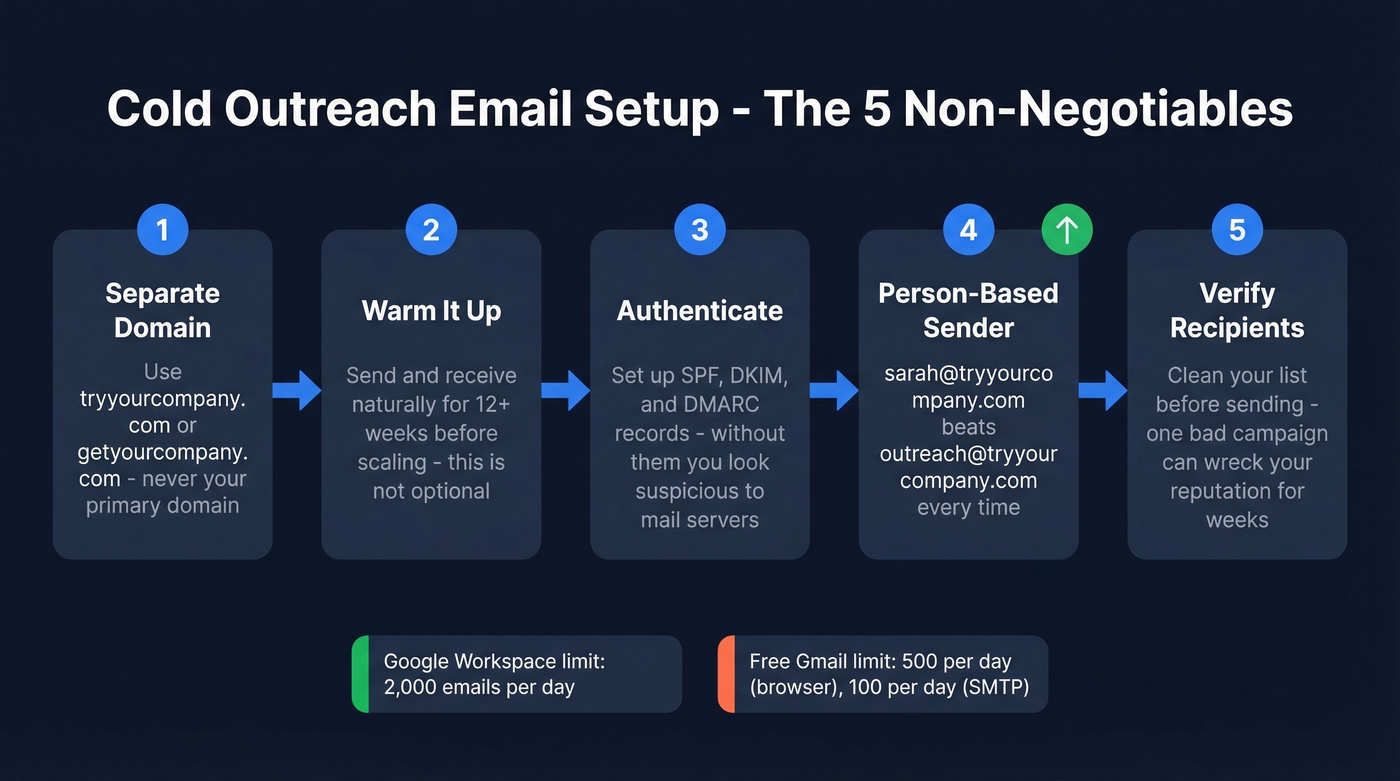
Use a separate outbound domain. Don't send cold email from your primary domain. Set up tryyourcompany.com or getyourcompany.com, redirect it to your main site, and use that for all outbound. If your sending reputation takes a hit, your main domain stays clean.
Warm it up. New email addresses need at least 12 weeks of warm-up before automated cold email at scale. This isn't optional - it's the difference between inbox and spam.
Know your sending limits. Free Gmail caps you at 500 emails/day through the browser and 100/day via SMTP. Google Workspace bumps that to 2,000/day, which is why every serious outbound team uses it.
Set up authentication. SPF, DKIM, and DMARC aren't optional anymore. Without them, your emails look suspicious to receiving servers regardless of how good your sender name is. (If you need a refresher on setup details, start with SPF and DMARC alignment.)
Person-based senders win. sarah@tryyourcompany.com will outperform outreach@tryyourcompany.com every time.
Let's be honest: if your deal sizes sit below five figures, you probably don't need a multi-seat enterprise data subscription. A verified list, a clean sending domain, and a person-based sender address will outperform an expensive platform with sloppy data hygiene every time. If you're building the system end-to-end, pair this with a B2B cold email sequence and a plan to improve sender reputation.
You set up your outbound domain, warmed it for 12 weeks, and wrote killer copy. Don't waste it on bad recipient data. Prospeo verifies every email through a 5-step process with spam-trap removal and catch-all handling - keeping your bounce rate under 4%.
Protect your sending reputation with 98% accurate contact data.
Best Email Name Generator Tools in 2026
You probably don't need a dedicated tool for this. Every generator produces the same ten patterns - firstname.lastname, f.lastname, firstnamelastname, and so on. The real value is in the decision framework above. But if you want a tool to speed things up, here's what's out there.
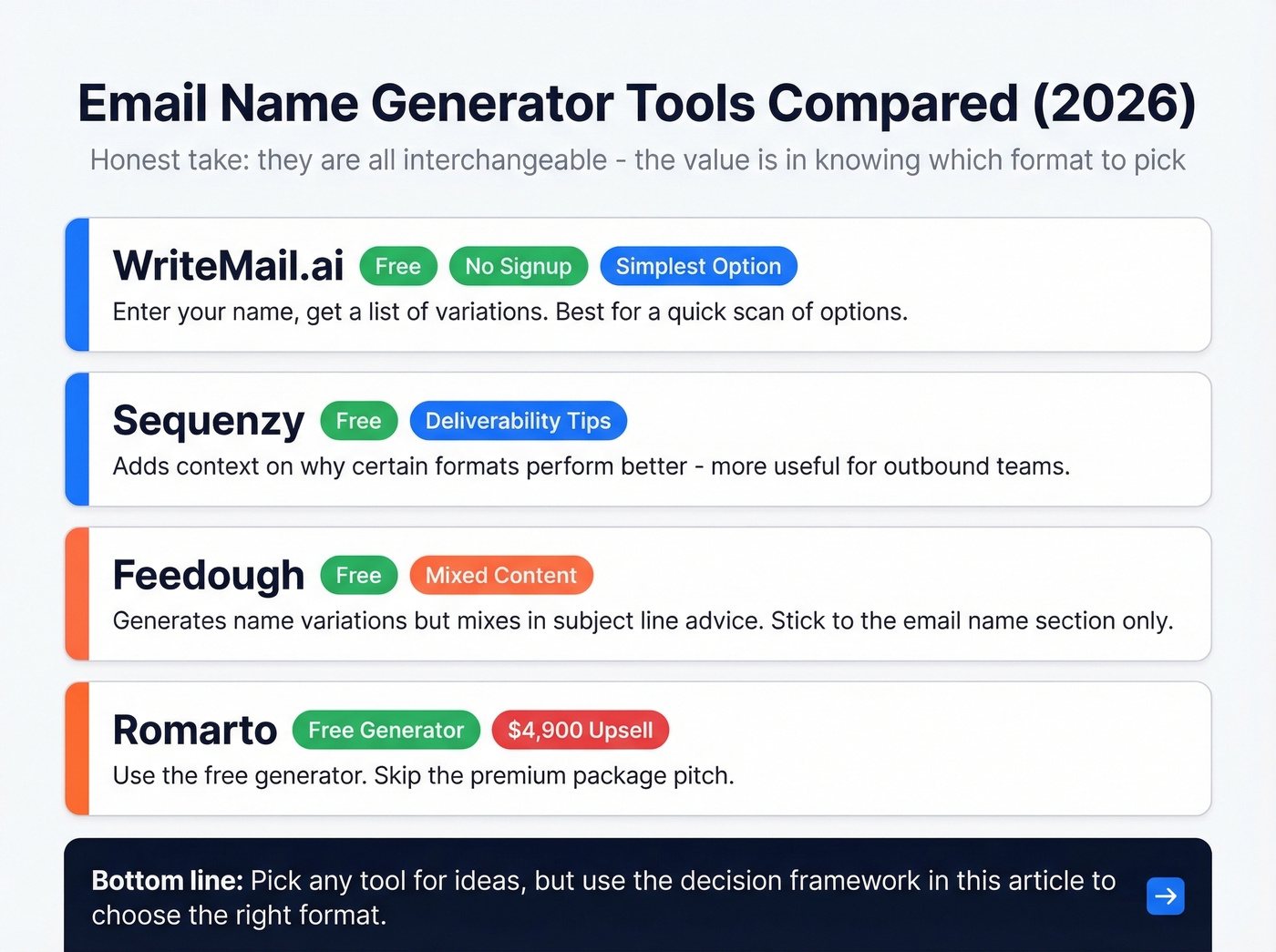
WriteMail.ai is the simplest option - enter your name, get a list of variations. Free, no signup, no friction. If you just need a quick list to scan, start here.
Sequenzy adds deliverability tips alongside its suggestions, which makes it more useful if you're thinking about outbound. Unlike WriteMail, it explains why certain formats perform better. Also free.
Feedough generates variations but mixes in subject-line advice, which gets confusing. Stick to the email name section and ignore the rest.
Romarto offers a free generator and promotes a $4,900 "professional email, personal domain, and custom website design" package. Use the free part. Skip the pitch.
The honest truth: they're all interchangeable. The value isn't in the tool - it's in knowing which format to pick and why.
How to Find Someone Else's Email from a Name
If you're trying to go from a person's name to a working address, you need two things: (1) the right pattern guess, and (2) verification so you don't burn your domain on bounces. Start with a name to email workflow, then run a quick check if an email exists before you send.
If you're doing this at scale for outbound, build the rest of the stack around it: sales prospecting techniques, a clean lead generation workflow, and a deliverability baseline (watch your email bounce rate).
FAQ
What's the most professional email format?
firstname.lastname@domain.com is the universal standard. With a custom domain, firstname@yourcompany.com is even cleaner and signals brand ownership. Default to one of these two - they cover 90%+ of professional use cases.
Should I use Gmail or Outlook?
Both are fine for personal professional use. For business, get a custom domain through Google Workspace or Microsoft 365 (typically $6-$15/user/mo). The credibility difference is worth the cost.
Is it bad to have numbers in my email?
Numbers almost always imply a birth year, revealing your age to recruiters and clients. Use a middle initial or professional suffix word like .dev or .writes instead - they look intentional rather than desperate.
How do I verify an email address works?
Send a test to a friend first. For outbound campaigns, use a verification tool like Prospeo to confirm deliverability before sending at scale - a single bounced campaign can damage your sender reputation for weeks.
Can I change my Gmail address?
No. Gmail doesn't allow username changes on existing accounts. You'll need to create a new account and migrate contacts, filters, and subscriptions manually. It's a one-time hassle, but worth it for a stronger professional presence.