

Email Search by Name: Methods, Tools, and What Actually Works
You send 500 cold emails. 140 bounce. Your domain reputation tanks, your sequences stall, and your ops team spends the next two weeks cleaning up the mess. That's not a hypothetical - ZeroBounce data shows nearly 28% of email addresses checked were invalid or risky, up from 22% just two years earlier.
Running an email search by name is easy. Finding an address that actually lands in an inbox? That's the hard part, and it's a two-step process most people skip half of.
What You Need (Quick Version)
- Best for budget: Anymail Finder - $14/month, you only pay for valid emails.
- Best all-in-one: Apollo - massive database plus built-in sequencing, but verify separately (stale data risk is real).
If you have a name and company domain, use a dedicated email finder tool. If you only have a name, start with the manual methods below - then run whatever you find through verification.
How Email Finders Work
Every email finder tool runs the same basic playbook, just with different levels of sophistication. It starts with pattern permutation. Given a name like "Jane Smith" and a domain like "acme.com," the tool generates every plausible combination: jane.smith@, jsmith@, jane@, j.smith@, smithj@ - sometimes dozens of variants depending on the tool's pattern library.
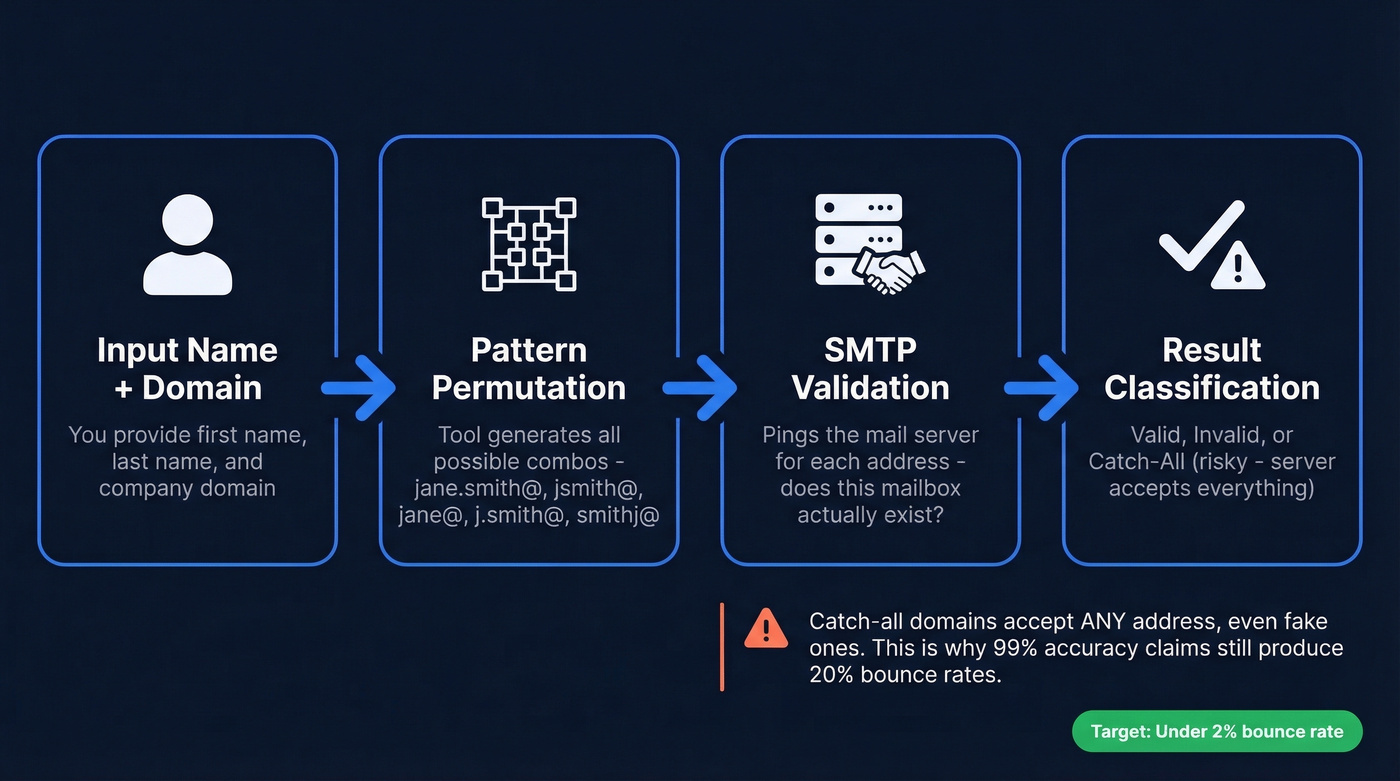
Next comes SMTP handshake validation. The tool pings the mail server for each permuted address, essentially asking "does this mailbox exist?" without actually sending a message. If the server confirms, you've got a match. Rejection means the address gets flagged as invalid.
Here's where it gets tricky: catch-all domains. Some companies configure their mail servers to accept email sent to any address at their domain - valid or not. When a tool hits a catch-all server, it can't distinguish jane.smith@acme.com from gibberish@acme.com. Both return "valid." This is why tools that claim 99% accuracy can still produce 20% bounce rates in practice.
The industry rule of thumb: keep your total bounce rate below 2%. Top performers target hard bounces under 1%. If you want a deeper breakdown of bounce types and fixes, see our guide on bounce rate.
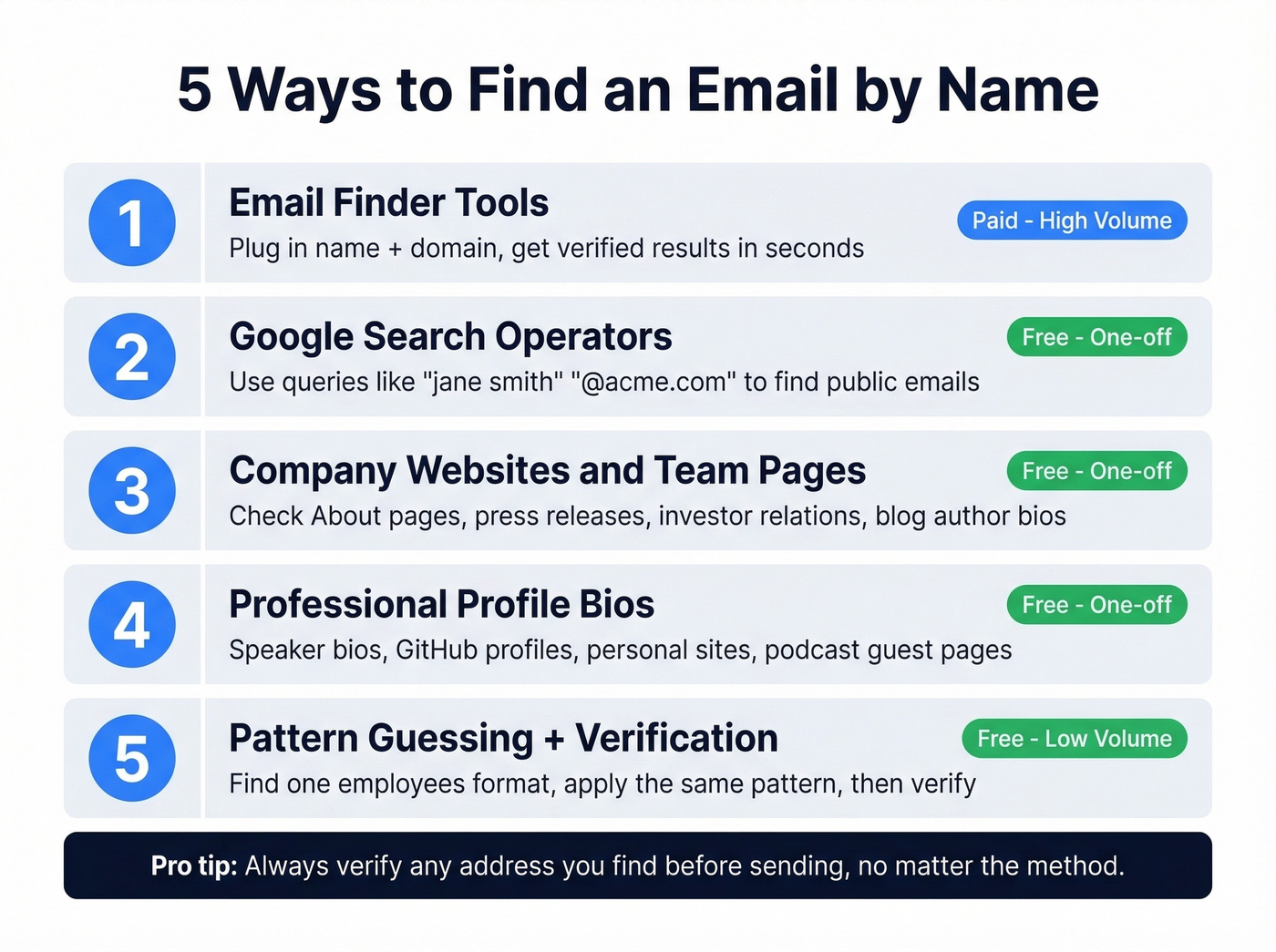
Five Ways to Find an Email by Name
Email Finder Tools
The fastest method for any kind of volume. Plug in a first name, last name, and company domain - the tool handles permutation, SMTP checks, and verification in seconds. If you're doing more than a handful of lookups per week, a dedicated finder tool is non-negotiable. If you're comparing options, start with our roundup of email search tools.
Google Search Operators
Surprisingly effective for one-off lookups, and it costs nothing. Try "jane smith" "@acme.com" or site:acme.com "jane smith" email. You can also search "jane.smith@" acme to catch email addresses that appear in public documents, conference speaker bios, or press releases. For common names, add a job title or location to narrow results. I've found C-suite emails buried in PDF investor decks that no finder tool had indexed - it's worth the five minutes when you're chasing a high-value prospect. For more, see Google Search Operators.
Company Websites and Team Pages
Many companies list leadership emails on their About or Team pages. Press releases and investor relations pages often include direct contact information for spokespeople. Check the company blog too; author bios sometimes include email addresses.
Professional Profile Bios
People put their work email in surprising places: speaker bios from conferences, GitHub profiles, personal websites, podcast guest pages, industry association directories, Crunchbase profiles, and academic publication author pages. A quick scan through someone's public profiles often surfaces contact details that paid tools miss entirely. If you’re doing this at scale, it helps to pair it with data enrichment services.
Pattern Guessing Plus Verification
If you know the company's email format - first.last@, flast@, firstl@ - you can guess the address and verify it manually using a free verification tool. Check one existing employee's email format by searching their name and domain in Google. Most companies are consistent. Apply the same pattern to your target and run the result through a verifier before you send. If you need a step-by-step, see how to check if an email exists.
This works best for large enterprises with standardized naming conventions. Skip it for startups where email formats change every six months.

You just read about catch-all domains wrecking bounce rates. Prospeo's 5-step verification handles catch-alls, spam traps, and honeypots - so every email search by name returns an address that actually lands. 98% accuracy at ~$0.01/email.
Search any name and get a verified email in seconds - 75 free lookups included.
Best Email Finder Tools Compared
We've tested three different tools on the same prospect list and gotten three different email addresses for the same person. That's the reality of this market. The tool you pick matters less than understanding what each one is actually good at.
Here's the thing: if your average deal size is under $10k, you don't need ZoomInfo-level data. A $39/month tool with a separate verification step will get you 90% of the way there at 5% of the cost. If you’re building a full outbound stack, our list of SDR tools can help.
Prospeo
Use this if you care about accuracy above everything else and want finding plus verification in a single step.
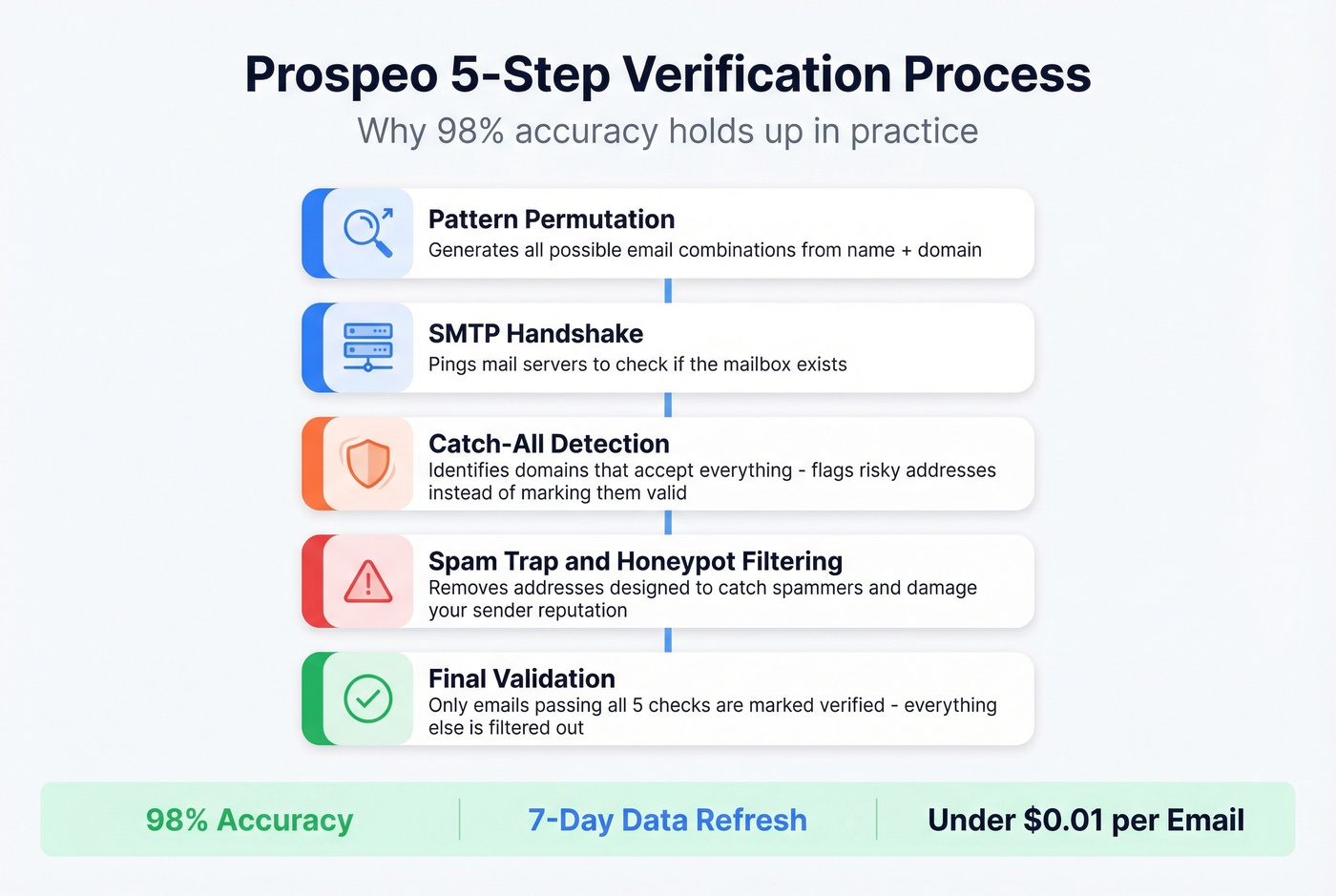
Prospeo's database covers 300M+ professional profiles with 143M+ verified emails, and the 98% email accuracy rate holds up because of how verification works under the hood. It's not just an SMTP ping - Prospeo runs a 5-step verification process that includes catch-all domain handling, spam-trap removal, and honeypot filtering. That catch-all detection alone eliminates a huge chunk of the "verified but bouncing" problem that plagues other tools. If you want the technical side, see our guide on spam trap removal.

Data refreshes every 7 days, compared to the 6-week industry average. At ~$0.01 per email, it's a fraction of what enterprise tools charge. The free tier gives you 75 emails and 100 Chrome extension credits per month - enough to test properly before committing.
Meritt cut their bounce rate from 35% to under 4% after switching, which tells you more than any vendor accuracy claim ever will. For sequencing, pair it with Instantly or Lemlist - the data accuracy makes those sequences actually land. If you’re building sequences from scratch, use our B2B cold email sequence guide.
Hunter
Hunter is the most recognized name in email finding. The interface is clean, the domain search is fast, and verification is solid - 4.4/5 on G2 across 634 reviews. The free tier gives you 50 credits/month, and paid plans start at $49/month.

Hunter's database is small, though. The consensus among practitioners is that it works better as a verification layer than a primary finder. If you're prospecting into niche industries or smaller companies, Hunter will miss contacts that larger databases catch. It's a great second tool, not your only tool. Skip it if you need high coverage across SMBs or international markets. If you’re evaluating similar tools, see our list of Hunter alternatives.
Apollo
Apollo's database runs 250M+ contacts, and the free tier is genuinely generous - 100 credits/month with access to the sequencing engine. Paid plans start around $49/month per user. The all-in-one pitch is compelling: find contacts, build lists, and launch sequences without leaving the platform.
The tradeoff is data freshness. Threads on r/coldemail consistently flag that Apollo data "feels bad sometimes," with more bounces on older contacts. We've seen the same pattern - contacts who changed jobs in the last 90 days are where Apollo's data falls apart fastest. Run Apollo contacts through a separate verification step before sequencing. If you can't afford bounce rates above 2%, Apollo alone won't cut it.
Anymail Finder
Anymail Finder starts at $14/month - the cheapest paid option in this roundup. The pricing model is what makes it interesting: you only burn a credit on valid emails. Risky results, catch-all domains, greylisted addresses, and not-found results are all free. Duplicate searches within a month are free too. They claim 97%+ delivery rates on valid results.
Skip this if you need a large-scale prospecting database. Anymail Finder is a finder/verifier, not a lead database.
RocketReach
One practitioner on r/coldemail tested multiple tools, chose RocketReach, and reported their bounce rate "dropped a lot." That tracks with what we've heard from other teams - RocketReach works well even with limited information, just a name and rough company match. The free tier is tiny at 5 lookups/month, and paid plans start around $53/month. Not the cheapest for high-volume prospecting, but when you're working with incomplete data, it earns its price.
Skrapp
Skrapp focuses on professional profile-based email finding. Free 100 credits/month, Professional plan at $39/month for 1,000 searches. G2 4.4, Capterra 4.5. Decent mid-tier option if your workflow centers on prospecting from professional profiles.
GetProspect
GetProspect offers 50 free emails/month and paid plans from $49/month for 1,000 valid emails. It performed well in the Saleshandy benchmark at 95/100 found, though the Tomba large-scale test showed lower accuracy at 61.9%. Results diverge sharply depending on methodology - more on that below.
Snov.io
Snov.io is the go-to for international leads, with solid coverage outside North America. Free 50 credits/month, paid from $39/month. G2 4.5. It also bundles email automation, which makes it a decent all-in-one for smaller teams working global territories.
ZeroBounce
ZeroBounce isn't an email finder - it's a verification powerhouse. G2 4.7/5 across 1,361 reviews, one of the highest ratings in this list. Free 100 verification credits/month, with pricing around $10 per 1K verifications. Use it as a second pass after your finder tool, not as your primary discovery engine.
Comparison Table
| Tool | Starting Price | Free Tier | Accuracy | G2 | Best For |
|---|---|---|---|---|---|
| Prospeo | ~$0.01/email | 75 emails/mo | 98% | N/A | Accuracy + freshness |
| Hunter | $49/mo | 50 credits/mo | ~85-90% | 4.4 | Domain search |
| Apollo | ~$49/mo/user | 100 credits/mo | ~85% | 4.7 | All-in-one + sequences |
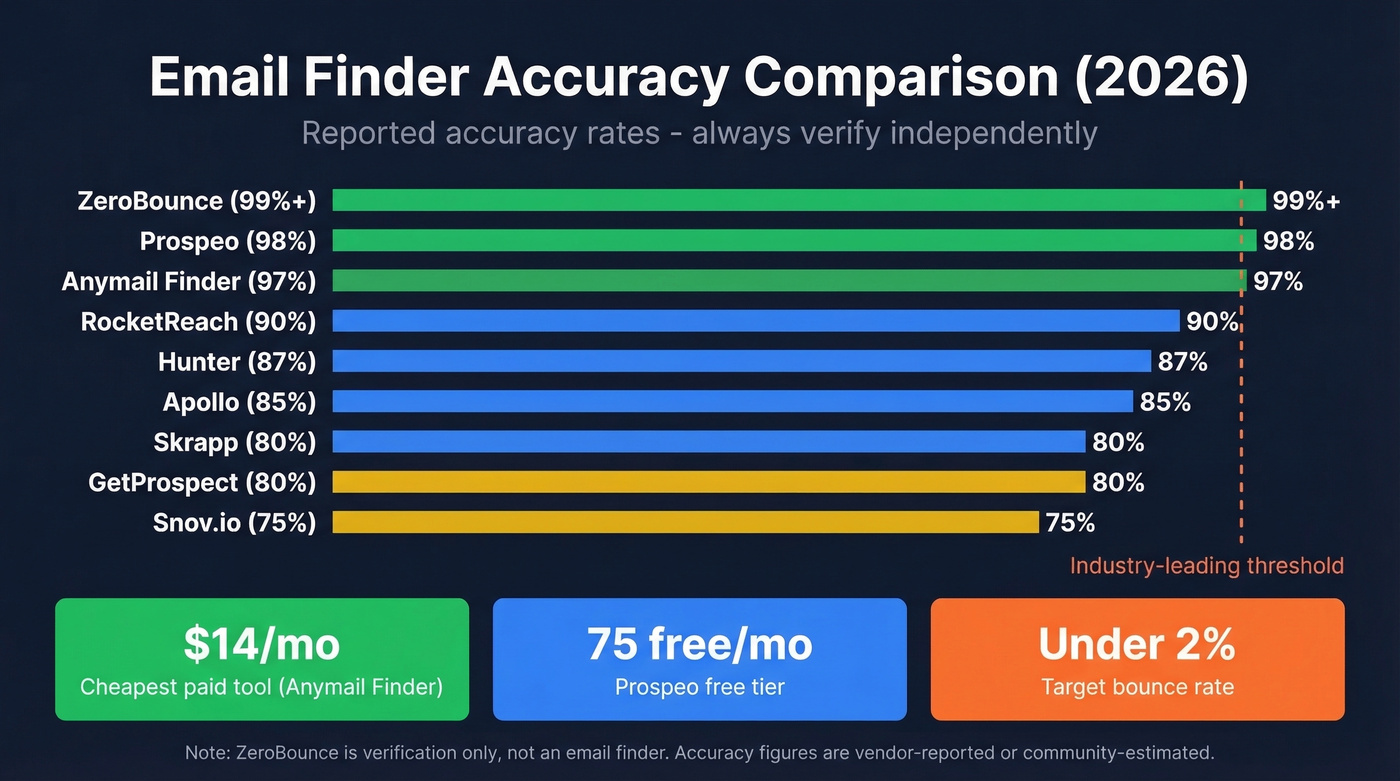
| Anymail Finder | $14/mo | 100 free credits | 97%+ | 3.4 | Budget-conscious teams |
| RocketReach | ~$53/mo | 5 lookups/mo | ~90% | N/A | Limited-info lookups |
| Skrapp | $39/mo | 100 credits/mo | ~80% | 4.4 | Profile-based finding |
| GetProspect | $49/mo | 50 emails/mo | ~75-85% | N/A | Mid-market teams |
| Snov.io | $39/mo | 50 credits/mo | ~75% | 4.5 | International leads |
| ZeroBounce | $10/1K | 100 credits/mo | 99%+ | 4.7 | Post-finder verification |
Pattern guessing and Google operators work for one-off searches. At scale, you need 300M+ profiles refreshed every 7 days. Prospeo finds emails by name and domain, verifies them in real time, and keeps bounce rates under 4% - like it did for Meritt.
Stop manually verifying email guesses. Let Prospeo do both steps at once.
Accuracy Benchmarks You Should Know
Vendor accuracy claims are marketing. Independent tests tell a different story - and they don't even agree with each other.
The Saleshandy test ran the same list of 100 verified business contacts through 15 tools:
| Tool | Found (out of 100) |
|---|---|
| GetProspect | 95 |
| Skrapp | 93 |
| ZoomInfo | 92 |
| Apollo | 91 |
| Hunter | 90 |
| RocketReach | 83 |
| Snov.io | 79 |
The Tomba benchmark (February 2026) ran 5,000 identical searches per tool - 2,500 domain searches plus 2,500 company-name searches - and validated for deliverability:
| Tool | Accuracy |
|---|---|
| Tomba | 80.3% |
| Anymail Finder | 77.5% |
| GetProspect | 61.9% |
| Skrapp | 42.8% |
| Hunter | 37.6% |
| Snov.io | 20.1% |

Look at Hunter: 90/100 in the Saleshandy test, 37.6% in the Tomba test. Same tool, wildly different results. The difference comes down to methodology - small curated lists of known contacts vs. large-scale blind searches across diverse domains. Company-name-only searches without a domain tank most tools' accuracy.
In our testing, the gap between claimed and actual accuracy was even wider for niche industries. A tool can find the right email and still produce bounces. One Reddit user reported 20%+ bounce rates even when their tool labeled every address as "verified." Stale data, catch-all domains, and role-based addresses all contribute to the gap between "found" and "delivered."
Let's be honest: the only benchmark that matters is the one you run yourself, on your own prospect list, in your own target market.
Why Verification Alone Falls Short
Most email finders return three statuses: Valid, Risky, and Not Found. The problem is that "Valid" doesn't mean "will definitely land in the inbox" - it means the mail server confirmed the mailbox exists at the time of the check.
Verification costs add up fast. Across major tools, you're looking at $8-$24.50 per thousand verifications. Hunter runs about $24.50/1K, NeverBounce around $8/1K, and ZeroBounce at $10/1K. We've seen teams burn through $500/month on verification alone before consolidating tools. For a team verifying 10,000 contacts a month, that's $80-$245 just for the verification step - on top of whatever you paid to find the emails in the first place. If you’re troubleshooting deliverability end-to-end, see our email deliverability guide.
The cost math changes when finding and verification happen in a single step, eliminating the double-pay problem and the workflow friction of juggling two platforms.
GDPR and CAN-SPAM Basics
Email addresses are personal data under GDPR. By early 2025, cumulative GDPR fines hit ~EUR5.88 billion across 2,245 enforcement actions. That number keeps climbing.
For B2B outreach, "legitimate interest" is the most common lawful basis - you're contacting someone in their professional capacity about something relevant to their role. That's generally defensible, but it requires you to document your reasoning and offer a clear opt-out.
The key distinction: GDPR is opt-in with limited exceptions for legitimate interest, while CAN-SPAM is opt-out. If you're emailing prospects in the EU, you need a stronger justification than "I found their email online." For US-based contacts, you need a functioning unsubscribe link and a real physical address. Neither framework bans cold outreach entirely - they just set rules for how you do it. If you want the compliance angle on list sourcing, see Is it illegal to buy email lists?.
FAQ
Can you find personal email addresses by name?
Most finder tools focus on professional/work emails, not personal ones like Gmail or Yahoo. Work emails are discoverable because they follow predictable patterns tied to company domains. Personal addresses don't follow patterns and aren't indexed by B2B databases. For personal emails, you'd need a people-search engine like BeenVerified or Spokeo, not a B2B email finder.
How do you find someone's email without knowing their company?
Start with Google search operators and professional profile lookups to identify their current employer. Once you have a company name or domain, any finder tool can take it from there. Without a company, most tools can't narrow down which of the thousands of "Jane Smiths" you're looking for. Adding a job title, city, or industry dramatically improves results.
How many free email lookups can you get?
Stack free tiers across tools: Prospeo gives 75 emails/month, Apollo offers 100 credits, Skrapp provides 100, and Hunter gives 50. Combined, that's 325+ free searches monthly - enough to run a meaningful test across multiple providers before paying anything.
What's a catch-all domain and why does it matter?
A catch-all domain accepts email sent to any address - real or fake - so finder tools can't confirm whether a specific mailbox exists. The email shows as "valid" but might bounce. Tools with catch-all detection flag these separately so you can decide whether to risk sending. Roughly 20-30% of company domains are catch-all configured, which is why this matters more than most people realize.
Which email finder has the highest accuracy?
Prospeo's 98% accuracy is the highest independently verifiable claim in this category, backed by 5-step verification and a 7-day data refresh cycle. But in practice, accuracy depends on your target market and company sizes. Run your own 100-contact test across two or three tools - that's the only benchmark that matters for your specific use case.