

Best Email Tester Online: Free Tools Compared (2026)
You're about to send 500 cold emails. You scraped the list from three different sources, merged them in a spreadsheet, and now you're hovering over the "launch" button. Stop. Run those addresses through an email tester online first - because if even 5% bounce, your domain reputation takes a hit that can take weeks to recover from. Email databases decay roughly 22.5% per year, so that list you built last quarter? A chunk of it is already dead.
What You Need (Quick Version)
Need to check a single email right now? Use Verifalia (25 free/day) or Mailmeteor (free, browser-based). Building outbound lists and want emails that arrive pre-verified? Prospeo gives you 75 emails/month free with catch-all handling built in. Testing whether your own emails land in inbox vs. spam? That's mail-tester.com - a different tool entirely.
What "Email Testing" Actually Means
The phrase gets used for three completely different things. Mixing them up wastes time and money.
Email address verification checks whether a specific email address exists and can receive mail. You paste in jane@company.com, the tool pings the mail server, and tells you valid, invalid, or risky. This is what most people looking for an online email tester actually need. (If you need a deeper walkthrough, see how to check if an email exists.)
Deliverability/spam testing checks whether your outgoing email lands in the inbox or gets flagged as spam. Tools like mail-tester.com and MxToolbox work this way - you send a message to a seed address and get a spam score back. It's about your sending reputation, not the recipient's address. And deliverability tools themselves often disagree, which adds to the confusion. (More on this in our email deliverability guide.)
Inbox placement testing goes a step further, measuring where your email lands across multiple providers - Gmail inbox vs. Outlook promotions tab vs. Yahoo spam. Enterprise tools like Litmus and GlockApps handle this.
Here's the thing: an email can have perfect delivery and still land in spam. Email delivery means the server accepted your message. Email deliverability means it actually reached the inbox. Two different problems.
How Verification Actually Works
Every verification tool runs roughly the same four-step process, and real-time verifiers often return a result in under 500ms per address:
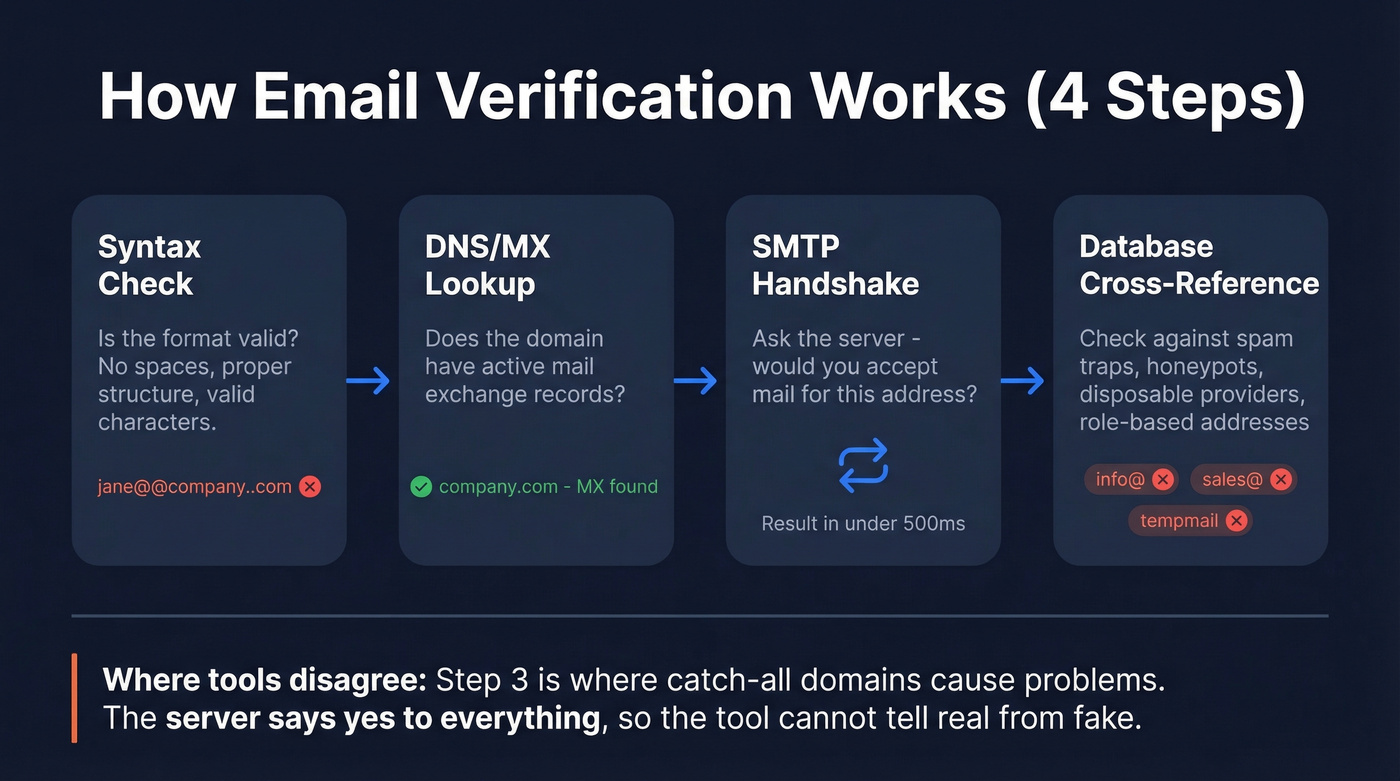
Syntax check - Is the email formatted correctly? No spaces, valid characters, proper domain structure. This catches typos like
jane@@company..com.DNS/MX lookup - Does the domain exist, and does it have mail exchange records pointing to an active mail server? No MX record means nobody's receiving mail there.
SMTP handshake - The tool connects to the mail server and asks "would you accept a message for this address?" without actually sending one. The server's response reveals whether the mailbox exists.
Database cross-reference - Advanced tools check the address against known spam traps, honeypots, role-based addresses like info@ or sales@, and disposable email providers. (If you’re cleaning a list that’s been burned before, start with spam trap removal.)
The SMTP step is where things get interesting - and where tools diverge. Some servers give honest answers. Others accept everything. That's the catch-all problem, and it's the single biggest reason verification tools disagree with each other.
The Truth About Accuracy
Every email verification tool's landing page claims 98-99% accuracy. Let's be honest about what actually happens when you test them.
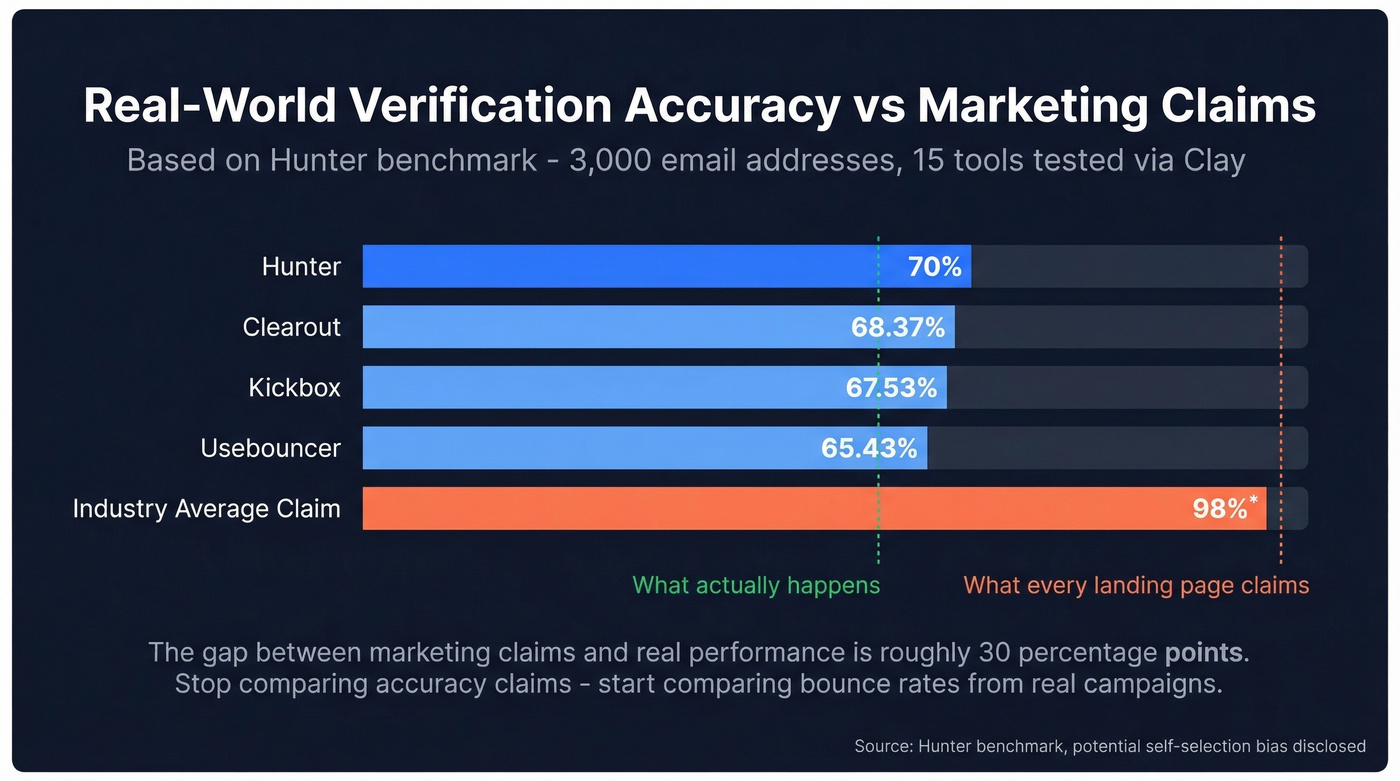
Hunter ran a benchmark of 15 email verification providers using 3,000 email addresses - 2,700 real business emails segmented by company size, plus 300 known invalid addresses. They ran every tool through Clay with default settings to keep the comparison fair. The top accuracy score? Hunter itself at 70%. Clearout hit 68.37%. Kickbox came in at 67.53%. Usebouncer landed at 65.43%. That's a long way from 98%.
Hunter deserves credit for disclosing potential bias - their validity labels were based on recent outreach activity observed on their own platform, which naturally advantages their own tool. But even accounting for that, the gap between marketing claims and real-world performance is enormous.
Accuracy drops further on mid-market and enterprise domains. These companies run stricter server configurations, greylisting, and rate limiting that make SMTP verification less reliable. The emails you most need to verify - decision-makers at target accounts - are the hardest to verify accurately.
A high-volume practitioner on r/coldemail put it well after testing 10+ tools over a year: "Most tools work. None are perfect. The difference shows up at scale." At 100 emails, every tool looks fine. At 100,000, a 3-5% accuracy gap translates into thousands of bounces and real domain damage. (To quantify the damage, track email bounce rate by campaign and segment.)
The 98% accuracy claim on every verification tool's homepage is the email industry's version of "up to" internet speeds. It's technically defensible against a cherry-picked test set and completely useless for predicting your actual results. Stop comparing accuracy claims. Start comparing bounce rates from real campaigns.

Every tool in this article verifies emails after the fact. Prospeo's 5-step verification happens before you ever see the address - catch-all handling, spam-trap removal, and honeypot filtering included. 98% accuracy across 143M+ emails, refreshed every 7 days.
Skip the verification step entirely. Start with emails that are already clean.
Why Tools Disagree: Catch-All Domains
If you've run the same email through two verification tools and gotten different results, catch-all domains are almost certainly why.
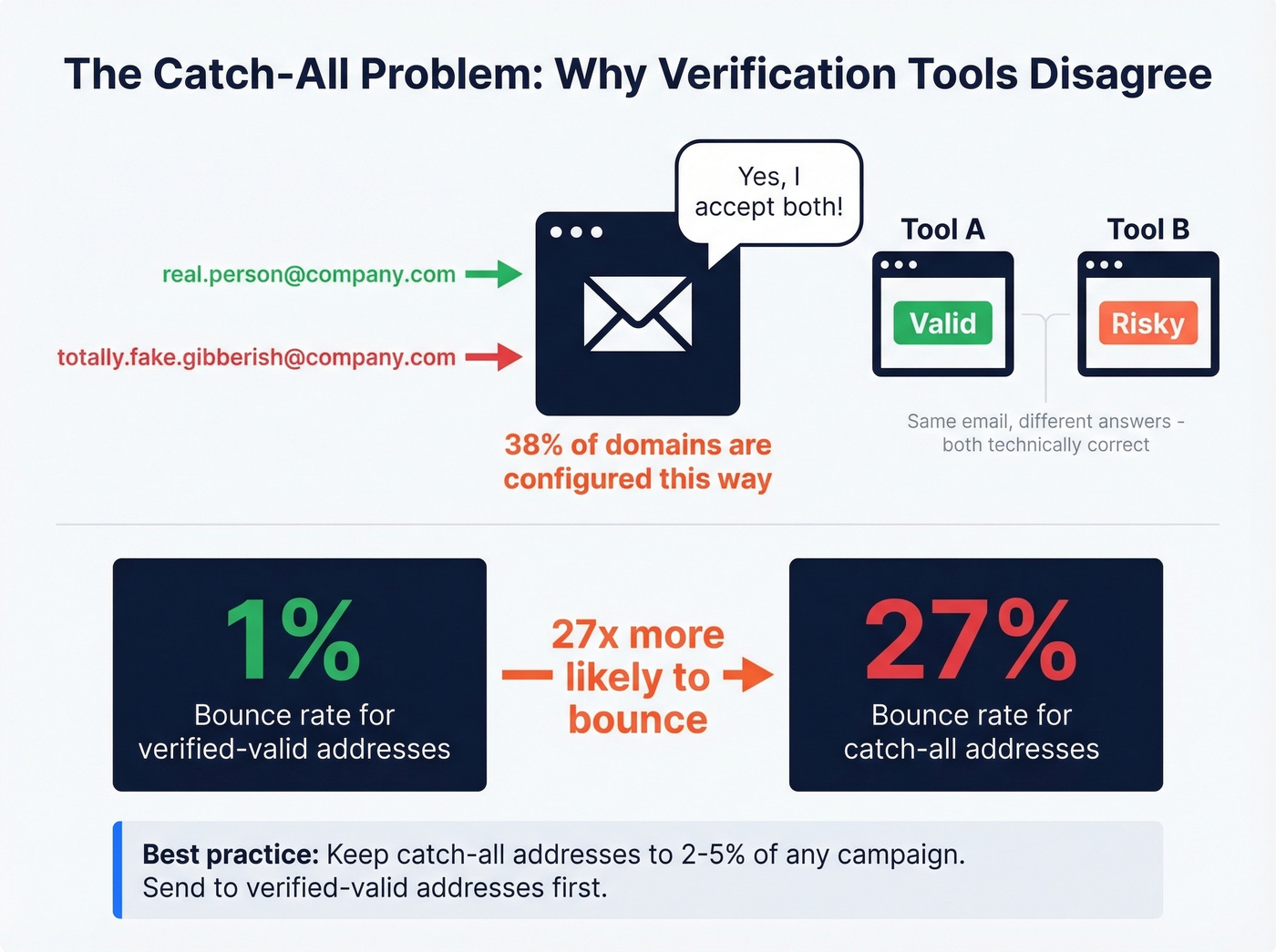
About 38% of email domains are configured as accept-all. These servers accept mail for any address at the domain - real.person@company.com and completely.fake.gibberish@company.com both get a "yes" from the mail server. The verification tool has no way to distinguish a real mailbox from a nonexistent one.
The stakes are real. Hunter's experiment found that emails sent to accept-all addresses are roughly 27x more likely to bounce - a 27% bounce rate compared to 1% for verified-valid addresses. That's the difference between a healthy sender reputation and a blacklisted domain. (If you’re already seeing issues, use this playbook to improve sender reputation.)
Detection works through SMTP "tickling": the tool asks the server if it'll accept a random, guaranteed-nonexistent mailbox. If the server says yes, the entire domain gets flagged as catch-all. From there, one tool labels the address "valid" while another calls it "risky." Both are technically correct - they're just making different judgment calls about the same ambiguous data.
Best practice: don't discard catch-all results automatically, but limit them to 2-5% of any campaign and send to verified-valid addresses first.
Best Free Email Testers Compared
| Tool | Free Limit | Best For | Bulk Option | Paid (per 1K) |
|---|---|---|---|---|
| Prospeo | 75 emails/mo | Pre-verified outbound lists | Yes (CSV) | ~$10 |
| Verifalia | 25/day (~750/mo) | Quick single checks | Yes (paid) | ~$1.20 |
| Mailmeteor | Fair use (single) | No-signup spot checks | 50/mo (Sheets) | N/A |
| Hunter | Up to 100/mo | Find + verify combo | Yes (paid) | ~$4 |
| Bouncer | 100 on signup | Budget bulk cleaning | Yes | $7 |
| NeverBounce | 1,000 on signup | Large one-off list cleans | Yes | $3 |
| ZeroBounce | 100 free credits | Granular categorization | Yes | $4 |
| Email Hippo | 100/day | Clear-cut status labels | Yes | ~$5 |
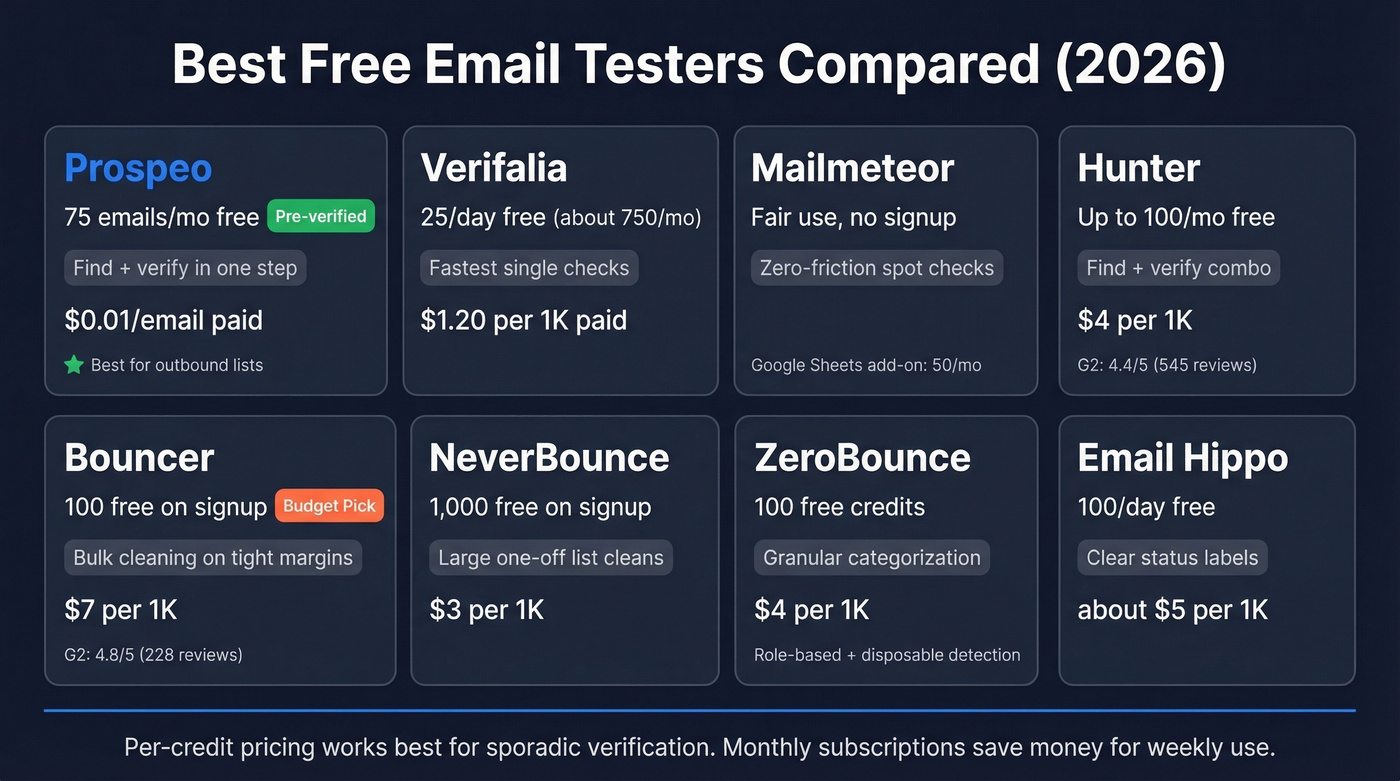
A note on pricing models: Some tools charge per credit, others bundle credits into monthly subscriptions, and a few offer true pay-as-you-go without minimums. If you verify lists sporadically, per-credit pricing saves money. Weekly verification? A subscription with a monthly credit allotment is usually cheaper.
Prospeo
Use this if you're tired of the two-step workflow - finding emails in one tool, then verifying them in another. Prospeo isn't just a verification layer. Its 143M+ verified emails come pre-verified through a 5-step process that includes catch-all handling, spam-trap removal, and honeypot filtering. The free tier gives you 75 emails plus 100 Chrome extension credits per month.
We've watched teams waste hours on the find-export-verify-import dance. Prospeo eliminates that entirely - every email is verified before you see it. The 7-day data refresh cycle means contacts stay current without manual re-verification. Stack Optimize built to $1M ARR using Prospeo with 94%+ client deliverability and under 3% bounce rates across all campaigns. Paid plans run about $0.01/email with no contracts. (If you’re comparing sources, start with our breakdown of email list providers.)

Verifalia
Verifalia is the fastest path from "I have an email address" to "I know if it's real." Twenty-five free verifications per day - roughly 750/month. Paste the address, get a result. Simple.
The limitation is scale. The free tier is single-email only, and paid plans start at $9/month for about 7,500 credits. That per-email cost adds up fast if you're cleaning lists regularly. No email finding capability - pure verification. (If you need alternatives in the same category, see Bouncer alternatives.)
Mailmeteor
Mailmeteor runs 15+ checks including format validation, DNS, MX records, and SMTP verification - all without requiring a signup for single-email checks. It operates on a fair-use policy rather than a hard daily cap, so you can check a handful of addresses without friction. The real value is the Google Sheets add-on, which gives you 50 free bulk verifications per month. Verified emails aren't saved or shared. For quick, no-commitment checks, it's hard to beat.
Hunter
Hunter pulls double duty as both an email finder and verifier, which makes it useful if you're prospecting and verifying in the same workflow. The free plan includes up to 100 verifications per month, and paid plans start at $49/month. Hunter carries a G2 rating of 4.4/5 across 545 reviews, and they ran the most transparent verification benchmark we've seen - testing 15 tools against 3,000 addresses. That kind of intellectual honesty earns trust, even if their own tool topped their own benchmark. (If you’re evaluating similar tools, compare against these Hunter alternatives.)
Bouncer
Bouncer is the budget pick for bulk verification. You get 100 free credits on signup, and paid pricing runs just $7 per 1,000 emails - one of the lowest rates in the space. G2 users rate it 4.8/5 across 228 reviews, which is unusually high for a verification tool. Upload a CSV, get results, download the clean list. No frills, no upsells. If you're an agency cleaning client lists on a tight margin, test Bouncer first.
NeverBounce
The go-to for large one-off list cleans. You get 1,000 free credits on signup, then pay $0.003/email on pay-as-you-go. NeverBounce supports API integration and bulk upload. Got a 50K-row CSV from a trade show and need it scrubbed before Monday? This is the tool.
ZeroBounce
100 free credits, with a 2,000-credit minimum on paid plans starting at $0.004/email. ZeroBounce adds role-based and disposable email detection on top of standard verification - slightly pricier than NeverBounce but more granular in its categorization. Worth the premium if you care about filtering out generic addresses like info@ and support@.
Email Hippo
100 free checks per day, resetting at midnight UTC. Email Hippo returns three main result categories: OK, Bad, or Unverifiable. Skip this if you need nuanced confidence scores - but for teams that want straightforward yes/no categorization without interpretation, it does the job well.
When Free Testers Aren't Enough
Free email verification tools solve a specific problem: checking whether addresses you already have are valid. But most outbound teams hit a wall quickly.
The typical workflow goes like this: find emails in one tool, export them, upload to a verification tool, wait for results, download the clean list, import into your sequencer. That's six steps of friction before you send a single email. We've seen teams burn entire afternoons on this loop every week.
Pre-verified data eliminates that workflow. Instead of verifying after the fact, you start with a database where every email has already been through multi-step verification - including catch-all handling, spam-trap removal, and honeypot filtering - before it appears in search results. Data that refreshes every 7 days, compared to the 6-week industry average, means contacts stay current without manual re-verification. (If you’re building lists upstream, these data enrichment services can also reduce bad records.)
Snyk's 50-person AE team went from a 35-40% bounce rate to under 5% after switching their upstream data source. That's not a verification improvement - it's eliminating the need for a separate verification step entirely.
Catch-all domains cause 27x more bounces, and most testers just label them "risky" and leave you guessing. Prospeo's proprietary infrastructure handles catch-all verification natively - no second tool, no guesswork. 75 free emails/month, ~$0.01 each after that.
Stop paying twice - once to find emails and again to verify them.
Post-Verification Checklist
Once you've run your list through an email tester online, don't just blast the "valid" addresses. Follow this sequence:
Remove all invalid and undeliverable addresses. No exceptions. Even one hard bounce per hundred sends hurts your sender score.
Segment catch-all and risky addresses separately. Limit these to 2-5% of any single campaign. Mix them into sends gradually rather than batching them together.
Send to verified-valid addresses first. Build positive engagement signals - opens, replies - before introducing riskier segments. This gives your domain a reputation cushion. (If you’re scaling, also watch email velocity to avoid sudden spikes.)
Monitor bounce rates in real time. Target under 2% total bounces and under 1% hard bounces. Average deliverability across ESPs runs 83-89%; excellent is above 95%. If you're below 80%, stop sending and clean your list again.
FAQ
Is there a 100% accurate email verifier?
No. The best tools in independent benchmarks hit roughly 70% accuracy on real business emails. Accept-all domains - 38% of all domains - make perfect verification impossible. Any tool claiming 99% accuracy is measuring against its own curated test set, not real-world outbound lists.
What's the difference between verification and deliverability testing?
Verification checks whether an address exists and can receive mail. Deliverability testing checks whether your sent email reaches the inbox vs. spam. Tools like Verifalia verify addresses; tools like mail-tester.com test your message's spam score. Different problems, different tools.
How often should I re-verify my email list?
At minimum quarterly. Email databases decay roughly 22.5% per year as people change jobs and companies shut down. For ongoing outbound, use a data source with automatic refresh - a 7-day refresh cycle effectively eliminates the need for periodic re-verification.
Can I verify addresses on catch-all domains?
You can run them through any checker, but results will be inconclusive. When a domain accepts mail for any address, no verification tool can confirm whether a specific mailbox actually exists. Flag catch-all results separately and limit them to 2-5% of each campaign.
Why do two tools give different results for the same email?
Usually catch-all domains. When a domain accepts mail for any address, one tool calls it "valid" while another flags it "risky." Different tools also use different SMTP timeout thresholds and database cross-references. This is normal - not a sign that one tool is broken.