

The Complete Guide to Email Testing in 2026
You ran your Q3 campaign through a rendering tool, got green checks across the board, hit send - and 12% bounced. The email looked perfect. The list was garbage.
That's the gap most teams never close, and it's why email testing means something much broader than most marketers realize. 35.1% of marketers say inconsistent rendering is their biggest email design challenge, while another 22.4% point to accessibility issues. But the real damage happens before the email even renders - when you're sending to addresses that don't exist, hitting spam traps, or wrecking your sender reputation with a list you never verified.
Here's the thing: the rendering-obsessed crowd will spend hours pixel-perfecting a dark mode layout while sitting on a list that's 15% dead addresses. Priorities are backwards.
What You Need (Quick Version)
You don't need seven tools. You need three, used in this order:
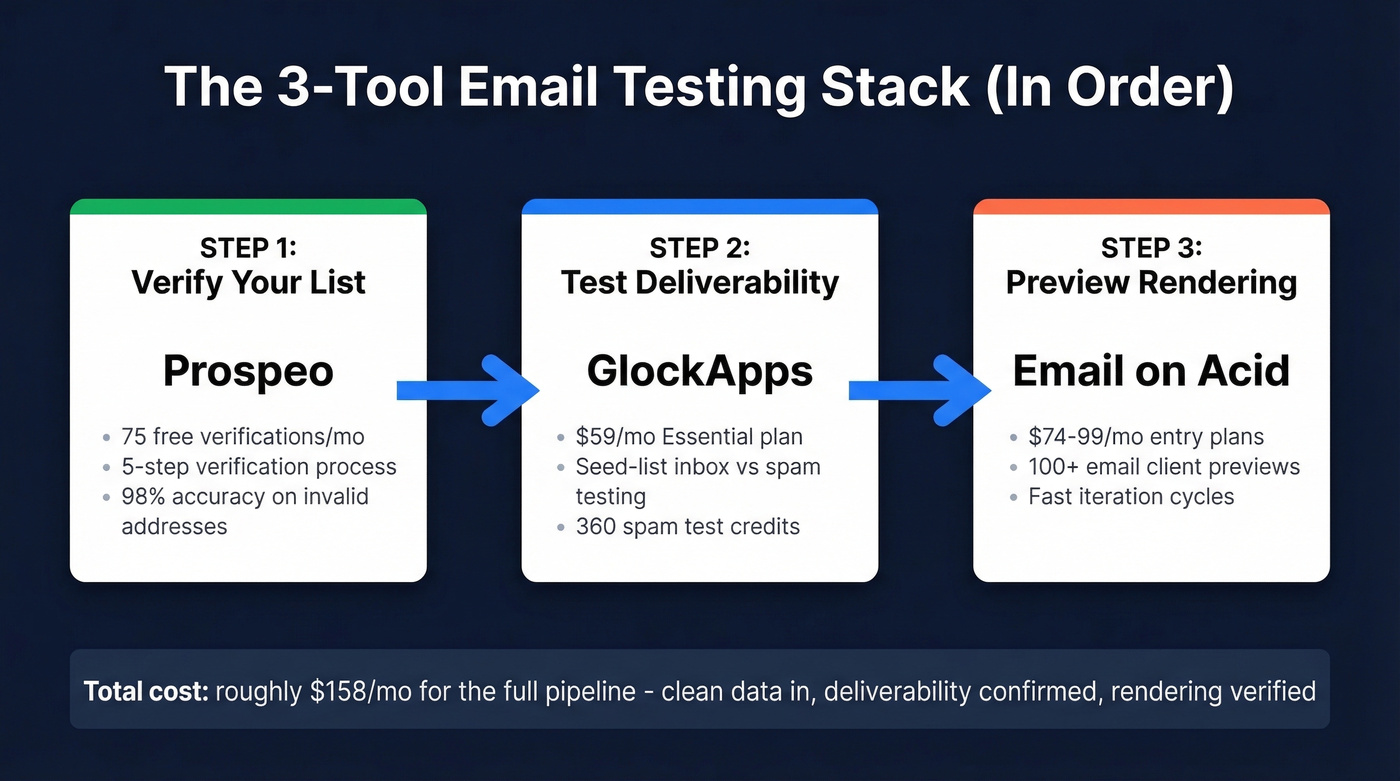
- Test deliverability - GlockApps. Starting at $59/mo, seed-list testing across major providers shows you exactly where you're landing: inbox, spam, or nowhere.
- Preview rendering - Email on Acid. Starts around $74-$99/mo depending on plan and billing, with testing across 100+ email clients.
This stack covers the full pipeline: clean data in, deliverability confirmed, rendering verified. Total cost runs about $158/mo for the common setup with Prospeo's free tier, GlockApps Essential, and Email on Acid.
The 7 Types of Email Testing
Most guides cover five types. Litmus covers rendering and spam checks. Mailtrap covers sandbox workflows. None of them give you the full picture - they're missing two categories that cause the most real-world damage.
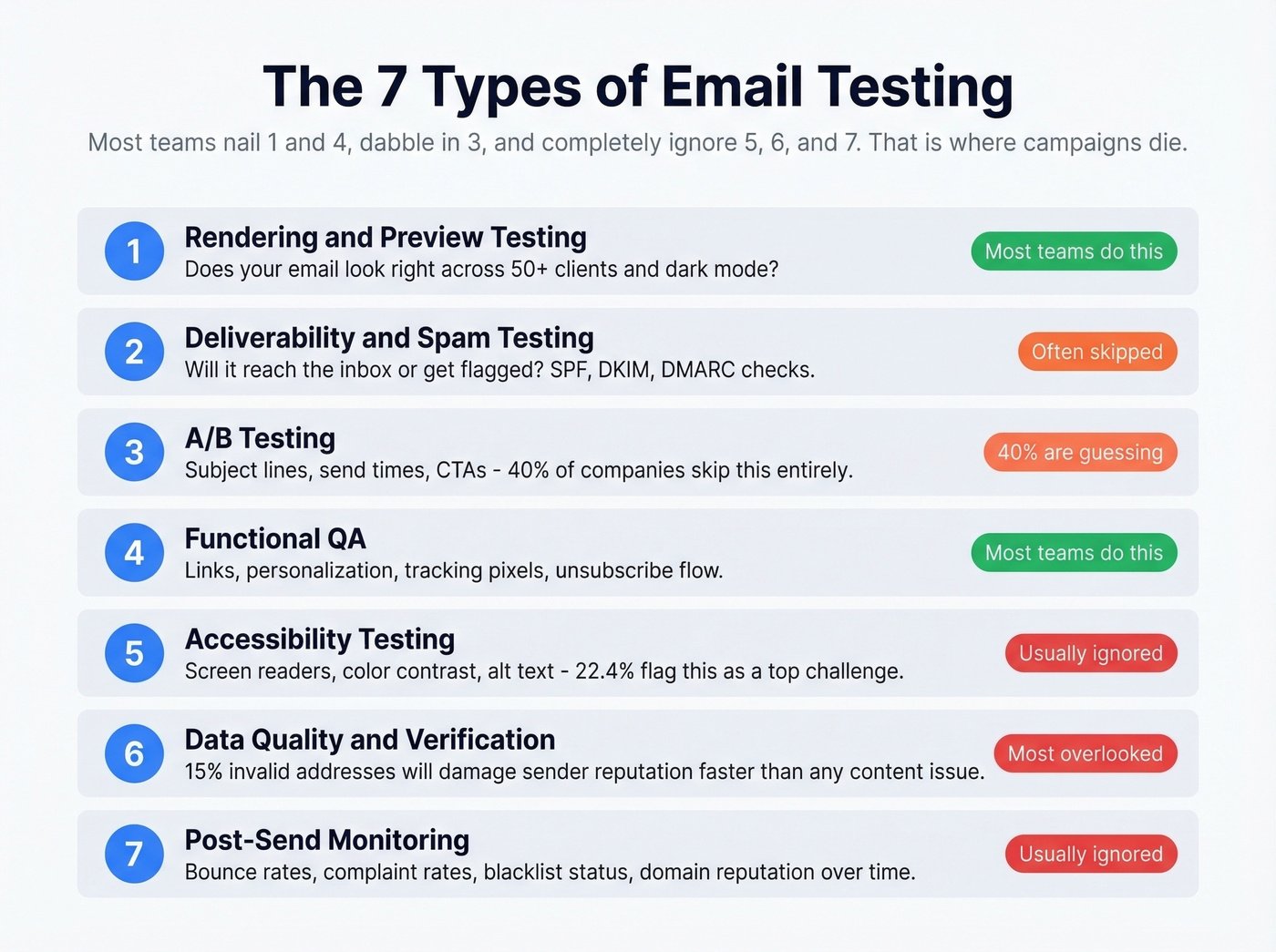
Inbox Monster's framework identifies five core areas: rendering, accessibility, links/functionality, email size, and inbox placement. That's a solid start, but it leaves out A/B testing and data quality verification, which is where the highest-ROI improvements actually live. Here are all seven.
1. Rendering and preview testing. Does your email look right across Gmail, Outlook, Apple Mail, and the 50+ other clients people actually use? Dark mode alone can destroy a carefully designed layout.
2. Deliverability and spam testing. Will your email reach the inbox, land in Promotions, or get flagged as spam? Seed-list tools send your email to test accounts across major providers and report back where it landed. Authentication checks - SPF, DKIM, DMARC - fall here too.
3. A/B testing. Subject lines, send times, CTAs, layouts - roughly 6 in 10 companies actually run A/B tests on their campaigns. The other 4 in 10 are guessing. AI-powered subject line tools are getting better at predicting open rates, but they still can't replace testing against your specific audience. This is the optimization layer that compounds over time.
4. Functional QA. Do the links work? Does personalization render correctly? Are tracking pixels firing? Does the unsubscribe link actually unsubscribe? Gmail clips messages over 102KB, hiding your CTA and unsubscribe link below the fold. Broken links and busted merge tags are embarrassing and preventable.
5. Accessibility testing. Can screen readers parse your email? Is there sufficient color contrast? Do images have alt text? With nearly a quarter of marketers flagging accessibility as a top challenge, this isn't optional anymore.
6. Data quality and verification. A perfectly designed email sent to 15% invalid addresses will damage your sender reputation faster than any content issue. Tools that verify whether addresses actually exist before you hit send are the most overlooked category. Skip this and your domain reputation pays the price. (If you’re building lists upstream, pair this with data enrichment so you’re not verifying junk inputs.)
7. Post-send monitoring. Bounce rates, complaint rates, blacklist status, domain reputation over time. This is the feedback loop that tells you whether your process is working or just giving you false confidence.
Most teams nail types 1 and 4, dabble in type 3, and completely ignore types 5, 6, and 7. That's where campaigns die.
Pre-Send Checklist
Here's the sequence that catches problems before they reach your audience. Order matters - start with the cheapest fixes and work toward the most complex.
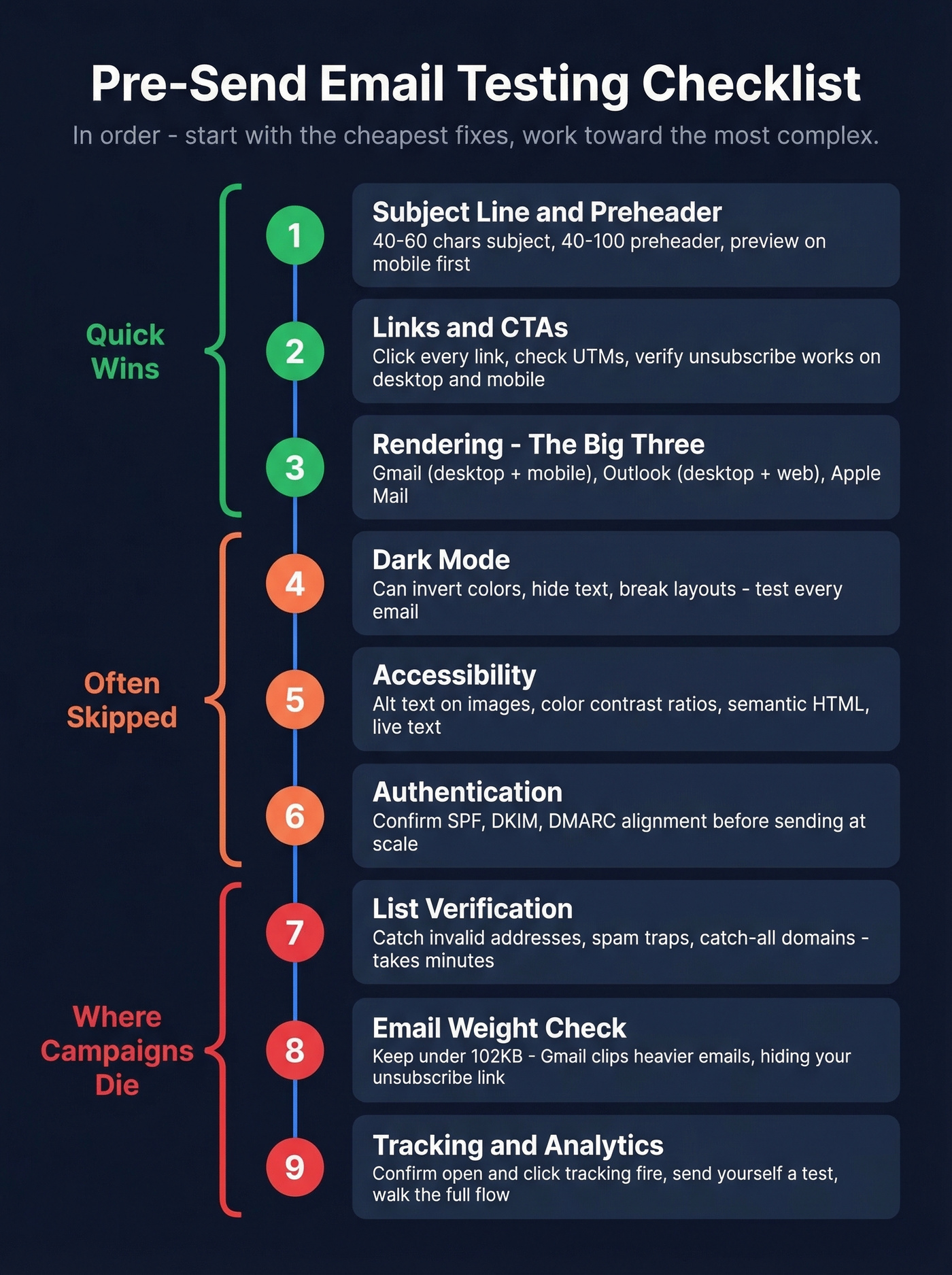
1. Subject line and preheader. Check length (40-60 characters for subject, 40-100 for preheader), personalization tokens, and emoji rendering. Preview on mobile first - that's where most people see it. If you need ideas, pull from proven subject line examples.
2. Links and CTAs. Click every single link. Check UTM parameters. Verify the unsubscribe link works. Test on both desktop and mobile. One broken CTA can tank an entire campaign's conversion rate. (If you’re rewriting CTAs, use a quick email call to action checklist.)
3. Rendering across the big three. At minimum, test Gmail (desktop + mobile), Outlook (desktop + web), and Apple Mail. If you can only test three clients, these are the ones.
4. Dark mode. Not optional. Dark mode can invert colors, hide text, and break layouts that look perfect in light mode. Test every email in dark mode variants for Gmail, Outlook, and Apple Mail.
5. Accessibility. Alt text on every image. Sufficient color contrast ratios. Semantic HTML structure so screen readers can parse the content. Live text instead of text baked into images.
6. Authentication. Confirm SPF, DKIM, and DMARC alignment before sending at scale. A single misconfigured record can route your entire campaign to spam. (If you’re troubleshooting alignment, start with DMARC alignment.)
7. List verification. Run your send list through a verification tool to catch invalid addresses, spam traps, and catch-all domains before they wreck your domain reputation. This takes minutes and prevents the kind of bounce spike that takes weeks to recover from. If you’re diagnosing a spike, use an email bounce rate breakdown to map causes to fixes.
8. Email weight check. Keep total email size under 102KB. Gmail clips anything heavier, which means your footer - including the unsubscribe link - disappears. Strip unnecessary code, compress images, and test the final file size.
9. Tracking pixels and analytics. Confirm open tracking and click tracking are firing correctly. Verify that your analytics platform is receiving the data. Send a test to yourself and walk through the entire flow. (If you’re implementing tracking, see email tracking pixels.)
We've seen teams skip steps 4-8 and then post on r/emailmarketing asking why their deliverability cratered overnight. Don't be that team.

You just read that list quality is the most overlooked type of email testing. Prospeo's 5-step verification catches invalid addresses, spam traps, and honeypots at 98% accuracy - for roughly $0.01/email. Stack Optimize used it to hold bounce rates under 3% across every client campaign, zero domain flags.
Stop pixel-perfecting emails you're sending to dead addresses.
How to Test Deliverability and Rendering
Prospeo - List Verification
Stack Optimize built their agency from zero to $1M ARR using Prospeo's verification - their client deliverability runs 94%+, bounce rates under 3%, zero domain flags. That result makes the case better than any feature list.
Prospeo's 5-step verification process catches invalid addresses, spam traps, honeypots, and catch-all domains with 98% accuracy. The free tier gives you 75 verifications/month, enough to test the workflow before committing. Paid plans run about $0.01/email, which is trivial compared to the cost of a blacklisted domain. For any team running outbound campaigns or batch sends where list quality directly impacts deliverability, this is where you start. (If you’re comparing vendors, see Bouncer alternatives.)
GlockApps - Deliverability Testing
GlockApps uses seed-list testing: it sends your email to test accounts and reports back inbox vs. spam vs. missing placement for each provider. The consensus on email marketing forums is that different deliverability tools can give conflicting results for the same message, so having a reliable primary tool matters.
The Essential plan at $59/mo gives you 360 spam test credits, 1 sending account, and 600,000 DMARC messages. Growth ($99/mo) bumps that to 1,080 credits and 10 sending accounts. Enterprise ($129/mo) gets you 1,800 credits, 20 sending accounts, and 25 IP reputation monitors - worth it if you're managing multiple brands or high-volume sends. The free plan exists but only includes 2 tests. Barely enough for a sanity check.
Email on Acid vs. Litmus
Let's put them side by side, because this is the comparison everyone asks about.
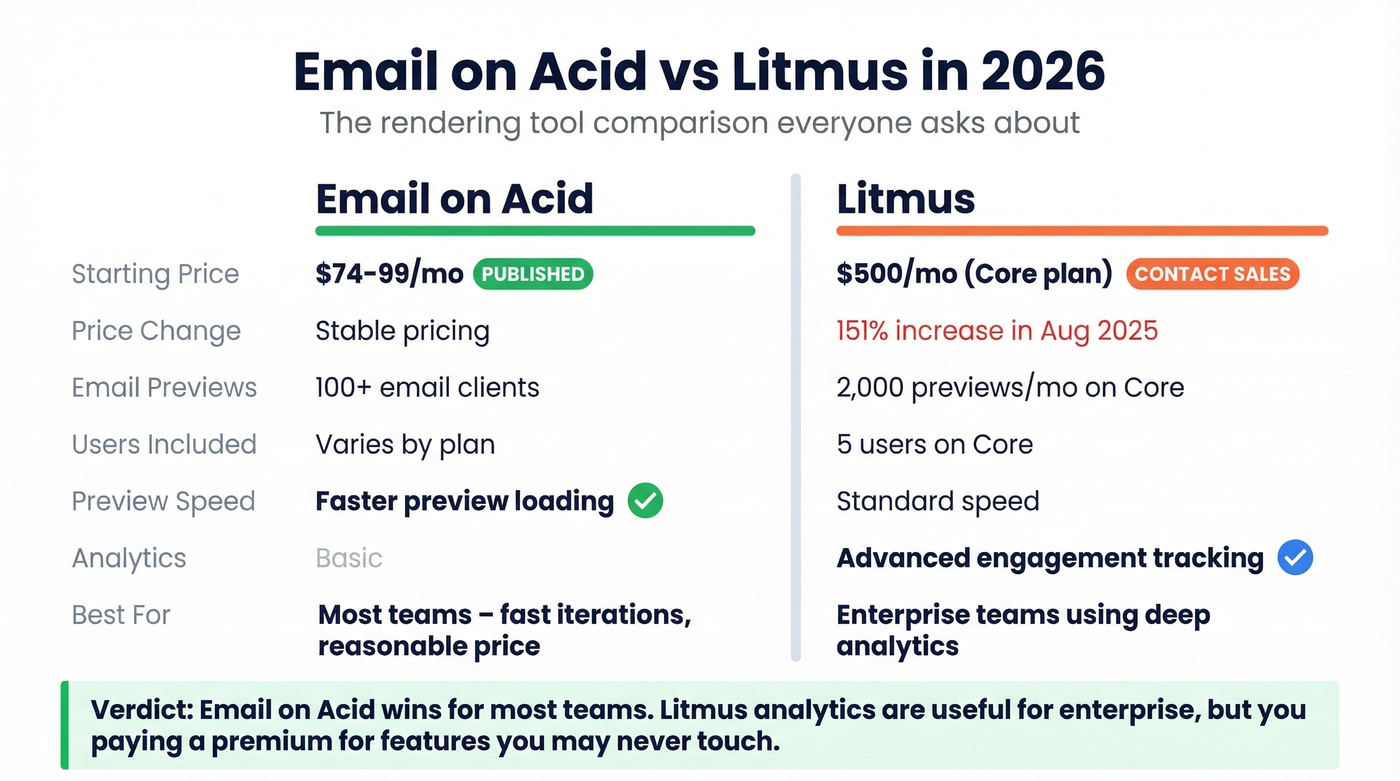
Email on Acid pricing sits around $74-$99/mo for entry plans, with previews across 100+ clients. Litmus was the gold standard for years - then Validity acquired it and a widely shared industry report documented a 151% price increase effective August 1, 2025, moving what was previously Litmus Plus ($199/mo) to a new plan called Core at $500/mo. That Core plan includes 5 users, 2,000 email previews/month, and 500,000 analytics opens.
Email on Acid wins for most teams. Previews load faster, and it's easier to run lots of iterations without feeling like you're buying an enterprise suite. Litmus analytics can be genuinely useful for enterprise teams tracking engagement across campaigns, but if you're not using those analytics deeply, you're paying a premium for features you'll never touch. The Litmus pricing page now just says "Contact Sales," which tells you everything about who it's built for.
Mailtrap - Developer Sandbox
Mailtrap solves a different problem entirely. It gives developers a safe sandbox to test transactional email flows without accidentally emailing real users. The free tier includes 4,000 emails/month, which is enough for most dev teams. Sending pricing starts at $15/mo for 10k emails, and Business plans scale to $85-$450/mo for higher volumes with dedicated IPs.
One gotcha: if you exceed the sandbox rate limit, messages get rejected with a "550 5.7.0" error that can be confusing if you're not expecting it. Best for QA engineers testing signup flows, password resets, and notification templates. Not a marketing tool - skip this if your work is purely campaign-side.
Quick Mentions
mail-tester.com - Send an email to a randomly generated address, get a spam score out of 10. Free, instant, catches obvious authentication problems. The quickest sanity check available, not a full strategy. (For deeper pre-send checks, use an email spam checker workflow.)
MxToolbox - Useful for SPF, DKIM, and DMARC lookups, plus deliverability diagnostics. Paid monitoring plans run up to $399/mo. Use it to diagnose authentication issues, not to replace a proper inbox placement tool.
SendGrid - If you're already on SendGrid for sending, their built-in checks include spam scoring, link validation, and inbox render previews on a credit-based model. Paid plans start at $15/mo. Not best-in-class for any single category, but convenient if you want fewer tools in your stack.
Pricing Comparison
The fact that Litmus doesn't publish pricing anymore is frustrating for everyone trying to make an informed decision. Here's everything in one place.
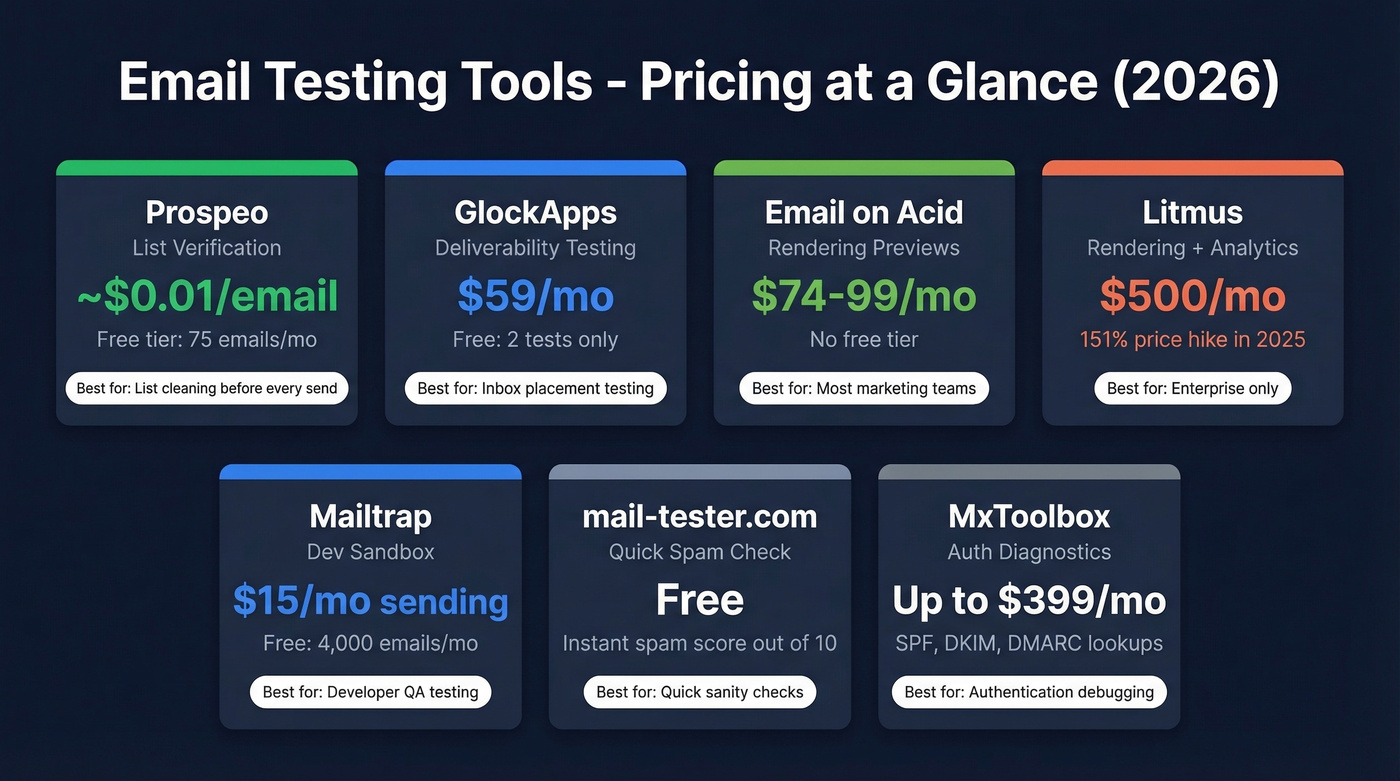
| Tool | Category | Starting Price | Free Tier | Best For |
|---|---|---|---|---|
| Prospeo | Verification | ~$0.01/email | 75 emails/mo | List cleaning |
| GlockApps | Deliverability | $59/mo | 2 tests only | Inbox placement |
| GlockApps Enterprise | Deliverability | $129/mo | - | Multi-brand senders |
| Email on Acid | Rendering | ~$74-$99/mo | No | Rendering previews |
| Litmus | Rendering | ~$500/mo* | No | Enterprise analytics |
| Mailtrap | Dev Sandbox | Free (sandbox) | 4,000 emails/mo | Transactional QA |
| mail-tester.com | Spam Score | Free | Yes | Quick auth check |
| MxToolbox | Auth Checks | Free | Yes | DNS diagnostics |
| SendGrid Testing | Multi-purpose | $15/mo+ | Limited | Existing SendGrid users |
*Litmus Core pricing per the EmailExpert report on the August 2025 price hike. Official page now says "Contact Sales."
The three-tool stack runs about $158/mo. That covers verification, deliverability, and rendering - the three pillars that actually prevent campaign failures.
Mistakes That Kill Deliverability

1. Testing in only one inbox. Gmail's rendering engine is completely different from Outlook's. An email that looks perfect in Gmail can be unreadable in Outlook desktop. The classic example: you ran your campaign through a rendering tool, got green checks, and assumed you were safe - but you forgot Outlook 2019. Test at minimum three clients plus their mobile variants.
2. Skipping dark mode. Dark mode doesn't just dim your email. It can invert background colors, hide white text, and break image-based layouts entirely. If you're not testing dark mode in 2026, you're ignoring how a significant chunk of your audience actually reads email.
3. Making edits after the final test. You tested everything, got green lights, then your VP asked you to swap the CTA copy. That one edit can break a link, shift the layout, or introduce a rendering bug. Any edit after the final test requires a re-test. No exceptions.
4. Trusting a single deliverability tool's verdict. Different tools can give different inbox/spam results for the same email. Use GlockApps as your primary, but cross-check with mail-tester.com for a quick sanity check. If they disagree, dig into your authentication records.
5. Testing the message but not the list. This is the mistake that causes the most damage, and it's the one we see constantly. You can have a perfectly designed, fully authenticated, beautifully rendered email - and still crater your sending score by blasting it to a list full of invalid addresses and spam traps. We've watched teams spend weeks debugging deliverability issues that turned out to be a list quality problem all along. Fix the list first. Always. (If you’re remediating traps, follow a spam trap removal playbook.)
Real talk: if your deal sizes are under $15k, you probably don't need Litmus-level rendering analytics. But you absolutely need list verification. The $158/mo three-tool stack will outperform a $500/mo Litmus subscription every time if your list is dirty.
The 3-Tool Workflow
You don't need a sprawling tool stack. You need two or three tools, used in the right order, every single time.
Step 1: Verify the list. Before you test anything about the email itself, make sure the addresses you're sending to are valid. Run your list through verification. Remove invalids, flag catch-all domains, strip out spam traps. This takes minutes and prevents the single most common cause of deliverability problems.
Step 2: Test deliverability. Send your email through a seed-list tool and check inbox placement across providers. Here's a scenario we see constantly: your marketing manager asks why campaigns land in Promotions. You check SPF, DKIM, and DMARC - all passing. GlockApps reveals you're on two blacklists you didn't know about. That's the kind of problem you can't find by eyeballing your own inbox. (If you’re working on the upstream fix, see how to improve sender reputation.)
Step 3: Preview rendering. Now that you know the list is clean and the email will actually arrive, make sure it looks right. Test across the big three clients plus dark mode. Fix any layout breaks, re-test, and send.
This workflow catches problems in order of severity. A bad list can damage your domain for weeks. A deliverability issue can tank an entire campaign. A rendering bug is embarrassing but recoverable. Prioritize accordingly - proper email testing isn't about perfecting pixels. It's about protecting your sender reputation first and polishing the creative second.
A bounce spike takes weeks to recover from. A verification check takes minutes. Prospeo refreshes its 143M+ verified emails every 7 days - not the 6-week industry average - so you're never sending to addresses that went stale between campaigns. That's the difference between 35% bounce rates and under 4%.
Run your list through 5-step verification before your next send.
FAQ
Is email testing worth the cost?
Email marketing returns roughly $42 for every $1 spent, but one spam folder landing can erase that entirely. A proper stack costs $60-200/mo. One recovered campaign that would've bounced or hit spam pays for an entire year of tooling.
How often should I test campaigns?
Every campaign, minimum. Run rendering tests before each send. Test deliverability weekly or before any major campaign. Verify your list before every batch send - addresses decay at 2-3% per month in B2B, where people change jobs constantly.
Can I test emails for free?
Partially. mail-tester.com gives a free spam score. Mailtrap's free sandbox handles 4,000 emails/month for dev workflows. Prospeo's free tier covers 75 verifications per month. These cover the basics, but ongoing monitoring and high-volume previews require paid plans.
What's the minimum client coverage?
Gmail (desktop + mobile), Outlook (desktop + web), and Apple Mail. Add dark mode variants for all three - that's six test configurations minimum. For a heavily corporate audience, weight Outlook more heavily.
Why do emails pass spam tests but land in Promotions?
Spam tests check authentication and content triggers. Gmail's Promotions tab uses engagement signals - open rates, click rates, reply rates, sender reputation - that no pre-send tool can fully simulate. The fix is upstream: clean your list, warm your domain, and improve engagement over time.