

Email Titles That Actually Get Opened: What 5.5 Million Emails Reveal
You spent an hour writing the perfect cold email. The prospect never saw it - because the subject line didn't earn the click. Email titles are the highest-impact three seconds in outreach, and most people get them wrong by overthinking them.
What "Email Titles" Actually Means
When people search this term, they almost always mean subject lines - the text that shows up in the inbox before anyone opens the message. Some folks land here looking for salutations or job titles in email signatures, but the overwhelming majority want to know how to write better subject lines. That's what we're covering.
Short on Time? Here's the Cheat Sheet
From [5.5 million analyzed emails](https://belkins.io/blog/cold-email-response-rates):
- 2-4 words is the sweet spot (46% open rate)
- Front-load the first 33 characters - that's the shortest full-subject visibility across tested devices
- Question-form subject lines tie for the highest open rates
- Personalize with the recipient's first name (46% vs 35% without)
- Skip emoji unless you're running seasonal B2C campaigns
- Verify your list first. A perfect subject line means nothing if the email bounces.
Why Subject Lines Decide Everything
The Belkins study puts hard numbers on what works. Personalized subject lines hit 46% open rates vs 35% without personalization - a 31% lift. Reply rates jumped from 3% to 7%, more than doubling.
One outbound benchmark shows average cold email open rates dropping from 36% to 27.7%. Generic subject lines that worked a couple years ago don't clear the bar anymore. Your subject line is the first filter. If it doesn't pass, nothing else you wrote matters - not the value prop, not the CTA, not the case study you spent a week polishing.
Ideal Subject Line Length (By the Numbers)
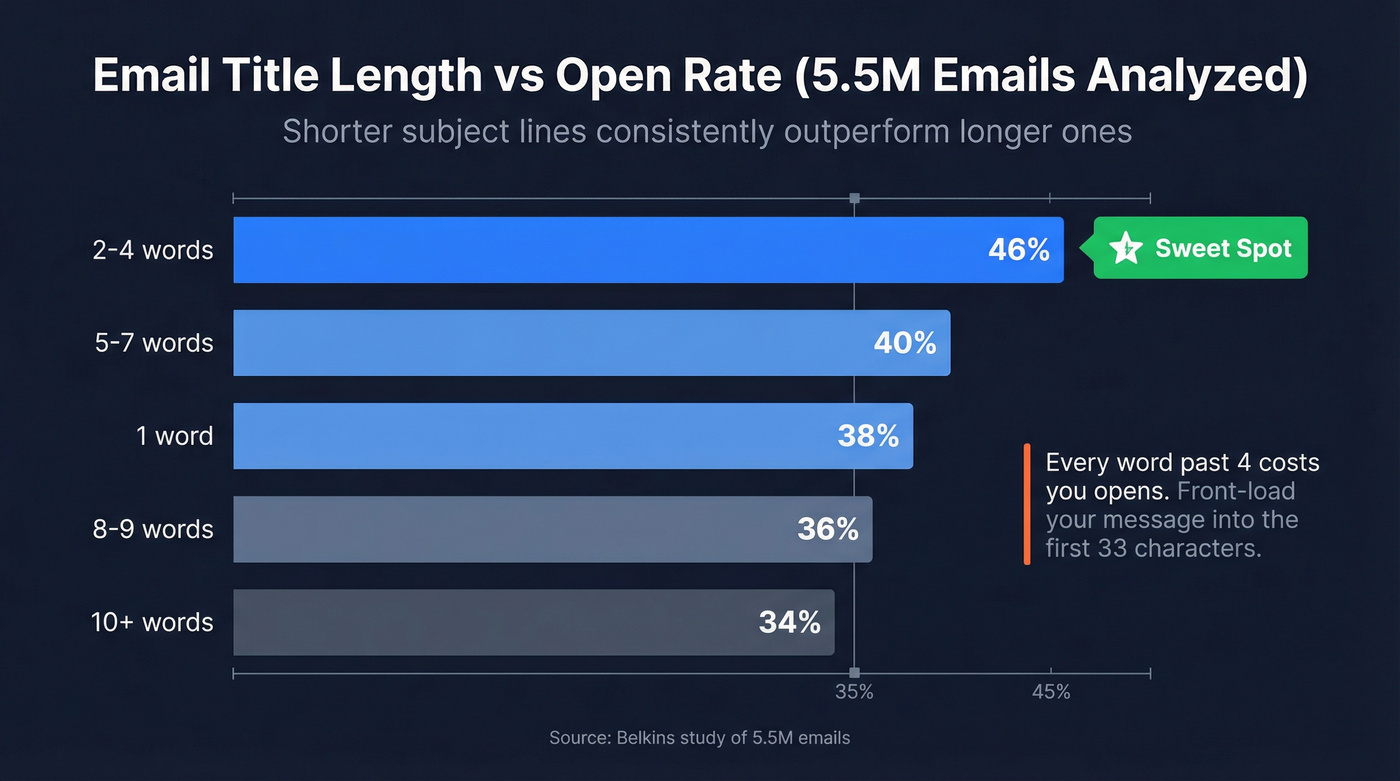
Shorter wins. The Belkins dataset makes this unambiguous:
| Word Count | Open Rate |
|---|---|
| 2-4 words | 46% |
| 1 word | 38% |
| 5-7 words | ~40% |
| 8-9 words | ~36% |
| 10+ words | 34% |
The drop-off after four words is steep. Every word you add past that threshold costs you opens.
But word count and character count aren't the same thing. "Quick question, Sarah" is three words and 22 characters. "Thoughts on your Q3 pipeline strategy?" is six words and 40 characters. The practical rule: front-load your key message into the first 33 characters, which is the shortest full-subject visibility window across the major devices and email clients tested. Anything past character 33 is bonus text that a big chunk of your audience won't see.
Truncation by Device
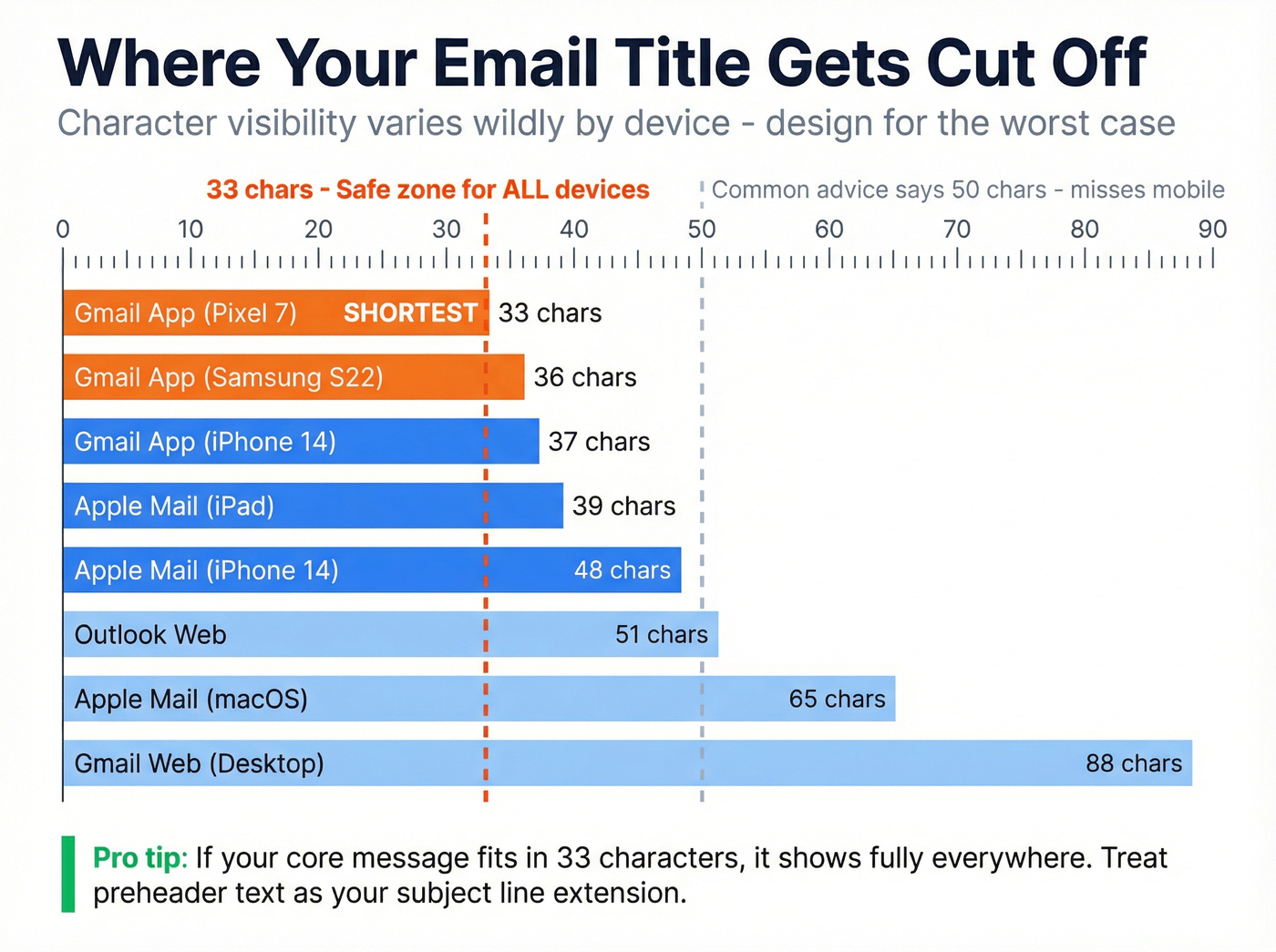
Most guides say "keep it under 50 characters" and move on. The reality is messier - and more useful. EmailToolTester ran actual tests across major devices, and the truncation points vary widely:
| Device / Client | Subject Chars | Preheader Chars |
|---|---|---|
| Gmail app (Pixel 7) | 33 | 37 |
| Gmail app (Samsung S22) | 36 | 40 |
| Gmail app (iPhone 14) | 37 | 39 |
| Apple Mail (iPhone 14) | 48 | 99 |
| Apple Mail (iPad 10th) | 39 | 75 |
| Outlook web (desktop) | ~51 | 60+ |
| Gmail web (desktop) | ~88 | 60+ |
| Apple Mail (macOS) | ~65 | 60+ |
The lowest common denominator is 33 characters. If your core message fits in 33 characters, it displays fully on every device in this table. Preheader text gets at least 37 characters of visibility, so treat it as a continuation of your subject line - not a throwaway.
A huge share of email is opened on mobile. If you're optimizing for desktop Gmail's ~88-character limit, you're optimizing for the wrong screen.

Personalized subject lines lift open rates to 46%. But personalization starts before you write - it starts with accurate data. Prospeo gives you verified emails, first names, job titles, and 50+ data points per contact so every email title you craft actually reaches a real inbox.
Stop crafting perfect subject lines for emails that bounce.
Five Formats That Produce the Best Results
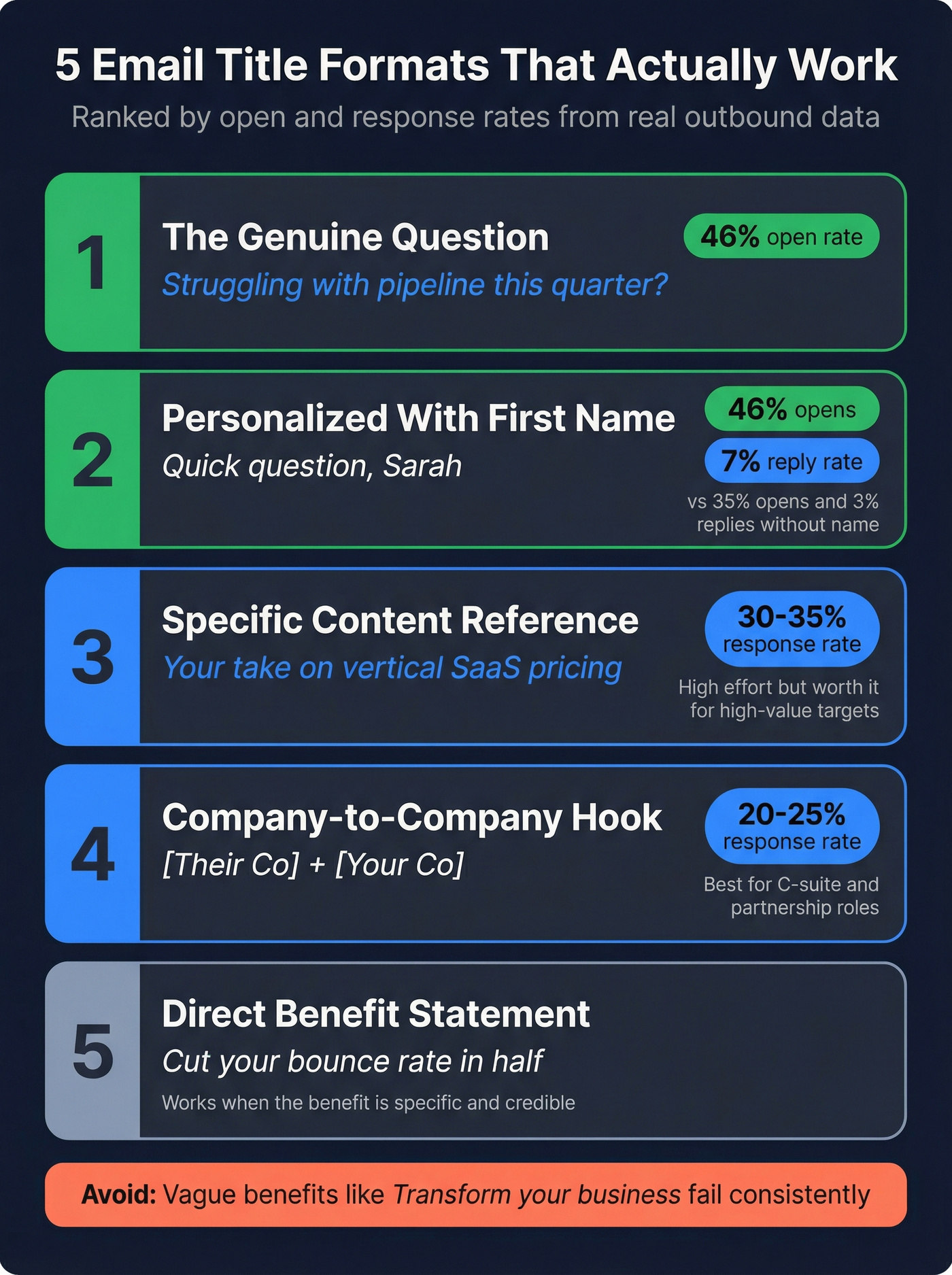
Not all email titles are created equal. These five formats have the strongest performance data behind them.
The Question That Demands an Answer
Open rate: 46%. Questions create an open loop the reader wants to close. Compare:
- "Want to 10x your revenue?" - obvious pitch, gets ignored
- "Struggling with pipeline this quarter?" - genuine, specific, hard to scroll past
The difference is authenticity. Rhetorical questions that are obviously pitches perform worse than statements. Genuine questions that touch a real pain point pull the highest open rates in the entire Belkins dataset.
Personalized With First Name
Open rate: 46% vs 35% without. Adding a first name is the lowest-effort, highest-impact change you can make. "Quick question, Sarah" outperforms "Quick question" every time. The reply rate lift is even bigger - 3% to 7%.
Specific Reference to Their Content
One practitioner on r/b2bmarketing shared their results: referencing something the prospect actually posted or published pulled response rates around 30-35%. Example: "Your take on vertical SaaS pricing." This is high-effort personalization, but the returns justify it for high-value targets. We've found it works best when the reference is specific enough that the prospect knows you actually read their content, not just their headline.
Company-to-Company Hook
"[Their Company] + [Your Company]" creates instant context and frames the email as a potential partnership, not a cold pitch. Response rates land around 20-25%. Skip this format unless you're targeting C-suite or partnership-oriented roles - for individual contributors, it reads as vendor spam.
Direct Benefit Statement
Short, clear, no fluff. "Cut your bounce rate in half" or "3 accounts your team is missing." These work when the benefit is specific and credible. Vague benefits ("Transform your business") fail consistently.
Cold Email vs. Marketing Email
These are different games with different rules.
| Cold Email | Marketing Email | |
|---|---|---|
| Tone | Conversational, lowercase, human | Branded, polished, designed |
| Emoji | Never for B2B | Works for seasonal B2C |
| Testing | Small batches (dozens) | Large splits (thousands) |
Cold email rewards simplicity. The consensus among outbound practitioners is clear: anything that sounds like marketing copy gets deleted. "Quick question, [Name]" pulls a 25-30% response rate because it reads like a real person wrote it - and the email contains a real question, not a disguised pitch. If you want more copy-and-paste structures, start with these B2B email examples.
Marketing email gives you more room. Your recipients opted in, so they're expecting branded content. Curiosity gaps and creative hooks are fair game, and A/B testing is easier because you're sending to thousands, not dozens. If you're building campaigns (not just outreach), use these marketing email tactics alongside your subject line tests.
Here's the thing: we see teams applying marketing email tactics to cold outreach all the time. "Boost Your ROI by 300%" might work for a newsletter. In a cold email, it's an instant delete.
Should You Use Emojis?
If you're doing B2B cold email, don't use emojis. Period.
28% of 69,315 subject lines analyzed by Moosend contained at least one emoji. The most common ones skew seasonal and promotional: sparkles (4.97%), gift (4.08%), checkmark (2.89%). They work for seasonal B2C campaigns - Black Friday, holiday sales, summer promos. They're neutral to negative for everything else. Money emojis are common in promotional email and increase spamminess signals. And never stack emojis - that's the fastest way to look like spam.
Mistakes That Kill Open Rates
Fake Re:/Fwd: prefixes. Not just sleazy - it's a CAN-SPAM violation. Misleading subject headings can trigger legal liability. If you're unsure what crosses the line, review the core email marketing rules.
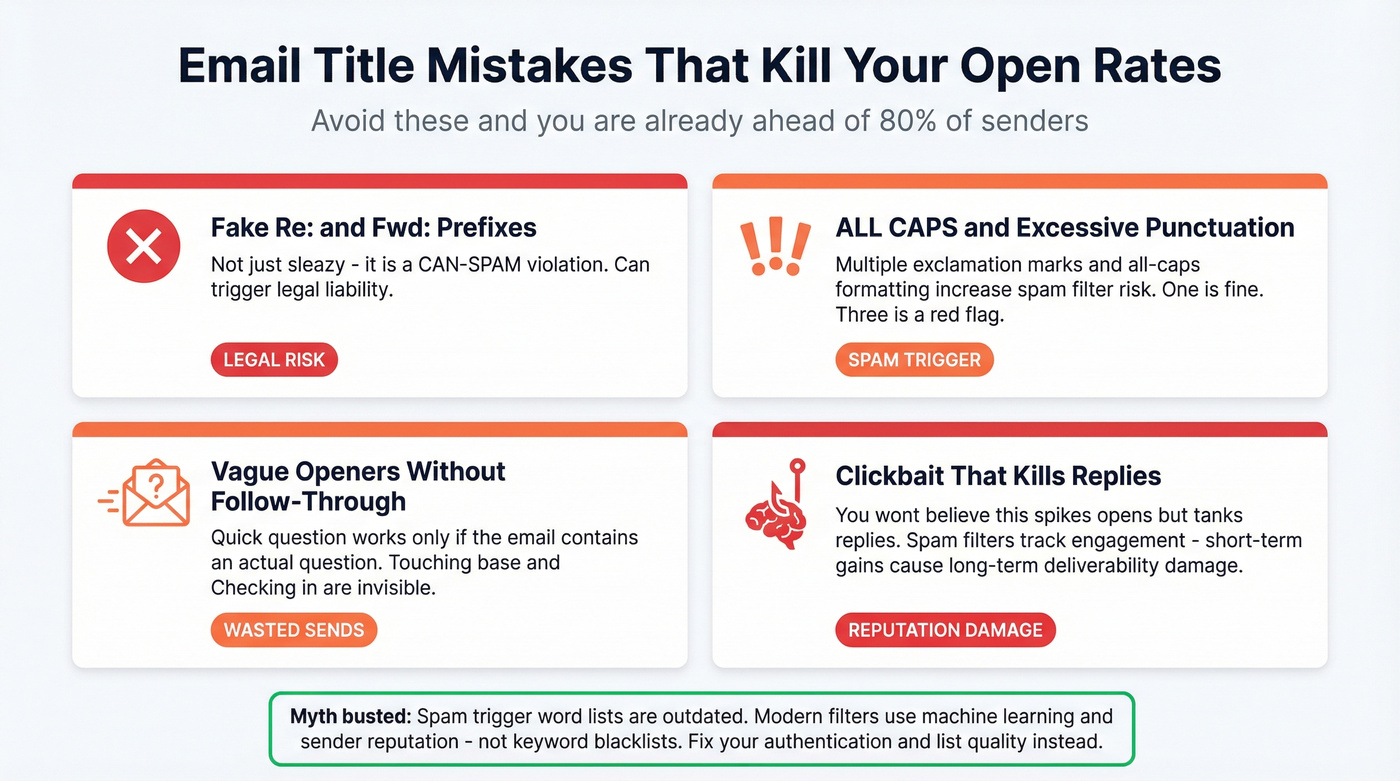
Vague openers that aren't real. "Touching base," "Checking in," and even "Quick question" become invisible when the email doesn't contain a genuine, specific question. If you keep defaulting to “checking in,” steal better phrasing from this checking in email guide.
ALL CAPS and excessive punctuation. Multiple exclamation marks and all-caps formatting increase spam risk. One exclamation mark is fine. Three is a red flag.
Clickbait that kills replies. "You won't believe this" spikes opens but depresses replies and creates negative engagement signals. Spam filters track engagement patterns, so short-term open rate gains aren't worth long-term deliverability damage. For safer curiosity hooks, see these clickbait email subject lines.
One myth worth busting: the "spam trigger words" list. Modern spam filters use machine learning, engagement signals, and sender reputation - not keyword blacklists. The fix is almost always authentication and list quality, not avoiding the word "free." If you’re troubleshooting inboxing, start with sender authentication.
How to A/B Test Subject Lines
Don't guess. Test. Here's a clean workflow based on MailerLite's methodology:
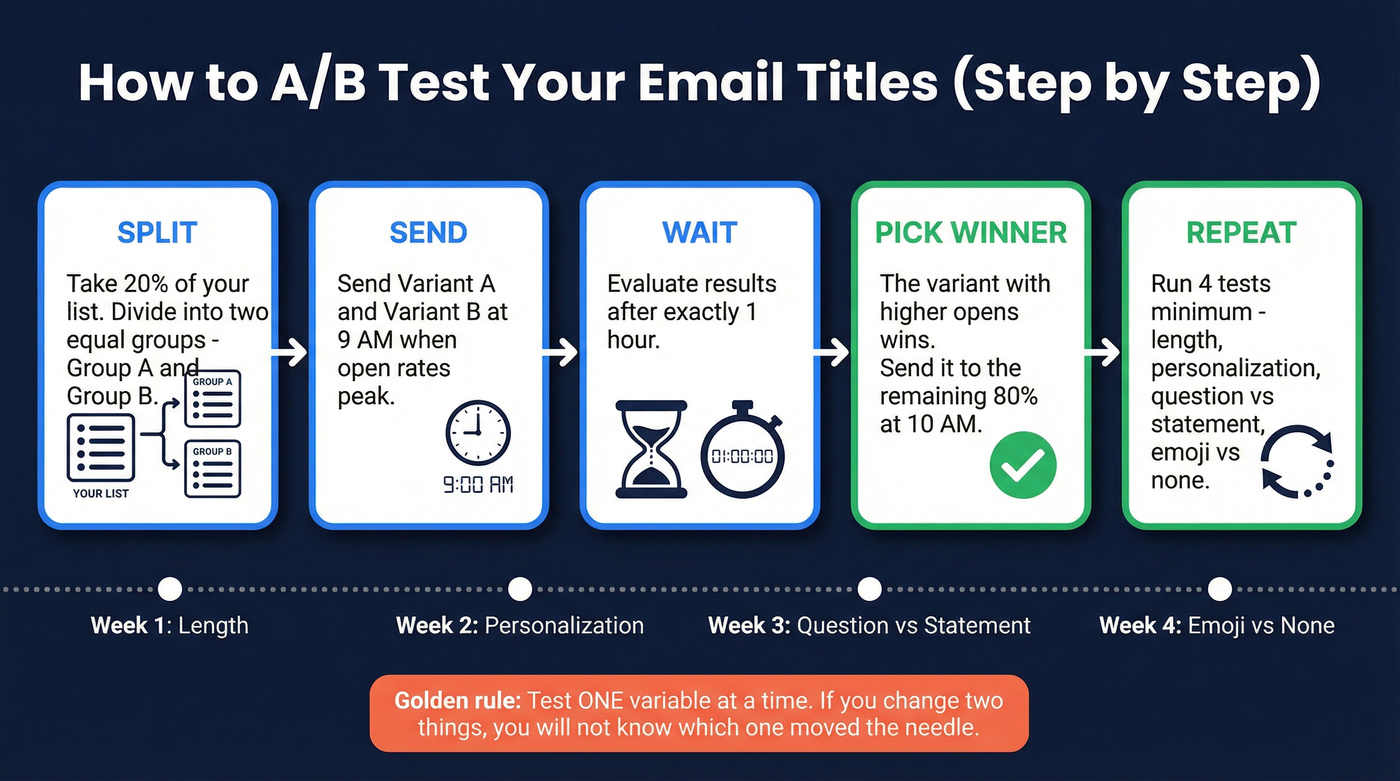
Split 20% of your list into two equal groups. Send variant A and B at 9 AM, when open rates peak. Evaluate after one hour - the winner goes to the remaining 80% at 10 AM. Test one variable at a time: length vs. length, question vs. statement, emoji vs. no emoji, personalized vs. generic. If you change two things, you won't know which one moved the needle.
Run at minimum four tests before settling on a formula: length, personalization, question vs. statement, and emoji. That's a month of weekly sends. After that, you'll have a subject line framework specific to your audience - worth more than any best-practices article, including this one. Over time, this testing process is how you discover the best email titles for your particular market and buyer persona. If you want a bigger swipe file to test from, use these email subject line ideas.
Fix Your Data Before Your Subject Lines
Let's be honest about something most email marketing advice won't tell you: subject line optimization is the last 20% of the equation. Data quality is the first 80%.
We've seen teams spend weeks A/B testing email titles when their real problem was a 20% bounce rate. You send 500 cold emails. Open rate: 8%. You blame the subject line. But 23% bounced because the list was stale. The 385 emails that actually arrived had a 14% open rate - not great, but fixable. The subject line wasn't the issue. The data was.
Bounce rates above 3-4% burn sender reputation. Once your domain reputation drops, even perfect email titles land in spam. Before you test a single subject line, verify your list. Prospeo's 5-step verification process catches invalid addresses, spam traps, and honeypots before they damage your domain - 98% email accuracy with a 7-day data refresh cycle. The free tier gives you 75 verifications per month to start. If you’re auditing deliverability, run an email domain reputation lookup and then check if an email is valid before scaling sends.

The data is clear: short, personalized email titles win. But teams using bad contact data see 35%+ bounce rates - killing deliverability before any subject line can work. Prospeo's 98% email accuracy and 7-day data refresh keep your sender reputation intact.
Fix your list before you fix your subject lines.
FAQ
How long should an email subject line be?
Two to four words hits the highest open rates at 46%, based on a 5.5-million-email study. For character count, keep your core message within 33 characters - that's the shortest full-visibility threshold across major devices and email clients tested.
Do emojis help email open rates?
They perform best in seasonal B2C campaigns and are neutral to negative in B2B cold email. About 28% of subject lines use them. Money emojis carry elevated spamminess risk. Use them sparingly and only when they match the campaign context.
What words trigger spam filters?
Modern spam filters don't rely on keyword blacklists. They use machine learning, engagement signals, and sender reputation. The fix is better authentication and list hygiene - not avoiding specific words.
How do I know if my subject line is the problem?
If your open rates are below 15%, the issue is typically deliverability, targeting, or data quality - not the subject line. High bounce rates destroy sender reputation, which tanks inbox placement for every email you send. Verify your list first, then A/B test subject lines once deliverability is solid.