

Email Marketing Rules: Legal, Technical & Best Practices for 2026
Email marketing rules aren't one set of guidelines - they're three overlapping systems that determine whether your campaigns land in inboxes or get you fined. The global average inbox placement rate sits at 83.5%. That means roughly 1 in 6 legitimate marketing emails never reaches a recipient. Most of that gap comes from senders who don't understand the interplay between legal compliance (what governments require), platform-enforced technical mandates (what Gmail, Yahoo, and Microsoft require), and performance best practices (what actually keeps you out of the spam folder).
Miss any one of the three and your campaigns suffer.
Quick-Reference Checklist
If you're short on time, here's the distilled version across all three rule categories:
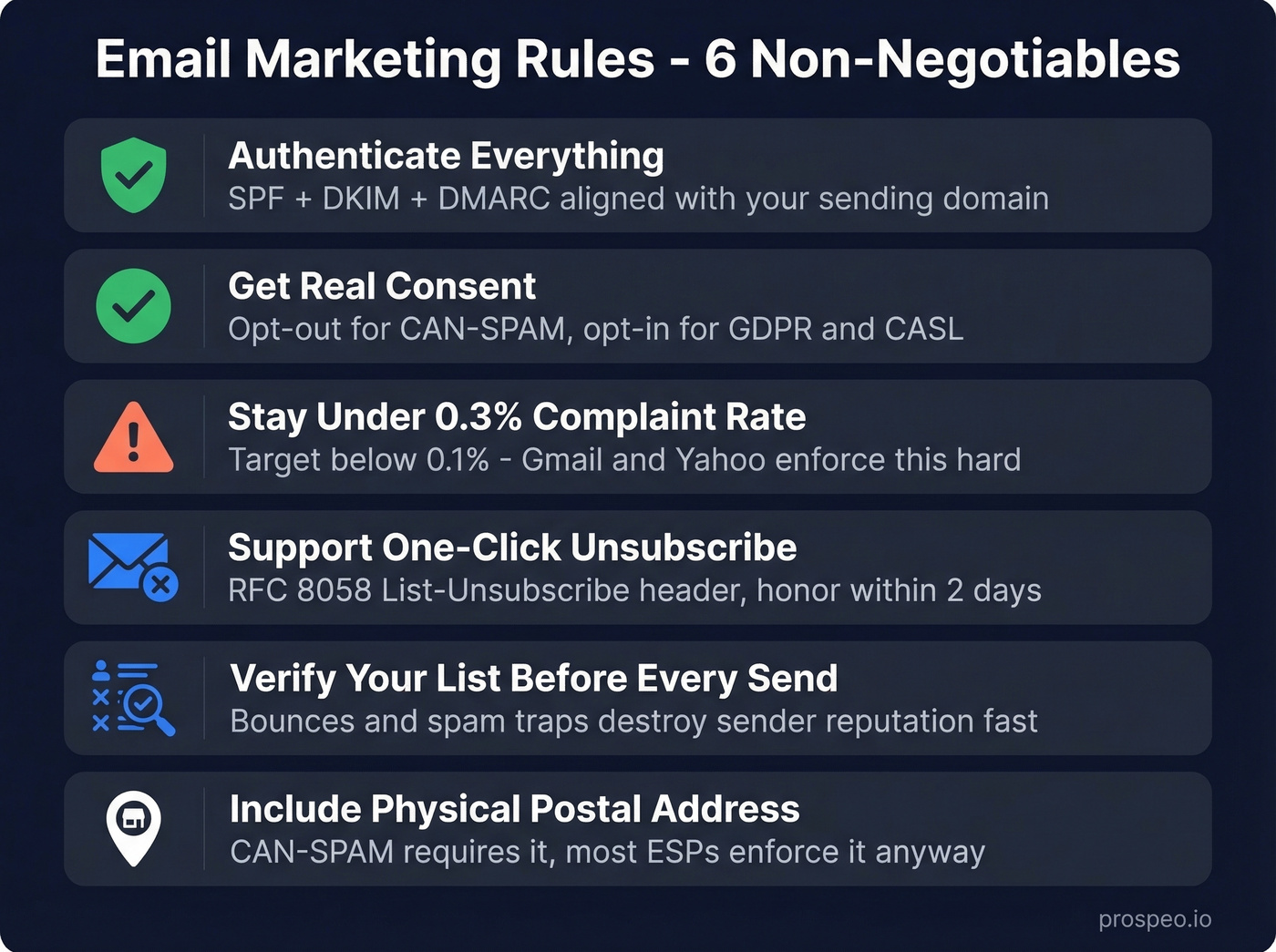
- Authenticate everything. SPF, DKIM, and DMARC must be configured and aligned with your sending domain. No exceptions. (If you need help with alignment, see DMARC policy.)
- Get real consent. CAN-SPAM lets you use opt-out, but GDPR and CASL require opt-in. Know which law applies to your recipients.
- Stay under the 0.3% spam complaint ceiling. Gmail and Yahoo enforce this. Target below 0.1%.
- Support one-click unsubscribe. Bulk senders must support one-click unsubscribe via List-Unsubscribe (RFC 8058) and honor requests within 2 days.
- Verify your list before every major send. Bounces and spam traps destroy sender reputation faster than bad copy ever will. (Use a spam trap removal process, not guesswork.)
- Include a physical postal address in every commercial email. CAN-SPAM requires it, and most ESPs enforce it regardless.
That's the skeleton. Here's the full breakdown.
Legal Compliance by Jurisdiction
Email law isn't global - it's a patchwork of national and regional frameworks. The rules that apply depend on where your recipients live, not where you're sending from.
CAN-SPAM Act (US)
CAN-SPAM covers all commercial messages, including B2B. The FTC's compliance guide lays out seven core requirements:
- No false or misleading header information (From, Reply-To, routing domain must be accurate)
- No deceptive subject lines
- Identify the message as an advertisement
- Include a valid physical postal address
- Provide a clear, conspicuous opt-out mechanism
- Honor opt-out requests within 10 business days
- Monitor what third parties do on your behalf - you're liable for their violations too
Two often-missed operational details: your opt-out mechanism must remain functional for at least 30 days after sending, and you can't sell or transfer an opted-out email address.
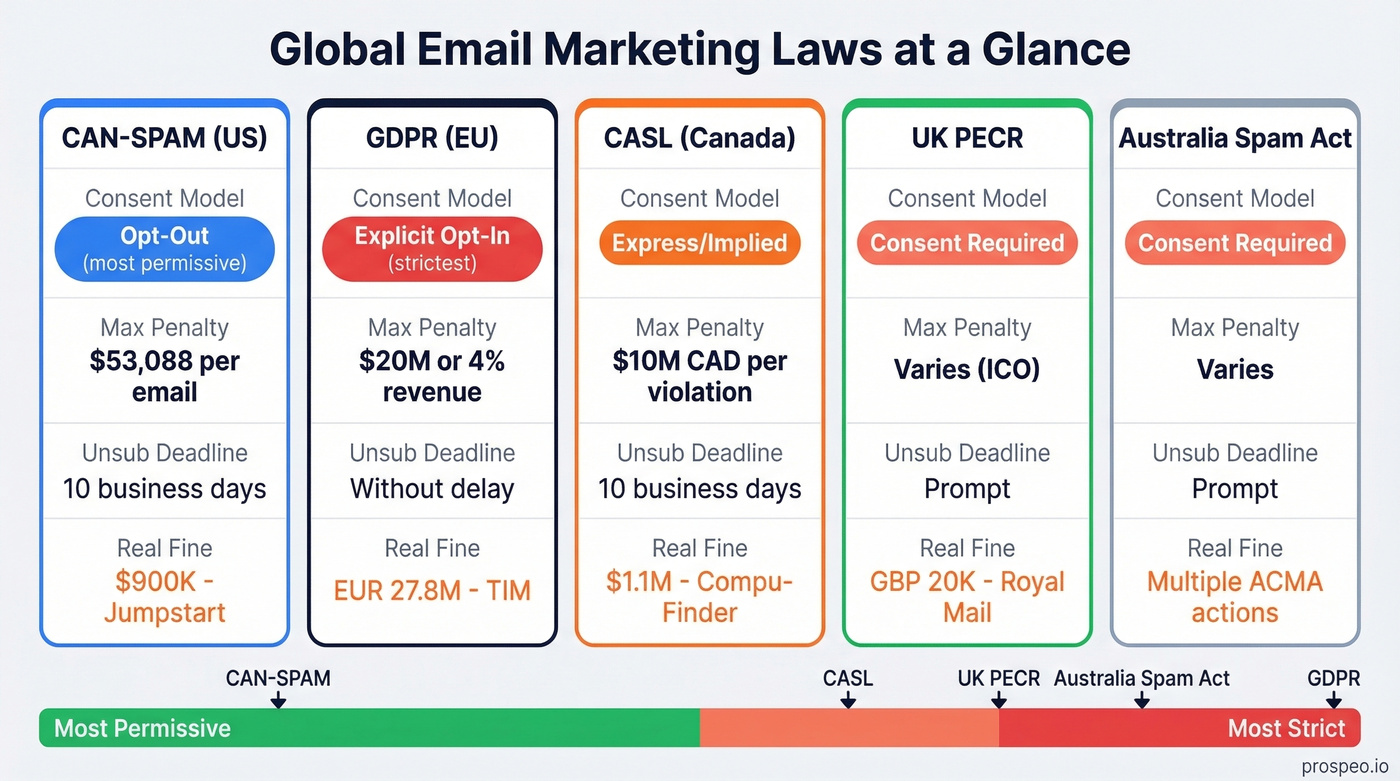
The penalty: up to $53,088 per email in violation. Per message, not per campaign. A 10,000-email blast with a missing postal address creates $530 million in theoretical exposure. No court has imposed anything near that figure, but the per-email structure means even small campaigns carry outsized risk. The math should scare you.
The "primary purpose" test is the concept most marketers get wrong. CAN-SPAM classifies emails based on their primary purpose, not just whether they contain a commercial element. If an email contains both commercial content (a product promotion) and transactional content (a shipping update), the primary purpose determines which rules apply. A shipping confirmation with a small product recommendation at the bottom? Transactional. A product promotion that opens with "Thanks for your recent order"? Commercial. When in doubt, treat it as commercial - the penalties only apply in one direction. (For cold outreach specifically, see cold email marketing.)
One thing that trips up B2B marketers: CAN-SPAM uses an opt-out model. You can email someone without prior consent, as long as you give them a way to stop. That's the most permissive framework on this list.
GDPR (EU/EEA)
GDPR flips the model entirely. You need a lawful basis before sending - typically explicit consent or legitimate interest (and legitimate interest is a tightrope for marketing emails). The regulation applies extraterritorially, meaning if you're a US company emailing EU residents, GDPR applies to you.
The fines are real. Italy's data protection authority hit TIM with a EUR 27.8M penalty for aggressive unsolicited marketing. Wind Tre got EUR 17M for unlawful direct marketing, including making it difficult for recipients to unsubscribe. These aren't theoretical maximums - they're actual enforcement actions against real companies.
CASL, UK PECR & Australia Spam Act
Canada's Anti-Spam Legislation is the strictest major email law. It requires express or implied consent before sending, carries penalties up to $10M CAD per violation, and has already produced significant enforcement - Compu-Finder was fined $1.1M CAD in one of the earliest cases.
The UK's PECR works alongside GDPR and requires consent for marketing emails to individuals. Australia's Spam Act similarly requires consent and includes penalties enforced by the ACMA.
Jurisdiction Penalty Table
| Law | Penalty Ceiling | Consent Model | Unsub Timeline | Real Case |
|---|---|---|---|---|
| CAN-SPAM (US) | $53,088/email | Opt-out | 10 business days | Jumpstart Technologies: $900K |
| GDPR (EU) | EUR 20M or 4% revenue | Opt-in (explicit) | Without delay | TIM: EUR 27.8M |
| CASL (Canada) | $10M CAD/violation | Express or implied consent | 10 business days | Compu-Finder: $1.1M |
| UK PECR | Varies (ICO) | Consent required | - | Royal Mail: GBP 20K |
| Australia Spam | Varies | Consent required | - | ACMA: multiple actions |
US State Laws You Can't Ignore
CAN-SPAM preempted most state email laws, but it didn't preempt state privacy laws. And those privacy laws increasingly affect how you collect, store, and use email addresses.
The biggest recent development: Washington State's Commercial Electronic Mail Act (CEMA). A 2025 state Supreme Court decision expanded CEMA to cover false or misleading subject lines in marketing emails. The result was more than 30 lawsuits targeting retailers over promotional subject lines. If you're sending marketing emails to Washington residents, your subject lines need to be defensibly accurate - not just catchy. (If you want safer ideas, use these email subject lines as a starting point.)
California's CCPA/CPRA applies to for-profit entities meeting any of three thresholds: over $25M annual revenue, buying/selling/sharing personal data of 100,000+ consumers, or deriving 50%+ of revenue from data sales. Email addresses are personal data under CCPA, which means the law's transparency requirements, opt-out rights, and deletion obligations apply to your marketing lists. Penalties run $2,500 per unintentional violation and $7,500 per intentional violation.
The list of states with comprehensive privacy laws keeps growing:
| State | Law | Effective Date |
|---|---|---|
| Virginia | VCDPA | Jan 1, 2023 |
| Colorado | CPA | Jul 1, 2023 |
| Connecticut | CTDPA | Jul 1, 2023 |
| Utah | UCPA | Dec 31, 2023 |
| Oregon | OCPA | Jul 1, 2024 |
| Texas | TDPSA | Jul 1, 2024 |
| Delaware | DPDPA | Jan 1, 2025 |
| Iowa | ICDPA | Jan 1, 2025 |
| New Jersey | NJDPA | Jan 15, 2025 |
| Tennessee | TIPA | Jul 1, 2025 |
| Minnesota | MCDPA | Jul 31, 2025 |
| Maryland | MODPA | Oct 1, 2025 |
The fact that there's still no federal privacy law in the US is genuinely frustrating. Every state is building its own framework, and marketers are left stitching together compliance across 12+ jurisdictions with no end in sight.
Platform-Enforced Rules: Gmail, Yahoo & Microsoft
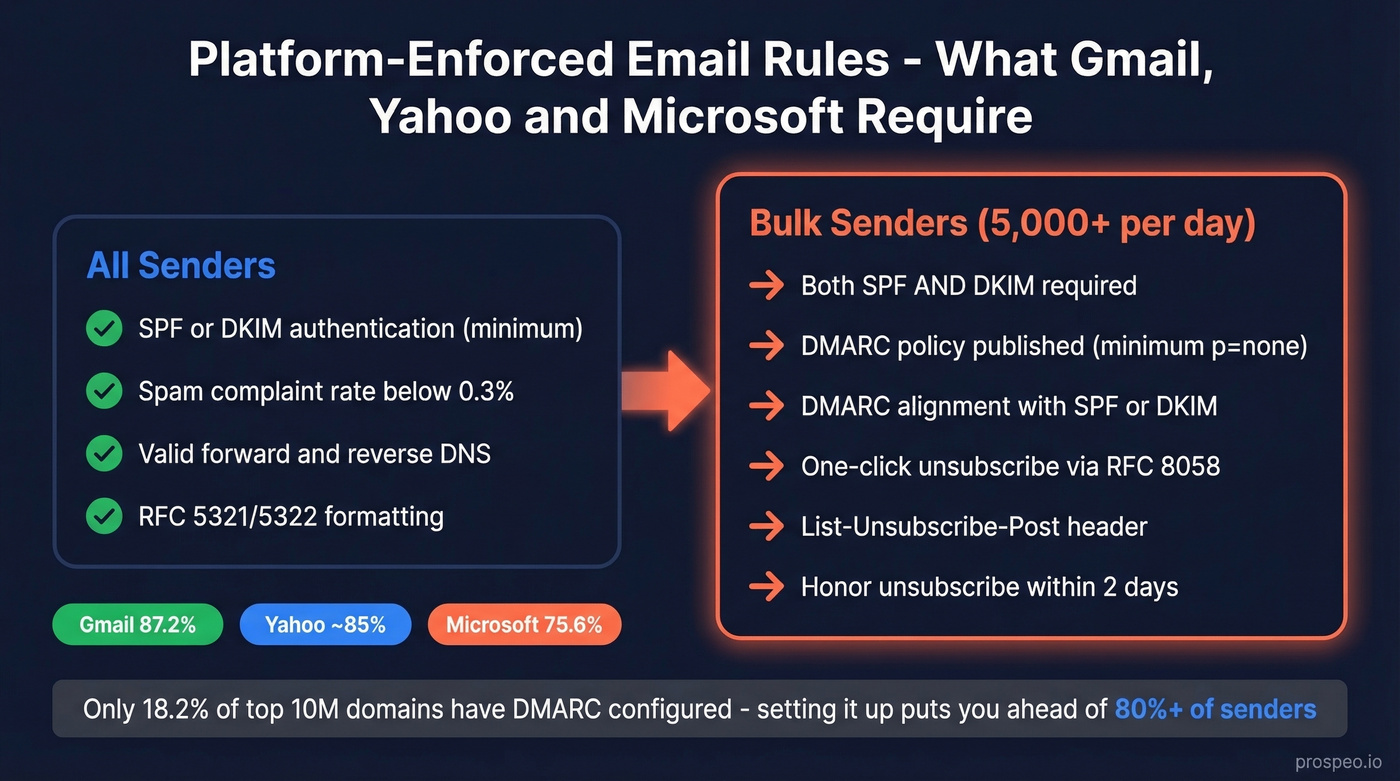
Legal compliance gets your emails lawful. Platform compliance gets them delivered. Gmail, Yahoo, and Microsoft now enforce technical requirements that function as hard rules - violate them and your messages get throttled, bounced, or routed to spam. Inbox placement varies significantly by provider: Gmail delivers 87.2% of authenticated mail to the inbox, while Microsoft sits at just 75.6%, making Microsoft compliance particularly important. (For a deeper fix-it guide, see email deliverability.)
The core requirements, enforced since early 2024 and tightened through 2025:
All senders must authenticate with SPF or DKIM at minimum, keep spam complaint rates below 0.3% (target under 0.1%), maintain valid forward and reverse DNS records, and comply with RFC 5321/5322 formatting standards.
Bulk senders (5,000+ messages/day to a single provider) face additional mandates:
- Implement both SPF and DKIM
- Publish a DMARC policy (at minimum
p=none) - DMARC must pass with either SPF or DKIM alignment (relaxed alignment is acceptable)
- Support one-click unsubscribe via List-Unsubscribe (RFC 8058)
- Include List-Unsubscribe-Post (strongly recommended)
- Honor unsubscribe requests within 2 days
Gmail tightened enforcement as of late 2025, with non-compliant senders receiving SMTP 4xx/5xx errors - meaning outright rejection, not just spam folder placement. Microsoft followed with its own mandate effective May 5, 2025 for Outlook, Hotmail, and Live domains, requiring SPF/DKIM/DMARC for high-volume sending.
Here's the thing: only 18.2% of the top 10M domains have DMARC configured, and just 7.6% actually enforce it. If you set up DMARC properly, you're already ahead of 80%+ of senders.
The 0.3% spam complaint threshold deserves special attention. That's 3 complaints per 1,000 emails. In our experience, the 0.3% number is generous - most well-maintained lists stay under 0.1%. One bad campaign to a stale list can blow past 0.3% and tank your sender reputation for weeks. Google Postmaster Tools is free - use it. Yahoo publishes similar guidance in its sender best practices.

Staying under the 0.3% complaint ceiling starts with verified data. Prospeo's 5-step email verification - with spam-trap removal and honeypot filtering - delivers 98% accuracy, keeping bounce rates under control and your sender reputation intact.
Stop risking fines and spam folders with unverified lists.
Technical Authentication Checklist
Authentication is the foundation everything else sits on. Here's the setup, in order:
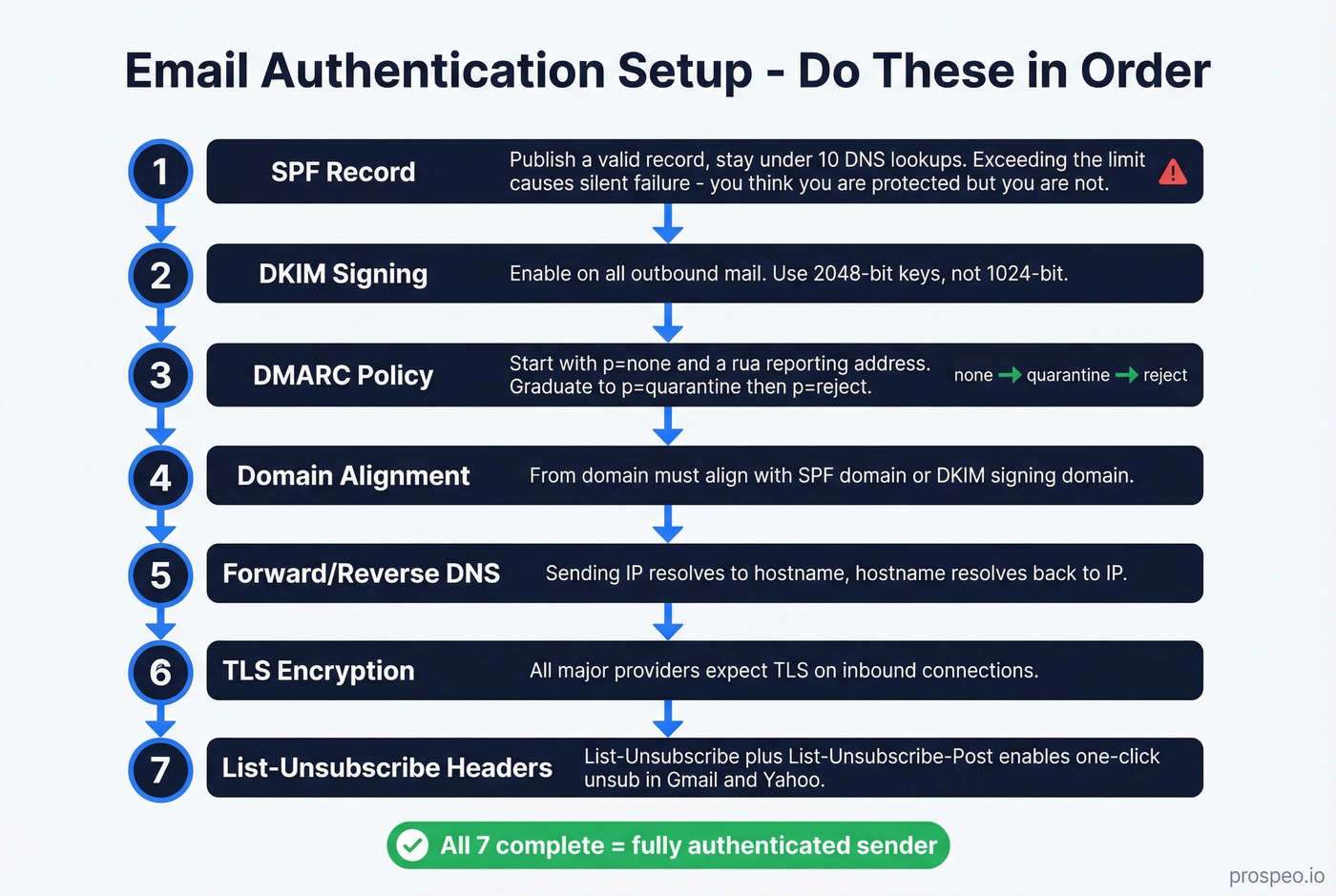
- SPF record - publish a valid record and keep it under 10 DNS lookups. Exceeding the lookup limit causes SPF to fail silently, which is worse than not having it at all because you think you're protected when you aren't. (Use these SPF record examples to sanity-check syntax.)
- DKIM signing - enable on all outbound mail. Use 2048-bit keys (1024-bit is the minimum, but 2048 is the standard you should be using). (If you're unsure, follow how to verify DKIM is working.)
- DMARC policy - start with
p=noneand add aruareporting address. Graduate top=quarantineorp=rejectonce you've identified all legitimate sending sources. - Domain alignment - your From domain must align with either the SPF domain or the DKIM signing domain.
- Forward/reverse DNS - your sending IP must resolve to a hostname, and that hostname must resolve back to the IP.
- TLS encryption - all major providers now expect TLS on inbound connections.
- List-Unsubscribe + List-Unsubscribe-Post headers - these enable the one-click unsubscribe button in Gmail and Yahoo's interfaces.
Authentication gets your emails accepted by servers. Verification ensures you're sending to real addresses in the first place. Two different problems, both non-negotiable.
Best Practices for Sender Reputation
Legal compliance and technical authentication are table stakes. The practices below separate senders with 45% open rates from senders wondering why their domain got blacklisted.
Do this:
Send only to people who gave permission. The consensus on r/coldemail is unambiguous: permission-based sending is the single biggest factor in long-term deliverability. It's not just a legal requirement in most jurisdictions - it's the foundation of sender reputation.
Segment instead of blasting. A 50,000-person list isn't one audience. Break it into segments by engagement, purchase history, or intent signals. Segmented campaigns routinely double click rates compared to batch-and-blast sends. (If you want a framework, use intent signals.)
Clean your list before every major campaign. When Gmail and Yahoo enforce a 0.3% spam complaint ceiling and bounces damage sender reputation, sending to unverified addresses gambles your entire email program. We've tested several verification tools, and Prospeo's 5-step process catches invalid addresses, spam traps, and honeypots at 98% accuracy with a 7-day data refresh cycle. The free tier gives you 75 verifications per month - enough to audit a segment before you hit send. (Track the impact with email bounce rate.)
Let people reply. Don't use no-reply@ addresses. They signal that you don't care about the relationship, and they prevent engagement signals that help deliverability.
Design for mobile first. At least 30% of recipients will open on their phone. Single-column layouts, readable font sizes, and tappable CTAs aren't optional.
Never do this:
Never buy email lists. We've seen teams tank a domain's reputation in a single week by importing a purchased list. Reddit practitioners are unanimous on this point - it's the fastest way to destroy deliverability. Skip this shortcut entirely. (If you need the legal angle, read is it illegal to buy email lists.)
Never email a stale list without re-verification. If contacts haven't been validated in 90+ days, treat them as suspect. Waiting until bounce rates spike means the damage is already done.
Never ignore bounce data. Hard bounces should trigger immediate suppression. Soft bounces need monitoring. If your bounce rate exceeds 2% on a campaign, stop and clean before sending again.
Let's be honest about something: most deliverability problems are list quality problems, not content problems. If you're spending hours A/B testing subject lines while sending to an unverified list, you've got your priorities backwards. Fix the data first. The creative optimization only matters once your emails actually arrive.
What Happens When You Break the Rules
These aren't hypothetical scenarios. Real companies, real fines:
| Company | Jurisdiction | Fine | Violation |
|---|---|---|---|
| TIM (Italy) | GDPR | EUR 27.8M | Unsolicited marketing |
| Wind Tre (Italy) | GDPR | EUR 17M | Unlawful direct marketing |
| Vodafone Spain | GDPR | EUR 8.15M | No consent, ignored opt-outs |
| Compu-Finder | CASL | $1.1M CAD | Sending without consent |
| Jumpstart Technologies | CAN-SPAM | $900K | Compliance violations |
| Royal Mail (UK) | PECR | GBP 20K | 213K emails without consent |
Look at the pattern. Every one of these fines traces back to the same root cause: sending to people who didn't want to hear from you, or making it hard for them to say stop. The legal frameworks differ, but the enforcement logic is identical.
The Wind Tre case is particularly instructive - part of their violation involved making it difficult for recipients to unsubscribe by using incorrect contact details. That's not a sophisticated compliance failure. It's a broken unsubscribe link.
2026 Benchmarks - What Good Looks Like
Klaviyo's 2026 benchmark report, drawn from 183,000+ brands, gives us concrete performance targets:
| Metric | Average | Top 10% |
|---|---|---|
| Campaign open rate | 31% | 45.1% |
| Campaign click rate | 1.69% | 3.38% |
| Campaign order rate | 0.16% | 0.36% |
| Flow click rate | 5.58% | 10.48% |
| Flow order rate | 2.11% | 4.3% |
A caveat on open rates: Apple Mail Privacy Protection pre-fetches images, which inflates open rate numbers. Treat opens as directional, not precise. Click rate and placed order rate are the metrics you can trust. (If you want to standardize reporting, use a consistent click rate formula.)
If your spam complaint rate is above 0.1%, you've got a compliance problem - not a creative problem. Fix authentication, clean your list, and tighten consent before you touch subject lines.
Regulatory Changes Coming in 2026-2027
The regulatory trajectory is clear: more states, more enforcement, more technical requirements.
California, Colorado, and Connecticut are already running enforcement sweeps requiring businesses to recognize Global Privacy Control (GPC) signals. California's AB 566 goes further - it requires major browsers to include built-in, user-configurable opt-out preference signals by 2027. At least a dozen states now have universal opt-out requirements on the books.
What this means for email marketers: the browser itself will soon be telling you a user has opted out of data sharing. If your marketing stack doesn't recognize and honor those signals, you're exposed. The absence of a federal privacy law means this complexity will only increase. Plan for the strictest standard, not the loosest.
CAN-SPAM, GDPR, and CASL all punish senders who hit invalid addresses. Prospeo refreshes 300M+ profiles every 7 days - not every 6 weeks - so your lists stay current and compliant across every jurisdiction.
Clean data is the foundation of every compliant email campaign.
FAQ
Does CAN-SPAM apply to B2B emails?
Yes. CAN-SPAM applies to all commercial messages regardless of whether the recipient is a consumer or business contact. The "primary purpose" test determines classification, and the same $53,088 per-email penalty applies. B2B senders don't get a pass on opt-out mechanisms, physical addresses, or honest subject lines.
What's the difference between transactional and commercial email?
Transactional emails - order confirmations, password resets, shipping notifications - are largely exempt from anti-spam regulations because their primary purpose is facilitating an existing transaction. If an email's main goal is promoting a product or service, it's commercial, even if it includes transactional content. A shipping confirmation with a small upsell? Transactional. A promotional email that opens with "Thanks for your order"? Commercial.
How often should I clean my email list?
Before every major campaign, or at minimum quarterly. Prospeo's free tier covers 75 verifications per month for quick audits, and tools like NeverBounce and ZeroBounce offer similar bulk cleaning. Waiting until bounce rates spike means the damage is already done - your sender reputation has already taken the hit.
Do I need DMARC if I send fewer than 5,000 emails per day?
Yes. The 5,000/day threshold triggers bulk sender mandates at Gmail and Yahoo, but DMARC protects your domain from spoofing regardless of volume. Even if you send 500 emails a month, a spoofed message from your domain can destroy your reputation. Setup takes 15 minutes and costs nothing.
Which email marketing law is the strictest?
CASL. It requires express or implied consent before sending and carries penalties up to $10M CAD per violation. Unlike CAN-SPAM's opt-out model, CASL demands you prove the recipient agreed to receive your emails before you hit send. If you're emailing Canadian recipients without documented consent, you're exposed.