

How to Set Up a Custom Email Tracking Domain (Any ESP)
Stop obsessing over open rates. A custom tracking domain exists for reputation isolation, not analytics precision. Email tracking domain setup takes 15 minutes, yet most people start with warmup and wonder why nothing works - the actual priority order is verified list, SPF/DKIM/DMARC, custom tracking domain, then warmup.
Quick Version
A custom tracking domain is a subdomain you control (like track.yourdomain.com) pointed via CNAME to your ESP's tracking host. Three things go wrong almost every time: Cloudflare proxy left on, a CAA record blocking certificate issuance, and SSL/HTTPS not enabled in the ESP.
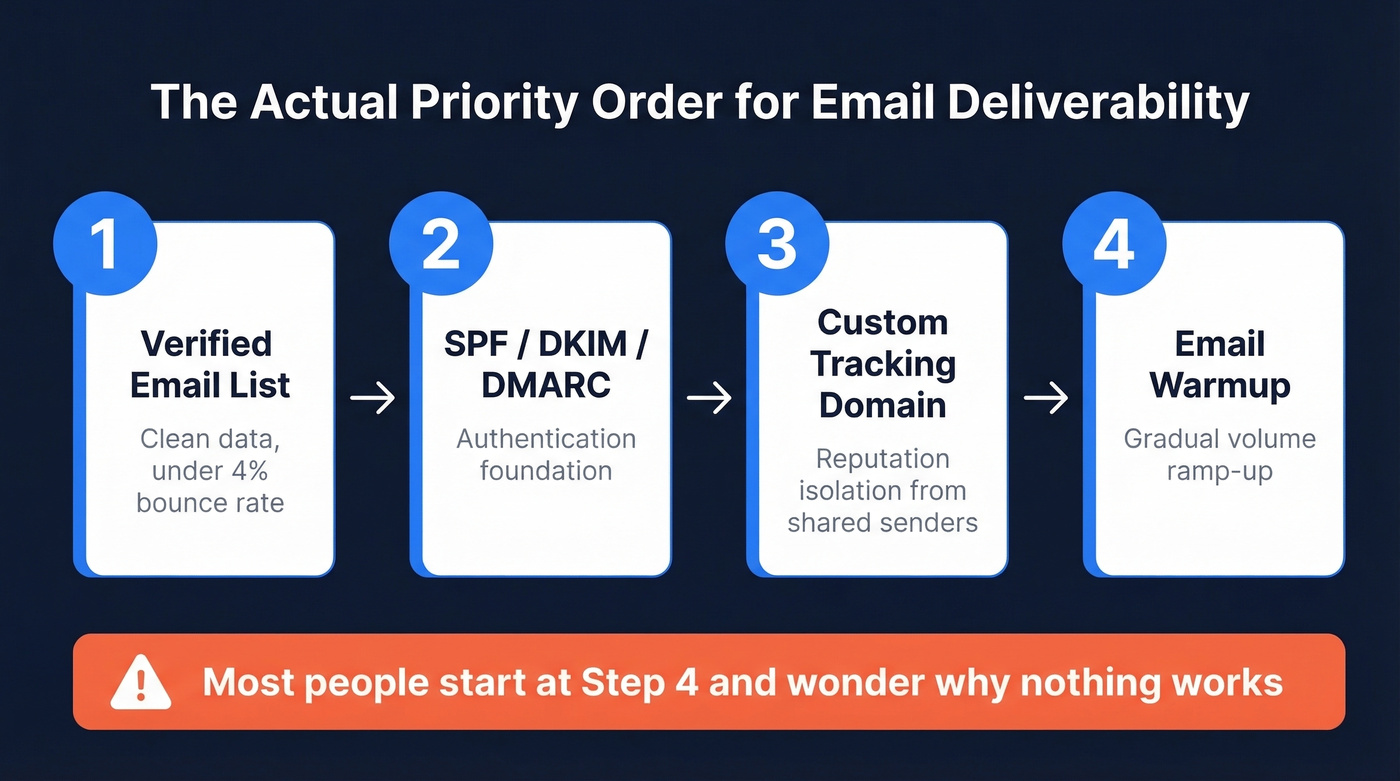
If you're running cold email in 2026, this is table stakes. Still on your ESP's shared domain? You're sharing reputation with every spammer on the platform.
Why Your Tracking Domain Matters
One in six emails never reach the inbox. Global inbox placement sits at about 84%, and the gap between providers is brutal - Gmail hovers at 87.2% while Microsoft limps along at 75.6%.
Every ESP assigns you a shared tracking domain by default. That domain handles open pixels and click redirects for thousands of senders. When one of those senders burns the domain's reputation - and someone always does - your deliverability takes the hit. Corporate security gateways like Proofpoint and Mimecast are especially aggressive about flagging shared redirect domains. A custom tracking domain isolates you from that mess entirely.
What Is a Custom Tracking Domain?
When you enable open or click tracking, your ESP does two things: it embeds a tiny invisible pixel that tracks opens and rewrites your links through a redirect service that tracks clicks . Both pass through a tracking domain. By default, that's a shared domain like links.sendgrid.net or click.mailchimp.com.
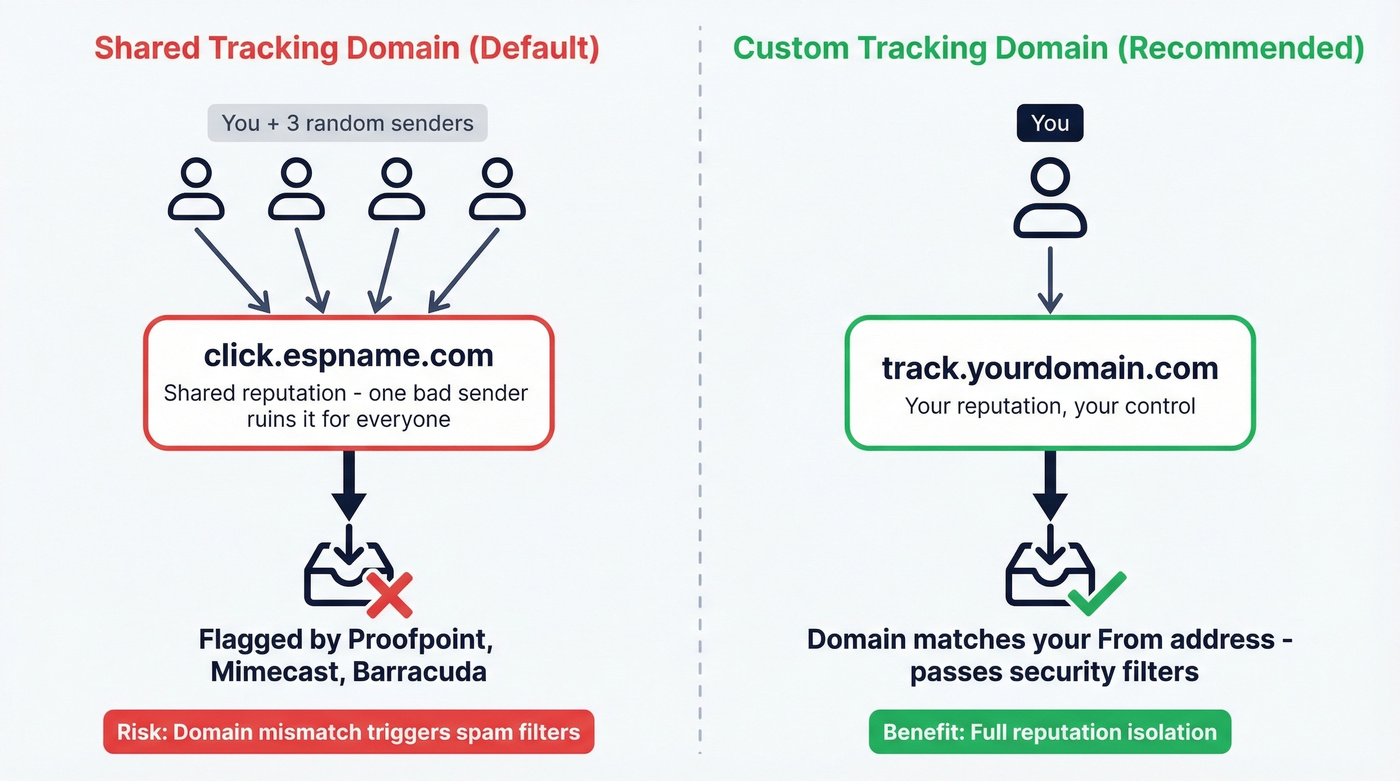
A custom tracking domain replaces that shared domain with a subdomain you own - track.yourdomain.com instead of click.espname.com. The mechanics are identical; the reputation is yours alone.
Here's why this matters beyond branding. GMass documented how a single bad actor on a shared tracking domain can tank deliverability for everyone else on it. Email filters also scrutinize domain mismatches - when your From address says you@company.com but every link routes through click.randomesp.net, that's a signal. Corporate security systems actively block generic tracking domains from major providers, particularly in enterprise environments running Mimecast, Proofpoint, or Barracuda.
Do You Actually Need One?
Set one up if:
- You're sending cold email or B2B outreach
- Multiple senders share your ESP account
- You track opens or clicks (most ESPs enable this by default)
- Your recipients include enterprise companies with security gateways
Skip it if you've disabled both open and click tracking entirely, you're only sending internal communications, or you don't include links and don't need open tracking. No tracking means no tracking domain ever appears in your emails.
Consider disabling tracking entirely when your ICP is heavily enterprise with Proofpoint or Mimecast. One practitioner on r/coldemail put it bluntly: they've "never once registered an open from a domain with these filters." If tracking data is unreliable, it's just adding risk for zero signal.
Step-by-Step Setup
Pick Your Subdomain
Use a subdomain, never your root domain. Common choices: track.yourdomain.com, go.yourdomain.com, click.yourdomain.com. This isolates tracking reputation from your main domain and avoids DNS conflicts with your website.
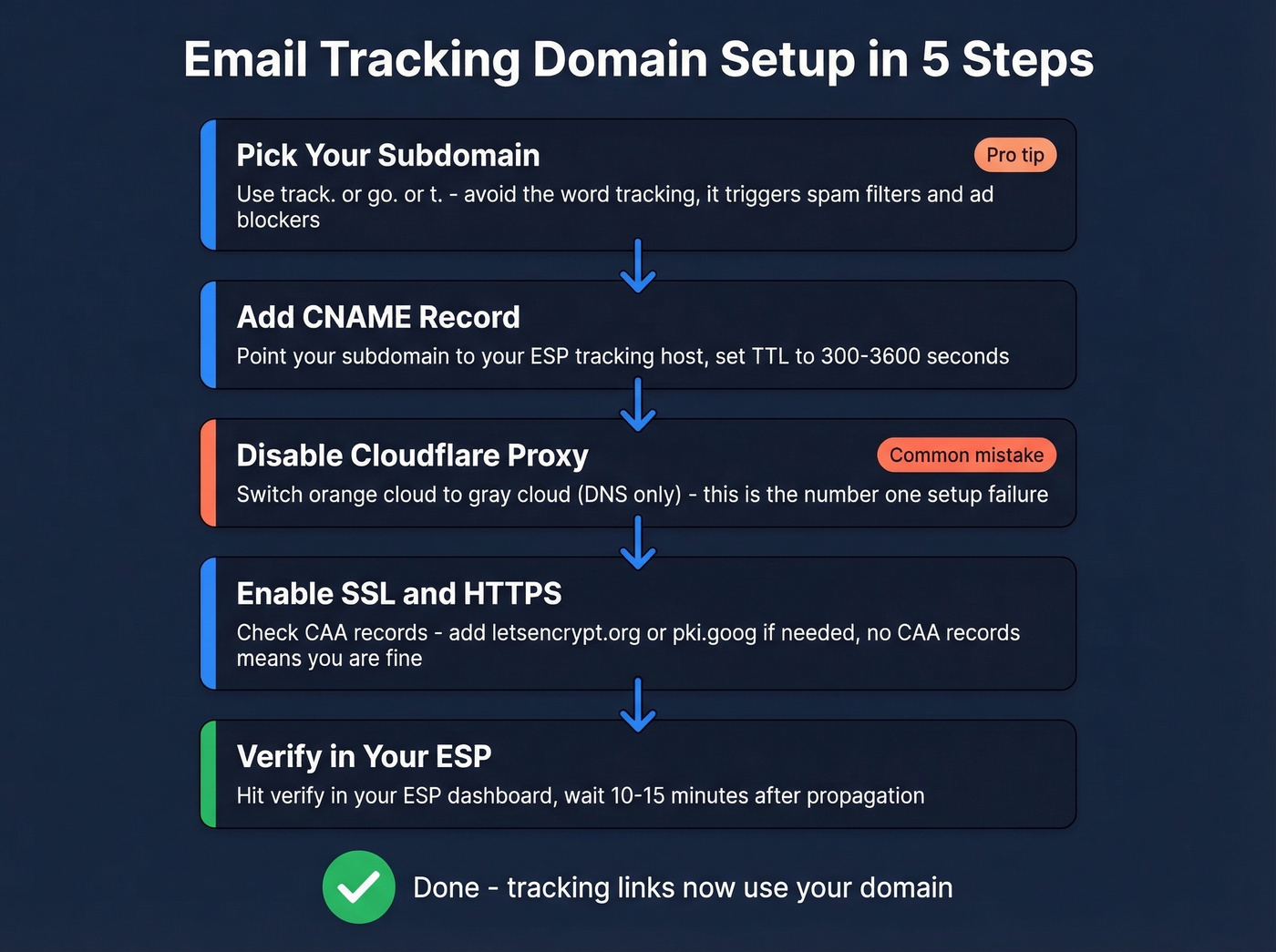
One thing most guides skip: ad blockers and spam filters use pattern matching. Apollo's own docs recommend avoiding the word "tracking" in your subdomain name - it can trigger spam filters, not just ad blockers. A subdomain like tracking.yourdomain.com or pixel.yourdomain.com will trip uBlock Origin. Test your chosen subdomain against uBlock before committing. Something like go. or t. tends to fly under the radar.
Add the CNAME Record
Log into your DNS provider and create a CNAME record. The "Name" field is your subdomain (e.g., track). The "Target" field is the tracking host your ESP provides - every ESP has a different one (see the reference table below).
Set TTL to 300-3600 seconds during rollout. Lower TTL means faster propagation if you need to fix a mistake. In our experience, propagation usually completes within 30 minutes, though it can stretch to 48-72 hours in edge cases.
Disable Cloudflare Proxy
This is the single most common setup failure we see. It's also the easiest to fix.
Cloudflare proxies DNS records by default (the orange cloud icon). Many ESPs need to reach the CNAME directly to validate it and provision an SSL certificate. If the proxy is on, both can fail silently - you'll just see a verification error with no useful explanation.
Go to your Cloudflare dashboard, find your CNAME record under DNS, and click the orange cloud until it turns gray ("DNS only"). That's it. Don't turn it back on. If you need Cloudflare proxy on for other subdomains, set SSL/TLS mode to Full - but for tracking domains, DNS-only is simpler and avoids certificate conflicts.
Enable SSL/HTTPS
Many ESPs auto-provision an SSL certificate once the CNAME resolves, so tracking links are served over HTTPS.
But there's a gotcha. If you have CAA records in your DNS, you must explicitly allow the certificate authority your ESP uses. For setups using Let's Encrypt, add a CAA record for letsencrypt.org. Customer.io uses Google's CA for its automatic HTTPS link tracking, so add pki.goog to your CAA records. No CAA records at all? You're fine - the absence of CAA records means any CA can issue.
Verify in Your ESP
Head to your ESP's tracking domain settings and hit verify. Most ESPs check DNS propagation and confirm the CNAME resolves correctly. This typically takes 10-15 minutes after propagation completes. Some ESPs like Lemlist require a TXT verification record in addition to the CNAME - check your ESP's setup wizard for the exact records needed.
ESP CNAME Reference Table
Every ESP gives you a different CNAME target, different terminology, and different verification flow. Here's a practical reference:
| ESP | CNAME Target | Notes |
|---|---|---|
| Apollo | cname.apollo-email.com |
Subdomain only |
| GMass | x.gmtrack.net |
Auto SSL |
| Hunter | Verification TXT first, then CNAME | Hunter-managed flow |
| Lemlist | Per-account (Settings > Email > Tracking) | TXT + CNAME |
| Customer.io | e.customeriomail.com or e-eu.customeriomail.com |
Region-dependent; HTTPS has extra requirements |
| Klaviyo | trk.klaviyomail.com |
Auto SSL |
| Instantly | Per-account (Settings > Sending > Tracking) | Dashboard setup |
| Smartlead | Per-account (Settings > Email Accounts > Tracking) | Dashboard setup |
| Mailchimp | Per-account (Domains / tracking settings) | Dashboard setup |
| SendGrid | Per-account (Branded Links in Sender Authentication) | Dashboard setup |
| Constant Contact | Per-account (My Account > Advanced) | CNAME + TXT |
| Mailforge | Per-account (Domain Settings) | Dashboard setup |
Check your ESP's docs for the exact target - some generate account-specific CNAME values rather than using a universal one.

You just spent 15 minutes isolating your tracking domain reputation. Don't burn it by sending to unverified addresses. Prospeo's 5-step email verification keeps bounce rates under 4% - with 98% accuracy across 143M+ verified emails.
Protect the deliverability you just built. Start with verified data.
Troubleshooting Common Failures
CNAME won't verify. Cloudflare proxy is still on. Switch to "DNS only" (gray cloud). This fixes a huge chunk of verification failures.
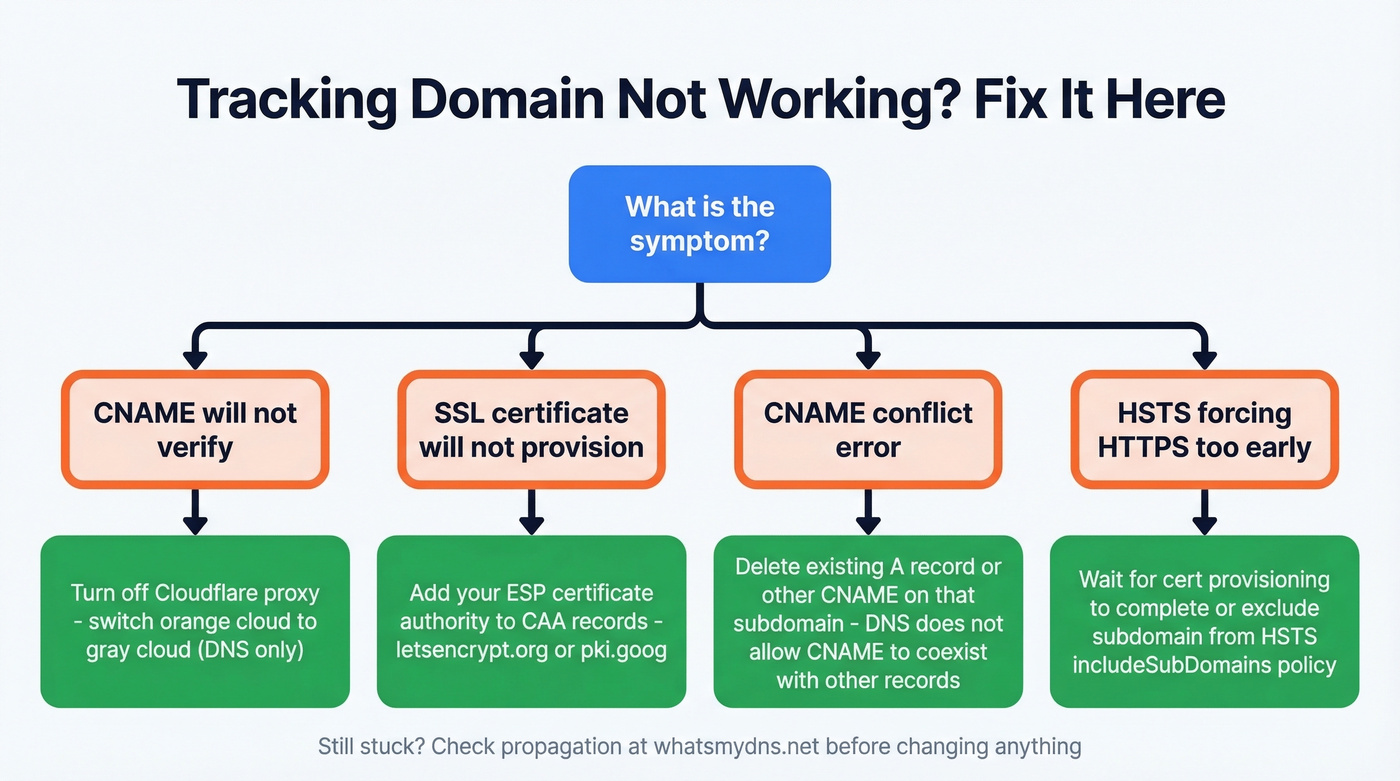
SSL certificate won't provision. You have a CAA record blocking the ESP's certificate authority. Add the appropriate CA (letsencrypt.org or pki.goog) to your CAA records, or remove CAA records entirely if you don't need them.
CNAME conflict. You already have an A record or another CNAME on that subdomain. DNS doesn't allow a CNAME to coexist with other record types on the same name. Delete the conflicting record first.
HSTS forcing HTTPS before cert is ready. If your root domain has an HSTS policy with includeSubDomains, browsers will demand HTTPS on your tracking subdomain before the certificate exists. Wait for cert provisioning to complete, or temporarily exclude the subdomain from HSTS.
Propagation not complete. Check WhatsMyDNS.net to see if your CNAME has propagated globally. If some regions show the old record, wait - don't start changing things.
How This Fits Your Auth Stack
SPF, DKIM, and DMARC are mandatory. Yahoo enforced this starting February 2024 for bulk senders. A custom tracking domain is best practice on top of that foundation - it's not a formal requirement, but it's the next layer of reputation protection.
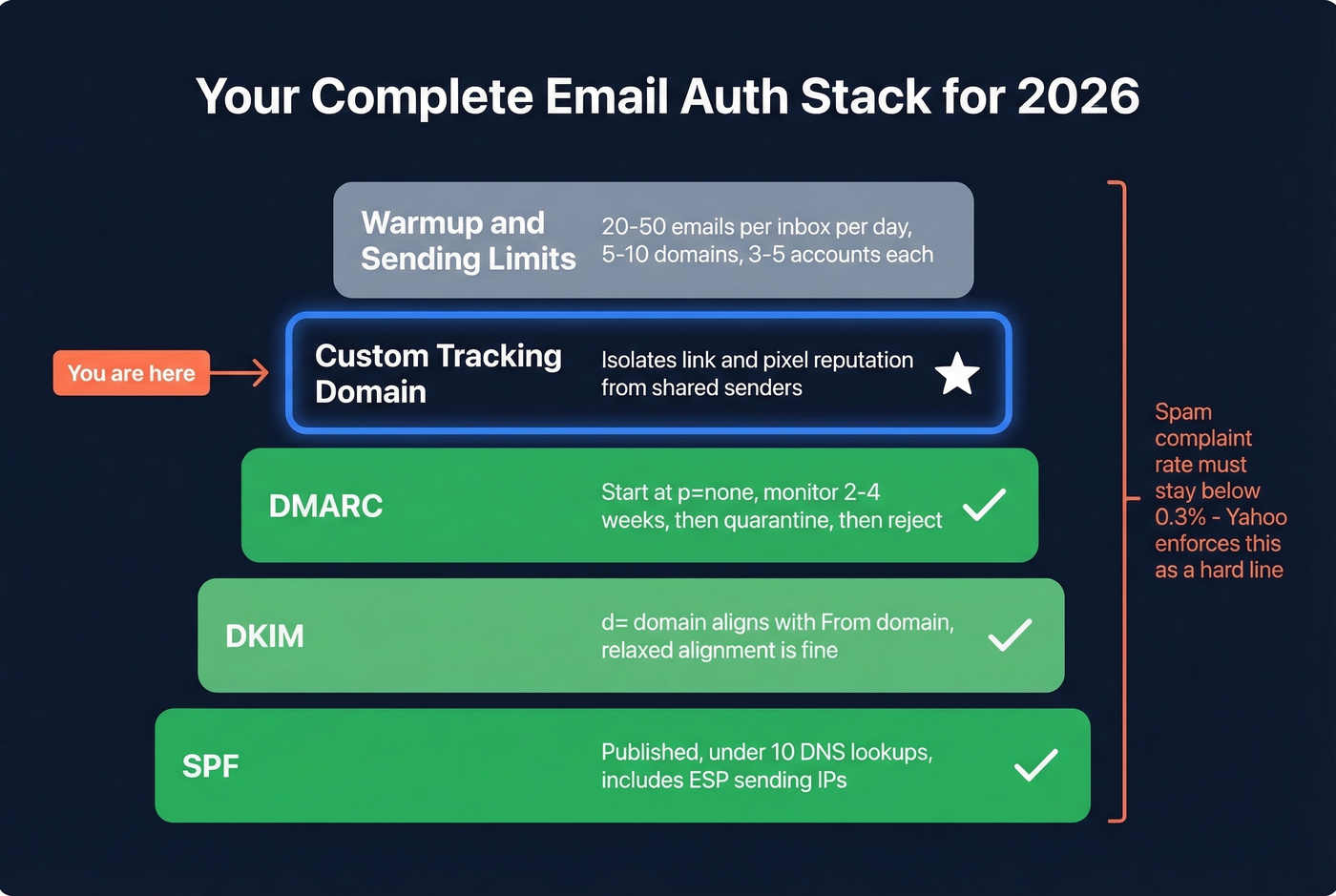
The checklist that actually matters:
- SPF: published, under 10 DNS lookups, includes your ESP's sending IPs (see SPF)
- DKIM:
d=domain aligns with your From domain (relaxed alignment is fine) (how to confirm: verify DKIM) - DMARC: start at
p=none, monitor for 2-4 weeks of clean reports, then move toquarantine, thenreject(details: DMARC alignment) - Spam complaint rate: keep below 0.3% - Yahoo enforces this, and it's a hard line (more: improve sender reputation)
- Custom tracking domain: isolates link/pixel reputation from shared senders (related: tracking domain)
Scaling norms matter too. Experienced cold emailers typically run 5-10 domains with 3-5 accounts each, sending no more than 20-50 emails per inbox per day. Your tracking domain means nothing if you're blasting 200 emails from a single inbox (see email velocity).
When to Turn Tracking Off
Not every recipient can be tracked, and pretending otherwise corrupts your data.
Proofpoint and Mimecast often strip or block tracking pixels and rewrite/scan URLs. You'll see a 554 rejection - "Email rejected due to security policies" - when Mimecast URL Protect flags a URL or tracking element. A practitioner on r/coldemail reported never once registering an open from domains running these gateways. Outlook desktop blocks images by default, which kills pixel-based open tracking. Apple Mail Privacy Protection pre-loads remote content, inflating your open rates with phantom data.
The smart move is to run an MX lookup on recipient domains before your campaign. If MX records point to Proofpoint or Mimecast, segment those contacts into a no-tracking group. You'll get cleaner data from the recipients who can be tracked, and you'll avoid adding unnecessary redirect hops for the ones who can't.
Let's be honest: most teams would get better results by disabling open tracking entirely and measuring replies instead. Open rates in 2026 are a vanity metric - between Apple MPP inflating everything and enterprise gateways blocking everything, the number in your dashboard bears little resemblance to reality. Reply rate is the only metric that can't be faked.
The Upstream Problem: Data Quality
Here's the thing - if 15% of your list bounces, no DNS configuration saves your sender reputation. Bounces directly damage the domain reputation your tracking domain is trying to protect (benchmarks + fixes: email bounce rate). You can have perfect SPF, DKIM, DMARC, and a custom tracking domain, and still land in spam because your contact data is stale.
We've seen this pattern repeatedly. Meritt came to Prospeo with a 35% bounce rate and watched it drop to under 4% after switching to verified data with a 7-day refresh cycle. That's the kind of data hygiene that makes everything downstream - including your tracking domain - actually work. Email addresses decay at 2-3% per month as people change jobs, and most providers only refresh every 4-6 weeks. By then, the damage is done.
Post-Setup Testing
Once your custom tracking domain is live, verify the full stack:
- DNS validation: run your domain through MXToolbox to confirm SPF, DKIM, DMARC, and CNAME records are all resolving correctly
- Propagation check: use WhatsMyDNS to confirm your CNAME is visible globally
- Inbox placement test: send seed emails through GlockApps to see where you're landing - inbox, spam, or missing
- Monthly list re-verification: re-verify before every major campaign. Weekly re-verification catches decay that monthly snapshots miss, protecting the tracking domain reputation you just built (see email deliverability)
Custom tracking domains fix reputation isolation. But if one in six emails never reach the inbox, bad data is the other half of the problem. Prospeo refreshes 300M+ profiles every 7 days - not 6 weeks - so your outbound hits real inboxes at real companies.
Clean tracking setup deserves clean contact data. Emails start at $0.01.
FAQ
Does a custom tracking domain improve open rates?
Not directly. It improves deliverability by isolating your sender reputation from shared domains. More emails reaching the inbox means more potential opens, but the domain itself doesn't change recipient behavior. Think of it as infrastructure that protects inbox placement, not a conversion lever.
Can I use my root domain for tracking?
Always use a subdomain like track.yourdomain.com, never the root domain. This isolates tracking reputation so if it takes a hit, your corporate email and website stay unaffected. It also avoids DNS conflicts with existing A records on your apex domain.
How long does the full setup take?
About 15 minutes of active work - creating the CNAME, disabling Cloudflare proxy if applicable, and verifying in your ESP. DNS propagation adds anywhere from a few minutes to a few hours. Budget 30 minutes total and you'll be done.
What's the best way to protect sender reputation after setup?
Re-verify your email list monthly at minimum. Addresses decay at roughly 2-3% per month as people change jobs. A weekly refresh cycle catches stale contacts that monthly snapshots miss - Meritt cut their bounce rate from 35% to under 4% after switching to verified data, which directly protects the sender reputation your tracking domain depends on.