

ESP Routing: The Deliverability Lever You're Missing in 2026
One in six emails never reaches the inbox. You've warmed your domains, written tight copy, and built a solid list - but 40% of your Outlook-bound emails land in spam while Gmail is fine. The problem isn't your content. It's your cold email infrastructure, and ESP routing is the fix most teams haven't implemented yet.
The Quick Version
This technique sends emails from the provider that matches your recipient's inbox - Google Workspace to Gmail, Microsoft 365 to Outlook. Same-provider emails hit the inbox 94-96% of the time versus 85-88% cross-provider. Before you configure routing, verify your list (bad data kills sender reputation regardless of provider matching), set up SPF/DKIM/DMARC, and warm up for at least two weeks. Tools like Instantly support native provider-matching workflows, and most modern sequencers offer similar capabilities. Prospeo handles the verification layer - 98% email accuracy on a 7-day refresh cycle, so your routing rules operate on clean data from the start.
What Is ESP Routing?
ESP routing directs outbound emails through the sending provider that matches the recipient's email host. If your prospect uses Gmail, the system routes that email through your Google Workspace account. If they're on Outlook, it goes through Microsoft 365.
Don't confuse this with ESP load balancing. Load balancing distributes volume across multiple providers to spread reputation risk and avoid sending limits. Routing is more targeted - it decides which provider sends to which recipient based on their inbox host. Many teams use both. Load balancing spreads volume; routing maximizes inbox placement rate per recipient.
Why Provider Matching Matters
Aggregated benchmarks from Winnr show a clear "home-field advantage" when sender and recipient share the same provider:
- Google Workspace to Gmail: 94-96% inbox placement
- Microsoft 365 to Gmail: 85-88% inbox placement
- Microsoft 365 to Outlook: 92-95% inbox placement
- Google Workspace to Outlook: 84-87% inbox placement
That's a 7-10 point gap from provider matching alone. Across a 10,000-email campaign, that translates to 700-1,000 more emails hitting the primary inbox instead of spam.
Gmail averages 87.2% inbox placement versus Outlook's 75.6%, and WarmForge's Q1 data shows Outlook/Hotmail inbox rates as low as 26.77% - making same-provider routing from Microsoft 365 accounts critical for Outlook-bound emails. Gmail and Microsoft together host roughly 65% of all business email. If you're not routing, you're leaving deliverability on the table for the majority of your list.
Here's the thing: a practitioner on r/ColdEmailMasters who tested 50,000 emails across 28 campaigns put it bluntly - "Outlook deliverability is HORRIBLE right now across the board." Their fix? Segment by recipient ESP and route accordingly. They pulled Outlook leads entirely until they found a configuration that delivered. In our experience, that's the right call. Routing without segmenting by recipient provider is just guessing with extra steps.
Let's be honest: this is the single highest-leverage deliverability fix most cold email teams haven't touched. Copywriting tweaks, subject line tests, send-time optimization - none of them move the needle like matching your sending provider to your recipient's inbox host. If your inbox placement rate is below 90% and you're not using provider matching, start here before you touch anything else.

You just read it: 12% invalid data tanks sender reputation even with perfect routing rules. Prospeo's 5-step verification catches invalid emails, spam traps, and catch-all domains before they touch your sending accounts - 98% accuracy on a 7-day refresh cycle.
Verify first, route second. Start with data that won't burn your domains.
How It Works Technically
When you upload a prospect list or trigger a send, the routing tool performs an MX record lookup on the recipient's domain. MX records tell the internet where a domain's email is hosted, and they're publicly queryable.
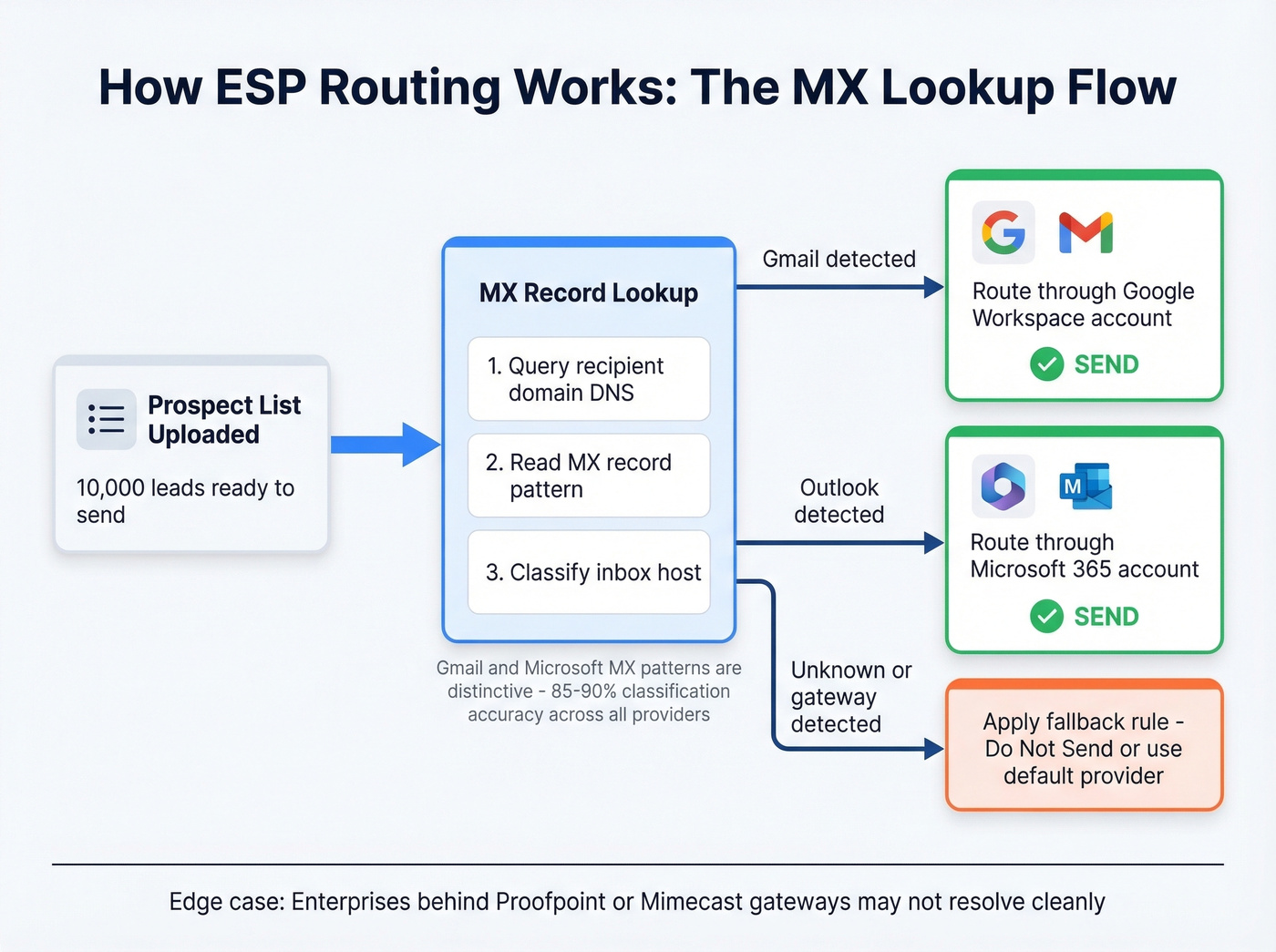
MX-based detection is highly accurate for Gmail and Microsoft because their MX patterns are distinctive. Across all providers including niche hosts, automated classification typically lands around 85-90%. Accuracy drops for enterprises behind security gateways like Proofpoint or Mimecast, where the MX record points to the gateway rather than the underlying provider. For most B2B prospecting lists, though, the majority of domains resolve cleanly.
Once detected, the tool applies your rules. A typical setup looks like this: Google to Google = Send, Microsoft to Microsoft = Send, Other to Microsoft = Do Not Send.
Prerequisites Before You Enable Routing
Routing won't save you if the fundamentals aren't in place.
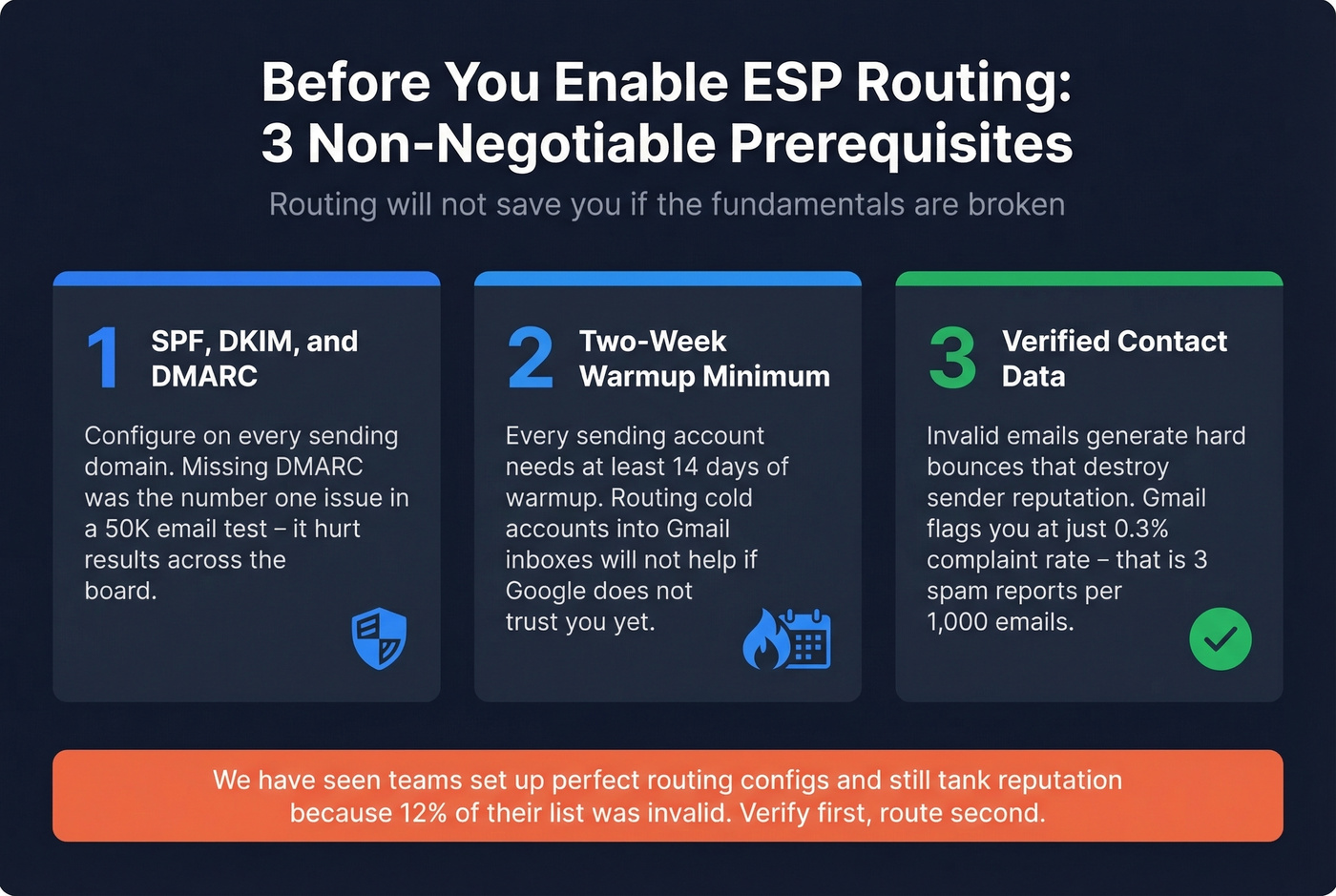
SPF, DKIM, and DMARC configured on every sending domain. The practitioner in the 50K email test discovered their provider hadn't set up DMARC properly - it hurt results across the board. (If you want a quick diagnostic workflow, see How to Verify DKIM Is Working and DMARC alignment.)
Minimum two-week warmup on all sending accounts. Routing cold accounts into Gmail inboxes won't help if Google doesn't trust you yet. If you're scaling volume, keep an eye on email velocity and consider unlimited email warmup tools.
Verified contact data. Invalid emails generate hard bounces, and bounces destroy sender reputation regardless of routing. Gmail's complaint-rate threshold sits at just 0.3% - three spam reports per 1,000 emails starts hurting you. Catch-all domains are dangerous too: they accept everything, so you're emailing dead addresses that never engage, dragging down your sender score silently. For deeper remediation, use an email spam checker and review spam trap removal basics.
Your routing rules are only as effective as the data they operate on. We've seen teams set up perfect provider-matching configs and still tank their reputation because 12% of their list was invalid. Verify first, route second - always.
How to Set Up Custom Routing Rules
Start with a practical framework: 2-3 ESPs, 3-5 sending accounts per provider, and a rough 40/30/30 volume split across Google Workspace, Microsoft 365, and a third provider. This gives you enough accounts to route effectively without overcomplicating management.
Here's the setup in Instantly, which has the most straightforward implementation:
- Open your target campaign and go to Campaign Options.
- Navigate to Advanced Options > Provider Matching > ESP Routing.
- Remove "All" from the dropdown to target specific routes.
- Create your rules - Google senders to Google recipients = Send, Microsoft senders to Microsoft recipients = Send.
- Add "Do Not Send" rules for routes you want to block.
Critical gotcha: if you add a "Do Not Send" rule, you must pair it with at least one "Send" rule. Otherwise, the campaign won't send at all. We've seen teams configure blocking rules and then wonder why their sequences went completely silent for three days before anyone noticed.
Smartlead offers similar provider-matching workflows starting around $32.50/mo. Instantly starts at roughly $30/mo. Both let you enable routing at the campaign level, and Instantly also supports workspace-level matching across all campaigns - set it once and every new campaign inherits the routing rules automatically, which saves serious time when you're running 10+ campaigns. If you're evaluating tooling, compare options in our SDR tools roundup and the broader cold email marketing playbook.
Common Mistakes and Troubleshooting
Skipping list verification. This is the most common failure, and it's frustrating because it's the most preventable. Routing an unverified list just means you're delivering bounces and spam-trap hits through the "right" provider. Verify before you route. (If you're diagnosing performance, start with email bounce rate benchmarks and fixes.)
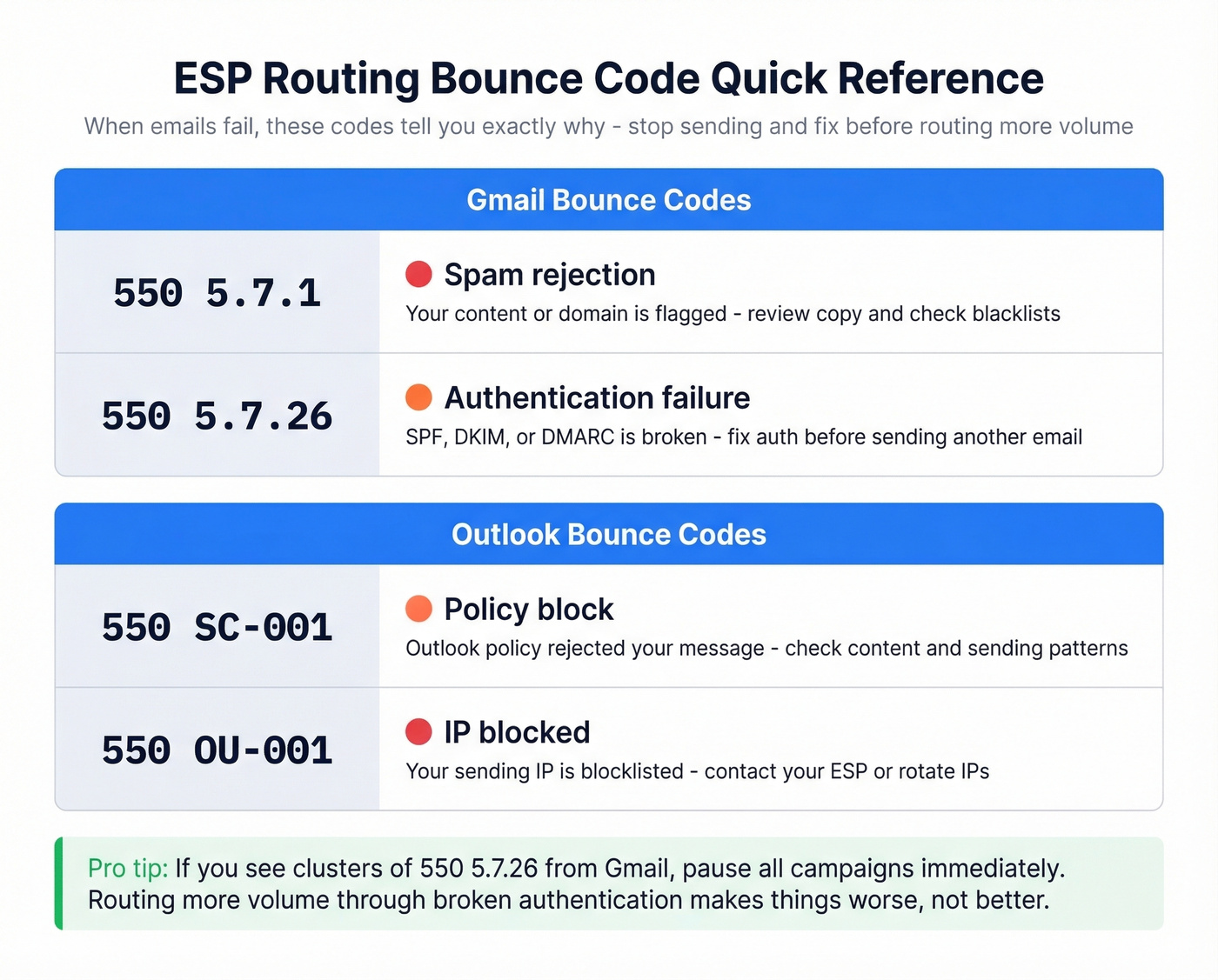
Ignoring bounce codes. When emails fail, bounce codes tell you exactly why:
| Provider | Code | Meaning |
|---|---|---|
| Gmail | 550 5.7.1 | Spam rejection |
| Gmail | 550 5.7.26 | Auth failure |
| Outlook | 550 SC-001 | Policy block |
| Outlook | 550 OU-001 | IP blocked |
If you're seeing clusters of 550 5.7.26 from Gmail, stop sending and fix your authentication before routing sends more volume through a broken setup.
Overcomplicating routing configs. Microsoft flagged a wave of phishing attacks exploiting misconfigured email routing, blocking 13 million malicious emails tied to spoofing gaps. Keep your routing rules simple, enforce strict email authentication, and avoid unnecessary routing layers. For Microsoft 365 environments specifically, pointing MX directly to Microsoft 365 reduces exposure to that internal-spoofing attack path.
Skip ESP routing entirely if you're sending fewer than 500 emails per month. The complexity isn't worth it at low volume - just use a single well-warmed Google Workspace account and focus on list quality instead. If you're still getting inconsistent placement, work through a full email deliverability guide and tighten your sender reputation.
ESP routing segments by provider. Prospeo segments by everything else - buyer intent, technographics, job changes, and 30+ filters across 300M+ profiles. Build lists that are already classified by inbox host, verified at 98% accuracy, and ready to drop into Instantly or Smartlead.
Stop routing emails to addresses that don't exist. Start with Prospeo.
FAQ
Does same-provider sending really improve inbox placement?
Yes. Benchmarks show Google Workspace to Gmail lands at 94-96% versus 85-88% from Microsoft 365 - a 7-10 point gap from provider matching alone. Across a 10,000-email campaign, that's 700-1,000 more emails in the primary inbox.
What if my leads use custom domains?
Routing tools detect the underlying provider via MX record lookups. Custom domains still resolve to Gmail, Microsoft, or another host the vast majority of the time. Enterprises behind security gateways like Proofpoint or Mimecast are harder to classify, but those edge cases represent a small fraction of most B2B lists.
How do I clean my list before enabling routing?
Use a verification tool that checks emails in real time, handles catch-all domains, and refreshes data regularly. Routing invalid addresses still generates bounces that damage sender reputation - no amount of provider matching fixes that.
Can I combine ESP routing with load balancing?
Absolutely, and you should. Use load balancing to distribute volume across 3-5 accounts per provider, then layer routing rules on top to match senders to recipients. Teams running both report 15-30% deliverability improvements compared to either technique alone.