

How to Find a Work Email in 2026: 5 Free Methods + Best Paid Tools
Every B2B deal starts the same way: you know exactly who you want to reach, but you don't have their email. The average rep burns 15-20 minutes per prospect trying to track down a work email address. Multiply that across a 50-contact campaign and you've lost nearly two full workdays to detective work before a single message goes out.
We've tested every method below - the free hacks and the paid tools - across thousands of lookups. Here's what actually works, what wastes your time, and where your money goes furthest.
Quick Answer
- One email, right now, for free? Google search operators + email pattern guessing. Two minutes, zero cost.
- A reliable paid tool? Prospeo - 98% email accuracy, 75 free emails/month, no contract, roughly $0.01/email on paid plans.
- The biggest brand name? Hunter. Accurate when it finds a match, but independent benchmark data shows it only covers about 47.62% of searches. Great quality, limited database.
Free Ways to Find a Work Email
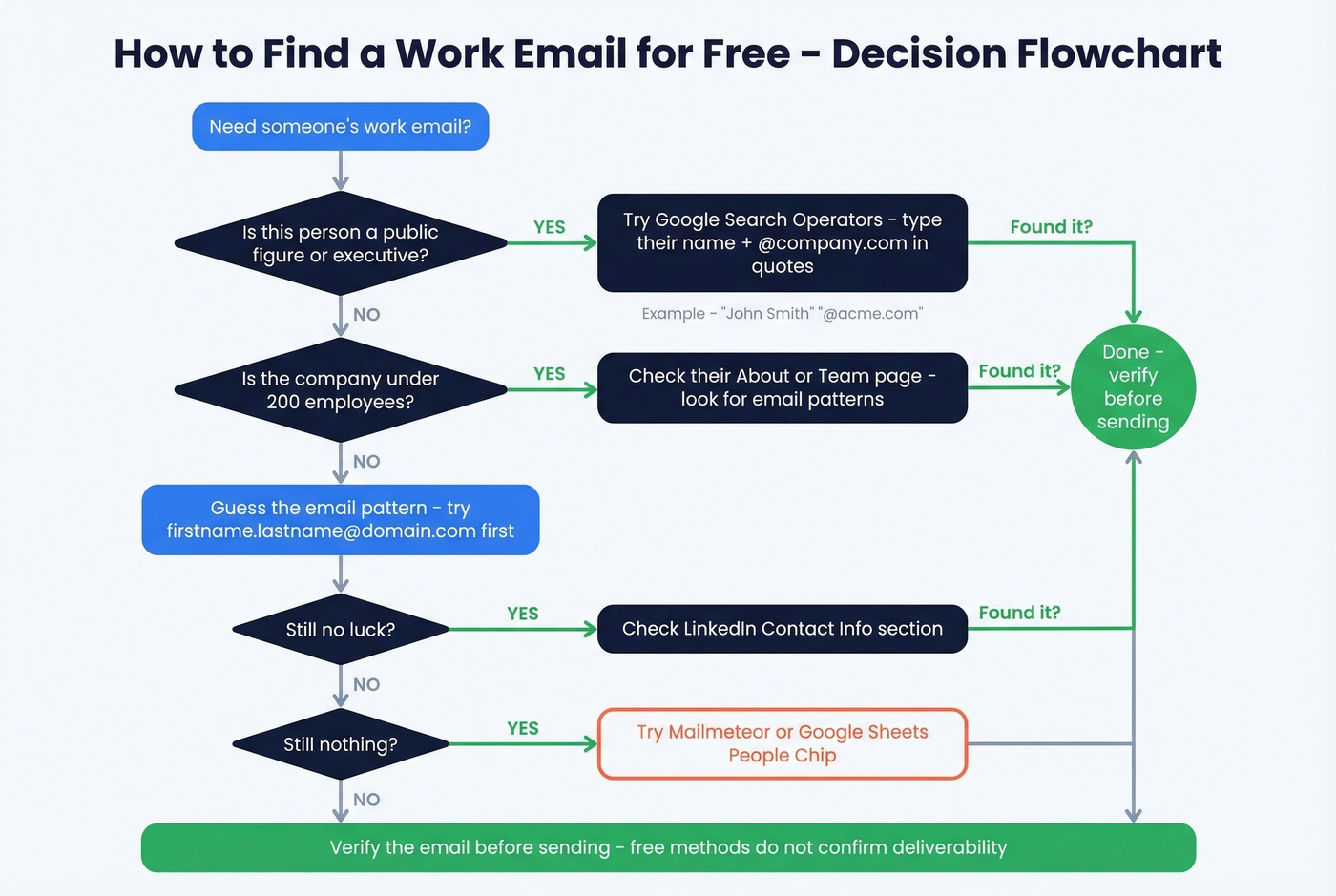
These methods cost nothing and work surprisingly well for one-off lookups. The tradeoff: none of them verify the email actually exists. You're making educated guesses.
Google Search Operators
Type this into Google: "John Smith" "@company.com" or site:company.com "john smith" email. You can also try "john.smith@" company name.
Google indexes a shocking amount of contact information from conference speaker pages, press releases, and PDF directories. This works best for executives and public-facing roles. We've pulled C-suite emails from conference agendas that were indexed years ago and still active - it's the fastest free method when it hits.
Company About and Team Pages
Startups and mid-market companies often list team members with email addresses on their About or Team pages. Even when they don't show the full address, you'll learn the email format - if one person's email is jane.doe@company.com, you know the pattern for everyone else.
This is the most reliable free method for companies under 200 employees.
Email Pattern Guessing
Most companies use one of five formats:
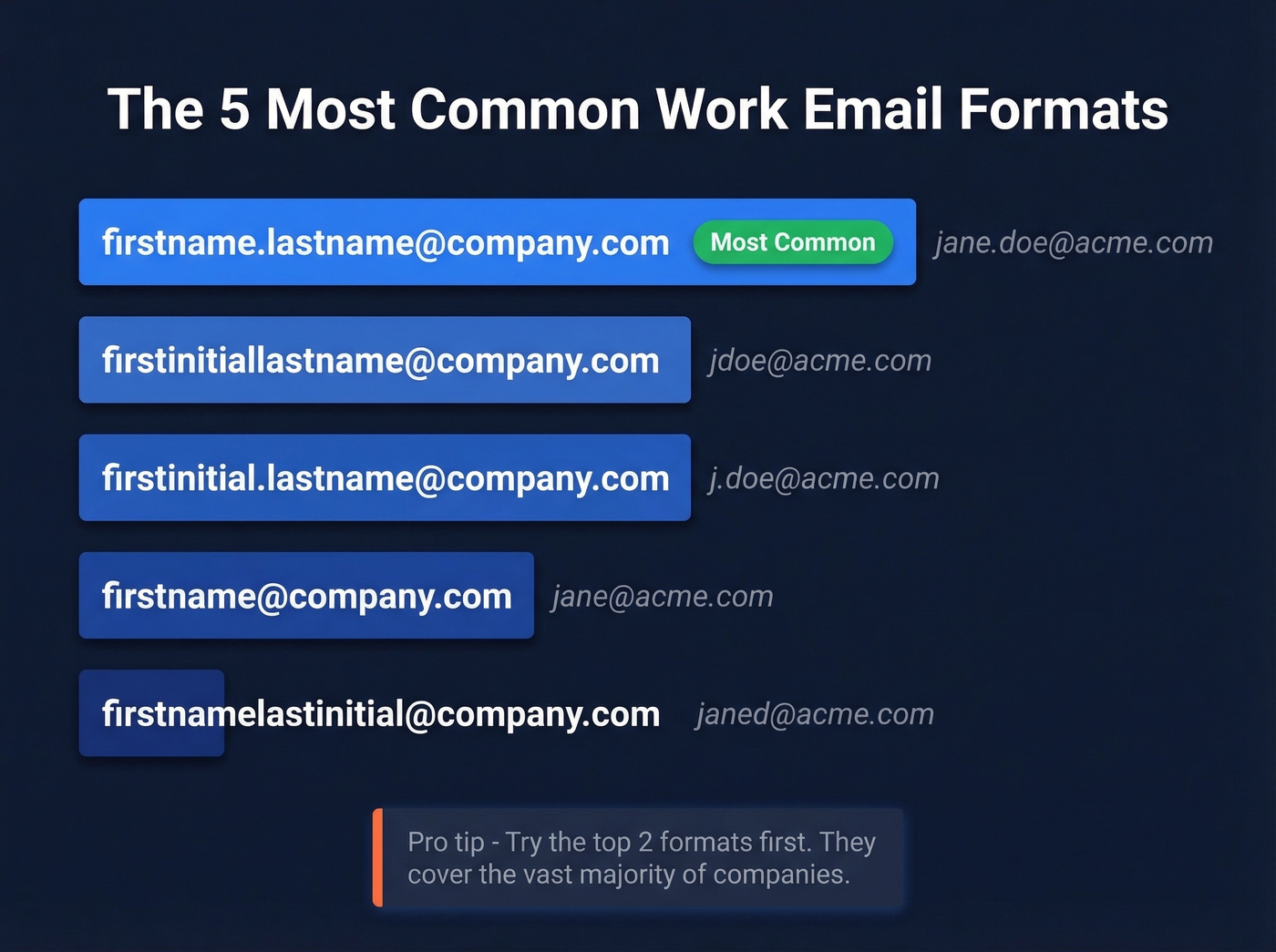
- firstname.lastname@company.com (by far the most common)
- firstinitiallastname@company.com
- firstinitial.lastname@company.com
- firstname@company.com
- firstnamelastinitial@company.com
Once you know the company's domain, try the top two patterns first. You can test whether the address exists by sending a low-stakes email or using a free verification tool like an AI Email Checker.
LinkedIn Contact Info
Many professionals list their work email in the contact info section of their profile. Click "Contact info" under their name and you'll see whatever they've chosen to share. It's not always there, but when it is, you've got an address straight from the person themselves.
The Mailmeteor Free Trick
A Reddit user flagged this one: paste a profile URL into Mailmeteor and it can return a work email for free, no sign-up required. It doesn't work every time, but for a zero-cost, zero-friction method, it's worth trying before you reach for a paid tool.
Bonus: Google Sheets People Chip
This one flies under the radar. Type a person's name into Google Sheets, and if Google recognizes them, you'll see a "People Chip" smart tag. Hover over it and Google sometimes surfaces an email address from publicly indexed sources. Inconsistent, but free and takes five seconds.
Here's the thing about free methods: they don't verify deliverability. You might land on the right address, or you might bounce and ding your sender reputation. For anything beyond a handful of lookups, you need a dedicated email finder that verifies in real time.
Best Email Finder Tools in 2026
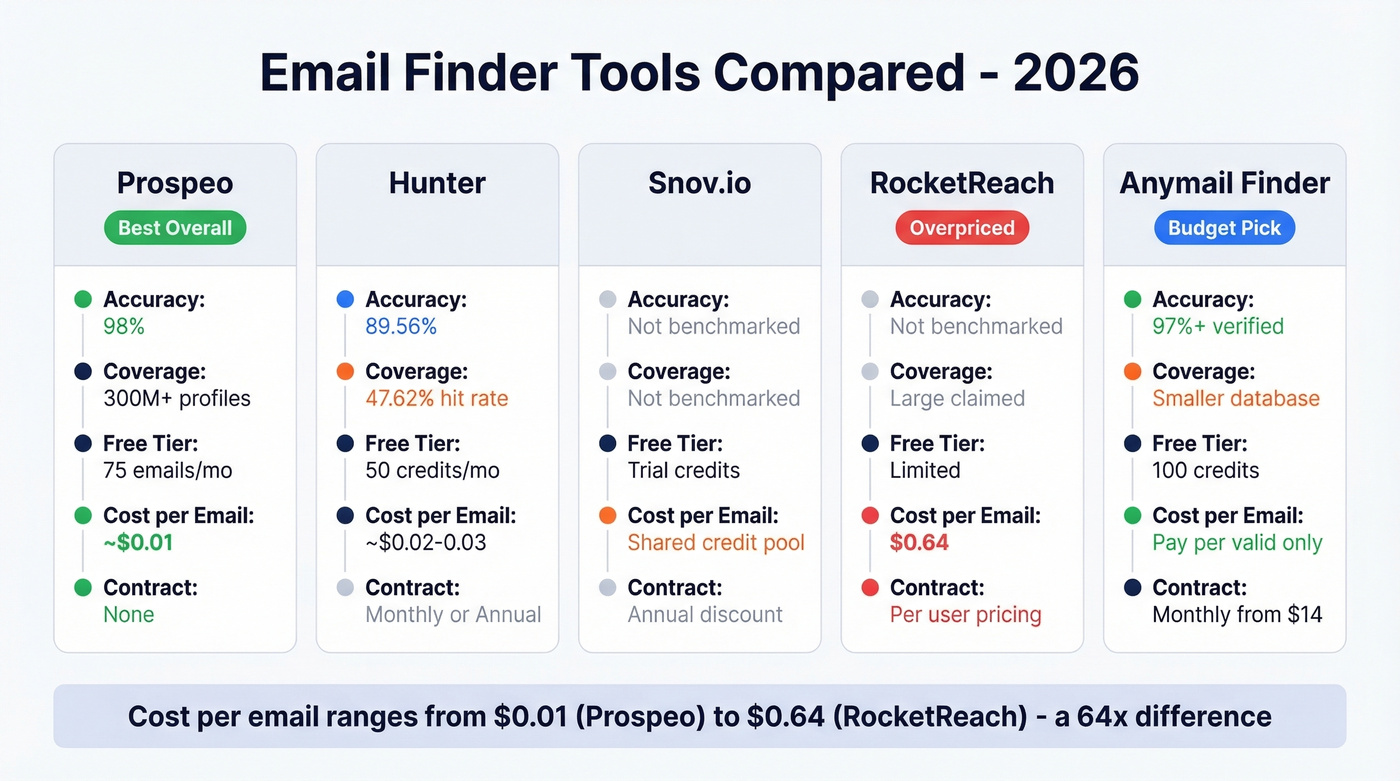
| Tool | Free Tier | Paid From | Accuracy | Coverage | Best For |
|---|---|---|---|---|---|
| Prospeo | 75 emails/mo | ~$0.01/email | 98% verified | 300M+ profiles | Best overall |
| Hunter | 50 credits/mo | $49/mo | 89.56% quality | 47.62% | Low-volume lookups |
| Snov.io | Trial credits | $29.25/mo | Not independently benchmarked | Not independently benchmarked | All-in-one outreach |
| RocketReach | Limited | $80/user/mo | Not independently benchmarked | Large database claimed | Overpriced - skip it |
| Anymail Finder | 100 credits | $14/mo | >97% (verified only) | Smaller database | Pay-per-valid model |
| GetProspect | 50 emails/mo | $49/mo | 95% guaranteed | Not independently benchmarked | Chrome-based prospecting |
| Skrapp | 100 credits | ~$49-$99/mo | 92% claimed | Profile-focused | Targeted lookups |
Prospeo
Prospeo's database covers 300M+ professional profiles with 143M+ verified emails, delivering 98% email accuracy through a 5-step verification process that includes catch-all handling, spam-trap removal, and honeypot filtering. It runs on proprietary email-finding infrastructure and doesn't rely on third-party email providers.
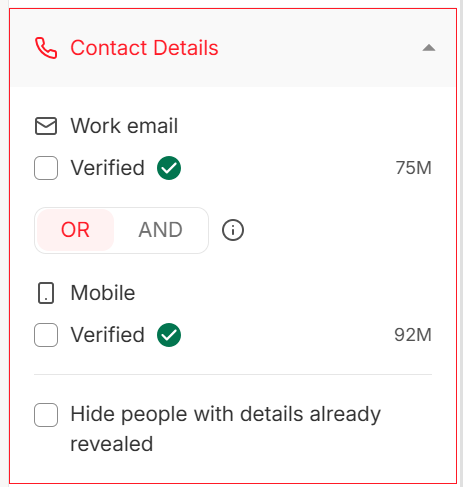
The free tier gives you 75 verified emails per month. Paid plans run about $0.01 per email with no contracts - cancel anytime. The Chrome extension (40,000+ users) lets you pull verified emails from any website, professional profile, or CRM in one click, and native integrations push contacts straight into Salesforce, HubSpot, Smartlead, or Lemlist.
Real-world proof: Meritt dropped their bounce rate from 35% to under 4% after switching to Prospeo. Stack Optimize built to $1M ARR with zero domain flags across all clients. Those numbers matter more than any accuracy claim on a marketing page.
Use this if: You want the highest email accuracy at the lowest cost per lead, and you don't want to negotiate an annual contract.
If you're comparing databases and enrichment depth, see our breakdown of data enrichment services.
Hunter
Hunter is one of the longest-running email finder tools, and it's earned its reputation for accuracy. Independent benchmarks put Hunter at 89.56% data quality - solid. The problem is coverage: only 47.62% of searches return a result. For every two emails you need, Hunter finds roughly one.

Pricing is straightforward: free plan with 50 credits/month, Starter at $49/mo (2,000 credits), Growth at $149/mo (10,000 credits), Scale at $299/mo (25,000 credits). Annual billing drops those by about 30%. The consensus on r/sales is that Hunter skews US-heavy with a smaller database - accurate when it hits, but it misses often, especially outside the US.
Use this if: You're doing low-volume lookups and accuracy matters more than coverage. Skip this if: You need international emails or high-volume prospecting.
If you want more options in the same category, check our list of Hunter alternatives.
Snov.io
Snov.io bundles email finding with outreach sequences and warm-up, which makes it appealing for teams that want one tool for everything. The catch is the shared credit pool - Starter plans run $29.25/mo (annual) with 1,000 credits split across search, email finding, and verification. Heavy verification eats into your search budget fast.
We've seen teams burn through a month's credits in a week when they're verifying large lists. LinkedIn automation costs an extra $69/mo per slot. Unlimited team seats are included, which is a nice touch for growing teams.
This works for early-stage teams running fewer than 500 emails per month who want finding, sequencing, and warm-up in a single dashboard. Beyond that volume, the credit math breaks down quickly.
If you're building outbound at scale, pair this with a tighter B2B cold email sequence.
RocketReach
Let me save you some time. RocketReach Essentials starts at $80/user/month for just 125 lookups - that's $0.64 per email. Pro jumps to $150/user/month, Ultimate to $300. Extra lookups cost $0.30-$0.45 each. Advanced features like Salesforce sync are locked behind higher tiers.
Reddit users in r/sales regularly call out RocketReach's pricing as unjustifiable for small teams. The data quality doesn't warrant a 60x premium over tools charging $0.01 per email. Unless your company already pays for it through an enterprise agreement, look elsewhere.
Anymail Finder
Anymail Finder's model is genuinely different: you only pay for valid emails. You get 100 free credits to test, and plans start at $14/mo. They claim 97%+ accuracy on verified results, and the pay-for-valid-only approach means you're not burning budget on dead addresses.
For teams running under 500 lookups per month on a tight budget, this is the best value play after Prospeo's free tier.
If you're deciding between finders vs verifiers, this guide on email search tools helps clarify the tradeoffs.
GetProspect
GetProspect gives you 50 free emails per month, with paid plans from $49/mo. It positions a 95% data accuracy guarantee with credits back if results fall short. The Chrome extension is its strongest feature - it works well for one-at-a-time prospecting directly from web profiles. But there's nothing here that makes it stand out against the top-tier options.
Skrapp
Free plan with 100 credits, paid plans around the $49-$99/mo range. Claims a 92% success rate. Skrapp is profile-focused, which makes it useful if your entire workflow revolves around profile-based prospecting. Worth testing if that's your process, but not a primary tool for most teams.
If you're doing this at volume, consider adding a dedicated email address directory workflow to reduce one-off lookups.

Free methods don't verify deliverability - one bad bounce can torch your sender reputation. Prospeo's 5-step verification catches spam traps, honeypots, and catch-all domains before you hit send. 98% accuracy, 75 free emails/month, no credit card required.
Stop guessing work emails. Start verifying them in one click.
Hunter finds roughly 1 in 2 emails. Prospeo covers 300M+ profiles with 143M+ verified emails and returns results at 98% accuracy - for about $0.01 per email. No contracts, no sales calls, no annual lock-in.
Find any work email and verify it instantly for a penny.
How Accurate Are Email Finders, Really?
Every email finder tool claims 90%+ accuracy. Here's our hot take: those numbers are meaningless without methodology. "95% accuracy" could mean bounce rate, deliverability rate, or just "we found an email format that looks right." Without context, the number is marketing, not data.
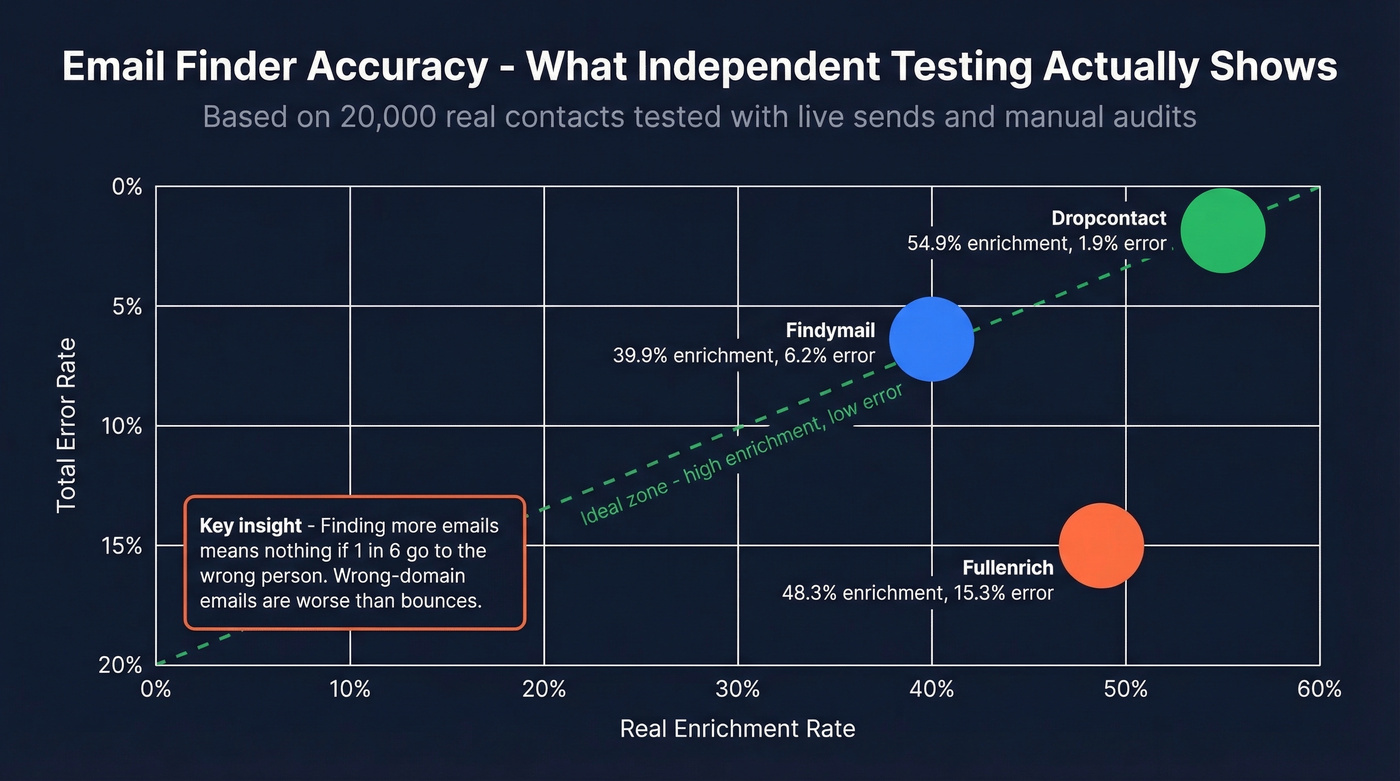
When someone actually tests these tools with live sends, the results look very different.
Dropcontact ran a benchmark across 15 email finders using 20,000 real contacts - 9,800 US, 9,700 Europe, 500 rest of world. They didn't just check if addresses existed; they sent actual emails and manually audited wrong-domain matches. That methodology matters because wrong-domain emails are worse than bounces - they deliver to the wrong person at the wrong company.

The results were humbling. Dropcontact led with a 54.9% real enrichment rate and just 1.9% total error. Findymail hit 39.9% real enrichment with a 6.2% error rate. Fullenrich found more emails (48.3% enrichment) but had a 15.3% error rate - one in six emails went to the wrong domain or bounced.
Let's break this down. "Enrichment rate" measures how many emails a tool both finds AND gets right. A tool can have 98% accuracy on the emails it returns while still not finding every contact. Think of it as precision vs. recall - accuracy tells you how reliable the results are, enrichment rate tells you how many results you get. Both matter, but they measure different things.
Independent benchmarks tell a similar story from a different angle: Hunter's 89.56% quality score sounds great until you see the 47.62% coverage. Findymail scored 90.05% quality with 83.73% coverage - a much better combination. Community discussions on Reddit echo this pattern: Apollo's data feels outdated, Hunter's database skews US-heavy, and newer tools show high accuracy but limited scale.
If you're building lists (not just one-off lookups), this lead enrichment guide will save you hours.
Verification Mistakes That Kill Deliverability
Your last campaign had a 12% bounce rate and your domain reputation tanked. Here's how to make sure that doesn't happen again.
Email lists decay fast - about 2% of a verified list goes invalid every four weeks. People change jobs, companies restructure, domains expire. If you verified a list two months ago and blast it today, you're rolling the dice. Keep your bounce rate below 2%, ideally under 1%. Anything above that and inbox providers start throttling your sends.
We've seen three mistakes kill teams over and over:
Treating "accept-all" as "valid." Catch-all domains accept every email regardless of whether the address exists. Verified emails have a >90% success rate; "risky" catch-all addresses drop to around 70%. Separate your sends accordingly - warm up catch-all contacts with lower-volume, higher-touch sequences.
Running emails through an external verifier after your finder. This sounds smart but can reduce your valid list by up to 20%, because many verifiers mishandle catch-all domains and flag good emails as invalid. If your finder already runs multi-step verification, a second pass often does more harm than good.
Verifying once and forgetting. Verification isn't a one-time task. Build re-verification into your workflow every 2-4 weeks. Tools with frequent data refreshes reduce this burden - a 7-day refresh cycle beats the 6-week industry average significantly.
If you're troubleshooting bounces, start with these email bounce rate benchmarks and fixes.
Compliance in 30 Seconds
| GDPR (EU/UK) | CAN-SPAM (US) | |
|---|---|---|
| Default | Opt-in required (with exceptions) | Opt-out model |
| B2B exception | Legitimate interest applies | N/A - all commercial email |
| Requirements | Role-relevant, corporate email, opt-out | Unsubscribe in 10 days, physical address, honest subject |
| Penalty | EUR 20M or 4% global revenue | $43,280+ per email |
B2B cold outreach is legal when the message is relevant to the recipient's professional role, sent to a corporate email, and includes a clear opt-out. Under GDPR, this falls under legitimate interest. Under CAN-SPAM, you need an unsubscribe mechanism, a physical address, and honest subject lines.
The practical takeaway: don't email personal addresses, don't hide who you are, and make opting out effortless. Do those three things and you're operating within the law in both the US and EU.
If you're scaling outreach, use this email deliverability guide to avoid compliance-adjacent deliverability issues.
FAQ
Can I find someone's work email for free?
Yes. Google search operators, company team pages, email pattern guessing, and the Google Sheets People Chip trick all work for one-off lookups. Mailmeteor also offers free lookups with no sign-up. The limitation is that free methods don't verify deliverability - you're guessing the address exists without confirmation.
How accurate are email finder tools?
Independent benchmarks show real enrichment rates of 30-55% across most tools, despite 90-98% accuracy claims. The gap exists because "accuracy" measures reliability of found emails, while "enrichment rate" measures how many contacts a tool finds correctly. Always ask a vendor which metric they're quoting before comparing.
Is it legal to cold email someone using a found work email?
In the US under CAN-SPAM, yes - include an opt-out mechanism and physical address. Under GDPR, B2B outreach is legal with legitimate interest, relevance to the recipient's role, and a clear unsubscribe option. Send to corporate email addresses, not personal ones.
How often should I re-verify my email list?
Re-verify every 2-4 weeks. Email lists lose roughly 2% validity per month as people change jobs and companies restructure. Tools with weekly data refreshes reduce stale-data risk substantially.
What's the fastest way to find a work email address?
Use a dedicated email finder tool - paste in a name and company domain, and you'll get a verified result in seconds. For a free option, start with Google search operators or check the company's team page for the email pattern, then guess the address format.