

First Name Last Name Email Formats (2026 Guide)
Two problems hide behind "firstname lastname email." You're either setting up a professional address and want to get the format right, or you're trying to track down someone else's email using nothing but their name. Both sound simple. Neither one is - and plenty of Reddit threads debating dot placement in Gmail prove it.
What You Need (Quick Version)
- Creating a professional email? Use firstname.lastname@yourdomain.com. It's the standard for a reason.
- Gmail user? Dots don't matter - firstname.lastname and firstnamelastname deliver to the same inbox.
- Trying to find someone's email? Stop guessing permutations. Use an email finder tool - paste a name and domain, get a verified address back in seconds.
Best Professional Email Formats
The format you pick affects more than aesthetics. It shapes how professional you look, whether people remember your address, and - surprisingly - whether your messages land in spam.
Here are the recommended patterns ranked by professionalism and memorability:
| Format | Example | Best For |
|---|---|---|
| firstname.lastname | jane.doe@company.com | Default choice |
| firstnamelastname | janedoe@company.com | Short names |
| firstinitial.lastname | j.doe@company.com | Common names |
| lastname.firstname | doe.jane@company.com | International orgs |
| firstinitial.middleinitial.lastname | j.m.doe@company.com | Name collisions |
The clear winner is firstname.lastname. It's instantly recognizable, easy to guess, and the format most enterprises standardize on. If you're setting up a business email, start there and only deviate when collisions force your hand.
A few things to avoid: numbers (jane.doe2@ looks like you lost a naming lottery), underscores (some mail systems handle them poorly), and anything cute or clever. Symbols beyond the period can trigger spam filters - the period is the safest separator because every major mail system handles it consistently. A memorable address shouldn't require explaining over the phone. Keep it short, keep it real-name-based, and use a period as your only separator.
Format Trends by Company Size
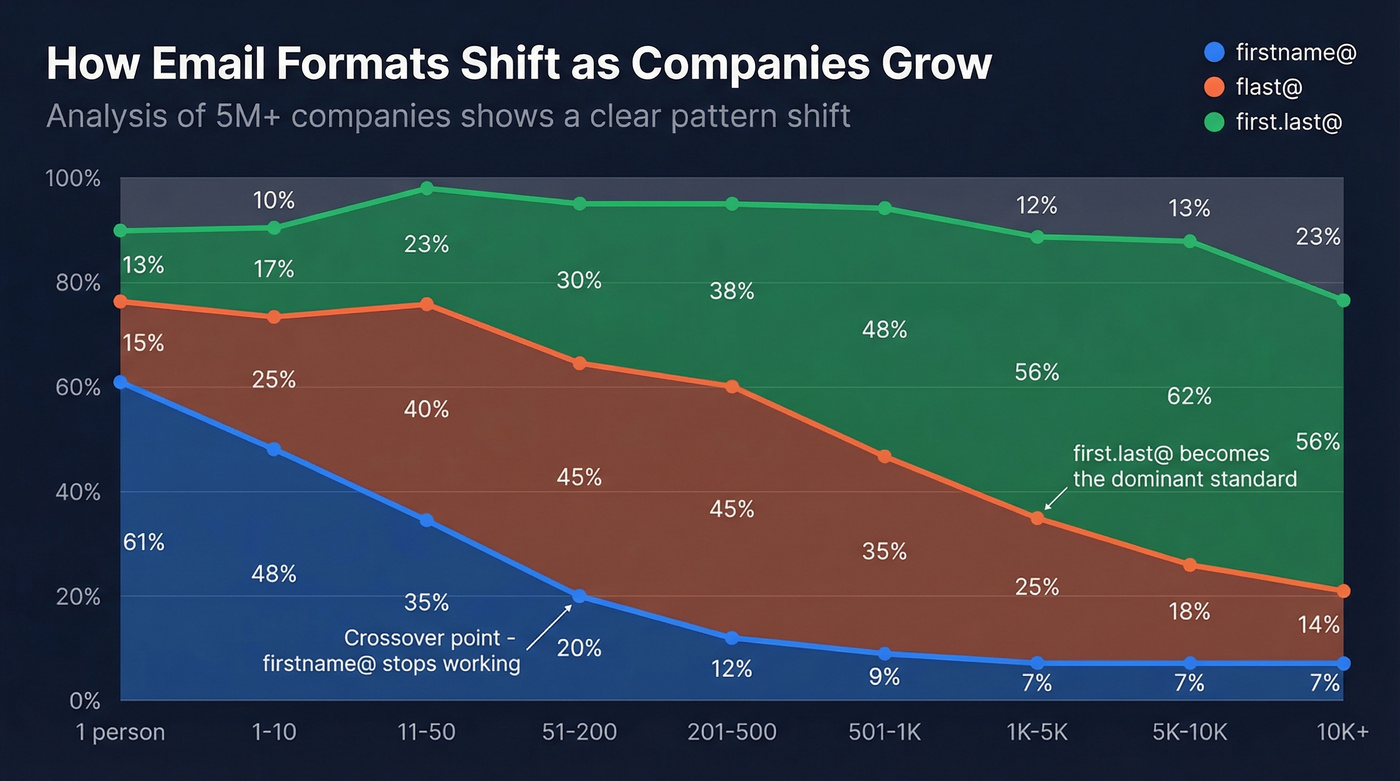
The "right" format depends on how big the company is. An analysis of 5M+ companies shows a clear pattern shift as organizations grow:
| Company Size | firstname@ | flast@ | first.last@ |
|---|---|---|---|
| 1 person | 61% | 15% | 13% |
| 1-10 | 71% | 13% | 10% |
| 11-50 | 42% | 27% | 23% |
| 51-200 | 17% | 42% | 30% |
| 201-500 | 7% | 45% | 35% |
| 501-1,000 | 5% | 42% | 41% |
| 1,001-5,000 | 4% | 35% | 48% |
| 5,001-10,000 | 3% | 26% | 55% |
| 10,001+ | 7% | 22% | 56% |
The pattern is striking. Solo founders and tiny teams default to firstname@ because there's no collision risk - there's only one Sarah. But once a company crosses ~50 employees, first.last@ and flast@ take over because they have to.
One Email Unlocks the Whole Company
This is the most actionable insight in the entire article. Once you verify a single email at any company, you can infer the pattern for everyone else at that domain. If you confirm that jane.doe@acme.com is valid, every other employee is almost certainly firstname.lastname@acme.com too.
If you want the workflow end-to-end, see our guide on name to email.
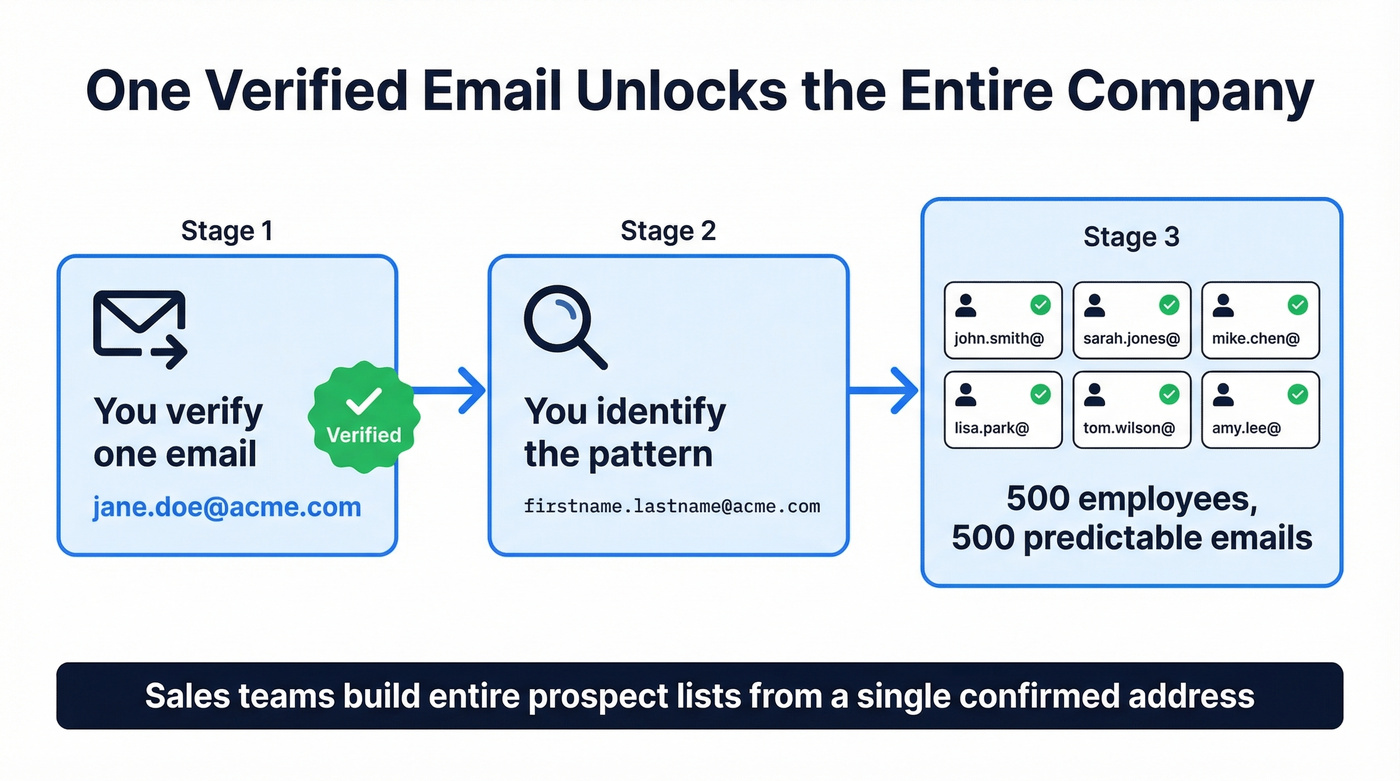
That one verified address turns a company of 500 unknowns into 500 predictable email patterns. We've seen sales teams build entire prospect lists off a single confirmed address - it's that reliable.

You just learned that one verified email unlocks the naming pattern for an entire company. Prospeo's Email Finder does exactly that - paste a name and domain, get a 98% accurate verified address back in seconds. At ~$0.01 per email, building a full prospect list from a single pattern costs less than a coffee.
Stop guessing permutations. Get verified emails in one click.
Gmail Ignores Dots - Why That Matters
This trips people up constantly. Gmail treats dots in usernames as purely cosmetic. john.smith@gmail.com, johnsmith@gmail.com, and j.o.h.n.s.m.i.t.h@gmail.com all deliver to the exact same inbox. Dots simply don't exist as far as Gmail's routing is concerned.
If you're trying to validate whether an address is real before outreach, use this check if an email exists guide.
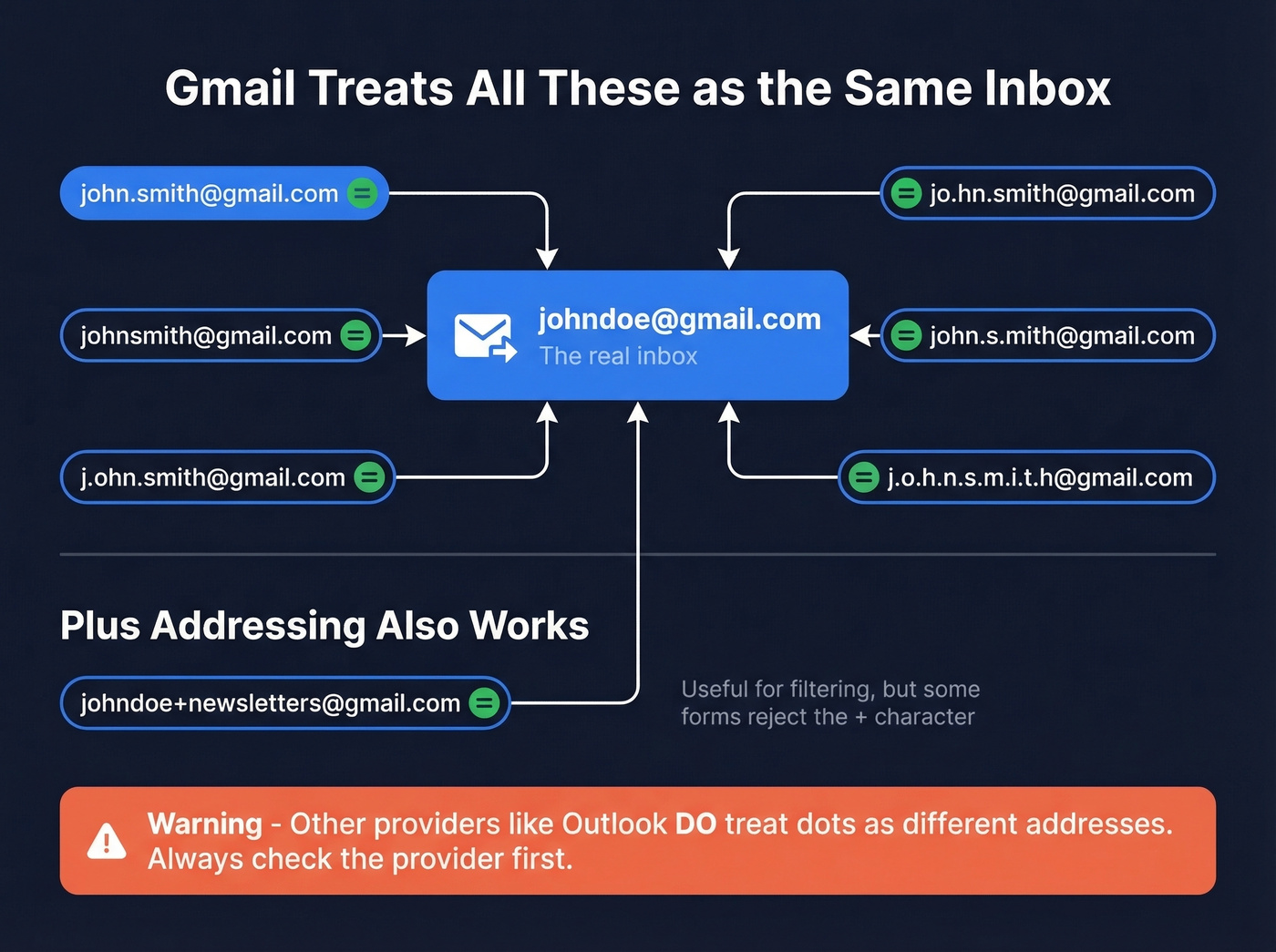
Gmail also supports plus addressing: johndoe+newsletters@gmail.com delivers to johndoe@gmail.com. It's useful for filtering incoming mail by source, though some web forms reject the + character.
For anyone sending emails at scale, this creates real headaches. Dotted and undotted Gmail variants will confuse support workflows and inflate your contact lists with duplicates, which skews open-rate metrics. Best practice: normalize Gmail addresses by stripping dots before the @ sign during import.
There's a security angle too. Some platforms treat dot variants as separate accounts, which opens the door to phishing and account-confusion attacks. If your system doesn't normalize Gmail addresses, someone could register a dot variant and receive sensitive communications meant for someone else.
What to Do When Your Name Is Taken
jane.doe@gmail.com is gone. So is janedoe@gmail.com. Now what?
- Add your middle initial: jane.m.doe@gmail.com
- Append a short number: janedoe1@gmail.com
- Use a location tag: jane.doe.nyc@gmail.com
- Buy a custom domain: jane@doeconsulting.com
Don't overthink it with department codes, birth years, or elaborate schemes nobody can remember.
Here's the thing: the domain matters more than the format. A custom domain costs $10-15/year for a .com, and Google Workspace starts around $6-$7/month. jane@doeconsulting.com beats janedoe4837@gmail.com in every scenario - professionalism, memorability, and deliverability. Set up forwarding from your custom domain to your existing Gmail inbox, configure "Send as" so replies come from your professional address, and the whole setup takes about 20 minutes. If you're using email for business, stop fighting over Gmail usernames and buy your domain. It's the single best $25/year you'll spend on your professional presence.
If you're doing outbound, pair this with an email deliverability guide so your new domain actually lands in inboxes.
How to Find Someone's Email by Name
Creating your own email is one problem. Finding someone else's is an entirely different game.
SDRs spend 18-22 minutes tracking down a single accurate email manually. That's Google operators like "name" @domain.com or filetype:pdf "name" email, digging through cached pages, checking GitHub commits, scanning X bios, even trawling YouTube "About" tabs - all for one address that might still bounce. Multiply that by 50 prospects a day and you've burned an entire workweek on data entry.
The key to narrowing results is what we call the identity trio: full name + current company + location or social handle. Without all three, you're guessing among every John Smith on the internet.
The brute-force approach is email permutation - generating 30-46 plausible combinations from a name and domain (john.smith@, jsmith@, j.smith@, smith.john@, and so on), then verifying which one actually exists. It works, but it's slow and you still need a verification step.
If you're still doing this manually, you'll get more leverage from modern sales prospecting techniques than from more permutations.

Best Tools for Finding Emails
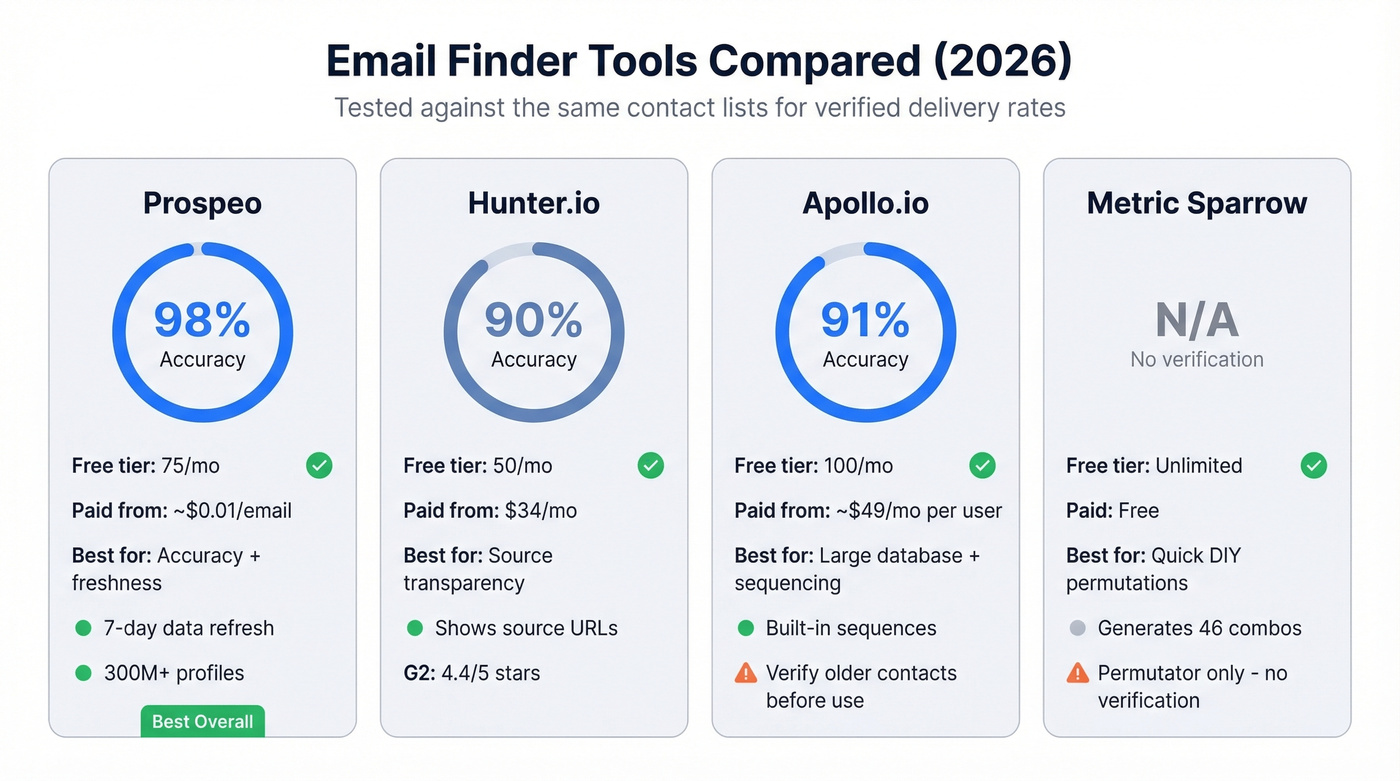
We've tested the major players against the same contact lists, and verified delivery rates vary dramatically across tools. Always test a sample before committing to any provider at scale.
If you're comparing vendors, start with our breakdown of the best email search tools and the best email ID finder tools.
| Tool | Accuracy | Free Tier | Paid From | Best For |
|---|---|---|---|---|
| Prospeo | 98% | 75/mo | ~$0.01/email | Accuracy + freshness |
| Hunter.io | 90% | 50/mo | $34/mo | Source transparency |
| Apollo.io | 91% | 100/mo | ~$49/mo/user | Large database + sequencing |
| Metric Sparrow | N/A | Free | Free | Quick DIY permutations |
Prospeo
The tool we'd start with for pure email accuracy. 98% verified emails across 300M+ profiles, with a 7-day data refresh cycle that keeps results current. The proprietary email-finding infrastructure doesn't depend on third-party providers, which means it catches addresses other tools miss. At roughly $0.01 per email on paid plans, the unit economics are hard to beat. One team - Meritt - cut bounce rates from 35% to under 4% after switching, which was the difference between a healthy sending domain and one circling the spam folder.
To keep bounces low as you scale, track your email bounce rate and set safe email velocity limits.
Hunter.io
Use this if you want transparency into where an email was found. Hunter shows source URLs and confidence scores for every result, which is genuinely useful when you're prospecting into unfamiliar companies. The free tier gives you 50 searches per month, with paid plans at $34/mo (Starter), $104/mo (Growth), and $349/mo (Business). G2 rating sits at 4.4/5 across 554 reviews. On Reddit, the consensus on r/sales treats Hunter more as a verification layer than a primary discovery engine - its database is smaller than the big players.
Skip this if you need high-volume discovery as your primary use case.

Apollo.io
Apollo's strength is volume - massive database, 100 free credits per month, and a built-in sequencing tool that makes it a one-stop shop for small teams. In accuracy testing, it scored 91% on a 100-contact benchmark. Paid plans start around $49/mo per user. The tradeoff: users on r/agency consistently flag bounces on older contacts, and per-seat pricing adds up fast once you're past 3-4 reps.
Verify Apollo results before loading them into your sequences.
Metric Sparrow Permutator
Free tool that generates up to 46 email combinations from a name and domain. Useful for one-off DIY lookups when you don't want to burn credits. But it's a permutator, not a finder - it guesses formats without telling you which one is real. You'll still need a separate verification step, so for anything beyond a handful of lookups, you're better off with a dedicated finder.
SDRs waste 18-22 minutes hunting down a single email by name. Prospeo searches 300M+ professional profiles and returns verified addresses instantly - no manual permutations, no bounced guesses. With 75 free lookups per month, you can replace an entire day of Googling with a 10-minute workflow.
Find any professional email by first name and last name in seconds.
FAQ
Does Gmail treat firstname.lastname and firstnamelastname as the same address?
Yes. Gmail ignores dots in the username portion entirely. john.smith@gmail.com and johnsmith@gmail.com deliver to the identical inbox. This is Gmail-specific; other providers like Outlook treat dots as distinct characters, so always confirm the provider before assuming equivalence.
What's the most common corporate email format?
first.last@ dominates at companies with 1,000+ employees, accounting for 48-56% of addresses. At companies under 50 people, firstname@ is most common (42-71%). The flast@ format peaks in the 51-500 employee range at roughly 42-45%.
How accurate are email finder tools?
Accuracy ranges from 79% on budget tools to 98% on Prospeo, depending on database freshness and verification rigor. In larger benchmarks of 5,000+ contacts, the gaps widen further. Always test a 50-100 contact sample before committing to bulk imports with any provider.
Is a custom domain worth it for professional email?
A .com domain costs $10-15/year and immediately outclasses @gmail.com for business communication. Pair it with Google Workspace (~$6-$7/mo) and you've got a professional setup for under $100/year. For anyone running outbound or client-facing work, it's the highest-ROI branding investment available.