

How to Write a Follow Up Email After a Call With a Client
You hang up, open a new compose window, and stare at it for twenty minutes. By then, half the call details have evaporated. You type something generic - "Great speaking with you today, let me know if you have any questions" - and hit send. The client never replies, and you're not sure why.
That's the failure mode for most post-call follow-ups. 86% of professionals say email is their preferred communication channel, so the medium isn't the problem. The problem is the gap between hanging up and hitting send. Too long, too vague, no clear next step.
What You Need (Quick Version)
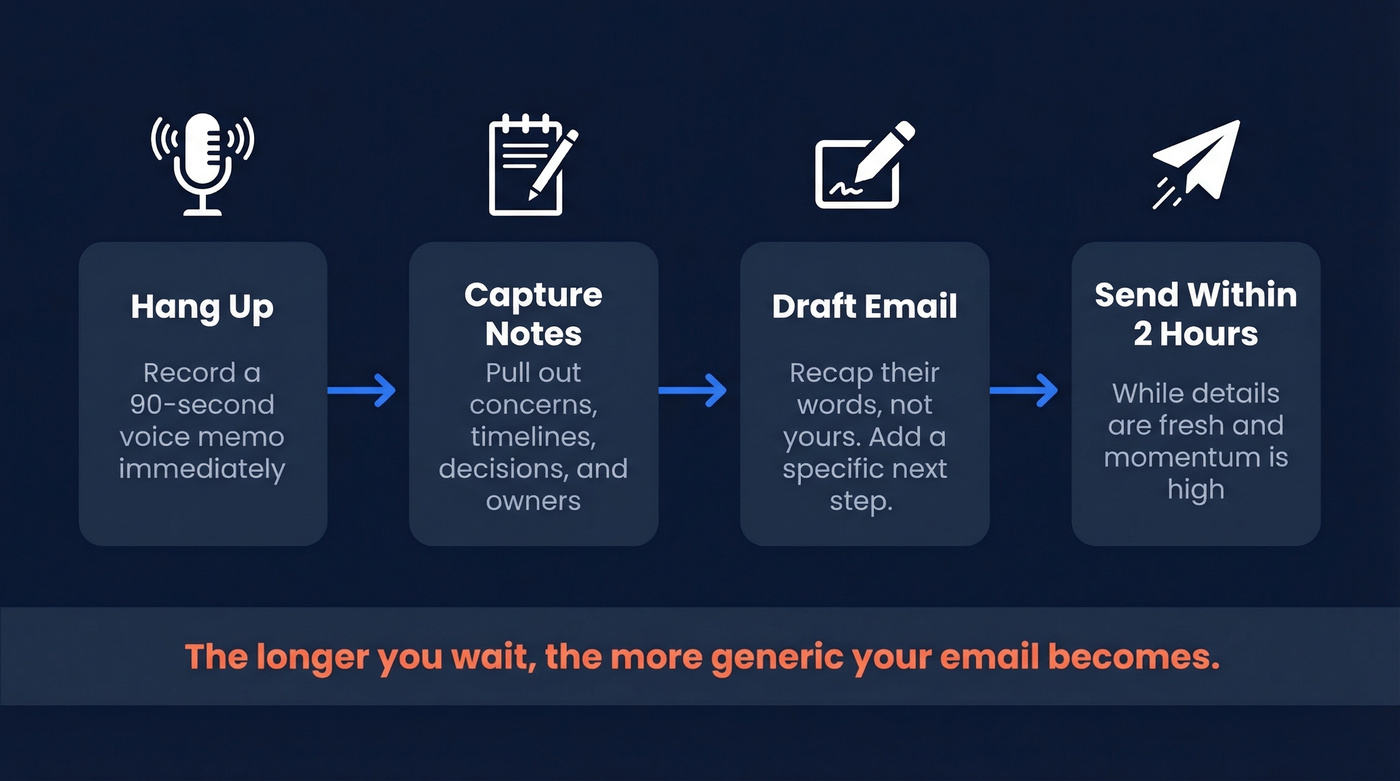
- Capture notes within 60 seconds of hanging up. A voice memo or bullet shorthand - anything beats relying on memory.
- Send the follow-up within 2 hours when you discussed next steps or action items. Otherwise, send it within 24 hours.
- Every follow-up needs a specific next step. Not "let me know if you have questions." A date, a deliverable, a decision to confirm.
Capture Notes Before You Write
The quality of your notes determines the quality of your follow-up. Full stop.
A mediocre writer with great notes will outperform a polished writer working from memory every time. We've seen this play out across our own team dozens of times - the rep who records a 90-second voice memo after every call consistently writes follow-ups that get replies, while the rep who "remembers everything" sends vague recaps that go nowhere.
Here's a workflow that works: the moment you hang up, hit record on your phone's voice memo app and do a 90-second brain dump. Cover the client's main concerns, any timeline they mentioned, decisions that were made, and who owns what. Then transcribe it - most phones do this natively now - and pull the specifics into your email while the details are still fresh.
This isn't about being organized for organization's sake. It's about having the raw material to write something the client actually recognizes as relevant to their call, not a template you send to everyone.
When to Send
Use this timing:
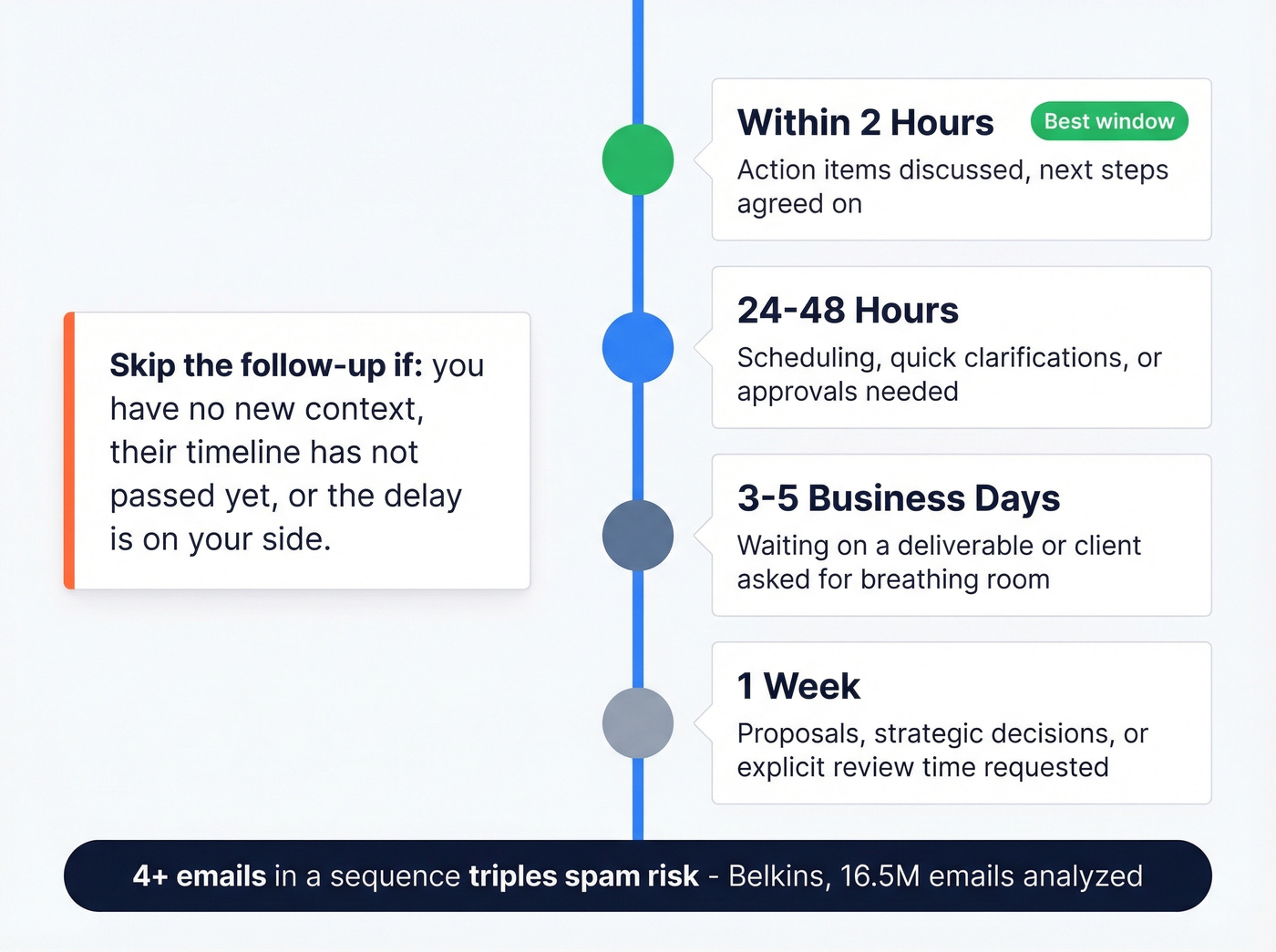
- Within 2 hours - ideal for any call where you discussed next steps or action items. This is the sweet spot.
- 24-48 hours - for time-sensitive items like scheduling, quick clarifications, or approvals.
- 3-5 business days - the standard window when you're waiting on a deliverable or the client asked for breathing room.
- 1 week - for proposals, strategic decisions, or anything the client explicitly said they'd need time to review.
Skip the follow-up if:
- You already followed up recently and have no new context to add.
- The client gave a clear timeline and it hasn't passed yet.
- The delay is on your side - don't ping them when you're the bottleneck.
One stat worth keeping in mind: Belkins analyzed 16.5 million emails and found that sending 4+ emails in a sequence more than triples spam-mark and unsubscribe risk. One good follow-up beats three mediocre ones.

You just nailed the call. Don't let a bad email address kill the momentum. Prospeo verifies every email through a 5-step process - 98% accuracy, refreshed every 7 days. Your follow-up lands in the right inbox, every time.
Stop writing perfect follow-ups to dead email addresses.
How to Structure the Email
The 5-Part Anatomy
Every post-call follow-up should hit five beats: subject line, greeting, call recap, next steps, sign-off. That's it.
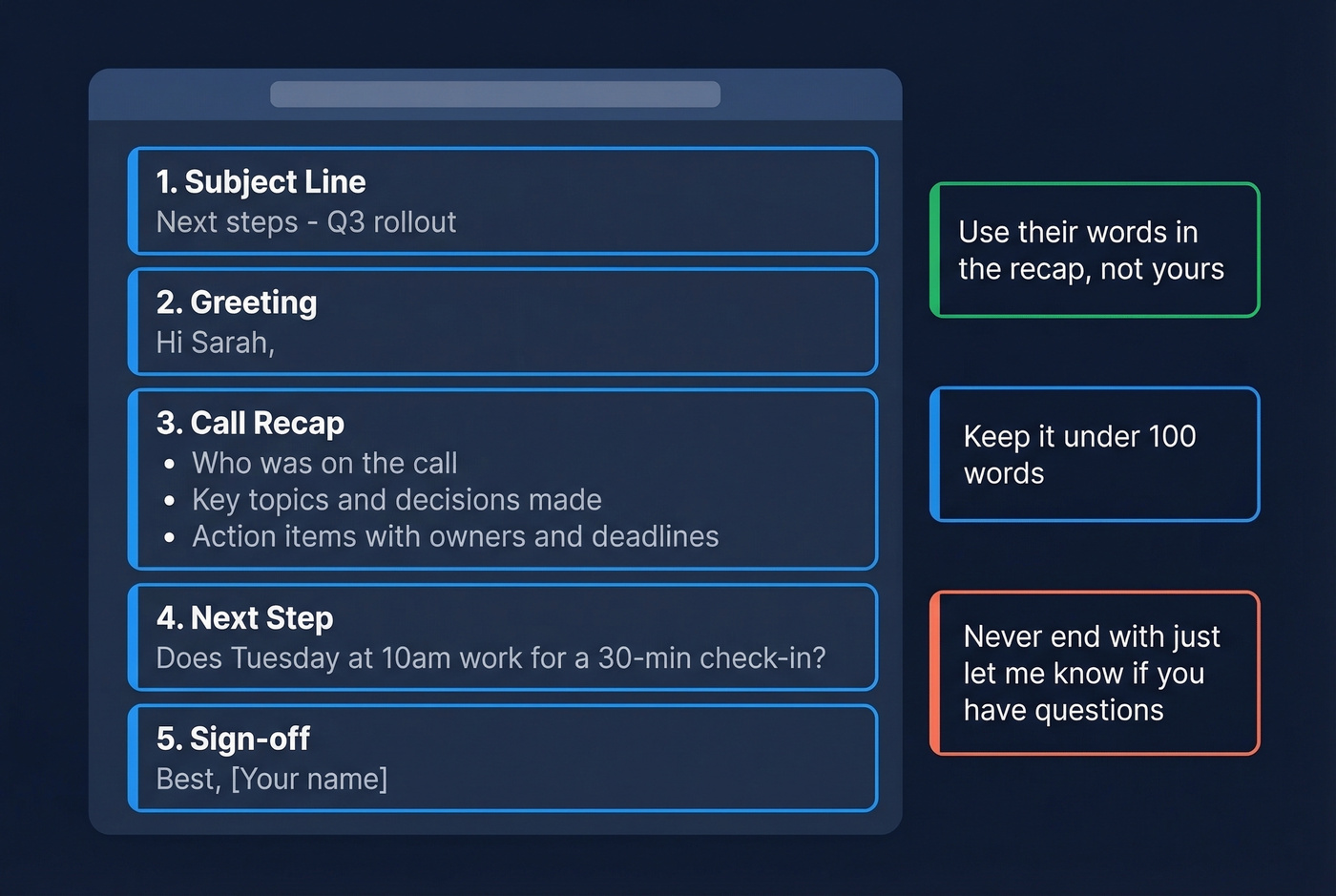
The recap is where most people get lazy. Don't just say "great call." Include who was on the call, the key topics discussed, any decisions made, and action items with owners and deadlines. This structure - borrowed from call summarization best practices - turns your email into a reference document the client will actually save. Keep the whole thing under 100 words where possible. Brevity is respect.
For more ready-to-send options, keep a few follow-up templates on hand so you can personalize fast without sounding robotic.
Subject Lines That Get Opened
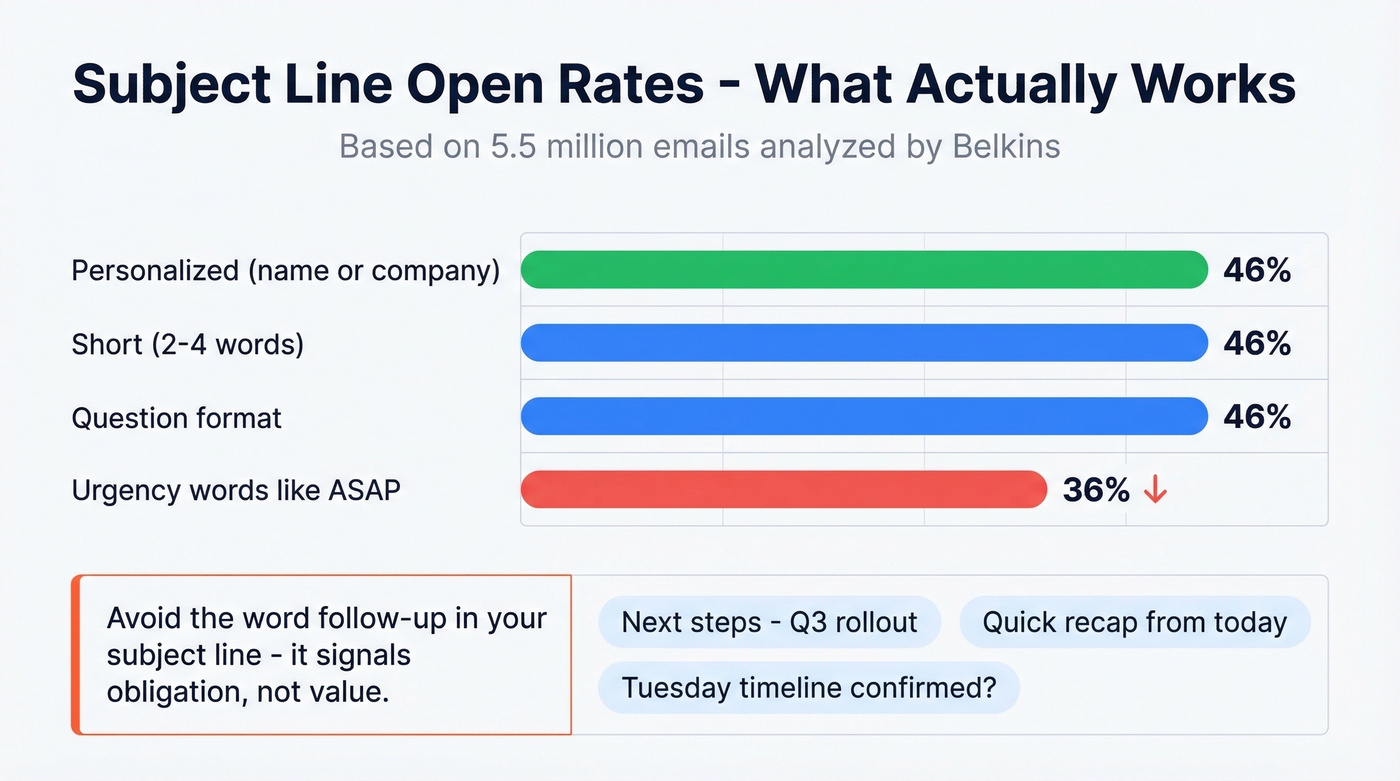
Belkins tested 5.5 million emails and the findings translate well to client follow-ups. Personalized subject lines hit a 46% open rate versus 35% without personalization. Short subject lines of 2-4 words also hit 46%. Questions averaged 46%. Urgency words like "ASAP" dragged opens below 36%.
A few examples that work:
- Next steps - Q3 rollout
- Quick recap from today
- Tuesday timeline confirmed?
If you want more variations, pull from these email subject line examples and adapt them to the call context.
Notice what's missing: the word "follow-up." NetHunt's research flags it as a subject line killer - it signals obligation, not value.
Templates That Actually Sound Human
After a Discovery or Kickoff Call
Hi Sarah,
Thanks for walking us through the onboarding timeline today. Here's what I captured:
- Migration target: March 15, with staging environment ready by Feb 28
- Your team's priority: minimizing downtime during the DNS cutover
- Our next step: I'll send the migration checklist by Thursday; you'll loop in DevOps for the staging review
Does a 30-minute check-in next Tuesday at 10am work to review the checklist together?
Keep the recap specific to their words. "Minimizing downtime during the DNS cutover" is something Sarah actually said - not a generic placeholder. That specificity is what separates a reply-worthy email from one that gets archived without a second thought.
If you need a tighter call flow to generate better notes, use a discovery questions framework so your recap writes itself.
After a Project Update Call
Hi Marcus,
Quick recap from our call:
- Phase 2 design approved - no revisions needed
- Content delivery deadline: your team by Nov 8, ours by Nov 15
- Budget reallocation for video approved ($4,200 moved from print)
I'll send the updated SOW reflecting these changes by end of day tomorrow. Let me know if anything looks off.
After Resolving a Client Issue
Hi Priya,
Glad we got the billing discrepancy sorted. To confirm: the $1,200 overcharge from September will appear as a credit on your next invoice (due Oct 15). If anything looks wrong when that invoice arrives, reply here and I'll escalate same-day.
Short, specific, and it tells the client exactly what to watch for. No fluff.
The Short Scheduling Follow-Up
Hi Jordan,
I'm finalizing my schedule for next week - does Thursday at 2pm work for the quarterly review?
This one comes from a Reddit thread on r/sales and it works because the reply is practically a one-word answer. "Yes" or "How about Friday?" - either way, you've moved the conversation forward without making the client think.
If you want more options for booking time cleanly, these email wording to schedule a meeting examples help.
Mistakes That Kill Your Follow-Up
Here's the thing: most follow-up failures aren't about writing quality. They're about habits.
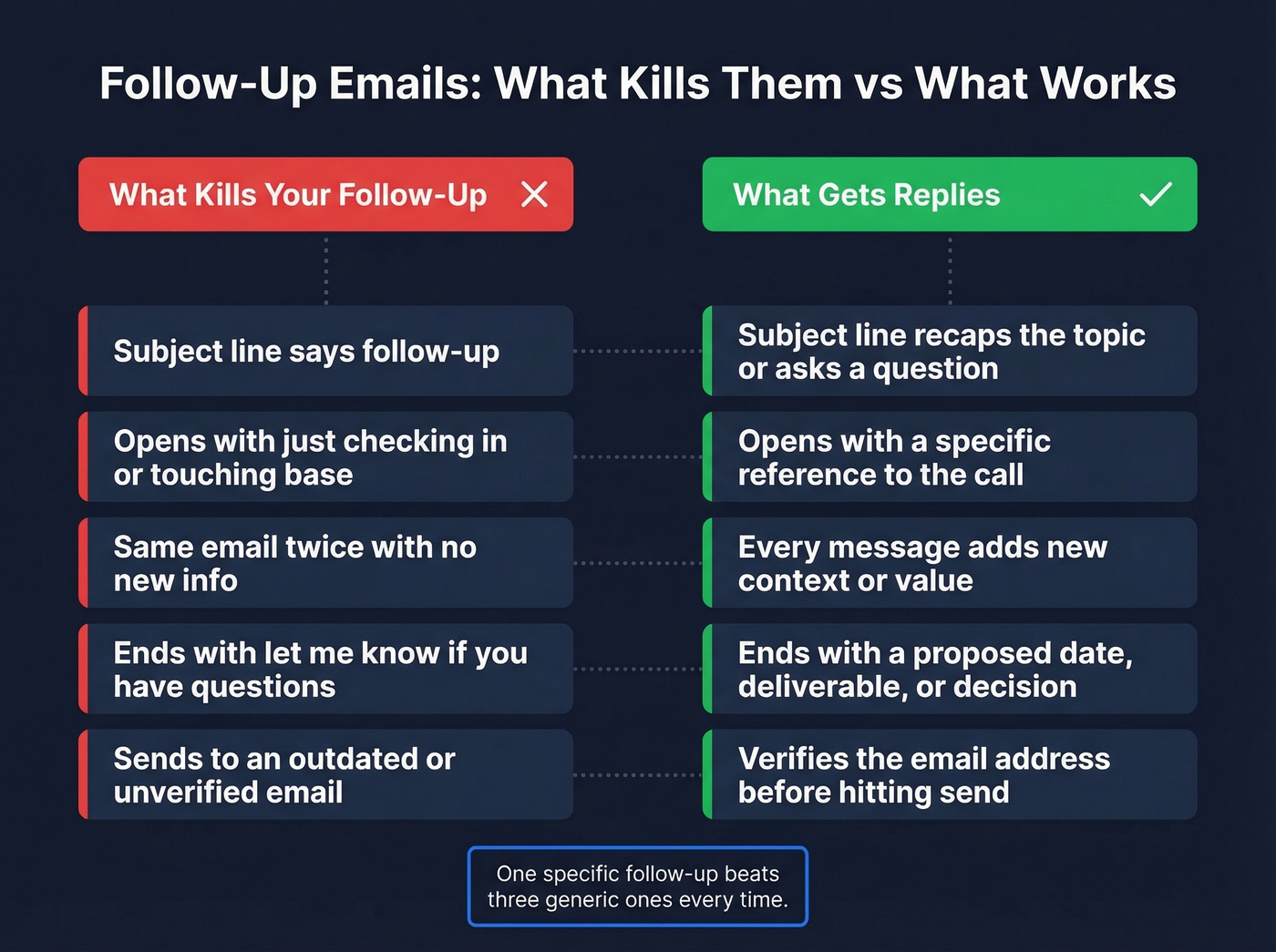
Putting "follow-up" in the subject line. It screams obligation. Use a recap phrase or question instead.
Writing "just checking in" or "touching base." These phrases add zero value. They're a fast way to get ignored, and the consensus on r/sales is that they're the single most hated opener in professional email. If you catch yourself typing it, use these alternatives for how to say just checking in professionally.
Sending the same email twice without new information. If you don't have something new to add, you don't have a reason to send.
Skipping the next step. Every email without a clear ask is a dead end. Propose a date, a deliverable, or a decision.
Sending to an outdated email address. Your follow-up is useless if it bounces - and people change roles more often than you'd think. We've seen teams lose deals simply because their CRM had a stale address and nobody checked before hitting send. Prospeo's real-time email verification catches these before your message goes out, with 98% accuracy and a free tier that covers 75 verifications per month. If you're troubleshooting bounces, this email bounce rate guide breaks down what to fix first.
Tools That Make Follow-Ups Easier
HubSpot offers a free CRM with email tracking, so you'll know when the client opens your follow-up and can time your next move accordingly. For teams already running outbound, it's a solid foundation. If you're comparing options, here are a few examples of a CRM to sanity-check what you actually need.
Calendly eliminates the back-and-forth of scheduling. Drop a link into any CTA and "pick a time that works" replaces three rounds of calendar tennis.
Skip dedicated follow-up tools that auto-send templated sequences for client relationships. Those are fine for cold outreach, but clients can smell automation. Your post-call email should feel like it was written by someone who was actually on the call. If you do need automation for the right use cases, start with follow up email software that still lets you personalize.
Great follow-ups need the right contact data. Prospeo's Chrome extension gives you 40+ data points per contact - verified emails, direct dials, job titles - so your post-call recap goes to the decision-maker, not a shared inbox.
Find any client's verified email in one click before you hit send.
FAQ
How soon should I follow up after a client call?
Within 2 hours is ideal when you discussed next steps or action items. Otherwise, send it within 24 hours. The longer you wait, the more call details you forget and the more generic your email becomes. Specificity is what separates a follow-up email after a call with a client that gets a reply from one that gets archived.
What should I include in a post-call follow-up email?
A brief recap covering topics discussed and decisions made, action items with owners and deadlines, and a specific next step. That next step could be a proposed meeting date, a document to review, or a decision to confirm. Never end with "let me know if you have any questions" - it gives the client nothing to act on.
How do I make sure my follow-up actually gets delivered?
Verify the recipient's email address before sending. People change roles and companies more often than your CRM reflects. A quick verification check takes seconds and saves you from the silent failure of a bounced email - which you won't even know about unless you're watching your delivery reports.