

Follow Up Email Templates After a Meeting: 12 Ready-to-Send Examples
A sales engineer on Reddit nailed the problem: take detailed notes during the call, then manually rewrite everything into a follow-up email. "Too manual and ad-hoc." Most people know they should follow up. They stare at a blank compose window for 20 minutes and either send something generic or don't send at all. A solid follow up email template after meeting kills that friction entirely.
A Belkins study analyzing 16.5M cold emails found that a single well-crafted email pulls an 8.4% reply rate. The templates below give you that email for every scenario you'll hit.
Quick Rules for Every Post-Meeting Follow-Up
- Send within 24 hours. Same day for interviews, same evening for in-person meetings.
- Use the 5-part structure: thanks, recap, decisions, action items, next meeting.
- Every follow-up must add new value. "Just checking in" gets ignored - or worse, flagged as spam.
- Verify the email address before you send. A bounced follow-up wastes your effort and dings your sender reputation.
Anatomy of a Great Follow-Up Email
The best follow-up emails share a structure that Fellow's research breaks into five parts: appreciation, recap, key decisions, next steps with owners, and a confirmed next meeting date. That order matters. Leading with a genuine thank-you isn't just polite - workers who feel appreciated are 47% more likely to say their leaders care about building a human workplace, per Workhuman's research.
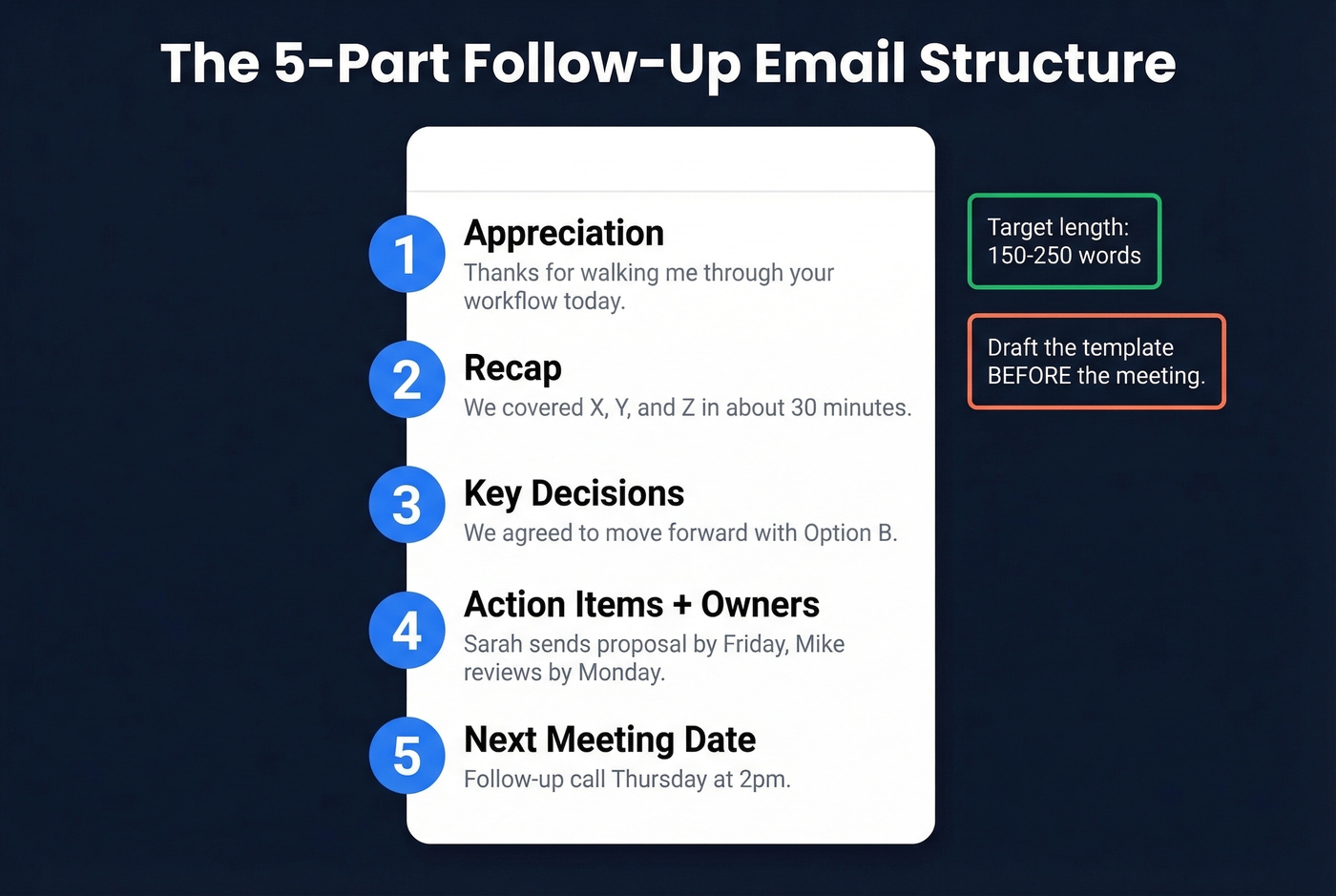
The recap section does the heavy lifting. Summarize what was discussed in two to three sentences, not a transcript. Then list decisions made and who owns each action item. Close by confirming the next touchpoint.
Here's the thing: draft your template before the meeting starts. Fill in the blanks during the call and you can send within minutes of hanging up. We've done this for years and it consistently cuts follow-up time from 20 minutes to under 5.
Keep the whole thing under 150-250 words. If you're writing more, you're recapping too much.
When to Send (Timing Matrix)
| Meeting Type | Send Window | Why |
|---|---|---|
| Internal team | Within 24 hrs | Keeps decisions and owners clear while it's fresh |
| Client/stakeholder | Same day or next AM | Maintains momentum and alignment |
| Sales demo | 24-72 hrs | Gives them breathing room | |
| Networking/conference | 1-2 days | Enough time to send a thoughtful note |
| Phone screen | Same day | Details are fresh for both sides |
| Video interview | Within 24 hrs | Standard expectation |
| In-person interview | Same evening | One Redditor got an offer 20 min after sending |
| Panel interview | Within 24 hrs | Individual emails to each panelist |
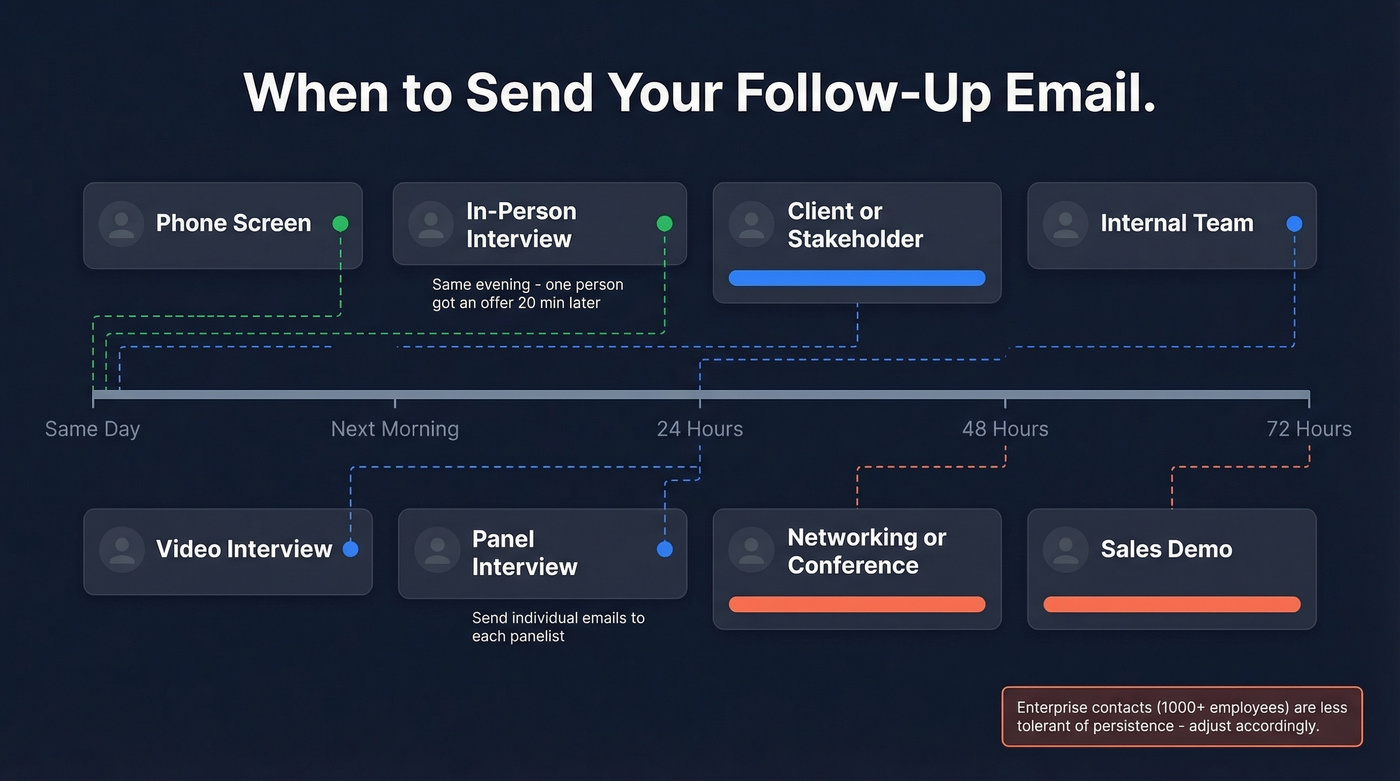
Enterprise contacts at 1,000+ employee companies are far less tolerant of persistence than small businesses - adjust your cadence accordingly.
12 Templates for Every Meeting Type
Sales Meeting Recap
Reference the specific pain point they mentioned. Generic recaps get deleted. A strong after-meeting email always leads with their problem, not your pitch.
Subject: Next steps on [pain point discussed]
Hi [Name],
Thanks for walking me through [specific challenge]. The way you described [problem] tells me [your solution/feature] could cut that timeline significantly.
Here's what we agreed on:
- [Action item 1 - owner]
- [Action item 2 - owner]
I'll send the [proposal/case study/demo recording] by [date]. Does [day] at [time] work for a follow-up call?
Why it works: It proves you listened by naming their problem, not your product. If you want more options, start with these sales follow-up templates.
Client or Stakeholder Meeting
Subject: Recap: [project name] - action items
Hi [Name],
Great discussion today. Quick summary:
Decisions made: [list] Action items: [who owes what by when] Next meeting: [date/time]
Let me know if I missed anything.
Internal Team Meeting
The follow-up you send most often - and the one nobody writes templates for.
Subject: [Meeting name] recap - [date]
Team,
Quick recap:
- [Key decision or update]
- [Key decision or update]
Action items:
- [Person]: [task] by [date]
- [Person]: [task] by [date]
Next sync: [date/time]. Holler if anything's off.
One-on-One Recap
For manager/report or peer 1:1s. This is about accountability, not formality.
Subject: 1:1 notes - [date]
Hey [Name],
Appreciate the time today. My takeaways:
- [Topic discussed + any decision]
- I'll [your action item] by [date]
- You mentioned [their action item] - flagging so it doesn't slip
Talk [next 1:1 date].
Networking or Conference
You met someone briefly. You've got a name and a company from a badge - maybe not even an email. If that's all you have, use Prospeo's email finder to surface a verified address before you send.
Subject: Good meeting you at [event]
Hi [Name],
We spoke briefly at [event] about [topic]. Your point about [specific thing] stuck with me.
I'd love to continue that conversation - would a 15-minute call next week work?
Job Interview (General)
Subject: Thank you - [role title] conversation
Hi [Name],
Thank you for taking the time today. Our conversation about [specific project or challenge] reinforced my excitement about this role. My experience with [relevant skill] maps directly to what you described.
Looking forward to next steps.
Keep it under 150 words. Interviewers read dozens of these.
Panel Interview
Send individual emails to each interviewer. Reference something unique from each person's questions - this is what separates you from every other candidate who sends one generic note.
Subject: Thank you, [Name] - [role] interview
Hi [Name],
I appreciated your question about [specific topic]. It made me think about [brief insight]. I'd bring that same [skill/approach] to [team/project].
Thank you again for your time.
No-Response Follow-Up
"Just checking in" is the fastest way to get archived. Every follow-up needs to add something new - a resource, an insight, a different angle. Each message should address a different objection: cost, urgency, trust, or need.
Subject: [Relevant resource] for [their challenge]
Hi [Name],
I came across [article/case study/data point] that's relevant to [challenge from our meeting]. Thought you'd find it useful: [link]
Still happy to pick up where we left off whenever timing works.
If email isn't working, try a LinkedIn message paired with a profile visit - Belkins' data shows that combo pulls an 11.87% reply rate, higher than any email-only follow-up. If you're unsure about timing, use this guide on when should i follow up on an email.
You Owe the Action Item
When you're the one delivering, confirm proactively. In our experience, this builds trust faster than anything else in a business relationship.
Subject: Sending over [deliverable] as promised
Hi [Name],
As discussed, here's [deliverable]. Key things to note:
- [Context point 1]
- [Context point 2]
Let me know if you need anything adjusted before [next step/meeting].
Multi-Stakeholder Meeting
When four-plus people attended, don't blast one email to all. Send a group recap for shared action items, then individual notes to decision-makers with their specific asks.
Group email subject: [Meeting name] - decisions + owners
All,
Thanks for the time today. Here's where we landed:
- [Decision 1]
- [Decision 2]
Owners:
- [Person]: [task] by [date]
- [Person]: [task] by [date]
Individual follow-up subject: [Name], your ask on [topic]
Sales Proposal Follow-Up
After sending pricing, nudge without pressure. Add value - don't just ask "did you see it?"
Subject: Quick thought on the [proposal topic]
Hi [Name],
Wanted to flag one thing in the proposal - [specific section] addresses the [pain point] you mentioned. [Company similar to theirs] saw [result] after implementing.
Happy to walk through the numbers live if that's easier.
If you're building a repeatable process, this is basically sequence management in action.
Warm Intro Follow-Up
Someone referred you. Lead with the mutual connection - it's your strongest asset.
Subject: [Mutual contact] suggested we connect
Hi [Name],
[Mutual contact] mentioned you're working on [challenge/initiative] and thought we should talk. We help teams [specific outcome] - here's a quick example: [one-liner proof point].
Worth a 15-minute call this week?

A perfect follow-up email means nothing if it bounces. Prospeo verifies emails at 98% accuracy with a 5-step verification process - so your post-meeting recap actually reaches the inbox, not a dead address.
Don't let a bounced email waste your best follow-up.
Subject Lines That Get Opened
Keep subject lines under 33 characters so they display fully on mobile. Three categories that work:
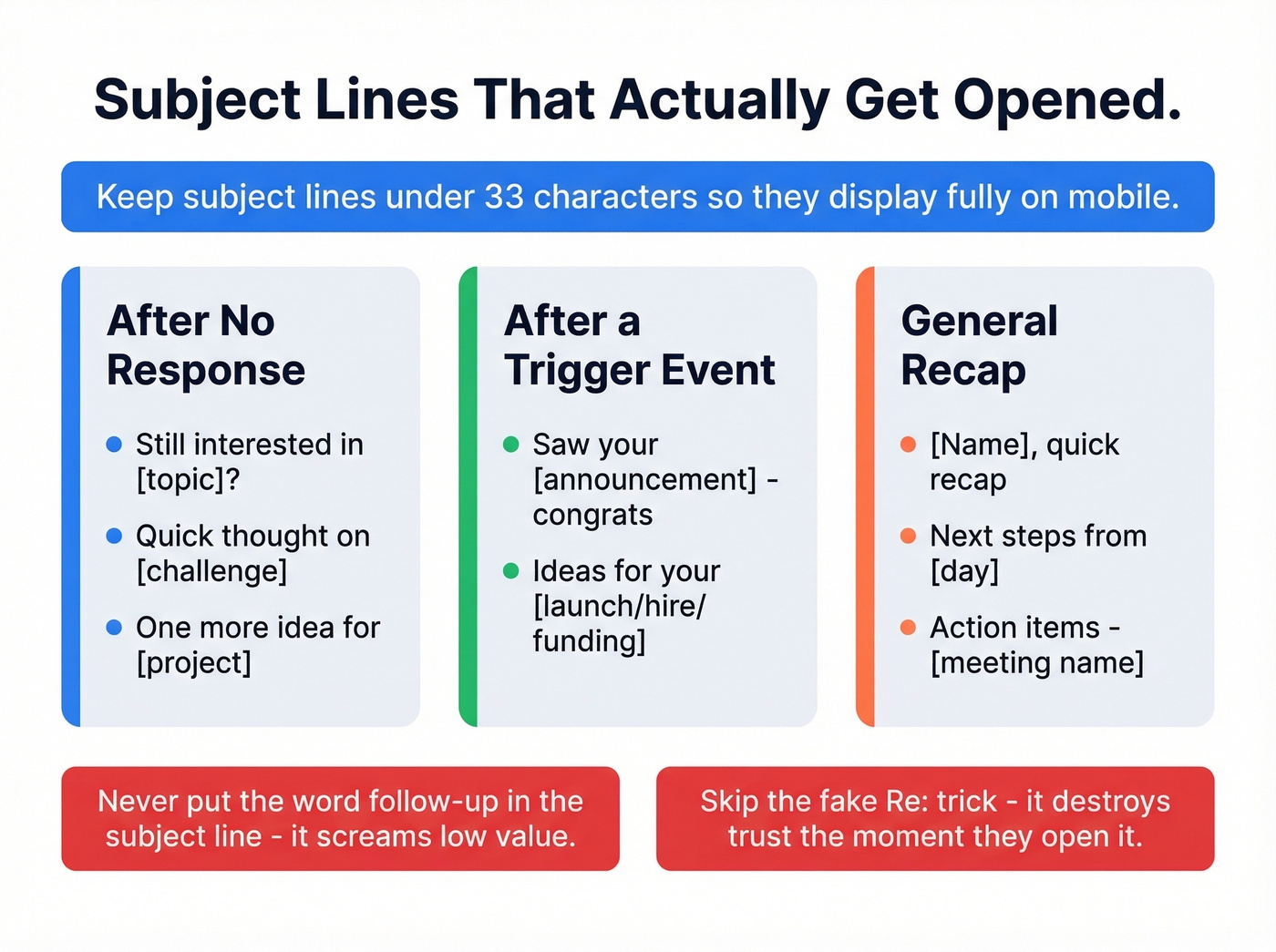
After no response: "Still interested in [topic]?" - "Quick thought on [challenge]" - "One more idea for [project]"
After a trigger event: "Saw your [announcement] - congrats" - "Ideas for your [launch/hire/funding]"
General recap: "[Name], quick recap" - "Next steps from [day]" - "Action items - [meeting name]"
Never put the word "follow-up" in the subject line - it screams low-value. Skip the misleading "Re:" trick too. It erodes trust the moment they open it. For more ideas, pull from these email subject line examples.
Five Mistakes That Kill Follow-Ups
1. Bumping with no new information. "Just wanted to bump this to the top of your inbox" tells the recipient you have nothing new to say. Every follow-up should add a resource, an insight, or a new angle.
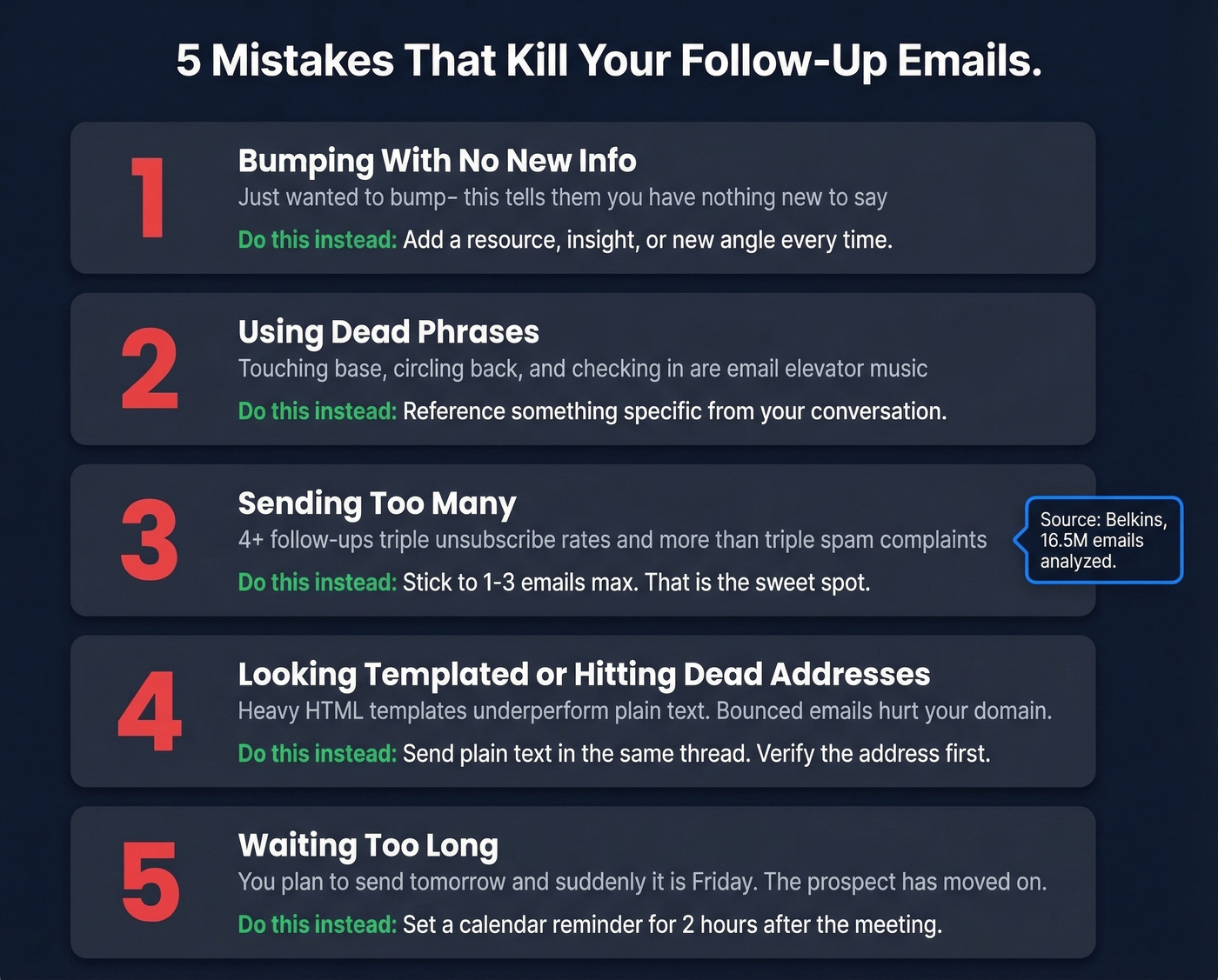
2. Using dead phrases. "Touching base," "circling back," and "checking in" are the email equivalent of elevator music. They signal you couldn't think of a reason to write. If you catch yourself writing those, use this guide on how to say just checking in professionally.
3. Sending too many. Belkins' data shows 4+ follow-ups triple unsubscribe rates and more than triple spam complaint risk. One to three emails is the sweet spot.
4. Looking templated and sending to dead addresses. Plain text follow-ups tend to outperform heavy HTML templates. Send as a reply in the same thread with minimal formatting - it should look like a real person typed it. And verify the address before you hit send, especially for contacts from events or business cards. A bounced follow-up wastes your work and hurts your domain reputation. If deliverability is a recurring issue, start with an email deliverability guide.
5. Waiting too long. We've seen this kill deals that were otherwise warm. You have a meeting on Tuesday, you "plan to send tomorrow," and suddenly it's Friday. By then the prospect's moved on to three other conversations. Set a calendar reminder for two hours post-meeting if you have to.
How to Build Your Own Template
If none of the examples above fit your exact scenario, use this framework to create a custom follow-up for any meeting - prospects, partners, or hiring managers:
- Open with one specific detail from the conversation (proves you were present).
- Summarize two to three key points in bullets (saves them from re-reading notes).
- Assign action items with deadlines and owners.
- Propose the next touchpoint with a specific date.
That four-step skeleton works for any post-meeting email you'll ever need to write. I've used it for everything from board meeting recaps to casual coffee chats, and the structure holds.
Tools to Speed Up Follow-Ups
AI drafting: Paste your meeting notes into ChatGPT or Claude with a prompt like "Write a 100-word follow-up email: thanks, recap, action items, next steps." Then customize. We've found AI gets you 80% there - the last 20% of personalization is what actually matters. If you're going deeper, see AI sales follow-up.
Meeting transcription: Fellow records meetings and turns transcripts into structured summaries and follow-up drafts. Paste the key points into your template instead of scribbling notes.
CRM sequences: HubSpot Sales Hub lets you build automated follow-up cadences so nothing falls through after a demo. If you're evaluating options, start with these examples of a CRM.
Email verification: Prospeo verifies emails in real time with 98% accuracy, so your follow-up lands and your domain stays clean. The free tier covers 75 verifications per month - enough for most teams' weekly meetings. If you need a broader view, compare follow up email software.
Met someone at a conference but only got a name and company? Prospeo's email finder surfaces verified addresses from 300M+ profiles so you can send that networking follow-up within hours, not days.
Turn a handshake into a verified email in seconds.
FAQ
How long should a follow-up email be after a meeting?
Aim for 150-250 words. Cover thanks, two to three key takeaways, action items with owners, and a proposed next step. Your recipient sat through the meeting - they don't need a transcript, just a scannable summary they can reference later.
Is it unprofessional to follow up the same day?
Not at all - same-day follow-ups show attentiveness and outperform delayed ones. For interviews, sales calls, and client meetings, sending within a few hours while details are fresh is ideal. Having a ready-to-go template makes same-day sends effortless.
What if my follow-up email bounces?
The contact info is outdated or incorrect. Run the address through a verification tool before resending. Repeated bounces hurt your sender reputation and can tank deliverability across your entire domain.
Can I use one template for every meeting type?
Start from one base structure - thanks, recap, action items, next steps - but customize the emphasis. A sales demo recap needs pain-point specificity; an internal standup recap needs task ownership. The 12 templates above cover the most common scenarios so you always have the right starting point.