

How to Write a Follow-Up Invitation Email (With Templates)
You sent a meeting invite on Monday. It's Thursday. Nothing - no accept, no decline, no "let me check my calendar." We've sent hundreds of these over the years, and the ones that actually get replies all follow the same pattern. With 392.5 billion emails expected daily by 2026, your follow-up invitation email almost certainly got buried, not ignored.
Quick version: Follow up 3 business days after your invitation. Use a 2-4 word personalized subject line. Reference the original, give one reason to respond, and ask a single clear question. Jump to your template: meeting invite, event RSVP, interview, networking, or breakup email.
When to Send Your Follow-Up
The only framework you need is the 3-5-7 rule:
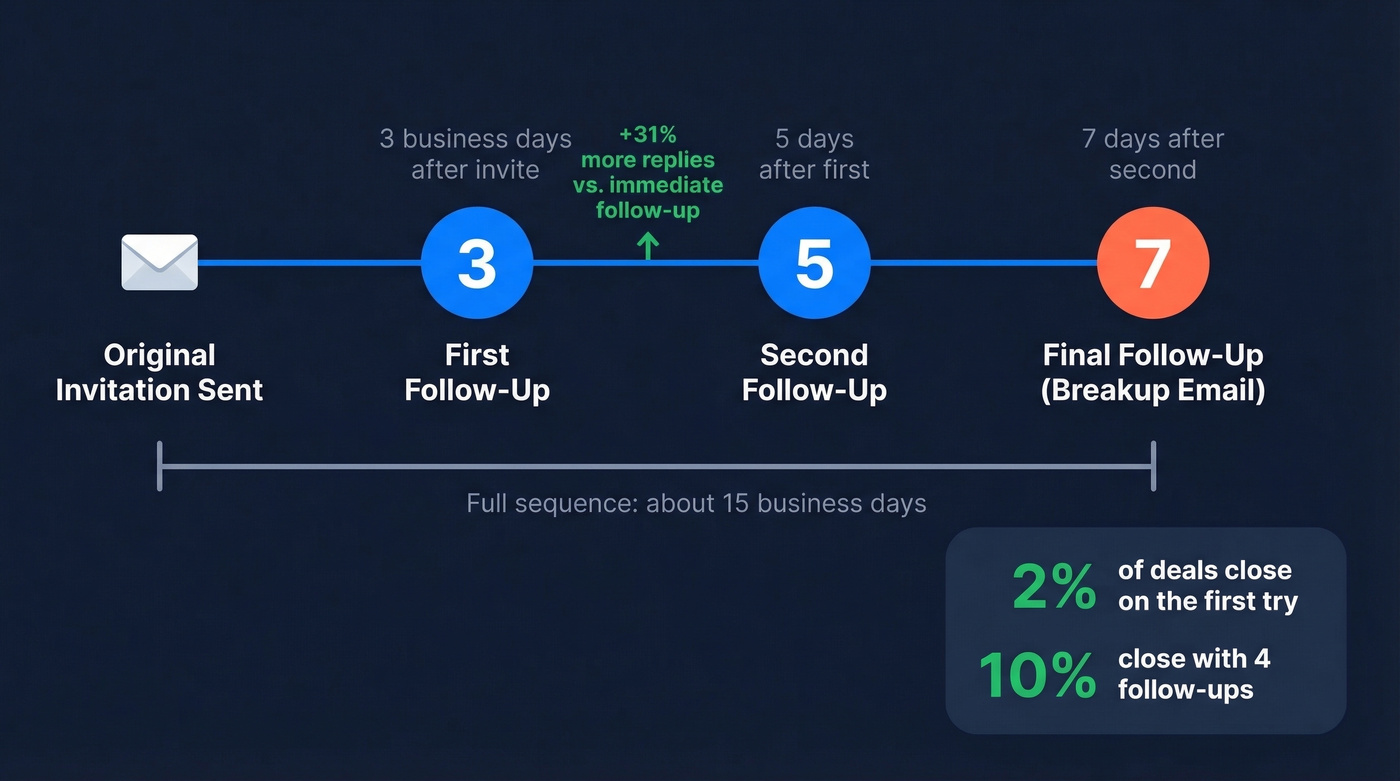
- First follow-up: 3 business days after the original invitation
- Second follow-up: 5 days after the first
- Final follow-up: 7 days after the second
Waiting 3 business days yields a 31% increase in replies compared to following up immediately. Patience signals confidence; urgency signals desperation.
Here's the thing: only 2% of deals close on the first try. That number jumps to 10% with four follow-ups. Three follow-ups is the minimum. One isn't a follow-up - it's giving up. (If you want more sequences, see these sales follow-up templates.)
Subject Lines That Get Opened
A Belkins study of 5.5 million emails gives us clear rules:
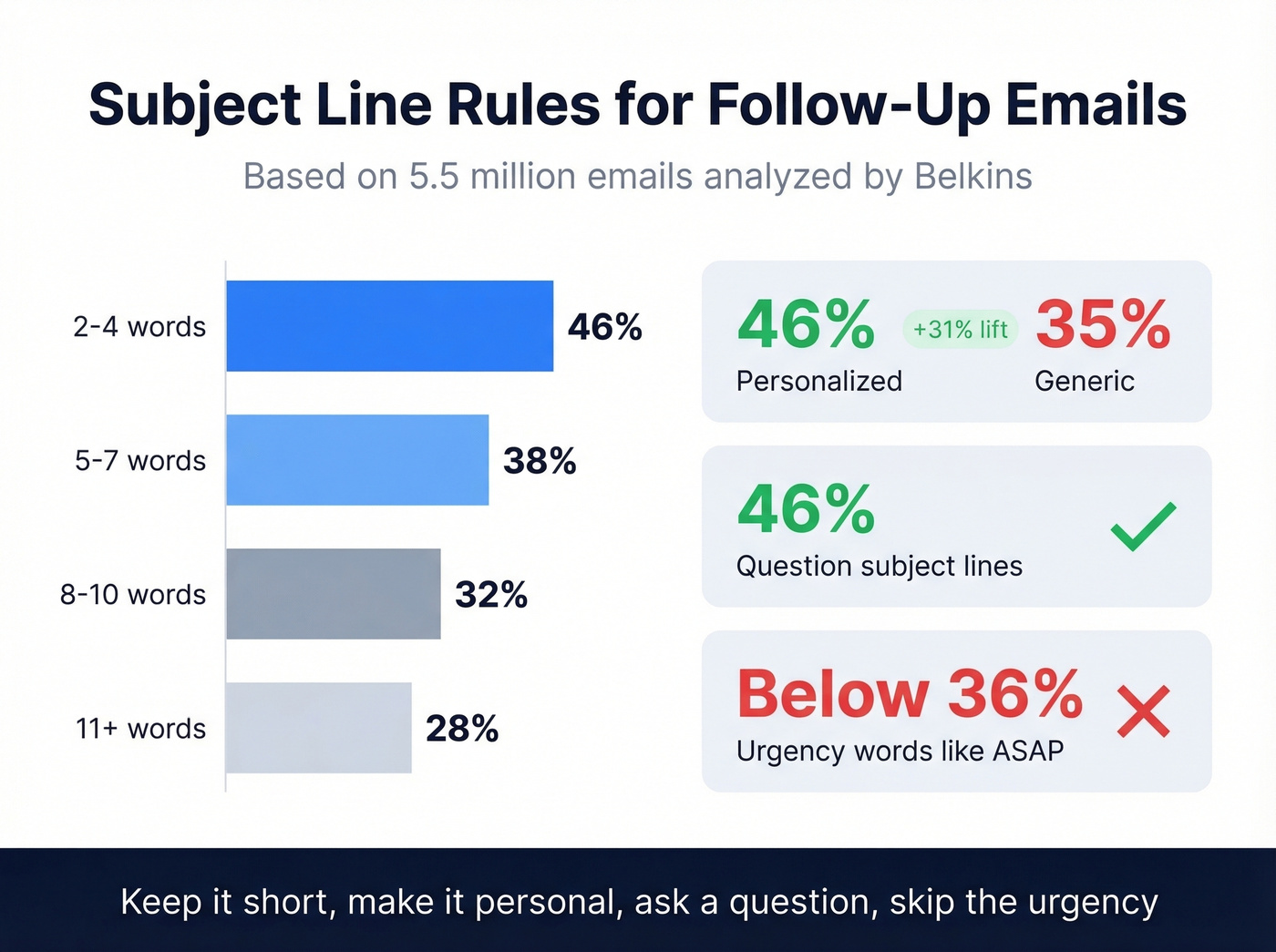
- 2-4 words hits a 46% open rate. Performance drops steadily after 7 words.
- Personalize it. Personalized subject lines hit 46% vs. 35% without - a 31% lift.
- Ask a question. Question-style subject lines match that same 46% rate.
- Kill urgency language. Words like "ASAP" push opens below 36%.
Examples that work: "Still available Thursday?" / "Quick RSVP check" / "Confirming our meeting?" Notice none of these use the word "follow-up" - it triggers guilt, not action. If your subject line is longer than 4 words, cut it. (Need more options? Steal from these email subject line examples.)

Your follow-up templates won't matter if you're sending to dead inboxes. 35% of business emails go stale within a year - and bounces destroy your sender reputation before your sequence even starts. Prospeo verifies emails at 98% accuracy with a 7-day refresh cycle, so every follow-up lands.
Verify your contact list before you follow up, not after you bounce.
Tone Rules - What NOT to Say
| Don't say | Say instead |
|---|---|
| "I haven't received a reply" | "Confirming you saw this" |
| "Just checking in" | "Is Thursday still good?" |
| "Kindly confirm at your earliest" | "Can you let me know by Friday?" |
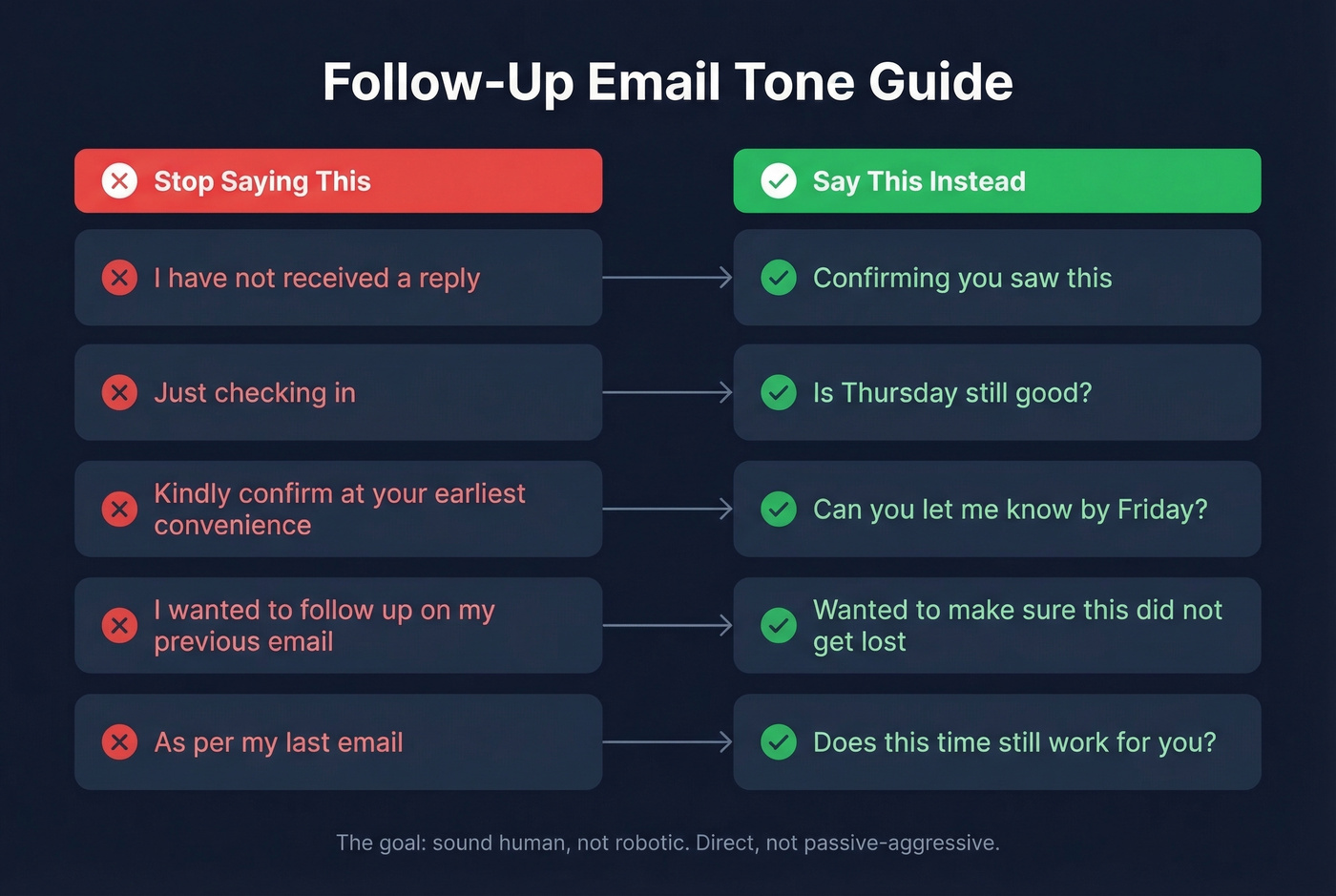
"Just checking in" is the worst opening line in professional email. It says nothing. And "kindly" reads as passive-aggressive in most business contexts - skip it entirely. (Here are better alternatives for just checking in.)
Templates for Every Invitation Scenario
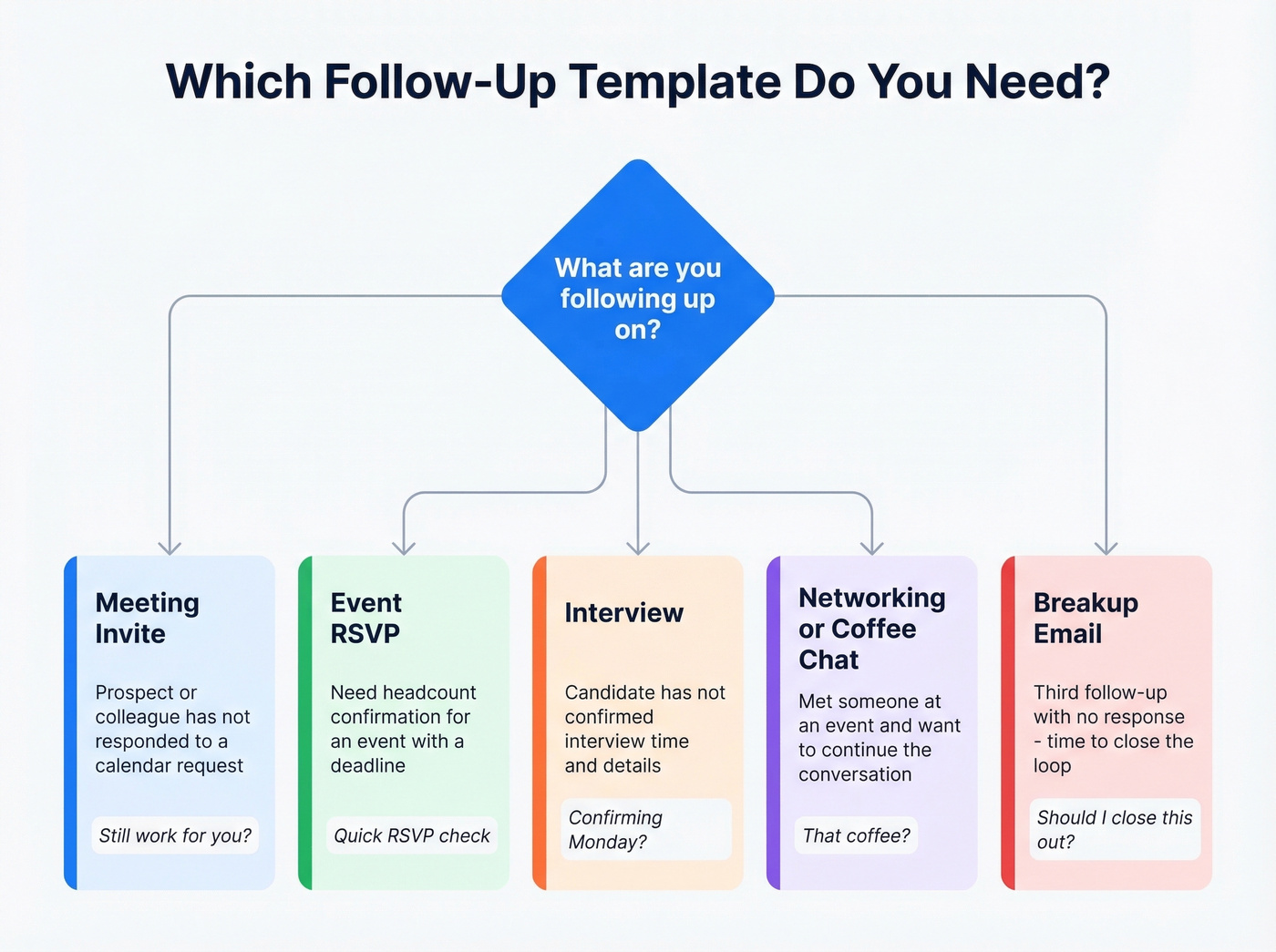
You don't need 15 templates. You need the right one. Each sample below is ready to copy, personalize, and send. (If you're building a full sequence, use cold email follow-up templates as a base.)
Meeting Invite Follow-Up
Use this when a prospect or colleague hasn't responded to a calendar request.
Subject: Still work for you?
Hi [Name],
I sent over a meeting invite for [Day, Date] at [Time] - wanted to make sure it didn't get lost. Does that slot still work, or would another time be better?
Happy to shift things around. Just let me know.
[Your name]
Short, direct, zero guilt. That's the formula. (More on email wording to schedule a meeting.)
Event RSVP Follow-Up
Subject: Quick RSVP check
Hi [Name],
We're finalizing the headcount for [Event Name] on [Date] and I want to make sure you're included. Could you confirm by [Deadline] so we can lock in catering and seating?
Here's the RSVP link again: [Link]
Hope to see you there.
[Your name]
Interview Invitation Follow-Up
This one works differently depending on which side of the table you're on.
If you're the hiring manager and a candidate hasn't confirmed:
Subject: Confirming [Day]?
Hi [Name],
Following up on the interview invitation I sent for [Date] at [Time] via [Zoom/in-person]. Want to make sure the details work for you. Is there anything you'd like to know beforehand?
Looking forward to it.
[Your name]
If you're the candidate, reply same day or by the next business day. Restate the date, time, and format, and ask if there's anything to prepare. Speed matters here - hiring managers notice who responds quickly and who doesn't.
Networking or Coffee Chat Follow-Up
The personal hook is everything with this one. A generic "great to meet you" gets deleted; a specific reference to your conversation gets a reply. We've tested both approaches across dozens of post-event outreach campaigns, and the specific version wins every time by a wide margin. (For more approaches, see personalized outreach.)
Subject: That coffee?
Hi [Name],
Great meeting you at [Event] - our conversation about [Topic] stuck with me. I'd love to continue it over coffee. Are you free [Day] or [Day] around [Time]?
No pressure either way. Just thought it'd be worth 30 minutes.
[Your name]
The Final Follow-Up (Breakup Email)
A breakup email works because it closes the loop and makes it easy for the other person to say "no" without feeling awkward. Re-engagement rates run as high as 40% in sales follow-up sequences, which is why this format is worth using even for invitations. (Related: importance of follow-up in sales.)
Subject: Should I close this out?
Hi [Name],
I've reached out a couple of times about [Meeting/Event/Coffee]. If the timing isn't right, no worries - just let me know and I'll stop following up.
If you're still interested, I'm happy to find a time that works better.
[Your name]
Look - most people stop after one follow-up because they're afraid of being annoying. But the person who sends three thoughtful follow-ups isn't annoying. They're the only one still in the conversation when everyone else has dropped off.
Before You Hit Send
Reply in the same thread if you're continuing the same topic. Start a new email if the original thread is old or buried.
Let's be honest about something else: if you're following up on contacts from a networking event or conference, half those business cards have outdated emails. Batch-verify before you start your sequence, not after you've already tanked your sender reputation with bounces. (If bounces are a recurring issue, fix it at the source with an email deliverability guide.)
Half the business cards from that event already have outdated emails. Prospeo's Email Finder pulls verified addresses from 300M+ profiles at $0.01 per email - so your follow-up invitation actually reaches the person you met, not a dead inbox.
Find the real email. Send the follow-up. Get the meeting.
FAQ
How many follow-up invitation emails should I send?
Three to five over 2-3 weeks is the sweet spot. The 3-5-7 rule gives you a clear stopping point - first follow-up at 3 days, second at 5, final at 7. After your breakup email, stop. Revisit in a month if the relationship matters.
Is there a follow-up meeting invite template I can customize?
Yes - the meeting invite follow-up template above works for internal syncs, prospect calls, and client check-ins. Swap in the recipient's name, proposed date and time, and send. Keep it under five sentences.
Should I follow up in the same thread or start fresh?
Same thread if you're continuing the same invitation - it preserves context and makes it easy for the recipient to scroll up. Start a new email only if the original thread is older than two weeks or buried under unrelated replies.
What if my follow-up email bounces?
A bounce means the address is invalid or outdated. Verify it with a tool like Prospeo before sending - it checks deliverability in real time so you don't waste your re-engagement window. The free tier includes 75 verifications per month, which is plenty for a single event's worth of contacts.