9 Free Trial Email Templates With Subject Lines, Timing, and Benchmarks
Opt-in free trials convert at 18.2% on average. Flip that number: 82% of your signups never pay. They poke around, forget about you, and move on. A proper free trial email template sequence won't save every one of them, but it'll push that 18% toward 25% - and the difference between 18% and 25% is the difference between a struggling SaaS and a funded one.
That 18.2% comes from First Page Sage's 86-company benchmark, and a LiveAgent survey of 300+ SaaS professionals landed at a similar 20%. The range is real. The leak is real. And the fix is a behavioral email sequence - not a time-based drip and a prayer.
The templates below are built from real sequences at companies like Linear, Zapier, and Dub.co, combined with behavioral trigger logic that actually works. Copy them. Customize them. Ship them this week.
The 9 Emails You Need
Every trial email sequence needs these:
- Welcome Email - immediate on signup
- Activation Nudge - 24-48 hrs, no key action taken
- Social Proof Email - Day 3-5
- Value Demonstration Email - Day 5-7
- Pricing Introduction Email - Day 7-10
- Trial Ending Soon Email - 3 days before expiration
- [Final Day / Last Chance Email](#final-day - last-chance-email) - day of expiration
- Extension Offer Email - day of expiration, engaged non-converters
- Win-Back Email - 7-14 days post-expiration
If you only set up one today, make it the trial ending email. It has the highest direct conversion impact because it catches users at peak loss aversion - they've built something and don't want to lose it.
Here's the single most important insight: behavior-based triggers beat time-based drips every time. Sending "Day 3 email" to someone who hasn't logged in since signup and someone who's used your product daily is treating a cold lead and a hot lead identically. Don't do it.
A well-built behavioral sequence pushes opt-in trial conversion from that 18.2% average to 25%+. That's the target.
Why Most Trial Email Sequences Fail
Most SaaS companies that do have trial emails still get them wrong. They set up a time-based drip - Day 1, Day 3, Day 7, Day 12 - and call it done. Every user gets the same emails on the same schedule regardless of whether they've spent 4 hours in the product or never logged in after signup.

That's the core failure, and it's shockingly common.

Time-Based Sequences Treat Every User the Same
A time-based drip campaign fires emails on a calendar. Day 1: welcome. Day 3: feature highlight. Day 7: social proof. Day 12: trial ending. It doesn't care what the user did. It doesn't know if they completed setup, invited teammates, or bounced after 30 seconds.
This is the default because it's easy to build. Every email automation platform supports it out of the box. But easy doesn't mean effective. The users who needed help - the ones on the fence - quietly disappear while your sequence sends them generic feature tours they'll never open.
The Three Paths Your Trial Users Actually Take
Your trial users split into three groups, and each needs a different approach:
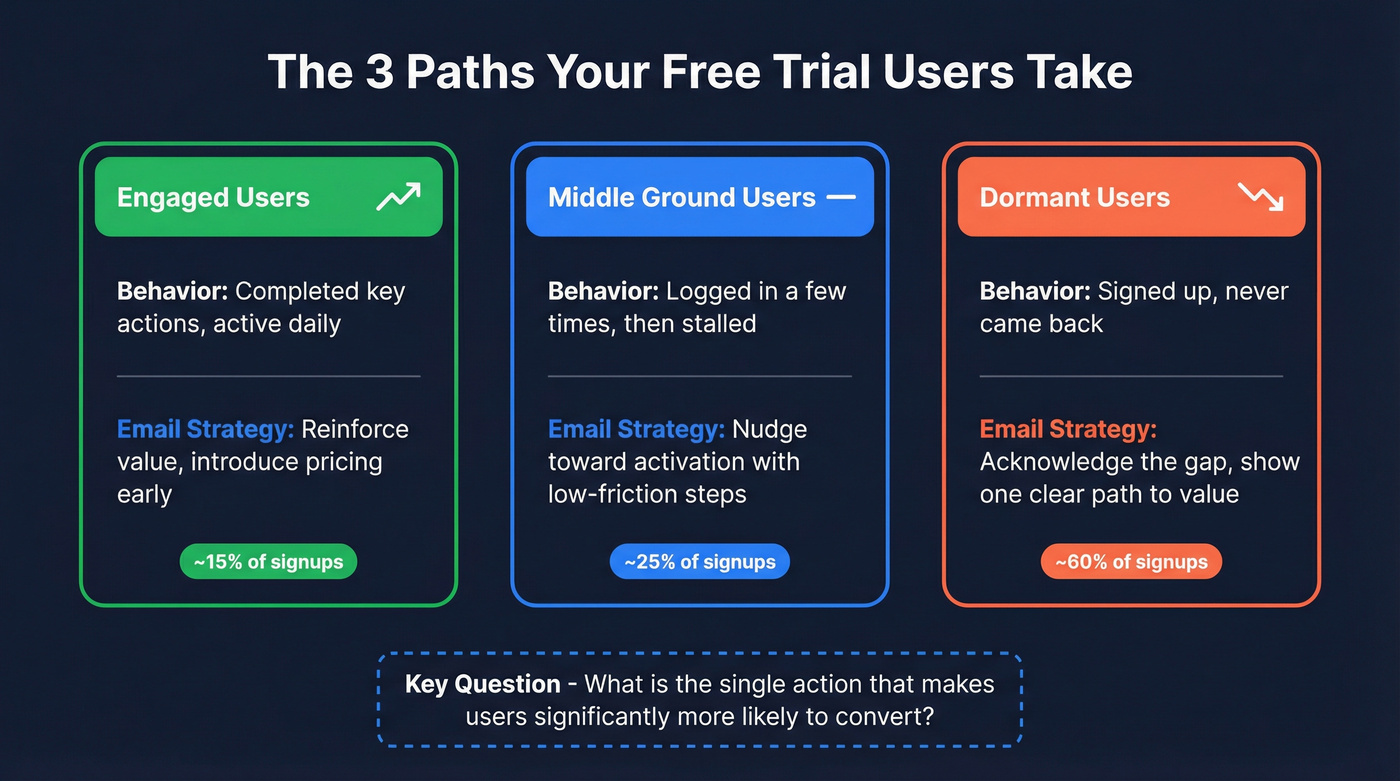
| User Path | Behavior Signal | Email Approach |
|---|---|---|
| Engaged | Completed key actions, active daily | Reinforce value, introduce pricing |
| Dormant | Signed up, never returned | Acknowledge gap, show one path to value |
| Middle ground | Logged in a few times, stalled | Nudge toward activation with low-friction steps |
The critical question you need to answer before building any sequence: What is the single action that, once a user takes it, makes them significantly more likely to become a paying customer?
For Slack, it was sending 2,000 messages. For Dropbox, it was saving a file. For your product, it's something specific. Find it. Then build your entire behavioral sequence around pushing users toward that moment.
Here's a concrete example: say a B2B SaaS lead generation tool finds that users who create a custom dashboard within 48 hours convert at 3x the rate of those who don't. They rebuild their entire email sequence around that single action - nudging users toward dashboard creation in the welcome email, the activation nudge, and every touchpoint after. That kind of focus is what moves trial-to-paid from the mid-teens to the low twenties in a single quarter.
Behavioral sequences improve trial-to-paid conversion by 20-30% over time-based sequences. Fewer emails, harder hits, because every message is relevant to where the user actually is.
The Complete Free Trial Email Sequence
Here's how the 9 emails map across both 7-day and 14-day trial timelines. The trigger column tells you whether each email fires on a schedule or based on user behavior.

| Trigger Type | 7-Day Trial | 14-Day Trial | |
|---|---|---|---|
| Welcome | Immediate | Signup | Signup |
| Activation Nudge | Behavior | 12-24 hrs, no action | 24-48 hrs, no action |
| Social Proof | Behavior/Time | Day 2-3 or after first action | Day 3-5 or after first action |
| Value Demo | Behavior | Day 3-4, usage summary | Day 5-7, usage summary |
| Pricing Intro | Time | Day 4-5 | Day 7-10 |
| Trial Ending | Time | Day 5 (2 days left) | Day 11 (3 days left) |
| Final Day | Time | Day 7 | Day 14 |
| Extension Offer | Behavior | Day 7, engaged non-converters | Day 14, engaged non-converters |
| Win-Back | Time | Day 14-21 | Day 21-28 |
Notice the compression for 7-day trials. You've got less runway, so the activation nudge fires faster (12-24 hours vs. 24-48) and the pricing introduction moves up. Don't try to cram all 9 emails into 7 days at the same cadence - your users will feel bombarded. Prioritize the welcome, activation nudge, trial ending, and final day. The others are nice-to-haves for shorter trials.
From the pricing introduction email onward, mention the remaining trial days in every email. "You've got 5 days left" then "3 days left" then "Tomorrow." This creates ambient urgency without being pushy, and it trains users to feel the clock ticking. You can't go overboard with displaying how many days are left - it's the single cheapest conversion lever you have.

Your trial email sequence is only as good as the emails it reaches. Bad data means bounces, burned domains, and wasted nurture sequences. Prospeo's 98% verified emails and 7-day refresh cycle ensure every free trial invite lands in a real inbox.
Stop nurturing email addresses that don't exist.
9 Copy-Paste Trial Email Templates (With Subject Lines and Benchmarks)
Every template below includes a subject line with character count, full copy-paste email body, the trigger that should fire it, why it works, and the metric you should track. Customize the bracketed fields and ship.
Welcome Email
Subject line: Your 14-day trial starts now (do this first) (48 characters)

Trigger: Immediate on signup
Hey [First Name],
Welcome to [Product]. Your trial is live - here's the one thing to do right now:
[Primary Action Button: "Create your first [thing]"]
It takes about 3 minutes, and it's the fastest way to see why teams like [Customer Name] use [Product] to [specific result].
If you get stuck:
- [Link to quick-start guide]
- [Link to support/chat]
- [Link to community]
You've got 14 days. Let's make them count.
[Signature]
Why this works: 74% of consumers expect a welcome email immediately after signup. One clear action beats a feature tour. Linear nails this by offering three resources (why the product exists, how to use it, what's new). Zapier connects automation to tangible value immediately. Dub.co uses a founder-led personal intro.
Pick the style that fits your brand, but always lead with a single action. And verified email lists increase open rates by up to 34% - so your welcome email can't convert if it bounces. If trial signups come from lead gen campaigns or outbound lists, run every address through an email verification tool before it enters your sequence. That way your first impression actually lands.

Target metric: 50-60% open rate, 30-50% click rate
Activation Nudge
Subject line: [First Name], a quick shortcut (90 seconds) (44 characters)
Trigger: 24-48 hours after signup, no key action taken
Hey [First Name],
I noticed you signed up for [Product] but haven't [key action] yet. Totally normal - here's the fastest path:
- [Step 1 - 30 seconds]
- [Step 2 - 30 seconds]
- [Step 3 - 30 seconds]
[Button: "Do it now (90 seconds)"]
That's it. Once you've done this, [Product] starts working for you automatically.
[Signature]
Common mistake: Sending this email to everyone on Day 2, including users who already completed the key action. Nothing kills trust faster than a "you haven't done X yet" email when the user did X yesterday. Make sure your automation checks for the activation event before this fires.
Why this works: The "takes 90 seconds" framing reduces perceived effort to almost nothing. Numbered steps make the action feel concrete and finite. This email only fires for users who haven't taken the key action - engaged users never see it, which keeps your sequence from feeling spammy.
Target metric: 15-25% click rate
Social Proof Email
Subject line: How [Customer] uses [Product] to [result] (45 characters)
Trigger: Day 3-5 or after first key action
Hey [First Name],
[Customer Name] was dealing with [specific problem your product solves]. Sound familiar?
Here's what happened:
- Before: [Specific pain point with number - e.g., "spending 15 hours/week on manual data entry"]
- After: [Specific result with number - e.g., "cut to 2 hours/week, saving $4,200/month"]
They started with the same trial you're on right now.
[Button: "See how they set it up"]
[Signature]
Why this works: Specific numbers beat vague testimonials. "Cut data entry from 15 hours to 2 hours" is infinitely more persuasive than "We love [Product]!" The before/after structure mirrors the user's own journey - they're in the "before" state and can see the "after" within reach. Slack does this brilliantly in their onboarding by showing how similar-sized teams use channels, making the social proof feel personal rather than generic.
Target metric: 20-30% open rate, 10-15% click rate
Value Demonstration Email
This is the template that separates good trial sequences from great ones. Instead of telling users your product is valuable, you show them their own data.

Subject line: What you've done with [Product] so far (40 characters)
Trigger: Day 5-7, based on usage data
Hey [First Name],
Quick update on your [Product] trial so far:
- You've created [X items/workflows/projects]
- You've [specific action] [Y] times
- Estimated time saved: [Z hours]
At this pace, [Product] would save you roughly [estimated monthly value] per month on a paid plan.
[Button: "Keep building"]
Questions about anything? Just reply.
[Signature]
Why this works: Showing users their own data creates ownership. They're not evaluating an abstract product anymore - they're looking at their work, their time saved, their results. This is where evaluation becomes dependency. The estimated value framing connects usage to dollars, which primes the pricing conversation. Dropbox pioneered this approach by showing users exactly how much storage they'd used and how many files they'd synced - making the free tier feel cramped by comparison.
Target metric: 25-35% open rate, 10-20% click rate
Pricing Introduction Email
This is the template no one else gives you. I reviewed every top-ranking article for trial email sequences and not a single one includes a pricing introduction email. That's a mistake. Price anxiety kills conversions silently - users who don't know what something costs assume it's expensive.
Subject line: What [Product] costs (and why) (32 characters)
Trigger: Day 7-10
Hey [First Name],
You're halfway through your trial (7 days left), so let's talk about what happens next.
[Product] has [X] plans:
| | Starter | Pro | Team | |---|---|---|---| | Price | $X/mo | $Y/mo | $Z/mo | | Best for | [Use case] | [Use case] | [Use case] | | Key feature | [Feature] | [Feature] | [Feature] |
Based on your usage, [Plan Name] is probably the right fit. Here's why: [one sentence explaining the recommendation].
[Button: "See full plan comparison"]
No pressure - you've still got [X] days left. Just wanted you to have the info.
[Signature]
Why this works: This email removes friction by being transparent, recommending a specific plan, and doing it before the trial-ending urgency kicks in. The "no pressure" close keeps it consultative, not salesy. Notice the remaining days callout - from this email forward, every message should remind users how much time they have left.
Target metric: 30-40% open rate, 8-12% click rate
Trial Ending Soon Email
This is the highest-impact template in the entire sequence. Here's the difference between the weak version and the strong version:
| Weak Version | Strong Version |
|---|---|
| "Your trial is ending soon" | "3 days left: keep your 12 saved reports" |
| Generic, easy to ignore | Specific, triggers loss aversion |
| No personalization | References their actual work |
| "Upgrade now" button | "Keep your reports -> Upgrade" button |
Subject line: 3 days left: keep your [specific work] (40 characters)
Trigger: 3 days before expiration
Hey [First Name],
Your [Product] trial ends in 3 days. Here's what you've built:
- [Item 1 they created]
- [Item 2 they created]
- [Item 3 they created]
When your trial ends, these will be locked. You won't lose them - but you won't be able to access or edit them until you upgrade.
[Button: "Keep your [items] -> Upgrade now"]
If [Product] isn't the right fit, no hard feelings. But if it is, don't let your work disappear.
[Signature]
Why this works: People are twice as motivated to avoid losing something as they are to gain something equivalent. Listing their specific items makes the loss concrete and personal. Canva does this exceptionally well - their trial-ending emails show thumbnails of designs you've created, making the potential loss visual and visceral.
Target metric: 5-15% conversion rate (direct upgrades from this email)
Look, if you're only going to build one email from this list, build this one. I've seen teams add a single trial-ending email and move conversion rates 3-5 percentage points. That's meaningful revenue from one email.
Final Day / Last Chance Email
Subject line: Your [items] will be locked tomorrow (37 characters)
Trigger: Day of expiration
Hey [First Name],
This is it - your [Product] trial expires today.
After today, your [items/data/workflows] will be locked. You can reactivate anytime, but why lose momentum?
[Button: "Upgrade now - keep everything"]
Takes 2 minutes. Your [items] stay exactly where you left them.
[Signature]
Why this works: Short, direct, urgent - but not desperate. No discount. No begging. Just a clear statement of what happens and a frictionless path to keep it. The "takes 2 minutes" framing removes the last objection (time/effort to upgrade). By this point in the sequence, the user knows the product. They don't need another feature tour. They need a nudge and a button. Basecamp's expiration emails follow this exact philosophy: one sentence, one CTA, zero noise.
Target metric: 3-8% conversion rate
Extension Offer Email
Most guides tell you to send a discount at expiration. That's wrong.
A discount trains users to wait for deals. An extension trains them to keep using your product - and usage is what converts. Here's how the mechanic works: you offer extra time, but only through a reply. That reply opens a conversation. And conversations convert.
Subject line: Need more time? Here's a week on us (36 characters)
Trigger: Day of expiration, for engaged non-converters only
Hey [First Name],
I can see you've been using [Product] - [specific usage data]. But you haven't upgraded yet, and that's okay.
Sometimes 14 days isn't enough. Reply "extend" and I'll add 7 more days to your trial. No strings.
[Signature]
Why this works: The "reply 'extend'" mechanic creates a micro-commitment - the user has to take an action, which increases their investment. Once someone replies to an email, you can have a real dialogue about what's holding them back. Ahrefs used a similar mechanic with their former $7 trial - a paid trial that sat between opt-in and opt-out, attracting higher-quality leads who'd already committed money. Only send this to users who've actually engaged with the product. Extending a trial for someone who never logged in is pointless.
Target metric: 15-25% reply rate, 30-40% eventual conversion of those who extend
Win-Back Email
Subject line: What's changed since you left (30 characters)
Trigger: 7-14 days post-expiration
Hey [First Name],
It's been a week since your [Product] trial ended. A few things have happened:
- [New feature or improvement]
- [New integration or update]
- [Customer milestone - "500 teams joined this month"]
Your account and [items] are still here. Want to pick up where you left off?
[Button: "Reactivate your trial"]
[Signature]
Why this works: 55% of responses come from follow-up emails. The "what's changed" framing gives you a legitimate reason to reach out that isn't "please come back." It positions the email as informational rather than desperate. Pair this with actual product updates - even small ones - to make it feel genuine. Notion does this well: their win-back emails highlight specific new features (like AI summaries or calendar integrations) that give lapsed users a concrete reason to return, not just a generic "we miss you."
Target metric: 10-15% open rate, 2-5% reactivation rate
Bonus: Post-Conversion Welcome Email
Don't stop emailing the moment someone pays.
The first 48 hours after conversion are critical for churn reduction - this is where buyer's remorse lives.
Subject line: You're in. Here's what to do next. (38 characters)
Trigger: Immediately after upgrade
Hey [First Name],
Welcome to [Product] [Plan Name]. You made a great call.
Three things to do this week to get the most out of your plan:
- [Advanced feature they haven't tried] - unlocked on your plan
- [Invite teammates] - collaboration is where [Product] really shines
- [Set up integration] - connect [Product] to your existing stack
[Button: "Go to your dashboard"]
Questions? I'm here. Just reply.
[Signature]
Why this works: The trial-to-paid conversion isn't the finish line - it's the starting line for retention. This email reinforces the purchase decision, introduces paid-only features, and pushes toward deeper adoption. Skip this and you're leaving Day-30 churn on the table.
Subject Lines That Get Opened
Your email sequence is worthless if nobody opens it. 43% of people decide whether to open an email based on the subject line alone.
The Data Behind What Works
- 61-70 characters hit the sweet spot in aggregate data: 43.38% open rate and 17.57% CTR
- Personalization (first name, company name) boosts opens by 26% and can push open rates up by 50%+
- Urgency ("3 days left," "expires tomorrow") increases opens by 22%
- Numbers in subject lines boost opens by up to 57% - "3 steps" beats "a few steps"
- No emojis outperform emojis in both open rates and click-throughs
- Avoid "newsletter" in subject lines - it drops open rates by 18.7%
- Casual colleague tone increases opens by 32% - "Quick thing" outperformed "Hey [First Name], quick question" by 8 percentage points
A note on length: 61-70 characters perform best in aggregate data, but for trial emails specifically, shorter 4-7 word subject lines work because they feel personal and colleague-like. Mobile screens truncate after ~40 characters. Test both lengths - only 47% of marketers test subject lines regularly, which means more than half of SaaS companies are guessing. Don't be one of them.
Four Subject Line Formulas for Trial Emails
Problem-based: "Still [pain point]? Here's a shortcut"
- Trial example: "Still exporting CSVs manually? Here's a shortcut"
Benefit-focused: "How to [achieve result] in [timeframe]"
- Trial example: "How to cut reporting time by 60% this week"
Personalized hook: "[First Name], quick idea for [Company]"
- Trial example: "Sarah, quick idea for Acme's pipeline"
Social proof: "How [Company] [achieved result] in [timeframe]"
- Trial example: "How Stripe cut onboarding time by 40% in 2 weeks"
Front-load the benefit or hook. And never use "Free," "Guaranteed," or "Act now." Spam filters eat those alive.
Free Trial Conversion Benchmarks by Industry
You need a baseline before you can improve. First Page Sage analyzed 86 SaaS companies (71% B2B, 29% B2C) from Q1 2022 through Q3 2025. Here's what they found:
| Trial Type | Organic Conv. | Paid Conv. |
|---|---|---|
| Opt-in (no card) | 18.2% | 17.4% |
| Opt-out (card upfront) | 48.8% | 51.0% |
| Freemium | 2.6% | 2.8% |
The opt-out number looks incredible until you see the visitor-to-trial rates:
| Trial Type | Organic Visitor to Trial | Paid Visitor to Trial |
|---|---|---|
| Opt-in | 8.5% | 7.1% |
| Opt-out | 2.5% | 2.2% |
| Freemium | 13.3% | 15.9% |
Opt-out trials convert higher because requiring a credit card filters out tire-kickers. But you get far fewer signups. Choose based on whether you need volume (opt-in) or qualification (opt-out).
Industry breakdown (trial-to-paid, opt-in):
| Industry | Conversion Rate |
|---|---|
| CRM | 29.0% |
| IoT | 25.2% |
| Enterprise | 18.6% |
| Healthcare | Highest visitor-to-trial at 12.3% |
If you're running an opt-out trial, note the Visa compliance requirement: you must send a reminder email at least 7 days before the first paid charge. This isn't optional - it's a card network rule. Build it into your sequence.
Here's the thing: if your deal size is under $5k and your product's "aha moment" happens in under 10 minutes, you probably don't need a 14-day trial at all. A 7-day trial with a tight 5-email behavioral sequence will outperform a 14-day trial with a lazy time-based drip. Shorter trials create urgency. Urgency converts.
One more framework worth knowing: paid trials (like Ahrefs' former $7 trial) sit between opt-in and opt-out. They attract higher-quality leads who've already committed money, but the friction is lower than a full credit card hold. Worth testing if your product has a complex setup that benefits from a longer evaluation.
How to A/B Test Your Trial Emails
Building the sequence is step one. Optimizing it is where the real gains happen.
Test one variable at a time. Subject line OR CTA text OR send time - never all three. You need to know what moved the needle.
Minimum sample size: 100-200 recipients per variant. Anything less and you're reading noise, not signal. If your trial volume is low, test over a longer period rather than splitting a tiny sample.
Start with subject lines. 47% of opens depend on them. It's the highest-leverage variable. Test:
- Short vs. long (under 40 chars vs. 60-70 chars)
- Personalized vs. generic
- Question vs. statement
- With number vs. without
Then test email body variables:
- Short emails (under 100 words) vs. detailed emails
- Direct CTA ("Upgrade now - keep your data") vs. soft CTA ("Want to explore your options?")
- Single CTA vs. multiple CTAs
- With usage data vs. without
Timing matters more than you think. 58% of U.S. consumers check email first thing in the morning. Emails sent on Sundays have the highest open rates (18.7%). Thursdays have the lowest open rates and the highest unsubscribe rates - avoid them for your most important trial emails.
We've run bake-offs where a simple subject line change moved open rates 12 points. Another test: swapping a generic "Upgrade now" CTA for "Keep your 14 saved dashboards" increased click-through by 23%. Don't skip testing because you think your copy is good enough. It's probably not. Nobody's is on the first try.
Building behavioral trial sequences for your SaaS? The contacts feeding those sequences matter. Prospeo gives you 143M+ verified emails at $0.01 each - so your activation nudges, social proof, and trial-ending emails actually reach decision-makers.
Great templates deserve deliverable contacts behind them.
Tools to Implement Your Trial Email Sequence
You don't need an enterprise platform to run behavioral trial emails. Here are the tools worth considering, matched to team size and complexity:
- Customer.io (~$100/mo) - The best option for behavior-based triggers. Built for product-led SaaS companies. Supports full behavioral branching natively. If you're serious about the sequences in this article, start here.
- Intercom (~$74/mo) - Strong if you're already using it for in-app messaging. Combines email with chat and product tours for a unified onboarding experience.
- ActiveCampaign ($29/mo) - Deepest automation logic at this price point. Conditional branching, lead scoring, and CRM built in.
- Drip ($39/mo) - Originally built for ecommerce but works well for SaaS trial flows. Good visual workflow builder.
- ConvertKit (free to 1K subscribers, $29/mo paid) - Budget-friendly for early-stage startups. Simpler automation - handles time-based sequences well, but behavioral triggers are limited.
- HubSpot (free tier, $20/mo Starter) - If you're already in the HubSpot ecosystem, don't add another tool. The free tier handles basic time-based sequences; Starter unlocks more automation.
Skip this section if you already have a marketing automation platform that supports conditional logic. Adding a new tool to send 9 emails is overkill. Customer.io, Intercom, and ActiveCampaign all support behavioral triggers natively. ConvertKit and HubSpot's free tier are limited to time-based sequences - fine for getting started, but you'll outgrow them fast.
If your trial signups come from outbound, make sure you’re using a deliverability-first stack (tooling, limits, and sequencing) - see cold email outreach tools and email sending infrastructure.
Free Trial Email Template FAQ
How many emails should I send during a free trial?
Five to seven behavior-triggered emails work for most B2B SaaS products. Start with the five highest-impact emails - welcome, activation nudge, trial ending, final day, win-back - and add the rest once those are optimized.
What's a good free trial to paid conversion rate?
The benchmark is 18.2% for opt-in trials (no credit card) and 48.8% for opt-out trials (credit card upfront), based on First Page Sage's 86-company study. CRM products convert highest at 29%. If you're below 15% with an opt-in trial, your email sequence or your product's time-to-value needs work.
Should I require a credit card for my free trial?
Opt-out trials (card required) convert at 48.8% vs. 18.2% for opt-in, but get far fewer signups - 2.5% visitor-to-trial vs. 8.5%. Choose opt-in if you need volume, opt-out if you need qualification. Visa requires a reminder email at least 7 days before the first charge, so build that into your sequence or risk chargebacks.
What's the best free trial length for B2B SaaS?
Fourteen days is the standard for most B2B SaaS products. Use 7 days if your product has fast time-to-value - Chrome extensions, simple tools where the "aha moment" happens in minutes. Only use 30 days if your product requires team adoption, complex integrations, or enterprise procurement cycles.
How do I make sure my trial emails actually reach inboxes?
Deliverability starts with list quality - verify every email address before it enters your automation. Beyond list hygiene, authenticate your sending domain (SPF, DKIM, DMARC), warm up new sending addresses gradually, and keep complaint rates under 0.1%. Tools like Prospeo handle the verification side with spam-trap and honeypot removal, so your sequence doesn't bounce before it starts.