How to Write a Referral Introduction Email That Actually Gets Replies
Your best client knows the VP of Engineering at your dream account. They've offered to make an introduction. You say "that'd be amazing" - and then realize you have no idea how to handle this without making it awkward for everyone.
Nine out of ten people trust recommendations from someone they know, which makes a referral introduction email the single highest-converting outreach channel you have. But only if you execute it right.
What You Need Before You Write Anything
Nail these three things first:
- Use the double opt-in method. Ask permission from both sides before connecting anyone. Skipping this burns social capital fast.
- Write a forwardable blurb. Your connector should be able to hit "forward" without rewriting a word. If they have to draft context from scratch, the intro dies in their inbox.
- Keep the intro email under 150 words. Context, who each person is, why it matters, next step. That's it.
What Is a Referral Email Introduction?
A referral email introduction connects two people through a mutual contact. It's not a cold email, which relies on no shared relationship (see cold email tactics), and it's not a referral marketing campaign driven by incentives or programs. Three parties are always involved: the requester (you), the introducer (your mutual connection), and the target (the person you want to meet).
The introducer's reputation is on the line. That's why getting the mechanics right matters more than most people think.
The Double Opt-In Rule
Fred Wilson popularized this concept, and it's become the gold standard for professional introductions. Before the introducer connects two people, both parties explicitly agree.
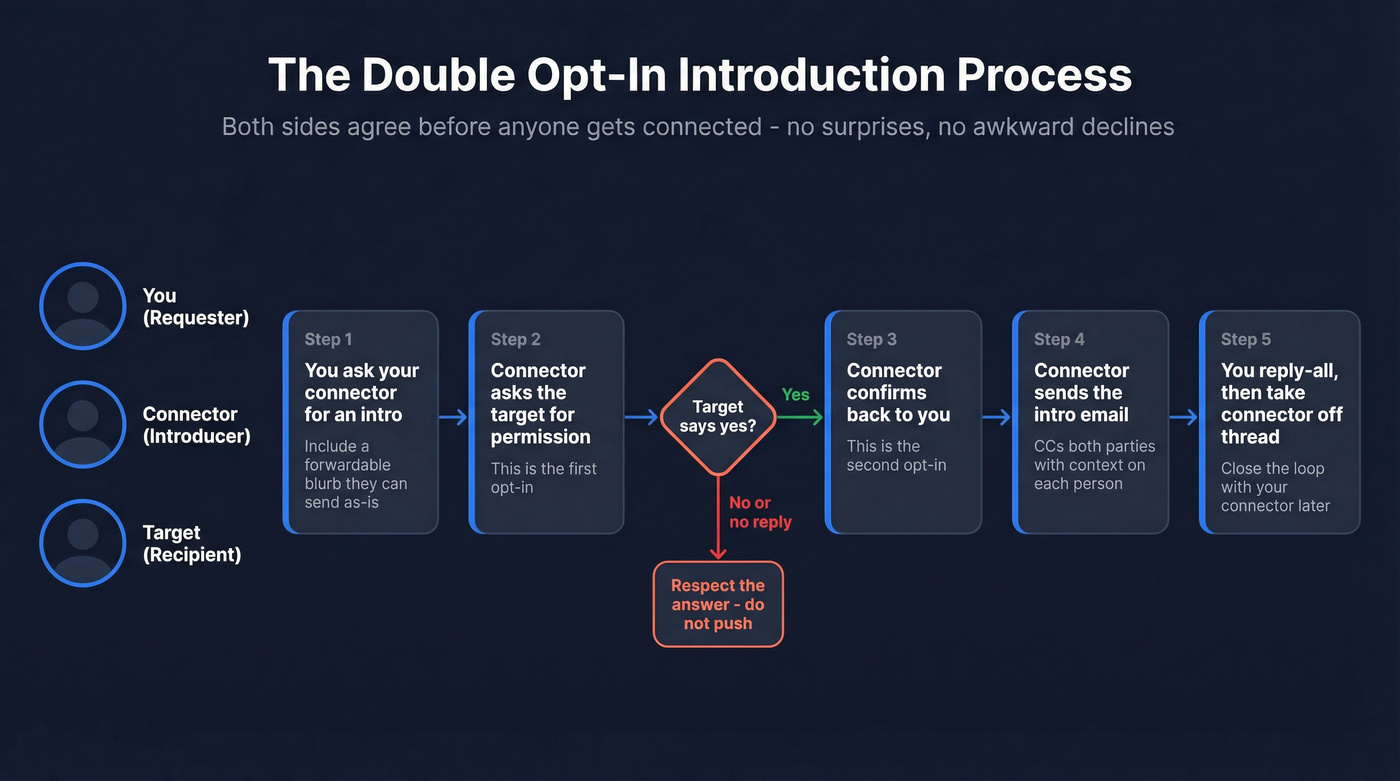
Why does this matter? A single opt-in intro - where the introducer just CCs everyone without asking - forces the recipient into an uncomfortable position. They have to either ignore the email, reject the meeting, or accept a conversation they never asked for. Skipping permission isn't a favor. It's a burden you're placing on someone else's calendar.
Here's a permission-request template:
Subject: Quick intro - okay with you?
Hey Sarah, a colleague of mine (Jake Torres, Head of Partnerships at Relay) is working on something I think overlaps with what your team's building. He'd love 15 minutes to compare notes. Totally fine if the timing doesn't work - just let me know either way.
How to Ask for an Introduction
The single best thing you can do for your introducer is write a forwardable blurb. Draft a short paragraph addressed to the target that your connector can forward without editing a word. Think of this as writing the warm intro for them - it should do all the heavy lifting so your connector doesn't have to. We've seen intros stall for weeks simply because the connector didn't know how to frame the request, and a forwardable blurb eliminates that friction entirely.
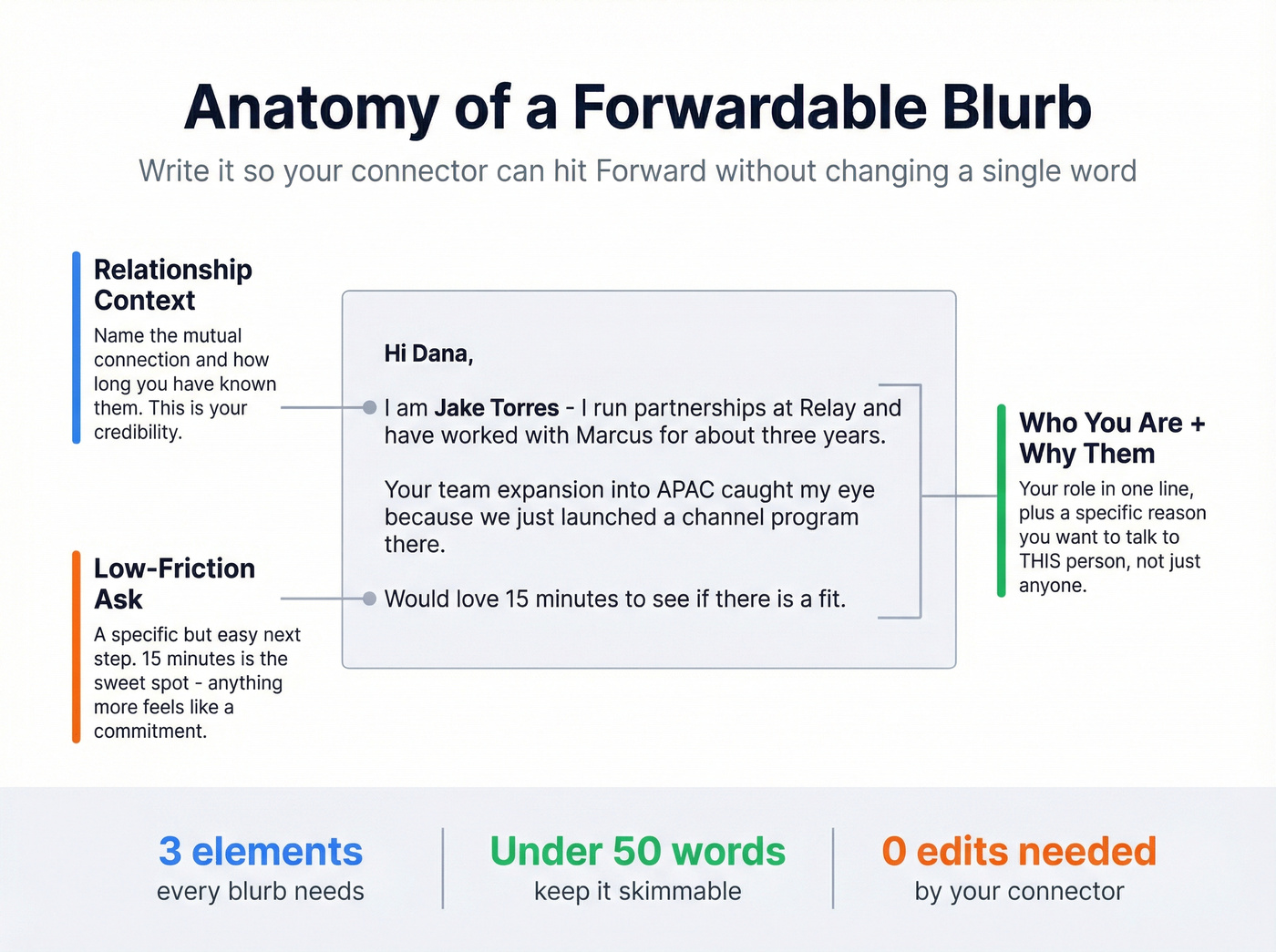
Your blurb needs three elements: relationship context, who you are and what you do, and why you want to meet the target specifically. Roughly half of email replies are under 43 words - your blurb should match that energy.
Hey Marcus - mind introducing me to Dana Chen at Vantage? Here's a blurb you can forward:
"Hi Dana, I'm Jake Torres - I run partnerships at Relay and have worked with Marcus for about three years. Your team's expansion into APAC caught my eye because we just launched a channel program there. Would love 15 minutes to see if there's a fit."

You wrote the perfect forwardable blurb. Your connector hit send. And it bounced - because the email address was wrong. Prospeo verifies emails with 98% accuracy so your warm introductions actually land in the right inbox.
Don't let a bad email address waste a warm introduction.
Writing the Warm Introduction Email
Once both parties have opted in, the introducer sends the actual connection email. Here's the process:
- Subject line: Use "{Name 1} <> {Name 2} introduction" - clean, scannable, and easy to find later (more email subject line pitfalls here).
- Get to the point. First sentence explains why you're connecting these two people.
- Introduce both parties. One sentence each - name, role, and the specific reason this mutual connection email is relevant.
- Suggest a next step. "I'll let you two take it from here" works fine.
- Verify the email before sending. Run the recipient's address through a verification tool like Prospeo to catch bad addresses before they become embarrassing bounces (use an email checker tool or follow an email verification for outreach workflow).
Here's an annotated example:
Subject: Jake Torres <> Dana Chen introduction
Hi both - connecting you two because I think there's a real overlap here. (Gets to the point in one sentence.)
Dana, Jake runs partnerships at Relay and just launched their APAC channel program. Jake, Dana leads BD at Vantage and is scaling their partner ecosystem across the same region. (One sentence per person, role + specific relevance.)
I'll let you two take it from here. (Clear handoff, no ambiguity.)
Templates You Can Copy Today
Sales Referral Introduction
Subject: Intro request - [Your Name] + [Target Name]
Hey [Introducer], would you be open to connecting me with [Target Name] at [Company]? I noticed they're [specific trigger]. Here's a forwardable blurb:
"Hi [Target], I'm [Your Name] at [Your Company]. We help teams like yours [one-sentence value prop]. Would love 15 minutes to see if there's a fit."
The Introducer's Email
Subject: [Name 1] <> [Name 2] introduction
Hi both - wanted to connect you two. (Open with intent - don't bury it.)
[Name 1], [Name 2] leads [role] at [Company] and is working on [initiative]. [Name 2], [Name 1] runs [role] at [Company] and has deep experience in [overlap area]. (Mirror structure: one sentence each, role + relevance.)
I'll leave you to it. (Short handoff. Resist the urge to add more.)
Job Seeker Referral
What to include: your relevant experience in one line, a specific accomplishment that maps to the role, and a low-friction ask like "happy to send my resume." Skip the life story - hiring managers skim these fast.
Subject: Introduction - [Your Name] + [Hiring Manager]
"Hi [Manager], I'm [Your Name] - I've spent [X years] in [relevant field] and most recently [key accomplishment]. I'd love to learn more about the [Role] opening. Happy to send my resume or jump on a quick call."
Partnership Introduction
Subject: [Name 1] <> [Name 2] - potential partnership
Hi both - I've been meaning to connect you. [Name 1] runs [function] at [Company A] and [Name 2] leads [function] at [Company B]. You're both solving [shared problem] from different angles. I'll let you take it from here.
Subject Lines That Work
47% of recipients decide whether to open an email based on the subject line alone. And 69% report emails as spam based solely on the subject line. For referral introductions, keep it simple and name-forward:
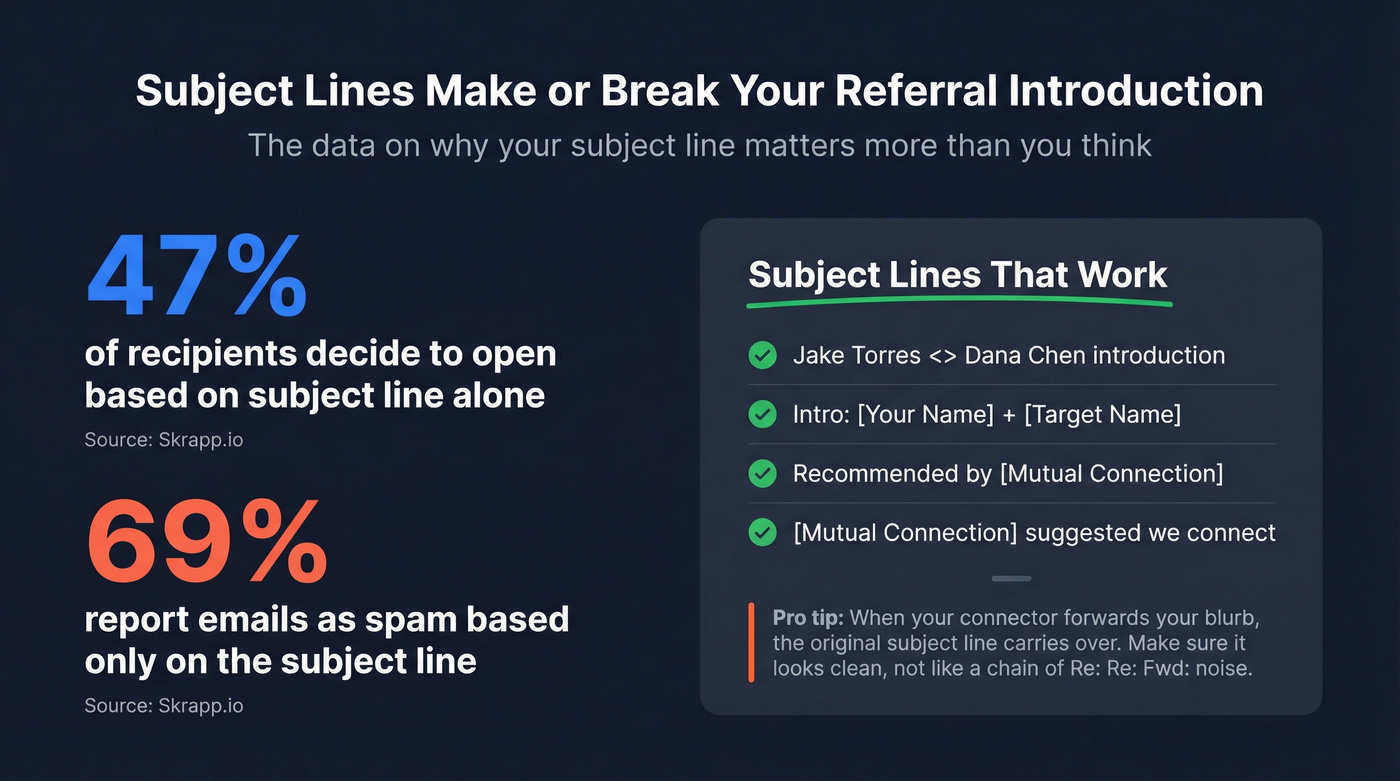
- Jake Torres <> Dana Chen introduction
- Intro: [Your Name] + [Target Name]
- Recommended by [Mutual Connection]
- [Mutual Connection] suggested we connect
One thing most guides miss: when the introducer forwards your blurb, the original subject line carries over. Make sure it's clean enough to land without looking like a chain of "Re: Re: Fwd:" noise (and avoid common words to avoid in email subject lines).
Mistakes That Kill Referral Intros
Not aligning with the introducer. If you don't agree on positioning beforehand, the intro email might undersell you - or worse, misrepresent why you want to connect. A 2-minute alignment call prevents this.
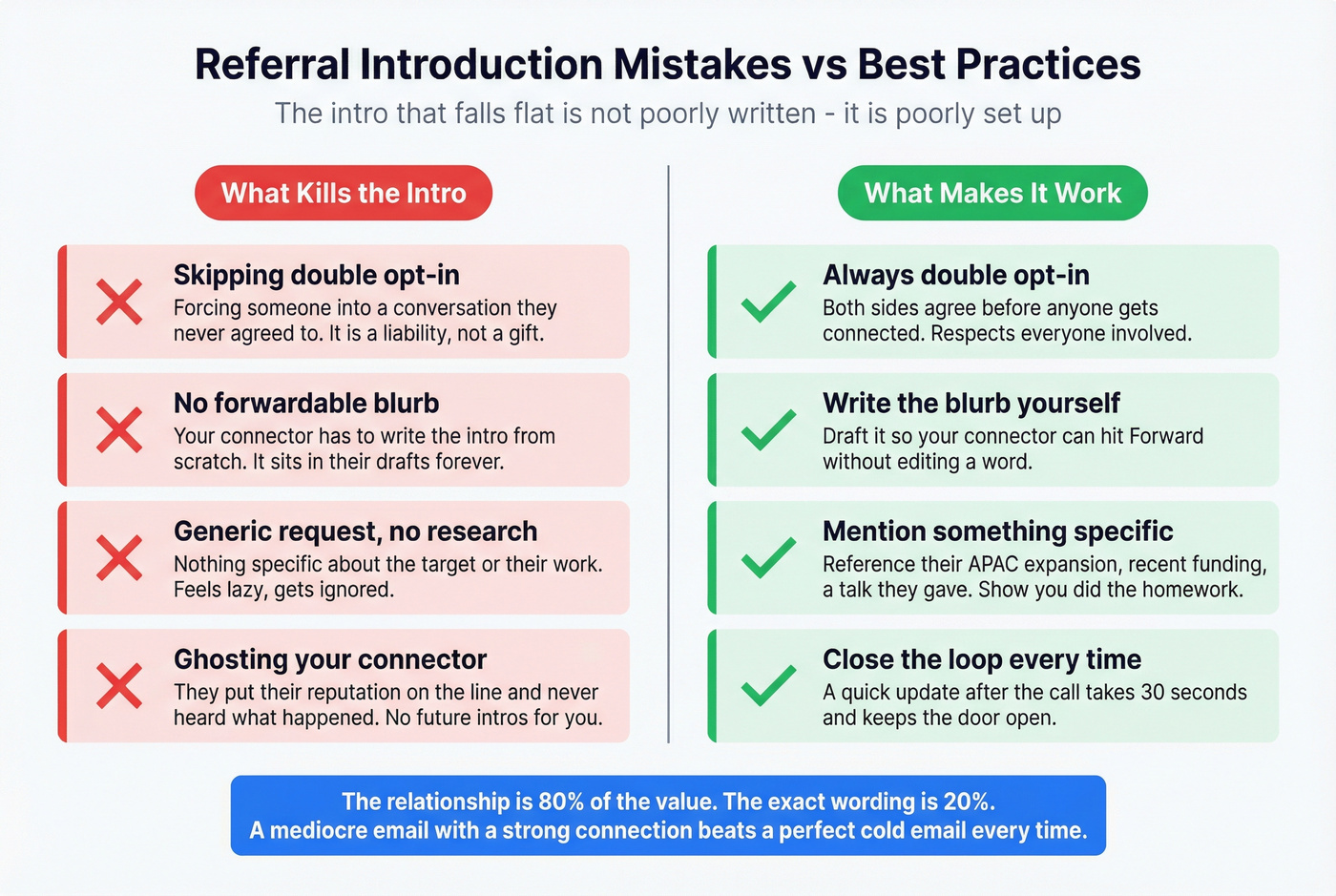
Not researching the target. Mentioning something specific about their work signals you're serious. Generic requests get generic responses - or none at all (use a lightweight pre call research checklist to stay consistent).
Ghosting the introducer. After the intro happens, update your connector. They put their reputation on the line. A quick "we had a great call, thanks for connecting us" takes 30 seconds and keeps the door open for future intros.
Skipping the double opt-in. An unsolicited professional introduction is a liability, not a gift.
Here's the thing: stop overthinking the email itself. In our experience, the intros that fall flat aren't poorly written - they're poorly set up. The relationship is 80% of the value. The exact wording is 20%. A mediocre email with a strong mutual connection will outperform a perfectly crafted cold email every single time. We've watched reps agonize over word choice for an hour when a two-minute phone call with their connector would've done ten times more good.
After the Intro: Your Follow-Up
Once the introducer sends the three-way email, reply-all to acknowledge the connection, then take the introducer off the thread on the very next message so they aren't stuck in the back-and-forth. Your follow-up should thank the connector, briefly restate why you're reaching out, and propose a specific time to talk (see how to ask for a meeting via email for phrasing).
If the intro goes unanswered after a few business days, send one gentle follow-up directly to the target - don't loop the introducer back in. Regardless of the outcome, circle back to your connector soon after. Closing the loop makes future introductions far more likely (a simple prospect follow up cadence helps).
Let's be honest - most people skip this step. Don't be most people.
Before you ask for that intro, make sure you have the right contact details. Prospeo's Chrome extension lets you pull verified emails and direct dials from any LinkedIn profile or company page - so your forwardable blurb reaches the exact person you want to meet.
Find verified emails for your target contacts in one click.